
Thermalright Peerless Vision 360 ARGB
4.6Editor score
3.95-inch IPS LCD screen
Wireless splicing fans
Customizable screen content
This guide compares the top 10 Aio for Am4am5 coolers for 2026, evaluating performance, features, and compatibility to help you choose the best solution.
Choosing the right cooling solution is critical for maintaining system stability and longevity. As processors become more powerful, efficient heat dissipation ensures your hardware performs at its peak without thermal throttling or unnecessary wear over time.
We evaluated ten top-rated all-in-one liquid coolers designed specifically for AM4 and AM5 platforms. Our analysis focused on thermal performance, noise levels, build quality, and ease of installation to provide a comprehensive overview for builders.
Each pick highlights unique strengths such as LCD displays, optimized fans, or superior cable management. Prices and availability change frequently, so verify current details before purchasing to ensure you get the best value for your specific build requirements.
4.6Editor score

4.7Editor score

4.7Editor score
This side-by-side comparison highlights key specifications and unique selling points across all ten selected coolers to help you quickly identify the model that best fits your specific cooling needs and aesthetic preferences.


The MSI MAG Coreliquid A13 360 stands out as a top contender for modern builds thanks to its robust construction and reliable thermal performance. With a high rating from users, it offers a balanced mix of quiet operation and effective heat dissipation for demanding workloads.
We may earn a commission when you buy through this link, at no additional cost to you.
Its split-flow radiator and integrated three-phase pump work together to reduce motor resonance while maintaining high cooling efficiency. The evaporation-proof tubing ensures longevity, and the inclusion of thermal paste simplifies the installation process for new builders.
While the design is solid, some users may find the installation brackets slightly tricky compared to tool-free systems. The RGB options are functional but lack the deep customization found in more premium models, which may matter to enthusiasts.
This cooler is ideal for users seeking a reliable, high-performance solution for AM5 or LGA1851 platforms without breaking the bank. Its durability and strong cooling capacity make it a smart choice for long-term system stability.
The high-performance pump operates up to 3800 RPM with ceramic bearings for quiet, efficient fluid circulation and reliable cooling under sustained loads.
Designed with LGA1851 readiness and AM5 support out of the box, this cooler ensures seamless installation on the latest CPU platforms without adapters.
We may earn a commission when you buy through this link, at no additional cost to you.
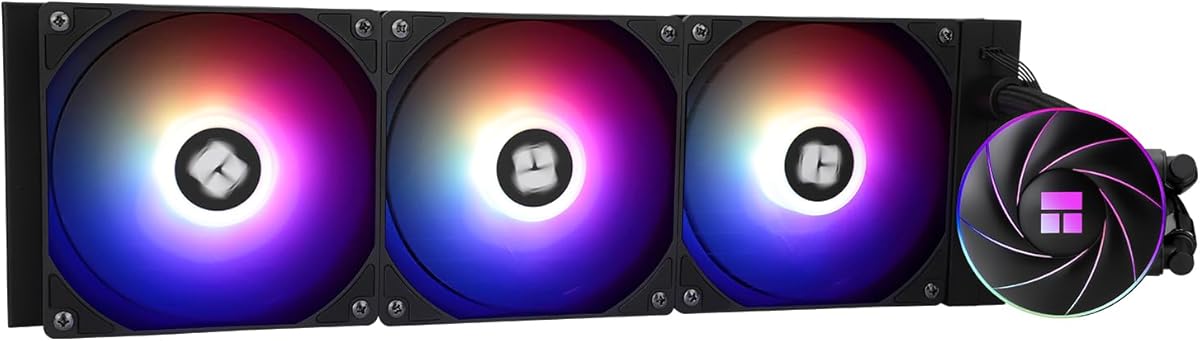
The Thermalright Peerless Vision 360 ARGB brings a unique visual edge to any build with its large IPS LCD screen and wireless fan design. Its high rating reflects strong performance and the innovative features that allow for personalized system monitoring and aesthetics.
We may earn a commission when you buy through this link, at no additional cost to you.
The magnetic pump head makes installation and removal straightforward, while the splicing fans provide efficient airflow with reduced noise. PWM temperature control ensures the fans adjust automatically based on CPU load for optimal silence and cooling.
Some users might need to spend time configuring the display content via software, which can be a minor hurdle. Additionally, the cost is higher than standard AIOs, though the premium features justify the price for many enthusiasts.
Ideal for gamers and streamers who value aesthetics as much as performance, this cooler delivers exceptional thermal efficiency while offering unmatched visual customization through its high-resolution screen.
The 3.95-inch IPS LCD displays system stats, animated GIFs, or custom images with vibrant color accuracy and wide viewing angles.
Equipped with S-FDB bearings and high-speed fans, this unit minimizes vibration and noise while maximizing heat dissipation for demanding tasks.
We may earn a commission when you buy through this link, at no additional cost to you.
The Thermalright Aqua Elite 240 V3 offers exceptional value without compromising on core performance metrics. It is a top choice for budget-conscious users needing reliable cooling for AM4 or AM5 systems with a high user rating reflecting satisfaction.
We may earn a commission when you buy through this link, at no additional cost to you.
Its fourth-generation pump head delivers efficient cooling with low noise, while the ARGB fans provide decent visual appeal. The build ensures low evaporation and long lifespan, making it a practical choice for daily driving.
The 240mm radiator may not be sufficient for extreme overclocking or very high-end CPUs, but it excels in standard gaming workloads. The design is functional and simple, lacking some of the high-end flair of pricier models.
This unit is perfect for users wanting efficient liquid cooling at an affordable price point. It balances performance and cost effectively, making it a reliable option for first-time builders or budget systems.
The 240mm cold plate and advanced pump design work together to maintain low CPU temperatures during standard use and gaming sessions.
With included accessories and clear instructions, this cooler can be installed quickly on various platforms without specialized tools.
We may earn a commission when you buy through this link, at no additional cost to you.
The ARCTIC Liquid Freezer III Pro 360 A-RGB is known for its comprehensive cooling approach including a dedicated fan for voltage regulation. Its solid performance rating highlights its effectiveness in managing heat across both CPU and motherboard areas.
We may earn a commission when you buy through this link, at no additional cost to you.
The P12 PRO fans offer higher power and lower noise than previous models, and the offset mounting design targets CPU hotspots directly. Integrated cable management simplifies the look of your build by reducing visible clutter significantly.
Installation might require some adjustment to ensure proper fit, especially in smaller cases. The design is optimized for performance, which sometimes means compromises on aesthetic flexibility compared to other options on the market.
This cooler is best suited for users who prioritize functional thermal management and clean aesthetics. Its unique VRM fan feature makes it stand out for builds where motherboard stability and CPU temperatures are both critical.
The integrated VRM fan helps lower voltage converter temperatures ensuring reliable system performance under heavy sustained loads.
Optimized pressure distribution and offset mounting improve heat transfer efficiency extending CPU life and reducing thermal stress.
We may earn a commission when you buy through this link, at no additional cost to you.
The ARCTIC Liquid Freezer III Pro 360 focuses heavily on acoustic performance while delivering strong cooling power. Users appreciate the quiet operation which makes it ideal for setups where noise reduction is a high priority.
We may earn a commission when you buy through this link, at no additional cost to you.
Its P12 PRO fans provide excellent airflow and silence especially at low speeds. The optimized pressure distribution and offset mounting further enhance efficiency ensuring your CPU stays cool without loud fans.
While the performance is stellar the mounting process can be tricky for some users due to the specific frame requirements. Visual customization is limited compared to RGB-heavy competitors which may not appeal to color-focused builders.
This model is perfect for those seeking a silent, reliable cooling solution. It balances quiet operation with effective heat management making it a top choice for home servers or quiet gaming rigs.
P12 PRO fans deliver more power at lower speeds for quieter operation without compromising cooling efficiency under high loads.
Native offset mounting shifts the cold plate to the hotspot improving heat transfer and long-term CPU longevity.
We may earn a commission when you buy through this link, at no additional cost to you.
The NZXT Kraken Plus 360 offers a sleek design with a custom LCD screen that allows for personalized content display. Its reputation for reliable cooling and ease of use makes it a popular choice among users seeking simplicity and style.
We may earn a commission when you buy through this link, at no additional cost to you.
The NZXT Turbine pump ensures efficient cooling with low noise levels. A unique Zero RPM Mode stops fans at low loads for true silence and the setup process is straightforward with pre-applied thermal paste.
While the CAM software is powerful it adds a layer of dependency that some users may not prefer. The price point is higher than competitors offering similar cooling performance which could be a drawback for budget builds.
This cooler is ideal for users who want a premium look and easy management through intuitive software. Its balance of performance and style makes it a strong contender for modern, visually focused PC builds.
The bright LCD screen supports custom images GIFs and live stats enhancing your build aesthetic and providing real-time system insights.
High static pressure fans and Zero RPM Mode ensure effective cooling while maintaining a quiet environment during light tasks.
We may earn a commission when you buy through this link, at no additional cost to you.
The Thermalright Aqua Elite 120 V3 is designed for smaller builds where space is limited but cooling is still needed. Its high rating reflects satisfaction among users who need compact yet reliable liquid cooling for AM4 or AM5 systems.
We may earn a commission when you buy through this link, at no additional cost to you.
Its 120mm radiator keeps the unit compact while still providing decent thermal dissipation. The low noise and bright ARGB lighting make it a practical choice for smaller enclosures without sacrificing visual appeal.
While it excels in compact builds it may struggle with high-end CPUs under sustained heavy loads compared to 360mm models. The build quality is functional but lacks the premium feel of larger or more expensive options.
This cooler is ideal for micro-ATX or ITX cases where space is a constraint. It offers a reliable and affordable solution for maintaining good temperatures in smaller form factors.
The 120mm design saves space while delivering effective cooling for standard processors and typical gaming workloads.
Optimized fans and pump reduce vibration ensuring a smooth quiet operation even in smaller case configurations.
We may earn a commission when you buy through this link, at no additional cost to you.
The NZXT Kraken Core 360 RGB focuses on simplicity and performance without extra frills. Its solid user rating highlights reliability and ease of use for builders seeking straightforward liquid cooling for high-performance CPUs.
We may earn a commission when you buy through this link, at no additional cost to you.
Its single-frame design reduces cables and screws making installation cleaner and faster. The direct motherboard connection and PWM control allow for precise adjustments to balance cooling and noise based on your needs.
Lacking an LCD screen and advanced software features it may not appeal to enthusiasts who want deep customization. However for most users the performance and simplicity are sufficient for a great build experience.
This model is ideal for users prioritizing easy setup and reliable cooling. Its clean design and strong performance make it a practical choice for standard gaming or workstation builds.
The single-frame fan design reduces clutter making installation easier and keeping your build looking clean and organized.
Optimized fan blades push air effectively through the radiator fins for strong cooling with minimal noise generation.
We may earn a commission when you buy through this link, at no additional cost to you.
The CORSAIR Nautilus 360 RS stands out for its daisy-chain fan design that simplifies system wiring significantly. This feature combined with strong thermal performance makes it a reliable option for builders valuing clean setups.
We may earn a commission when you buy through this link, at no additional cost to you.
The RS120 fans deliver high static pressure for effective heat dissipation while keeping noise levels low. Direct motherboard connection and convex cold plate ensure efficient heat transfer and compatibility with the latest AMD and Intel sockets.
Limited RGB customization and dependency on specific headers may be drawbacks for some users. However the functional performance and cable management advantages are strong selling points for practical system builds.
This cooler is perfect for users who want to reduce cable clutter without sacrificing performance. Its reliable cooling and simple setup make it a great choice for both novice and experienced builders.
Daisy-chain fan connectors reduce the number of cables needed saving motherboard headers and simplifying the build process.
A convex shape ensures maximum contact with the CPU heat spreader for faster and more efficient heat transfer.
We may earn a commission when you buy through this link, at no additional cost to you.
The Thermalright Aqua Elite 360 ARGB offers a large radiator at an accessible price point making it a strong value proposition for high-performance cooling. Its high user rating confirms reliable performance and user satisfaction for standard builds.
We may earn a commission when you buy through this link, at no additional cost to you.
A full copper mirror base enhances heat transfer while the 360mm radiator provides ample surface area for cooling. The PWM fans are adequate and offer decent noise levels suitable for most gaming or workloads.
While the build is functional it lacks some premium materials found in higher-end models. The ARGB lighting is bright but basic which may not suit users seeking advanced customization or sync capabilities.
Ideal for budget-conscious users needing powerful cooling this unit delivers effective thermal management at a great value. It is a solid choice for those upgrading from air cooling without overspending.
The 360mm aluminum radiator and copper base work together to maintain low temperatures during intensive tasks.
Wide socket compatibility and included hardware allow for quick and straightforward installation on most modern motherboards.
We may earn a commission when you buy through this link, at no additional cost to you.
Selecting the right AIO cooler for AM4 or AM5 platforms requires understanding key factors that impact performance, compatibility, and longevity.
Always verify that the cooler supports your specific CPU socket. Modern coolers list support for AM5 and LGA1851 alongside AM4 ensuring a secure fit and proper mounting pressure.
Check the product details to confirm compatibility before purchase to avoid installation issues or inadequate contact.
Radiator size directly impacts cooling capacity. 240mm models suit smaller cases while 360mm units provide superior dissipation for high-end processors or overclocking scenarios.
Measure your case clearance to ensure the radiator fits before selecting a size.
Fans with PWM control and high static pressure are crucial for moving air through the radiator efficiently. Look for models with low noise ratings for a balanced acoustic experience.
Prioritize fans that adjust speed based on temperature to save power and reduce noise.
A reliable pump with durable bearings ensures long-term operation and consistent coolant circulation. High RPM pumps generally move heat faster but check noise levels carefully.
Ceramic bearings or quality seals reduce the risk of failure over time.
Modern coolers often include RGB lighting or LCD screens. Decide if you want visual customization or a simple design for better value.
Check sync support to match existing lighting ecosystems in your system.
Models with integrated cable management or single-frame designs simplify installation and improve airflow. Proper cabling reduces clutter and potential obstruction.
Look for features like daisy-chaining or hidden cables to keep your build neat.
Determine your budget and compare the performance of models within that range. Sometimes spending slightly more offers significant durability or feature gains.
Balance cost with long-term reliability to avoid premature replacement.
Install the cooler carefully following the manufacturer instructions ensuring secure mounting and proper alignment on the CPU. This ensures effective heat transfer and prevents physical damage to the processor.
Connect the pump and fans to the correct headers on your motherboard. Verify the PWM and ARGB connections are secure to enable automatic speed control and synchronized lighting.
Regularly check for dust buildup on the radiator fans and clean them periodically. Inspect hoses for signs of leaks or wear to maintain optimal cooling performance and system safety.
While many AM4 coolers work on AM5 with adapters it is best to choose a model explicitly listed as AM5 compatible. New coolers often come with brackets designed for the socket to ensure proper mounting pressure.
A 360mm cooler offers larger surface area for better heat dissipation and quieter operation. This makes it ideal for high-end CPUs or overclocking while 240mm units are compact and efficient for standard loads.
Measure the top and front radiator support of your case before buying. Most cases support 240mm or 360mm units but clearance can vary especially with RAM height or motherboard features.
No ARGB fans are not required for cooling. They add aesthetic value and customization but plain RGB or non-RGB fans provide the same thermal performance at a lower cost.
Most modern AIO pumps have a lifespan of 40000 hours or more under normal use. High-quality bearings and proper installation help prevent leaks and ensure reliable operation.
Many coolers come with pre-applied thermal paste on the cold plate which simplifies installation. Check the product specs to confirm if additional paste is needed.
No AIOs are liquid coolers designed to circulate coolant. Air coolers use heatsinks and fans directly on the CPU. AIOs generally offer better performance for high heat loads.
PWM allows the motherboard to adjust fan speeds based on CPU temperature automatically. This reduces noise during light use and increases cooling power when needed.
The top picks include models like the MSI MAG Coreliquid A13 360 for reliability and the Thermalright Peerless Vision for visual appeal. These options cover a range of needs from budget to premium.
Prioritize compatibility and radiator size for your build case and CPU type. A cooler that fits and supports your platform will deliver the best long-term performance and stability.
Prices and availability change regularly so check current listings before purchasing. Comparing reviews and specs will help you select the ideal AIO for your AM4 or AM5 system.