
TP-Link Nano AC600 USB WiFi Adapter
4.5Editor score
Compact nano design
Dual-band 2.4G and 5G
Industry leading support
This guide compares the top 5GHz WiFi Dongle options for speed and range to help you choose the right adapter for your desktop or laptop needs.
Finding a reliable 5GHz WiFi Dongle can transform your desktop or laptop into a high-speed wireless hub. Modern adapters support dual-band connections, offering faster speeds and less interference than older standards.
We evaluated ten top-rated models based on performance, compatibility, and ease of use. Each product was reviewed for signal strength, data transfer rates, and support for the latest WiFi protocols.
Every pick highlights key features like antenna gain, USB version, and operating system support. Prices and availability change frequently, so verify details before purchasing to ensure you get the best deal.
4.5Editor score

4.4Editor score

4.1Editor score
This side-by-side comparison highlights the core specifications of each adapter to help you quickly identify the best fit for your network environment and device requirements.


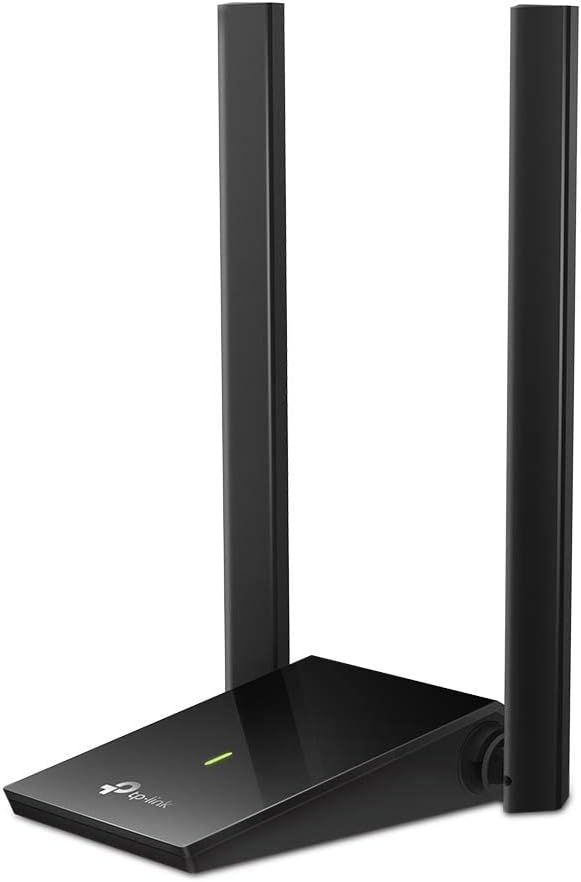


The TP-Link AC600 stands out as a reliable choice for desktop users seeking enhanced wireless performance. With a solid 4.4 rating, this adapter delivers lag-free connections and supports the latest 802.11ac standards for faster speeds.
We may earn a commission when you buy through this link, at no additional cost to you.
Its standout feature is the 5dBi high-gain antenna, which you can rotate to optimize signal reception. The dual-band capability allows you to switch between 2.4 GHz and 5 GHz bands, ensuring flexible connectivity depending on your network congestion.
While it offers impressive range, the antenna design might be slightly bulky for compact setups. Additionally, it supports Windows versions only, which could limit its utility for Mac users without additional workarounds.
This adapter is ideal for homeowners needing a straightforward upgrade to faster Wi-Fi speeds. If you prioritize range and ease of use on a Windows PC, this model offers excellent value for everyday browsing and streaming.
The adjustable antenna allows you to direct the signal toward your router, minimizing dead zones and improving overall network stability.
By utilizing both 2.4 GHz and 5 GHz bands, you can choose the best frequency for your specific needs, balancing speed and range effectively.
We may earn a commission when you buy through this link, at no additional cost to you.
The TP-Link Nano AC600 is perfect for users who value portability without sacrificing performance. Rated at 4.5 stars, this adapter features a sleek, miniature design that fits easily into laptops or desktops without obstruction.
We may earn a commission when you buy through this link, at no additional cost to you.
It supports both 2.4G and 5G bands, providing a strong connection for web surfing and streaming. The industry-leading support ensures you have access to help if setup issues arise, making it beginner-friendly.
Due to its compact size, it may not offer the same range as larger adapters with external antennas. However, for users within close proximity to their router, the signal strength remains reliable.
This is an excellent budget choice for travelers or those with limited space. If you need a discreet solution that keeps your connection fast and stable on both Windows and Mac, this Nano adapter is a top contender.
The nano size design allows you to leave the adapter plugged in without it getting in the way of other ports or cables.
Support for Mac OS X 10.9-10.14 alongside Windows ensures this adapter works across multiple platforms with minimal configuration.
We may earn a commission when you buy through this link, at no additional cost to you.
For those seeking top-tier performance, the BrosTrend AX1800 offers cutting-edge WiFi 6 technology. Its 4.1 rating reflects strong feedback on its ability to deliver faster speeds and broader range than previous generations.
We may earn a commission when you buy through this link, at no additional cost to you.
The dual 5dBi high-gain antennas ensure signals pass through walls effectively, while OFDMA and MU-MIMO technologies optimize connections in crowded networks. A 3.3-foot USB 3.0 extension cable adds flexibility in placement.
This adapter is limited to Windows 11 and 10, which may exclude some users. Additionally, the premium features come with a higher price tag, though the performance justifies the cost for power users.
Choose this adapter if you stream 4K content or game online and need maximum throughput. If your PC runs a supported Windows version, the AX1800 provides a robust, future-proof connection for demanding applications.
WiFi 6 technology delivers 38% faster speeds than AC1300 adapters, ensuring smooth streaming even when multiple devices are connected.
The included USB 3.0 extension cable lets you place the adapter in an optimal spot for signal reception, away from obstructions.
We may earn a commission when you buy through this link, at no additional cost to you.
The TP-Link AC1300 combines speed with portability, offering 1300Mbps of wireless capacity. With a 4.4 rating, it is praised for its MU-MIMO capability, which ensures lag-free connections even with multiple devices.
We may earn a commission when you buy through this link, at no additional cost to you.
It features USB 3.0 for faster data transfer and a portable design that makes it easy to carry. The dual-band support provides strong connectivity throughout your home, suitable for various internet activities.
The antennas are smaller than some desktop models, which might limit range in large spaces. Also, while it supports both Mac and Windows, the driver setup can occasionally require manual intervention.
This adapter is perfect for users who need a balance of speed and mobility. If you want a reliable upgrade that supports modern streaming needs without occupying much space, the AC1300 is a solid choice.
Beamforming and MU-MIMO allow the adapter to direct data to specific devices, reducing interference and boosting overall network performance.
USB 3.0 support ensures that data transfer speeds are 10x faster than USB 2.0, fully utilizing the adapter's wireless potential.
We may earn a commission when you buy through this link, at no additional cost to you.
The Nineplus Wireless adapter offers a budget-friendly way to upgrade to AC1300 speeds. Rated at 4.3, it features dual 5dBi antennas that capture signals accurately, providing stable connectivity even at a distance.
We may earn a commission when you buy through this link, at no additional cost to you.
It supports USB 3.0 for improved compatibility and transfer speeds. The online setup technical support ensures that even less tech-savvy users can get connected without frustration.
Like many budget models, it is limited to Windows systems. While the drivers are often automatic, you might need to manually install them for older versions, which can be a minor hurdle.
If you need a dual-antenna solution that boosts signal strength without breaking the bank, this adapter is ideal. It is especially useful for desktops located far from the router where consistent coverage is crucial.
Two 5dBi high-gain antennas ensure that the adapter captures signals accurately, providing a stable connection even in areas with weak signal.
With 2-year support and online guidance, you can rely on the manufacturer to help you resolve any installation or connectivity issues quickly.
We may earn a commission when you buy through this link, at no additional cost to you.
The UGREEN AX900 offers a streamlined setup with built-in drivers for Windows 10 and 11. With a 4.2 rating, it provides speeds up to 600 Mbps on the 5GHz band, suitable for ultra-high-speed video transmission.
We may earn a commission when you buy through this link, at no additional cost to you.
Its dual-band connection under the AX standard ensures efficient usage of both frequency ranges. The adapter supports WPA encryption modes to keep your data safe while browsing or sharing internet via hotspot.
To achieve AX900 speeds, you need a compatible WiFi 6 router, which might be a constraint if your current hardware is older. Also, it does not support Linux or Mac, limiting its versatility.
This adapter is perfect for Windows users seeking a hassle-free installation. If you want to upgrade to WiFi 6 without managing drivers, the UGREEN AX900 delivers reliable, low-latency performance for your daily tasks.
With built-in drivers, you can skip the CD installation process and get online quickly on supported Windows systems.
Support for WPA2-PSK and mixed encryption modes ensures that your wireless connection remains secure against unauthorized access.
We may earn a commission when you buy through this link, at no additional cost to you.
The Tenda AX900 stands out with its external 6dBi omnidirectional high-gain antenna, which improves signal reception significantly. Rated at 4.3, it offers speeds 38% faster on 5GHz compared to older AC adapters.
We may earn a commission when you buy through this link, at no additional cost to you.
Preloaded drivers allow for instant setup, getting you online in under 20 seconds. It also supports AP mode, allowing you to turn your PC into a Wi-Fi hotspot for up to 8 devices.
The AP mode is limited to the 5GHz band, which restricts flexibility slightly. Additionally, it is tailored for Windows systems, excluding Mac and Linux users from utilizing its full potential.
Choose this adapter if you need strong signal coverage in interference-heavy environments. The intelligent algorithm and wide transmission range make it a reliable option for gaming and conferencing on Windows machines.
The external high-gain antenna provides multi-dimensional rotation, greatly improving weak signal reception compared to built-in options.
AP mode allows you to create a hotspot from your PC, enabling internet sharing with other devices easily.
We may earn a commission when you buy through this link, at no additional cost to you.
The TP-Link AC1300 with Dual High Gain Antenna is designed for desktops requiring robust coverage. Rated 4.4, it supports flexible connectivity with 400Mbps on 2.4GHz and 867Mbps on 5GHz.
We may earn a commission when you buy through this link, at no additional cost to you.
Its adjustable, multi-directional antennas enable flexible deployment, ensuring the best reception regardless of router position. The USB 3.0 port ensures transfer speeds are significantly faster than USB 2.0 standards.
The dual antennas require some desk space, which might be an issue in compact setups. However, the flexibility they offer in signal optimization outweighs the minor inconvenience for most desktop users.
This adapter is ideal for users who prioritize signal quality over portability. If you need a reliable connection for gaming and streaming on both Mac and Windows, this model delivers top performance.
Adjustable multi-directional antennas enable flexible deployment, allowing you to position them for the best possible signal reception.
The Super Speed USB 3.0 port offers up to 10x faster transfer speeds than USB 2.0, ensuring data moves quickly between devices.
We may earn a commission when you buy through this link, at no additional cost to you.
The UGREEN AX1800 combines high-speed performance with enhanced security features. With a 4.1 rating, it offers blazing-fast dual-band speeds of 1201 Mbps on 5GHz and includes WPA3-SAE encryption for secure browsing.
We may earn a commission when you buy through this link, at no additional cost to you.
Its built-in driver simplifies installation on supported Windows systems. The back ventilation holes ensure superior heat dissipation, maintaining reliable performance during long streaming or gaming sessions.
The requirement for a WiFi 6 router may limit immediate usability for some users. Additionally, the adapter's compatibility is restricted to Windows, which could be a drawback for Mac or Linux users.
Choose this adapter if security and speed are your top priorities. For Windows users with a modern router, the AX1800 provides a secure, stable, and fast connection suitable for heavy internet usage.
The WPA3-SAE encryption mode ensures that your browsing and online activities remain secure from potential cyber threats.
Back ventilation holes provide superior heat dissipation, keeping the adapter cool and reliable even during extended usage.
We may earn a commission when you buy through this link, at no additional cost to you.
The BrosTrend AX900 Mini is perfect for those needing a discreet WiFi solution. Rated 4.2, its tiny design integrates seamlessly with laptops and desktops, ensuring portability without cluttering your workspace.
We may earn a commission when you buy through this link, at no additional cost to you.
It offers up to 600 Mbps on the 5GHz band, which is significantly faster than AC600 adapters. The WiFi 6 technologies like OFDMA and MU-MIMO ensure fast and reliable performance for your PC.
The USB 2.0 interface might not maximize the full potential of the adapter compared to USB 3.0 models. Also, it is restricted to Windows 11/10/7, limiting cross-platform flexibility.
If you value a clean desk and high-speed connectivity, this mini adapter is a smart choice. For Windows users seeking a portable solution with advanced WiFi 6 features, it delivers excellent speed in a small package.
With dimensions of 1.4 × 0.7 × 0.3 inches, this adapter integrates seamlessly without obstructing other ports.
Technologies like 1024-QAM and OFDMA enable fast and reliable WiFi performance, ensuring uninterrupted wireless connectivity.
We may earn a commission when you buy through this link, at no additional cost to you.
Selecting the right 5GHz WiFi Dongle requires considering compatibility, speed requirements, and physical design to ensure optimal performance for your setup.
Look for adapters that support at least AC1300 or the newer WiFi 6 (AX) standards. These provide higher throughput and better handling of multiple devices simultaneously.
Prioritize models offering speeds above 500 Mbps on the 5GHz band for smooth streaming and gaming.
USB 3.0 is preferred over USB 2.0 for faster data transfer rates. This ensures the adapter can handle high-speed wireless connections without bottlenecks.
Check if your computer has USB 3.0 ports to fully utilize the adapter's capabilities.
External antennas with high gain (dBi) improve signal range and stability. Adjustable antennas allow you to optimize reception based on router position.
Consider dual-antenna models for stronger signal penetration through walls and obstacles.
Most adapters are designed for Windows, but some support macOS or Linux. Verify system support before purchasing to avoid installation issues.
Look for models with built-in drivers for hassle-free setup on your OS.
Ensure the adapter supports modern encryption protocols like WPA3 for enhanced security. This protects your data from unauthorized access on public or home networks.
Advanced security features also ensure compatibility with newer routers.
Nano or mini adapters are ideal for laptops and portable use, while larger models with antennas suit desktops. Choose based on your space constraints and port needs.
Balance portability with performance to meet your daily connectivity requirements.
Insert the adapter into a free USB port and wait for automatic driver installation. If needed, download drivers from the manufacturer's website to ensure full functionality.
Open your network settings and select your WiFi network to connect. Switch to the 5GHz band if multiple options are available for faster speeds.
Keep the adapter away from heat sources and metal objects to prevent signal interference. Periodically update drivers to maintain optimal performance and security.
5GHz dongles offer faster speeds and less interference but have a shorter range. 2.4GHz offers better range but is slower and more prone to congestion. Dual-band adapters let you choose the best frequency.
For AC1300 and WiFi 6 adapters, a USB 3.0 port is highly recommended to handle high data transfer speeds efficiently. USB 2.0 may limit the maximum performance of the adapter.
Most dongles are designed for PCs and laptops. While some may work with other devices, consoles typically require specific adapters or built-in wireless capabilities for full functionality.
Weak signals may result from distance, physical obstacles, or antenna placement. Use an external antenna or position the dongle closer to the router to improve reception.
Most models listed are optimized for Windows and macOS. Some support Linux, but you may need to manually install drivers. Check the product specifications before purchasing for Linux support.
Range varies based on antenna gain and environment. High-gain antennas can reach 30 to 50 feet indoors, while nano models have shorter effective ranges. Always test signal strength in your home.
The TP-Link AC600, Nano AC600, and BrosTrend AX1800 stand out as top choices for different user needs. Each offers unique benefits ranging from portability to premium performance.
Prioritize speed and compatibility when making your decision. If you need a compact solution, the Nano models work well, while power users may prefer the AX series.
Remember to verify current prices and availability before buying. Checking reviews and specifications ensures you select the adapter that best fits your network and device requirements.