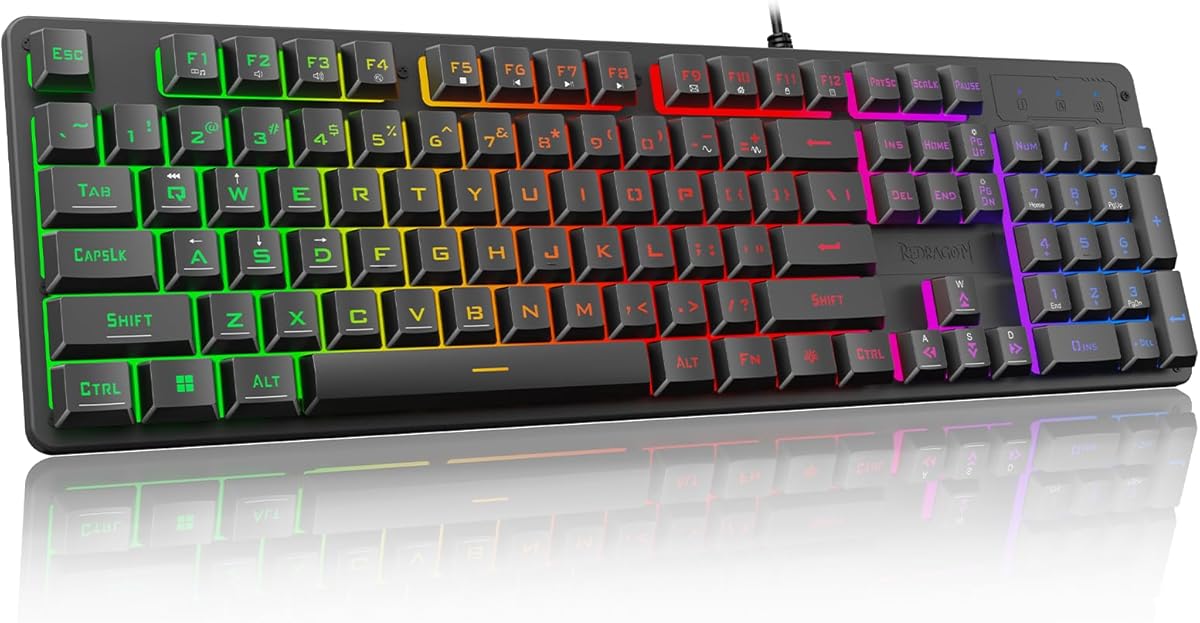
Redragon K521 Upgrade Rainbow LED Gaming Keyboard
4.4Editor score
Mechanical feeling keys
Anti-ghosting support
Affordable price point
This guide compares the top ten keyboards for Rainbow Six Siege, evaluating switch types, build quality, and performance features to help you choose the right
Finding the right keyboard for Rainbow Six Siege is essential for competitive play. The game demands rapid inputs and precise movement. A quality board ensures your commands register instantly without delay or error during intense firefights.
We analyzed ten top-rated keyboards based on switch responsiveness, durability, and customization features. Each product was evaluated for its ability to support fast-paced tactical shooters and offer reliable performance over long gaming sessions.
Each pick highlights specific strengths tailored to different playstyles and budgets. Prices fluctuate frequently so check current listings before purchasing. This guide provides the data you need to make an informed decision for your setup.
4.4Editor score

4.6Editor score

4.6Editor score
This side-by-side comparison evaluates all ten keyboards across key performance metrics. Use this table to quickly identify which model best matches your needs for speed, comfort, and customization.



This keyboard stands out for its advanced customization and wireless flexibility. It offers a robust feature set that competes with premium models. With a high rating, it is a top choice for enthusiasts.
We may earn a commission when you buy through this link, at no additional cost to you.
The tri-mode connection allows seamless switching between devices. Hot-swappable switches let you tailor the feel without soldering. The PBT keycaps and pre-lubed switches ensure a smooth, durable experience for daily use.
While powerful, it requires a driver for full RGB and macro control. The 75% layout saves space but may take adjustment. These minor drawbacks are outweighed by its performance and build.
It is ideal for gamers seeking high-end features at a reasonable cost. Whether you play FPS or MMOs, this board delivers. It balances performance, customization, and reliability effectively.
Connect via Bluetooth, 2.4GHz, or USB for versatile setups. Switch between five devices instantly to adapt to your workflow.
Change switches easily without soldering. Experiment with different tactile or linear switches to find your perfect feel.
We may earn a commission when you buy through this link, at no additional cost to you.
This keyboard offers an affordable entry into gaming peripherals. It delivers a mechanical-like feel at a fraction of the cost. Its solid rating reflects good value for budget-conscious buyers.
We may earn a commission when you buy through this link, at no additional cost to you.
The rainbow LED backlight creates an engaging visual effect. One-touch controls make lighting adjustments simple. The anti-ghosting feature ensures accurate input for essential gaming commands.
Keys feel responsive but lack true mechanical independence. The fixed backlight limits per-key customization. These trade-offs are expected at this price point and do not hinder performance.
Perfect for new gamers or those on a tight budget. It provides the core features needed for competitive play. It is a reliable choice that punches above its weight.
Enjoy vibrant lighting with multiple modes. The one-touch button lets you toggle effects quickly.
Dedicated keys streamline media playback. Adjust volume or skip tracks without leaving your game.
We may earn a commission when you buy through this link, at no additional cost to you.
This model defines premium gaming keyboards with top-tier specs. It combines wireless tech with hot-swappable switches for ultimate flexibility. The high rating confirms its quality and reliability.
We may earn a commission when you buy through this link, at no additional cost to you.
The 96% layout saves desk space without sacrificing the numpad. ROG SpeedNova wireless ensures minimal latency. Sound dampening creates a pleasing keystroke experience that feels solid and consistent.
The price reflects its high-end features. Software customization adds depth but requires setup time. These factors are standard for premium gear and are worth the investment.
Ideal for serious gamers wanting the best setup. It offers versatility, performance, and style. If you prioritize quality, this keyboard delivers exceptional value.
Keep your numpad and arrows in a smaller frame. It balances functionality with desk space.
Integrated foam absorbs noise for quieter typing. The result is a clean sound profile.
We may earn a commission when you buy through this link, at no additional cost to you.
This keyboard provides essential gaming features at a budget price. It features dynamic RGB lighting and macro capabilities. A solid option for those starting their gaming journey.
We may earn a commission when you buy through this link, at no additional cost to you.
Six dedicated macro keys allow complex command setup. The IP42 rating protects against spills. The detachable palm rest adds comfort for extended play sessions.
The membrane switches lack tactile feedback. Cables are non-detachable which reduces portability. These limitations are acceptable given the low cost and functionality.
Best for casual gamers or students. It offers reliable performance and essential features. It is a practical choice for everyday use.
Assign shortcuts to dedicated keys for efficiency. Use iCUE software to program complex sequences.
Protection against minor accidents keeps you gaming. The IP42 rating guards against dust and liquid.
We may earn a commission when you buy through this link, at no additional cost to you.
This keyboard is known for its quiet and durable design. It offers a comfortable experience with a magnetic wrist rest. Highly rated for comfort and reliability.
We may earn a commission when you buy through this link, at no additional cost to you.
The water resistant design prevents accidental damage. Dedicated multimedia controls make adjustments easy. The RGB zones add visual flair without complexity.
The switches are quiet and lack a mechanical click. Customization is limited compared to advanced models. These traits make it suitable for shared environments.
Great for late-night gaming or quiet spaces. It is comfortable and reliable for general use. It delivers value with solid build quality.
Nearly silent switches prevent disturbing others. Ideal for shared rooms or offices.
Provides full palm support for comfort. It attaches securely for consistent use.
We may earn a commission when you buy through this link, at no additional cost to you.
This keyboard combines sleek aesthetics with functional hybrid tech. It is designed for long hours with reduced strain. The rating highlights its comfort and reliability.
We may earn a commission when you buy through this link, at no additional cost to you.
Low-profile keys allow natural hand positioning. UV-coated keycaps resist wear over time. The magnetic wrist rest offers ample support during intense play.
Switches feel like mechanical but use membrane tech. Cables cannot be removed for transport. These minor cons do not detract from its overall utility.
Ideal for gamers seeking a slim setup. It balances ergonomics and performance. It is a solid choice for those wanting low-profile switches.
Slimmer keys reduce hand strain. Enjoy long sessions with minimal fatigue.
UV coating ensures legends stay visible. Protects against wear from frequent typing.
We may earn a commission when you buy through this link, at no additional cost to you.
This keyboard is built for durability and performance. It features tactile switches and PBT keycaps. A solid choice for gamers needing reliable hardware.
We may earn a commission when you buy through this link, at no additional cost to you.
The aluminum case resists flex during intense use. White LED lighting provides a clean look. Anti-ghosting ensures precise input for complex moves.
It lacks RGB and advanced software features. The layout may not suit all players. These traits are consistent with its focus on reliability.
Great for fans of simple and sturdy boards. It offers a premium feel without complexity. It is a dependable tool for competitive play.
Heat and wear resistant caps last longer. They maintain texture for consistent typing.
6-key rollover ensures accurate input. Register complex combos without error.
We may earn a commission when you buy through this link, at no additional cost to you.
This keyboard delivers premium performance in a full-size frame. It supports switch customization for tailored typing. The design ensures stability and sound quality.
We may earn a commission when you buy through this link, at no additional cost to you.
Pre-lubed switches provide a smooth experience. PBT keycaps are resistant to wear. The aluminum plate adds weight and durability to the structure.
The lack of wireless may limit placement. Price reflects its high-end materials. For wired setups, it is an excellent option.
Best for desk gamers wanting a complete layout. It offers customization and a high-quality build. It stands out for reliability and performance.
Retain all keys and numpad for productivity. Ideal for mixed gaming and work use.
Replace switches easily for varied feel. Adjust without soldering for quick changes.
We may earn a commission when you buy through this link, at no additional cost to you.
This keyboard is designed for speed and silence. It features linear switches for rapid inputs. High rating confirms its appeal for tactical shooters.
We may earn a commission when you buy through this link, at no additional cost to you.
Six macro keys expand your command arsenal. RGB lighting supports Chroma integration. Sound dampeners reduce noise without sacrificing feedback.
The lack of a media wheel is a minor miss. Tactile feedback is minimal by design. These traits support its focus on speed.
Perfect for gamers valuing fast and quiet inputs. It is reliable and visually striking. It is a strong choice for competitive play.
Instant reset points allow rapid-fire inputs. Ideal for fast-paced gaming scenarios.
Special foam minimizes typing noise. Ensures a quiet experience during gaming.
We may earn a commission when you buy through this link, at no additional cost to you.
This keyboard brings magnetic switch tech to gaming. It offers rapid trigger for fast stops. The high rating shows its success in performance.
We may earn a commission when you buy through this link, at no additional cost to you.
8000Hz polling ensures minimal latency. Web driver simplifies customization without installs. The 60% design frees up desk space for mouse use.
The compact layout requires relearning keys. Wired-only limits mobility. These trade-offs are expected for speed-focused boards.
Best for FPS players needing fast response. It offers innovation and practical features. It is a great tool for competitive advantages.
Contactless actuation ensures consistent triggers. Eliminates wear and improves reliability.
Ultra-low reset distance aids rapid stops. Ideal for peeking and counter-strafing.
We may earn a commission when you buy through this link, at no additional cost to you.
Selecting the right keyboard involves balancing speed, comfort, and build. This guide covers the key factors that impact performance in tactical shooters.
Linear switches offer smooth fast actuation ideal for rapid inputs. Tactile switches provide feedback that helps confirm key presses. Clicky switches are less common in competitive play due to noise.
Choose linear for speed or tactile for confirmation based on preference.
A higher polling rate reduces latency. Models offering 1000Hz or higher ensure fast signal transmission to your PC.
Prioritize 8000Hz for ultra-fast response in competitive matches.
TKL and 60% layouts save space for mouse movement. Full-size boards offer a numpad but occupy more desk area.
Pick a compact layout if you need space for wide mouse movements.
Aluminum cases resist flex during intense play. PBT keycaps offer better texture and durability than ABS.
Look for solid frames and high-grade materials for long-term use.
Wrist rests help maintain natural hand positions. Adjustable tilt supports long sessions without strain.
Ensure the keyboard offers wrist support or ergonomic angles.
Macros and lighting require software control. Ensure the driver supports your OS and offers intuitive settings.
Choose software that is easy to use for customization.
Wired connections ensure zero latency. Wireless models offer convenience but may add delay.
Use wired for competition and wireless for convenience or multi-device setups.
IP ratings protect against spills and dust. High actuation count ensures long life.
Look for spill resistance and robust materials for daily gaming.
Position your keyboard at a comfortable height to prevent wrist strain. Ensure your hands are relaxed and your elbows are supported during play.
Clean regularly using compressed air to remove debris. Wipe down keycaps with a soft cloth to maintain texture.
Update firmware and drivers for optimal performance. Calibrate macros or switches if your software allows adjustments.
Mechanical keyboards offer faster actuation and durability compared to membrane models. For competitive play, a good mechanical keyboard can provide a slight edge in speed.
Linear switches like Cherry MX Red are popular for their smooth and fast actuation. They minimize the resistance that can slow down rapid inputs.
RGB lighting adds aesthetics but is not required for performance. Many players prefer minimal lighting to reduce distractions during intense matches.
TKL layouts remove the numpad to save desk space. This allows more room for mouse movement which is essential in shooters.
Modern wireless tech like SpeedNova offers low latency comparable to wired connections. However, wired boards still guarantee zero delay for tournament play.
Clean your keyboard weekly using compressed air and a soft cloth. Regular maintenance keeps keycaps free of dust and ensures smooth operation.
Many keyboards support custom macros through dedicated software. You can assign weapon reloads or gear swaps to single keys for faster access.
A wrist rest can reduce strain during extended play. It supports a neutral wrist angle which helps prevent fatigue and discomfort.
The top choices for Siege include wireless and compact mechanical options. Each board balances speed, comfort, and build quality to suit different needs.
Prioritize switch type and latency if you play competitively. For casual play, comfort and features matter more.
Check current listings for pricing and availability. Upgrading your keyboard can enhance your setup and gaming performance.