
GIGABYTE X470 AORUS Gaming 7 WIFI
4.3Editor score
10+2 Phase PWM
Fins-Array Heatsink
Intel Wave 2 WIFI
This comprehensive guide compares the top Amd Ryzen Gen 2 X470 Motherboards and compatible AM4 boards to help you choose the best platform for your PC build
Finding the right motherboard for your AMD Ryzen processor is crucial for system stability and performance. The AM4 socket has a rich history, and selecting a board with the right features ensures longevity and value for your investment in modern computing.
We evaluated ten top-rated motherboards based on power delivery, connectivity options, thermal design, and user reviews. Our analysis focuses on how well each board supports Ryzen 2nd Gen processors while offering future-proof features like PCIe 4.0 and robust VRM phases.
Each pick below highlights specific strengths, from budget-friendly options to premium gaming rigs. Prices fluctuate frequently, so check the latest listings before purchasing. We aim to provide honest insights to guide your decision-making process effectively.
4.3Editor score

4.6Editor score

4.6Editor score
The following table provides a side-by-side comparison of all ten motherboards reviewed in this guide, highlighting their key specifications and unique selling points for informed decision making.


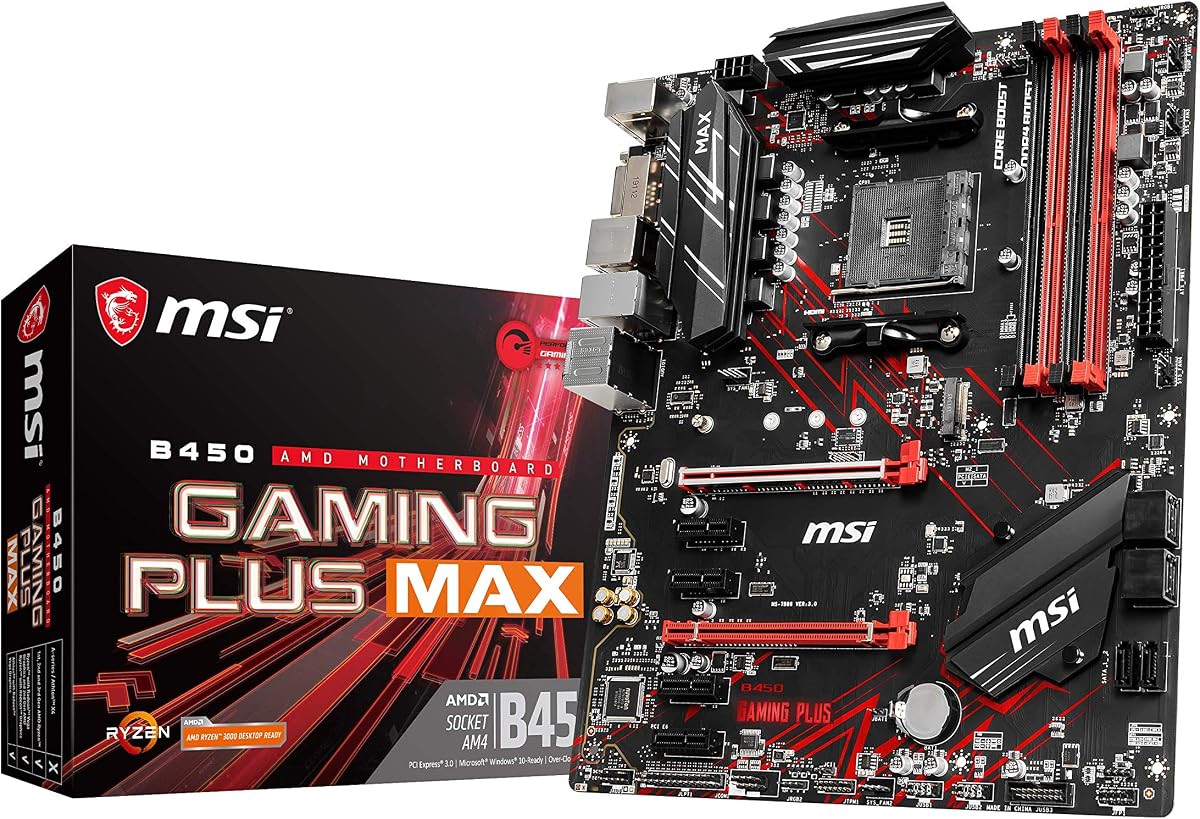
This motherboard stands out as a top choice for enthusiasts seeking high performance and reliable connectivity. With its AM4 socket support and PCIe 4.0 readiness, it caters to modern Ryzen processors efficiently.
We may earn a commission when you buy through this link, at no additional cost to you.
The 12+2 teamed power stages ensure stable power delivery even under heavy loads, making it suitable for overclocking. WiFi 6E provides ultra-fast wireless speeds for gaming and streaming without latency issues.
While it carries a premium price, the included features like BIOS flashback and dual M.2 slots justify the investment. Users might need to configure RGB settings to match their setup preferences initially.
Ideal for gamers and creators needing robust specs, this board delivers exceptional value. Its blend of power, speed, and connectivity makes it a standout pick in the current market landscape.
The 12+2 power stages with ProCool connectors handle high-power CPUs with ease ensuring stability during intensive tasks.
Features like PCIe 4.0 and WiFi 6E ensure your system remains relevant for years to come without hardware limitations.
We may earn a commission when you buy through this link, at no additional cost to you.
This board offers premium features tailored for high-end Ryzen builds with a focus on power and audio quality. The X470 chipset provides solid support for second-generation processors effectively.
We may earn a commission when you buy through this link, at no additional cost to you.
The 10+2 phase digital PWM design ensures clean power delivery which is crucial for overclocking stability. Fins-Array heatsinks help dissipate heat efficiently maintaining optimal temperatures under load.
While it is a larger board requiring a spacious case, the inclusion of ESS 9018 audio codec delivers superior sound. Users should verify case clearance due to its substantial dimensions before purchasing.
Recommended for users seeking top-tier audio and power stability, this motherboard excels in performance categories. Its premium build quality makes it a reliable choice for demanding gaming setups.
Integrated ESS 9018 DAC provides studio-grade audio clarity enhancing the immersive experience for gamers and audiophiles alike.
Direct touch heatpipes and Fins-Array heatsinks manage VRM temperatures effectively allowing sustained high performance.
We may earn a commission when you buy through this link, at no additional cost to you.
An excellent entry point for builders needing reliable performance without breaking the bank. The Prime series focuses on stability and essential features for daily computing tasks.
We may earn a commission when you buy through this link, at no additional cost to you.
SafeSlot technology reinforces the PCIe slot preventing damage from heavy GPUs ensuring long term durability. The Realtek S1220A codec delivers quality audio output suitable for most entertainment needs.
While it lacks integrated WiFi, the included Ethernet and USB ports cover most connectivity requirements. Users needing wireless should consider a USB adapter or choose a variant with built-in wireless.
Perfect for budget conscious builds, this board balances cost and quality effectively. It remains a solid choice for those prioritizing core performance over extra bells and whistles.
SafeSlot design integrates metal framing to withstand heavy graphics cards reducing risk of damage during installation.
8-channel HD audio provides clear sound output enhancing gaming and media experiences without additional hardware.
We may earn a commission when you buy through this link, at no additional cost to you.
This board bridges the gap between budget and premium options offering key features for gamers. The X470 chipset supports Ryzen 2nd gen processors well for smooth operation.
We may earn a commission when you buy through this link, at no additional cost to you.
Features like front panel USB-C and robust power phases enhance usability and performance. Multi-GPU support allows for expanded graphical capabilities if needed for specific workloads.
Audio is functional but not top-tier compared to higher-end models. Lack of built-in WiFi means reliance on wired connections or add-on adapters for wireless connectivity.
Great for users wanting flexibility and core features at a reasonable price. It suits builders who need essential connectivity without paying for unnecessary premium extras.
Front USB-C header simplifies cable management and provides easy access to modern peripheral connections.
Supports CrossFire and SLI configurations allowing multiple graphics cards for enhanced rendering or gaming power.
We may earn a commission when you buy through this link, at no additional cost to you.
Ideal for smaller builds needing modern specs without sacrificing core performance. The Micro-ATX design fits compact cases while still supporting newer Ryzen CPUs effectively.
We may earn a commission when you buy through this link, at no additional cost to you.
It includes PCIe 4.0 and dual M.2 slots providing fast storage connectivity. This ensures your storage speeds keep up with modern application and gaming demands.
Power delivery is basic but sufficient for non-overclocked CPUs. Limited expansion may restrict users with many peripherals or additional add-in cards for their system.
Recommended for budget mini-PC builds or secondary systems. It delivers essential features efficiently for those prioritizing size and cost over expandability.
Micro-ATX footprint allows for smaller cases saving desk space while maintaining full DDR4 performance capabilities.
Dual M.2 slots with PCIe 4.0 support enable rapid data transfer for OS and game loading speeds.
We may earn a commission when you buy through this link, at no additional cost to you.
A well-rounded board combining reliable power and essential modern connectivity. It targets users needing stability and decent speed without excessive marketing features.
We may earn a commission when you buy through this link, at no additional cost to you.
The 8+1 DrMOS power stages offer strong delivery suitable for mid to high-end Ryzen chips. Integrated WiFi 5 provides wireless convenience though WiFi 6 is newer.
Protection features like LANGuard and overcurrent protection safeguard hardware longevity. USB-C headers simplify connectivity for front panel devices and peripherals.
Suitable for general purpose builds needing solid specs and warranty features. It balances cost with functional design for reliable daily computing and gaming.
5X Protection III includes multiple safeguards like LANGuard ensuring hardware safety against power surges and electrical issues.
Front and rear USB-C headers facilitate modern peripheral connections making device setup faster and cleaner.
We may earn a commission when you buy through this link, at no additional cost to you.
Designed for gamers needing stable power and easy BIOS management. The B550 chipset ensures compatibility with recent Ryzen generations out of the box.
We may earn a commission when you buy through this link, at no additional cost to you.
Q-Flash Plus allows BIOS updates without CPU installation simplifying troubleshooting or compatibility adjustments. 10+3 power phases ensure consistent performance even with higher core count processors.
WiFi is absent which requires wired or external solutions. However, the front USB-C and RGB Fusion add modern touches that appeal to enthusiasts.
Great for users who value BIOS ease and power stability over wireless features. It serves as a dependable foundation for gaming systems needing consistent performance.
Q-Flash Plus enables updating firmware without CPU or memory installed reducing complexity during system setup.
Twin 10+3 power phases with premium components ensure clean voltage delivery for sustained CPU performance.
We may earn a commission when you buy through this link, at no additional cost to you.
A compact board offering modern wireless connectivity and video output. It fits well in smaller cases without sacrificing essential performance features.
We may earn a commission when you buy through this link, at no additional cost to you.
WiFi 6 ensures fast wireless speeds and better latency for online activities. HDMI 2.1 support allows 4K video output for modern displays and monitors.
VRM cooling is adequate for non-overclocked use but may warm under load. Reduced USB ports require careful planning if multiple peripherals are needed.
Excellent for compact builds needing wireless capability and high resolution output. It balances size and features effectively for space-conscious builders.
Built-in WiFi 6 provides higher throughput and reduced interference ensuring smooth online gaming and streaming experiences.
HDMI 2.1 port enables 4K at 60Hz making this ideal for home theater PC setups or high refresh gaming displays.
We may earn a commission when you buy through this link, at no additional cost to you.
An established board offering reliability for Ryzen 2nd gen builds. The B450 chipset supports older and newer CPUs with BIOS updates.
We may earn a commission when you buy through this link, at no additional cost to you.
DDR4 Boost technology enhances memory stability for higher frequencies. Studio grade audio delivers clear sound enhancing gaming immersion without extra DACs.
Lacks PCIe 4.0 which may limit future storage speeds but works fine for current needs. Users needing latest gen should consider B550 or X470 models.
Good for budget builds relying on existing parts or older CPUs. It offers proven stability and essential features for everyday computing tasks.
DDR4 Boost ensures pure data signals enhancing memory stability and overclocking headroom for better system performance.
Enhanced audio circuits provide studio grade sound quality improving the gaming and multimedia experience significantly.
We may earn a commission when you buy through this link, at no additional cost to you.
This variant provides similar core specs with an emphasis on traditional connectivity and expansion. It supports Ryzen 2nd gen processors reliably for most tasks.
We may earn a commission when you buy through this link, at no additional cost to you.
ATX form factor ensures compatibility with standard cases offering ample room for components. SATA 6Gb/s ports allow plenty of storage connections for traditional drives.
Absence of WiFi limits wireless setups unless external adapters are used. Lack of PCIe 4.0 makes it less future-proof for next gen storage solutions.
Best for users prioritizing traditional storage and multi GPU setups on a budget. It remains a viable option for those not needing latest connectivity standards.
Standard ATX layout ensures fit in most cases while providing familiar component placement for easier assembly.
Crossfire support allows multiple graphics cards for users needing extra graphical power for specific rendering tasks.
We may earn a commission when you buy through this link, at no additional cost to you.
Selecting the right motherboard involves balancing chipset features power delivery and budget constraints for your specific needs and usage scenarios.
The chipset determines feature sets like PCIe lanes USB versions and overclocking support. X470 offers more PCIe lanes than B450 making it better for multi GPU or storage heavy setups.
Choose X470 for maximum connectivity and B450 for budget builds where fewer peripherals are needed.
VRM phases ensure stable power to the CPU especially during overclocking. More phases generally mean better thermal management and longevity.
For Ryzen 2nd Gen look for at least 8 phases to handle higher TDP models without throttling.
ATX boards offer more slots and ports while Micro-ATX fits smaller cases with reduced expandability. Ensure your case supports the board size you choose.
Match the form factor to your case and build goals to avoid compatibility issues during assembly.
Check for USB 3.2 Type-C ports front panel headers and SATA options. Modern peripherals often require faster data transfer rates for smooth operation.
Verify rear and front port availability to meet your peripheral needs without additional hubs or adapters.
Integrated WiFi 6 or 5 is valuable if you lack Ethernet cabling. Ethernet speeds of 2.5Gb are becoming standard for better local network performance.
Select a board with wireless if your setup requires flexibility or use high speed LAN for gaming stability.
VRM and chipset heatsinks manage heat during sustained loads. Heatsinks with heatpipes dissipate heat more effectively than basic aluminum blocks.
Ensure adequate airflow around VRM heatsinks to maintain stable temperatures in enclosed case environments.
Built-in audio codecs vary in quality affecting sound clarity and immersion. High-end boards include DACs for studio grade audio without extra hardware.
Prioritize audio features if you use high quality headphones or surround speakers without external DAC units.
Easy flash features allow updating BIOS without CPU installation which is useful for compatibility. Intuitive interfaces help manage settings and overclocking effortlessly.
Look for Q-Flash or Flashback buttons to simplify firmware updates and troubleshooting processes.
Install your motherboard on standoffs inside your case ensuring no metal contact causes shorts. Connect power cables and data lines carefully to avoid pin damage during initial setup.
Use updated BIOS to ensure full compatibility with your Ryzen processor and memory speed. Check manufacturer support pages for the latest firmware versions before installing components.
Maintain clean dust filters and airflow to keep heatsinks functional. Regularly update drivers and software for optimal performance and security across all connected devices.
Most X470 boards can support Ryzen 5000 series with a BIOS update though some require a 3000 series chip first to flash. Always verify specific model support lists before purchasing to ensure compatibility without extra steps.
No X470 boards are limited to PCIe 3.0 speeds which means M.2 slots run at 3.0. For PCIe 4.0 support look for B550 or X570 chipsets instead.
More VRM phases provide cleaner power delivery which reduces heat and improves stability especially during overclocking. It extends the lifespan of components under heavy sustained loads.
Choose ATX for more expansion slots and ports or Micro-ATX for smaller cases. Your case size and component needs should dictate which form factor is best.
WiFi is optional if you can use Ethernet for gaming stability but essential if cabling is difficult. Choose boards with integrated WiFi if you need wireless connectivity convenience.
Some X470 boards support ECC memory but it depends on CPU and BIOS settings. Check manufacturer specs for ECC compatibility before purchasing compatible RAM modules.
Use BIOS Flashback or Q-Flash Plus features available on some boards that allow updating via USB without CPU installation. Refer to your manual for button location and procedures.
Most X470 motherboards include one or two M.2 slots for fast storage though they run at PCIe 3.0 speeds. Verify slot count in specs to match your storage needs.
This guide reviewed ten excellent options ranging from budget B450 to premium X470 models. Each board offers unique strengths tailored to different build requirements and performance goals.
Prioritize power delivery and connectivity features that match your specific CPU and peripheral needs. Balancing cost with necessary features ensures long term satisfaction and performance.
Check current listings for availability and latest discounts as prices fluctuate regularly. Selecting the right board today lays the foundation for a reliable and powerful computing system.