
YOCTOSUN Magnifying Glasses with Light
4.5Editor score
Interchangeable Lens Design
Three LED Lights Included
USB Rechargeable Battery
Finding the right magnifying glasses for computer monitors can transform your digital experience by reducing eye strain and making small text easier to read. Whether you are working late into the night or enjoying your favorite games, having the right optical aid ensures comfort and productivity throughout your day.
Our team analyzed ten top-rated products focusing on lens clarity, adjustability, and build quality to bring you this comprehensive list. We considered user feedback, technical specifications, and real-world usability to ensure every recommendation meets high standards for daily visual tasks and screen interaction.
Each pick below highlights key features and performance details to help you make an informed decision quickly. Please note that product availability and pricing may fluctuate over time so checking the latest listings before purchasing is always recommended for the best value.
4.5Editor score

3.6Editor score

4.6Editor score
As an Amazon Associate we earn from qualifying purchases.
This side-by-side comparison highlights the core specifications and unique selling points of each magnifier to help you identify the model that best fits your specific visual needs and workspace setup.


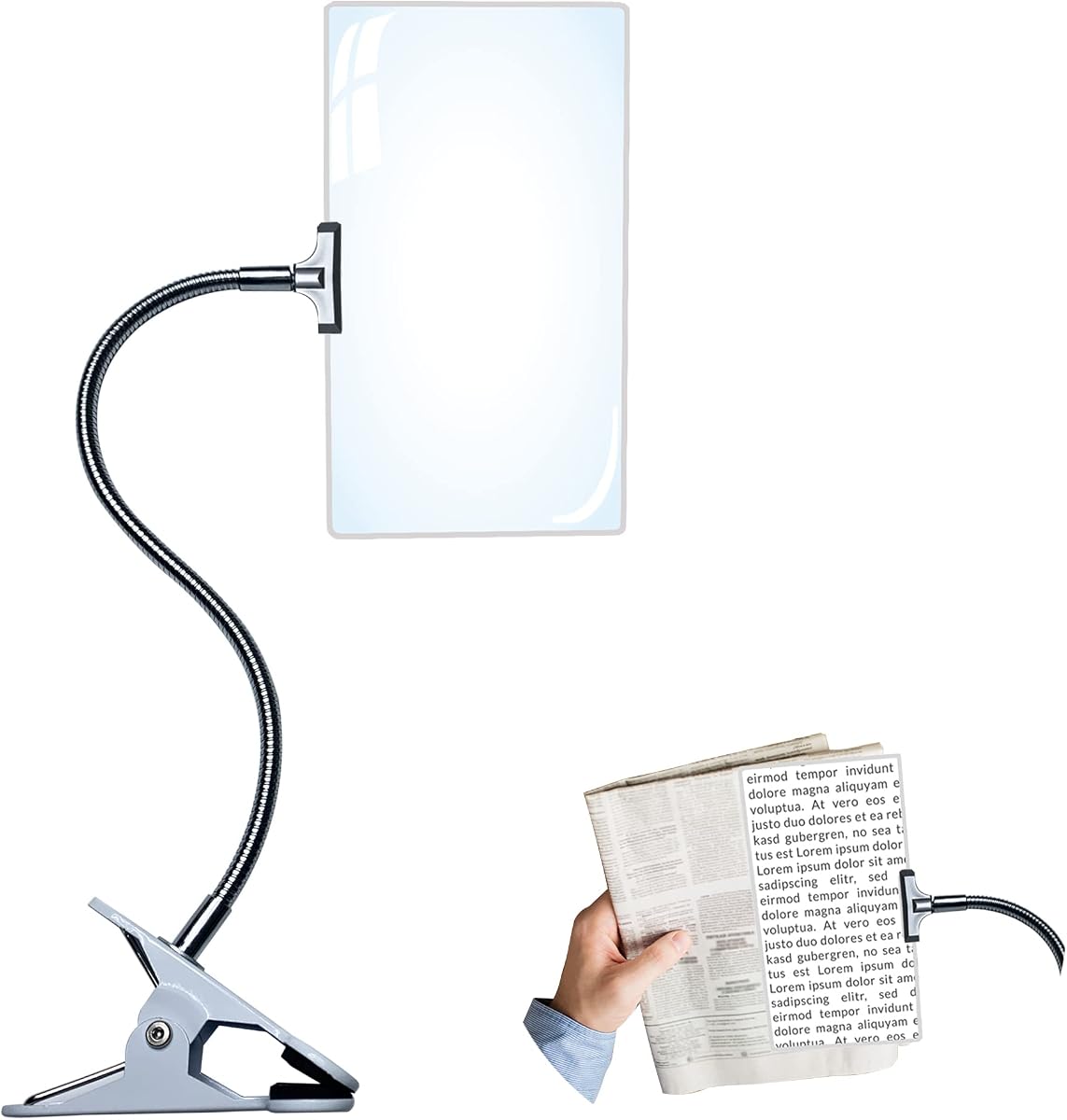
This 5X magnifying glass stands out as a top contender for anyone needing reliable optical assistance for computer monitors or detailed crafts. With a robust 3.6 rating and optical-grade PVC construction it delivers clear visuals that help reduce strain during extended viewing sessions.
We may earn a commission when you buy through this link, at no additional cost to you.
The standout feature is the massive 10×6 inch viewing area which covers a significant portion of a standard page or screen section. The flexible gooseneck allows users to bend the lens into any angle ensuring that the focus point remains steady without constant readjustment. This flexibility is crucial for tasks like reading small text or inspecting hobby materials.
While the optical clarity is impressive some users note that the plastic lens requires careful handling to avoid scratches. Additionally the clamp design is versatile but may struggle with unusually thick or rounded monitor edges. These trade-offs are minor compared to the overall utility and affordability of the device.
Anyone looking for an affordable yet effective solution for reading or crafting should consider this model. It balances size adjustability and clarity well making it a solid choice for seniors or anyone with low vision needs.
The lens is made from optical grade PVC which provides superior image quality compared to standard fresnel lenses often found in cheaper models.
Users can detach the magnifier to use it handheld or clip it onto a desk providing flexibility for different tasks and environments.
We may earn a commission when you buy through this link, at no additional cost to you.
This 21 inch screen magnifier is designed to enhance the viewing experience for laptops and desktop monitors by expanding the visible area significantly. It aims to reduce visual fatigue through its unique 3D HD screen amplifier design which fits the curvature of the human eye for comfortable watching.
We may earn a commission when you buy through this link, at no additional cost to you.
The product features an HD acrylic fresnel lens that offers a durable and scratch-resistant surface while maintaining visual clarity. Users can adjust the viewing angle from 0 to 90 degrees making it suitable for both standing desk use and lying down reading. This adaptability makes it a versatile tool for seniors or anyone who needs larger text on their screen.
Despite its large size some reviews indicate that the lens quality may not meet expectations for high-definition tasks. Additionally the product performs best in low light environments and can suffer from glare in bright or reflective settings. These limitations should be weighed against the convenience of the adjustable design.
This magnifier is a strong option for those primarily watching videos or reading large documents on a laptop. Its portable collapsible nature also makes it easy to store when not in use.
The 3D screen amplifier technology helps create a more immersive viewing experience which is beneficial for movies and gaming.
It works with various laptop sizes ranging from standard notebooks to larger displays ensuring broad utility across devices.
We may earn a commission when you buy through this link, at no additional cost to you.
This ultra-clear screen magnifier offers a unique blend of optical technology and sturdy construction designed to fit various devices from phones to laptops. The high-definition optical lens ensures that content is magnified without losing clarity which is essential for detailed work or entertainment.
We may earn a commission when you buy through this link, at no additional cost to you.
The device features multiple pivot points that can be rotated over 180 degrees providing significant flexibility in how the magnifier is positioned. This allows users to adapt the device for reading newspapers viewing scores or simply browsing on a phone. The wooden frame bracket not only looks stylish but also adds a durable element to the build.
While the specifications are promising the lack of available customer ratings makes it difficult to gauge real-world reliability and satisfaction. Users might need to invest time in setting up the pivot points correctly to get the best viewing angle which could be a hurdle for some.
For those seeking a versatile and aesthetically pleasing magnifier this model warrants consideration. Its ability to work across multiple device types adds to its value as a multi-purpose tool.
The design accommodates a range of screen sizes including 14 to 21 inch laptops making it a universal solution for tech users.
It aims to prevent radiation harm from mobile phones while protecting eyes from close viewing distances for better health.
We may earn a commission when you buy through this link, at no additional cost to you.
The YOCTOSUN magnifying glasses provide a highly flexible solution for close-up tasks thanks to their interchangeable lens system. With a strong 4.5 rating this headset allows users to switch between five different magnification levels from 0.75X to 4.0X depending on the task at hand.
We may earn a commission when you buy through this link, at no additional cost to you.
Equipped with three LED lights and adjustable brightness levels this model ensures that detailed work is always well illuminated. The rechargeable lithium battery and USB-C charging make it eco-friendly and convenient for long-term use. The ergonomic frame design with a rubber nose bridge helps distribute weight evenly for comfortable extended wear.
Some users may find that the acrylic resin lenses require careful cleaning to maintain clarity over time. Additionally the headset strap might need adjustment to prevent slipping during active tasks. These issues are minor given the overall durability and functional design of the product.
This headset is ideal for hobbyists and professionals who need hands-free magnification for precision work. The combination of lighting versatility and comfort makes it a top choice for daily use.
Users can easily swap lenses to suit different tasks from reading to precision repair work without needing multiple devices.
The rechargeable battery system ensures that the LED lights are always ready when needed without recurring battery costs.
We may earn a commission when you buy through this link, at no additional cost to you.
This magnifying glass features four detachable lenses offering magnification powers ranging from 1.5X to 5.0X to suit various needs. The high definition acrylic resin lenses provide durable and scratch-resistant performance while maintaining clarity for detailed inspection tasks.
We may earn a commission when you buy through this link, at no additional cost to you.
The included LED light can be adjusted to ensure optimal illumination of the work area reducing shadows and eye strain. Users will appreciate the ergonomic frame which fits comfortably on the face without putting pressure on the temples. The silicone-coated nose bracket adds stability ensuring the headset stays in place during movement.
While the lenses are clear they have fixed focal lengths meaning users must adjust the distance to focus properly which might take practice. Battery performance is decent but can vary based on how long the light is used. These are manageable trade-offs for the level of detail this tool provides.
Anyone working on crafts repairs or jewelry will benefit from the precision this tool offers. The flexibility of having multiple lenses in one set makes it a practical investment for hobbyists.
The adjustable headlight direction allows users to direct light exactly where it is needed improving visibility on small objects.
The elastic headband and rubber nose bridge ensure a secure fit that does not slip during detailed work.
We may earn a commission when you buy through this link, at no additional cost to you.
These magnifying glasses offer a solid 200% magnification rate ideal for reading small text or performing basic detailed work. The polycarbonate lenses are lightweight and durable ensuring that the device remains comfortable even during long sessions.
We may earn a commission when you buy through this link, at no additional cost to you.
A unique feature is the built-in blue light blocking technology which helps reduce eye strain and headaches caused by exposure to digital devices and artificial light. The rechargeable battery charges quickly and provides reliable power for daily tasks. Bright LED lights on both sides of the frame ensure consistent visibility.
While the magnification is fixed at 200% some users might prefer more variety for different tasks. Also the lighting system does not allow for directional adjustment which might limit focus on specific small areas. Despite these limitations the health benefits and convenience are notable strengths.
This tool is well suited for general reading and light crafting where moderate magnification suffices. The eye protection features make it a thoughtful choice for those sensitive to light and screen time.
The blue light blocking technology is a significant addition for those who spend long hours in front of screens.
Charging via USB cable ensures the device is ready to use without the need to replace batteries frequently.
We may earn a commission when you buy through this link, at no additional cost to you.
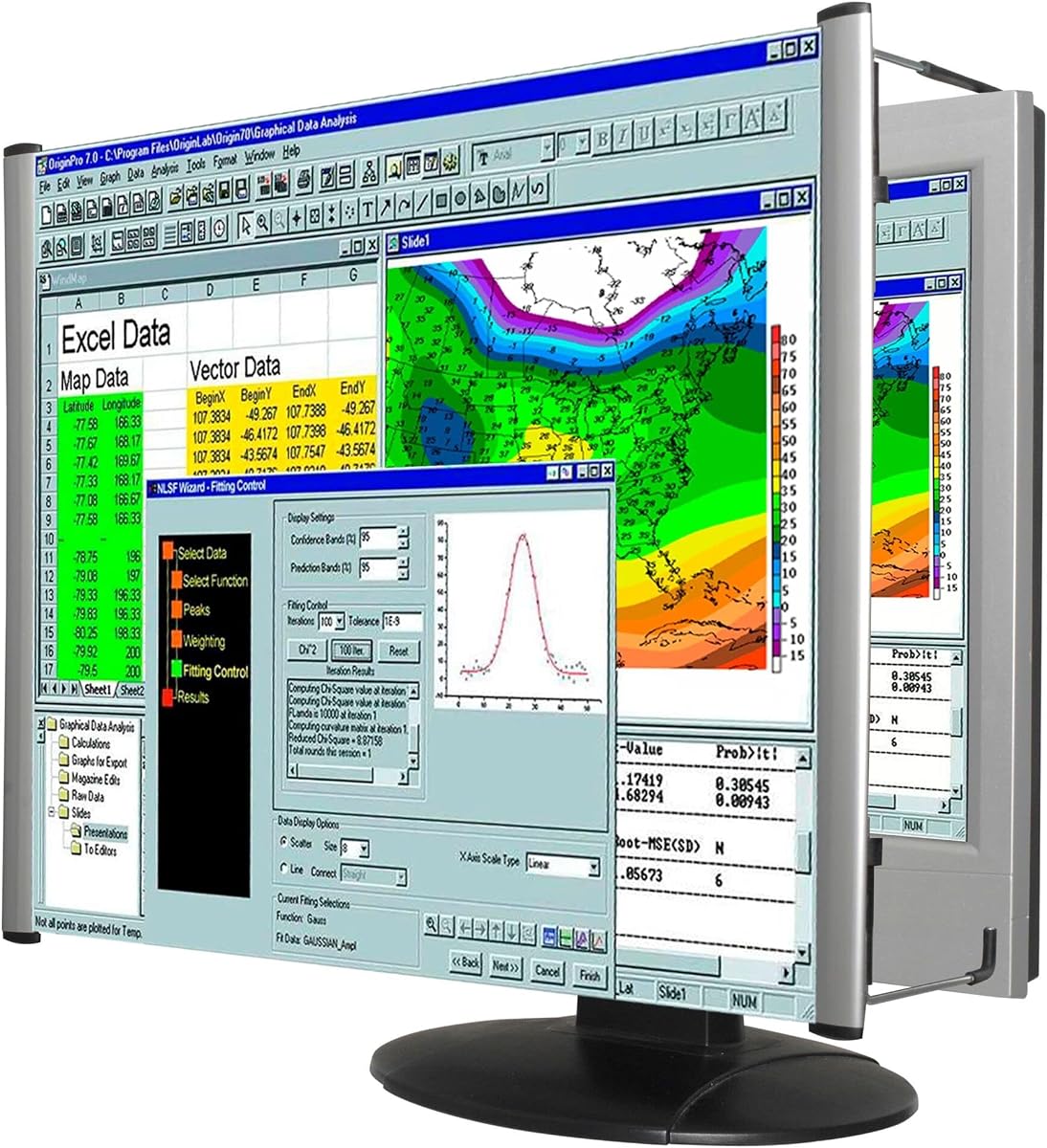
This Kantek filter is tailored for 22 inch widescreen monitors providing a specialized solution for desktop users. The antiglare coating on the fresnel lens helps to reduce reflections and improve readability in various lighting conditions.
We may earn a commission when you buy through this link, at no additional cost to you.
Users can adjust the magnification to suit their specific needs which adds a layer of versatility to the device. The fully assembled design ensures that installation is straightforward and quick without requiring technical expertise. This convenience is appreciated by those who want an immediate improvement in screen visibility.
However some user feedback suggests that the optical clarity may not be perfect for everyone. Additionally the fit is specific to certain monitor sizes which might limit its utility for users with different display dimensions. These factors should be considered before purchase.
For desktop users with a matching monitor this filter offers a practical way to enhance visibility without changing hardware. Its ease of use makes it a good candidate for office environments.
Designed for 22 inch widescreens with 16:9 or 16:10 ratios it ensures a precise fit for compatible devices.
The fully assembled structure means users can attach it quickly and start using it immediately.
We may earn a commission when you buy through this link, at no additional cost to you.
This large clip-on magnifier is a premium option designed for stability and ease of use in both reading and repair tasks. With an impressive 4.6 rating users consistently praise its ability to provide clear high-definition views without the need to hold the lens manually.
We may earn a commission when you buy through this link, at no additional cost to you.
The alloy spring clamp ensures that the device stays firmly attached to the desk or monitor reducing the risk of accidental slippage. The bendable hose design allows users to change the lens angle and height with minimal effort making it adaptable to different seating positions. This stability is crucial for seniors or anyone with limited hand strength.
While the design is robust users should ensure their surface is suitable for the clamp before buying. The hose is flexible but may require occasional adjustment to maintain the desired shape. These minor issues do not detract from the overall quality of the product.
It is an excellent choice for anyone needing a reliable hands-free magnification solution. The combination of build quality and clarity makes it a top contender in the premium category.
The desktop stable design allows users to focus on tasks without worrying about holding the magnifier in place.
The bendable hose design provides the flexibility to position the lens exactly where it is needed for comfort.
We may earn a commission when you buy through this link, at no additional cost to you.
This magnifying glass is specifically designed with seniors and visually impaired users in mind offering a large viewing area and hands-free operation. The 4X magnification is sufficient to enlarge full pages of books or documents making reading and crafts more accessible.
We may earn a commission when you buy through this link, at no additional cost to you.
The use of a non-glass fresnel lens makes the device lightweight and resistant to breakage which is a significant advantage for users who may have shaky hands. The flexible gooseneck allows for precise adjustments to the viewing position ensuring that the focus area is always visible without strain.
Some reviews suggest that the clamp might not remain tight after prolonged use. Additionally the plastic construction while durable may not offer the same clarity as glass in some lighting conditions. These factors are balanced by the overall utility and accessibility features.
This product is a thoughtful option for elderly family members or anyone needing reliable reading assistance. Its large size and stable design make it a practical tool for daily activities.
The large lens size and easy clamping mechanism make it suitable for seniors with low vision or limited dexterity.
The non-glass lens reduces the risk of breakage making it safer and easier to handle during daily use.
We may earn a commission when you buy through this link, at no additional cost to you.
The Kantek MAXVIEW magnifier is a patented device designed to improve readability on 22 inch monitors by using optical grade acrylic fresnel lenses. It offers a lightweight alternative to heavy glass lenses making it easy to mount and adjust on most office setups.
We may earn a commission when you buy through this link, at no additional cost to you.
The screen magnification level can be adjusted by moving the device closer or farther from the display allowing users to customize the viewing experience. The light tint on the lens enhances contrast which helps in reading small text or data on spreadsheets without needing high power magnification.
However the manufacturer notes that this device is not designed for visually impaired users as the magnification level may be insufficient for their needs. Additionally intense lighting near the work area can cause reflections that might be distracting. Users should consider their specific visual requirements before purchasing.
For general office use where better contrast and slight enlargement are needed this filter is a practical addition. Its ease of installation and adjustability make it a solid choice for professional environments.
The optical grade acrylic lens with light tint improves contrast making text easier to read on computer screens.
Users can move the magnifier closer or farther to change the image size allowing for flexible viewing preferences.
We may earn a commission when you buy through this link, at no additional cost to you.
Selecting the right magnifying tool involves understanding your specific needs such as magnification power lens material and ease of use. This guide breaks down the essential factors to help you find a product that enhances your viewing experience effectively.
Magnification power determines how much larger the image will appear to your eyes. For computer monitors a range between 1.5X and 5X is typically sufficient to enlarge text without causing too much distortion. Higher magnification is useful for detailed inspection but may limit your field of view.
Choose a magnification level that matches the size of the text you regularly work with to ensure comfort and clarity.
The material of the lens affects both durability and clarity. Optical grade PVC and acrylic fresnel lenses are common and offer good clarity at a reasonable price. Glass lenses are more scratch-resistant but can be heavier and more fragile to handle.
Look for lenses that promise minimal distortion and scratch resistance to maintain clear vision over time.
Good lighting is essential for reducing eye strain when using a magnifier. Many modern models include built-in LED lights that illuminate the work area evenly. Adjustable brightness levels allow you to control the intensity based on ambient light conditions.
A model with adjustable LED lights will provide better visibility in dark environments and reduce the need for external lamps.
Stability is crucial for hands-free use especially if you have limited hand strength or need to keep your hands free for other tasks. Options include desk clamps adjustable arms or standalone bases. Ensure the mount is sturdy enough to hold the lens in place without slipping.
A stable mounting mechanism ensures that the lens stays positioned correctly allowing for uninterrupted focus on your work.
Flexibility in positioning allows you to find the most comfortable viewing angle for your specific setup. Look for devices with flexible goosenecks or multiple pivot points that can be rotated to suit different tasks.
An adjustable device lets you change the lens height and angle easily which improves ergonomics during long work sessions.
The physical size of the magnifier should fit your workspace without taking up too much room. Portable models are ideal if you need to move between different locations or use them on multiple devices like laptops and phones.
Consider the total dimensions to ensure the device fits your desk or laptop comfortably while still offering a large viewing area.
If your magnifier includes a light you will need a reliable power source. USB rechargeable models are eco-friendly and convenient since they do not require frequent battery replacements. Check the battery life to ensure it lasts through your typical workday.
Opt for a model with a long-lasting battery to avoid interruptions during critical tasks.
Comfort is key if you plan to wear a headset or hold the magnifier for extended periods. Features like rubber nose bridges adjustable headbands and lightweight frames reduce pressure on the face and hands.
Prioritize ergonomic designs that distribute weight evenly to prevent fatigue and discomfort over time.
To get the best results from your magnifier start by placing it on a stable surface or attaching it securely to your monitor or desk. Adjust the height and angle so that the lens is directly over the text or area you wish to view clearly.
If your device includes a light ensure it is turned on and positioned to shine evenly on the work area. Move the magnifier closer or farther away until the image comes into sharp focus which may require slight adjustments depending on your eyesight.
Clean the lens regularly with a soft microfiber cloth to remove dust and fingerprints that can reduce clarity. Store the device in a safe place away from direct sunlight or extreme temperatures to protect the lens and electronic components from damage.
Yes many models are designed specifically for reading large documents or books. Look for a model with a wide viewing area like 10×6 inches to cover more text at once. This reduces the need to move the lens constantly and helps maintain focus throughout the document.
Absolutely many products in this list are compatible with laptops and tablets. Just ensure the magnifier size fits your screen dimensions properly. Some models are specifically designed to clamp onto laptop bezels without obstructing the keyboard.
Yes using a magnifier reduces the need to squint or lean in close to the screen which can cause eye strain. Models with blue light blocking features provide additional protection by filtering harmful light from electronic displays.
A magnification power between 2X and 5X is typically ideal for reading small text. Higher powers like 5X provide clearer details but may limit your field of view so balance is important for comfort.
Most models are designed for easy installation without tools. Clip-on versions can be attached quickly to desks or monitors while desktop stands require minimal setup. Always follow the manufacturer instructions for the best fit.
Use a soft dry microfiber cloth to wipe away dust and fingerprints. Avoid using harsh chemicals or paper towels that might scratch the surface. Most products include a cleaning cloth for this purpose.
Yes many of these magnifiers are versatile enough for detailed hobbies. Look for hands-free models with good lighting to keep your hands free for intricate tasks like sewing or embroidery.
Scratches can reduce clarity so handle the lens with care. If scratches become severe you may need to replace the lens or the entire unit. Some models offer replaceable lenses for this reason.
Choosing the right magnifying glasses for computer monitors can significantly improve your viewing comfort and productivity. The top picks like the 5X Magnifying Glass with Clip and the YOCTOSUN Magnifying Glasses with Light offer excellent features ranging from large viewing areas to hands-free illumination.
When making your decision prioritize features that match your specific needs such as magnification power lens clarity and stability. Whether you need a lightweight portable option or a sturdy desktop solution there is a model in this list designed to meet your demands.
Remember that product availability and pricing can change so always verify the current details before purchasing. We hope this guide helps you find the perfect tool to enhance your digital experience in November 2026.