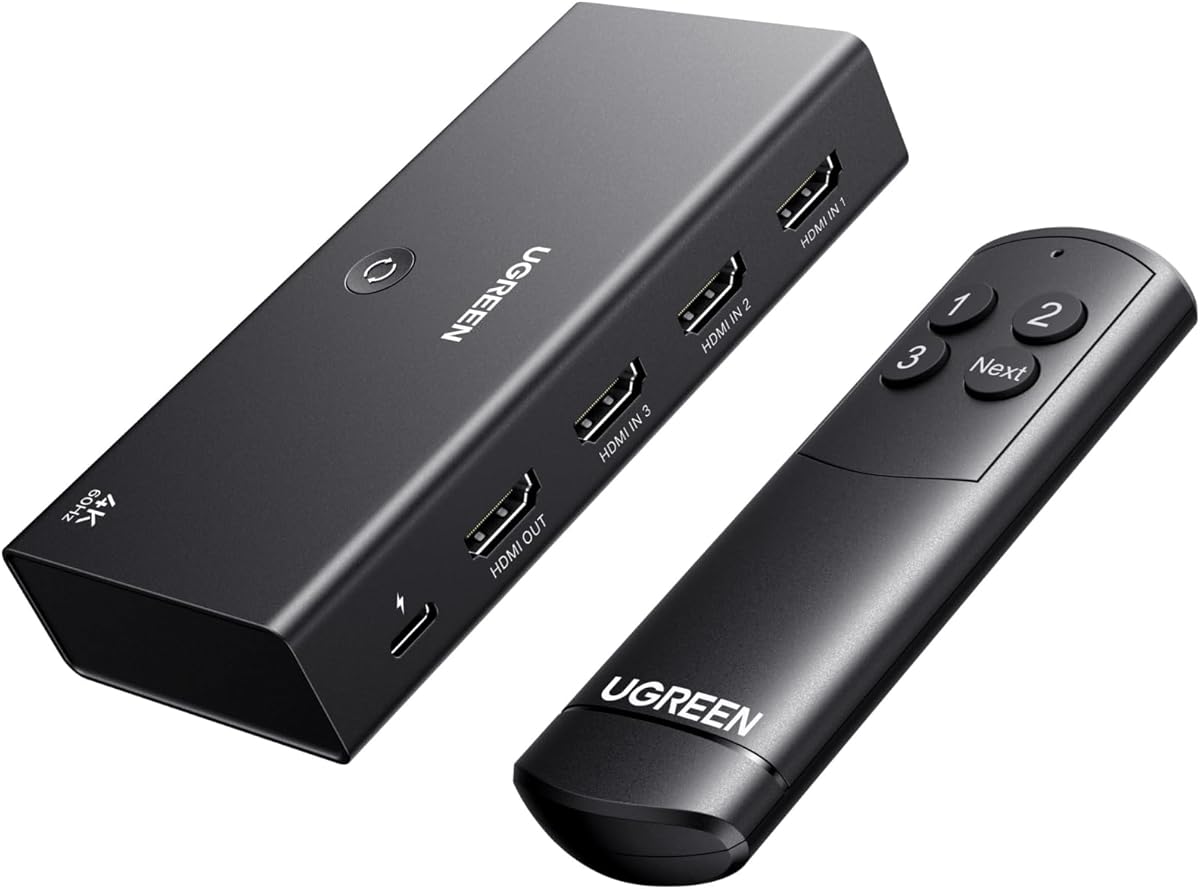
UGREEN HDMI Switch 3 in 1 Out
4.4Editor score
Supports 4K@60Hz resolution
Includes remote control
Compatible with most devices
This guide compares the top 10 cheap HDMI switch models for October 2026, evaluating resolution, port count, and features to help you pick the right one.
Finding a reliable and affordable HDMI switch can transform your home entertainment setup. Whether you need to connect multiple consoles or streaming devices, a good switch simplifies your cable management. This guide highlights the best options available today.
We evaluated ten top-rated models based on resolution support, port count, and ease of use. Our comparison covers essential features like 4K capability, remote controls, and build quality. These products offer great value for budget-conscious buyers seeking performance.
Each pick in this list showcases unique strengths to meet different needs. From simple two-port hubs to advanced five-port hubs, we have you covered. Please note that prices and availability may change frequently online.
4.4Editor score

4.3Editor score

4.1Editor score
The following table provides a side-by-side comparison of the ten selected HDMI switches. It highlights key specifications to help you quickly identify the model that fits your specific setup requirements.


The UGREEN HDMI Switch 5 in 1 Out stands out as a top choice for gamers needing multiple connections. It supports 4K@60Hz resolution and includes a remote for easy switching. This model handles PS5, Xbox, and other devices with ease.
We may earn a commission when you buy through this link, at no additional cost to you.
Its standout feature is the ability to connect five devices to one TV. The switch supports VRR and HDR for enhanced visuals. Transmission is stable at 18Gbps ensuring no frames are lost during gameplay.
While it lacks automatic switching, manual options are convenient. You must connect a power source for proper operation. These minor drawbacks are acceptable given the high performance and port count.
Buyers seeking a reliable hub for multiple consoles will appreciate this pick. It simplifies cable management and delivers high-quality video. We recommend it for serious gaming setups.
Supports VRR and HDR for smoother visuals and better color depth.
Remote control allows effortless switching from the couch or bed.
We may earn a commission when you buy through this link, at no additional cost to you.
This UGREEN model offers excellent value for those needing three inputs. It supports 4K@60Hz and includes HDR10+ for rich visuals. The remote control adds convenience for daily use.
We may earn a commission when you buy through this link, at no additional cost to you.
Its key strength is the balance of features and cost. It handles gaming consoles and streaming devices smoothly. The 18Gbps bandwidth ensures fast data transmission without lag.
Users should note the need for a power adapter. Automatic switching is not supported but manual options work well. These points are minor given the overall performance.
This pick is ideal for budget-conscious buyers. It frees you from plugging cables constantly. We recommend it for simple yet effective setups.
HDR10+ and Dolby Atmos support deliver superb image and sound quality.
Manual switch and remote make changing sources simple and quick.
We may earn a commission when you buy through this link, at no additional cost to you.
The BENFEI HDMI Switch is a robust choice for demanding setups. It supports up to 30ft HDMI transmit with Adaptive Equalization. This feature ensures stable signals over longer distances.
We may earn a commission when you buy through this link, at no additional cost to you.
Its standout trait is the included fixed pigtail cable. This saves cost and reduces loose connection issues. The 18Gbps bandwidth supports 4K@60Hz and 2K@144Hz resolutions.
You must plug in the USB-C power cable for use. Automatic switching is not supported but manual options are reliable. These trade-offs are reasonable for the premium features.
Buyers needing long cable runs should consider this model. It offers long-time satisfaction with an 18-month warranty. We recommend it for professional or extended setups.
Adaptive Equalization technology supports up to 30ft HDMI transmit distance.
Includes fixed pigtail cable to save cost and ensure stability.
We may earn a commission when you buy through this link, at no additional cost to you.
This GANA switch offers a simple solution for two-device setups. It does not require external power for operation. The aluminum body provides durability and heat dissipation.
We may earn a commission when you buy through this link, at no additional cost to you.
Its key strength is bidirectional functionality. You can connect two sources to one display or one source to two displays. It supports 4K@60Hz for crisp visuals.
While it lacks a remote, manual switching is quick. Only one display works at a time in output mode. These limitations are acceptable for its price point.
Buyers needing a compact power-free hub will like this pick. It reduces cable clutter effectively. We recommend it for basic home setups.
Supports 2 in 1 out or 1 in 2 out configurations.
No external power source required for normal operation.
We may earn a commission when you buy through this link, at no additional cost to you.
The Anker HDMI Switch simplifies transitions between two devices. It supports 4K@60Hz resolution for excellent viewing. The design is compact and fits well in small setups.
We may earn a commission when you buy through this link, at no additional cost to you.
Its main benefit is hassle-free manual switching. You do not need to unplug cables constantly. It integrates seamlessly with laptops, consoles, and TVs.
Note that HDMI CEC is not supported on this model. Only one display works at a time. These minor points do not detract from its core functionality.
Buyers seeking a reliable two-port switch will find this ideal. It offers solid performance and customer service. We recommend it for desk or monitor use.
Single button switching for transitions between game or movie sources.
Backed by Anker's reputation for quality and customer service.
We may earn a commission when you buy through this link, at no additional cost to you.
This acer model expands your HDMI output to five inputs. It supports 4K@60Hz and HDR for vivid visuals. The metallic body offers durability and stable performance.
We may earn a commission when you buy through this link, at no additional cost to you.
Its key feature is the wide range of inputs. Connect consoles and TVs and streaming sticks easily. The remote control allows one-touch switching from afar.
Users should connect to a power supply for full performance. Automatic switching is not supported but manual options work well. These are minor trade-offs for the port count.
Buyers needing multiple connections will appreciate this hub. It solves limited port hassles in home offices. We recommend it for entertainment setups.
18Gbps bandwidth ensures lossless audio and video data.
Gold plated ports prevent corrosion and ensure pure signal.
We may earn a commission when you buy through this link, at no additional cost to you.
This GANA switch offers a complete package with a cable. It supports 4K@30Hz resolution and includes a pigtail cable. This setup is easy to install for trade shows or home rooms.
We may earn a commission when you buy through this link, at no additional cost to you.
Its main benefit is the included cable saving cost. It handles HDMI devices like Xbox and Roku smoothly. Manual switching is simple with the key-press function.
Note that 4K@60Hz may require console adjustment. No remote is included but manual options are reliable. These points are acceptable for the price.
Buyers seeking a simple and complete solution will like this. It reduces initial setup hassle. We recommend it for basic streaming needs.
One fixed HDMI cable provided for easy setup and use.
USB-C power port ensures stable video transmission.
We may earn a commission when you buy through this link, at no additional cost to you.
This NEWCARE switch includes a cable for immediate setup. It supports 4K@60Hz for excellent video quality. The gold plated connectors ensure superior signal transfer.
We may earn a commission when you buy through this link, at no additional cost to you.
Its key strength is the included high-speed cable. You avoid buying extra cables right away. Manual switching allows easy selection of inputs.
Users should connect external power for proper operation. No remote is included but buttons work well. These are minor drawbacks for the included accessories.
Buyers needing a plug and play solution will appreciate this. It reduces initial setup complexity. We recommend it for conference or living rooms.
Includes a 2.6ft high-speed HDMI cable for easy setup.
24K gold plated connectors resist corrosion and improve transfer.
We may earn a commission when you buy through this link, at no additional cost to you.
This GANA model supports five inputs in one aluminum box. It offers 4K@60Hz resolution for a visual feast. The remote control allows effortless switching from the couch.
We may earn a commission when you buy through this link, at no additional cost to you.
Its standout feature is the durable aluminum build. All ports are on the same side for convenient cabling. Transmission is stable at 18Gbps bandwidth.
Users must connect a power source for operation. Automatic switching is not supported but manual options work well. These trade-offs are minor for the value.
Buyers needing multiple connections in one hub will like this. It reduces cable mess effectively. We recommend it for entertainment setups.
All ports on same side make cable management convenient.
IR remote control allows easy switching from up to 33 feet.
We may earn a commission when you buy through this link, at no additional cost to you.
This switch simplifies your entertainment setup with a remote. It supports 4K@30Hz resolution and has LED indicators. The design is durable and complements home setups.
We may earn a commission when you buy through this link, at no additional cost to you.
Its main benefit is plug and play simplicity. Just connect and press a button to start content. It handles PS5 and Xbox and PC smoothly.
Note that resolution is 4K@30Hz for most devices. HDMI cables are not included in the package. These points are acceptable for the price and convenience.
Buyers seeking a basic remote-controlled hub will like this. It ensures smooth transitions between devices. We recommend it for casual home use.
Use included remote or button for zero lag switching.
Handles gaming streaming and work devices seamlessly.
We may earn a commission when you buy through this link, at no additional cost to you.
Choosing the right HDMI switch requires considering several factors to ensure compatibility and performance.
Determine how many devices you need to connect. Most switches offer two to five inputs. Ensure the switch supports your specific devices.
Choose a model with enough ports to cover current needs and future expansion.
Check the supported video resolution. Some models support 4K@60Hz while others offer 4K@30Hz. Higher resolution ensures crisp visuals on modern TVs.
Prioritize models that match your TV and console capabilities for best results.
Some switches need external power for stable transmission. Others operate without power for basic use. Check if a power adapter is included.
Select a powered model if you plan to use high bandwidth features.
Manual switching uses buttons while remote control adds convenience. Automatic switching detects signals but may not be supported. Consider your usage habits.
Remote control models are ideal for viewing from a distance.
Ensure the switch works with your existing HDMI cables. Some include pigtail cables while others do not. Cable length can affect resolution.
Use certified high-speed cables to maintain signal quality.
Aluminum bodies offer better heat dissipation than plastic. Gold plated connectors resist corrosion. Durability impacts long-term performance.
Invest in a robust build for daily use environments.
Look for support for HDR, 3D, and surround sound. These features enhance the viewing experience. Check specific audio formats supported.
Prioritize models with advanced features if you use home theaters.
Verify the warranty period and customer service availability. Lifes support can help with technical issues. A good warranty protects your investment.
Choose brands with positive reviews and reliable support teams.
Connect your devices to the input ports on the switch. Ensure all HDMI cables are securely plugged in. This establishes the connection path.
Connect the switch output to your TV or monitor. If powered, plug the USB power adapter into a wall outlet. The LED indicators will show active ports.
Press the manual button or use the remote to switch between devices. Keep the switch in a ventilated area to prevent overheating. Regularly check connections for stability.
Many models support 4K resolution. Some offer 4K@60Hz while others are limited to 4K@30Hz. Always check the specs before purchasing to match your TV capabilities.
Some switches require external power for stable transmission especially at high resolutions. Others may work without power. Check the product description for power requirements.
Most switches come with their own remote control for input switching. This remote typically controls the switch only not your source devices. Separate remotes may be needed for devices.
Most budget models rely on manual switching via buttons or remotes. Automatic detection is less common. Verify this feature if it is important to your setup.
Use high-speed HDMI cables certified for your resolution. Cable length should be kept short to maintain signal quality especially at 4K. Avoid cheap cables that degrade performance.
Many modern switches support HDR for enhanced color and contrast. Check if HDR10 or Dolby Vision is supported specifically. This ensures compatibility with streaming services.
Ensure all cables are securely connected and powered devices are plugged in. Try restarting your TV and source devices. Check that the correct input is selected on the display.
Most switches are compatible with PS5 and Xbox and Nintendo Switch. Ensure the resolution and refresh rate match your console output. Check for VRR support if needed.
We have reviewed ten top picks for cheap HDMI switches offering various features and prices. Each model provides solid value for different user needs.
Prioritize resolution support and port count when making your decision. Ensure the model matches your devices and setup requirements.
Prices and availability can change frequently online. Check current listings before purchasing to confirm details and deals.