
EMEET C960 1080P
4.4Editor score
1080p video with cover
Built-in 2 omnidirectional mics
Automatic light adjustment
This guide compares the top 1080p webcams for video calls and streaming, evaluating image quality, microphone performance, privacy features, and ease of use
Finding the right webcam is essential for clear communication in today's remote work and streaming landscape. A quality 1080p camera ensures you look sharp and professional during meetings, classes, or live broadcasts without breaking the bank.
We evaluated ten top-rated models based on resolution, lens quality, microphone clarity, privacy controls, and compatibility with major platforms. Each pick balances performance and value to help you choose the best fit for your setup.
Every review highlights key strengths, potential drawbacks, and ideal use cases for each model. Note that prices fluctuate frequently, so check current listings before purchasing to ensure you get the best deal available today.
4.4Editor score

4.6Editor score

4.6Editor score
This side-by-side comparison highlights the core specifications and unique features of each model to help you decide quickly.




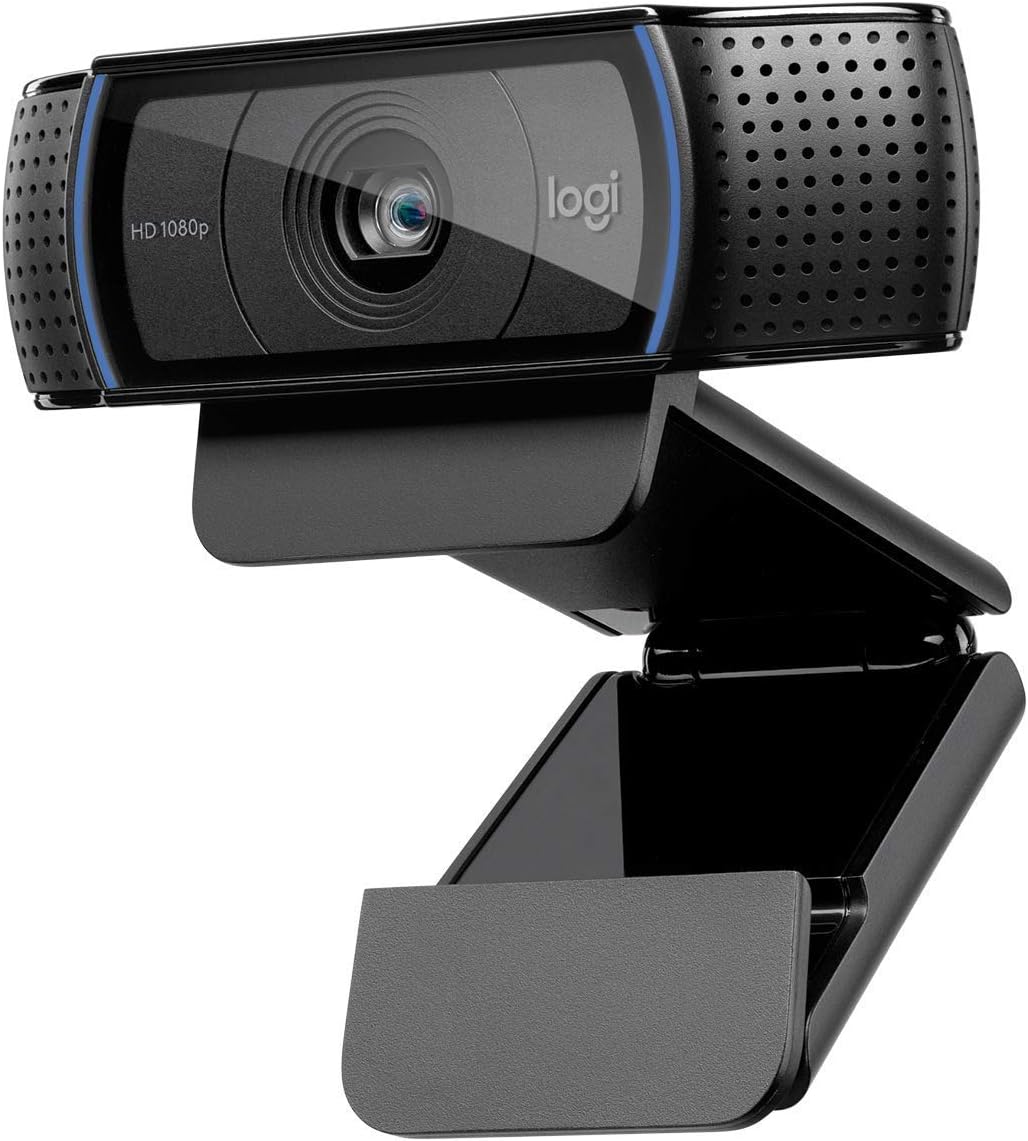


The Logitech C920x HD Pro stands out as a reliable workhorse for professionals and casual users alike. It delivers crisp 1080p video at 30fps with an autofocus system that keeps your image sharp during movement. With a solid 4.6 rating, it proves its worth in daily video conferencing tasks.
We may earn a commission when you buy through this link, at no additional cost to you.
Its HD autofocus and light correction technology ensure you look your best even in challenging lighting conditions. The stereo audio with dual microphones captures natural sound without needing an external mic. This model works seamlessly with Windows 11 and includes a trial for background removal software.
While it lacks a physical privacy shutter, the software features are robust enough for most users. The fixed focal length might limit flexibility for wide group calls, but for individual use, the framing is consistent. These trade-offs are minor considering the overall performance and price point.
This webcam is ideal for remote workers, students, and streamers who prioritize image quality and ease of use. It balances premium features with affordability, making it a top choice for anyone upgrading from a built-in laptop camera.
Choose this if you need dependable video quality and clear audio without complex setup. It delivers professional results for meetings, classes, or casual chats.
For those who value reliability, the C920x HD Pro offers the perfect blend of performance and convenience for everyday video needs.
The 1080p resolution combined with autofocus ensures every detail remains sharp and vibrant during calls.
Dual microphones capture clear voice audio, reducing the need for separate external microphones in many setups.
We may earn a commission when you buy through this link, at no additional cost to you.
The EMEET C960 delivers impressive performance for its low price point. It offers true 1080p video with a built-in privacy cover and dual microphones for clear communication. Its 4.4 rating reflects strong value for budget-conscious buyers seeking basic webcam functionality.
We may earn a commission when you buy through this link, at no additional cost to you.
Automatic light adjustment helps stabilize your image in varying lighting conditions, though it works best in well-lit rooms. The 90-degree field of view is perfect for small group calls without frequent adjustments. The privacy cover adds peace of mind when the camera is idle.
The fixed focus range may not suit users needing close-up shots, but it works well for standard desk setups. Lighting sensitivity is higher than premium models, so dim environments might result in softer images. Still, for everyday use, the performance exceeds expectations.
This model suits students, home office users, and anyone needing a reliable backup camera. It provides essential features without unnecessary bloat, making it a smart pick for those on a tight budget.
Pick this if you need an affordable, no-frills solution for video calls and streaming.
The C960 proves you don't need to spend much to get clear video and audio.
Priced lower than competitors while maintaining 1080p resolution and essential privacy features.
The included camera cover slides smoothly to block the lens when not in use.
We may earn a commission when you buy through this link, at no additional cost to you.
The Logitech C920e HD is built for professional environments that demand reliability and certification. It features a fixed field of view optimized for individual and small group calls. With a 4.6 rating, it stands out as a trusted choice for corporate deployments.
We may earn a commission when you buy through this link, at no additional cost to you.
Its certification for Zoom and Microsoft Teams ensures seamless integration without driver issues. The dual omnidirectional microphones capture voice from up to one meter, keeping conversations clear. The attachable privacy screen adds a layer of control for security-conscious users.
The higher cost reflects its business-grade durability and specialized compliance features. The privacy screen requires manual flipping, unlike sliding shutters on some models. Yet, the robust clip and tripod compatibility make it versatile for various desk setups.
This webcam is perfect for enterprises, remote teams, and anyone using certified conferencing tools. It balances performance with compliance, ensuring smooth operations in professional settings.
Choose this if you need guaranteed compatibility with major meeting platforms and durable hardware.
The C920e delivers confidence and clarity for business-critical video interactions.
Certified for Zoom and Microsoft Teams to eliminate compatibility headaches in corporate settings.
Built-in microphones optimized for voice clarity during team meetings and calls.
We may earn a commission when you buy through this link, at no additional cost to you.
The Logitech Brio 101 combines clear video with sustainable design. Made with recycled plastic, it meets eco-friendly goals without sacrificing performance. Its RightLight technology boosts brightness by up to 50%, reducing shadows for better visibility during calls.
We may earn a commission when you buy through this link, at no additional cost to you.
A sliding privacy cover provides quick access to privacy, and the customizable view via Logi Options+ lets you adjust framing easily. It connects via USB-A and works with major platforms like Teams, Zoom, and Google Meet out of the box.
While it lacks advanced software features found in pricier models, its core functionality is solid. The microphone is adequate for casual calls but may not impress those seeking high-fidelity audio. These trade-offs keep it affordable and simple.
This webcam is great for environmentally conscious users, home workers, and casual streamers. It offers reliable video quality with modern conveniences like privacy control.
Pick this for a green alternative with essential features for daily video interactions.
The Brio 101 shows sustainability can coexist with clear, professional video.
Constructed with minimum 77% post-consumer recycled plastic to reduce environmental impact.
Integrated cover offers reliable physical privacy with just a quick slide.
We may earn a commission when you buy through this link, at no additional cost to you.
The Logitech C920S HD Pro offers premium video quality with a dedicated privacy shutter. It produces razor-sharp 1080p video and recordings thanks to its glass lens and HD autofocus. The 4.6 rating confirms its status as a long-standing favorite for quality.
We may earn a commission when you buy through this link, at no additional cost to you.
Its HD autofocus and light correction ensure you stay in focus and look good in any environment. The stereo audio with dual microphones delivers natural sound for calls and recorded videos. The included shutter gives you total control over when the lens is active.
While it lacks the XSplit VCam license found in similar models, the hardware remains robust. It doesn't include advanced software, relying on standard plug-and-play functionality. This simplicity ensures reliability without unnecessary complexity.
This model suits privacy-focused professionals and content creators who need reliable video. It offers consistent performance for daily meetings and recording sessions.
Choose this if physical privacy controls and video clarity are your top priorities.
The C920S remains a benchmark for balance and quality in HD webcams.
Snugly fitting cover protects the lens and assures privacy when not in use.
Premium video quality makes you look professional on every call and recording.
We may earn a commission when you buy through this link, at no additional cost to you.
The NexiGo N60 delivers solid 1080p video at 30fps with essential privacy features. Its privacy cover blocks the lens when not in use, offering peace of mind. A 4.3 rating indicates reliable performance for casual users seeking affordable options.
We may earn a commission when you buy through this link, at no additional cost to you.
The 3.6mm glass lens provides crisp images at fixed distances optimized for indoor use. Its noise-cancelling microphone reduces background sounds to enhance call clarity. It works with most systems without extra drivers, ready in under a minute.
Image sharpness may lag behind premium models, but it suffices for typical meetings. Some users reported audio delays that require firmware updates for resolution. Still, it offers great value for those who need simple plug-and-play performance.
This webcam is ideal for students and remote workers needing a no-fuss solution. It balances cost with essential features like privacy and clear audio.
Pick this if you need an affordable webcam with privacy protection.
The N60 proves budget webcams can still deliver acceptable quality.
Works across Windows, Mac, Android, and Linux without additional software installation.
Cover blocks lens for security and peace of mind when the camera is unused.
We may earn a commission when you buy through this link, at no additional cost to you.
The EMEET S600 stands out with 4K capabilities, but also excels at 1080p with 60fps smooth streaming. It uses a Sony sensor and PDAF autofocus for precise tracking and clarity. A 4.4 rating highlights its appeal to aspiring streamers and creators.
We may earn a commission when you buy through this link, at no additional cost to you.
Advanced autofocus handles various scenes faster and more precisely than standard models. Its auto light balance keeps shadows in check even in low-light environments. You can adjust the FOV at 1080p to focus on yourself or surroundings as needed.
Although the 4K mode requires compatible apps, the 1080p performance is robust. The integrated privacy cover prevents accidental exposure. Some advanced settings need software, which might deter minimalists.
This model suits content creators who want flexibility and high-quality output. It delivers professional results for live streaming and recording.
Choose this if you want cutting-edge features and adaptable framing.
The S600 offers exceptional value for those exploring advanced webcam capabilities.
Phase detection autofocus ensures precise focus tracking across various scenes.
Auto adjustment balances shadows and highlights for consistent image quality.
We may earn a commission when you buy through this link, at no additional cost to you.
The Logitech HD Pro C920 is a classic model that continues to perform well. It delivers Full HD 1080p video with widescreen calling for natural framing. Its 4.6 rating reflects enduring popularity and trust among users.
We may earn a commission when you buy through this link, at no additional cost to you.
It works seamlessly as a desktop or laptop camera with simple plug-and-play setup. The design fits most monitors and laptops without hassle. This model focuses on core functionality without extra bells or whistles.
Lacking a privacy shutter may be a drawback for some users. However, the video quality and audio clarity remain strong for everyday use. Its simplicity makes it easy to integrate into existing setups.
This webcam is perfect for general users who prefer straightforward performance. It meets all essential needs for calls and recordings.
Pick this if you value simplicity and proven reliability.
The C920 remains a solid choice for basic high-quality video.
Proven track record ensures dependable performance for years of use.
Optimized for widescreen video calls to improve natural framing.
We may earn a commission when you buy through this link, at no additional cost to you.
The Logitech Brio 105 delivers clear 1080p video for business use at a reasonable price. Its RightLight 2 technology balances images in suboptimal lighting. A 4.4 rating indicates solid performance for remote work scenarios.
We may earn a commission when you buy through this link, at no additional cost to you.
It is Google Meet certified and supports Chromebooks, making it ideal for G-Suite environments. The integrated privacy shutter ensures confidence when working from home. Setup is simple with plug-and-play functionality via USB-A.
Build quality is basic, reflecting its cost-effective positioning. The fixed field of view is narrower than some competitors, but sufficient for individual calls. These compromises keep it affordable without sacrificing core utility.
This webcam suits businesses deploying devices at scale or budget-conscious remote workers. It offers essential features for professional video interactions.
Choose this if you need reliable certified hardware without overspending.
The Brio 105 offers clear value for business-grade video conferencing.
Certified for Google Meet and Chromebook for seamless integration in modern offices.
Improves image quality automatically in varied lighting conditions.
We may earn a commission when you buy through this link, at no additional cost to you.
The Logitech Brio 100 (Renewed) offers reliable Full HD 1080p video at 30fps. A 58-degree field of view captures more surroundings for natural framing. With a 4.5 rating, it shows renewed units perform well.
We may earn a commission when you buy through this link, at no additional cost to you.
Plug-and-play compatibility ensures it works with popular conferencing apps seamlessly. The built-in microphone provides convenient all-in-one functionality without extra hardware. It is compact and fits well in small workspace setups.
As a renewed item, it may show minor signs of wear but passes inspection. It lacks privacy features found in newer models. However, the price and functionality make it a smart option for budget users.
This webcam suits students and casual users needing proven performance affordably. It delivers clear video and audio for everyday tasks.
Pick this if you want high-quality video at a lower cost.
The renewed Brio 100 offers great value without compromising core features.
Certified renewed condition ensures performance at a lower cost.
Easy USB connection works seamlessly with common video conferencing apps.
We may earn a commission when you buy through this link, at no additional cost to you.
Selecting the right 1080p webcam involves balancing video clarity, audio quality, and specific features for your environment.
Resolution determines how sharp your video appears. While 1080p is standard, some models support higher frame rates for smoother motion. Look for 30fps as a baseline, but 60fps helps in active scenarios.
Prioritize 1080p with 30fps or higher for clear, fluid video.
Field of view dictates how much of your surroundings the camera captures. A wider FOV suits group calls, while narrower angles focus on individuals. Consider your typical meeting size when choosing.
Pick a FOV that fits your usual number of participants.
Autofocus keeps you sharp during movement, and light correction balances exposure in dim settings. Models with PDAF or similar tech offer faster, more precise focus. These features reduce manual adjustments.
Look for autofocus and auto light balance for consistent clarity.
Built-in mics vary in clarity and noise reduction. Dual omnidirectional mics capture sound from multiple directions. Some models include noise-canceling tech for cleaner audio without an external mic.
Check for dual mics or noise-canceling features for clear voice.
Privacy is critical for security. Physical shutters or covers provide reliable protection when the camera is unused. Models with sliding covers are more convenient than manual attachments.
Choose models with built-in privacy shutters for peace of mind.
Certification for Zoom, Teams, or Google Meet ensures seamless compatibility. This avoids driver issues and guarantees optimized settings. Business users should prioritize certified hardware.
Verify certification for your primary meeting software before buying.
Durability and mounting options affect long-term use. Adjustable clips fit monitors or laptops, while tripod threads allow flexible placement. Sturdy materials withstand daily adjustments better.
Select a webcam with a robust clip or tripod support for stability.
Plug-and-play models reduce setup time. Compatibility with multiple operating systems ensures flexibility. Software support can add value for customization if needed.
Opt for plug-and-play models to start using the camera immediately.
Position the webcam at eye level on your monitor or laptop to create a natural angle. Use a stable surface or tripod to prevent shaking during calls. Adjust the field of view to frame yourself properly.
Keep the lens clean by gently wiping it with a microfiber cloth. Avoid harsh chemicals that might damage coatings. Ensure the camera is well-lit from the front for best image quality.
Check connection and permissions regularly. Update firmware if available to maintain performance. Test audio and video before important meetings to avoid technical issues.
Look for models certified for Zoom like the Logitech C920e. These ensure optimized settings and reliable connectivity. High-quality autofocus and clear audio are essential for smooth meetings.
Yes, most modern webcams support macOS. They use plug-and-play USB connections without drivers. Check compatibility lists to confirm support for your specific OS version.
Use soft, front-facing light to reduce shadows. Adjust exposure in software if available. Models with auto light balance or RightLight help automatically correct dim environments.
Absolutely. Look for models supporting 1080p at 30fps or higher. Adjustable framing and clear audio enhance streaming quality. Some include software for background effects or overlays.
High-quality webcams typically last several years. Durability depends on usage and build materials. Protecting the lens and avoiding rough handling extends its operational life.
A privacy shutter provides physical security against unauthorized access. It offers peace of mind during idle periods. Models without them require manual covers for similar protection.
Built-in mics often suffice for calls. External mics improve audio in noisy environments. Dual mics in webcams deliver clear sound for most users.
Download drivers from the manufacturer's site. Follow setup instructions carefully. Most modern models work plug-and-play but software unlocks advanced features.
We highlighted top picks like the Logitech C920x HD Pro for overall quality and the EMEET C960 for budget value. Each model offers distinct strengths for different needs and settings.
Prioritize features like autofocus, light correction, and privacy controls to match your use case. Business users may prefer certified models while casual users need simplicity.
Prices fluctuate regularly, so check current listings before purchasing to ensure the best deal. A solid 1080p webcam enhances clarity and professionalism in video calls.