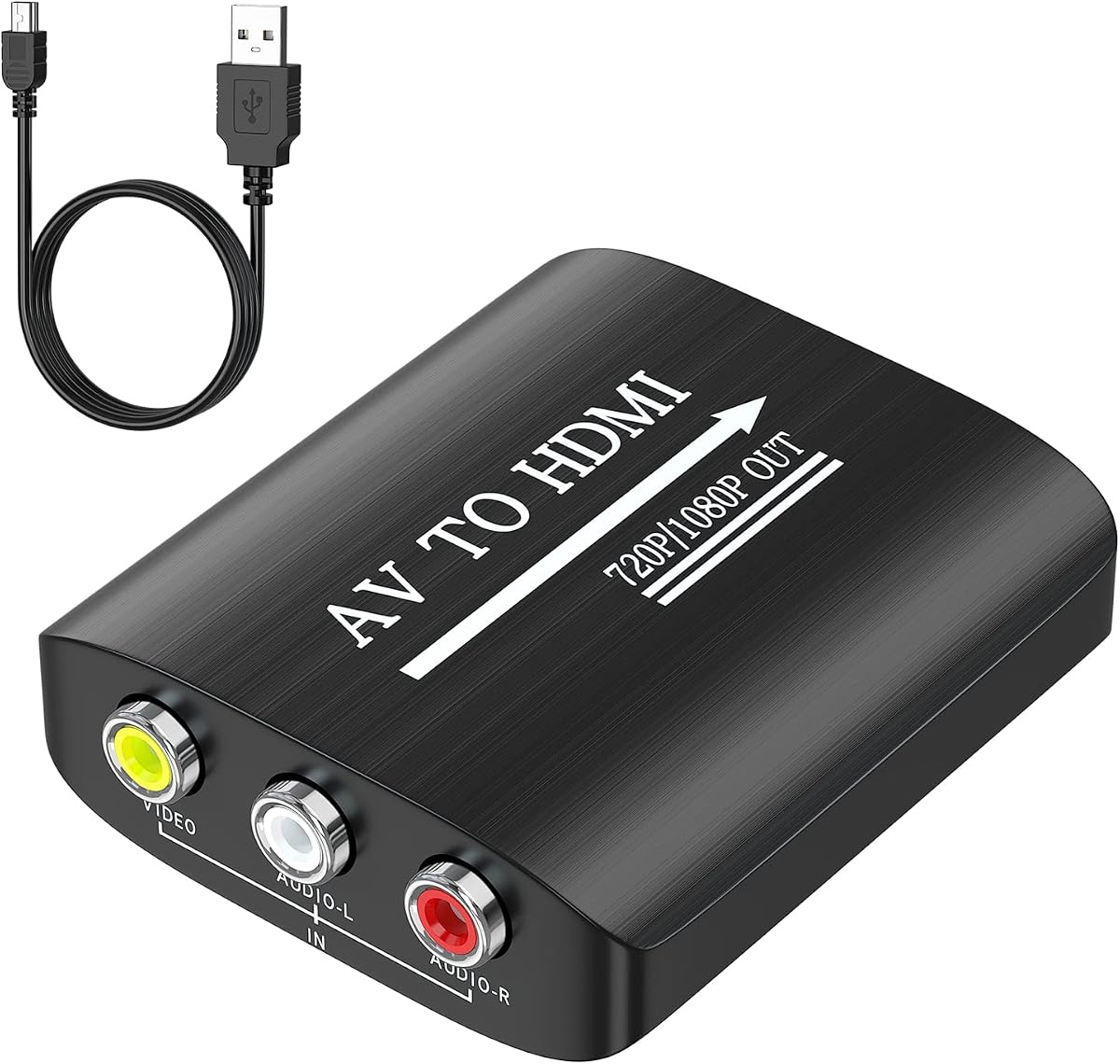
GINGIN AV to HDMI Converter
4.3Editor score
Supports 720p/1080p
Wide console compatibility
Plug and play setup
This guide compares the top HDMI adapter for PS1 options to help you connect your classic console to modern TVs with improved video quality and ease of use.
Connecting your classic PlayStation 1 to a modern high-definition television requires the right hardware to ensure signal conversion. An HDMI adapter for PS1 transforms analog signals into digital formats compatible with contemporary displays.
We evaluated ten top-rated HDMI adapters designed specifically for retro gaming consoles like the PS1. Our analysis focuses on signal quality, ease of setup, compatibility, and overall performance across different display types.
Each recommendation includes detailed specifications, pros, cons, and user feedback to guide your purchase decision. Prices may fluctuate, so verify current listings before finalizing your order to ensure you get the best value available.
4.3Editor score

4.6Editor score

4.2Editor score
The following table provides a side-by-side comparison of the ten best HDMI adapters for PS1 available in November 2026. This overview helps you quickly identify key features, compatibility, and unique selling points for each option.


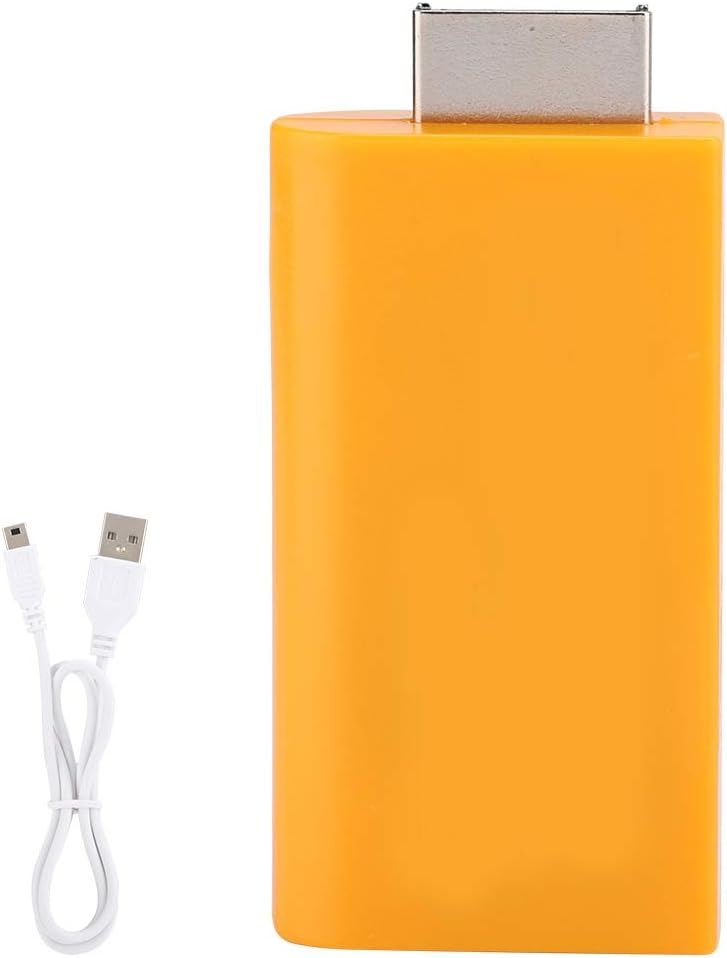

The HD Link HDMI Cable stands out as the top choice for connecting your PS1 to modern displays. With a rating of 4.6, it offers improved video quality through advanced upscaled signal processing that enhances precision and detail.
We may earn a commission when you buy through this link, at no additional cost to you.
Its standout feature is the ability to switch between 4:3 and 16:9 aspect ratios, ensuring you can enjoy games in their original format or adapt to widescreen TVs. The low latency design ensures that gameplay remains responsive without delay.
While it lacks an included HDMI cable, the detachable design allows you to use high-end or extended cables as needed. This flexibility makes it suitable for various setup configurations without compromising on performance or signal integrity.
If you prioritize image quality and ease of use, this adapter is the best option. It transforms the analog output into a crisp digital signal, making your classic games look significantly better on today’s HDTVs.
The upscaled signal processing improves colors and resolution, delivering a clearer picture than standard converters.
A built-in toggle switch lets you choose between 4:3 and 16:9 modes to match your display preferences.
We may earn a commission when you buy through this link, at no additional cost to you.
This PS to HDMI Converter offers excellent value for those seeking a cost-effective solution. With a rating of 4.3, it uses S-Video based conversion to provide a cleaner signal path compared to standard composite video adapters.
We may earn a commission when you buy through this link, at no additional cost to you.
The package includes everything you need to get started: the converter, a 1.5m HDMI cable, and a Micro USB power cable. This complete kit eliminates the need for additional purchases, making setup quick and hassle-free for retro gaming.
While the video quality depends on the original console signal and display settings, the convenience of a plug-and-play design without drivers is a major plus. Just connect it to a 5V USB power source and start playing instantly.
Budget-conscious gamers will appreciate this adapter’s balance of performance and price. It successfully converts analog signals to digital HDMI output, allowing you to enjoy classic games on modern TVs without spending much.
Includes HDMI and power cables so you can start using it right out of the box.
Uses S-Video Y/C signal for a cleaner conversion than standard composite video methods.
We may earn a commission when you buy through this link, at no additional cost to you.
For enthusiasts who demand the highest quality, the BITFUNX adapter delivers premium performance. Rated 4.2, it upscale analog RGB signals to digital 1080P HDMI output, ensuring your classic games look crisp on modern HDTVs and projectors.
We may earn a commission when you buy through this link, at no additional cost to you.
It supports various resolutions from 240p to 576i, and includes a built-in RGB to YPbPr switch. This allows you to adjust settings based on whether you are using a PS1 or PS2 console for optimal compatibility.
The converter provides video and audio in full digital HDMI-compatible format with zero transmission loss. This advanced signal processing ensures colors and resolution are preserved, offering a reliable connection without degradation over time.
Investing in this premium adapter ensures long-term satisfaction. It is an ideal choice for serious retro gaming setups where maintaining the integrity of the original signal is paramount for an authentic experience.
Supports resolutions like 240p, 288p, 480i, and 576i for various classic consoles.
Zero transmission loss ensures your audio and video remain in perfect quality.
We may earn a commission when you buy through this link, at no additional cost to you.
This HDMI adapter is designed specifically for PS1 and PS2 consoles, offering true RGB signal output for better visual fidelity. With a rating of 4.1, it focuses on providing advanced signal processing to enhance precision, colors, and details.
We may earn a commission when you buy through this link, at no additional cost to you.
Its portable and flexible design makes it easy to set up anywhere without requiring any driver installation. The plug and play functionality ensures you can start gaming immediately after connecting it to your display.
While it does not improve the original video quality, it successfully transfers the signal to HDMI. This means you retain the authentic look of classic games while benefiting from the convenience of modern HDMI connections.
For those who prefer a simple and direct solution, this adapter is a solid choice. It works well for transferring video signals without complications, making it suitable for casual retro gaming sessions at home.
Offers true RGB signal output for enhanced precision and color in your gameplay.
No drivers needed and portable design make it easy to use and transport anywhere.
We may earn a commission when you buy through this link, at no additional cost to you.
The Kaico HDMI adapter delivers component cable quality display with HDMI output, making it a reliable choice for PS1 and PS2 users. With a rating of 4.2, it supports all PlayStation output resolutions to ensure compatibility across various game types.
We may earn a commission when you buy through this link, at no additional cost to you.
A built-in RGB to YPbPr switch allows you to change modes for the correct settings on your console. This feature ensures that you get the best possible signal output whether you are using a PS1 or PS2 system.
Its durable construction promises long-term use, and the plug and play design simplifies setup significantly. The included 12-month support warranty adds peace of mind, showing the manufacturer stands behind the product's quality and reliability.
If you want a dependable adapter that offers flexible signal options, this is a great pick. It effectively bridges the gap between older consoles and modern TVs, providing a stable connection for uninterrupted gaming.
Switch between RGB and Component modes to match your specific console and TV requirements.
Built to last with durable materials and supported by a 12-month warranty for added trust.
We may earn a commission when you buy through this link, at no additional cost to you.
This Tengchi RCA to HDMI Converter is a solid option for users looking for a straightforward way to connect classic consoles. With a rating of 4.4, it converts analog composite input to HDMI 1080p output for clear visuals on HD TVs.
We may earn a commission when you buy through this link, at no additional cost to you.
It supports a wide range of TV formats including PAL, NTSC, SECAM, and others, making it versatile for different regions. The plug and play feature makes it easy to install and operate without any technical hassle or drivers needed.
The adapter requires an external USB power cable connected to a 5V source during use. While the power supply is not included, this common setup ensures stable operation for the video conversion process over extended gaming sessions.
For those needing a compact and reliable solution, this converter delivers value. It supports multiple console types, making it a versatile addition to your gaming setup for both PS1 and other retro devices.
Supports PAL, NTSC, and other TV formats ensuring it works globally across different regions.
Converts input to 1080p HDMI for a sharper image on modern high-definition displays.
We may earn a commission when you buy through this link, at no additional cost to you.
The GINGIN AV to HDMI Converter is an affordable choice that supports a wide range of retro consoles. With a rating of 4.3, it converts analog AV composite inputs to HDMI 720p or 1080p output for modern displays like TVs and projectors.
We may earn a commission when you buy through this link, at no additional cost to you.
Its plug and play design ensures that no extra drivers are needed. Simply hook up the included USB power cable to a 5V source, and you can start enjoying your old games with better connectivity and convenience on new screens.
This adapter is designed to bring back cherished memories by connecting VHS, DVD, and gaming consoles. However, note that it cannot improve video quality, and for PS2 specifically, the console must be set to RGB output for best results.
For gamers looking for a budget-friendly option that works with many devices, this adapter is ideal. It offers a practical solution to connect various systems to modern TVs without breaking the bank.
Works with PS1, PS2, Xbox, Wii, N64, and even VHS players for broad retro connectivity.
No drivers required and easy setup make it user-friendly for everyone.
We may earn a commission when you buy through this link, at no additional cost to you.
CAMWAY offers a user-friendly adapter that simplifies connecting PS1 or PS2 to modern HDMI TVs. With a rating of 4.2, it supports 1080P 60Hz signals and allows you to switch between 4:3 and 16:9 ratios easily.
We may earn a commission when you buy through this link, at no additional cost to you.
Unlike other adapters that require manual settings changes, this one works without changing console video output configurations. This plug and play functionality ensures you can start playing within minutes of setting up the device.
It transmits the original resolution without lag, providing an authentic retro gaming experience. The compact design makes it lightweight and easy to carry, perfect for family game nights or taking your setup on the go.
If you want a hassle-free way to connect your classic console, this adapter is a good choice. It balances ease of use with compatibility, ensuring you can enjoy your favorite games without complex configurations.
Switch between 4:3 and 16:9 to view games in original proportions or widescreen mode.
Unnoticeable lag and original resolution transmission maintain the true feel of classic games.
We may earn a commission when you buy through this link, at no additional cost to you.
This adapter focuses on maintaining signal clarity through anti-interference design and tin plated connectors. It provides a practical solution for connecting PS1 and PS2 consoles to HDTVs without the hassle of installing drivers or complex setups.
We may earn a commission when you buy through this link, at no additional cost to you.
Each internal copper wire is tinned to resist oxidation and reduce interference for long-term use. This durability ensures that your connection remains stable over time, making it reliable for extended gaming sessions at home or on the go.
Its compact palm-sized form factor makes it easy to store in a bag, drawer, or on a desk. This portability is perfect for gamers who move their setups around or want to take their console to a friend's house.
If you need a versatile and practical adapter, this is worth considering. It balances convenience with durability, offering a straightforward way to enjoy your console on modern televisions without technical complications.
Anti-interference design helps maintain signal clarity during your gaming sessions.
Compact size allows easy storage and transport for setups at home or on the go.
We may earn a commission when you buy through this link, at no additional cost to you.
The Y.D.F adapter is designed for PlayStation consoles up to PS3, offering flexibility in signal conversion. With a rating of 4.4, it supports a 16:9/4:3 output switch and provides an RGB signal mode display for better visuals.
We may earn a commission when you buy through this link, at no additional cost to you.
It requires no driver installation, making it portable and flexible to use anywhere. You simply plug it in, and it handles the video signal transfer efficiently, keeping the setup straightforward for gamers of all experience levels.
While it is just a converter that does not improve video quality, it ensures a smooth transfer of signals. The aspect ratio switch lets you adapt the display to your preference, enhancing the overall viewing experience on modern TVs.
If you want a reliable converter for multiple PlayStation consoles, this is a solid option. It offers the essential features you need to connect your classic gaming system to modern displays without unnecessary complexity.
Supports 16:9 and 4:3 output switch for flexible viewing options on different screens.
No drivers needed and portable design make it easy to use with multiple consoles.
We may earn a commission when you buy through this link, at no additional cost to you.
Selecting the right HDMI adapter for PS1 involves considering several factors such as signal quality, ease of use, and price. This guide outlines key aspects to help you make an informed decision.
Look for adapters that offer upscaled signal processing to enhance clarity and detail. Better adapters preserve RGB signals and reduce interference, ensuring your games look their best on modern displays.
Choose adapters that support advanced signal processing for improved colors and resolution.
Ensure the adapter works specifically with your console model, whether PS1, PS One, or PS2. Some adapters also support multiple consoles like PS3 or Xbox, which adds versatility to your gaming setup.
Verify compatibility with your console to avoid signal issues.
Adapters with built-in switches for 4:3 and 16:9 aspect ratios offer more flexibility. This allows you to match the original game format or adapt to widescreen TVs for a better viewing experience.
Select adapters with aspect ratio switches for flexible viewing.
Opt for plug and play adapters that do not require driver installations. This simplicity saves time and ensures you can start playing quickly without technical hurdles or complex configurations.
Choose plug and play adapters for hassle-free setup.
Most adapters require external USB power to function. Check if a power cable or adapter is included in the package to avoid buying additional components after purchase.
Ensure the package includes necessary power cables for use.
Durability matters for long-term use. Look for adapters with high-quality connectors like tin-plated ones and warranty support to ensure reliability over time during gaming sessions.
Look for durable construction and warranty support.
Price ranges vary, so determine your budget while considering features. Affordable options can work well but may lack premium features like better signal processing or aspect ratio switches.
Balance price with features to get the best value.
Some adapters come with HDMI cables included, while others do not. Verify what is included in the package to avoid unexpected additional costs for connecting to your display.
Check if HDMI cables are included in the package.
To use your HDMI adapter for PS1, connect the console's AV output to the adapter and plug the HDMI cable into your TV. Ensure the adapter is connected to a 5V USB power source to function correctly before starting your console.
Maintain your adapter by keeping it away from excessive heat or moisture. Regularly check the cables and connectors for any signs of wear to ensure stable signal transmission and prevent connection issues over time.
Store the adapter in a dry place when not in use to preserve its condition. Avoid bending the cables sharply to prevent internal damage and ensure your gaming setup remains reliable for years to come.
No, most HDMI adapters for PS1 are designed to be plug and play without requiring driver installations. You simply connect the adapter to your console and display to start using it immediately.
Most adapters do not inherently improve video quality but can enhance clarity through better signal processing. The actual quality depends on the original console output and the display settings you use.
External power is needed to ensure stable signal conversion and consistent performance. This prevents signal drops or issues that might occur from relying solely on the console's power supply.
Some adapters are compatible with both PS1 and PS2, while others may also support PS3. Check the product description to confirm compatibility with your specific console model before purchasing.
4:3 is the original screen ratio for classic games, while 16:9 is widescreen. Choosing the right ratio ensures games are displayed correctly without stretching or cropping on modern TVs.
Connect the PS1's AV output port to the adapter's input and plug an HDMI cable from the adapter to your TV. Ensure the adapter is connected to power and your TV is set to the correct HDMI input.
Yes, several adapters support 1080p HDMI output which is ideal for modern HD TVs. This provides a sharper image compared to standard resolution connections on older systems.
Yes, as long as your PC monitor has an HDMI input and supports the resolution output by the adapter. Ensure your monitor settings are adjusted correctly to receive the signal properly.
The HDMI adapters reviewed here offer various features to suit different needs. From the HD Link HDMI Cable as the top overall choice to budget-friendly options like the GINGIN adapter, there is a solution for every gamer.
Prioritize signal quality, ease of setup, and compatibility when making your choice. These factors ensure a smooth transition from analog to digital displays, enhancing your classic gaming experience significantly.
Always check current prices and availability before purchasing to ensure you get the best deal. With the right adapter, you can enjoy your favorite PS1 games on modern TVs with improved clarity and convenience.