
18.5" Digital Signage Display
3.8Editor score
700 Nits Brightness
Free Lifetime CMS Access
Android 12 System
Choosing the right digital menu display can transform how customers interact with your business. Modern screens offer dynamic content that captures attention far better than static paper signs. Businesses need reliable hardware that handles continuous operation while delivering crisp visuals in bright environments.
We evaluated ten leading digital menu displays based on screen quality, connectivity options, and ease of content management. Our comparison focuses on commercial-grade durability and features that help businesses update promotions quickly. Each product was analyzed for its suitability across different retail and service settings.
Each pick highlights specific strengths such as brightness levels, operating systems, and remote management capabilities. Prices and availability change frequently so verify current details before purchasing. Use this guide to find a display that fits your space and operational needs perfectly.
3.8Editor score
5.0Editor score

3.4Editor score
As an Amazon Associate we earn from qualifying purchases.
This side-by-side comparison highlights key specifications across all ten selected digital menu displays. Use this table to quickly identify screen sizes, brightness levels, and operating systems that match your specific business requirements.


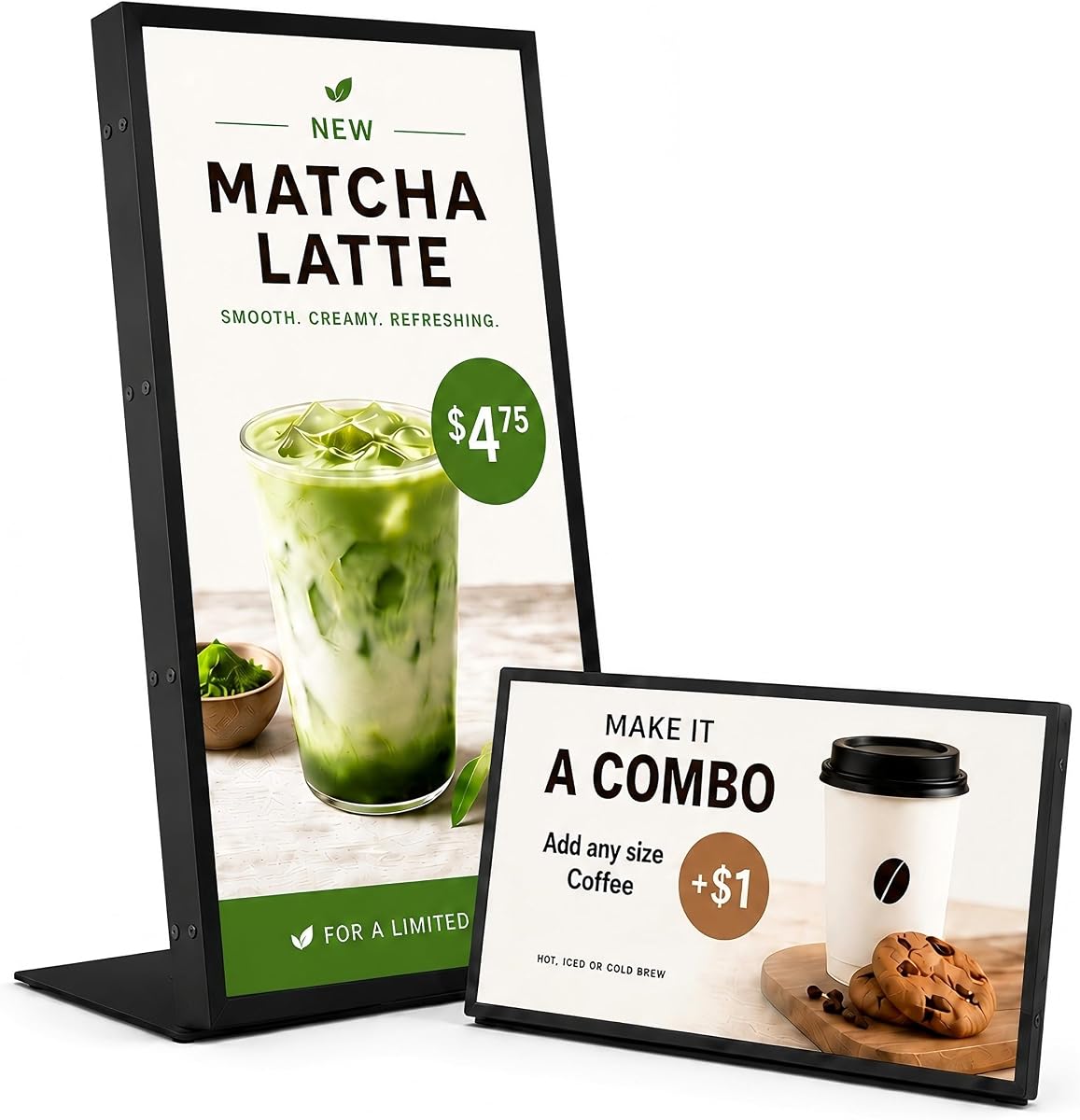


This 18.5-inch digital signage display offers a practical entry point for businesses seeking dynamic menus. It features 700 nits of brightness ensuring clear visibility even in well-lit environments like cafés or retail counters. The included lifetime free cloud CMS allows remote management from any connected device.
We may earn a commission when you buy through this link, at no additional cost to you.
The Android 12 system provides stability for continuous operation without frequent crashes. Users appreciate the USB plug-and-play capability for quick local content updates when needed. Its compact design fits perfectly on countertops at checkout areas or reception desks without occupying excessive space.
While the storage capacity is modest at 32GB it handles standard menu files efficiently. The rating suggests some variability in customer experiences but the warranty support aims to mitigate risks. For small businesses needing a reliable tabletop display this unit delivers essential functionality.
Ideal for bakeries or salons wanting to show promotions digitally. The flexible connectivity options including HDMI and LAN ensure compatibility with existing setups. Choose this model if you need an affordable yet capable solution for indoor counter displays.
The lifetime free CMS allows you to schedule playlists and update promotions remotely without extra subscription costs.
The sturdy desktop stand supports both landscape and portrait orientations to suit various counter layouts effectively.
We may earn a commission when you buy through this link, at no additional cost to you.
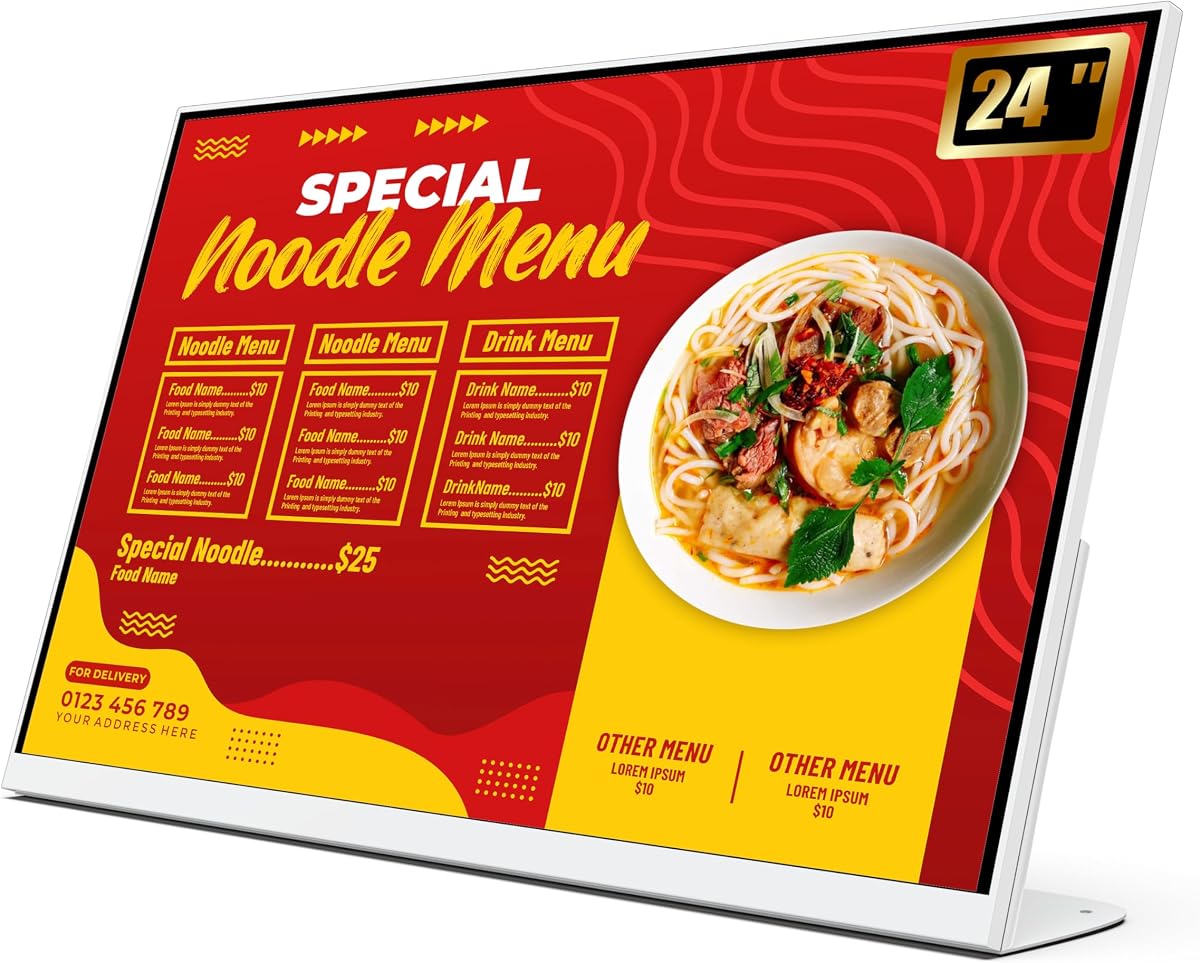
This 24-inch desktop display earns top marks for its balanced performance and visual quality. The FHD 1920×1080 resolution ensures menus and images appear crisp and true to color. Businesses report high satisfaction with its ability to operate continuously for 24 hours a day without overheating.
We may earn a commission when you buy through this link, at no additional cost to you.
The Android system supports centralized content management via a reliable CMS. Updating menus across multiple units is seamless using Wi-Fi or LAN connections. It serves effectively as an advertising screen in retail stores or an electronic menu in milk tea shops.
Durability is a key strength with commercial-grade materials designed for long-term use. The packaging ensures safe transport reducing the risk of damage during shipping. While it requires a fixed power source the stability it offers justifies the setup requirements for most businesses.
Recommended for restaurants needing a larger tabletop solution. The wide viewing angle allows customers from different positions to view content clearly. Select this model for its proven reliability and exceptional customer feedback ratings.
True color restoration and high contrast make food and product images look appealing to potential customers.
Multiple update methods via USB or remote connection make changing daily specials quick and hassle free.
We may earn a commission when you buy through this link, at no additional cost to you.
The MWE 32-inch display stands out for its portability and large screen size. It features a vibrant IPS panel with FHD quality making it ideal for attracting attention in busy environments like malls or hotels. The built-in wheels allow easy movement between locations or events.
We may earn a commission when you buy through this link, at no additional cost to you.
Users benefit from automatic loop playback ensuring content runs continuously without manual intervention. The CMS enables real-time remote updates so promotions can be changed instantly from a central location. HDMI and USB inputs provide flexibility for local content sources too.
Timed power settings help manage energy consumption based on business hours. The foldable design makes it easy to store when not in use. While it is heavier than tabletop models the mobility offers significant advantages for temporary setups.
Best suited for exhibitions or businesses requiring adaptable display solutions. The 3-year warranty provides peace of mind for long-term investment. Choose this if you need a large mobile kiosk for indoor promotional events.
Foldable design with wheels allows you to transport and setup the display easily across different rooms.
Real-time synchronous remote publishing keeps your content current without needing physical access to the screen.
We may earn a commission when you buy through this link, at no additional cost to you.
This device is a digital signage player designed to work with existing HDMI screens. It delivers 4K content quality ensuring high-resolution playback for menus and videos. The free plan supports essential features like image uploads and tech support making it accessible for small teams.
We may earn a commission when you buy through this link, at no additional cost to you.
Content creation is simplified with a template builder and video studio tools. You can manage and generate content on the move using the mobile app. Multiple connectivity options including HDMI and Ethernet ensure stable data transmission for cloud updates.
The vertical display settings allow flexible screen layouts to maximize space. Auto content updates keep your display fresh without constant manual effort. Since it works with any TV it reduces hardware costs if you already have a display.
Ideal for businesses wanting a plug-and-play media solution. The extensive video gallery offers creative inspiration for ads. Choose this if you need a versatile player to drive existing screens.
Template builders and mobile apps make designing professional menus easy without requiring graphic design skills.
Customize screen layouts to show videos and images simultaneously on vertical or horizontal displays.
We may earn a commission when you buy through this link, at no additional cost to you.
This 10.1-inch display is perfect for close-range interactions at tables or counters. The touchscreen capability allows customers to browse information directly making it engaging for retail or reception use. Its compact structure keeps surfaces organized while presenting essential details.
We may earn a commission when you buy through this link, at no additional cost to you.
Built for organized indoor information presentation it supports simple update methods for routine changes. The Android system ensures compatibility with various content types including text and supported media. Wi-Fi and USB connectivity allow efficient file transfers and management.
While smaller than larger models it focuses on usability and space efficiency. The display presents text with clean detail suitable for menus or notices. It works well as a desktop advertising screen in clinics or salon service areas.
Recommended for businesses needing a low-profile interactive display. The simple control process reduces training time for staff. Select this model if you prioritize compact design and customer interaction.
Simple tap and swipe controls let users easily navigate menus and information boards.
Space-saving tabletop design ensures the screen is viewable at close range without cluttering workspaces.
We may earn a commission when you buy through this link, at no additional cost to you.
This countertop display is built for high-traffic commercial counter environments. The tempered glass front panel and metal housing ensure durability against daily wear. It features 700-nit brightness and 1080P resolution for clear visual communication near checkout areas.
We may earn a commission when you buy through this link, at no additional cost to you.
Users can place it in landscape or portrait orientations to suit different information types. The Android 10.0 system supports remote publishing via CMS and offline USB playback. Scheduled content allows targeted messaging at specific times during the business day.
It is designed solely for indoor use without waterproof features. The 3-year warranty with first-year replacement support highlights its reliability. While not a touchscreen it excels as a dedicated information display for waiting areas.
Ideal for retail counters or salons needing a robust unit. The scheduling features help manage promotional cycles efficiently. Choose this model for its durable construction and flexible mounting options.
Metal housing with tempered glass protects the display from accidental impacts in busy service areas.
Remote publishing and scheduling allow you to align content with business hours and peak traffic times.
We may earn a commission when you buy through this link, at no additional cost to you.
This 50-inch display delivers premium quality with 4K UHD resolution and 1000 nits of brightness. It features ultra-thin bezels enabling seamless wall mounting and gap-free installation. The all-metal chassis ensures stable operation even with 24/7 loop playback.
We may earn a commission when you buy through this link, at no additional cost to you.
The Android-based system supports versatile connectivity and includes Google Play Store apps. You can divide the screen into multiple zones for interactive content like feeds and countdowns. The complimentary CMS software handles bulk editing and remote scheduling efficiently.
Smart management includes automatic switching between menu periods. Real-time adjustment of brightness and power optimizes energy usage. While it is a larger investment the visual impact and durability justify the cost for flagship locations.
Best for large venues needing impactful signage. The smart management tools reduce administrative overhead significantly. Choose this model for high-resolution clarity and advanced commercial features.
Ultra-narrow bezels create a minimalist look when installed flush against walls for professional appeal.
Divide the screen into interactive zones to show videos and feeds simultaneously without clutter.
We may earn a commission when you buy through this link, at no additional cost to you.
The 29-inch display offers a balance between compact desktop models and large wall units. It provides 700 nits brightness ensuring clear visibility indoors. The intelligent heat dissipation technology helps maintain stable operation over long periods.
We may earn a commission when you buy through this link, at no additional cost to you.
Features include 2K display support and 2GB RAM for smooth multitasking. CMS software supports automatic menu switching and remote adjustments. It is versatile for retail stores or offices needing mid-range digital signage.
While ratings vary the hardware supports diverse applications like queue systems. The 3-year warranty and reinforced packaging offer protection during shipping. Setup involves drivers and configuration which may take time.
Suitable for businesses needing moderate screen real estate. The multi-screen design aids in organizing complex content. Choose this if you need more visibility than a tablet offers.
Intelligent heat dissipation ensures the device remains stable during continuous operation.
Divide the screen into zones to show different content types simultaneously.
We may earn a commission when you buy through this link, at no additional cost to you.
This player focuses on cloud control and content design capabilities. It supports 4K media playback and includes a canvas menu designer. Users can schedule content remotely and use AI tools to enhance image quality.
We may earn a commission when you buy through this link, at no additional cost to you.
PowerPoint uploads and AI enhancers allow quick creation of professional boards. The LightningAds platform lets you upload content at no cost initially. Setup is plug-and-play requiring only HDMI and Wi-Fi connection.
While basic features are free advanced tools require upgrades. The AI image enhancer helps optimize visuals for better display quality. It is ideal for businesses needing creative control over their messaging.
Recommended for businesses wanting design flexibility without hiring external designers. The remote management saves time. Choose this if you rely heavily on custom content.
AI tools enhance your images to optimize display quality and improve visual appeal.
Design your menu boards exactly how you want using the integrated canvas designer without extra software.
We may earn a commission when you buy through this link, at no additional cost to you.
This player is powered by a dedicated ARM Cortex CPU with 4GB RAM ensuring smooth performance. It integrates with free digital signage cloud services for content management. The 16GB storage provides local caching to prevent playback interruptions.
We may earn a commission when you buy through this link, at no additional cost to you.
It supports vertical and horizontal screen modes for flexible placement. HDMI, Wi-Fi, and Ethernet ports offer stable connectivity options. The custom Android OS includes a watchdog for system stability.
While local storage is limited it works best with cloud-based workflows. The reliable CPU handles HD video without lag. It is suitable for businesses needing a robust player for commercial screens.
Best for setups using digital signage cloud platforms. The hardware reliability ensures consistent daily operation. Choose this if you prioritize processing power and system stability.
Dedicated CPU and watchdog ensure stable playback for commercial displays.
Integrates with popular cloud services for easy remote content management.
We may earn a commission when you buy through this link, at no additional cost to you.
Selecting the ideal digital menu display involves evaluating several technical factors. This section outlines key considerations to help you match features with your business needs.
Screen size determines how far away customers can stand and still read content effectively. Larger screens like 50 inches suit open areas while smaller 10 inch units work for close counters. Resolution impacts clarity ensuring text and images look sharp.
Choose a size based on your venue layout and a resolution of at least 1080P for crisp visuals.
Brightness measured in nits is crucial for visibility in different lighting conditions. Indoor displays should offer at least 500 nits but 700 nits is better for well-lit spaces. High brightness prevents content from appearing washed out.
Select a display with 700 nits or higher to ensure visibility under overhead lights or near windows.
Android operating systems provide flexibility for installing apps and managing media locally. They support cloud CMS and local USB playback for diverse content needs. An OS with reliable RAM ensures smooth multitasking without lag.
Prioritize Android systems with at least 2GB RAM for stable content management and playback.
CMS platforms allow remote updates and scheduling of content across multiple screens. Look for free or affordable plans that support playlist creation and remote publishing. Efficient CMS tools reduce administrative time significantly.
Ensure the display supports a CMS that allows remote updates from any connected device.
Connections like HDMI Ethernet and USB allow flexible integration with existing hardware. HDMI connects to external PCs while Ethernet offers stable network access for cloud updates. Wi-Fi adds convenience for remote management.
Choose a unit with multiple ports including HDMI and LAN to match your network infrastructure.
Commercial displays must withstand continuous operation 24 hours a day. Look for models with metal housings and cooling systems designed for longevity. A warranty of at least three years protects your investment against defects.
Prioritize units with commercial-grade materials and a minimum 3-year warranty for reliability.
Consider how the display will be mounted or placed. Desktop stands offer flexibility while wall mounts require drilling and stability checks. Some models support both landscape and portrait orientations for versatile setups.
Verify mounting options and included stands to ensure the display fits your physical space.
Cost varies based on features like resolution and smart capabilities. Balance upfront costs with long-term value such as free CMS or included warranties. Avoid choosing solely on price without considering operational needs.
Evaluate total cost of ownership including hardware software and support to find the best value.
To ensure proper operation begin by connecting the display to a stable power source and your network. Use the included stand or mount securely according to manufacturer instructions to prevent tipping. Plug in HDMI or USB drives if using local content sources.
Install the content management app on a PC or mobile device to schedule and upload menus. Log in to your CMS to access the cloud controls and create new playlists for your business needs. Test the display to ensure all images render correctly.
Regular cleaning with a dry microfiber cloth helps maintain screen clarity. Avoid harsh chemicals and dust the casing to keep heat vents clear for efficient cooling. Periodically check your software settings to ensure the device updates and runs smoothly.
For small counters, a 10.1 inch or 18.5 inch display is ideal as it saves space while remaining visible to customers standing close. These sizes fit neatly on tables without obstructing staff workflow. They also support both landscape and portrait orientations.
Most modern displays include built-in Android systems that run apps directly so separate hardware is often unnecessary. Cloud CMS allows management from any PC or phone. Some players require external screens but offer more versatility for upgrades.
Yes, many units support USB or SD card playback for offline content. You can upload playlists locally and set them to loop. However remote updates require an internet connection. Local content ensures menus display during connectivity outages.
Commercial displays are designed for continuous use and can last up to 50,000 hours with proper maintenance. Most offer warranties ranging from three to five years. Regular cleaning and ventilation checks help extend their lifespan significantly.
4K is essential for large screens like 50 inches where detail matters. For standard 24 inch displays 1080P is usually sufficient. Higher resolution increases hardware cost so balance needs with budget. Sharp visuals improve customer perception regardless of resolution.
Most systems allow switching via settings menus or physical rotation. Ensure the mount supports both orientations. Some models auto-detect rotation but software adjustment may be needed. Check the manual for specific toggle instructions to avoid display errors.
Many providers offer free plans with basic features. Advanced tools like AI design often require upgrades. Always review pricing tiers before purchasing. Some systems are completely free. Budget for potential subscription costs if you need premium features.
Yes, centralized CMS platforms allow managing multiple screens from a single dashboard. You can push updates or schedules simultaneously. Grouping displays helps streamline operations. This ensures consistent content across your locations.
We reviewed ten distinct options ranging from compact tabletop units to large commercial panels. Top picks include the 24 inch display for balance and the 50 inch model for premium impact. Each offers unique strengths suitable for various business environments.
Prioritize brightness and durability for high traffic areas. Ensure your chosen system supports your preferred content management tools. Balancing hardware quality with software flexibility is key to long-term satisfaction and efficiency.
Prices fluctuate often so verify current offers before purchasing. Check compatibility with your existing setup to avoid unexpected costs. Use this guide to make an informed choice that enhances your business visibility.