
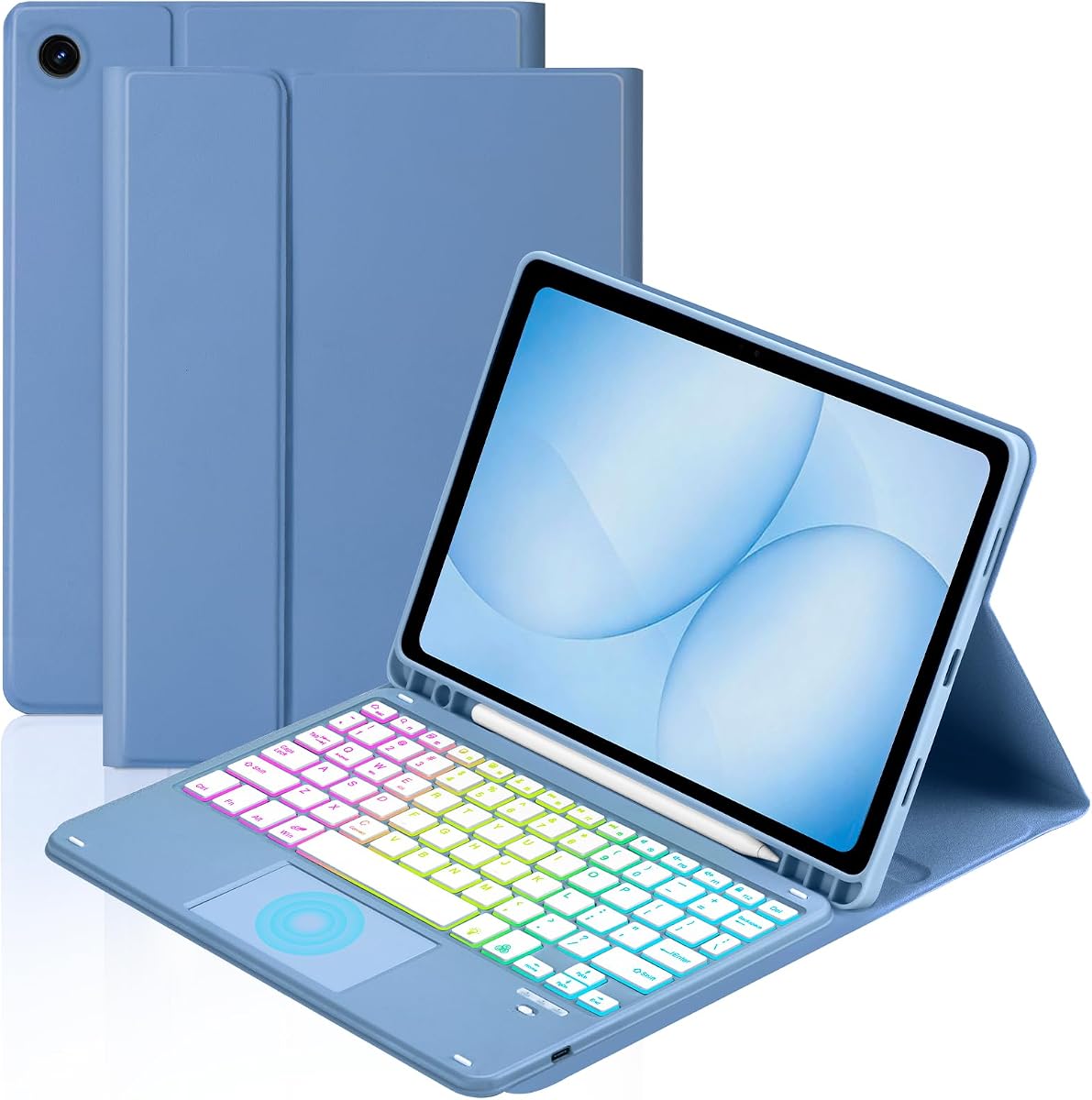
YBING Keyboard Case for Samsung Galaxy Tab A11 Plus & Galaxy Tab A9 Plus
4.5Editor score
7-Color Rainbow Backlight
360 Rotatable Cover
Detachable Bluetooth Keyboard
We compare top rated keyboard cases for Samsung Galaxy Tab A11 Plus to help you choose the best magnetic detachable option with backlight and trackpad features.
Transforming your Samsung Galaxy Tab A11 Plus into a productivity powerhouse is easier than ever with the right keyboard case. These accessories combine protection with typing comfort, turning your tablet into a laptop-like workstation for work or study.
To build this list, we analyzed compatibility, build quality, battery life, and typing experience across ten top-rated models. Each option was evaluated on its magnetic strength, key responsiveness, and additional features like trackpads or mouse support to ensure genuine utility.
Every pick below highlights specific strengths and trade-offs to match different user needs and budgets. Please note that product availability and pricing can change frequently, so always verify the latest details on the retailer page before making your final decision.
4.5Editor score

4.3Editor score

4.6Editor score
This table provides a side-by-side view of key specifications for all ten models to help you quickly identify the right fit for your Samsung Galaxy Tab A11 Plus tablet needs.




The Dexnor keyboard case stands out as the top choice for users seeking a seamless laptop experience on their Samsung Galaxy Tab A11 Plus. Its integrated multi-touch trackpad enables precise cursor control, significantly reducing the need to touch the screen during complex tasks.
We may earn a commission when you buy through this link, at no additional cost to you.
Key strengths include the strong magnetic support that keeps the tablet secure at a 120-degree viewing angle, plus a full row of shortcut keys for quick access to brightness and volume. The adjustable white backlight ensures comfortable typing in any lighting condition without draining power.
However, this model uses a solid base design rather than a floating cantilever, meaning the screen does not elevate as high as some competitors. Additionally, the backlight is limited to white rather than offering multiple color options, which might appeal to users seeking more customization.
Overall, the Dexnor case is best suited for professionals or students who prioritize typing efficiency and navigation over aesthetic lighting effects. Its robust build and functional features make it a reliable partner for daily work and creative projects on your tablet.
The built-in multi-touch trackpad supports gestures like scrolling and app switching, transforming your tablet into a full-fledged computing device without extra peripherals.
With a 650mAh battery and smart sleep modes, this case offers up to 720 hours of standby, ensuring you stay productive through long work sessions without frequent recharging.
We may earn a commission when you buy through this link, at no additional cost to you.
The TUNKARMOR case offers exceptional portability with its detachable magnetic keyboard, allowing you to use the tablet standalone when typing is not needed. The case provides three adjustable viewing angles for comfortable viewing in various environments like cafes or desks.
We may earn a commission when you buy through this link, at no additional cost to you.
A standout feature is the built-in S Pen holder, ensuring your stylus is always accessible when not in use. The auto sleep/wake function helps extend battery life by automatically waking or sleeping the tablet based on the case lid status.
However, this model lacks a built-in trackpad, requiring you to rely on the touch screen for cursor control. The keyboard is also a separate piece that attaches magnetically, which means it could potentially shift if not properly secured on uneven surfaces.
Ideal for travelers or casual users, the TUNKARMOR case balances protection and flexibility well. It is a solid choice if you value the ability to remove the keyboard and need reliable physical protection for your device during transit.
Adjustable grooves allow you to set the tablet at angles suited for reading, drawing, or typing, adapting to your workflow instantly.
With full edge coverage and a honeycomb grid pattern, the case cushions against drops and prevents overheating, extending your tablet's lifespan.
We may earn a commission when you buy through this link, at no additional cost to you.
This keyboard case impresses with the inclusion of a rechargeable Bluetooth mouse, offering an alternative to the trackpad for cursor control. The built-in trackpad also supports multi-touch gestures, providing flexible navigation options for different user preferences.
We may earn a commission when you buy through this link, at no additional cost to you.
The keyboard features a vibrant 7-color rainbow backlight with constant on, breathing, and off modes, adding visual flair to your typing experience. A long-life battery ensures you can work for extended periods without interruption, supported by fast Type-C charging.
On the downside, carrying both a trackpad and a separate mouse may not be ideal for minimalists seeking a single solution. The lighting modes are predefined, so you cannot customize colors individually beyond the set options provided in the device settings.
This model is perfect for users who need precise cursor control for design work or prefer using a mouse alongside a keyboard. Its robust feature set and lighting effects make it a versatile option for diverse usage scenarios.
With both a trackpad and a wireless mouse included, you can switch control methods based on task requirements for maximum comfort.
The rainbow backlight allows you to personalize your setup with vibrant colors, enhancing the aesthetic appeal of your tablet workspace.
We may earn a commission when you buy through this link, at no additional cost to you.
Soke delivers a premium feel with its durable construction and stylish design, making it a strong contender for users who value aesthetics alongside functionality. The 7-color backlight allows you to switch between colors for a personalized typing atmosphere in low light.
We may earn a commission when you buy through this link, at no additional cost to you.
Compatibility spans iOS, Android, and Windows, offering flexibility if you use multiple devices. The auto sleep/wake function conserves battery life effectively, ensuring your device remains ready when needed without manual intervention.
One limitation is that it only offers two viewing angles, which might restrict positioning options compared to models with more slots. Also, the keyboard is detachable but lacks a trackpad, relying on touch navigation for cursor control which may feel less precise.
This case is ideal for those seeking a balance of style and utility with a reliable protective shell. The broad system compatibility and quality build make it a great investment for versatile tablet users.
Switch seamlessly between different operating systems using dedicated keys, accommodating your diverse tech ecosystem easily.
Choose from seven vibrant backlight colors to match your mood or environment, adding a unique touch to your daily typing routine.
We may earn a commission when you buy through this link, at no additional cost to you.
YBING offers incredible value with a feature-rich case that doesn't break the bank. The 360-degree rotatable cover allows for versatile viewing, making it easy to switch between landscape and portrait modes comfortably.
We may earn a commission when you buy through this link, at no additional cost to you.
The 7-color rainbow backlight and breathing mode add visual appeal, while the 16 built-in magnets ensure the keyboard stays firmly in place. A built-in pencil holder keeps your stylus secure, which is a thoughtful touch for creative users.
However, battery life with backlight on is limited to about 5 hours, requiring more frequent charging if you rely on it often. The absence of a trackpad means you must navigate via the touch screen, which might not suit everyone's preference.
This model is perfect for budget-conscious buyers who still want style and utility. Its rotating design and affordable price make it a great entry point for enhancing your tablet experience.
Flip the cover to rotate your tablet for optimal viewing angles, whether for media consumption or content creation.
Keep your S Pen organized and safe with a dedicated holder slot, preventing loss during travel or busy work sessions.
We may earn a commission when you buy through this link, at no additional cost to you.
Harvopu stands out for including a 3-level DPI wireless mouse, allowing you to adjust sensitivity for detailed editing or general browsing. The mouse provides desktop-grade accuracy, enhancing productivity for tasks requiring precise cursor movements.
We may earn a commission when you buy through this link, at no additional cost to you.
The keyboard offers marathon-ready battery life, lasting up to 180 hours on a single charge, and features detachable multi-color backlit keys. The case itself is easy to clean and resistant to stains, keeping your device looking fresh.
The main trade-off is the reliance on the mouse for navigation since there is no trackpad, which adds a bit of bulk to your setup. The keyboard attaches magnetically but sits separately from the main case, which some may find less convenient.
This setup is excellent for users who prefer mouse control over trackpads. With its durable case and precision mouse, it offers a complete workstation solution for professional use.
Switch DPI levels instantly to match the precision needs of your current task, from casual browsing to graphic design.
The stain-resistant case can be wiped clean quickly, maintaining a polished look even after spills or daily wear.
We may earn a commission when you buy through this link, at no additional cost to you.
TiMOVO focuses on endurance with a 420mAh battery that supports over 90 hours of usage on a single charge. This makes it ideal for users who are often away from power sources for extended periods.
We may earn a commission when you buy through this link, at no additional cost to you.
The case provides three adjustable viewing angles and a 7-color backlight for a visually pleasing typing experience. Full protection against scratches and bumps ensures your tablet remains safe from daily hazards.
One drawback is the lack of a trackpad, requiring touch-based navigation. The design is also relatively basic compared to some competitors with more modern features like mouse integration.
For users prioritizing battery performance and simple functionality, this case is a reliable choice. Its long life and protective qualities ensure consistent performance across various environments.
With over 90 hours of battery life, you can work through long trips without worrying about recharging the keyboard.
The 7 vibrant backlight colors add a fun and stylish element to your typing setup, enhancing your daily workflow.
We may earn a commission when you buy through this link, at no additional cost to you.
MePadKey offers a smart touchpad with advanced multi-finger gesture support, allowing for intuitive navigation like zooming and switching apps. This elevates the user experience by mimicking laptop-like controls effectively.
We may earn a commission when you buy through this link, at no additional cost to you.
The keyboard features a 7-color rainbow backlight and multi-function shortcut keys for efficiency. It is rechargeable and detachable, making it easy to carry when only the tablet is needed.
However, battery life with the backlight on is only about 5 hours, which might be insufficient for all-day travel. The protection features are standard and do not offer unique anti-slip patterns like some competitors.
This model suits users who rely heavily on gesture-based navigation and want a responsive touchpad. Its combination of features and affordability makes it a practical option for daily tasks.
Use multi-finger swipes to manage windows and zoom content, streamlining your workflow without touching the screen.
Access common tasks like copy and paste directly from the keyboard, speeding up document editing and browsing.
We may earn a commission when you buy through this link, at no additional cost to you.
This MePadKey variant includes a 360-degree rotating cover, offering maximum flexibility for viewing and typing angles. The integrated touchpad supports multi-finger gestures, providing a versatile navigation experience.
We may earn a commission when you buy through this link, at no additional cost to you.
The case features a built-in pencil holder and a 7-color rainbow backlight for visual customization. Thickened convex edges protect the screen from direct contact, reducing the risk of scratches.
A limitation is the short battery life when the backlight is on, requiring frequent recharging for heavy users. The overall design is functional but lacks unique premium features like a high-end mouse integration.
It is a solid choice for users needing versatile angles and basic touchpad support. The protective elements and gesture controls make it suitable for varied usage scenarios.
Rotate the cover to find the perfect angle for any situation, making it easy to adapt to different environments.
Thickened edges and convex design ensure the screen never touches the surface, preventing damage during travel.
We may earn a commission when you buy through this link, at no additional cost to you.
Supveco emphasizes protection with a honeycomb grid inner layer that guards against overheating and impacts. The flexible silicone and TPU cover provide robust defense while maintaining a slim profile.
We may earn a commission when you buy through this link, at no additional cost to you.
Features include auto sleep/wake functionality and backlit keys with automatic color change. A built-in pencil holder adds convenience for stylus users, keeping accessories organized and accessible.
The main downside is the lack of a trackpad, meaning navigation relies on the touch screen. Charging takes 3.5 hours, which is slightly longer than some competitors with faster charging capabilities.
This case is ideal for users who prioritize device safety and standard functionality. Its protective features and auto-sleep capabilities make it a reliable choice for everyday use.
The honeycomb grid cushions the tablet against shocks, helping to prevent internal damage from drops.
Auto wake and sleep functions ensure your device is ready when you need it, saving power when not in use.
We may earn a commission when you buy through this link, at no additional cost to you.
Selecting the right keyboard case requires evaluating several critical factors to ensure it meets your specific needs.
Ensure the keyboard case is explicitly compatible with your specific model number like SM-X230 or SM-X210. Mismatched models can lead to poor fit or lack of support.
Check the product details against your tablet settings to confirm compatibility before purchasing to avoid returns.
Decide between a built-in trackpad or an external mouse for navigation. Trackpads save space, while mice offer precision for detailed work.
Choose based on your preference for cursor control and how you typically interact with tablet apps.
Look for backlight features like color options or brightness levels to type comfortably in low light environments.
Ensure the lighting modes are sufficient for your needs without draining the battery too quickly.
Assess the standby and active usage times to ensure the keyboard lasts through your work sessions without frequent charging.
Consider models with longer battery life if you work away from power sources regularly.
Evaluate the case's protective features like honeycomb patterns or reinforced edges to safeguard your device from drops.
Choose a level of protection that matches how often you travel or handle your tablet.
Check for adjustable grooves or stands that allow multiple viewing angles for comfortable reading or typing.
More angle options provide better ergonomics for different tasks and environments.
Determine if you need a detachable keyboard for standalone tablet use when typing is not required.
Detachable designs offer flexibility but ensure the magnetic connection is strong enough for stability.
Consider premium materials like PU leather or silicone for durability and comfort over long periods.
Quality materials enhance the tactile feel and protect the device better over time.
Always align the tablet securely within the case to ensure the magnetic connection holds the keyboard in place. This prevents accidental disconnections during typing.
Use the charging cable provided to recharge the keyboard periodically. Avoid using it while plugged in for extended periods to maintain battery health.
Clean the surface gently with a soft cloth to remove dust and fingerprints. Avoid harsh chemicals that could damage the case material or keyboard keys.
Most of these keyboards are designed specifically for the Samsung Galaxy Tab A11 Plus and A9 Plus. It is essential to verify your model number to ensure proper fit and function.
No additional software is typically required as the keyboards connect via Bluetooth automatically. You may just need to switch the system mode using FN keys if needed.
Battery life varies by model but ranges from 5 hours with backlight to over 180 hours without. Standby times can reach several months depending on usage habits.
Yes, most models are lightweight and detachable, making them easy to carry. The magnetic connection ensures stability even when working on your lap.
Most cases feature a built-in holder for your S Pen, but the pen itself is usually sold separately. Make sure to purchase the correct stylus for your model.
Many models offer brightness control via function keys. Check the user guide for specific steps to adjust lighting to your preference.
Use a soft, dry cloth to wipe down the keys. Avoid using liquid cleaners that might seep into the keyboard mechanism and cause damage.
Most magnetic cases include auto sleep/wake sensors that wake the tablet when opened. Ensure the magnets are properly aligned for this feature to work correctly.
We reviewed ten top keyboard cases offering a range of features from trackpads to mouse support and vibrant backlights. The Dexnor and YBING options stand out for their balance of functionality and value.
Prioritize features like battery life, protection, and navigation tools based on your specific workflow needs. Whether you need a detachable design or a sturdy protective case, there is a model that fits.
Prices and availability can change frequently, so double-check the details on the retailer page before purchasing. This ensures you get the best deal and the correct product for your tablet model.