
PROZOR 192KHz Digital to Analog Converter
4.4Editor score
Optical and Coaxial Inputs
192kHz 24bit Support
Gold Plated RCA Connectors
This guide compares the top 192kHz DACs for high resolution audio, evaluating features, sound quality, and value to help you choose the perfect converter.
Finding the right digital to analog converter is essential for audiophiles seeking pristine sound quality from modern digital sources.
We compared ten top rated models focusing on support, build quality, and real world performance across various listening setups.
Each pick highlights key strengths and considerations while noting that product availability and costs may change over time.
4.4Editor score

4.6Editor score

4.6Editor score
This side by side comparison outlines the key specifications and capabilities of each model to help you identify the best fit for your audio system needs.



The D&A Alpha Pro stands out as a flagship converter designed for audiophiles who demand the highest fidelity from their digital sources.
We may earn a commission when you buy through this link, at no additional cost to you.
It features the ES9039MSPRO DAC chip which delivers unmatched dynamic range and precision through advanced noise shaping technology.
While the cost is significant, the inclusion of analog inputs and discrete amplification justifies the investment for serious listeners.
This model is ideal for those seeking a complete high-end desktop solution that bridges modern digital formats with legacy analog systems.
Three femtosecond oscillators ensure precise timing which minimizes distortion and enhances imaging in complex musical passages.
Analog inputs allow turntables and tape decks to connect directly making it a versatile preamplifier for vintage gear.
We may earn a commission when you buy through this link, at no additional cost to you.
The PROZOR Basic model offers an entry point into high resolution audio conversion without demanding a large financial commitment.
We may earn a commission when you buy through this link, at no additional cost to you.
It supports PCM formats up to 192kHz 24bit ensuring compatibility with most modern streaming and gaming devices.
Users should note that volume must be managed at the source device since this unit lacks a dedicated control knob.
This converter is perfect for connecting TVs or consoles to stereo systems where budget constraints are a primary concern.
The aluminum alloy casing provides better heat dissipation and electromagnetic shielding than plastic alternatives.
It works seamlessly with devices like PS4 Apple TV and Blu-ray players making setup straightforward for home cinema.
We may earn a commission when you buy through this link, at no additional cost to you.
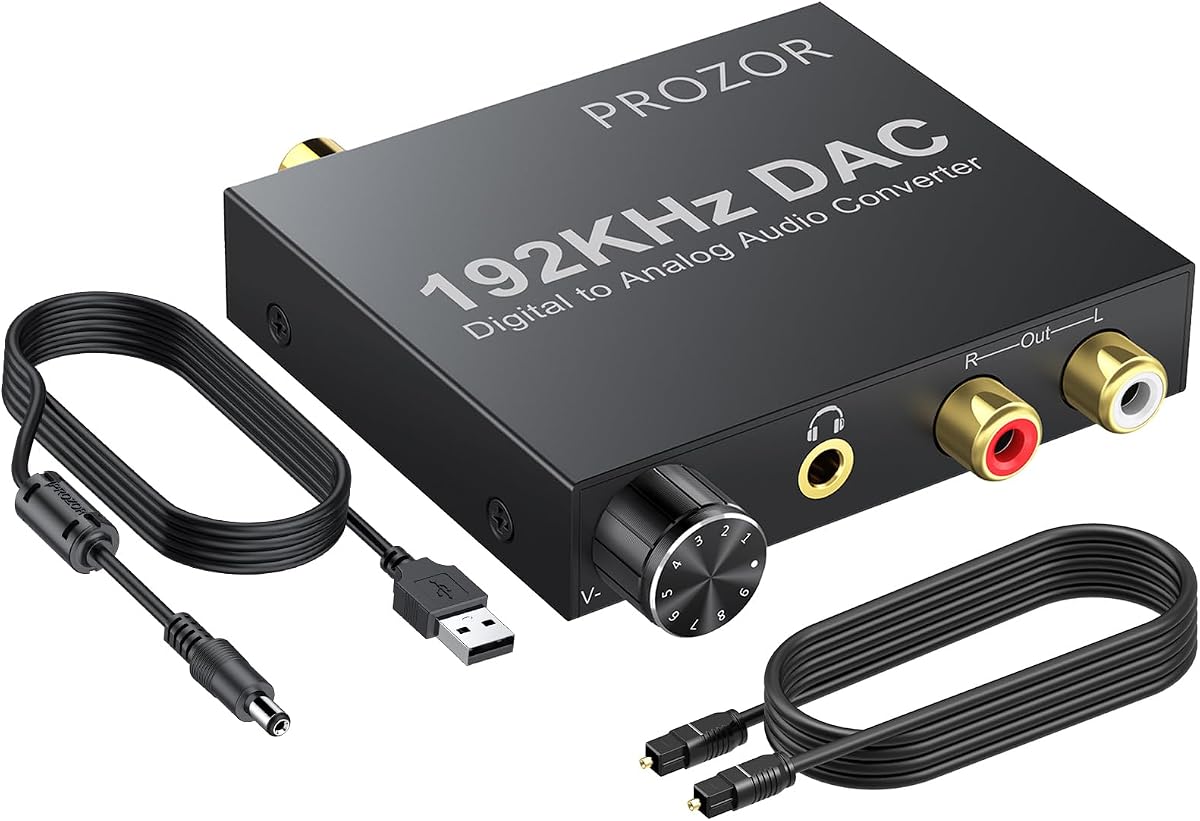
This PROZOR upgrade adds a practical volume knob that allows listeners to adjust output levels directly at the unit.
We may earn a commission when you buy through this link, at no additional cost to you.
It maintains the high resolution support seen in the basic model while offering greater convenience for desktop usage.
The auto mute function prevents noise during signal drops which helps maintain a quiet listening environment.
It serves well for users who need simple adjustment capabilities without paying for premium features.
The integrated knob provides immediate tactile feedback allowing for quick adjustments without navigating menus.
Gold plated interfaces reduce signal loss over time ensuring consistent performance across various cable connections.
We may earn a commission when you buy through this link, at no additional cost to you.
This compact adapter focuses on delivering audio directly to headphones via a dedicated 3.5mm jack.
We may earn a commission when you buy through this link, at no additional cost to you.
A built-in amplifier chip improves signal strength providing pure sound output even from digital sources.
It is particularly useful for users who want to connect game consoles or TVs to personal listening devices.
While it lacks RCA outputs the simplicity makes it a strong choice for mobile or personal setups.
The enhanced sound quality provides a more detailed listening experience compared to standard TV speakers.
It works effortlessly with HD TVs and set-top boxes ensuring hassle-free integration into home entertainment.
We may earn a commission when you buy through this link, at no additional cost to you.
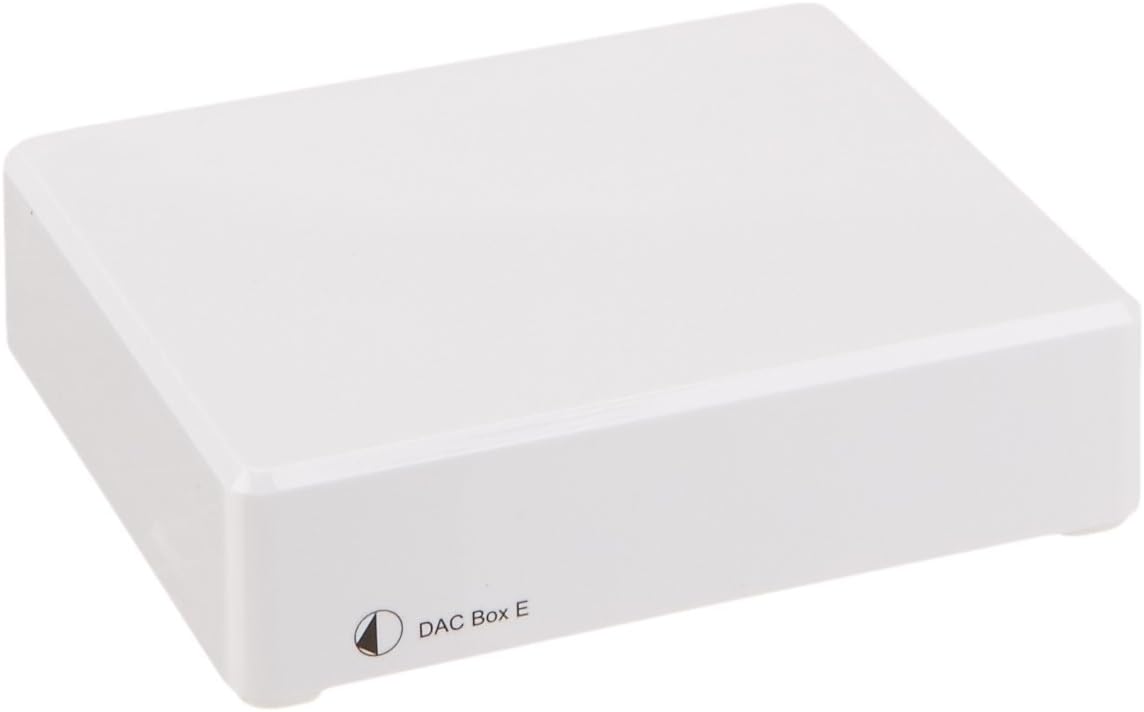
The Pro-Ject DAC E combines functionality with a stylish white aluminum chassis that fits well in modern setups.
We may earn a commission when you buy through this link, at no additional cost to you.
It supports multiple digital formats including USB coaxial and optical inputs for broad device compatibility.
While it handles high resolution files effectively it lacks advanced features found in higher priced competitors.
This unit is suitable for listeners who prioritize aesthetics and simplicity over extreme technical specifications.
The sleek design allows easy integration into any audio setup without dominating the visual space.
The aluminum chassis provides effective shielding against electromagnetic interference for cleaner audio reproduction.
We may earn a commission when you buy through this link, at no additional cost to you.
The Fosi Audio Q4 serves as both a DAC and headphone amplifier making it an all-in-one solution for desktop users.
We may earn a commission when you buy through this link, at no additional cost to you.
Adjustable bass and treble knobs allow listeners to fine-tune the sound to match their personal preferences.
It includes USB optical and coaxial inputs supporting a wide range of audio sources for flexible connectivity.
This model is ideal for those seeking a balance of sound customization and plug-and-play convenience.
High-quality metal knobs provide smooth adjustment for optimizing audio for any source or genre.
No driver installation is required ensuring instant HiFi audio for any device that supports standard outputs.
We may earn a commission when you buy through this link, at no additional cost to you.
The Fosi Audio Q6 delivers exceptional high resolution performance in a compact desktop form factor.
We may earn a commission when you buy through this link, at no additional cost to you.
It supports sampling rates up to PCM 32bit 768kHz and DSD512 which caters to critical listeners.
With a sub-out feature it allows users to connect to powered subwoofers for a complete surround setup.
This unit is highly recommended for those seeking flagship audio performance without a massive footprint.
The AKM chipset and XMOS processor ensure crystal-clear audio for a truly immersive listening experience.
Connecting to home amplifiers or powered speakers is seamless thanks to versatile digital inputs and outputs.
We may earn a commission when you buy through this link, at no additional cost to you.
This specialized converter transforms optical digital signals into balanced XLR outputs for use with professional gear.
We may earn a commission when you buy through this link, at no additional cost to you.
It supports 192kHz sampling rates ensuring high-quality transmission from TVs or players to amplifiers.
While it lacks volume adjustment it is designed for fixed setups where signal conversion is the primary goal.
This adapter is best suited for users needing to interface optical sources with balanced analog inputs.
The design ensures precise detail retention during conversion which is vital for high fidelity playback.
Installation is straightforward with included cables allowing users to connect easily without technical knowledge.
We may earn a commission when you buy through this link, at no additional cost to you.
The SMSL PS100 is a compact converter that includes HDMI ARC support for modern TV setups.
We may earn a commission when you buy through this link, at no additional cost to you.
It handles up to 192kHz resolution ensuring that audio from game consoles or TVs is reproduced clearly.
The device is designed for portability making it easy to move between different audio systems.
This unit is a strong choice for home cinema users needing HDMI ARC extraction in a small package.
The ARC function allows connection to TV HDMI interfaces for simplified audio routing from modern sources.
Equipped with an ES9023 DAC chip it enhances signal conversion for improved clarity across outputs.
We may earn a commission when you buy through this link, at no additional cost to you.
This multifunction converter serves as a hub allowing audio to be sent to multiple devices simultaneously.
We may earn a commission when you buy through this link, at no additional cost to you.
It supports HDMI ARC input making it useful for extracting audio from TVs to external speakers or systems.
The ability to output to optical coaxial and analog ports provides significant flexibility for complex setups.
Users should note that while versatile it is best for general audio extraction rather than high-end audiophile use.
Sending audio to multiple outputs at once ensures compatible with various entertainment configurations.
The plug and play design ensures easy installation and simple operation for television audio routing.
We may earn a commission when you buy through this link, at no additional cost to you.
Choosing the right converter requires understanding key factors that influence sound quality and compatibility with your existing equipment.
Ensure the DAC supports PCM 192kHz and DSD formats to guarantee compatibility with your digital music files and streaming services.
Look for clear specifications confirming bit depth and sampling rate capabilities for high fidelity playback.
Select a unit with inputs like USB optical or HDMI ARC that match your source devices such as computers or TVs.
Check for outputs like RCA or XLR that align with your speakers or amplifiers to ensure direct connectivity.
Aluminum or metal casings offer better shielding against electromagnetic interference compared to plastic housings.
A solid build also improves heat dissipation which maintains consistent performance during extended listening sessions.
Some converters include a physical knob for volume control offering convenience over relying solely on source software.
If your setup lacks an external amplifier a built-in volume control is essential for adjusting output levels directly.
Devices with built-in headphone amps can drive high impedance headphones better than passive converters.
Check if the unit can power your specific headphones or if you need to connect it to a separate amplifier.
Stable power inputs reduce jitter and noise which are critical for maintaining high audio resolution.
Units with external power adapters often perform better than those powered directly by USB cables.
Advanced clocking systems or jitter reduction chips enhance clarity by minimizing timing errors in digital signals.
Look for features like femtosecond oscillators in higher-end models for precise signal reproduction.
Entry-level converters provide basic functionality but high-end models offer superior components for critical listening.
Evaluate your needs to decide if premium features justify the cost for your specific audio setup.
Connect the DAC using high-quality optical or coaxial cables to ensure clean signal transmission from your source.
Set your source device to output PCM audio to avoid compatibility issues with formats like Dolby Digital.
Keep the unit in a well-ventilated area to prevent overheating and extend its lifespan significantly.
A 192kHz DAC can improve sound quality if your source files are high resolution. If you stream standard quality audio the difference might be minimal. Always match the DAC capabilities with your source files for best results.
Many modern USB DACs are plug and play and do not require drivers. Some high-end models may offer drivers for extra features but basic functionality works immediately.
Both carry digital audio signals effectively. Coaxial uses electrical signals while optical uses light. Coaxial often supports higher data rates but optical is immune to electrical interference.
Most DACs accept digital inputs only. Turntables output analog signals so you need an analog preamp unless your DAC explicitly supports analog inputs like the D&A Alpha Pro.
Ensure your source device is set to PCM output and that cables are securely connected. Check if the DAC is powered on and not muted via the source settings.
HDMI ARC can carry more advanced audio formats than optical. However optical is simpler and often sufficient for standard stereo or compressed surround sound setups.
Use a soft dry cloth to wipe the surface gently. Avoid harsh chemicals or compressed air which could damage internal components or sensitive ports.
DACs typically connect via wired outputs. You would need a Bluetooth transmitter with analog inputs to use a DAC with wireless headphones.
From the budget friendly PROZOR to the flagship D&A Alpha Pro these converters offer distinct advantages for every listener.
Prioritize build quality and format support to ensure your setup meets both current and future audio demands effectively.
Always verify product availability and current pricing before purchasing as terms may shift frequently in the market.