
Acer Gadget Auto Face Tracking Tripod
4.6Editor score
360-degree AI tracking
Detachable ring light
Quadpod stability design
Choosing the right stabilization tool is crucial for modern content creators who demand smooth footage without heavy gear. An AI gimbal with tripod combines advanced tracking algorithms with flexible mounting options, allowing you to capture professional-quality videos solo. These devices streamline your workflow by automating framing and stabilization tasks.
We evaluated ten leading models based on their tracking precision, stabilization performance, and versatility in real-world scenarios. Each product was assessed for ease of use, battery endurance, and compatibility with popular social media apps. Our analysis focuses on how well each device handles dynamic movement and low-light conditions.
Every pick in this list highlights unique strengths tailored to different creator needs, from vloggers to live streamers. We examine key specifications like axis count, extension range, and intelligent features to ensure you find the best fit. Please note that product availability and pricing may vary over time.
4.6Editor score

4.3Editor score

4.4Editor score
As an Amazon Associate we earn from qualifying purchases.
The following comparison table provides a side-by-side overview of the top-rated AI gimbal with tripod models available this year. We highlight essential specifications such as stabilization axes, tracking capabilities, and unique features to help you make an informed decision quickly.




The DJI Osmo Mobile 8 stands out as a top performer in the AI gimbal with tripod category with its robust 3-axis stabilization. It holds a solid 4.3 rating from users who appreciate its intelligent tracking and seamless 360-degree pan rotation. This model is designed to keep shots smooth and focused without requiring constant manual adjustments.
We may earn a commission when you buy through this link, at no additional cost to you.
Its native tracking combines audio reception and lighting capabilities, allowing creators to stay in focus and well-lit during dynamic scenes. The ultra-comfortable grip reduces wrist strain while the built-in tripod enables low-angle shots effortlessly. Features like direct phone connection and 10-hour battery life ensure you can shoot for extended periods without interruption.
While the DJI Mimo app has been removed from Google Play, the device still offers intuitive tutorials and editing tools for quick content creation. The trade-off is that users must download the app manually for the best experience. This minor inconvenience does not detract from the overall high-quality performance and versatility of the gimbal.
Creators looking for a reliable all-in-one solution should consider the DJI Osmo Mobile 8 for its balance of features and usability. Its ability to handle everyday vlogging and live streaming makes it a practical choice for both beginners and professionals. Investing in this model ensures you have the tools needed for polished, professional-looking videos.
Native tracking with audio and lighting helps you capture clearer shots in various environments.
The built-in tripod and comfortable grip make it easy to film from unique angles for long durations.
We may earn a commission when you buy through this link, at no additional cost to you.
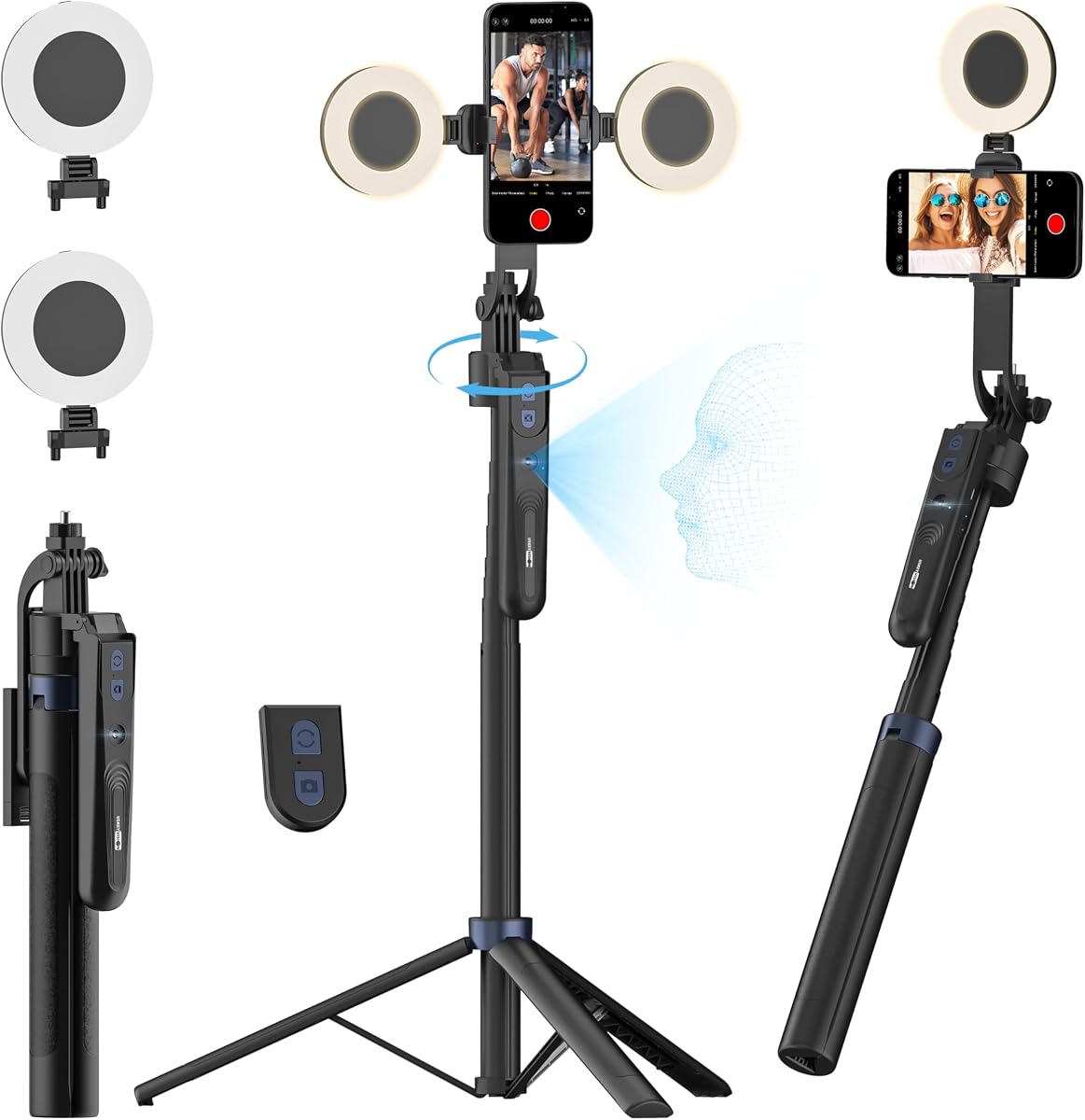
The Acer Gadget Auto Face Tracking Tripod offers an exceptional entry point into smart stabilization with its impressive 4.6 rating. It features 360-degree AI face tracking that works without needing a dedicated app, making it incredibly easy to set up. This model combines a selfie stick, desktop tripod, and floor stand into one versatile package.
We may earn a commission when you buy through this link, at no additional cost to you.
Users benefit from advanced gesture recognition, allowing them to start or pause tracking with hand signals. The detachable remote control provides flexibility for group shots or solo filming within a five-meter range. A mini ring light with three color modes ensures your footage looks great even in low-light conditions.
While the aluminum alloy construction is durable, it may not feel as premium as higher-end models in this list. The lack of a dedicated app means you rely solely on the built-in tracking features which might limit customization. However, for budget-conscious creators, these trade-offs are minimal compared to the value provided.
This tripod is ideal for streamers and vloggers who need a portable and reliable tracking solution without breaking the bank. Its quad-foot design offers superior stability on uneven surfaces compared to traditional tripods. Choose this model if you prioritize ease of use and affordability over advanced software integration.
No need to download additional software as the AI tracking works directly out of the box.
It transforms easily between a desktop tripod, selfie stick, and floor stand for diverse shooting scenarios.
We may earn a commission when you buy through this link, at no additional cost to you.
The Insta360 Flow 2 Pro sets a new standard for premium AI gimbals with its unique DockKit compatibility for iPhones. It earns a 4.4 rating for its precision tracking even in challenging environments and its ability to track subjects at up to 15x zoom. This bundle includes an AI Tracker that enhances tracking capabilities across 200+ iOS apps.
We may earn a commission when you buy through this link, at no additional cost to you.
Creative features like the Infinite Pan Tracking and Free Tilt Mode allow for cinematic shots that follow your movements smoothly. The multi-person tracking ensures everyone in a group stays framed correctly during travel or family gatherings. A built-in spotlight guarantees quality footage in low-light conditions without needing external lights.
The main drawback is the higher cost compared to standard gimbals, and it is specifically optimized for certain iPhone models. Users must also rely on the Insta360 app for the best editing experience which adds a layer of dependency. However, the innovative technology and build quality justify the investment for serious content creators.
For those who want the best in tracking technology and editing tools, this gimbal is the ultimate choice. Its ability to integrate seamlessly with iOS devices and support complex tracking scenarios makes it unmatched. Consider this model if you are looking for professional-grade features in a portable design.
Active zoom and multi-person tracking keep your subjects framed perfectly even during fast movement.
DockKit support ensures reliable tracking across many popular iOS apps without complex setup.
We may earn a commission when you buy through this link, at no additional cost to you.
This bundle extends the capabilities of the Flow 2 Pro to include Android devices, making it a versatile choice for mixed ecosystems. It receives a 4.2 rating for its native tracking across 200+ third-party apps and advanced active zoom tracking. The bundle includes a teleprompter and fill light, positioning it as a complete mobile filmmaking kit.
We may earn a commission when you buy through this link, at no additional cost to you.
The intelligent multi-person tracking ensures you never miss a moment during group events or family travel. The instant setup with 3-axis stabilization means you can start shooting without lengthy calibration processes. Infinite pan tracking allows for seamless content creation from every angle without manual interference.
The weight of the bundle might be a concern for extended handheld use, and the price reflects the extensive features. Not all users need a teleprompter and fill light, which could be seen as unnecessary costs for simple vlogging. However, the convenience of an all-in-one kit is significant for on-the-go creators.
This model is perfect for creators who need professional tools like teleprompters and lights in one portable package. It bridges the gap between high-end cinema gear and smartphone usability. Opt for this if you want a comprehensive setup that supports both iOS and Android workflows.
Native tracking on Android expands the user base significantly compared to iOS-only models.
Built-in teleprompter and fill light streamline the production process for professional-looking content.
We may earn a commission when you buy through this link, at no additional cost to you.
The DJI Osmo Mobile 7P features dual-lens enhanced tracking that keeps subjects in sharp focus even during fast action. With a 4.5 rating, it stands out for its seamless stability and multifunctional module that integrates audio and lighting. The extension rod and tripod built-in design make it easy to capture wide group selfies.
We may earn a commission when you buy through this link, at no additional cost to you.
The multifunctional module packs intelligent tracking and mic reception, enhancing audio quality for vlogs and streams. Users can pair it with the DJI Mimo app for shot guides that help create cinematic masterpieces quickly. The 10-hour operating time supports long filming sessions without the need for constant recharging.
One trade-off is that the multifunctional module can add bulk to the unit, which might affect portability slightly. Additionally, the app compatibility issues on Android users may experience setup challenges. These issues are generally manageable with updates or manual downloads from the official website.
For creators who prioritize audio quality and tracking precision, the 7P offers a powerful solution. The integration of mic reception directly into the gimbal reduces cable clutter during shoots. Choose this model if you want advanced audio capabilities alongside standard stabilization features.
Built-in mic receiver allows you to record high-quality audio without extra cables or gear.
Shot guides and one-tap edits help you create professional content quickly without advanced skills.
We may earn a commission when you buy through this link, at no additional cost to you.
The Insta360 Flow 2 introduces specialized animal tracking that allows your camera to follow pets during playful leaps and sprints. Rated 4.2, it also offers multi-person tracking and active zoom tracking suitable for sports or performances. The foldable design ensures it is portable enough for travel while maintaining robust stabilization features.
We may earn a commission when you buy through this link, at no additional cost to you.
Users appreciate the gesture control feature that lets them start or stop recording without touching the phone. Built-in golden ratio grid points help with perfect framing and positioning for aesthetically pleasing shots. Remote smartphone control turns another device into a remote for seamless previewing and shooting.
While the zoom tracking is impressive at 15x, some users note that battery life can vary depending on usage intensity. The lack of a physical shutter button requires reliance on gestures or app controls which takes some getting used to. These minor inconveniences do not outweigh the unique tracking benefits provided.
Pet owners and vloggers looking for fun and practical features will find this model highly engaging. The ability to track animals precisely adds a creative edge to your content creation workflow. Consider this for its unique capabilities and user-friendly design that simplifies mobile filmmaking.
Specialized AI tracking follows dogs and cats to ensure you capture every heartwarming moment.
Built-in grid points and AI editing tools help compose professional shots effortlessly.
We may earn a commission when you buy through this link, at no additional cost to you.
The Flow 2 Plus AI Tracker Bundle excels in universal compatibility by tracking within any app, making it versatile for diverse needs. It maintains a 4.2 rating with features like 10-hour battery life and multi-person tracking for group gatherings. The bundle includes a teleprompter and remote control to enhance usability and content depth.
We may earn a commission when you buy through this link, at no additional cost to you.
Active zoom tracking allows for precise capture of fast movements even at 15x magnification, ideal for sports. Second-screen control lets you use another phone to preview shots or shoot remotely for added convenience. Free tilt mode offers creative freedom by maintaining consistent angles during vertical movements.
Setup can be complex due to the many features and app integrations available on this model. The price point is higher than basic models which might deter casual users seeking simple solutions. However, creators who need flexibility and comprehensive tools will find the investment worthwhile.
This bundle is perfect for those who want to create content across various platforms without limitations. The ability to track within any app ensures you are not restricted to specific software ecosystems. Opt for this model if you need a highly adaptable tool for professional or semi-professional use.
Works with any app to give you maximum flexibility for your specific shooting needs.
Use a second screen to control the gimbal and frame shots for more complex scenes.
We may earn a commission when you buy through this link, at no additional cost to you.
The USKEYVISION tripod stands out with its impressive 70.9-inch maximum height, making it ideal for full-body shots. It earns a 4.4 rating for its AI face tracking and dual detachable ring lights that offer three color temperatures. This 3-in-1 design functions as a desktop tripod, selfie stick, and floor holder for live streaming.
We may earn a commission when you buy through this link, at no additional cost to you.
Its durable aluminum alloy construction ensures stability even at max height preventing slips during recording. The removable rechargeable remote allows for one-click shooting within a ten-meter range which is great for group events. A 1/4-inch thread enables you to extend with additional microphones or lighting equipment.
While the height is advantageous, the unit can feel heavy when fully extended making it challenging to maneuver quickly. The lack of app integration means you rely on the built-in gesture controls which may limit customization. Despite this, the versatility and build quality offer excellent value for budget-conscious buyers.
This tripod is best for creators who need extended height and lighting in one affordable package. Its adaptability for various settings makes it a practical addition to any creator's kit. Choose it if you need height and stability without investing in a high-end gimbal system.
The 70.9-inch extension allows for full-body filming from a comfortable standing height.
Dual detachable lights with adjustable colors ensure proper illumination for your footage.
We may earn a commission when you buy through this link, at no additional cost to you.
This bundle combines the Osmo Mobile 8 with a Mic Mini transmitter to deliver top-tier audio and video stability. With a 4.6 rating, it is perfect for vloggers and streamers who require crystal clear sound alongside smooth footage. The gimbal features robust 3-axis stabilization and intelligent tracking to keep your shots focused.
We may earn a commission when you buy through this link, at no additional cost to you.
The Mic Mini Transmitter integrates seamlessly with the gimbal allowing for wireless audio capture. Charging features enable the gimbal to power your phone while you film which is crucial for long sessions. Native tracking with audio reception ensures your voice and video remain synchronized and high quality.
The higher cost of the bundle might be a consideration for those who do not need professional audio gear. The app compatibility issue on Android platforms also remains a factor to keep in mind during setup. These factors are balanced by the high performance and convenience the bundle provides.
For creators prioritizing audio quality, this bundle is the clear choice in the gimbal market. It simplifies your workflow by combining essential tools into one cohesive package. Select this model if you want professional audio results without extra complexity or cabling.
Mic Mini integration offers professional-grade wireless audio for better content quality.
Built-in charging keeps your phone powered during extended recording sessions.
We may earn a commission when you buy through this link, at no additional cost to you.
The AOCHUAN Smart V3 offers a generous 70.9-inch extension with a telescopic rod that helps capture wide group shots. It holds a 4.5 rating for its Intelligent Image Stabilization 8.0 and integrated AI tracking that works without an app. The detachable magnetic remote allows you to control your shots from a distance.
We may earn a commission when you buy through this link, at no additional cost to you.
Creative modes like PF, F, POV, and DM provide artistic flexibility for cinematic shots. The fill light with adjustable brightness ensures visibility in low-light settings. The foldable top and quick release tripod design make setup and transport fast and convenient.
While the gesture controls are intuitive they may require practice to master for consistent results. The lack of app support can be a disadvantage if you need specific software features for editing. However, the hardware flexibility and range of motion offer significant advantages for travelers.
This gimbal is ideal for users who want a high reach and creative flexibility in a portable unit. The combination of tracking and lighting tools in one device simplifies the shooting process. Consider this model if you need a versatile and robust tool for varied environments.
Multiple shooting modes allow you to experiment with dynamic angles and movements.
Detachable remote enables hands-free operation from a distance for better framing.
We may earn a commission when you buy through this link, at no additional cost to you.
Selecting the right AI gimbal with tripod involves understanding several technical features that impact your workflow and output quality. Here are the key factors to consider before making a purchase.
A 3-axis stabilizer is standard for smooth video capture. It controls roll, pitch, and yaw to keep your footage steady even when moving. Fewer axes might save money but result in shaky shots that ruin your content.
Always choose a 3-axis gimbal for professional results and smoother transitions in your videos.
Look for models with advanced AI tracking like multi-person or active zoom. These features ensure your subject stays in frame even during dynamic movement. Some models require specific apps while others work natively across many platforms.
Prioritize models with broad app support and high zoom tracking if you shoot varied content.
The tripod height determines how low or high you can shoot. A taller tripod allows for ground-level shots and full-body framing. Some models fold down to act as a selfie stick or floor stand for added convenience.
Choose a model that extends at least 60 inches to ensure versatile shooting angles.
Long recording sessions require a battery that lasts at least 10 hours. Check if the device supports power delivery to your phone so you do not run out of energy. Short battery life can disrupt live streams and travel shoots.
Opt for a gimbal with a minimum 10-hour battery life and charging capabilities.
Integrated fill lights help you shoot in low-light conditions without external gear. Look for adjustable brightness and color temperature options to suit different environments. Built-in lights save you from carrying extra accessories.
Select a model with a built-in fill light if you often shoot indoors or at night.
A detachable remote or gesture control allows you to start and stop recording without touching the phone. This is essential for vloggers or creators working alone. Some remotes work via Bluetooth while others use gesture recognition.
Ensure your chosen model has a reliable remote or gesture system for hands-free operation.
Aluminum alloy frames provide durability and resistance to wear and tear. A sturdy build prevents wobbly shots and ensures the gimbal lasts longer. Lightweight materials make it easier to carry for travel.
Check for durable materials like aluminum to ensure longevity and stability.
Some models work only with specific apps while others support multiple platforms. Check if the app is available for your device and if it offers editing tools. Native tracking features often depend on app support.
Ensure the gimbal supports your preferred apps and offers useful editing features.
Balance your phone on the gimbal before turning it on to prevent motor strain. Align the axes so the device remains stable in all positions. Most models have indicator lights or sounds to confirm when balanced.
Keep the battery charged and store the device in a cool dry place when not in use. Avoid exposing it to extreme temperatures or moisture to protect the electronics. Regularly clean the clamps and sensors with a soft cloth.
Update the associated app and firmware to access new features and improvements. Follow the manufacturer's tutorials to learn advanced modes like zoom or tilt. Proper maintenance ensures your equipment lasts longer and performs reliably.
Not all models support both platforms equally. Some premium units prioritize iOS while others focus on Android. Always check the product specifications to ensure compatibility with your specific phone model before purchasing.
Most top-tier models offer between 10 to 15 hours of continuous use. This duration varies based on features used like tracking or lighting. Check the specific product details for exact battery performance.
Standard models are not waterproof and should be protected from moisture. Only specific outdoor-rated gimbals might offer splash resistance. Avoid using your device in heavy rain to prevent electronic damage.
It depends on your workflow. Remotes help with self-portraits or group shots where you cannot reach the device. Gesture controls offer a convenient alternative but may require practice to master effectively.
A height between 60 and 70 inches is ideal for full-body shots. This allows you to shoot without bending down or standing on tiptoes. Ensure the tripod extends fully to reach this comfortable range.
Many models feature one-tap setup and intuitive controls designed for beginners. Tutorials and automated tracking make the learning curve shallow. Just follow the manual and you will be creating smooth videos in minutes.
Most magnetic clamps work with thin cases but might struggle with thick ones. Some models come with adapters for better grip. Check if your case is compatible with the magnetic mount before buying.
Use a soft dry cloth to wipe dust off the motors and clamps. Avoid using water or harsh chemicals that might damage internal components. Regular cleaning ensures smooth operation and extends the device lifespan.
We have reviewed the top 10 AI gimbal with tripod options for November 2026 highlighting their unique strengths. Whether you choose the DJI Osmo Mobile 8 for its reliability or the Insta360 Flow 2 Pro for advanced tracking, there is a model for every creator.
Prioritize features like battery life and app compatibility to match your specific content needs. A gimbal that fits your workflow will save time and improve the quality of your videos significantly.
Always check current prices and availability as deals change frequently on Amazon. Investing in the right tool today will elevate your content creation capabilities for years to come.