
GRAUGEAR 20Gbps Type E Key A Front Panel USB C Header Extension Cable
4.6Editor score
Supports USB 3.2 Gen 2×2
Includes PCIe bracket for mounting
Double shielded EMI wires
Front panel USB C headers allow you to add modern connectivity to your computer case. They connect directly to your motherboard to provide fast data transfer and charging for your devices.
We evaluated ten different products based on speed, compatibility, build quality, and ease of installation. Our analysis covers adapters hubs and expansion cards that support USB 3 2 and newer standards.
Each pick highlights key features and potential limitations to help you decide. Please note that product availability and pricing may change over time so verify details before purchasing.
4.6Editor score

4.6Editor score

4.2Editor score
As an Amazon Associate we earn from qualifying purchases.
The following table provides a side by side overview of all ten products we reviewed. It highlights key specifications and features to help you compare them quickly.


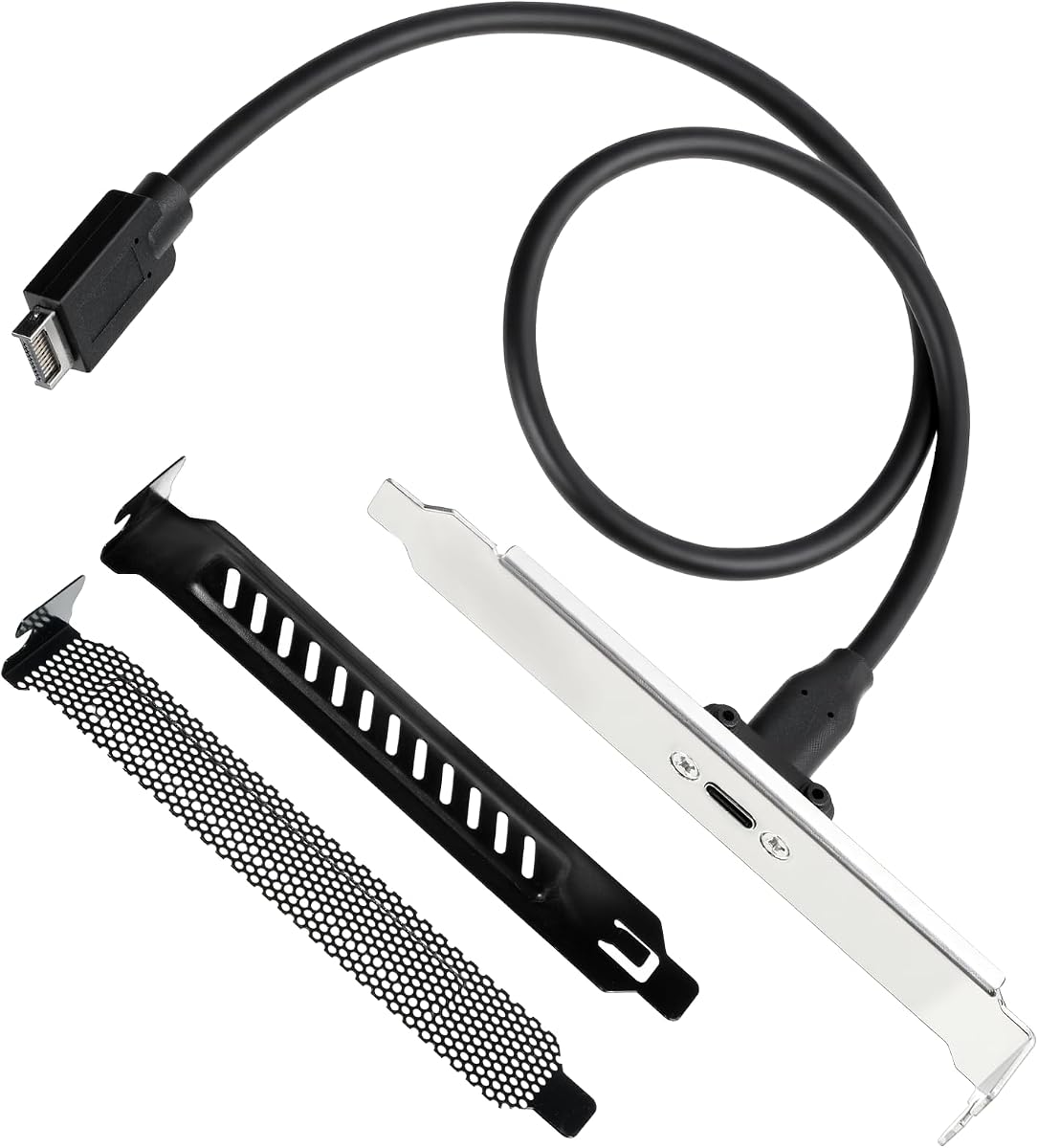


This GRAUGEAR extension cable is an excellent choice for adding a front panel USB C port to your PC. It supports the latest USB 3.2 Gen 2×2 standard for extremely fast data transfer.
We may earn a commission when you buy through this link, at no additional cost to you.
The cable connects a 20-pin Type-E header on your motherboard to a front panel USB C port. This allows you to connect phones tablets and other modern peripherals easily.
While it requires a specific motherboard header it is plug and play with no drivers needed. The included PCIe bracket ensures a clean look on the back of your case.
If you need high speed connectivity on the front of your case this cable offers great value. It is a reliable solution for most modern motherboards.
Supports USB 3.2 Gen 2×2 for up to 20Gbps transfer speeds.
Features double shielded EMI wires and metal construction for durability.
We may earn a commission when you buy through this link, at no additional cost to you.
This adapter cable provides a straightforward way to enable front panel USB C connectivity. It connects to the Type E header on compatible motherboards to deliver high speed data transfer.
We may earn a commission when you buy through this link, at no additional cost to you.
The cable is designed to support USB 3.2 Gen 2×2 allowing for up to 20Gbps throughput. This is ideal for large file transfers and modern peripherals that require high bandwidth.
Installation is simple and requires no additional drivers. The included PCI bracket allows you to mount the USB C port securely on the back of your case for easy access.
If your motherboard has a Type E header this cable is a solid option for expanding your front panel options. It balances speed and ease of use well.
Connects with phones tablets flash drives and other USB C peripherals.
Double shielded EMI wires prevent interference and ensure stable data.
We may earn a commission when you buy through this link, at no additional cost to you.
This adapter is unique because it provides both a USB C and a USB A port on the front panel. It connects to both the Type E and USB 3.0 headers on your motherboard.
We may earn a commission when you buy through this link, at no additional cost to you.
The USB C port supports USB 3.2 Gen 2×2 speeds of up to 20Gbps while the USB A port offers standard USB 3.0 speeds. This combination is very versatile for different types of devices.
Installation requires checking your motherboard for both headers. However once connected it provides a convenient mix of modern and classic USB ports on your front panel.
If you want the flexibility of multiple port types this adapter is a great choice. It allows you to connect older USB devices and newer USB C ones simultaneously.
Enables connection of both USB C and traditional USB A devices.
Features sturdy metal construction and double shielded wires.
We may earn a commission when you buy through this link, at no additional cost to you.
This hub transforms a 3.5 inch drive bay into a powerful USB connection center. It offers two USB C ports and two USB 3.2 ports for versatile connectivity.
We may earn a commission when you buy through this link, at no additional cost to you.
The hub requires both a Type E header and a SATA power connector from your motherboard to operate. This ensures it can provide sufficient power to connected devices.
Built with sturdy metal it includes multiple safety protections like over current and short circuit protection. The package comes with all necessary cables and mounting screws for easy installation.
If you need multiple high speed ports on the front of your case this hub is a premium solution. It is robust and well built for heavy use.
Delivers four high speed ports for multiple simultaneous connections.
Includes over current and voltage protection for your devices.
We may earn a commission when you buy through this link, at no additional cost to you.
This expansion card allows you to add front USB ports if your motherboard lacks the necessary headers. It uses an empty PCIe x1 slot to provide the connectivity.
We may earn a commission when you buy through this link, at no additional cost to you.
The card provides one USB 3.2 Gen 1 port and one USB C port on the front panel. These support speeds up to 5Gbps which is sufficient for most devices.
Installation involves inserting the card into a PCIe slot and routing the front panel connectors to your case. It does not require any external power adapters.
If your motherboard does not have USB 3.0 headers this card is an excellent alternative. It is a practical solution for older systems that need modern ports.
Ideal for systems without front USB headers on the motherboard.
Draws power from the PCIe slot so no extra cables are needed.
We may earn a commission when you buy through this link, at no additional cost to you.
This hub is a versatile option for adding multiple front panel ports to your PC. It fits into a standard 3.5 inch drive bay and provides both USB C and USB 3.0 ports.
We may earn a commission when you buy through this link, at no additional cost to you.
The USB C port supports USB 3.2 Gen 2×2 allowing for 20Gbps data transfer speeds. This is perfect for external drives and other high bandwidth devices.
It requires both a Type E header and a USB 3.0 header on your motherboard. The package includes all necessary cables and screws for a secure installation.
If you want a mix of high speed and standard USB ports on the front this hub is a great choice. It offers a balance of performance and functionality.
Offers both modern USB C and legacy USB 3.0 ports.
Includes over current protection and sturdy mounting hardware.
We may earn a commission when you buy through this link, at no additional cost to you.
This cable allows you to add a USB C port to systems with older USB 2.0 headers. It converts a standard 9pin USB 2.0 header to a front panel USB C connection.
We may earn a commission when you buy through this link, at no additional cost to you.
The transfer speed is limited to USB 2.0 which is 480Mbps. This is sufficient for keyboards mice and charging but not for large data transfers.
It is a very affordable option for those who just need a USB C port for basic access. No drivers are required and installation is straightforward.
If you have an older motherboard and just need a USB C port for charging small devices this cable is a good choice. It is simple and effective for its purpose.
Works with existing USB 2.0 headers on older motherboards.
Provides basic USB C access without a large expense.
We may earn a commission when you buy through this link, at no additional cost to you.
This adapter cable is designed to add a front panel USB C port with high speed capabilities. It connects to a 20-pin Type-E A-Key header on your motherboard.
We may earn a commission when you buy through this link, at no additional cost to you.
It supports USB 3.2 Gen 2×2 speeds of up to 20Gbps making it suitable for fast data transfers. The cable length is 19.7 inches which is sufficient for most cases.
The package includes a PCI bracket and slot covers to ensure a clean finish on the back of your case. Installation is plug and play with no drivers required.
If you need a reliable high speed front panel connection this adapter is a solid option. The included covers help maintain a professional appearance.
Supports up to 20Gbps for high bandwidth applications.
Includes PCI slot covers for a professional case appearance.
We may earn a commission when you buy through this link, at no additional cost to you.
This cable provides a reliable way to add a front panel USB C port to your system. It connects a Type E 20pin header to a USB C female connector.
We may earn a commission when you buy through this link, at no additional cost to you.
The USB C port supports USB 3.2 Gen 2 speeds of up to 10Gbps. This is sufficient for most high speed data transfers and charging.
The cable is made from TPE material which is flexible and durable. It is double shielded to prevent signal interference and ensure stable performance.
If you need a flexible and reliable USB C extension cable this option is worth considering. The included screw helps secure the panel mount properly.
TPE cable allows for easy routing and bending without damage.
Double shielding ensures stable and interference free data transmission.
We may earn a commission when you buy through this link, at no additional cost to you.
This adapter offers a comprehensive solution for adding multiple front panel USB ports. It provides one USB C port and two USB 3.0 ports from the motherboard headers.
We may earn a commission when you buy through this link, at no additional cost to you.
The USB C port supports USB 3.2 Gen 2×2 speeds of up to 20Gbps. The USB 3.0 ports provide standard speeds for a wide range of devices.
It requires both a Type E header and a USB 3.0 header on your motherboard. The package includes a PCIe bracket for easy mounting on the case.
If you need a variety of front ports for different devices this adapter is a versatile choice. It balances high speed capabilities with broad compatibility.
Provides both high speed USB C and standard USB 3.0 ports.
Features double shielded wires and metal bracket for reliability.
We may earn a commission when you buy through this link, at no additional cost to you.
Choosing the right front panel USB C header requires attention to compatibility speed and build quality. This guide outlines the key factors to consider.
The most important factor is ensuring your motherboard has the correct headers. Most high speed USB C adapters require a Type E header with 20 pins. Some hubs also require a USB 3.0 19-pin header. Check your motherboard manual before purchasing to avoid compatibility issues.
Always verify your motherboard has the required headers before buying any adapter.
USB C ports can support different speeds ranging from USB 2.0 to USB 3.2 Gen 2×2. For high speed data transfers look for adapters that support USB 3.2 Gen 2 (10Gbps) or Gen 2×2 (20Gbps). Slower adapters may not be sufficient for modern external drives.
Choose adapters that support USB 3.2 Gen 2 or higher for fast transfer speeds.
Some adapters offer just a single USB C port while others provide multiple ports or a combination of USB C and USB A. Consider how many devices you need to connect simultaneously. Hubs offer more flexibility but require more motherboard resources.
Select a port configuration that matches your daily connection needs.
The length of the cable matters for fitting inside your case. Most cables range from 15cm to 23cm. Measure your case to ensure the cable can reach from the motherboard to the front panel without stretching or bending too sharply.
Ensure the cable length is sufficient for your case size.
High quality adapters use metal connectors and shielded cables to prevent interference. Look for products with double shielding or metal brackets. This ensures durability and stable data transmission over time.
Prioritize metal construction and shielded cables for longevity.
Most simple adapters draw power directly from the motherboard header. However some hubs with multiple ports may require additional power such as a SATA power connector. Ensure your power supply and case can support the power needs.
Check if the adapter requires additional power connectors like SATA.
Installation involves connecting cables to the motherboard and mounting the front panel. Products that include screws mounting brackets and clear instructions are easier to install. Some adapters also come with PCIe brackets for a cleaner look.
Look for products that include all necessary mounting hardware and tools.
Choose products from reputable brands that offer customer support and warranty coverage. This ensures you can get help if there are compatibility issues or defects. Read user reviews to understand real world reliability.
Buy from trusted brands to ensure good customer support.
To use your new front panel USB C header start by powering off your computer and unplugging the power cable. Open the case and locate the correct header on your motherboard. Connect the adapter cable securely ensuring the orientation matches the keying on the pins.
Once connected route the cable to the front panel opening. Use the included screws or brackets to secure the USB C port. Close the case and power on the system. The port should be recognized automatically without needing drivers.
To maintain your adapter avoid bending the cable sharply or pulling on the connector. Keep the front panel area clean from dust to prevent interference. If you notice connection issues check the cable connections for looseness or debris.
Most high speed USB C adapters require a Type E header with 20 pins. However some older or basic adapters can work with USB 2.0 headers but will be limited to slower speeds. Check the adapter specifications carefully before purchase to ensure your motherboard supports it.
These front panel headers are designed for data transfer and charging not video output. Standard USB C ports on these adapters do not support video signal transmission. If you need video output you will need a different solution like a dedicated video card.
Yes most USB C adapters and hubs are plug and play and do not require driver installation. Your operating system will automatically recognize the connection. However older operating systems may require drivers for full functionality.
If your motherboard lacks a Type E header you can use a PCIe expansion card that adds the header to your system. Alternatively some adapters can work with USB 3.0 headers but will be limited to slower transfer speeds.
Most simple adapters provide standard power for charging phones and powering peripherals. However high draw devices like external hard drives may require additional power. Some hubs include SATA power connectors to support higher power needs.
The cable length can affect signal integrity if it is too long or poorly shielded. Most quality adapters use shielded cables that maintain performance up to 23cm. Avoid using extension cables beyond what is provided.
We reviewed ten excellent options for adding USB C connectivity to your PC case. The GRAUGEAR 20Gbps Type E Key A Extension Cable offers the best value for most users. The 3.5 inch Hubs provide versatility for those needing multiple ports.
When choosing consider your motherboard compatibility and the speed you need for your devices. Adapters that support USB 3.2 Gen 2 or Gen 2×2 offer the best performance for modern peripherals.
Prices and availability may change so check current listings before purchasing. We hope this guide helps you find the perfect front panel USB C solution for your build.