
QUI Presentation Clicker with Volume Control
4.3Editor score
328 foot wireless range
Volume control included
Affordable price point
This guide compares the top laser pointer for presentations options available in October 2026 to help you choose the best wireless remote for your needs.
Finding the right laser pointer for presentations can transform how you engage your audience during meetings or classes. A reliable remote allows you to move freely while controlling slides and highlighting key points with precision.
We evaluated ten top-rated wireless presenters based on visibility, battery life, range, and ease of use. Each model offers unique features suited for educators, professionals, and public speakers alike.
Each pick below highlights specific strengths and ideal use cases. Prices and availability may vary, so check current listings before purchasing to ensure you get the best deal available today.
4.3Editor score

4.6Editor score

4.6Editor score
The following table provides a quick side-by-side overview of the key specifications for each of the ten selected wireless presentation remotes reviewed in this guide.




The Green Light Presentation Clicker stands out as a top choice for educators and professionals alike. It earns a solid 4.6 star rating from users who appreciate its bright visibility and convenience.
We may earn a commission when you buy through this link, at no additional cost to you.
This device features a powerful 532nm green laser that cuts through ambient light far better than standard red pointers. It remains visible even on bright LCD or LED screens where other pointers fail.
Users note that the USB-C rechargeable battery eliminates the need to constantly hunt for replacements. A single hour of charging provides weeks of daily classroom or meeting use.
Ideal for teachers and presenters who need reliability without technical headaches, this clicker is highly recommended for those prioritizing visibility and ease of use.
The green laser wavelength ensures your point remains crisp and clear even on high brightness projectors or LED displays.
Forget about AAA batteries; the built-in lithium battery charges via a standard USB-C cable included in the package.
We may earn a commission when you buy through this link, at no additional cost to you.
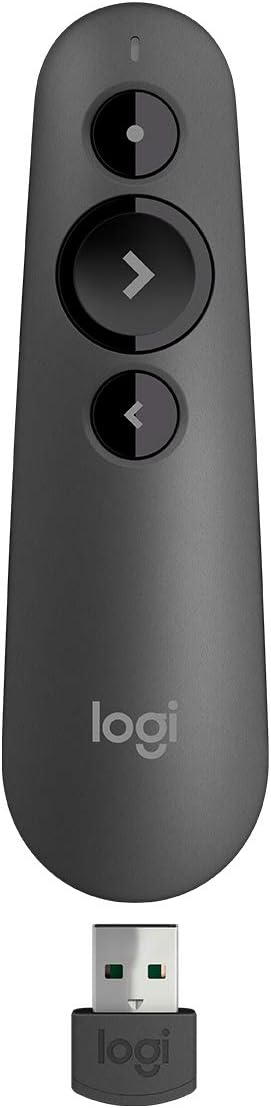
The Logitech R400 is a classic wireless presenter that has been a staple in offices and classrooms for years. It maintains a 4.6 rating due to its consistent performance and build quality.
We may earn a commission when you buy through this link, at no additional cost to you.
Its red laser is bright enough for most standard presentation environments, and the 2.4GHz connection ensures a stable link to your computer without interference.
While the range is limited to 50 feet, this is sufficient for many meeting rooms and lecture halls. The receiver docks neatly inside the clicker to prevent loss.
This model is best suited for users who prefer a simple, no-fuss device from a reputable brand without needing advanced features like volume control.
The intuitive touch-keys allow for easy slideshow control without the need to look down at the device during a talk.
A built-in docking bay keeps the USB receiver secure within the presenter, ensuring you never lose the tiny component.
We may earn a commission when you buy through this link, at no additional cost to you.
This wireless presenter offers an impressive array of features at a budget-friendly price point. Users rate it 4.4 stars, highlighting its functionality and ease of use for daily presentations.
We may earn a commission when you buy through this link, at no additional cost to you.
It includes dedicated volume control buttons, which is rare at this price tier. The red laser is bright against most backgrounds though not recommended for LCD screens.
With a range of up to 100 feet, you have the freedom to move around large rooms or auditoriums while maintaining a solid connection to your laptop.
For students or occasional presenters who need essential tools like volume control without a high cost, this model is a practical and efficient choice.
Beyond slide advancing, the clicker allows you to adjust volume and switch windows with dedicated buttons on the side.
Soft rubber buttons and a compact design ensure the device fits comfortably in your hand for extended use.
We may earn a commission when you buy through this link, at no additional cost to you.
The Logitech R800 is a premium option designed for professional speakers who demand visibility and precise time management. Its 4.6 rating reflects its robust build and advanced feature set.
We may earn a commission when you buy through this link, at no additional cost to you.
The brilliant green laser ensures your pointer is seen clearly even on bright LCD screens or in well-lit conference rooms. This eliminates the frustration of a fading red dot.
A key feature is the LCD display with silent vibrating alerts. You can set a timer to feel gentle vibrations when time is running out, keeping you on track without distracting the audience.
For high-stakes presentations where every second counts and visibility is paramount, this clicker provides the premium tools needed for a polished delivery.
The LCD display lets you manage your presentation time with silent alerts, so you can focus on your message without checking the clock.
With a range of up to 100 feet, you can mingle with your audience and interact directly while still controlling your slides.
We may earn a commission when you buy through this link, at no additional cost to you.
The Logitech R500s offers unique versatility by supporting both USB and Bluetooth connections. This dual capability makes it compatible with a wide range of devices including tablets and smartphones.
We may earn a commission when you buy through this link, at no additional cost to you.
Users give it a 4.4 rating because of its reliable wireless performance and the ability to customize button functions through the Logitech Presentation App on Mac and PC.
While the red laser is standard, the smart battery management system ensures long life, going into power-saving mode to extend usage even when the battery is low.
This clicker is ideal for tech-savvy users who want to connect wirelessly via Bluetooth or need to present from a device without a USB port.
Connect via USB receiver or Bluetooth low energy technology for flexibility across different computers and mobile devices.
Install the Logitech Presentation App to customize button functions and monitor battery life for a tailored experience.
We may earn a commission when you buy through this link, at no additional cost to you.
The QUI Presentation Clicker is an outstanding budget option that does not sacrifice essential features. It holds a 4.3 rating among users looking for an inexpensive yet functional remote.
We may earn a commission when you buy through this link, at no additional cost to you.
Its standout feature is the massive 328-foot wireless range, allowing you to roam an entire hall or stage without worrying about signal loss.
It also includes volume control and works with major software like PowerPoint and Keynote. The compact design includes a pocket clip for easy transport to meetings.
For educators or trainers on a tight budget who need to present in large spaces, this remote delivers high value and performance.
With a control distance of up to 328 feet, you can interact directly with your audience from anywhere in the venue.
This clicker offers essential functions like volume control and screen switching without the high cost of premium models.
We may earn a commission when you buy through this link, at no additional cost to you.
The Norwii N95 combines a bright green laser with USB-C connectivity and reprogrammable buttons. It receives a 4.5 rating from users who appreciate its flexibility and modern power options.
We may earn a commission when you buy through this link, at no additional cost to you.
The green pointer is significantly brighter than standard red ones, ensuring visibility in large rooms. It supports a wireless range of up to 100 meters for auditorium use.
You can customize button functions via the Norwii Presenter app to suit your specific workflow. The built-in 300mAh battery charges via USB-C for weeks of use.
This clicker is recommended for presenters who need a rechargeable device with custom button mapping and superior visibility for large venue presentations.
Download the free software to remap buttons for different modes such as scroll or page navigation based on your needs.
Equipped with a high capacity lithium polymer battery, this presenter charges via USB-C to reduce waste from disposable batteries.
We may earn a commission when you buy through this link, at no additional cost to you.
This presentation remote is designed for universal compatibility with both USB-A and USB-C ports directly. It earns a 4.4 rating for its simplicity and ease of use across different devices.
We may earn a commission when you buy through this link, at no additional cost to you.
The bright red light highlights key points effectively, and the receiver fits into the battery cover to prevent loss. It supports a wide range of systems including Windows and Mac.
Although the range is limited to 49 feet, it is sufficient for most standard office meetings or classroom settings. The ergonomic design ensures comfort during use.
Ideal for users with mixed tech setups who want a single device that works seamlessly with both older USB-A ports and modern USB-C devices.
The receiver fits both USB-A and USB-C ports, making this clicker a versatile choice for any computer or laptop.
The USB receiver is stored under the battery cover, ensuring it is always with the presenter and never misplaced.
We may earn a commission when you buy through this link, at no additional cost to you.
This model offers comprehensive control including volume buttons and screen toggles in a sleek body. It has a 4.4 rating from professionals who value complete command over their presentation environment.
We may earn a commission when you buy through this link, at no additional cost to you.
It features a built-in receiver supporting both USB-A and USB-C connectors, eliminating the need for adapters. The wireless range reaches up to 100 feet for dynamic presentations.
The ergonomic body with soft touch coating ensures comfort, and the magnetic receiver slot keeps the dongle secure. It supports auto-sleep to extend battery life.
For business professionals needing full control and broad compatibility with modern and older computers, this clicker delivers robust performance and convenience.
Gain full command with buttons for page navigation, volume adjustment, and screen switching all in one ergonomic device.
Intelligent low power consumption with auto sleep technology ensures over 30 days of standby time on a single set of batteries.
We may earn a commission when you buy through this link, at no additional cost to you.
This lightweight clicker is designed for users who prioritize portability and ease of use. It holds a 4.5 rating among users who appreciate its compact and comfortable ergonomic design.
We may earn a commission when you buy through this link, at no additional cost to you.
The wireless control distance reaches 100 feet, allowing you to move freely. It supports a wide variety of software and systems without needing drivers or software installation.
Weighing only 38 grams, it fits easily in any pocket or bag. One AAA battery lasts about two months, ensuring long-term reliability for daily use.
For students or travelers who need a simple, reliable tool to control slides without extra weight, this clicker is an excellent lightweight solution.
Weighing just 38 grams, this remote is easy to carry and fits comfortably in your pocket without adding bulk.
No drivers are required; just plug the USB dongle in and press connect to start using the remote immediately.
We may earn a commission when you buy through this link, at no additional cost to you.
Choosing the right wireless presenter involves considering factors like laser color, battery type, and connectivity options to suit your specific needs.
Green lasers are significantly brighter than red ones and remain visible on bright LED or LCD screens. Red lasers work well on standard projection screens and whiteboards in darker rooms.
Ensure the remote has enough range to move freely. Typical ranges are between 50 to 100 feet, which is sufficient for most meeting rooms and classrooms.
Some models use disposable AAA batteries while others offer rechargeable USB-C options. Rechargeable units save money and waste over time but require charging cycles.
Modern laptops may lack USB-A ports so check if the clicker supports USB-C receivers or Bluetooth connectivity for universal compatibility with your devices.
Look for useful features like volume control, full screen toggles, and hyperlink navigation. These enhance your control beyond simple slide advancing.
An ergonomic design ensures comfort during long presentations. Rubberized buttons and a lightweight body prevent hand fatigue and accidental presses.
Some advanced clickers allow customization via apps which can modify button functions or add timers. Check if you need software installation for these features.
Ensure the USB receiver can be stored inside the clicker. Magnetic docks or battery compartment slots prevent losing the tiny dongle when packing up.
Before presenting insert fresh batteries or ensure the device is fully charged. Plug the USB receiver into your computer and wait for the connection indicator to light up.
Test the clicker functions like slide advancing and laser on-off in a quiet moment before starting your talk. Familiarize yourself with button placement to avoid fumbling.
When finished storing the USB receiver inside the clicker to prevent loss. Keep the device in a protective case or pocket to avoid damage during transport.
Green lasers have a higher wavelength of 532nm which makes them appear much brighter to the human eye. They remain visible on bright LCD screens where red dots often disappear. Red lasers are generally sufficient for standard projection screens in dimmer rooms.
Most clickers are plug and play requiring no software installation. However some models like the Logitech R500s offer optional apps for customization. Basic functions work immediately after connecting the receiver.
Battery life depends on usage but typically ranges from weeks to months on a single set of AAA batteries. Rechargeable models offer weeks of use on a single charge.
Yes if the clicker supports Bluetooth or USB-C. Some models include a dual USB-A and USB-C receiver to ensure compatibility with modern devices like MacBooks.
Most clickers can be paired with another receiver if you contact support. However it is better to store the included receiver inside the clicker to prevent loss.
Yes when used within Class 2 limits. Avoid shining the laser directly into eyes as it can be dazzling. Always follow standard laser safety guidelines during presentations.
We have reviewed ten top-rated wireless presenters that cater to different needs and budgets. Whether you need a bright green laser or a budget-friendly red pointer there is a fit for everyone.
Prioritize features like battery type and compatibility with your devices before making a decision. A reliable remote ensures you focus on your message rather than technical issues.
Remember that prices and availability change frequently so check the latest listings to confirm current deals. Choose the model that best aligns with your daily presentation routine.