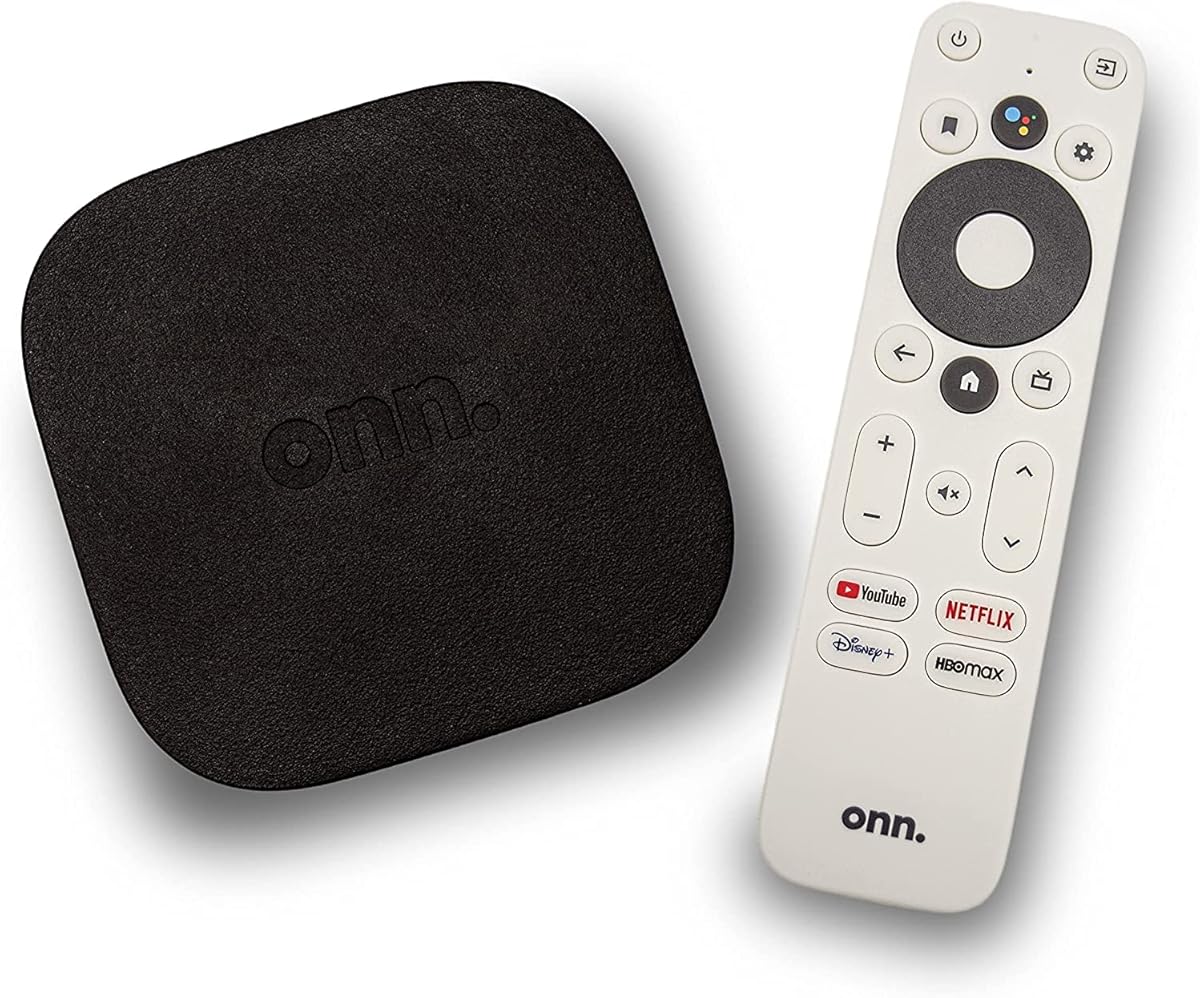
ONN Android TV 4K UHD Streaming Device
4.4Editor score
Affordable entry-level price
Google Assistant voice remote
Chromecast built-in support
Discover the top 4K Android Box models for streaming in 2026. We compare performance, features, and value to help you choose the best device.
Finding the right streaming device can transform your home entertainment setup significantly. A quality 4K Android Box offers access to thousands of apps and crisp visual quality for your television.
We evaluated ten top-rated models based on processing power, connectivity options, and user interface design. Our analysis focuses on real-world performance and software support to ensure lasting value.
Each pick highlights specific strengths like budget friendliness or premium features. Note that product availability and pricing can change frequently, so check current listings before purchasing.
4.4Editor score

4.4Editor score

4.3Editor score
This table provides a side-by-side overview of the key specifications for each model we reviewed to help you compare features quickly.



The Xiaomi TV Box S 3rd Gen stands out as a top contender for home entertainment. With a rating of 4.4 stars it delivers crisp visuals and reliable streaming performance.
We may earn a commission when you buy through this link, at no additional cost to you.
It supports 4K resolution at 60FPS along with Dolby Vision and Atmos for an immersive experience. The quad-core CPU ensures smooth navigation through apps without lag.
Connectivity is robust with WiFi 6 and HDMI 2.1 which future-proofs the device. Some users may find the voice remote takes a moment to get used to.
This box is ideal for anyone wanting premium features without a high price tag. It balances performance and value effectively for modern streaming needs.
HDR10+ and Dolby Vision support enhance contrast and color accuracy for a cinematic view.
Dual-band Wi-Fi and Bluetooth 5.2 provide stable wireless connections for all devices.
We may earn a commission when you buy through this link, at no additional cost to you.
The ONN Android TV 4K UHD Streaming Device offers incredible value for budget-conscious buyers. It provides a rating of 4.4 stars and access to thousands of apps.
We may earn a commission when you buy through this link, at no additional cost to you.
It features a voice remote with Google Assistant to simplify content search. Chromecast built-in allows easy streaming from mobile devices to the TV screen.
While the hardware is entry-level it handles standard streaming well. Those needing heavy gaming or intensive multitasking might find it limited.
This device is perfect for upgrading old TVs cheaply. It delivers clear 4K visuals and essential smart features without the extra cost.
Plug into any HDMI port and configure your account quickly to start watching.
Press the Google Assistant button to find shows or control playback hands-free.
We may earn a commission when you buy through this link, at no additional cost to you.
The onN 4K Pro Streaming Device is built for power users who demand speed and reliability. With 4.3 stars rating it offers a premium experience with advanced hardware.
We may earn a commission when you buy through this link, at no additional cost to you.
It features 3GB of RAM which is significantly more than basic models ensuring seamless multitasking. An Ethernet port provides stable wired internet options for consistent streaming.
Dolby Vision and Atmos support deliver exceptional audio and video quality. The Find My Remote feature helps locate the controller quickly using a backlight.
This device suits households with many streaming apps and devices. Its robust performance justifies the higher price for a premium home entertainment hub.
Extra RAM allows multiple apps to run smoothly without buffering or crashes.
Use the Ethernet port for wired stability or WiFi 6 for wireless speed.
We may earn a commission when you buy through this link, at no additional cost to you.
The TiVo Stream 4K focuses on bringing all your content into one unified place. It holds a 4.2 rating and simplifies navigation across different apps effectively.
We may earn a commission when you buy through this link, at no additional cost to you.
Its centralized search function helps you find shows without switching between interfaces. Dolby Atmos sound enhances the audio experience for movies and shows.
It includes popular apps like Netflix and Disney+ right out of the box. The trade-off is limited internal storage which restricts offline content options.
This device is great for people who want a simple TV interface. It reduces clutter and makes it easy to access favorites quickly.
Search across all apps at once instead of opening each one separately.
Use integrated Google Assistant to launch apps or dim lights easily.
We may earn a commission when you buy through this link, at no additional cost to you.
This Xiaomi Google TV Box excels in audio capabilities with support for DTS:X alongside Dolby Atmos. It has a 4.1 rating and delivers a cinematic sound experience.
We may earn a commission when you buy through this link, at no additional cost to you.
The 360 degree Bluetooth remote allows flexible control from any angle. 32GB storage provides ample space for applications and content installation.
HDMI 2.1 ensures compatibility with newer displays and features like eARC. The remote may require practice for some users to master fully.
Audio enthusiasts will appreciate the rich sound output. It is an ideal choice for home theater setups that prioritize quality sound.
DTS:X and Dolby Atmos provide immersive multidimensional sound for movies.
Use the 360 degree remote to control the box from any direction.
We may earn a commission when you buy through this link, at no additional cost to you.
This Android TV Box offers impressive hardware specs with 4GB RAM at a competitive price. It holds a 4.4 rating and supports true 4K Ultra HD with HDR.
We may earn a commission when you buy through this link, at no additional cost to you.
Quad-core processing ensures stable multitasking for smooth operation. Dual band Wi-Fi reduces interference and supports faster data transmission speeds.
H.265 decoding optimizes video compression for clearer details. The interface is simple which might feel less polished than branded boxes.
Buyers looking for raw hardware value will find this appealing. It transforms old TVs into smart devices effectively without compromising performance.
4GB RAM supports running multiple apps without slowing down the system.
Dual-band WiFi provides stronger signal and less interference for streaming.
We may earn a commission when you buy through this link, at no additional cost to you.
Another Xiaomi model appears on this list for its strong streaming performance. With 4.4 stars it offers personalized recommendations across various apps effectively.
We may earn a commission when you buy through this link, at no additional cost to you.
Powered by a 6nm platform it ensures efficient power use and speed. The voice search function simplifies finding content without typing.
WiFi 6 connectivity enables instant playback of online content. Users note that it may lack some extra accessories found in other bundles.
This device is excellent for daily streaming needs. It provides a clean interface and reliable performance for most households.
Google TV suggests new movies and shows based on your watching habits.
The 6nm platform ensures quick boot times and fast app launches.
We may earn a commission when you buy through this link, at no additional cost to you.
The KP1 Android TV Box runs the latest Android 14 for enhanced security. It has a 4.1 rating and is certified for full app compatibility.
We may earn a commission when you buy through this link, at no additional cost to you.
Chromecast built-in makes sharing content from your phone very simple. Voice search helps find movies quickly without typing out full titles.
It supports Google Home integration for smart control. The storage is limited which means you may need to clear space often.
This device suits those who value software updates and safety. It ensures all apps run smoothly and without unexpected errors.
Official certification ensures all apps work correctly without compatibility issues.
Tap to cast videos from your phone or tablet to your TV.
We may earn a commission when you buy through this link, at no additional cost to you.
This model offers a wide selection of over 3000 channels and apps. It holds a high 4.5 rating for reliable performance and smooth video rendering.
We may earn a commission when you buy through this link, at no additional cost to you.
Chromecast built-in allows for seamless screen mirroring. Voice assistants let you check weather or set alarms from the TV screen.
The 4K HDR support ensures clear visuals for all content. It uses an older OS version which may delay some new features.
It is a solid choice for general entertainment. It delivers consistent quality and access to popular streaming services.
Thousands of channels and apps are available for diverse viewing options.
Use built-in Google Assistant to search and control your smart home.
We may earn a commission when you buy through this link, at no additional cost to you.
This TV Box runs Android 14 for future readiness and security. It has a 3.4 rating but offers 8K video decoding capabilities for ultra high definition.
We may earn a commission when you buy through this link, at no additional cost to you.
It supports Airplay and DLNA for flexible screen mirroring. An included wireless keyboard allows light office tasks on your TV screen.
The interface is user-friendly and integrates well with platforms. However performance can be mixed depending on the specific app used.
This device is good for those needing modern software support. It provides a range of connectivity options for various devices and use cases.
Android 14 provides better security and access to latest apps.
Use the included keyboard to turn the box into a workstation.
We may earn a commission when you buy through this link, at no additional cost to you.
Choosing the right streaming device depends on your specific needs and existing TV setup.
Ensure the box supports at least 4K Ultra HD with HDR10 or Dolby Vision. These standards provide better brightness and contrast than basic HD displays.
Look for a quad-core processor and at least 2GB of RAM. Higher RAM helps prevent lag when switching between apps or navigating menus.
Check for HDMI 2.1 and dual-band WiFi. These features ensure faster data transfer and support for newer displays and audio systems.
Google TV and Android TV offer extensive app libraries. Newer versions provide better security and smoother updates for streaming services.
A voice remote simplifies navigation and search. Ensure it supports Google Assistant for hands-free control of smart home devices.
Dolby Atmos and DTS:X support enhance sound immersion. This is crucial if you use external speakers or a soundbar setup.
Internal storage should be at least 32GB for multiple apps. Expandable storage via USB can also be a helpful feature.
Compare the features against the cost. Premium devices may cost more but often offer better longevity and reliability over time.
Connect the HDMI cable from the box to your TV and power it via the adapter. Turn on the TV and select the correct HDMI input channel to begin.
Follow the on-screen setup to log into your Google account and connect to your Wi-Fi network. Install your preferred apps from the Play Store.
Keep the device in a well-ventilated area to prevent overheating. Update the software regularly to maintain security and performance stability.
Yes, especially if your current TV lacks smart features. It offers access to streaming apps and 4K content at a lower cost than a new TV.
Most boxes work with any TV that has an HDMI port. You will need to ensure the port matches the HDMI version for best 4K performance.
Yes, a stable internet connection is required for streaming. Wired Ethernet is an option on some models for more consistent speeds.
Simply open the Play Store on the device and browse for apps. Select your desired app and click install to download it directly.
It does not replace a gaming console but you can stream games via cloud services. It can also cast from phones to display game content.
Lag can be caused by weak Wi-Fi or low RAM. Ensure your network is strong and close background apps to improve performance.
We have reviewed ten top models ranging from budget options to premium devices. Each offers unique strengths in connectivity, audio, and software support.
Consider what you value most such as price, sound quality, or app integration. The right choice depends on your existing TV capabilities and usage habits.
Prices and availability change often so verify the latest listings before purchasing. Your perfect streaming companion is waiting to upgrade your viewing experience.