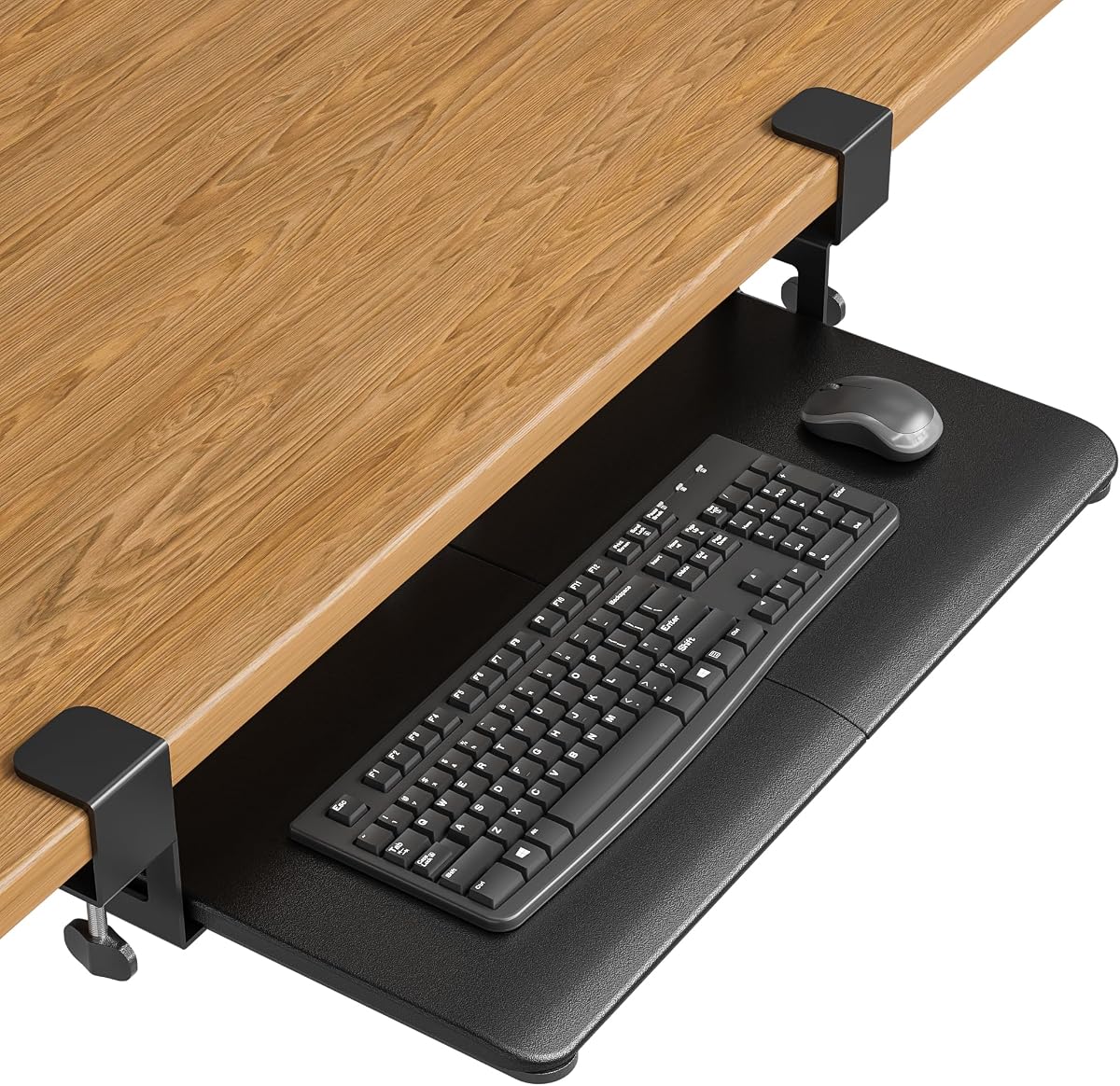
BONTEC Under Desk Keyboard Tray
4.4Editor score
No-drill installation option
Spacious platform design
Affordable price point
Finding the right clamp on keyboard tray can transform your workspace by freeing up valuable desk space and improving your typing posture. A good tray should be sturdy, easy to install without drilling, and offer enough surface area for your keyboard and mouse while fitting securely under your existing desk.
We have analyzed the leading models available in the market, focusing on build quality, compatibility with different desk types, and ergonomic features like tilt and swivel adjustments. Our comparison covers various sizes and price points to ensure you find a solution that matches your specific workstation needs and budget constraints effectively.
Each pick below highlights key specifications and real-world performance notes to help you make an informed decision for your home office or professional setup. Please note that product availability and pricing can change frequently, so always check the latest details on the manufacturer or retailer site before finalizing your purchase today.
4.4Editor score

4.4Editor score

4.3Editor score
As an Amazon Associate we earn from qualifying purchases.
The following table provides a side-by-side comparison of all ten selected models to help you quickly identify which features matter most for your specific workspace setup and ergonomic requirements.


The VIVO MOUNT-KB05E stands out as a top contender in the clamp on keyboard tray category with its robust build and practical design. It currently holds a strong rating from users who appreciate its ability to free up desktop real estate while maintaining typing comfort.
We may earn a commission when you buy through this link, at no additional cost to you.
This model features a spacious 27 by 11 inch platform that comfortably accommodates most standard keyboards and mice. The sturdy C-clamps ensure a secure fit on desks up to 1.25 inches thick without causing any damage to the surface during installation.
While it lacks advanced tilt features, the sliding mechanism allows for smooth extension and retraction to suit different working positions. The only notable limitation is its incompatibility with desks that have beveled or lipped edges which may require checking your setup first.
If you need a reliable and straightforward solution to organize your workspace, this tray offers excellent value and performance. It is ideal for users who prioritize desk space recovery and solid stability over complex adjustability features.
Moving your keyboard below the desktop instantly clears room for monitors or documents making your desk feel larger and more organized.
The solid construction prevents wobbling during intense typing sessions ensuring a stable platform that supports productivity throughout the day.
We may earn a commission when you buy through this link, at no additional cost to you.
The VIVO Mount-KBST1 offers advanced adjustability that sets it apart from standard models by allowing both height and width customization for optimal ergonomics. Users frequently highlight the included wrist pad as a significant comfort addition for long work sessions.
We may earn a commission when you buy through this link, at no additional cost to you.
This tray adapts to desk thicknesses up to 3.4 inches making it suitable for a wider range of workstation types including heavy-duty tables. The split design allows for separate placement of the keyboard and mouse to fit various ergonomic preferences effectively.
While the versatility is impressive, the split configuration might require some adjustment time to find the perfect layout for your specific needs. Also note that like many models it cannot be installed on desks with beveled edges which limits compatibility slightly.
Choose this model if you need a highly customizable solution that grows with your ergonomic requirements and desk specifications. It delivers premium features at a competitive price point for those seeking comfort and adaptability.
Adjustable height and width settings let you tailor the tray to your body dimensions reducing strain on wrists and shoulders.
Supporting desks up to 3.4 inches thick means it works with heavier furniture where standard clamps might not fit securely.
We may earn a commission when you buy through this link, at no additional cost to you.
The VIVO MOUNT-KB04CB introduces a unique rotating feature that allows you to pivot the tray a full 360 degrees for maximum placement flexibility. This innovation makes it easy to tuck the tray away when not in use reclaiming valuable floor space instantly.
We may earn a commission when you buy through this link, at no additional cost to you.
Its single C-clamp design simplifies installation compared to dual clamp systems while still providing a secure hold on desks up to 2 inches thick. The compact dimensions suit smaller keyboards or users who prefer a minimalist approach to under-desk accessories.
While the rotation is a standout feature, the smaller surface area may not fit larger ergonomic keyboards or dual mouse setups comfortably. Additionally compatibility with beveled edges is limited so you must verify your desk edge before purchasing this specific model.
This tray is perfect for those who value flexibility and space efficiency in a compact package. It offers a creative solution for tight workspaces where traditional trays might feel too bulky or restrictive.
Pivoting the tray up to 360 degrees allows you to store it out of the way when working on other projects.
A single clamp reduces complexity and drilling time making it quick to set up for temporary or shared workstations.
We may earn a commission when you buy through this link, at no additional cost to you.
The BONTEC Under Desk Keyboard Tray emphasizes ease of use and protection with its no-drill C-clamps and protective pads to prevent desk scratches. It receives praise for its large platform that provides ample room for both keyboard and mouse movement simultaneously.
We may earn a commission when you buy through this link, at no additional cost to you.
Designed for flat and unobstructed desk undersides it supports thicknesses up to 1.97 inches with a stable mounting system. The sliding mechanism is engineered to be smooth ensuring you can pull the tray out and push it back without friction or noise.
However it is critical to verify your desk underside is free of beams or crossbars before installation to avoid fitment issues. Also curved or rounded edges are not compatible which limits its use on certain modern furniture designs found in creative offices.
Select this tray if you prioritize a spacious working surface and a quick non-invasive installation process. It balances functionality and safety making it a smart choice for home offices and rental spaces.
Built-in pads on the clamps protect your desk surface from scratches and marks during the tightening process.
The extra wide surface ensures you have enough space for a full size keyboard and a mouse with ample room.
We may earn a commission when you buy through this link, at no additional cost to you.
The VIVO MOUNT-KB05HT is a premium offering that focuses on superior comfort through its nine distinct tilt settings ranging from negative to positive degrees. This level of control helps users find the perfect neutral position for wrists and elbows reducing fatigue over time.
We may earn a commission when you buy through this link, at no additional cost to you.
Swivel clamps allow for independent 90 degree rotation providing flexibility in how the tray aligns with your desk edge. The adjustable side brackets ensure you can customize the clearance height under the desk to suit your legroom needs accurately.
While the tilt options are excellent for ergonomics the higher price point may be a consideration for budget conscious buyers. Also the requirement for flat desk edges limits its application to standard flat surface workstations only.
Invest in this tray if ergonomic precision and build quality are your top priorities. The ability to fine-tune the angle makes it an exceptional choice for professionals who spend long hours typing daily.
With nine settings you can adjust the angle to match your natural typing posture and reduce strain on your arms.
Independent swivel clamps let you rotate the mount to fit corner setups or awkward desk configurations easily.
We may earn a commission when you buy through this link, at no additional cost to you.
The VIVO MOUNT-KB10C is specifically engineered to address the unique challenges of L-shaped corner desks. It features swiveling clamps that rotate 90 degrees independently allowing for a secure fit on the two perpendicular surfaces of a corner workstation.
We may earn a commission when you buy through this link, at no additional cost to you.
This specialized design ensures stability even on corner setups where standard straight trays might struggle to attach properly. The under-desk placement saves space and keeps your keyboard within easy reach while maintaining a clean look on your desktop.
Users should note that it supports desks only up to 1.25 inches thick which may not work with heavier executive corner desks. Additionally beveled edges are not compatible so you need to confirm your corner desk structure matches these requirements.
Choose this tray if you have an L-shaped desk and need a solution tailored to its geometry. It simplifies the installation process for corners ensuring a sturdy and ergonomic typing platform without hassle.
The swivel clamps adapt to the angles of L-shaped desks providing a stable anchor point where others fail.
Moving your keyboard under the desk frees up the corner surface for monitors and important documents.
We may earn a commission when you buy through this link, at no additional cost to you.
The VIVO MOUNT-KB05-4D combines a standard keyboard tray with a built-in pencil drawer offering a two-in-one solution for typing and small item storage. This feature makes it ideal for users who need to keep pens and accessories handy but off the desktop surface.
We may earn a commission when you buy through this link, at no additional cost to you.
The tray supports up to 11 pounds ensuring stability when typing even when the drawer is loaded with office supplies. The extended combined length of the tray and drawer provides enough reach for comfortable access while tucking neatly under the desk.
One consideration is that the total length from clamp to clamp is significant so you must ensure you have enough desk space for installation. Also it shares the common limitation of not being compatible with beveled edges which restricts some desk types.
This model is perfect for those who want to maximize utility from their under-desk space. It keeps your workspace tidy by consolidating keyboard storage and small accessories into one ergonomic unit.
The pencil drawer offers convenient access to pens and clips keeping your top desk clean and organized.
Enjoy both a typing platform and a storage drawer without cluttering your workspace with separate organizers.
We may earn a commission when you buy through this link, at no additional cost to you.
The Ergonomic Mouse & Keyboard Tray features a practical back baffle that stops keyboards from sliding during intense typing sessions. It supports desks up to 2.76 inches thick making it one of the most versatile options for varied desk thicknesses available.
We may earn a commission when you buy through this link, at no additional cost to you.
Its upgraded slide mechanism ensures smooth extension and retraction without jerky movements adding to the overall user experience. The design is straightforward and focuses on essential features like stability and ease of use at an accessible price point.
While the baffle is a great addition the 20 inch width is slightly smaller than some premium models which may affect mouse space. However it is well suited for standard setups where maximum desktop surface is not a primary concern.
Opt for this tray if you need a reliable system with a focus on preventing keyboard movement. It offers a cost effective way to improve ergonomics without sacrificing stability or ease of installation.
The back baffle keeps your keyboard securely in place so it does not shift during rapid typing or gaming.
Accommodating desks up to 2.76 inches means it fits heavier workstations where thinner clamps might fail.
We may earn a commission when you buy through this link, at no additional cost to you.
The VIVO DESK-EXT24 functions as a versatile desk extender that can be used as a keyboard tray or a heavy duty surface for printers and speakers. Its 90 degree folding design allows you to store it flat against the desk when not in use.
We may earn a commission when you buy through this link, at no additional cost to you.
With a load capacity of up to 44 pounds this platform is robust enough to support larger equipment beyond just a keyboard. The K-shaped brackets provide rigid support ensuring stability even when carrying heavier items on the extended surface.
Note that it is not compatible with beveled edges so you must check your desk structure before purchase. It also adds more bulk than a standard tray so consider your space needs carefully before adding this accessory.
Choose this extender if you need a flexible platform that can adapt to different tasks. It is a smart solution for users who need extra workspace occasionally without permanent installation changes.
The strong K-shaped brackets allow you to place speakers or monitors on the extender with confidence.
Fold the platform away when not needed to reclaim the full width of your desk for other tasks.
We may earn a commission when you buy through this link, at no additional cost to you.
The Mount-It! Keyboard Tray offers peace of mind with its lifetime warranty and responsive US-based product support. This commitment to customer service makes it a standout choice for users who prioritize long-term reliability and assistance options.
We may earn a commission when you buy through this link, at no additional cost to you.
It supports desks up to 2.2 inches thick and uses a no-drill clamp-on system that keeps your workspace safe and damage free. The 27 by 11 inch platform provides ample room for full-size keyboards and smooth mouse movement during daily work.
While the warranty is excellent the tray is not compatible with glass desks which limits its use in modern minimalist offices. Additionally beveled edges are not supported so you need to confirm your desk edge type before buying.
Select this tray if you value strong backing and a secure installation method. It is a durable solution that combines practical design with a guarantee that supports your investment over time.
A lifetime warranty ensures your purchase is protected against defects providing long-term value and peace of mind.
Access to US-based support specialists makes troubleshooting and installation questions quick and easy to resolve.
We may earn a commission when you buy through this link, at no additional cost to you.
Choosing the right clamp on keyboard tray involves considering several factors to ensure it fits your desk and improves your workspace ergonomically.
Check your desk thickness to ensure the tray clamps can secure it properly. Most trays fit desks between 0.5 and 3 inches thick but some models only support up to 1.25 inches which limits options for thicker tables.
Always measure your desk thickness before purchasing to avoid returns and installation issues with incompatible clamps.
Measure the available space under your desk to confirm the tray fits without obstructing your legs. Consider the width and depth needed for your keyboard and mouse plus any additional accessories you use.
Ensure the tray dimensions match your equipment so it provides enough room for comfortable typing and movement.
Many trays are incompatible with beveled or lipped edges because the clamps need a flat surface to grip securely. Verify if your desk has these features as some products require completely flat unobstructed edges.
If your desk has a rounded or beveled edge look for models specifically designed to accommodate such variations or use a flat adapter.
Some trays offer height or tilt adjustments to help you find a neutral typing position that reduces strain. Fixed trays are simpler but adjustable ones can better suit ergonomic needs over time as your setup changes.
Consider if you need tilt settings to align your wrists properly or if a fixed height will suffice for your workflow.
Clamps can be dual C-clamps or single clamp designs which affect stability and installation complexity. Dual clamps generally provide more stability while single clamps offer flexibility for corner or awkward desk shapes.
Choose a mounting mechanism that matches your desk structure to ensure the tray stays secure during regular use.
Check the maximum weight the tray can support to ensure it holds your keyboard mouse and any extra weight like books or wrist rests. Most trays support around 11 pounds but some heavy-duty models offer more.
Confirm the load capacity matches your gear to prevent sagging or instability during typing sessions.
Some trays come with built-in drawers or pencil holders to help organize small office supplies underneath your desk. This adds functionality beyond just typing and can reduce clutter on your desktop significantly.
Decide if extra storage is valuable to you or if a simple platform is enough to meet your needs.
Look for products with solid warranty coverage such as one year or lifetime options to protect your investment. US-based support can also be a benefit if you encounter installation or assembly questions later.
Prioritize brands that offer clear support channels and warranty terms to ensure long-term satisfaction with your purchase.
To install your tray correctly measure your desk thickness and edge type before attaching the clamps to avoid fitting problems. Tighten the clamps evenly on both sides to ensure the tray is stable and does not wobble during use.
Position the tray at a height that allows your wrists to stay straight and your elbows close to your body for better ergonomics. Adjust tilt settings if available to find a neutral typing angle that reduces fatigue over long sessions.
Keep the tray clean by wiping it with a soft dry cloth regularly to prevent dust buildup that can affect slide mechanisms. Avoid placing heavy objects on it beyond the weight limit and check the clamps occasionally to ensure they remain tight.
Most quality trays come with protective pads on the clamps to prevent scratches or marks on your desk surface. As long as you tighten them properly without overtightening they should not cause damage or leave visible wear over time.
Yes many clamp on trays are compatible with standing desks provided the desk thickness and edge type match the product specs. Just ensure the clamps can reach and secure to the underside of the desk when at your preferred height.
Most clamp on trays require flat edges for secure mounting so beveled edges can be problematic. You may need to choose a model designed for such surfaces or use an adapter to create a flat mounting area.
You need enough clearance under your desk for the tray to slide out fully without hitting your knees. Check the tray's extended length and ensure you have at least that much depth available below the desktop.
Installation is typically tool-free as most trays include all necessary hardware and simple hand-tightening clamps. A screwdriver may be included for minor adjustments but no drilling or professional help is usually required.
When installed correctly on a compatible desk the tray should feel stable and secure during typing. Avoid overtightening the clamps excessively as it can strain the desk but ensure it is tight enough not to shift.
We have explored ten top models ranging from budget options to premium adjustable trays to help you find the perfect fit. The VIVO MOUNT-KB05E leads overall while the Mount-It! tray stands out for warranty and the VIVO Mount-KBST1 offers great adjustability.
Prioritize your specific needs such as desk thickness compatibility and adjustability when making your final decision. A tray that fits your workspace properly will provide lasting comfort and help maintain a clutter free and productive environment.
Remember that product details and pricing may change so verify current specifications and availability before purchasing. We hope this guide empowers you to choose a clamp on keyboard tray that enhances your daily workflow effectively.