
ASUS Prime AP201 Micro-ATX PC Case
4.7Editor score
Quasi-filter mesh panels design
Supports up to six fans
Tool-free side panels clip mechanism
32 millimeter gap for cables
This guide compares the top ten ASUS PC Case options for 2026, evaluating cooling, design, compatibility, and features to help you choose the right chassis for
Finding the right chassis is critical for any PC build. A good case protects components while ensuring airflow and style. ASUS offers a wide range of designs for every budget and need.
We compared ten models based on cooling, build quality, and features. Each product was analyzed for compatibility with modern hardware and ease of use. This list covers everything from budget-friendly to premium options.
Each pick highlights unique strengths and ideal use cases. Prices and availability can change frequently so verify details before buying. Use this guide to make an informed decision for your next system.
4.7Editor score

4.8Editor score

4.6Editor score
This side-by-side comparison highlights key specs across all ten models. Use this table to quickly identify which case fits your hardware and design requirements.


The ASUS TUF Gaming GT501 stands out as a robust full-tower case designed for serious enthusiasts. With an impressive 4.8 rating it delivers on both performance and aesthetics. Its metal chassis and smoked tempered glass provide a sturdy foundation for any high-end build.
We may earn a commission when you buy through this link, at no additional cost to you.
Cooling is a major strength here thanks to the support for multiple fans and radiators. The included Aura Sync RGB fans add visual flair while the layout supports custom loops. This flexibility makes it ideal for users who prioritize thermal performance.
While the size might be a constraint for smaller desks the carry handles mitigate transport issues. The TUF spatter pattern is unique but may not suit all tastes. These trade-offs are acceptable given the overall build quality and cooling potential.
If you need a reliable case for an EATX system this is a top choice. It balances style function and durability well. We recommend it for users who want a premium full-tower experience with proven airflow capabilities.
The layout supports up to seven fan-mounting points and large radiators for efficient heat dissipation.
A rugged metal chassis with custom spatter pattern ensures long-lasting protection and a distinctive look.
We may earn a commission when you buy through this link, at no additional cost to you.
The ASUS Prime AP201 offers an incredible entry point into PC cases without sacrificing quality. Rated 4.7 it is a favorite among builders looking for efficiency and value. Its quasi-filter mesh design ensures your components stay cool under load.
We may earn a commission when you buy through this link, at no additional cost to you.
Despite its compact 33L footprint it supports long graphics cards and radiators. This spatial efficiency is rare in small cases. The tool-free panels make upgrades simple and the cable management gap keeps things tidy.
The only real downside is the limited expansion due to the MicroATX size. However for most home builds this is a minor concern. The balance of size and performance makes it an outstanding budget-friendly option.
For small form factor enthusiasts or budget builders this case is hard to beat. It proves you do not need to spend a lot to get great airflow and design. We highly recommend it for compact high-performance builds.
Supports ATX PSUs and long GPUs despite a small 33L footprint for maximum space efficiency.
Over 57000 precision-machined holes in the mesh panels maximize airflow for thermal performance.
We may earn a commission when you buy through this link, at no additional cost to you.
The ROG Hyperion GR701 is a true flagship case designed for those who want the best. With a 4.6 rating it delivers premium materials and features. The diecast aluminum frame looks and feels significantly more expensive than standard steel cases.
We may earn a commission when you buy through this link, at no additional cost to you.
Thermal performance is unmatched with support for massive 420mm radiators. The semi-open structure enhances airflow and the integrated GPU holder protects heavy cards. These features cater to high-end custom water-cooling builds perfectly.
The price is steep and the size is imposing but you get what you pay for. The Type-C ports offer modern connectivity and the carry handles support heavy loads. These details elevate it above typical full-tower competitors.
If budget is no object and you demand top-tier build quality this is the choice. It combines aesthetics and function in a way few cases can. We recommend it for enthusiasts building a showpiece system.
Sturdy diecast aluminum-alloy frame and top bars provide durability and a luxury look.
Supports up to two 420mm radiators for large AIOs or custom water cooling setups.
We may earn a commission when you buy through this link, at no additional cost to you.
The GT502 Horizon introduces a panoramic design that makes every component visible. Rated 4.5 it appeals to builders who prioritize visuals. The dual-chamber layout separates heat sources for better overall thermal management.
We may earn a commission when you buy through this link, at no additional cost to you.
The front and side glass panels offer an unobstructed view which is visually impressive. However this can mean more dust accumulation over time. The USB Type-C port adds modern convenience and the modular design simplifies installation.
While the cooling is good it may not match the raw potential of the GT501. The glass is also a fingerprint magnet. These issues are manageable for users who value the look of their build.
Choose this case if you want a modern immersive view of your components. The dual-chamber design helps keep temperatures in check. It is a solid option for mid-tower enthusiasts seeking style and substance.
Internals divided into two chambers establish independent cooling zones for CPU and graphics cards.
Tempered tinted glass at front and side offer a fully unobstructed view of the main chamber.
We may earn a commission when you buy through this link, at no additional cost to you.
The ASUS A31 PLUS is designed for modern motherboards with hidden connectors. Rated 4.1 it offers a clean look by hiding cables. The angled base improves airflow while also enhancing the visual perspective of the build.
We may earn a commission when you buy through this link, at no additional cost to you.
It includes four ARGB fans which adds value and visual appeal. The chassis supports large GPUs and radiators which ensures compatibility. This is ideal for users who want a clutter-free setup out of the box.
The lower rating suggests some users might find build quality or ease of use average. However the unique design features are strong selling points. These trade-offs are acceptable for those prioritizing cable management.
Buy this if you plan to use a motherboard with hidden connectors. It helps achieve a clean professional look with minimal effort. The ARGB fans and airflow design add functional value to your build.
Built for motherboards featuring hidden connectors to optimize cable management for a clutter-free setup.
Eight degree angled base enhances airflow efficiency for better thermal performance and viewing angle.
We may earn a commission when you buy through this link, at no additional cost to you.
The White Edition of the GT501 brings a fresh look to a proven design. With a 4.7 rating it offers the same reliability as its sibling. The metal front panel and smoked glass showcase white components beautifully.
We may earn a commission when you buy through this link, at no additional cost to you.
It retains the strong cooling layout and carry handles of the original model. This means you get performance without compromising on aesthetics. The software optimization helps maintain low noise and high efficiency.
White cases often require more frequent cleaning to avoid dust buildup. This is a common trade-off for the visual appeal. For white-build enthusiasts this case is a top contender in the market.
Select this if you want a white theme for your setup. It combines durability and style effectively. We recommend it for users who value a clean modern look alongside strong functionality.
Metal front panel with custom TUF Gaming spatter pattern to showcase your build internals in white.
Fan and cable placement optimized for TUF Gaming gear and ready for Fan Xpert 4 software.
We may earn a commission when you buy through this link, at no additional cost to you.
The GT301 is a compact case that does not sacrifice airflow or style. Rated 4.6 it features a honeycomb front panel for maximum ventilation. The included RGB controller simplifies lighting management for users.
We may earn a commission when you buy through this link, at no additional cost to you.
It supports 360mm radiators which is impressive for its size. The headphone hanger is a nice touch that adds convenience. This makes it a strong candidate for mid-sized gaming setups.
The RGB controller can be tricky for new users to set up initially. This is a minor inconvenience given the overall value. The case offers great cooling in a smaller footprint.
Choose this for a compact build that still supports modern cooling needs. The lighting features and hanger add extra value. It is a great option for gamers who want performance in a smaller box.
Perforated honeycomb front panel aids airflow to keep internal temperatures low during gaming.
Integrated six port Aura Sync addressable-RGB controller hub to create stunning lighting effects easily.
We may earn a commission when you buy through this link, at no additional cost to you.
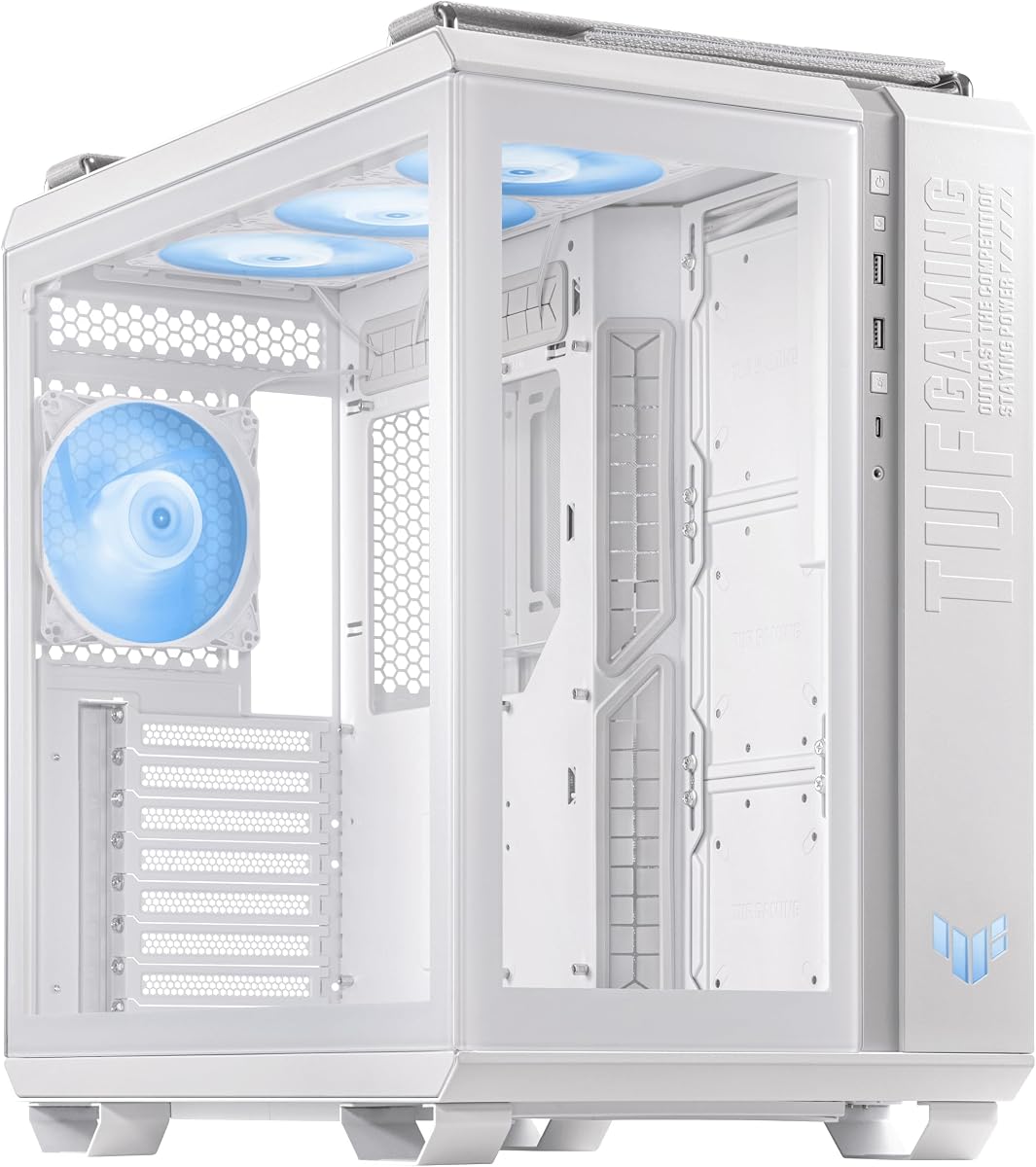
This white ARGB version of the GT502 offers a modern modular experience. With a 4.7 rating it focuses on aesthetics and function. The four pre-installed fans provide immediate cooling and lighting out of the box.
We may earn a commission when you buy through this link, at no additional cost to you.
The two-chamber design helps separate hot components for better performance. The panoramic layout ensures your build is visible from multiple angles. This is perfect for white builds that need to stand out.
As with all glass panels dust can become visible over time. The mid-tower size may limit top radiators but is sufficient for most. These are small drawbacks for a visually stunning case.
Opt for this if you want a white build with strong lighting and cooling. The modular design makes maintenance easy. It is an excellent choice for enthusiasts who value style and airflow.
Four ARGB fans with vivid lighting effects ensure balanced cooling performance right out of the box.
Tempered tinted glass on front and sides provide a completely unobstructed view of the main chamber.
We may earn a commission when you buy through this link, at no additional cost to you.
The A31 Plus TG ARGB Black holds the highest rating of 4.9 for good reason. It combines modern design with practical features like the eight-degree angled base. This improves airflow and viewing angles for a unique look.
We may earn a commission when you buy through this link, at no additional cost to you.
The concealed port readiness ensures clean cable management for compatible boards. The panoramic glass panels showcase your build beautifully. It supports long GPUs which ensures compatibility with future upgrades.
The fan mounting might be slightly less flexible than larger cases. For some users cable management can be tight with thick cables. These issues are minor given the strong overall design and rating.
If you want a stylish black build with high approval choose this case. The angled base adds a distinct functional touch. It is a top choice for those who value aesthetics and modern features.
Eight degree angled base improves airflow efficiency for better thermal performance and viewing angle.
Tempered glass panels on front and sides provide an unobstructed view of the main chamber.
We may earn a commission when you buy through this link, at no additional cost to you.
The GT502 Plus is a white dual-chamber case designed for simplicity and cooling. Rated 4.6 it features tool-free panels for easy access. The four ARGB fans ensure your build looks great and stays cool.
We may earn a commission when you buy through this link, at no additional cost to you.
The independent cooling zones help manage heat effectively. The USB Gen 2 Type-C port provides modern connectivity for devices. This makes it suitable for users who value quick access and modern ports.
The white version requires regular cleaning to maintain its look. This is typical for light-colored cases. The mid-tower size fits most components but may limit extreme liquid cooling.
Choose this for a clean white build with solid cooling features. The tool-free design saves time during assembly. It is a great balance of style and function for modern gaming PCs.
Side panels can be removed simply by pressing a button hidden on the rear of the chassis.
USB 3.2 Gen 2 Type-C port ripe for transfer speeds up to 10 Gbps.
We may earn a commission when you buy through this link, at no additional cost to you.
Choosing the right case requires balancing dimensions cooling and design. This guide helps you prioritize features that match your specific build needs.
Ensure the case supports your motherboard size whether it is Mini-ITX Micro-ATX or ATX. Full-tower cases offer the most room for future upgrades while smaller cases save desk space.
Always check the exact dimensions against your desk layout to avoid fit issues before buying.
Look for cases with mesh front panels and multiple fan-mounting points. Proper airflow is crucial for high-performance components to prevent thermal throttling.
Verify maximum radiator support to ensure custom liquid cooling or AIOs fit correctly.
Good cable management keeps your build clean and improves airflow. Look for wide gaps behind the motherboard tray and cutouts for easy routing.
Cases with hidden connector support further simplify the setup and reduce clutter.
Steel chassis offer durability and noise dampening while aluminum adds a premium feel. Tempered glass panels allow you to showcase your components securely.
Check panel thickness and mounting mechanisms for long-term stability.
Modern cases should include USB-C ports for faster data transfer and charging. Ensure you have enough ports for your peripherals.
USB 3.2 Gen 2 Type-C is becoming standard and adds future-proofing to your build.
Consider how the case looks with your other components. Panoramic designs offer wider views while compact models save space.
Choose RGB or minimalist designs based on your visual preference for the final setup.
Tool-free side panels and modular designs speed up building and maintenance. Look for clear labeling and secure latches.
A well-designed interior reduces frustration during hardware installation and upgrades.
Set a realistic budget while comparing features like fan count and included accessories. Higher price often means better materials and design.
Balance your needs with cost to find a case that offers the best value.
Install components starting with the motherboard and GPU before attaching drives. Use the modular design to remove panels for easier access during assembly.
Route cables through the rear cutouts and use ties to secure them. This keeps airflow unobstructed and maintains a clean look inside.
Clean dust from filters and glass panels regularly using compressed air. Avoid harsh chemicals and maintain proper airflow for long-term performance.
The ROG Hyperion GR701 is ideal for custom liquid cooling due to its support for large 420mm radiators. The TUF GT501 also offers strong support for 360mm radiators. Check radiator dimensions before purchasing.
Yes models like the GT501 and ROG Hyperion GR701 support EATX motherboards. The GT502 Horizon supports ATX. Verify your motherboard size against the case specs.
The A31 PLUS with hidden connectors and GT501 with its spacious interior offer excellent cable management. Look for wide gaps and cutouts for the cleanest setup.
Yes the GT501 White Edition and GT502 Horizon ARGB are available in white. These cases feature white panels to match your build theme.
Most TUF and A31 models come with pre-installed ARGB fans. The GT301 and GT501 include fans for immediate cooling out of the box.
Several cases like the GT502 offer USB-C with 10 Gbps speeds. Others include standard USB 3.2 ports. Check connectivity needs before choosing.
The ASUS TUF GT501 ROG Hyperion GR701 and Prime AP201 stand out for performance budget and cooling respectively. Each offers unique strengths suited to different build types and styles.
Prioritize cooling and motherboard compatibility over aesthetics if performance is your main goal. For style enthusiasts panoramic designs add significant visual value to your desk.
Prices and stock change frequently so verify availability and current details before finalizing your purchase. Use this guide to find the perfect chassis for your next system.