
NIMO 15.6" AI Ready Laptop
4.8Editor score
Silent N150 Processor
Fast 65W PD Charging
180 Degree Lay Flat Hinge
Finding the right laptop for karaoke gear can transform your home entertainment experience into a professional studio setup. Whether you are hosting parties or practicing vocals, the right device ensures smooth playback and clear audio output for every performance.
We compared ten top-rated devices based on performance, connectivity, display quality, and audio handling capabilities. Our analysis covers everything from budget-friendly options to premium machines designed for multitasking and media streaming.
Each pick highlights specific strengths like battery life, screen size, and microphone compatibility. Please note that prices and availability can change frequently so check current listings before making your final purchase decision today.
4.8Editor score

4.5Editor score

4.5Editor score
As an Amazon Associate we earn from qualifying purchases.
This side by side comparison details the key specifications and strengths of each model to help you make an informed decision for your karaoke needs.






This HP 17 inch laptop stands out as a reliable choice for hosting karaoke nights at home thanks to its robust performance and large screen. With a rating of 4.5 stars it delivers smooth multitasking and clear visuals for song lyrics and music videos.
We may earn a commission when you buy through this link, at no additional cost to you.
The AMD Ryzen 5 processor paired with 16GB RAM ensures that streaming high definition content and running karaoke software does not slow down the system. The 17.3 inch FHD display provides ample space to view lyrics clearly even in well lit rooms.
While the battery life is impressive and the large screen can make it less portable for frequent travel. The numeric keypad is useful for entering playlist data quickly. Overall the performance justifies the weight for a stationary entertainment hub.
If you need a dependable machine for streaming karaoke content and running apps simultaneously this HP model is highly recommended. It balances power and screen real estate perfectly for home entertainment setups.
The 17.3 inch FHD anti-glare display ensures lyrics remain visible and sharp without strain during long singing sessions.
16GB of RAM allows you to run karaoke software while browsing playlists without lag or freezing.
We may earn a commission when you buy through this link, at no additional cost to you.
The NIMO 15.6 laptop offers exceptional value for users seeking an affordable yet capable device for karaoke and media consumption. With a strong rating of 4.8 stars it is designed to handle everyday tasks with efficiency and reliability.
We may earn a commission when you buy through this link, at no additional cost to you.
Its Intel N150 processor provides silent and energy efficient power which is ideal for home environments where fan noise can be distracting during quiet intros. The 180 degree hinge allows for easy screen sharing with guests sitting nearby.
Although the storage is modest at 256GB it can be expanded via the M.2 slot or Micro SD card which is a helpful feature for storing large music libraries. The 65W PD fast charging ensures you stay powered up during long events.
For those on a budget who still want a dependable machine for streaming karaoke apps this laptop is a top contender. It combines portability with essential features that support seamless home entertainment experiences.
The silent fan design ensures your vocal performance is not interrupted by distracting computer noise.
Add more space for song files easily using the M.2 slot or Micro SD card reader.
We may earn a commission when you buy through this link, at no additional cost to you.
The HP OmniBook 3 16 inch elevates your karaoke setup with its premium features and sleek design that appeal to power users. Its high rating of 4.5 reflects the quality of its display and processing capabilities.
We may earn a commission when you buy through this link, at no additional cost to you.
The 2K IPS touchscreen offers incredible detail and color accuracy which enhances the visual experience of music videos and lyric displays. Advanced AI noise reduction ensures that microphone feedback is minimized during video calls or streaming sessions.
While the battery lasts up to 14 hours and 15 minutes the 8GB RAM might limit heavy multitasking compared to higher tier models. However for typical karaoke use cases this machine provides a seamless and responsive interface.
If you prioritize visual quality and modern features like a touchscreen this laptop is an excellent investment. It transforms a standard karaoke session into a polished and professional entertainment event for your guests.
The 2K resolution ensures every pixel of your media content looks sharp and vibrant.
Built-in AI filters out background noise so your vocals remain clear during recording or streaming.
We may earn a commission when you buy through this link, at no additional cost to you.
The Dell Pro 15.6 laptop delivers smooth performance for multimedia tasks thanks to its Intel Core 3 100U processor and DDR5 memory. It is rated at 4.5 stars indicating reliability for everyday use and entertainment needs.
We may earn a commission when you buy through this link, at no additional cost to you.
The 120Hz refresh rate on the display ensures fluid motion when playing music videos which helps prevent motion blur. With 16GB of RAM you can easily switch between streaming services and local playlists without lag.
Although the battery life is decent the weight may be a factor if you plan to move it frequently between rooms. The variety of ports includes HDMI and USB C making it easy to connect external speakers or projectors.
For users who need a robust machine for streaming karaoke content this Dell model offers solid performance. Its connectivity options and screen refresh rate make it a practical choice for home entertainment setups.
The 120Hz refresh rate makes animations and video playback look fluid and responsive.
Multiple ports allow easy connection to external audio systems and projectors.
We may earn a commission when you buy through this link, at no additional cost to you.
This HP OmniBook 3 offers a generous 17.3 inch display that is perfect for viewing lyrics and videos during karaoke sessions. With a 4.5 star rating it balances performance and battery life effectively for home use.
We may earn a commission when you buy through this link, at no additional cost to you.
The AMD Radeon 610M graphics support smooth entertainment and the advanced AI noise reduction helps clear up audio feedback during calls. The battery life of up to 14 hours and 15 minutes means you can host a party without charging.
While the laptop is not the lightest option available its speed for home setup makes it ideal for stationary use. The 512GB SSD provides ample space for storing your music library and local video files efficiently.
If you want a large screen and long battery life for extended listening sessions this model is a strong choice. It combines essential features that make hosting a karaoke party effortless and enjoyable.
The 17.3 inch screen gives ample room to view lyrics without squinting.
HP Fast Charge restores half your battery in just 45 minutes for quick top-ups.
We may earn a commission when you buy through this link, at no additional cost to you.
The HP Ultrabook 14 comes bundled with valuable accessories like an external drive and wireless mouse which makes it an attractive package for home entertainment. It holds a rating of 4.2 stars indicating decent performance for its price point.
We may earn a commission when you buy through this link, at no additional cost to you.
The 16GB RAM supports smooth multitasking while the 500GB external drive offers ample space for storing large media files. This setup is convenient for users who want a ready to use system without extra purchases.
The anti glare display ensures visibility in various lighting conditions and Windows 11 Pro provides a stable environment for running apps. While the processor is not the fastest it handles basic media tasks competently.
For those seeking a complete package with extra storage this ultrabook is a practical option. It simplifies the setup process and provides essential tools for enjoying media content at home.
Included external drive allows you to store a large library of songs and videos.
Preinstalled software and accessories save time setting up your entertainment station.
We may earn a commission when you buy through this link, at no additional cost to you.
The HP 255 G10 is designed to handle mobile workstyles with a lightweight design and capable Ryzen 3 7330U processor. With a 4.2 rating it offers solid reliability for everyday streaming and media consumption tasks.
We may earn a commission when you buy through this link, at no additional cost to you.
The 15.6 inch Full HD display provides clear visuals for videos and the 16GB RAM ensures smooth operation across multiple tabs. AMD Radeon graphics enhance the visual experience making it suitable for casual entertainment use.
While the battery life is average the lightweight chassis makes it easy to move around the house or office. The SSD ensures fast boot times and quick access to your media files when needed.
If you need a balance of mobility and performance this HP model fits well for home karaoke use. It is easy to set up and move which is helpful for flexible hosting arrangements.
The lightweight chassis allows you to move the laptop easily to any room.
16GB of RAM helps run streaming apps smoothly without frequent restarts.
We may earn a commission when you buy through this link, at no additional cost to you.
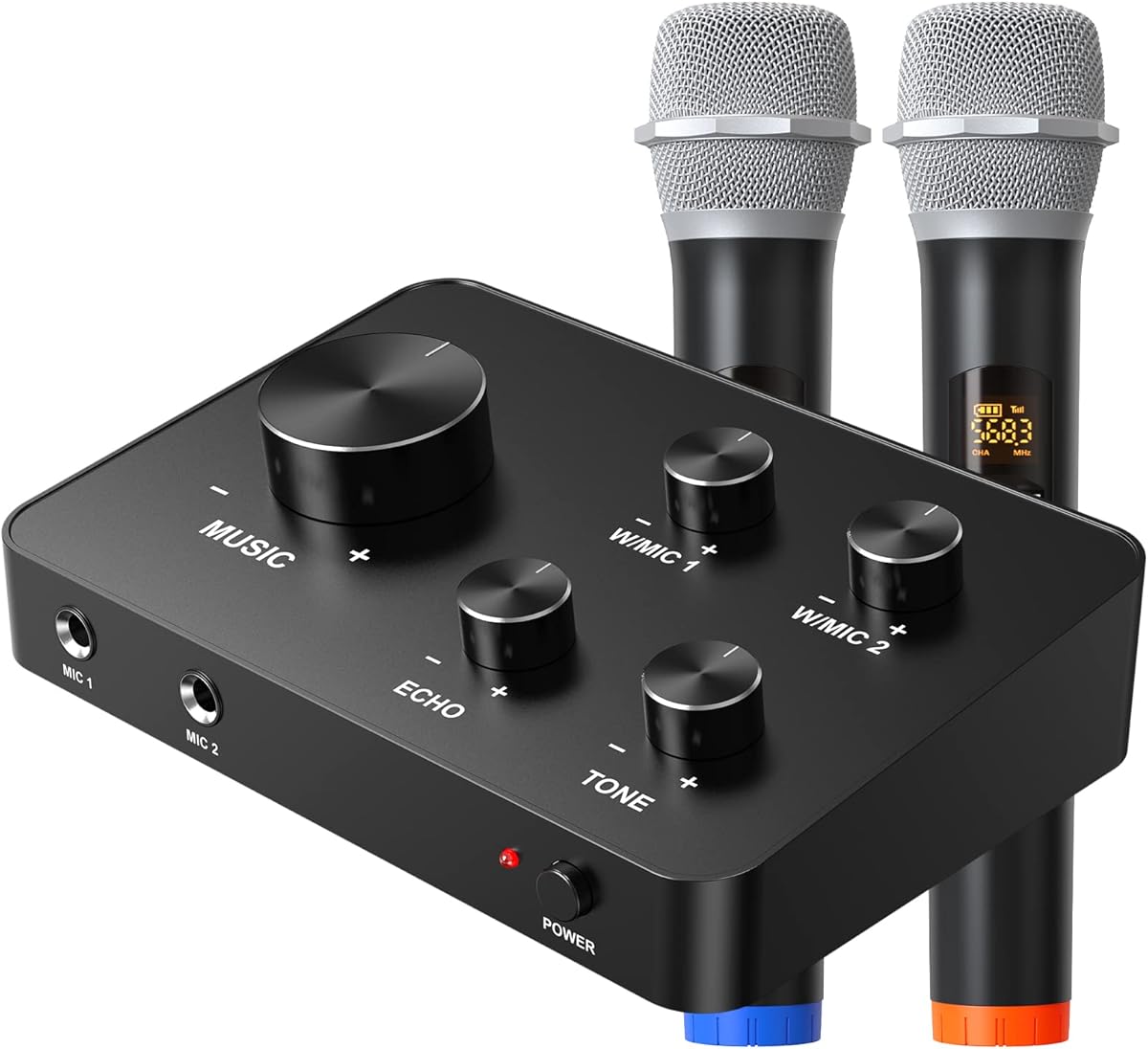
This Rybozen wireless microphone mixer system is a key addition to any karaoke setup aiming for vocal clarity. It is rated 3.8 stars offering basic functionality that suits home parties and casual entertainment needs.
We may earn a commission when you buy through this link, at no additional cost to you.
The dual wireless microphones operate within a 100ft range allowing singers to move freely across the room. The mixer includes echo and tone controls which let you adjust the sound to match your voice style.
While the sound quality is decent for the price it may lack the precision of higher end professional mixers. The HDMI and AUX inputs make it compatible with most TVs and speakers which simplifies connections.
For users wanting to upgrade from built-in laptop speakers this mixer provides necessary vocal enhancement. It is an affordable step up for those looking to improve audio quality during karaoke sessions.
The 100ft range lets you move around while singing without being tied to cables.
Works with HDMI and AUX inputs so you can connect most smart TVs.
We may earn a commission when you buy through this link, at no additional cost to you.
The Sound Town SWM15-MAX mixer offers versatile connectivity options including HD ARC and Optical inputs which enhances audio routing flexibility. It is rated at 3.7 stars indicating it suits intermediate users seeking more control.
We may earn a commission when you buy through this link, at no additional cost to you.
The 16 frequency selections help avoid interference in crowded wireless environments and the vocal cut mode allows you to remove vocals from tracks for practice. This gives you more tools to tailor the music experience.
While the setup may be slightly complex compared to plug-and-play systems the extra controls are beneficial for detailed audio adjustments. It supports multiple inputs making it compatible with soundbars and receivers easily.
If you need advanced control over your audio sources this mixer is a useful tool. It offers features that help refine sound quality for a better overall karaoke experience at home.
Use the vocal cut feature to practice singing with instrumental tracks easily.
HD ARC allows high quality audio return from your TV to the mixer.
We may earn a commission when you buy through this link, at no additional cost to you.
This wireless karaoke microphone is a fun portable tool perfect for impromptu singing sessions and children's entertainment. It holds a 4.1 star rating and is designed to be easy to use without complex setup.
We may earn a commission when you buy through this link, at no additional cost to you.
The dynamic light show adds a visual element to the singing experience and the built-in DSP chip provides decent sound quality. You can enjoy up to 10 hours of playtime on a single charge which lasts for most parties.
While the audio quality is not professional grade it is sufficient for casual fun and gifts. The Bluetooth connectivity allows it to work with smartphones and smart TVs directly making it highly versatile.
If you want a lightweight option for quick entertainment or gifts this mic is a great choice. It brings joy and engagement to gatherings without the need for a full system setup.
Dynamic lights create a fun atmosphere that engages kids and guests during singing.
Six voice effects allow for creative fun and entertaining vocal modifications.
We may earn a commission when you buy through this link, at no additional cost to you.
Selecting the right laptop involves considering multiple factors that impact your overall performance and experience.
For karaoke the display must be large enough to read lyrics comfortably and clear enough to show videos. Look for at least 15 inches and a resolution of 1080p or higher for sharp visuals.
Prioritize IPS panels for wider viewing angles so guests can see the screen from different positions.
A capable processor ensures that streaming video and running karaoke apps does not lag. Aim for Intel Core 3 or AMD Ryzen 3 or higher to handle media tasks smoothly.
Multi-core processors help when you have background apps running while playing music videos.
RAM determines how many programs you can run at once without slowdowns. 8GB is a minimum but 16GB is better for multitasking across streaming and local media.
More RAM helps prevent freezing during long karaoke sessions or when switching apps.
Local storage is important if you plan to download music files or videos. SSDs offer faster boot times and quicker file access than traditional hard drives.
Consider models with expandable slots or external drive options for large song libraries.
Check that your laptop has HDMI or USB-C ports to connect to external speakers or projectors. Wi-Fi 6 ensures stable streaming without buffering during events.
Multiple ports allow you to connect a mic interface or mixer alongside other devices.
Long battery life is crucial for events where power outlets may be scarce or inconvenient. Aim for 8 hours or more to sustain playback throughout a party.
Fast charging support helps you top up quickly between sets or breaks.
While speakers matter external audio is often better. Ensure the laptop has a 3.5mm jack or HDMI audio support for external speakers.
Look for models with audio enhancement software or AI noise reduction to improve vocal clarity.
If you need to move the laptop around the house or to different rooms weight matters. Lighter models make setup easier and reduce strain during transport.
Balance screen size with portability based on whether you use it fixed or on the go.
Set up your laptop in a central location where the screen is visible to all guests. Connect external speakers or a mixer via HDMI or AUX for better sound quality than built-in speakers.
Keep your system updated to ensure smooth performance and security. Clean the screen with a soft microfiber cloth to avoid dust that can interfere with touchscreens or visuals.
Avoid placing liquids near the device during parties to prevent damage. Store the laptop in a protective case when transporting it to safeguard against bumps and scratches.
A screen size of 15 inches or larger is ideal for reading lyrics clearly. The 17 inch models offer even more space but ensure they fit your available table or stand space.
Most laptops have a 3.5mm audio jack that supports mic input but sound quality may vary. For better results use a mixer or USB audio interface to improve vocal clarity and reduce background noise.
A dedicated card is not necessary for most karaoke software. Integrated graphics on Ryzen or Core CPUs handle video playback and lyric apps well for home use cases.
8GB of RAM is the minimum requirement but 16GB is recommended for smooth performance if you run multiple apps simultaneously. More RAM helps prevent lag when switching between browser tabs.
These laptops are suitable for home parties but professional events may require more specialized audio gear. They work well with external mixers and speakers to enhance sound quality for larger crowds.
Windows 11 is widely supported by most karaoke applications and offers stability for media playback. It also provides features like AI tools that can help with organization and content creation.
Ensure the vents are not blocked and use the laptop on a hard flat surface for better airflow. If possible use a cooling pad and take breaks to let the machine cool down during long events.
Popular choices include apps that support YouTube lyric videos or dedicated karaoke platforms. Ensure your app supports streaming and audio output settings that match your speaker connections.
To summarize the HP 17 inch Business Laptop and the NIMO 15.6 AI Ready Laptop stand out as top picks for different needs. They offer strong performance and value for hosting karaoke at home.
When choosing prioritize display quality and connectivity to ensure your audio and visuals sync properly. A balance of RAM and storage will help you run apps smoothly without interruptions.
Remember that prices may vary so check current listings before purchasing. With the right setup your home entertainment experience will be seamless and enjoyable for all guests.