
Clip Busy Light Standard
4.4Editor score
Affordable USB option
Clip fits monitors easily
Manual color toggles
This guide compares the top 10 busy lights for office use to help you reduce interruptions and boost productivity in your workspace or home office.
Finding the right busy light for office environments can transform how your team communicates. These simple devices signal availability to prevent unnecessary interruptions during critical tasks.
We evaluated ten leading models based on compatibility, ease of use, and design. Our comparison covers wired and wireless options tailored for modern hybrid work settings.
Each pick highlights key strengths and ideal use cases. Note that product availability and details may shift over time so verify specifications before purchasing.
4.4Editor score

4.3Editor score
4.2Editor score
This table summarizes the core specifications of each model so you can quickly compare size connectivity and target use cases.


The Kuando Busylight UC Omega earns top marks for seamless integration with unified communication platforms. It automatically reflects your status during calls and meetings to keep colleagues informed.
We may earn a commission when you buy through this link, at no additional cost to you.
Its built in ringer alerts you to incoming chats even if you are not wearing a headset. The free software supports Teams Zoom and Cisco Jabber ensuring broad enterprise compatibility.
Setup involves installing the kuandoHUB application which manages status synchronization. While effective this software dependency adds a layer of configuration not found in simpler models.
This model is ideal for offices using standardized softphones that need reliable presence indicators. Choose it if you value automated status updates over manual control.
The included software monitors your active calls to adjust the light color automatically without manual input.
Eight distinct ringtones help you hear notifications clearly when your attention is focused elsewhere.
We may earn a commission when you buy through this link, at no additional cost to you.
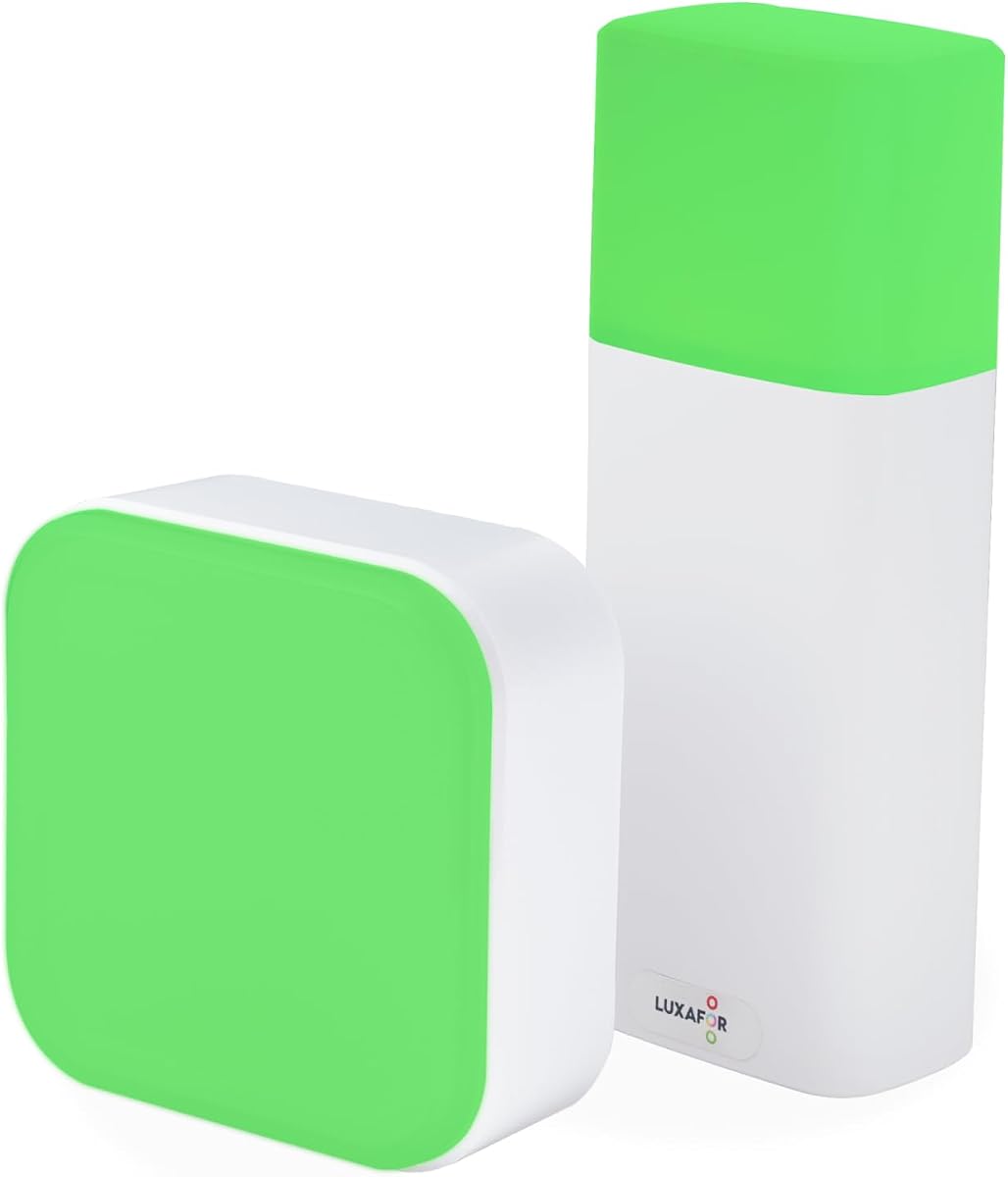
The Clip Busy Light Standard offers a straightforward way to signal availability without complex software setup. It relies on physical switches to toggle between red and green indicators.
We may earn a commission when you buy through this link, at no additional cost to you.
Its fifty nine inch USB cable provides flexibility for placement on desks or walls. The metal clip securely attaches to monitors up to thirty millimeters thick for stable positioning.
Users must manually change colors when their status changes which prevents automatic syncing. This limitation keeps costs low and removes the need for computer configuration.
Pick this model if you want an inexpensive visual signal for home offices or shared desks. It works well for individuals who prefer simple hardware over app based solutions.
The long cable allows you to position the light where colleagues can see it from across the room.
Tap the top to switch colors instantly without needing to interact with a computer.
We may earn a commission when you buy through this link, at no additional cost to you.
This variant mirrors the standard model with a focus on visibility and durability. The taller tube design ensures the light is noticeable from various angles in open offices.
We may earn a commission when you buy through this link, at no additional cost to you.
Installation requires no tools as the clip grips most monitor edges securely. You control the state manually to indicate availability or focus time as needed.
While it lacks automated syncing the simplicity makes it reliable for any environment. Support is available through the seller to resolve any hardware issues quickly.
Choose this for personal workspaces where automatic syncing is not required. It serves as a clear visual barrier to maintain focus during deep work sessions.
The vertical design makes the status light more prominent compared to flat alternatives.
Customer service offers replacements or accessories to ensure continued operation.
We may earn a commission when you buy through this link, at no additional cost to you.
This busylight expands on basic red and green states by adding yellow blue and purple indicators. These extra colors help communicate nuanced availability statuses to nearby coworkers.
We may earn a commission when you buy through this link, at no additional cost to you.
It connects via USB-C for modern device compatibility and includes a short adapter. The accompanying software automates status changes when you join calls on Teams or Zoom.
Manual tapping allows quick changes without relying on software sync. This dual mode ensures you stay in control even if the background application encounters issues.
Select this option if you need more than binary availability states. It suits dynamic teams that benefit from clearer visual communication signals.
Purple specifically marks Do Not Disturb to signal deep focus periods more clearly.
Balance automation with manual tap toggles for better flexibility.
We may earn a commission when you buy through this link, at no additional cost to you.
The Switch Pro 2 is designed specifically for conference rooms where software installation is restricted. It uses a rotating cube inside the room to signal availability outside.
We may earn a commission when you buy through this link, at no additional cost to you.
Bluetooth 5.2 connectivity supports distances up to eighty meters ensuring reliable communication. This eliminates the need for IT tickets or admin approvals to install apps.
Installation uses included magnets to attach the exterior indicator to metal doors or frames. The system is self contained and operates independently of personal computers.
Invest in this if you manage shared spaces with strict security policies. It provides a robust hardware based solution that respects IT constraints.
Control room status without leaving the meeting or accessing any digital interface.
The wireless link stays stable even through walls in typical office layouts.
We may earn a commission when you buy through this link, at no additional cost to you.
This model stands out for its support of custom integrations via a software development kit. Teams can build their own workflows to link the light with internal tools.
We may earn a commission when you buy through this link, at no additional cost to you.
It offers adjustable brightness to match office lighting conditions without causing glare. Incoming call alerts flash brightly to ensure you never miss a message.
While it supports most UC platforms some features are limited on Mac systems. The software requires initial configuration to map status changes to light colors.
Choose this if you have technical resources to leverage the SDK. It fits specialized environments needing custom automation beyond standard apps.
The SDK enables developers to connect the light to niche business applications.
Bright flashing patterns draw immediate attention to incoming communications.
We may earn a commission when you buy through this link, at no additional cost to you.
This device offers unique brightness control allowing you to adjust light intensity. A long press adjusts brightness while a short tap changes status colors.
We may earn a commission when you buy through this link, at no additional cost to you.
It runs on rechargeable power making it easy to move between desks or rooms. The compact form factor keeps it unobtrusive on crowded work surfaces.
You cannot change status while charging which limits usability during power replenishment. However the battery lasts long enough to minimize frequent charging needs.
Pick this for flexible workspaces where portability matters. It suits those who want control over light intensity without software dependencies.
Dimming prevents the light from being too harsh in low light environments.
The wireless design allows you to take the status indicator with you anywhere.
We may earn a commission when you buy through this link, at no additional cost to you.
The Alpha model features a tall cylindrical design that stands upright on desks. It integrates with the same software ecosystem as the Omega model for unified control.
We may earn a commission when you buy through this link, at no additional cost to you.
Its built in ringer provides audio cues for incoming calls and chats. You can adjust volume and brightness through the settings menu easily.
The height makes it noticeable but may take up more desk space than round units. It remains a strong choice for users prioritizing visibility.
Opt for this if you prefer a traditional indicator shape. It offers reliable presence signaling for standard office setups.
Software allows fine tuning of light intensity to match your workspace.
Mute options and volume controls help manage noise levels effectively.
We may earn a commission when you buy through this link, at no additional cost to you.
This version of the Omega adds a magnet kit for easy wall or frame mounting. It retains the compact ball shape that fits easily on any desk.
We may earn a commission when you buy through this link, at no additional cost to you.
The LED is powerful enough to be seen despite its small size. It connects via USB and syncs with common UC platforms automatically.
The included magnet simplifies installation on metal surfaces without screws. This makes it versatile for shared spaces where permanent mounting is not desired.
Select this if you need a tiny status indicator with flexible placement. The magnet kit adds convenience for vertical mounting options.
The small diameter minimizes desk clutter while keeping status visible.
Use the magnet to attach it to metal partitions or whiteboards.
We may earn a commission when you buy through this link, at no additional cost to you.
The Cube 2 runs on a rechargeable battery for up to ninety hours on a charge. It uses a simple rotate mechanism to change colors without any software.
We may earn a commission when you buy through this link, at no additional cost to you.
The magnetic mount allows you to place it outside meeting rooms or on cubicle walls. It is designed for hot desk environments where devices move frequently.
While it requires manual rotation the lack of apps simplifies IT administration. The eco mode extends battery life significantly for long workdays.
Choose this for teams needing a completely standalone solution. It provides clear status signals with zero computer dependency.
Run untethered for days so you can move freely without cables.
Rotate the cube physically to cycle through colors quickly.
We may earn a commission when you buy through this link, at no additional cost to you.
Selecting the right model depends on your technical environment and workspace needs.
Decide between USB wired or wireless battery powered options. Wired models are simple but restrict placement to cable reach. Wireless units offer portability but require charging.
Choose wireless if you move desks often or need to mount on walls without outlets.
Check if the light syncs with your current call platform. Some models require specific software to link status to Teams or Zoom automatically.
Opt for auto sync if you want hands free status changes during meetings.
Determine if your IT policy allows background applications. Some lights work without software using manual toggles which simplifies approval.
Pick manual models for IT locked environments to avoid installation hurdles.
Consider the available desk space. Taller units are visible but take more room while compact balls fit anywhere.
Select a small footprint for cluttered desks to keep surfaces clear.
Basic lights use red and green while advanced ones add yellow and purple. More colors help convey nuanced states like away or deep focus.
Choose multi color if your team needs more than just available busy states.
Look for built in ringtones that notify you of incoming calls. This ensures you catch messages even when not wearing a headset.
Prioritize audio alerts if you are often distracted or away from the screen.
Assess how you plan to attach the light. Clips work for monitors while magnets fit metal doors and frames.
Select magnets if you need to place status indicators outside rooms.
Check for robust construction and clear warranty terms. Frequent use may require replacement so reliable support is essential.
Prioritize brands offering direct replacement guarantees for peace of mind.
Begin by connecting the light to a USB port or charging it fully. Place it where colleagues can see it clearly from walking paths.
Use the manual button or software settings to set your status. For automatic models ensure the software runs in the background.
Clean the surface with a dry cloth to remove dust. Keep firmware updated to maintain compatibility with your communication tools.
Some models offer plug and play functionality without software. You can use manual buttons to toggle status manually. This is ideal for strict IT environments that block installations.
Yes they are popular for home offices too. The same features help signal to family members that you are working. Just ensure you have USB access or battery power.
Basic units use red and green. Advanced models add yellow blue and purple for more nuance. Check the specs to see which colors suit your team's needs.
Battery models last from forty to ninety hours on a charge. Usage and color affect runtime so check the manufacturer details. Wireless lights need occasional charging via USB-C.
Many units include clips or magnets for wall mounting. Ensure the surface is flat or metal for secure attachment. Some models come with adhesive strips for extra hold.
Most modern lights integrate with Zoom via software. Install the required app to sync status automatically. Manual models still work without integration if you prefer.
The Kuando Busylight UC Omega and Clip Busy Light Standard lead in integration and value respectively. Your choice depends on whether you prioritize automation or simplicity.
Prioritize models that match your technical environment and workspace layout. Wireless units offer freedom while wired ones ensure steady operation without charging.
Always verify current specifications and support before buying to ensure the device fits your specific needs effectively.