
10Gb PCIe NIC Intel 82599EN
4.5Editor score
Genuine Intel 82599EN Silicon
No vendor lock on SFP+ cage
Plug and play on Proxmox
This guide compares the top Fiber Optic Network Interface Cards for speed, reliability, and compatibility to help you choose the right adapter for your network.
Choosing the right Fiber Optic Network Interface Card is essential for modern high-speed networking needs. Whether you run a home lab, manage a small business server, or need low-latency gaming performance, the right adapter ensures stable connectivity. These cards allow your system to connect directly to fiber optic cables, offering speeds far beyond standard copper Ethernet and immunity to electromagnetic interference.
We evaluated ten top-rated Fiber Optic Network Interface Cards based on chipset quality, compatibility with operating systems, and support for advanced networking features like VLAN tagging and virtualization. Our selection includes models from reputable brands like Intel, StarTech, and Mellanox, ensuring you find a card that fits your budget and technical requirements without sacrificing performance or reliability.
Each pick in this list highlights specific strengths such as budget-friendly pricing, dual-port capabilities, or enterprise-grade RDMA support. While prices and availability can change rapidly due to market demand, these models represent the best current options for upgrading your network infrastructure. Always verify driver support and slot compatibility before purchasing to ensure a smooth installation process.
4.5Editor score

4.9Editor score

5.0Editor score
This table provides a side-by-side comparison of all ten Fiber Optic Network Interface Cards reviewed in this guide. It highlights key specifications including controller type, interface speed, port configuration, and compatibility with various operating systems to help you quickly identify the model that best fits your specific networking requirements and budget constraints.


The StarTech 2-Port GbE SFP Network Card stands out as the top choice for users seeking reliable gigabit fiber connectivity. With a perfect 5.0 rating, it delivers exceptional stability using the Intel I350 Series chipset. This card is ideal for desktops and servers needing open SFP slots that work with any MSA-compliant module.
We may earn a commission when you buy through this link, at no additional cost to you.
Its unlocked 1GB SFP slots provide immense flexibility, allowing you to choose singlemode or multimode transceivers without vendor restrictions. The built-in heatsink ensures sustained performance under load, while LED indicators assist with troubleshooting port status. It supports IPv4, IPv6, and various offloading features to maximize throughput.
While the price is higher than generic alternatives, the reliability and broad compatibility justify the investment for professional environments. It works seamlessly with Windows Server, Linux, and VMware, making it a versatile choice for virtualization. The included low-profile bracket ensures it fits in smaller cases without issue.
For anyone prioritizing stability and flexibility in a gigabit fiber solution, this card is the definitive choice. Its robust design and enterprise-grade features make it suitable for mission-critical applications where network downtime is not an option. We highly recommend it for server upgrades and office networking.
The open SFP slots allow compatibility with third-party transceivers, reducing long-term costs without sacrificing performance or reliability.
A built-in heatsink keeps the controller chip cool during prolonged high-load operations, preventing throttling and ensuring consistent speeds.
We may earn a commission when you buy through this link, at no additional cost to you.
The LinksTek X520 DA1 brings affordable 10GbE speeds to NAS and desktop environments. Rated 4.3 stars, it uses the trusted Intel 82599ES controller to deliver stable LAN and SAN connectivity. This makes it perfect for high-speed storage applications, virtualization, and gaming where latency matters.
We may earn a commission when you buy through this link, at no additional cost to you.
Its PCIe 2.0 x4 interface provides sufficient bandwidth for 10GbE operations while maintaining compatibility with x4, x8, and x16 slots. The card supports advanced features like SR-IOV and QoS, ensuring efficient traffic management across virtual machines. You can use SFP+ transceivers or DAC/AOC cables for versatile connectivity options.
Users should note that while Windows Server works plug-and-play, Windows 10 and 11 may require manual driver installation. Despite this minor setup step, the performance gains are substantial. The package includes both full height and low profile brackets, making it adaptable to various case sizes.
For users needing to upgrade from gigabit to 10-gigabit speeds without breaking the bank, this adapter is a solid contender. It balances performance and cost effectively, especially for home labs and small businesses. Ensure your PCIe slot and OS are compatible before purchasing for a smooth experience.
Support for iSCSI, FCoE, and NFS allows seamless integration with storage networks and virtual environments for maximum efficiency.
Both full height and low profile brackets are included, ensuring the card fits in standard towers or compact mini-ITX chassis.
We may earn a commission when you buy through this link, at no additional cost to you.
The Asus XG-C100F delivers blazing fast 10 Gbps speeds, ten times faster than standard gigabit Ethernet. Rated 4.3 stars, it combines performance with a stylish design featuring a sophisticated aluminum heatsink. This cooling solution ensures the card stays cool during high-performance tasks like video streaming or large file transfers.
We may earn a commission when you buy through this link, at no additional cost to you.
Its SFP+ cage allows for both fiber optic and direct-attach copper connections, offering great flexibility. Built-in QoS technology automatically prioritizes bandwidth for gaming or important streams, reducing lag and congestion. The card supports PCIe 2.0/3.0 x4, ensuring compatibility with modern motherboards.
While the single port limits expansion compared to dual-port cards, the reliability and speed make it a strong choice for single-connection upgrades. The passive cooling design helps maintain optimal operating temperatures without fan noise. Asus provides reliable support and warranty coverage for peace of mind.
For home users or professionals needing a fast, reliable upgrade to fiber networking, this card is an excellent option. Its premium build quality and thoughtful features like QoS justify the higher price point. Just ensure your case has adequate airflow to complement the heatsink design.
Quality of Service technology ensures critical applications get priority bandwidth, preventing lag during heavy network usage.
A custom aluminum heatsink dissipates heat effectively, maintaining performance stability during extended high-throughput sessions.
We may earn a commission when you buy through this link, at no additional cost to you.
The 10Gtek 10Gb PCI-E NIC offers a cost-effective way to get genuine Intel 82599EN performance. With a 4.4 rating, it provides stable server connectivity and supports key virtualization features. This card is designed for environments needing robust 10G throughput without the premium price of branded Intel units.
We may earn a commission when you buy through this link, at no additional cost to you.
Its single SFP+ port supports various modules and cables, making it versatile for data center or home lab setups. The PCIe X8 lane ensures full bandwidth utilization, and it includes both standard and low profile brackets for flexible installation. Technical support is available for lifetime assistance with setup.
Users must correctly install drivers on Windows 10 for functionality on Windows 11, as noted in documentation. While hot swapping is not supported, typical server environments do not require this feature. The 30-day return window and 3-year warranty provide confidence in the purchase decision.
This adapter is ideal for IT professionals managing servers needing reliable 10G connectivity on a budget. The combination of a proven chipset and comprehensive support makes it a strong contender. Verify your OS compatibility carefully to avoid driver issues during installation.
Ongoing technical support ensures help is available whenever setup or configuration challenges arise during use.
Inclusion of low profile and standard brackets ensures compatibility with various chassis sizes from compact towers to racks.
We may earn a commission when you buy through this link, at no additional cost to you.
The Realtek RTL8127 controller card offers modern PCIe Gen4 x1 performance with robust stability features. Rated 4.5 stars, it utilizes RealWoW technology for wake-on-LAN and diagnostics. This makes it suitable for systems requiring quick deployment and reliable daily network performance in mixed environments.
We may earn a commission when you buy through this link, at no additional cost to you.
Its PCIe Gen4 x1 design ensures it works in most standard slots including x1, x4, x8, and x16. Comprehensive protocol support includes VLAN tagging and flow control, adapting to complex network setups. The QR code scanning feature simplifies driver installation for users with mobile devices.
However, Linux users must be aware that kernel support caps at 6.15, and FreeBSD or ESXi are not supported. This limits compatibility with some virtualization platforms or newer distributions. For mainstream Windows and standard Linux desktops, it remains a reliable choice.
For users upgrading modern PCs with PCIe Gen4 lanes, this card provides a future-proof networking option. Its balance of speed and flexibility supports daily and professional needs well. Ensure your OS version matches the supported list to avoid potential compatibility hurdles.
Leveraging PCIe Gen4 ensures low latency and high bandwidth efficiency for demanding network applications.
QR code scanning provides a quick way to download drivers directly to your device for streamlined setup.
We may earn a commission when you buy through this link, at no additional cost to you.
This adapter delivers genuine Intel 82599EN silicon at a budget-friendly price point, rated 4.5 stars. It sustains 10 Gigabit throughput for NAS transfers and VM migration without expensive proprietary costs. The lack of vendor lock on the SFP+ cage allows use with third-party optics and DAC cables.
We may earn a commission when you buy through this link, at no additional cost to you.
Plug and play compatibility with Proxmox, TrueNAS, and Unraid makes it easy to integrate into homelabs. The four PCIe lanes leave room on the motherboard while still providing full performance. Both full-height and low-profile brackets are included for versatile mounting options.
Users should note the passive heatsink runs warm, so adding case airflow or a fan is recommended for silent builds. Jumbo frames up to 9KB and checksum offload help maintain high efficiency under load. It's a practical choice for cost-conscious professionals.
For anyone building a high-performance lab or server on a tight budget, this card offers unbeatable value. The combination of real Intel silicon and open compatibility is rare at this price. Just ensure adequate airflow to manage heat effectively during heavy usage.
Using third-party optics reduces costs significantly while maintaining reliable connectivity with no restrictive vendor checks.
Native support for popular NAS platforms means drivers are pre-installed, enabling immediate use without extra configuration.
We may earn a commission when you buy through this link, at no additional cost to you.
The CX4121A provides dual 25GbE SFP28 ports and stands out with a massive 4.9 rating. Based on Mellanox ConnectX-4 Lx controller, it offers intelligent RDMA for storage and virtualization servers. This premium solution handles data analytics and database workloads with exceptional throughput and low latency.
We may earn a commission when you buy through this link, at no additional cost to you.
Its PCIe Gen 3.0 x8 interface ensures full bandwidth utilization across both ports. Advanced network features like NVGRE and VXLAN support overlay networks efficiently, while auto-negotiation adapts to available lanes. It supports both Windows and Linux systems with extensive OFED compatibility.
Due to high performance, the card may generate heat and requires a server environment with robust cooling. Users must ensure their switches support 25GbE SFP28 optics for full functionality. Despite the higher complexity, the raw power delivers unmatched networking capability for data centers.
For enterprises or advanced users managing massive data traffic, this is the ultimate networking upgrade. It future-proofs your infrastructure against increasing bandwidth demands. Ensure your infrastructure matches the card's requirements to fully leverage its impressive capabilities.
Remote Direct Memory Access reduces CPU overhead by transferring data directly between memory, maximizing throughput.
Support for VXLAN and NVGRE enables efficient multi-tenant virtualization and complex cloud network architectures.
We may earn a commission when you buy through this link, at no additional cost to you.
This 10Gb card includes a multimode optical module, making it ready to use right out of the box. It features the proven 82599EN chip for low consumption and stable performance. Users appreciate the gold-plate fingers which improve contact reliability and extend service life against oxidation.
We may earn a commission when you buy through this link, at no additional cost to you.
The PCIe X1 port ensures broad slot compatibility, working with x1, x4, x8, and x16 slots. Auto adaptive transmission rates support both half and full duplex modes for flexible networking. It reduces CPU usage by offloading checksum tasks, freeing resources for applications.
While specific ratings aren't available, the inclusion of the module adds value for users needing an immediate fiber setup. Ensure your switches and cables match the multimode type for proper connectivity. The passive design is ideal for standard tower cases.
For users looking for an all-in-one solution to get online fast, this kit is practical. It simplifies the buying process by including a necessary component. Just verify your hardware supports PCIe X1 to ensure stable operation without bandwidth bottlenecks.
The bundle includes a multimode transceiver, saving the effort and cost of sourcing one separately for initial setup.
Gold-plate fingers resist corrosion, ensuring reliable electrical contact and preventing sudden disconnections over time.
We may earn a commission when you buy through this link, at no additional cost to you.
The TP-Link TX401 delivers 10Gbps speeds using standard copper cables instead of fiber. With a 4.2 rating, it offers versatility for environments where fiber is not feasible. It supports 10GBase-T technology and is backwards compatible with lower speeds for easy integration.
We may earn a commission when you buy through this link, at no additional cost to you.
Included with the card is a 1.5m CAT6A Ethernet cable rated for full 10Gbps performance. QoS technology helps gamers prioritize traffic, avoiding congestion during intense sessions. A 2-year warranty and 24/7 technical support provide confidence in the purchase.
While it doesn't support fiber optics directly, it provides the best alternative when existing copper infrastructure must be upgraded. The card consumes more power than fiber options but remains efficient for desktop use. Low-profile and full-height brackets ensure it fits any tower.
Ideal for home users and small offices needing fast Ethernet without changing to fiber cabling. Its ease of use and comprehensive warranty make it a reliable choice. Verify your network switch supports 10GBase-T to fully utilize the card's capabilities.
Using standard Ethernet cables simplifies installation and maintenance compared to specialized fiber optic setups.
Quality of Service ensures your game traffic gets priority, maintaining low latency even during heavy downloads.
We may earn a commission when you buy through this link, at no additional cost to you.
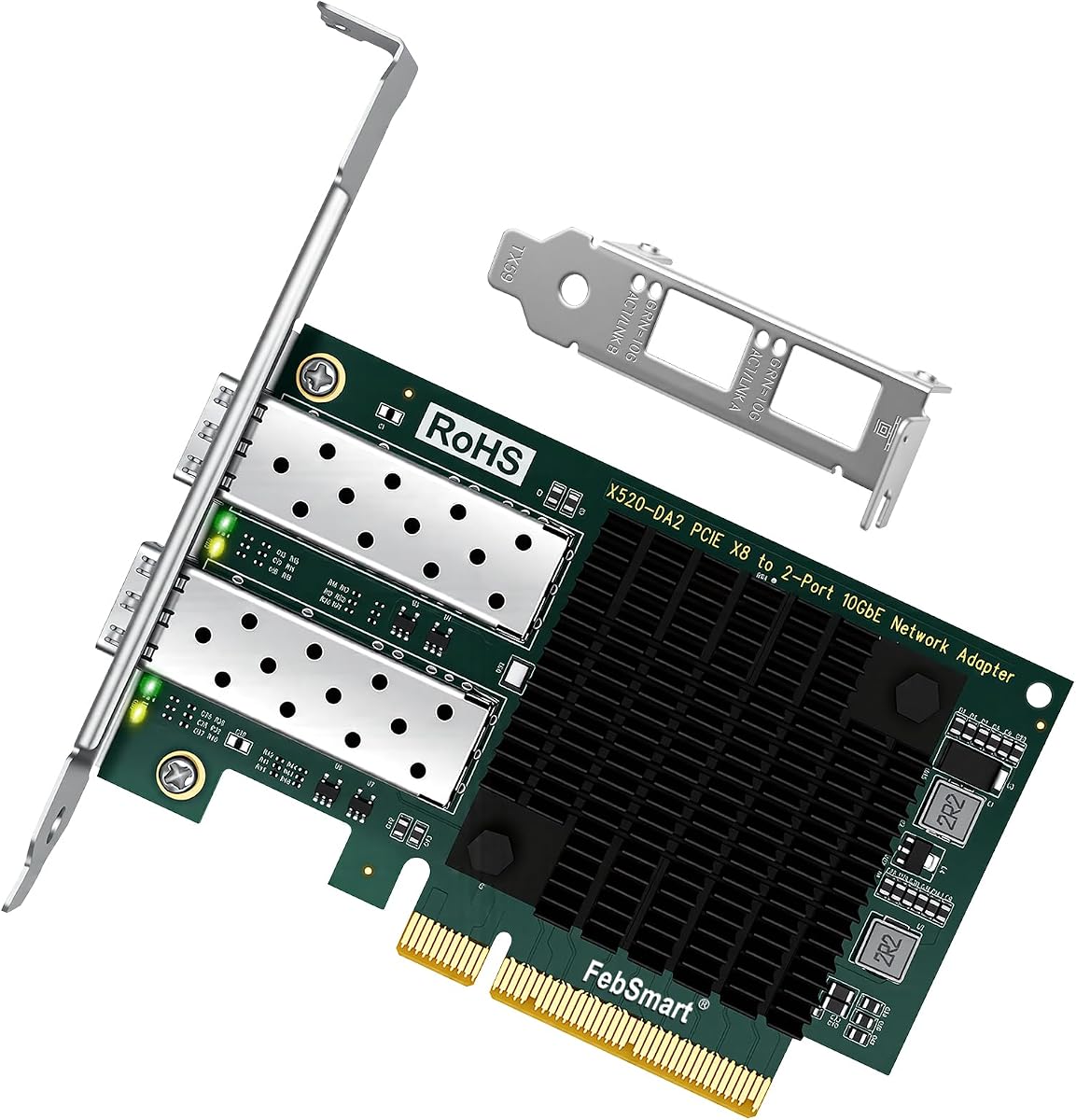
The X520-DA2 offers dual 10GbE SFP+ ports powered by the Intel 82599ES controller. With a strong 4.8 rating, it delivers stable connectivity for data centers and virtualization. This dual-port design allows redundancy or link aggregation, improving overall network resilience and throughput.
We may earn a commission when you buy through this link, at no additional cost to you.
Its PCIe 2.0 x8 interface provides 40 Gbps of total bandwidth, enabling full-duplex connections on both ports. It supports intelligent offloads and SR-IOV for efficient virtualization traffic management. Both full height and low profile brackets ensure fit in any chassis size.
Drivers are needed for Windows 10 and 11, but Windows Server works out of the box. While PCIe 2.0 is older, it still supports 10GbE speeds effectively. The dual port configuration is a significant advantage for those needing multiple network connections.
For users needing dual fiber connections for redundancy or throughput, this card is a top value. It is particularly suitable for virtualization environments where multiple virtual switches are required. Check your PCIe slot availability to accommodate the larger x8 form factor.
Two independent ports allow for link aggregation or failover, ensuring continuous network access if one fails.
Native driver support on Windows Server makes installation seamless for enterprise or advanced home server deployments.
We may earn a commission when you buy through this link, at no additional cost to you.
Selecting the right Fiber Optic Network Interface Card requires understanding your network needs, operating system compatibility, and physical interface requirements. This guide covers the key factors to consider to ensure you choose a card that delivers performance and reliability without compatibility issues.
The controller chipset determines the card's performance, driver support, and feature set. Intel 82599 series chips are reliable for 10GbE, while Mellanox is preferred for RDMA and 25GbE workloads. Realtek is a budget-friendly option but may have limited driver support for virtualization platforms.
Always prioritize well-known chipsets like Intel or Mellanox for better stability and broader OS compatibility.
Decide whether you need 1GbE, 10GbE, or 25GbE speeds based on your network infrastructure. SFP+ ports support fiber optics and DAC cables, while SFP28 is needed for 25GbE. Ensure your switches support the same speed and transceiver type to avoid link issues.
Match the card speed to your switch capabilities to prevent bottlenecks and ensure full utilization.
Check your motherboard's PCIe slot generation and lane count. Most 10GbE cards work on PCIe 2.0 x4, but higher speeds may require PCIe 3.0 x8. Ensure your slot supports the card's required bandwidth to achieve full performance.
Verify slot generation and lane availability in your system specs before purchasing.
Confirm that the card has drivers for your specific OS version. Windows Server usually has built-in drivers, while desktop Windows may need manual installation. Linux support varies by distribution and kernel version, so check the manufacturer's list.
Ensure OS driver availability to avoid functionality issues after installation.
If using VMware or Hyper-V, look for support for SR-IOV and VT-d to improve virtual machine network performance. Advanced features like VLAN tagging, jumbo frames, and flow control help optimize traffic management in complex environments.
Choose cards with virtualization support to maximize efficiency in server or cloud setups.
Measure your case's height availability to determine if you need a low-profile or full-height bracket. Some cards include both, ensuring compatibility with towers or compact mini-ITX systems. Proper fit is essential for airflow and mounting stability.
Confirm bracket types included to avoid installation problems in your specific chassis.
High-speed cards generate heat, so passive heatsinks or active cooling may be required. Ensure your case has adequate airflow or consider adding a fan for silent builds. Thermal throttling can reduce performance if the card overheats.
Prioritize airflow and cooling design to maintain stable performance under load.
Some cards lock specific transceivers, so look for open or unlocked SFP cages. Third-party SFP modules are often cheaper and work well with unlocked cards. Check if the card requires branded optics to avoid unexpected hardware costs.
Opt for unlocked cages to save money and increase flexibility with module choices.
Before installing the card, ensure your computer is powered off and unplugged. Ground yourself to prevent static discharge and remove the case cover. Locate a compatible PCIe slot on the motherboard and align the card carefully to insert it fully.
After installation, secure the card with screws and replace the case cover. Power on the system and check if the OS detects the new hardware. Install necessary drivers from the manufacturer's website if automatic detection fails or features are missing.
Regularly clean the card and ensure adequate airflow to prevent dust buildup and overheating. Monitor link status and temperatures using system tools to maintain optimal performance. Update drivers periodically to get bug fixes and security patches.
A Fiber Optic Network Interface Card allows your computer to connect to a network using fiber optic cables. It provides faster speeds, longer cable distances, and immunity to electromagnetic interference compared to copper Ethernet. These cards are essential for high-performance servers and data centers.
You need SFP+ or SFP28 transceivers depending on your card's speed. Most unlocked cards work with third-party transceivers to save money. Ensure the transceiver matches your switch's fiber type, such as singlemode or multimode, for successful connection.
No, fiber cards require switches with SFP or SFP+ ports. If your switch only has copper ports, use direct-attach copper cables (DAC) if supported. Check switch compatibility before purchase to ensure the card and switch can communicate effectively.
Installation is straightforward for users familiar with PC hardware. You insert the card into a PCIe slot and secure it physically. Software setup involves installing drivers and configuring network settings, which is typically handled via standard OS tools.
Fiber offers higher speeds over longer distances without signal loss. It is immune to electrical interference, making it reliable in noisy environments. Fiber is essential for inter-building connections and high-bandwidth data centers where copper is insufficient.
Yes, many cards support virtualization features like SR-IOV and VLAN tagging. This allows direct network access for virtual machines, improving performance. Ensure your hypervisor supports the card for proper integration into virtual networks.
The Fiber Optic Network Interface Cards reviewed offer diverse options for every networking need. From the reliable StarTech adapter to the high-performance Mellanox CX4121A, each model provides distinct advantages in speed, compatibility, and cost.
Prioritize chipset quality and OS support to ensure your investment lasts. Consider your required bandwidth and physical setup to match the right card to your system without overcomplicating the network.
Prices and availability fluctuate frequently due to demand. Verify current listings and compatibility details before buying to ensure you get the best value. A proper choice guarantees faster data transfers and more stable connections for your projects.