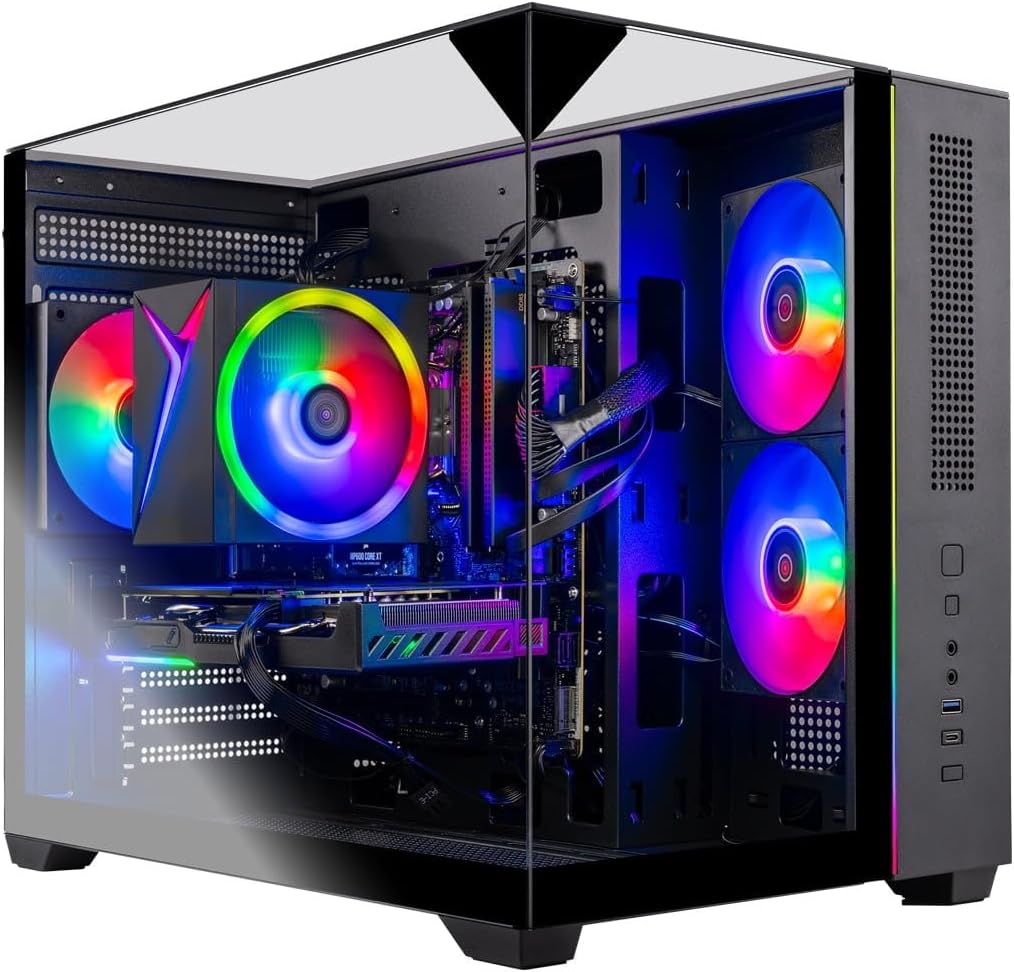
Skytech Gaming PC Desktop
4.5Editor score
Ryzen 7 5700 CPU
RTX 5060 GPU
32GB DDR4 RAM
Compare the top gaming PCs for Escape from Tarkov with detailed specs on CPUs, GPUs, and RAM to find the perfect machine for high FPS gameplay.
Escape from Tarkov demands powerful hardware to handle its intense physics and large maps. Finding the right gaming PC ensures smooth gameplay without frustrating stutters or crashes during critical moments.
We compared ten prebuilt systems based on processor power, graphics capabilities, and memory speed. Each selection offers different price points to suit various budgets while maintaining strong performance standards.
Every pick highlights key specs and real-world benefits for Tarkov players. Note that prices and availability change frequently, so check current listings before making your final purchase decision today.
4.5Editor score

4.2Editor score

4.5Editor score
This side-by-side comparison helps you quickly identify which system offers the best value and performance for running Escape from Tarkov at high settings and frame rates.


This YAWYORE system offers a balanced entry point for Tarkov with a capable eight core processor and modern graphics card. It scores well for value among budget-conscious gamers.
We may earn a commission when you buy through this link, at no additional cost to you.
The AMD Ryzen 7 5700X handles background tasks efficiently while the RTX 5060 delivers steady performance at high settings. The MSI motherboard ensures reliable stability during long raids.
Using DDR4 RAM instead of DDR5 is a trade-off for lower cost but remains sufficient for current needs. Ensure to remove shipping foam inside the case before first power-on.
Buy this if you need a ready-to-play machine without overspending on unneeded features. It is an excellent choice for players focused on getting into the game quickly.
Delivers reliable frame rates for Tarkov without breaking the bank.
Built-in WiFi and Bluetooth simplify setup for wireless headsets.
We may earn a commission when you buy through this link, at no additional cost to you.
The MSI Codex Z2 brings next-gen Blackwell architecture to your desk with strong ray tracing and rasterization capabilities. It stands out for future-proofing your Tarkov experience.
We may earn a commission when you buy through this link, at no additional cost to you.
An eight core Ryzen 7 8700F paired with the RTX 5070 handles intense scenarios effortlessly. The generous 2TB SSD lets you store multiple large titles without constant management.
While effective cooling keeps temps in check the case design remains fairly generic compared to enthusiast builds. This model fits those wanting raw power over aesthetics.
Invest in this unit if you plan on playing future titles or streaming simultaneously. It provides the power headroom needed for demanding creative workflows.
Blackwell architecture offers significant leaps in visual fidelity.
Huge drive space means no need to delete games often.
We may earn a commission when you buy through this link, at no additional cost to you.
This CyberPowerPC system strikes a solid middle ground for performance and price. It uses newer AMD hardware to ensure smooth operation for Tarkov and other shooters.
We may earn a commission when you buy through this link, at no additional cost to you.
The 8700F processor provides ample speed for physics calculations while DDR5 RAM improves responsiveness. You get a complete setup with peripherals included right out of the box.
The main limitation is the 16GB RAM which may limit heavy multitasking later on. However for dedicated gaming sessions this configuration remains quite capable and stable.
Choose this model if you want a complete package without assembling parts yourself. It suits players who need immediate reliability and standard high-quality connectivity.
Includes essential peripherals for immediate gaming setup.
USB-C and high-speed ports support latest accessories.
We may earn a commission when you buy through this link, at no additional cost to you.
KOTIN delivers a highly competitive rig featuring the latest Ryzen 7 9700X and an RTX 5070. It is built to handle high frame rates and advanced graphical settings smoothly.
We may earn a commission when you buy through this link, at no additional cost to you.
The standout feature is the integrated smart display showing real-time hardware stats. This adds a unique utility for monitoring thermals and usage during intense battles.
Ensure you connect your monitor to the graphics card ports as noted to avoid display issues. The 360mm liquid cooler keeps the CPU running cool under sustained loads.
This PC is ideal for enthusiasts who want advanced monitoring tools built in. It serves well for those needing top tier power for streaming and recording.
Smart screen keeps track of system health easily.
WiFi 7 ensures low latency online performance.
We may earn a commission when you buy through this link, at no additional cost to you.
Skytech continues to offer strong value with this desktop configuration. It includes generous memory and storage suitable for extensive gaming libraries and multitasking.
We may earn a commission when you buy through this link, at no additional cost to you.
The tempered glass case offers a sleek look while keeping components cool. It runs popular titles efficiently and comes ready to play with included peripherals.
Using older generation parts keeps the cost low but still meets requirements for most games. The 32GB RAM ensures you have headroom for background applications.
Buy this if you seek a reliable prebuilt with proven components. It is a safe choice for players wanting consistent performance without complex setup.
Tempered glass case provides a modern gaming look.
Includes peripherals to get you started immediately.
We may earn a commission when you buy through this link, at no additional cost to you.
This Skytech model leverages high-end AMD silicon for maximum processing power. It is designed for users who want top performance in both gaming and content creation.
We may earn a commission when you buy through this link, at no additional cost to you.
The Ryzen 7 9850X3D utilizes 3D V-Cache technology to boost gaming frame rates significantly. Paired with a powerful RX 9070 XT it handles modern titles with ease.
A 360mm liquid cooler maintains optimal temperatures even during marathon gaming sessions. The massive 2TB SSD provides ample room for all your favorite games.
Choose this if you need peak performance and are willing to invest accordingly. It is suitable for streaming setups or demanding professional workflows.
Top cache architecture maximizes gaming speed.
Liquid cooler ensures sustained peak performance.
We may earn a commission when you buy through this link, at no additional cost to you.
The O11 Vision model features a stunning case design that showcases internal components. It combines aesthetic appeal with high quality components for a premium experience.
We may earn a commission when you buy through this link, at no additional cost to you.
An X670 motherboard provides extensive connectivity and upgrade potential. The RTX 5070 paired with DDR5 RAM ensures excellent performance for modern titles like Tarkov.
While the price is higher the build quality and component selection justify the cost. The Gold rated PSU and liquid cooler add to long-term reliability.
Buy this if aesthetics and quality are your top priorities. It is a beautiful addition to any setup that performs exceptionally well.
Premium case design highlights internal hardware beautifully.
Gold PSU ensures stable and efficient power delivery.
We may earn a commission when you buy through this link, at no additional cost to you.
This Gamer Xtreme unit focuses on Intel performance paired with efficient graphics. It serves as a solid entry point for those new to PC gaming.
We may earn a commission when you buy through this link, at no additional cost to you.
The i5-13400F handles standard tasks well while DDR5 RAM boosts responsiveness. It is marketed as VR ready which adds versatility beyond just standard gaming.
The RTX 4060 is sufficient for current titles but may lack longevity. Keep in mind that 16GB memory is standard but not expansive for heavy multitasking.
Choose this if you want a reliable Intel-based system at a lower cost. It fits casual players who need decent performance for most games.
Certified for virtual reality headset compatibility.
DDR5 and Gen4 SSD provide modern speed.
We may earn a commission when you buy through this link, at no additional cost to you.
Another variant of the MSI Codex Z2 focuses on memory speed and capacity. It balances CPU strength with a modern graphics card for consistent performance.
We may earn a commission when you buy through this link, at no additional cost to you.
The 32GB of DDR5 RAM ensures smooth multitasking during game sessions. You can run Discord and browsers in the background without impacting gameplay stability.
The RTX 5060 covers most requirements but lacks the headroom for 4K. It remains a solid choice for 1080p or 1440p gaming environments.
Buy this if you value high speed memory for future software needs. It suits gamers who want a balanced machine for long-term use.
DDR5 RAM enhances system responsiveness significantly.
System certified to work with VR headsets.
We may earn a commission when you buy through this link, at no additional cost to you.
The MSI Codex R2 focuses on GPU power and modern connectivity features. It brings a strong graphics card to the table for demanding titles and VR.
We may earn a commission when you buy through this link, at no additional cost to you.
An i5-14400F handles daily tasks well while the RTX 5070 drives visuals. Wi-Fi 6E connectivity ensures low latency for online multiplayer experiences.
The air cooling system is adequate but may not match liquid coolers under load. However for standard gaming usage the temperatures should remain within safe limits.
Choose this if you prioritize graphics performance and connectivity over raw CPU. It fits VR users or those needing robust frame rates for streaming.
Strong GPU supports VR and high fidelity visuals.
Wi-Fi 6E reduces lag during online play.
We may earn a commission when you buy through this link, at no additional cost to you.
Selecting the right system requires balancing CPU speed graphics power and memory to run this demanding title smoothly.
Escape from Tarkov relies heavily on single core speed and cache size for physics calculations. Look for CPUs with at least six cores and high boost clocks to avoid frame drops.
Prioritize newer generation processors to ensure longevity and support for modern software standards.
A strong GPU is essential for rendering detailed environments and maintaining high frame rates. Aim for cards with at least 8GB VRAM to handle high texture settings.
Modern GPUs with ray tracing support will enhance visuals but may require tuning settings for stability.
RAM capacity matters significantly for multitasking while gaming. 32GB of DDR5 memory is recommended to run background apps without impacting performance.
Faster RAM speeds can help reduce stuttering in large open world environments.
Modern games require fast load times and large drive space. A 1TB NVMe SSD is the minimum standard for current titles and system files.
Choose larger drives if you plan to install multiple games or store large video files.
Sustained performance requires effective cooling to prevent thermal throttling. AIO liquid coolers or high quality air coolers maintain stable temps during long raids.
Ensure the case has good airflow to support the cooling solution effectively.
A stable power source is critical for system reliability and future upgrades. Look for units with 80 Plus Gold certification to ensure efficiency and safety.
Higher wattage units give you headroom for adding more components later.
Modern peripherals require diverse ports and fast wireless standards. USB-C and Wi-Fi 6E support ensure compatibility with the latest devices.
Check for enough USB ports to connect all your input devices comfortably.
Prebuilt systems vary in how easy they are to upgrade. Standard components make swapping storage or RAM straightforward for future needs.
Research the motherboard and case size to confirm upgrade paths before buying.
Keep your PC in a well ventilated area to prevent heat buildup. Dust regularly with compressed air to maintain cooling efficiency over time.
Update your graphics drivers and system BIOS to ensure optimal performance. Use manufacturer software to manage fan speeds and lighting preferences.
Monitor system temperatures using built-in tools to catch issues early. Proper cable management improves airflow and makes future upgrades easier.
The RTX 5070 or RX 9070 XT offer excellent performance for high settings. Mid-range cards like the RTX 5060 still run the game well at 1080p.
While 16GB runs the game, 32GB helps when streaming or running background apps. It ensures smoother performance without stuttering.
The game itself takes significant space plus updates. A 1TB SSD is ideal to store Tarkov and other large games comfortably.
Yes all listed systems run the latest game patches. Ensure your OS is updated for the best compatibility and performance.
Modern WiFi standards like 6E provide low latency connections. Ethernet is still preferred but good WiFi is often sufficient for play.
Most models allow RAM and storage upgrades. GPU swaps depend on power supply capacity and physical case space inside.
The top three picks offer distinct advantages whether you need budget efficiency or premium features. Select based on your specific playstyle and desired resolution settings.
Prioritize CPU speed and RAM capacity for Tarkov to minimize stutter and load times. Graphics power should match your monitor resolution for best results.
Check current pricing and availability before purchasing as deals change frequently. A solid prebuilt setup ensures you start playing Tarkov quickly.