
H3 Standalone Biometric Clock
4.1Editor score
No monthly fees required
Standalone offline operation
Auto hour calculation built-in
This guide compares the top biometric fingerprint scanner time clock systems for small businesses, focusing on accuracy, security, and payroll integration
Choosing the right time clock system is essential for modern small businesses aiming to streamline operations and ensure accurate payroll processing. Biometric solutions offer a reliable way to track employee hours while preventing common issues like buddy punching or data entry errors.
We evaluated leading models based on recognition speed, data security, setup ease, and integration capabilities. Our analysis covers standalone units, cloud-enabled devices, and multi-modal systems to help you find the best fit for your unique workplace needs and budget constraints.
Each pick highlights key strengths, ideal use cases, and potential limitations based on manufacturer specifications and user feedback. Prices and availability change frequently, so verify current details on the product pages before making your final purchasing decision for your team.
4.1Editor score

4.7Editor score

4.1Editor score
This side-by-side comparison highlights the core specifications and capabilities of the leading biometric time clock systems currently available for small business owners seeking reliable workforce management tools.




This NGTeco model stands out with its rapid 0.5 second fingerprint recognition, ensuring minimal queue times during peak clock-in hours. It offers a balanced blend of standalone reliability and app connectivity for modern workforce management needs.
We may earn a commission when you buy through this link, at no additional cost to you.
The advanced sensor handles wet or dry fingerprints effectively, maintaining accuracy across different environmental conditions. Real-time sync allows managers to edit punches instantly via the mobile app, reducing administrative overhead significantly.
While it requires a local network for syncing data between the app and device, the offline functionality ensures records remain secure even during outages. The US-based support team provides reliable assistance for any operational issues.
This device is ideal for small businesses needing fast, accurate clock-ins without complex cloud dependencies. Its flexible payroll sync and intuitive app make it a top choice for efficiency-focused teams.
The 0.5 second authentication speed ensures employees spend less time waiting and more time working, improving overall productivity.
Export timesheets via USB or email aligns tracked hours with any payroll cycle, reducing manual calculation errors.
We may earn a commission when you buy through this link, at no additional cost to you.
The H3 Standalone Biometric Clock delivers reliable time tracking without any monthly fees, making it perfect for cost-conscious small businesses. Its standalone design ensures data remains local and secure without needing internet access.
We may earn a commission when you buy through this link, at no additional cost to you.
Setup is straightforward with minimal learning required, and automatic hour calculations eliminate manual math errors. The multi-language support caters to diverse teams, while RFID cards offer an alternative to fingerprint scanning.
Without remote access, managing attendance requires physical data exports via USB. However, this offline approach enhances security for businesses prioritizing data privacy over real-time monitoring capabilities.
Choose this clock if you want a simple, affordable system that works immediately out of the box. It fits well for offices or shops needing basic tracking without ongoing costs.
With zero monthly fees and no software installation, the upfront cost is the only expense, simplifying budget planning for small businesses.
Data stays private on the device and transfers only via USB, ensuring no external network vulnerabilities affect employee records.
We may earn a commission when you buy through this link, at no additional cost to you.
This system offers robust security through five distinct authentication options including face palm and fingerprint scans. Web-based reporting and GPS geo-fencing enable precise location tracking for remote or field teams.
We may earn a commission when you buy through this link, at no additional cost to you.
The included mobile app enhances convenience with geo-fencing and selfie verification. Automated alerts for overtime help managers stay compliant with labor laws while keeping payroll processing efficient and accurate.
While the initial cost is higher and requires a subscription for advanced features, the lifetime warranty and comprehensive security justify the investment. It suits businesses prioritizing maximum control and accuracy.
Ideal for growing companies needing detailed reporting and strict attendance policies, this clock combines versatility with long-term reliability to support scalable operations effectively.
Multiple biometric methods ensure high accuracy and prevent unauthorized clock-ins through diverse verification pathways.
GPS geo-fencing allows managers to verify clock-in locations ensuring employees are present at the correct site.
We may earn a commission when you buy through this link, at no additional cost to you.
This NGTeco model is designed for simplicity with zero setup hassles and no need for WiFi or complex software. Attendance data exports directly to Excel via USB, making payroll integration immediate and error-free.
We may earn a commission when you buy through this link, at no additional cost to you.
The onboard memory supports up to 500 user profiles and handles large teams reliably. Its industrial-grade materials ensure durability in demanding environments like warehouses or retail counters.
Without network connectivity, you won't have real-time remote access to punch data. However, the internal backup system protects records during power outages ensuring no data loss occurs.
Perfect for businesses wanting plug-and-play tracking without IT dependencies, this clock balances cost efficiency with reliable standalone performance for everyday operational needs.
Ready-to-use Excel reports eliminate the need for custom data formatting saving valuable time during payroll processing.
The 500 user profile capacity allows growing teams to expand without replacing the device prematurely.
We may earn a commission when you buy through this link, at no additional cost to you.
The uAttend JR2000 simplifies time tracking with a cloud-based system offering real-time access from any device. Payroll tasks become easier with automation features and optional integration with popular payroll platforms.
We may earn a commission when you buy through this link, at no additional cost to you.
Detailed reporting tools provide valuable insights into attendance trends and labor costs. Automatic cloud backups ensure your employee data remains secure and retrievable even if local hardware fails.
However, the subscription model may add ongoing costs compared to standalone options. Some users report a lower average rating which suggests potential areas for improvement in reliability or support.
This system works well for businesses wanting centralized management and detailed analytics. Ensure you review the subscription details to confirm it aligns with your budget and reporting needs.
Real-time access allows managers to monitor attendance remotely ensuring accurate tracking regardless of their location.
Comprehensive reporting helps identify trends in labor costs and attendance patterns supporting better workforce planning.
We may earn a commission when you buy through this link, at no additional cost to you.
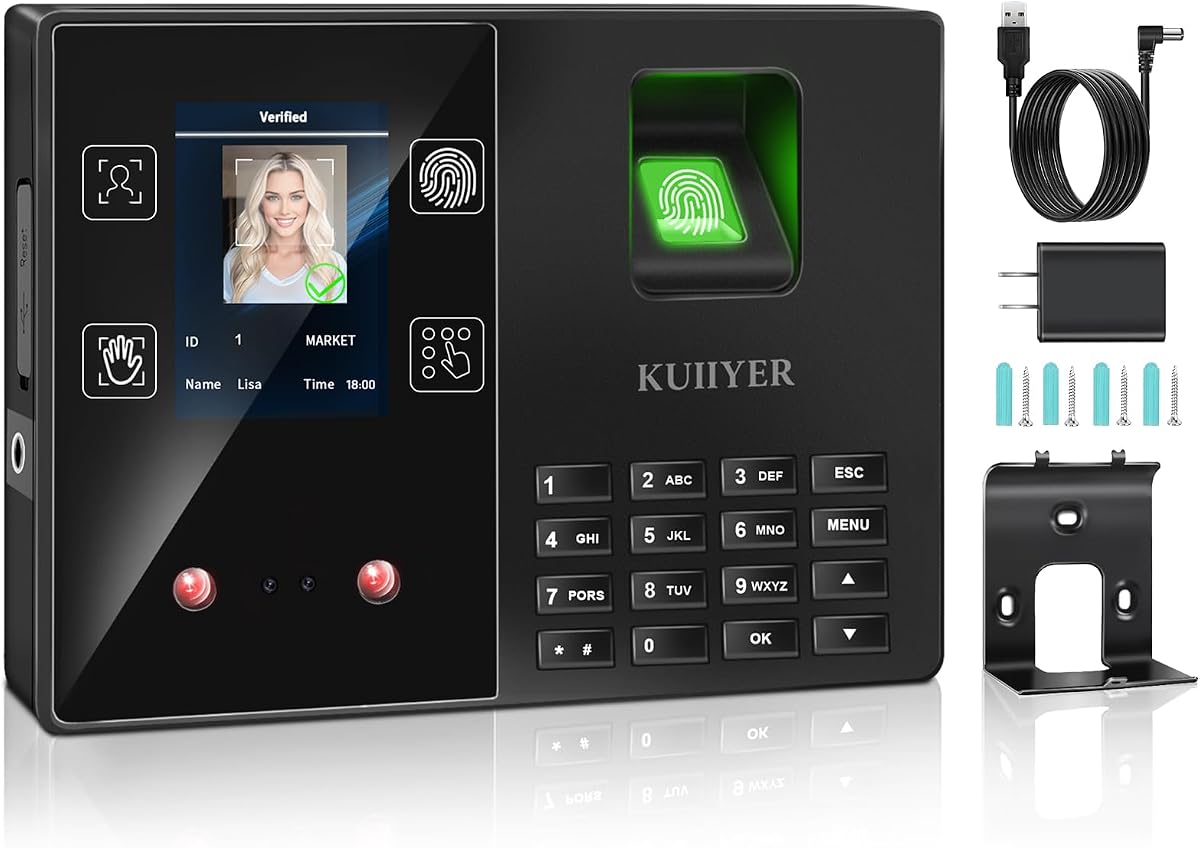
This KUIIYER device supports four authentication methods and a massive user capacity making it ideal for medium-sized businesses. The offline design means no network fees or subscriptions are required to operate effectively.
We may earn a commission when you buy through this link, at no additional cost to you.
The TFT color display and voice announcements provide clear feedback during clock-in. With 160,000 records capacity, it handles large teams without needing frequent data exports or resets.
Recognition speed is slightly slower at 0.6 seconds for face and palm which may cause minor delays. Also, the USB drive for data export is not included in the purchase.
For businesses needing high capacity without recurring costs, this model offers strong value. Ensure you purchase a compatible USB drive separately to access offline reports efficiently.
The 160,000 record capacity reduces the frequency of data exports supporting continuous long-term tracking.
No network dependency keeps data entirely within your control minimizing external security risks.
We may earn a commission when you buy through this link, at no additional cost to you.
This compact USB fingerprint scanner integrates with existing attendance software for flexible tracking solutions. Its plug-and-play interface allows quick setup without specialized drivers or complex configurations for immediate use.
We may earn a commission when you buy through this link, at no additional cost to you.
The stable performance ensures consistent recognition across different employees. Its lightweight design makes it portable for various office desks or portable access control setups.
Unlike standalone clocks, it requires separate attendance software to function fully. This adds potential costs and complexity if you do not already have compatible systems in place.
Best for offices with existing software needs, this device provides reliable verification. Check software compatibility before purchasing to ensure it meets your specific operational requirements.
The USB interface connects directly to computers enabling quick installation without technical expertise.
Compatible with most access control systems allowing integration into broader security management.
We may earn a commission when you buy through this link, at no additional cost to you.
This NGTeco model offers free access to core features like auto calculation and AWS storage. Customizable shifts and multilingual support accommodate diverse workflows including part-time staff and rotating schedules.
We may earn a commission when you buy through this link, at no additional cost to you.
Bank-grade security and encryption ensure your attendance data remains compliant with global standards. Offline capture syncs automatically once the network is restored preventing any data loss during outages.
Advanced features like GPS check-ins require a separate TimeEntrix subscription. Also, the 200 user limit may restrict scalability for larger organizations needing broader capacity.
Ideal for small teams wanting reliable cloud access without monthly fees, this clock balances basic automation with secure storage. Review feature limits to confirm alignment with your team size.
AWS servers with encryption ensure data remains safe and compliant with international protection standards.
Custom shift configurations adapt to various workflows reducing manual scheduling errors and overtime confusion.
We may earn a commission when you buy through this link, at no additional cost to you.
The H1 model provides simple, secure tracking without needing internet or subscriptions. Automatic calculations reduce manual errors and eliminate the need for paper cards or messy ink ribbons.
We may earn a commission when you buy through this link, at no additional cost to you.
Multi-language support and step-by-step guides make setup fast for any team. Export records via USB for offline management ensuring your data stays private under your control.
While the lack of remote access limits real-time monitoring, the device remains reliable for daily tracking. It focuses on core functionality rather than complex integrations.
Suitable for small shops or offices prioritizing privacy and simplicity, this clock delivers essential features. Verify current warranty details before purchase to confirm support terms.
No network setup keeps employee records entirely within your facility ensuring complete data privacy.
Video guides and minimal requirements allow ready-to-use operation within minutes.
We may earn a commission when you buy through this link, at no additional cost to you.
This cloud-enabled clock features dual-band WiFi for stable connectivity and automatic report generation. Web portal and mobile app access let managers monitor attendance from anywhere without being tied to the office.
We may earn a commission when you buy through this link, at no additional cost to you.
The 2000mAh backup ensures continuous tracking during power outages preventing any data loss. Flexible overtime rules auto-compute hours accurately aligning payroll with diverse company policies.
Advanced features like GPS check-ins require a TimeEntrix subscription which adds ongoing costs. Cloud dependency means internet stability impacts remote access reliability.
Perfect for teams needing remote oversight, this clock combines connectivity with flexible shift management. Confirm subscription requirements before buying to understand total long-term costs.
Dual-band WiFi ensures fast stable connections reducing lags that could interrupt daily tracking.
Configurable rules automate overtime calculations ensuring accurate payroll without manual intervention.
We may earn a commission when you buy through this link, at no additional cost to you.
Selecting the right biometric time clock requires balancing accuracy, connectivity options, and long-term costs. These factors determine how well the system fits your specific business size and workflow.
Different devices support fingerprints, facial recognition, palm scans, or PIN codes. Multi-modal systems provide enhanced security by allowing employees to choose their preferred method or combining options to prevent buddy punching effectively.
Choose models with multiple biometric options if your workforce size varies or if specific conditions require alternative verification methods like dry or wet fingerprints.
Standalone units work without internet using USB for data exports. Cloud-based models offer real-time access but require stable networks. Decide if remote monitoring is necessary versus prioritizing offline security and cost savings.
If you need remote access, select cloud-enabled devices with dual-band WiFi for stable connections. Otherwise, standalone units offer better privacy and lower recurring costs.
Check if the system integrates with your payroll software automatically. Direct CSV exports or API links reduce manual data entry errors and streamline monthly processing cycles significantly.
Verify export formats like Excel or CSV before purchasing to ensure compatibility with your existing accounting tools.
Devices vary from supporting hundreds to thousands of user profiles. Ensure the chosen model can accommodate your current staff size plus anticipated growth without requiring frequent hardware upgrades or resets.
Select units with 500 to 1000 user capacity for small to mid-sized businesses aiming for scalability over time.
Look for built-in backups, local storage, and cloud encryption features. Power outage protection ensures attendance records remain safe during unexpected disruptions without losing critical hours.
Prioritize models with internal backup systems or battery protection to prevent data loss in environments prone to power fluctuations.
Compare upfront hardware prices against any required subscription fees. Some devices charge monthly for reporting features while others offer one-time purchases with basic functionality included.
Evaluate long-term value by calculating total cost of ownership including potential add-ons over three to five years.
Strong customer support and warranty coverage are essential for smooth operations. US-based service and replacement policies reduce downtime if hardware issues arise unexpectedly.
Choose brands offering at least a one-year warranty with accessible technical support to maintain operational continuity.
Industrial-grade materials ensure reliability in demanding settings like warehouses or retail counters. Rugged designs resist dust, moisture, and daily wear compared to standard office plastic models.
Assess your workplace conditions to select units built for ruggedness if placed in high-traffic or harsh environments.
Start by enrolling employee fingerprints or other biometric data following the on-screen prompts. Ensure hands are clean and dry for optimal recognition speed and accuracy during the initial setup process.
Place the device in a central location accessible to all staff. Mount it securely at a comfortable height to prevent delays during peak arrival times and maintain consistent clock-in consistency.
Regularly update firmware if cloud-enabled and clean sensors with a soft cloth to remove dust. Check backups and export data weekly to avoid storage limits and maintain accurate records.
Yes many standalone models operate completely offline storing data locally. You can export records via USB for manual payroll processing without needing any network connections or subscriptions.
Capacity varies by model ranging from 200 to over 1000 users. Always check the user profile limit before purchase to ensure it matches your current and projected workforce size.
Biometric verification significantly reduces buddy punching by requiring unique biological data. Using fingerprints or facial scans ensures only authorized employees can clock in for work.
Most models have internal backup systems or batteries to preserve records. Data remains safe and recoverable once power returns without losing critical attendance information.
Many standalone models require no monthly fees. However advanced cloud features or reports often need subscriptions. Review product details to confirm recurring costs before buying.
Cloud-enabled models allow remote access via mobile apps or web portals. Standalone units require physical USB exports so check connectivity features if you need remote monitoring capabilities.
The NGTeco models offer the best balance of speed and affordability for most small businesses. Standalone units work well for offline needs while cloud options provide advanced analytics.
Prioritize devices with strong backup systems and flexible export formats to ensure payroll accuracy. Avoid hidden costs by choosing models with transparent subscription terms.
Verify current prices and warranty details before finalizing your purchase. These tools can save time and improve accuracy significantly when selected to match your specific operational requirements.