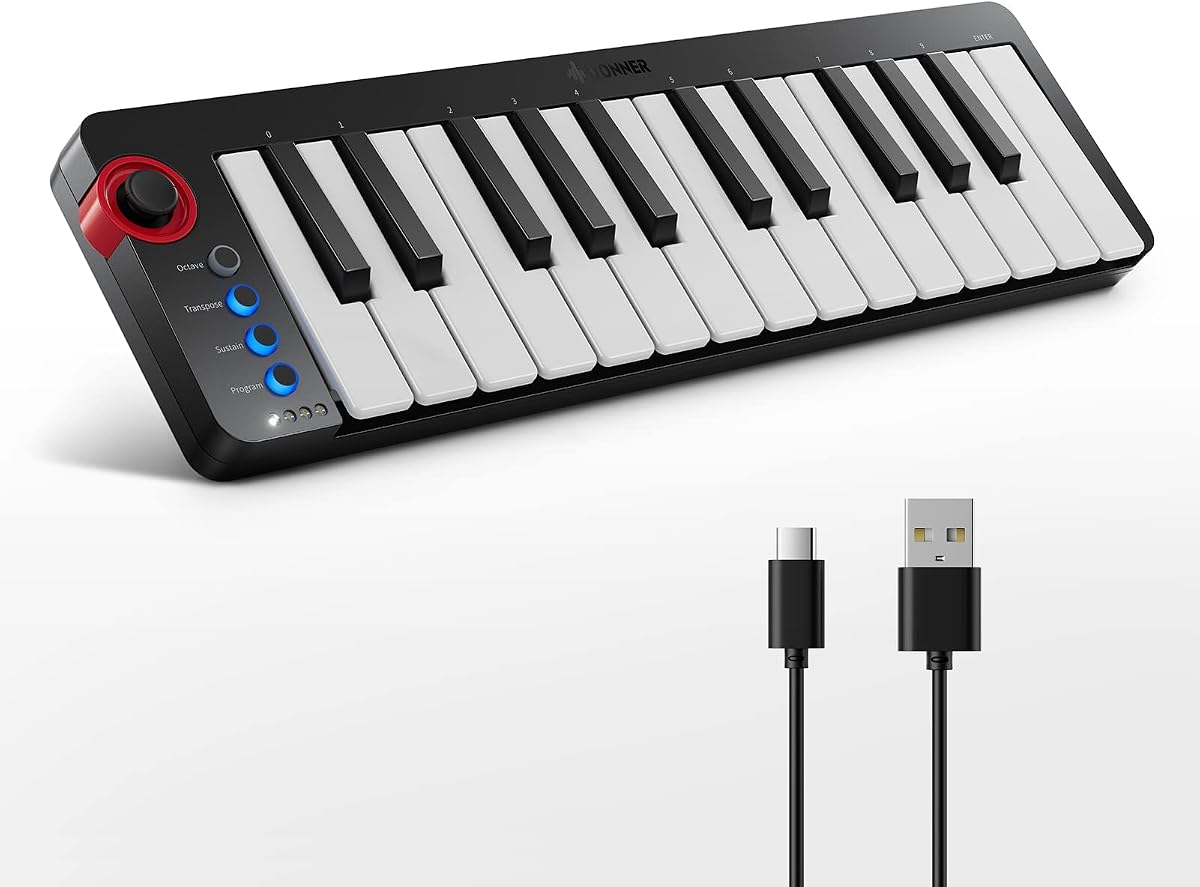
Donner Mini MIDI Keyboard N-25
4.1Editor score
Includes 40 teaching courses
Light up rocker buttons
Compact portable design
This guide compares the top 25 key MIDI controllers for producers, performers, and hobbyists focusing on portability features workflow integration and overall
Selecting the right 25 key MIDI controller can transform your music production workflow significantly. These compact devices offer a perfect balance between portability and functionality allowing you to create melodies and control software instruments without taking up much desk space. Whether you are a beginner or a seasoned producer finding a model that fits your specific needs is essential.
We have carefully evaluated a wide range of models based on key feel control layout software compatibility and overall build quality. Our analysis includes both budget friendly options and premium units designed for professional studio environments. Each product was assessed for its ability to integrate seamlessly with popular digital audio workstations and its versatility across different music genres.
Every pick in this list highlights specific strengths such as unique control surfaces dedicated drum pads or extensive software bundles. Keep in mind that availability and pricing can fluctuate over time so checking current listings is always recommended before making a final decision. Our goal is to provide you with a clear roadmap to the best options available on the market today.
4.1Editor score

4.6Editor score

4.6Editor score
The following table provides a side by side overview of the top ten models evaluated in this guide allowing you to quickly compare their core specifications and unique features.


The Akai Professional MPK Mini MK3 stands out as a top contender in the 25 key MIDI controller space. With a rating of 4.6 it offers a robust set of features that cater to both beginners and experienced producers. Its combination of velocity sensitive keys and MPC style pads makes it incredibly versatile for various music production tasks.
We may earn a commission when you buy through this link, at no additional cost to you.
One of its strongest features is the innovative four way thumbstick which provides dynamic pitch and modulation control. This allows for expressive performances that many other compact controllers lack. The built in arpeggiator further enhances creativity by enabling users to create complex patterns quickly. Additionally the NKS integration ensures seamless compatibility with Native Instruments software expanding its utility significantly.
While the keys are responsive they can feel a bit stiff compared to higher end models. This might be a consideration for users who prioritize a very soft touch. The lack of physical faders means you rely on knobs for mixing which can be less intuitive for some workflows. However these trade-offs are acceptable given the price point and feature set.
This controller is ideal for anyone looking for a reliable tool for beat making and songwriting. Its compact design makes it perfect for portable setups while still offering professional grade controls. If you want a controller that balances performance and portability this is a highly recommended choice for your studio.
The MPC experience provided by the backlit pads allows for intuitive drum programming and sample triggering. The 360 degree knobs offer precise control over virtual instruments and effects making mixing easier. Overall it delivers a complete command over your virtual instruments and FX without taking up too much desk space.
The thumbstick offers fluid pitch and modulation control for expressive performances during live or studio sessions.
NKS support allows direct browsing and control of Native Instruments presets enhancing workflow efficiency significantly.
We may earn a commission when you buy through this link, at no additional cost to you.
The Donner N-25 is an excellent entry level option for those new to music production. Rated at 4.1 it offers a simple and user friendly layout that removes barriers to entry. The inclusion of 40 entertaining keyboard teaching courses makes it a unique value proposition for novices looking to learn while they create.
We may earn a commission when you buy through this link, at no additional cost to you.
Its compact design with velocity sensitive keys allows for expressive playing despite the small form factor. The light up rocker buttons provide visual feedback which can be engaging for learners. Compatibility with Mac iOS and PC ensures that you can connect it to your existing setup without needing extra drivers.
On the downside the build materials are basic and it lacks the advanced controls found on pricier models. You will not find pads or complex mapping options which limits its use for advanced production. However for a beginner focused on learning melodies and basics these limitations are acceptable.
If you are starting your music journey and need a reliable tool without breaking the bank this is a great choice. It works seamlessly with various DAWs and provides a full music production experience. The educational resources included add significant value beyond the hardware itself.
The pitch bend wheel ensures a rich and expressive timbre while playing. The four user programmable banks give you some flexibility to customize your workflow. Overall it is a functional tool that encourages creativity and learning through its intuitive design and included software.
The 40 courses cover arrangement essentials to help unleash your creativity from beginner to advanced levels.
Light up buttons provide a fun visual display of your playing making the experience more interactive.
We may earn a commission when you buy through this link, at no additional cost to you.
The Novation Launchkey Mini 25 MK4 is designed for professionals who demand top tier performance. With a 4.6 rating it offers an all in one DAW controller experience that is hard to beat. The premium keybeds and sixteen responsive FSR pads make it perfect for drumming and clip launching tasks.
We may earn a commission when you buy through this link, at no additional cost to you.
One of its standout features is the Scale Mode which ensures you never hit a wrong note. This allows you to trigger lush chords from a single key or drum pad easily. The ability to create and mutate wild arpeggios adds a layer of creativity that inspires new musical ideas.
While it offers premium features it comes at a higher price point compared to entry level models. The footprint is also slightly larger which might be a constraint for very small desks. However the build quality and integration capabilities justify the investment for serious producers.
This controller is best for those deeply integrated into major DAWs like Ableton Live or Logic. The seamless integration and powerful creative tools streamline your workflow significantly. It is a robust investment for anyone looking to elevate their music production setup.
The FSR drum pads with polyphonic aftertouch serve as step sequencers and chord triggers. This versatility goes beyond simple finger drumming allowing for complex performance techniques. The NKS ready feature ensures it works seamlessly with Native Instruments software providing hands on control.
Never hit a wrong note by triggering lush chords from a single key or drum pad easily.
Offers intuitive workflows for major DAWs including Ableton Live Logic and Cubase.
We may earn a commission when you buy through this link, at no additional cost to you.
The Arturia MiniLab 3 is a universal MIDI controller that adapts to your specific needs and style. Rated at 4.7 it focuses on a fluid workflow that lets you forget you are using a mouse. The ability to control instruments and mute tracks with dedicated faders adds significant convenience.
We may earn a commission when you buy through this link, at no additional cost to you.
Its premium velocity sensitive keys provide a high quality playing experience that rivals larger keyboards. The four faders are particularly useful for mixing and adjusting levels without reaching for software controls. This design encourages hands on interaction with your music creation process.
Setting up the controller might require downloading specific software which could be a hurdle for some. The documentation is sometimes minimal so users need to explore features on their own. However once set up the device offers a unique and intuitive experience.
This is an excellent choice for creative individuals who want to focus on their flow rather than technical settings. It is versatile enough for studio production and live performance alike. The clean design fits well in modern studio environments making it a visually appealing tool.
The pads are great for punching in drum tracks quickly and efficiently. The software bundle that comes with it provides a rich set of sounds to start creating immediately. It allows you to get hands on with your music like never before.
Adjust your faders and mute tracks with a flow so fluid you will forget you have a mouse.
The sleek white design fits alongside your studio equipment perfectly enhancing your workspace aesthetics.
We may earn a commission when you buy through this link, at no additional cost to you.
The APC Key 25 MK2 is specifically designed as an Ableton Live USB MIDI keyboard controller. Rated 4.4 it offers total control over your sessions with a built in 25 note synthesizer keyboard. The dedicated octave buttons increase the melodic range for more versatile performance capabilities.
We may earn a commission when you buy through this link, at no additional cost to you.
The 5×8 RGB pad matrix is its standout feature providing visual color feedback for launching clips. This allows you to trigger everything from loops and vocals to melodic samples instantly. The 360 knob controls let you dial in volume pan and automation for all track types seamlessly.
While excellent for live performance its focus on clip launching might make it less ideal for pure composition. Users focused on recording audio tracks might find the workflow less intuitive. However for those using Ableton it offers a seamless integration experience.
This controller is perfect for live performers who need to trigger samples and clips efficiently. The ability to move around large groups of clips using arrow buttons is very practical. It is a specialized tool that excels in the right context.
The included virtual instrument pack provides powerful tools like Hybrid 3 and Velvet. These add value to the hardware ensuring you have sound sources ready to go. It supports seamless integration from the studio to the stage effectively.
40 RGB pads provide visual color feedback for launching clips in Ableton Live providing instant creativity.
Device mode allows direct control of your Ableton macros for quick parameter adjustments during sessions.
We may earn a commission when you buy through this link, at no additional cost to you.
The Akai Professional MPK Mini Play MK3 is a compact yet powerful standalone mini keyboard. With a 4.5 rating it offers a built in speaker and USB MIDI controller capabilities. This dual functionality makes it versatile for beat makers who want to record without a computer.
We may earn a commission when you buy through this link, at no additional cost to you.
The OLED display adds a modern touch that helps users navigate internal sounds and settings easily. You get over 100 internal drum and instrument sounds including acoustic and electric pianos. This ensures you have a wide range of options for creativity without needing external software.
While it is great for standalone use its editing features might be limited compared to software controllers. The speaker is convenient but not suitable for professional mixing. However for idea capture and quick sketching it is an excellent portable tool.
This is an ideal choice for musicians who want to take their music anywhere without a laptop. The ability to power up with batteries makes it truly mobile. It is a great addition to a mobile setup or for beginners.
The arpeggiator and note repeat features enhance the standalone experience significantly. The included Melodics educational software download provides 60 free lessons to help you improve. It is a complete package for creativity on the go.
Take it on the go and power up with batteries to compose music without a computer.
Includes over 100 internal sounds to provide limitless creativity without external plugins.
We may earn a commission when you buy through this link, at no additional cost to you.
The Akai Professional MPK Mini MK3 in black offers the same robust features as the standard model but with a sleek aesthetic. Rated 4.6 it is a must have for music production and beat makers seeking a compact studio solution. The black finish provides a professional look that fits well in any studio.
We may earn a commission when you buy through this link, at no additional cost to you.
Its innovative 4-way thumbstick allows for dynamic pitch and modulation control during performances. The eight backlit velocity-sensitive MPC-style MIDI beat pads are perfect for programming drums. The editor software allows you to manually map knobs and adjust settings to your preference.
The main downside is that it shares the same limitations as the standard version regarding build weight. The glossy black finish can be a fingerprint magnet which requires regular cleaning. However visually it stands out as a premium tool for creators.
This controller is ideal for those who value aesthetics alongside functionality in their studio setup. The NKS integration ensures you get ready to control straight from your MPK device. It is a complete command of your virtual instruments and FX.
The 1500+ sounds and everything you need for pro production are included in the bundle. You get two months of Splice which unlocks the ultimate sample library. This adds significant value to the purchase for expanding your sound library.
The sleek black design fits alongside your studio equipment for a polished look.
Download the Editor to learn how to manually map knobs and store your own programs.
We may earn a commission when you buy through this link, at no additional cost to you.
The M-VAVE 25 Key offers a powerful keyboard experience with the added benefit of Bluetooth wireless connectivity. Rated 4.5 it is very compact and portable allowing you to connect wirelessly to your device. The built-in 2000 mAh battery can work for about 16 hours making it reliable for extended use.
We may earn a commission when you buy through this link, at no additional cost to you.
Its semi weighted dynamic keybed provides a professional feel that is rare in this price range. The smart chord and smart sound function allow users to choose quickly through the keys during performance. This integrates well for setting up during practice sessions quickly.
Bluetooth setup might require some initial configuration to ensure stable connections with your device. Charging the battery is necessary which adds a maintenance step. However the freedom from wires makes it a great choice for live setups or traveling.
This controller is perfect for songwriters and beat makers who need mobility in their workflow. It is compatible with Windows Mac OS Android and iOS ensuring broad support. It works well with major DAWs like Ableton Live and FL Studio.
Connect wirelessly to your device with Bluetooth to take it easily into any bag.
Smart chord functions allow you to choose through keys quickly for live performance.
We may earn a commission when you buy through this link, at no additional cost to you.
The Rhymo 25 Key portable MIDI keyboard is slim and compact making it ideal for travelers. Rated 4.1 it is powered directly via USB-C from your computer or tablet. This ultra-portable setup requires no batteries or adapters for a truly hassle-free production experience.
We may earn a commission when you buy through this link, at no additional cost to you.
It features an X-Y joystick for pitch bend and modulation which adds expressive control. The arpeggiator with latch and multiple modes allows for creative loop functions. The 16 user-selectable MIDI channels give you flexibility in how you route your signals.
While portable the controls are basic which might limit complex workflows for advanced users. The lack of faders means mixing must be done via software. However for melody creation and basic control it serves well in tight spaces.
This is a great tool for travelers and beginners who need a simple and efficient controller. It connects easily with smartphone music apps using an OTG adapter. The plug and play nature ensures you can start creating immediately without setup.
Slim and compact design allows for hassle-free music production setup on the go.
X-Y joystick ensures rich and expressive timbre during your musical performances.
We may earn a commission when you buy through this link, at no additional cost to you.
The Akai Professional LPK25 is a mini keys major performance controller that is perfect for simple setups. Rated 4.7 it offers responsive keys to play with feel and dynamics. It is a classic choice for those who prioritize playing over complex controls.
We may earn a commission when you buy through this link, at no additional cost to you.
Its dedicated octave up and down buttons let you transpose the range of your software instruments easily. The built-in arpeggiator and clock provide creative control of any sound sources you are using. With 8 programmable preset slots you can instantly recall your mappings for DAWs.
It lacks pads which limits its utility for drum programming compared to other models. The control set is basic which might not suit complex live performance needs. However for writing music and melodies it remains a solid tool.
This controller is ideal for songwriters and beat makers who need a simple keyboard. It fits alongside your studio equipment without cluttering your desk. The USB power and plug-and-play compatibility make setup effortless.
Universal compatibility ensures it works with all popular applications including GarageBand and Logic. You can create edit and manage all your presets from the computer. Spend less time configuring and more time writing music wherever you create.
With USB power and plug-and-play compatibility setup is simple for Mac or PC.
Use the octave buttons to transpose the range of your software instruments with ease.
We may earn a commission when you buy through this link, at no additional cost to you.
Choosing the right controller involves understanding your workflow needs and the features that matter most to your production style.
Velocity sensitive keys are crucial for expressive playing. They allow you to control volume based on how hard you press. A good keybed should feel responsive without requiring too much force.
Look for premium velocity keys that mimic a piano feel if possible.
Consider whether you need pads drum pads or knobs for mixing. Different layouts suit different genres like beat making vs composition.
Pads are great for triggering samples while knobs are better for parameter control.
Your controller should work seamlessly with your preferred DAW. Look for controllers with pre-mapped controls for specific software to save setup time.
Seamless integration reduces friction during your creative process.
If you need to travel with your gear choose a slim and lightweight unit. USB powered models are ideal as they require no external power.
Compact designs are essential for mobile producers.
USB and Bluetooth connectivity options ensure you can connect to various devices. USB-C is becoming standard for faster data transfer.
Bluetooth MIDI adds wireless flexibility for mobile setups.
Many controllers come with DAW editions or virtual instruments. Check if these are useful to you before relying on them.
Included software adds value but verify compatibility.
A durable build ensures the controller lasts through frequent use. Metal or sturdy plastic construction is preferable for long term reliability.
Solid construction protects against daily wear and tear.
Balance your budget with the features you need. High-end models offer more control but entry-level ones are great for beginners.
Invest in what suits your current skill level.
Connect your controller to your computer via USB and ensure it is recognized by your DAW. Most modern controllers are plug and play but you may need to download drivers for specific models.
Map your knobs and pads to your preferred software functions using the provided editor software. This customization allows for a faster workflow during sessions.
Keep your controller clean by wiping it with a soft dry cloth regularly. Avoid placing liquids near it to protect the electronics from damage.
Most controllers require a computer to function as they send MIDI data to software. However some standalone models like the MPK Mini Play have built-in speakers and sounds so you can play without a computer.
Yes they are excellent for beginners because they are affordable and compact. They provide enough keys to learn basics without overwhelming you with a full 88 key layout.
NKS integration allows you to browse and control Native Instruments software directly from your controller. It streamlines workflow by mapping sounds and parameters automatically.
Many controllers are compatible with iPads using an OTG adapter. Ensure the controller is class-compliant for USB MIDI to work without extra drivers.
Most models include velocity-sensitive keys to detect how hard you press. This adds dynamics to your performances making them sound more natural and expressive.
An arpeggiator automatically plays notes in a sequence based on your input. It helps create complex melodies and patterns quickly which is great for songwriting.
We have explored ten top models ranging from budget-friendly options like the Donner N-25 to professional tools like the Novation Launchkey Mini. Each offers unique features tailored to different needs and budgets.
Prioritize controls that match your workflow whether that is drum pads for beat making or knobs for mixing. The right choice can significantly enhance your creativity and production speed.
Prices and availability change frequently so verify current listings before purchasing. Investing in the right controller will help you make music with better flow and precision.