
Zalman GigaMax 700W
4.4Editor score
80 Plus Bronze Certified
5 Year Manufacturer Warranty
Quiet 120mm Fan Operation
Discover the top 700W ATX power supplies for reliable gaming PCs. This guide compares efficiency, warranty, and features to help you choose the perfect PSU
Choosing the right power supply is crucial for any computer build. A 700W ATX power supply offers enough wattage for mid to high-end systems. It ensures stable performance without overheating or shutting down unexpectedly during heavy loads.
We evaluated ten models based on efficiency ratings and protection features. Each unit was reviewed for build quality, cable management, and fan noise levels. Our list includes options ranging from budget-friendly to premium certified units for all needs.
Each pick highlights specific strengths like gold certification or modular design. You will find detailed pros and cons to help decide quickly. Please note that prices and availability can change frequently on online retail platforms.
4.4Editor score

4.6Editor score

4.6Editor score
The following table provides a side by side overview of the ten top rated power supplies. Compare specifications like efficiency ratings, connector types, and warranty periods to find the best fit for your specific system requirements and budget constraints.

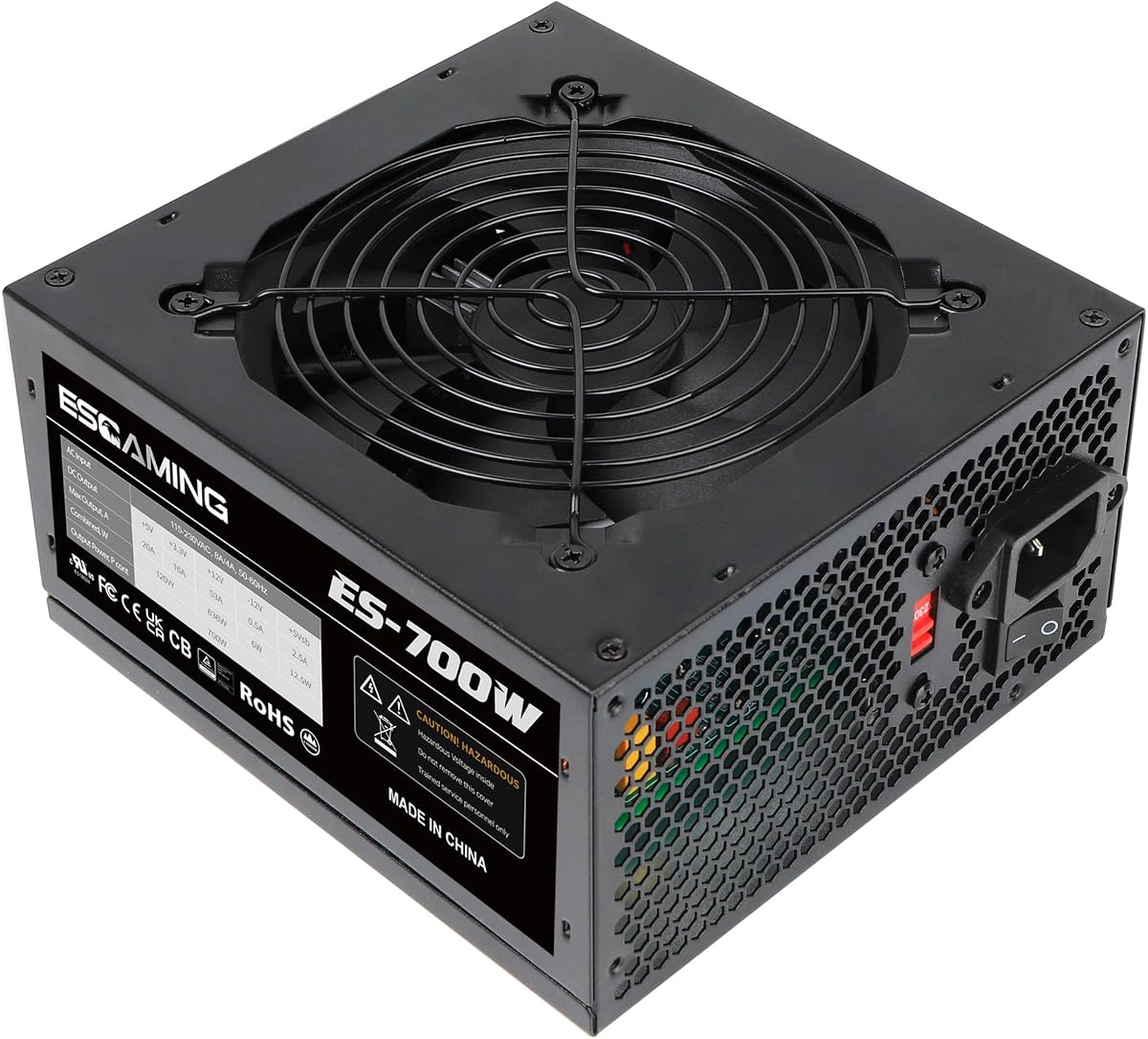


This unit offers a reliable entry point into quality power supplies with its 80 Plus Bronze certification. It achieves up to 87 percent efficiency which helps reduce heat generation during standard gaming workloads effectively.
We may earn a commission when you buy through this link, at no additional cost to you.
The active PFC system ensures a high power factor of 99 percent for stable energy output. It includes full safety protections like OCP and OVP to shield components from electrical surges or voltage spikes reliably.
While the non modular cables can make management slightly harder they are sleeved to keep things tidy. The fan is designed for silent operation so it won't distract during intense gaming sessions or video rendering tasks.
This power supply is ideal for budget conscious builders who need solid performance without overspending. It provides the essential protections and stability required for a dependable mid range PC build setup today.
The 80 Plus Bronze certification ensures you get better power conversion rates than standard units.
Comprehensive safety protocols protect your expensive components from voltage fluctuations and overheating risks.
We may earn a commission when you buy through this link, at no additional cost to you.
The Smart W3 Series stands out for its compatibility with the newer Intel ATX v3.1 specification. This forward thinking design helps ensure your system is ready for upcoming component standards without needing immediate upgrades later.
We may earn a commission when you buy through this link, at no additional cost to you.
It utilizes a DC to DC high amperage 12V rail design which offers better stability for modern graphics cards. The low profile flat black cables are easier to route than traditional round wires during case installation.
A 120mm FDB fan provides effective cooling while remaining relatively quiet under load. The industrial grade protections cover standard electrical risks ensuring your components remain safe during unexpected power fluctuations or usage spikes.
This unit is a strong choice for those building a system with future compatibility in mind. It balances current needs with upcoming standards at a price point that remains competitive for entry level builders today.
Supporting the ATX v3.1 spec means this PSU aligns with the latest power delivery standards.
The flat black cables help keep your build looking clean and improve airflow inside the case.
We may earn a commission when you buy through this link, at no additional cost to you.
This PSU delivers straightforward functionality for basic system builds without extra bells or whistles. It features a non modular design that keeps costs down while still providing the necessary connectors for standard components effectively.
We may earn a commission when you buy through this link, at no additional cost to you.
The auto thermally controlled fan helps maintain silence during light usage by slowing down when less cooling is needed. A global voltage switch allows you to easily adapt the unit for use in different regions without hassle.
Safety is addressed through heavy duty protections against short circuits and overloads that might occur. While it lacks formal efficiency certification it serves well for systems that do not push extreme power limits daily.
It is suitable for office PCs or home entertainment systems where raw power needs are moderate. The wide range of connectors ensures you can hook up various drives and peripherals without needing adapters.
The manual voltage switch allows this unit to work across different international power standards easily.
Auto thermal control ensures the fan only spins up when the system actually generates more heat.
We may earn a commission when you buy through this link, at no additional cost to you.
MSI brings a high level of quality to this unit with 80 Plus Gold certification and a ten year warranty. This long term coverage speaks to the durability and confidence the manufacturer has in the internal components used.
We may earn a commission when you buy through this link, at no additional cost to you.
Being ready for ATX 3.1 and PCIe 5.1 standards means it supports the latest graphics cards with a native cable. The dual color design of the 12V-2×6 cable helps identify correct connections easily during complex system assembly.
Full modularity gives you the freedom to only connect the cables you need which improves airflow significantly. The compact design makes it easier to fit into smaller cases without compromising on power output or stability features.
This model is excellent for gamers who want a balance of performance and future proofing without going ultra high end. It offers the latest connectivity options in a reliable package that stands out in its price tier.
A ten year warranty provides peace of mind that your investment is protected against early failures.
Native PCIe 5.1 readiness ensures you can use the latest GPUs without needing extra adapters or converters.
We may earn a commission when you buy through this link, at no additional cost to you.
CORSAIR is known for reliability and this unit maintains that reputation with high grade capacitors rated for heat. The 105 degree Celsius rated capacitors deliver steady performance even in warmer case environments over long periods of time.
We may earn a commission when you buy through this link, at no additional cost to you.
A specially calculated fan curve keeps noise levels low even when the system is under full load stress. The fully modular cabling ensures you can manage the cables neatly which improves air flow and overall aesthetics in the case.
Support for modern standby compatible wake from sleep times are faster and low load efficiency is improved significantly. This means less power is wasted when your system is idle or in sleep mode compared to older designs.
This unit fits well in systems where low noise and high reliability are top priorities for the user. It is a robust choice for workstations or gaming rigs that need consistent power without unnecessary noise.
High grade capacitors ensure the unit runs smoothly even when internal case temperatures rise during summer.
The custom fan curve balances cooling performance with quiet operation across all different load scenarios.
We may earn a commission when you buy through this link, at no additional cost to you.
ASRock delivers a strong performance with up to 90 percent energy efficiency which reduces wasted power and costs. The 120mm low noise fan ensures that the system stays quiet even during demanding gaming sessions or rendering work.
We may earn a commission when you buy through this link, at no additional cost to you.
Being compliant with ATX 3.1 and PCIe 5.1 standards means it is ready for the newest high performance hardware. The native 12V-2×6 connector supports modern graphics cards directly without needing clumsy adapter cables for power delivery.
The 750W capacity handles mid range to high end configurations with stability and room for headroom. This makes it versatile enough for various builds while keeping power loss to a minimum during daily operations effectively.
This unit stands out for offering next gen features at a competitive price point for most users today. It balances performance, noise, and efficiency well making it a top recommendation for standard gaming desktops.
High efficiency ratings mean you get more power to your components and less heat to cool down.
The optimized fan blades and motor ensure that noise levels remain low during normal use.
We may earn a commission when you buy through this link, at no additional cost to you.
This model combines 80 Plus Gold efficiency with a single 12V rail design for powerful and stable power delivery. It is ready for SLI and Crossfire setups ensuring that multiple graphics cards receive sufficient energy without issues.
We may earn a commission when you buy through this link, at no additional cost to you.
The dynamic bearing fan offers superior cooling performance while maintaining silent operation in most environments. This helps keep internal case temperatures low which can extend the life of other sensitive components inside the PC.
Industry grade protections like Over Power and Short Circuit safeguards ensure your hardware is safe from damage. The fixed cables are robust and easy to handle which makes the non modular design less of a hindrance for many.
It is a great choice for traditional builds that prioritize raw power delivery over modern features like modularity. The five year warranty provides a good safety net for long term system reliability and user confidence.
A single 12V rail provides consistent power to high demand components like GPUs without voltage drops.
The dynamic bearing fan technology ensures the unit stays cool without generating too much noise.
We may earn a commission when you buy through this link, at no additional cost to you.
This unit boasts an outstanding efficiency rating of up to 94.3 percent which leads to lower power consumption and heat. The fan turns off completely under low loads thanks to semi passive zero RPM cooling for truly silent operation during idle.
We may earn a commission when you buy through this link, at no additional cost to you.
It is future proof with ATX 3.1 compliance and includes a native 12V-2×6 connector for next generation graphics cards. This allows for reliable power delivery even if the graphics card demands excessive power for a short time during load.
With LLC topology it provides best in class voltage regulation that protects your hardware from fluctuations during use. The fully modular design makes cable management easy while keeping airflow efficient within standard PC cases easily.
This PSU is perfect for those who want the quietest possible system without sacrificing performance or power. It handles high power excursions with ease making it a premium choice for enthusiast level gaming builds today.
The semi passive zero RPM mode ensures the fan is completely off when the system is idle or lightly used.
Advanced topology ensures clean power delivery which protects sensitive components from electrical noise.
We may earn a commission when you buy through this link, at no additional cost to you.
This unit supports up to 235 percent power excursion which is helpful for modern GPUs that spike usage briefly. It uses 100 percent Japanese electrolytic capacitors for reliable electrical performance and longevity over several years of use.
We may earn a commission when you buy through this link, at no additional cost to you.
The dedicated PCIe 5.1 cable delivers power directly to new graphics cards ensuring safe and stable performance during load. A compact build ready chassis is 35 percent smaller which enables flexible small-form-factor integration in tight spaces.
Full modularity allows you to only plug in what you need which keeps the case tidy and airflow efficient. Six safety protections ensure your system stays secure against common electrical risks like short circuits or voltage surges.
It is a great option for small form factor builds that still need high power and modern connector support. The Japanese caps and modular design make it a solid choice for enthusiasts who value build quality.
Japanese electrolytic capacitors provide higher stability and longer lifespan compared to standard components used.
The smaller chassis fits easily into compact cases where space is at a premium for the user.
We may earn a commission when you buy through this link, at no additional cost to you.
This PSU is fully compatible with Intel ATX 3.1 specifications and includes native PCIe 5.1 connectors for modern GPUs. The 80 Plus Gold efficiency reduces energy consumption and heat output during operation to keep the case cooler.
We may earn a commission when you buy through this link, at no additional cost to you.
Smart Zero Fan technology automatically adjusts fan speed based on load to minimize noise during low load operations. This makes the unit very quiet when you are browsing the web or working on documents lightly today.
Fully modular design includes low profile flat black cables which improve airflow and make cable management much easier. The high amperage single 12V rail provides reliable power delivery optimized for high end gaming and workstation builds.
It is a strong recommendation for builders who want a balance of modern features and proven reliability. The combination of gold efficiency and smart fan control makes it efficient and quiet for daily usage patterns.
The smart zero fan technology ensures the fan stops spinning when the system does not need extra cooling.
High amperage single rail design ensures that power is delivered evenly to all connected components.
We may earn a commission when you buy through this link, at no additional cost to you.
Selecting the right power supply involves looking beyond just wattage. You must consider efficiency, connectors, and warranty to ensure your system runs safely and quietly.
Efficiency ratings like Bronze or Gold indicate how much power is converted to usable energy versus lost as heat. Higher efficiency means lower electricity bills and less heat which is easier for your case to manage.
Look for at least an 80 Plus Bronze certification to ensure you are not wasting excessive power or money.
Modern graphics cards often require specific cables like the new 12V-2×6 connector for PCIe 5.1 compatibility. Ensuring your power supply has these native connectors avoids the need for messy and potentially unsafe adapter cables.
Check that the PSU includes all the necessary connectors for your motherboard and drive setup before purchasing.
Modular power supplies allow you to plug in only the cables you need which helps with cable management and airflow. Non modular units come with all cables attached which can clutter your case and restrict air movement.
Choose fully modular if you want a cleaner build or non modular if you want to save some money on the price.
Safety features like Over Voltage and Short Circuit protection are essential to prevent damage to your expensive components. A good PSU should shut down safely if a power surge or electrical fault occurs.
Always look for a comprehensive suite of safety protections to ensure your system remains secure against electrical risks.
The warranty period reflects the manufacturer's confidence in the durability of their unit. Longer warranties like ten years suggest better internal components and a longer expected lifespan for the power supply.
Prioritize models with longer warranties if you plan to use the unit for many years without replacement.
Most units follow the standard ATX form factor which fits in most PC cases available today. However if you have a smaller case ensure the unit is compact enough to fit without blocking other components.
Verify the physical dimensions of the power supply before buying to ensure it fits inside your chosen case.
Fan noise can become annoying during quiet tasks so look for models with large silent fans or smart control tech. Units with a zero RPM mode stop the fan entirely when the system is idle.
Consider the fan technology and bearing type to ensure the unit runs quietly during your typical daily usage.
High quality internal components like capacitors affect the stability and life of the unit. Units with Japanese capacitors tend to have better longevity and performance under stress compared to generic alternatives.
Invest in a unit with known quality components to ensure stable power delivery over time.
When installing your power supply ensure it is screwed in securely to the case to prevent vibration noise or movement that could loosen cables. Orient the fan so it faces the air intake of your case for optimal cooling performance.
Connect the 24 pin motherboard cable first to ensure stability then attach the CPU power cable before moving on to graphics cards. Only plug in the modular cables that you actually need to keep the interior clean.
Periodically check the fan for dust buildup which can cause the unit to overheat or become noisy. Clean the intake vents with compressed air every few months to maintain airflow and extend the life of the power supply.
For most mid range to high end GPUs a 700W unit is sufficient. However if you plan to use extreme top tier graphics cards you may need more wattage to ensure stable performance under heavy loads.
Modular cabling helps with cable management and airflow in your case. If you have a tight case budget non modular is fine but modular offers more flexibility for clean builds and better cooling.
Gold certified units are more efficient than Bronze models meaning they waste less energy as heat. This can lead to lower electricity costs and quieter operation since the fan does not need to spin as fast.
ATX 3.1 readiness ensures compatibility with newer graphics cards that require higher transient power spikes. It often includes native cables that eliminate the need for adapters which improves safety and stability.
While adapters exist using the native connector on the PSU is safer and recommended. Adapters can sometimes be bulky or less stable so check if your PSU has the correct cable built in first.
Look for units from reputable brands with strong protection features and a long warranty. High quality components like Japanese capacitors are also a good sign of reliability and longer lifespan.
We have explored ten top options ranging from budget friendly to premium models that suit different system needs. Each unit brings unique strengths such as efficiency, fan control, or specific connector support for modern builds.
When making your decision prioritize efficiency and connector compatibility to ensure your system can handle future upgrades. A reliable power supply is the backbone of a stable PC so do not rush the selection process.
Remember to check current prices and availability as they can fluctuate frequently on retail sites. We hope this guide helps you find the perfect power supply for your next computer build today.