
ATTACK SHARK R5Ultra
4.3Editor score
39g Carbon Fiber Body
PixArt PAW3950 MAX
Tri-Mode Connectivity
Discover the top 8kHz polling rate mice for esports in 2026. This guide compares wireless performance, sensor accuracy, and ergonomics for competitive gaming.
Competitive gaming demands precision and speed that only advanced peripherals can deliver. An 8kHz polling rate mouse ensures your inputs are registered with near-zero latency, giving you a critical edge in fast-paced matches.
We evaluated ten leading models based on sensor performance, build quality, weight distribution, and wireless stability. Our analysis focuses on real-world esports needs including tracking consistency and switch durability.
Each review highlights key strengths and potential trade-offs to help you find your ideal match. Please note that product specifications and availability may vary by region and retailer at any time.
4.3Editor score
4.6Editor score

4.2Editor score
This side-by-side comparison outlines the critical specifications of each model. Use it to quickly identify differences in weight, sensor type, and connectivity options across the lineup.



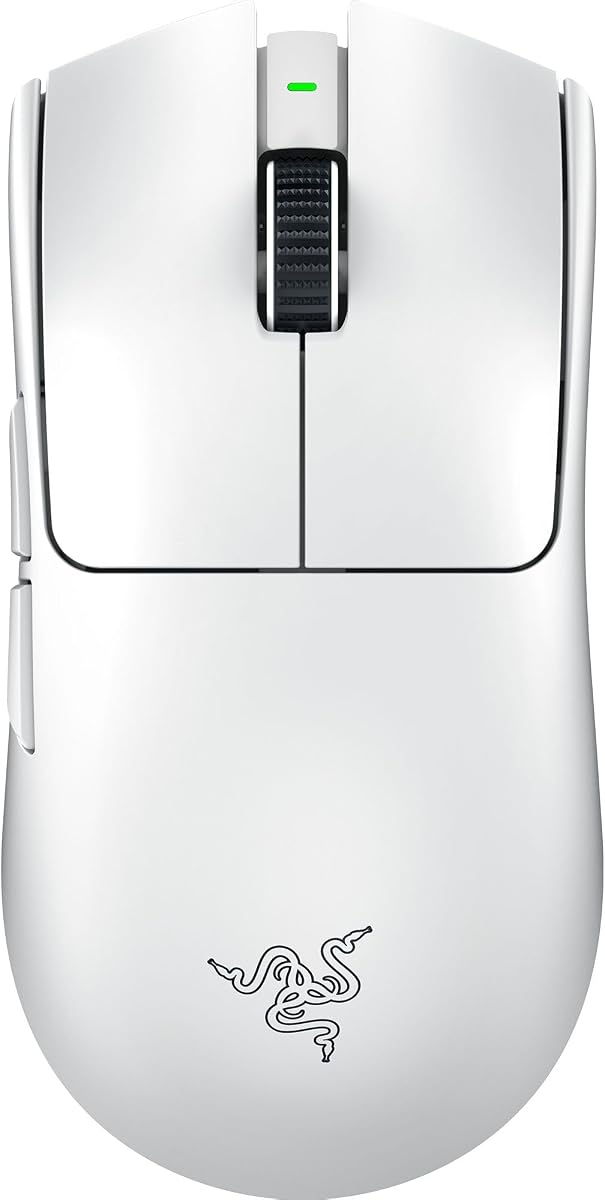
The Razer Viper V3 Pro stands out as a top tier choice for serious esports athletes seeking a lightweight wireless experience. With a rating of 4.6 stars from users, it delivers on the promise of speed and precision without sacrificing reliability. Its standout qualities include an ultra lightweight design and a high end sensor that tracks perfectly across most surfaces.
We may earn a commission when you buy through this link, at no additional cost to you.
At just 55 grams, this mouse allows for swift, precise flicks that match every intention. The Focus Pro 35K optical sensor Gen-2 provides pro grade tracking performance even on glass. Combined with 8000 Hz HyperPolling technology, it offers a true wireless polling rate that eliminates latency. Optical mouse switches Gen-3 ensure zero double clicking issues with a 90 million click lifecycle.
While it excels in performance, the lack of RGB lighting might be a trade-off for those who want a colorful setup. The battery life is strong but can drop when pushing the 8000 Hz polling rate. However, the 95 hour runtime at standard settings ensures you can game through intense schedules without frequent charging.
If you are a competitive player looking for reliability and speed, this model is worth the investment. It balances weight and features perfectly to meet pro standards. You should buy this if you prioritize wireless performance and minimal input lag in high stakes matches.
Designed with esports pros, the balanced 55g body reduces fatigue during long sessions while enabling faster reaction times.
The Focus Pro 35K sensor ensures flawless tracking with zero spinouts, supporting accurate aiming across all playstyles.
We may earn a commission when you buy through this link, at no additional cost to you.
The ATTACK SHARK R5Ultra offers exceptional value for budget-conscious gamers who still demand high performance. With a rating of 4.3 stars, it is praised for its ultra-light carbon fiber design and strong sensor. It brings flagship features like 8K polling to a much lower price point than top brands.
We may earn a commission when you buy through this link, at no additional cost to you.
Weighing only 39g, this mouse reduces strain significantly during extended play. The PixArt PAW3950 MAX sensor ensures top-notch accuracy with a 42,000 DPI and 750 IPS. Its wireless 8kHz polling rate uses self-developed technology for low power and fast data transmission. Tri-mode connectivity lets you switch seamlessly between Bluetooth, 2.4GHz, and wired.
The cloud-driven driver is unique but requires internet access for customization which may not suit offline users. Also, the build materials prioritize lightness over heavy durability. Despite this, the hollow design balances strength and weight well enough for daily competitive use.
This is a great entry point for those wanting pro features without the premium cost. You should choose it if you need a lightweight wireless mouse and value raw specs over brand prestige. It secures your triumph when it truly counts by delivering speed at a bargain.
You get top tier sensor and polling specs without paying for a luxury brand name or extra lighting features.
Whether you prefer wireless freedom or wired stability, the tri-mode system adapts to your needs instantly.
We may earn a commission when you buy through this link, at no additional cost to you.
The ASUS ROG Harpe Ace Extreme represents the pinnacle of build quality and performance for elite gamers. With a 4.2 star rating, it is designed for those who need the absolute best materials. Its carbon fiber shell keeps weight minimal while maintaining structural integrity against impacts.
We may earn a commission when you buy through this link, at no additional cost to you.
At just 47g, it is one of the lightest options available. The ROG AIMPOINT PRO optical sensor delivers 42,000 DPI precision with track-on-glass technology. The ROG Polling Rate Booster supports up to 8000 Hz wireless polling. Glass skates ensure an ultra-smooth glide on any surface. Optical micro switches offer a 100 million click lifespan.
The high price might be hard to justify for average users. Also, software is required for full customization. However, the durability and precision justify the cost for pros who rely on consistent inputs. The pro-approved shape ensures stability during rapid flicks.
If budget is not your main concern and you demand elite specs, this is a solid choice. You should buy this if you want a durable, lightweight wireless mouse with a premium feel. It offers a competitive edge through superior materials and sensor tech.
The carbon fiber structure is precision engineered to reduce weight without compromising on strength or stability.
Track-on-glass technology allows for reliable performance on almost any desk surface without needing a mat.
We may earn a commission when you buy through this link, at no additional cost to you.
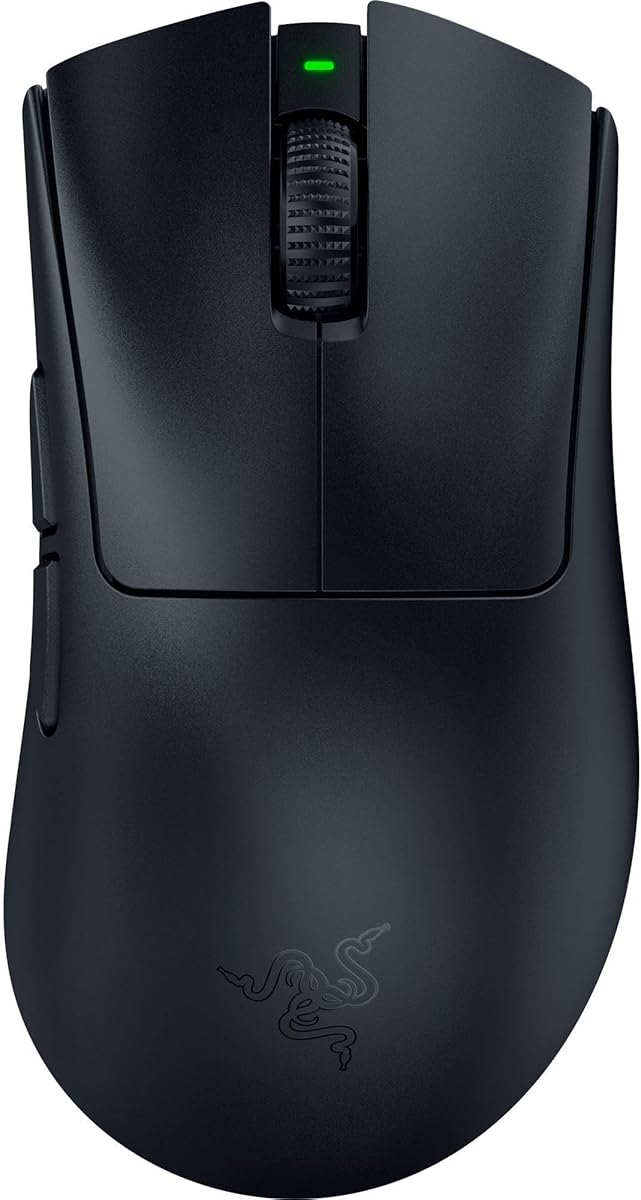
The Razer DeathAdder V3 brings legendary comfort to high-performance wired gaming. With a rating of 4.2 stars, it offers a lightweight ergonomic design favored by pros. It retains the classic shape that many players love while adding modern tech like 8K polling.
We may earn a commission when you buy through this link, at no additional cost to you.
Weighing 59g, it is one of the lightest ergonomic mice ever made. The Focus Pro 30K optical sensor tracks flawlessly on various surfaces. With 8K HyperPolling, it communicates inputs 8000 times per second for near-zero latency. Optical switches provide 0.2ms actuation with zero debounce. The Speedflex cable minimizes drag for smooth swipes.
Since it is wired, you miss out on the freedom of wireless movement. However, it ensures maximum performance without battery worries. The ergonomic form fits well for right-handed users but may not suit lefties.
This is a great pick if you prefer the simplicity of wired setups. You should choose this if you want ergonomic comfort at a lower price than wireless equivalents. It ensures reliability and speed built for esports competitions.
Developed with top esports pros, the shape ensures comfort and control during long tournament sessions.
The woven Speedflex cable allows for greater flexibility and produces minimal drag on your mousepad.
We may earn a commission when you buy through this link, at no additional cost to you.
The Razer Viper 8KHz is a classic choice for players who need a symmetrical shape without wireless. With a rating of 4.3 stars, it combines lightweight performance with high tech specs. It is the first mouse to introduce 8000Hz HyperPolling technology to the market.
We may earn a commission when you buy through this link, at no additional cost to you.
At 71g, it remains agile despite its wired nature. The Focus+ 20K optical sensor provides pixel-precise accuracy. Optical mouse switches register up to 8x faster than mechanical switches. RGB lighting allows customization to match your setup. On-board memory stores up to 5 profiles for tournament play.
The weight is slightly higher than newer wireless models. It relies on a cable which can limit movement space. However, it remains a robust option for those who favor wired reliability. The ESL edition branding ensures it meets pro standards.
This fits well if you need a symmetrical mouse for budget friendly reasons. You should buy this if you want a proven shape with a high polling rate. It offers quick execution and reliability for competitive gaming.
The ambidextrous shape makes it accessible for both left and right handed users equally.
Communicating inputs 8000 times a second ensures near-zero input latency for precise aiming.
We may earn a commission when you buy through this link, at no additional cost to you.
The Razer Viper V4 Pro is the latest evolution in wireless esports mice focusing on efficiency. With a rating of 4.6 stars, it offers a 9% lighter body than its predecessor. It balances raw performance with an impressive battery life that reduces charging anxiety.
We may earn a commission when you buy through this link, at no additional cost to you.
Weighing just 49g, it is incredibly agile. The Focus Pro 50K optical sensor tracks up to 930 IPS with high acceleration. Up to 180 hours of battery life at 1000Hz means less downtime. The optical scroll wheel improves accuracy for inventory control. Gen-4 optical switches ensure 100 million click durability.
The price is at the high end of the market. While battery life is long, it drops significantly if you max out the 8000Hz polling rate. However, the performance efficiency justifies the cost for serious gamers.
If you want a lightweight mouse that lasts long, this is a great fit. You should choose this if you prioritize battery longevity alongside high performance. It delivers unrivaled speed and reliability for competitive play.
Improved wireless efficiency allows up to 180 hours at standard polling for worry free sessions.
The optical scroll wheel uses actuation instead of mechanical parts for more consistent tracking.
We may earn a commission when you buy through this link, at no additional cost to you.
The Logitech G PRO X Superlight 2 builds on a championship-winning legacy. With a 4.5 star rating, it is designed with top esports pros for precision. It improves on the original with an 8 kHz polling rate and better sensor calibration.
We may earn a commission when you buy through this link, at no additional cost to you.
At 60g, it is a bit heavier than newer ultralights but stable. The HERO 2 sensor tracks over 388 IPS with no smoothing. Zero-additive PTFE mouse feet provide seamless connection to your game. LIGHTFORCE hybrid switches deliver tactile clicks. It works with POWERPLAY for continuous wireless charging.
The extra weight might be noticeable for users preferring sub 50g mice. Cost is also higher than average. Yet its stability and proven performance make it a top choice for pros who value reliability.
This is ideal for you if you want a mouse trusted by top players. You should buy this if you prioritize stability over absolute minimum weight. It is engineered to win with better speed and precision.
Precise sensor calibration with zero smoothing ensures the cursor follows your hand movement perfectly.
Designed in collaboration with leading esports pros, the mouse is tested for real world performance.
We may earn a commission when you buy through this link, at no additional cost to you.
The ATTACK SHARK X8 Ultra is a specialized choice for gamers with medium to large hands. With a rating of 4.3 stars, it offers comfort without sacrificing weight. It delivers 8K polling at a budget friendly price point.
We may earn a commission when you buy through this link, at no additional cost to you.
Weighing 55g, it is lightweight despite its larger dimensions. The PixArt PAW3950MAX sensor offers up to 42,000 DPI. It switches between Bluetooth, 2.4GHz, and wired. Nano-ice coating keeps your grip cool. 500mAh battery lasts up to 300 hours. Omron switches ensure 100 million clicks.
The larger size might not fit smaller hands well. Software relies on cloud access for customization. Yet for those needing a bigger mouse, this is a rare affordable option. The performance rivals expensive models.
If you have large hands and want wireless comfort, this is great. You should choose this if you need a larger grip that remains light. It provides seamless control for bigger hands.
The dimensions are optimized for medium to large hands providing a secure comfortable grip.
Nano-ice coating keeps your hand cool during intense gaming sessions reducing fatigue.
We may earn a commission when you buy through this link, at no additional cost to you.
The Razer DeathAdder V4 Pro combines wireless freedom with ergonomic comfort. With a 4.3 star rating, it targets FPS and esports tournaments. It features a re-engineered shape that is lighter than older models.
We may earn a commission when you buy through this link, at no additional cost to you.
Weighing 56g, it balances speed and comfort. The Focus Pro Optical Sensor Gen-2 provides 45K DPI accuracy. Up to 8000 Hz polling ensures responsive input. Optical switches offer 100 million clicks. 150 hours battery life at 1000Hz reduces interruptions. Dual wireless and wired modes add flexibility.
The cost is high for casual users. The shape is strictly for right handed gamers. However, the tracking reliability is top tier for shooters. The ergonomics reduce strain effectively.
This suits you if you prefer ergonomic wireless mice. You should buy this if you want pro features in a classic shape. It enables faster swipes and precise tracking.
The shape is designed for stable and control when flicking and tracking.
45K DPI optical sensor ensures reliable tracking across surfaces for precision gameplay.
We may earn a commission when you buy through this link, at no additional cost to you.
The ATTACK SHARK R11Ultra offers a high-end build at a mid-range price. With a 4.8 star rating, it is praised for its carbon fiber body. It combines durability with lightweight control for intense sessions.
We may earn a commission when you buy through this link, at no additional cost to you.
Weighing only 49g, it is easy to handle. The PixArt PAW3950MAX sensor achieves unbeatable accuracy. Nordic chipset ensures stable connectivity. It switches between 8K wireless and Bluetooth. Omron optical switches give crisp feedback. Ice-cool coating provides a sweat-resistant grip.
The reliance on cloud drivers may be a hurdle for offline users. The brand is less established than others. Still, the durability and performance are impressive. The battery is sufficient for most sessions.
This is ideal if you want a durable lightweight option. You should choose this if you value build quality and sensor performance. It offers precise movement perfect for FPS games.
Full-body injection-molded carbon fiber delivers extreme durability and pressure resistance.
Nano-metallic ice-cool coating ensures a sweat-resistant comfortable grip during extended use.
We may earn a commission when you buy through this link, at no additional cost to you.
Selecting the right mouse requires understanding key specs. This guide breaks down factors like sensor accuracy, weight, and connectivity.
A polling rate indicates how often the mouse sends position data to your PC. Standard mice use 1000Hz, but 8kHz models send data eight times faster. This reduction in latency gives a faster reaction time in competitive shooters.
Look for mice that support true 8kHz wireless polling rather than just wired. Ensure your PC hardware supports this feature to avoid bottlenecks.
The sensor is the heart of tracking quality. High DPI and IPS ratings allow for precise movements across surfaces. Look for optical sensors that do not spin out during fast swipes.
Focus on models with zero smoothing and acceleration to maintain consistent aim. Check for optical or track-on-glass features if you use glass surfaces.
Lightweight mice reduce strain and allow faster movements. Competitive players often prefer mice between 40g and 60g. Carbon fiber or hollow shells help lower weight without losing durability.
Consider your grip style. A balanced weight prevents the mouse from feeling too light or too heavy during flicks.
Optical switches are preferred for esports as they prevent double clicking. They use light to register clicks, offering faster actuation. Aim for switches rated for over 70 million clicks.
Check if the switches are Gen-3 or newer for improved tactile feedback. Avoid mechanical switches if you want maximum speed.
Wireless options offer freedom but need good battery life. 8kHz polling drains battery faster so ensure it supports longer runtimes at standard settings. Tri-mode connectivity adds flexibility.
Look for USB-C charging for convenience. Check if the mouse supports charging docks like POWERPLAY for zero downtime.
Your hand size determines if the shape suits you. Ergonomic shapes benefit right-handed grip while symmetrical ones fit ambidextrous needs. A comfortable shape reduces fatigue over hours.
Try to hold the mouse before buying if possible. Ensure the grip texture prevents slipping during sweaty sessions.
Drivers allow you to adjust DPI and macros. Cloud-based drivers are convenient but need internet. Local software works offline but requires installation.
Choose software that offers easy profiles switching. Ensure it runs smoothly on your operating system.
To get the best performance ensure your surface is clean and flat. Dust can affect tracking accuracy. Use a high-quality mousepad that matches your grip.
Keep firmware updated through the official app. Updates often improve stability and fix bugs. If you play wired, secure your cable to reduce drag.
Clean the mouse regularly with a soft cloth. Avoid harsh chemicals on the coating. Store it in a safe place to avoid damage to internal components.
Yes for competitive players it reduces latency significantly. For casual gaming 1kHz might suffice. Most pros prefer 8kHz for the precision in fast paced games.
Using 8kHz drains battery faster than 1kHz. Many mice offer adjustable polling to balance performance and power. Check runtime specs at both settings.
Modern CPUs and USB ports are required. Ensure your system is up to date. High frame rate monitors complement 8kHz mice for smooth visuals.
Optical switches prevent double clicking and actuate faster. They are standard for esports mice. They also last longer than mechanical alternatives.
Many new models have glass tracking support. Check the sensor specs for track-on-glass features. Otherwise a mousepad is required for consistent results.
Most pros prefer between 40g and 60g. Lighter mice allow faster flicks. Heavier ones offer more stability. Choose based on your preference.
We have reviewed the top 10 options ranging from budget picks to pro models. Each offers unique strengths in sensor accuracy and wireless reliability. Whether you want lightweight or ergonomic there is a fit.
Prioritize sensor quality and switch durability over brand names. Look for features like optical switches and high polling rates to boost performance. Consider your hand size and grip style for comfort.
Remember to check current prices and availability before buying. Deals often change so timing matters. With the right tool you can elevate your gameplay to the next level.