
Dell 24 Monitor SE2426H
4.7Editor score
144Hz refresh rate
IPS technology
TÜV 3-star eye comfort
Finding a monitor that remains visible in bright sunlight is crucial for outdoor professionals. Standard screens often wash out under direct light, making work impossible without shade. High brightness and anti-glare coatings are essential features for reliable performance in these conditions.
We evaluated ten top-rated monitors based on brightness, color accuracy, and portability. Each option offers unique strengths for photographers, inspectors, and remote workers. Our analysis focuses on real-world usability in challenging lighting environments to ensure you find the right fit.
Each pick highlights key specifications and ideal use cases for your workflow. We include detailed reviews and a comparison table to simplify your decision. Prices and availability change frequently, so check current listings before purchasing your new display solution.
4.7Editor score
4.8Editor score

4.2Editor score
As an Amazon Associate we earn from qualifying purchases.
This table provides a side-by-side comparison of all ten monitors to help you quickly identify key differences in resolution, refresh rate, and design features.





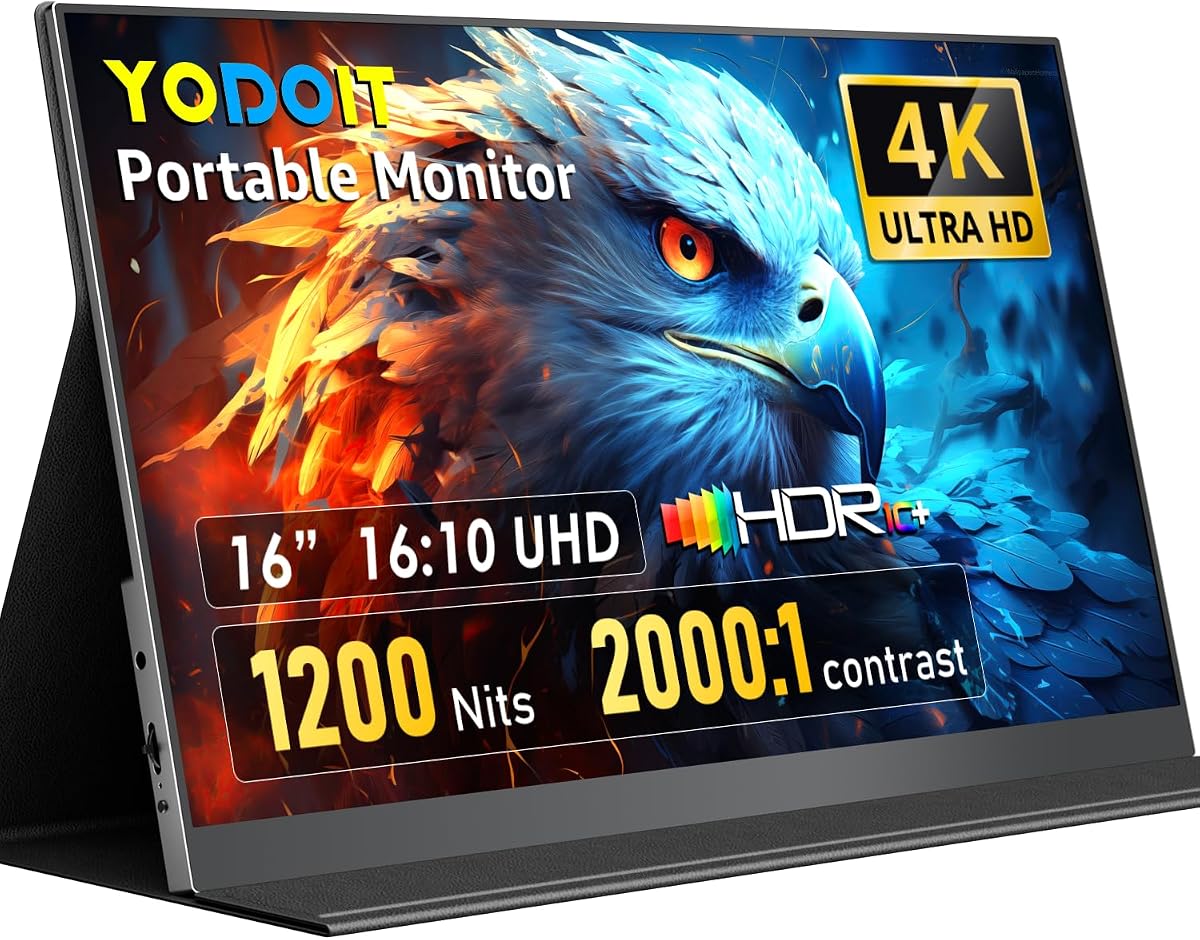
The Yodoit 4K Portable Monitor stands out as the top choice for professionals needing reliable performance in bright sunlight. With a peak brightness of 1200 nits, it overcomes the limitations of standard portable displays that often wash out outdoors. Its 4K resolution and color accuracy make it ideal for field photographers and designers.
We may earn a commission when you buy through this link, at no additional cost to you.
This monitor delivers exceptional visual fidelity with 145% sRGB coverage and a 2000:1 contrast ratio. The matte anti-glare coating ensures reflections do not interfere with viewing even in direct light. Connectivity options include USB-C and Mini HDMI, supporting a wide range of devices from laptops to consoles.
While it requires a power adapter for peak brightness output, this trade-off ensures consistent performance in demanding environments. The built-in speakers and magnetic cover add convenience for presentations and transport. These minor drawbacks are outweighed by its superior brightness and color quality.
Photographers, inspectors, and digital nomads will find this monitor invaluable for on location work. Its ability to display detailed images clearly in sunlight makes it a game changer for field professionals. We highly recommend it for anyone needing a rugged and bright portable display.
The 1200 nit display is three times brighter than standard portable monitors, ensuring content remains visible even under direct sun without eye strain.
With 145% sRGB coverage and 4K resolution, this screen provides the precision needed for photo retouching and color grading tasks on the go.
We may earn a commission when you buy through this link, at no additional cost to you.
The Dell 24 Monitor SE2426H offers excellent value for users seeking a reliable display without breaking the bank. Its IPS panel ensures consistent colors and wide viewing angles, making it suitable for collaborative tasks. While not designed for direct sunlight, it performs well in shaded outdoor or brightly lit indoor environments.
We may earn a commission when you buy through this link, at no additional cost to you.
With a 144Hz refresh rate and 1ms response time, this monitor delivers smooth visuals for both work and gaming. The TÜV 3-star eye comfort certification reduces blue light, helping to prevent strain during extended use. Its sleek design with thin bezels maximizes screen real estate for a modern setup.
The main limitation is its brightness level compared to specialized sunlight-ready monitors. However, for indoor use or outdoor setups where shade is available, it provides a clear and responsive experience. The absence of USB-C may require adapters for newer laptops, which is a minor inconvenience.
This monitor is an ideal choice for students, home office users, and casual gamers on a budget. It balances performance and comfort effectively, ensuring you get a dependable display for daily tasks. We recommend it for those prioritizing eye comfort and fluid motion.
The 144Hz refresh rate combined with 1ms response time eliminates motion blur, providing a fluid experience for video playback and fast paced gaming.
TÜV certified blue light reduction helps maintain visual comfort during long work sessions, making it a healthy choice for all day use.
We may earn a commission when you buy through this link, at no additional cost to you.
The Newsoul 4K Portable Monitor is a robust solution for professionals requiring high visibility in challenging lighting conditions. Its 1200 nits peak brightness ensures content remains clear even under direct sunlight, making it perfect for fieldwork. The aluminum alloy shell provides durability and efficient heat dissipation during extended use.
We may earn a commission when you buy through this link, at no additional cost to you.
Equipped with 4K resolution and 145% sRGB coverage, this monitor offers sharp details and accurate colors for creative tasks. The matte screen reduces glare effectively, enhancing readability without the need for sunglasses. Connectivity is flexible with dual USB-C ports and Mini HDMI for various devices.
To achieve peak brightness, a power connection is necessary, which adds a slight dependency on outlets. However, the included protective case and VESA mounting option add significant value for transport and setup versatility. These features make it a strong contender for mobile professionals.
Photographers and outdoor workers will appreciate the combination of brightness and durability in this model. Its ability to deliver crisp visuals in bright environments sets it apart from standard portable screens. We suggest it for users who prioritize visibility and build quality above all.
The aluminum alloy shell not only gives a premium look but also helps dissipate heat better than plastic alternatives for long sessions.
Dual USB-C and Mini HDMI ports allow easy connection to multiple devices without needing extra adapters or complex cable management.
We may earn a commission when you buy through this link, at no additional cost to you.
The Dell 27 Monitor S2725QS brings a large 4K workspace to your desk with excellent clarity and motion handling. Its 120Hz refresh rate and AMD FreeSync Premium support ensure smooth gameplay and video playback without tearing. The IPS panel delivers wide viewing angles and consistent color across the screen.
We may earn a commission when you buy through this link, at no additional cost to you.
Improved ComfortView Plus technology reduces harmful blue light by up to 35%, allowing for comfortable long term use without compromising color accuracy. The 99% sRGB coverage makes it suitable for creative work needing precise color representation. Additionally, the upgraded speakers provide detailed sound without external peripherals.
While this monitor excels in indoor environments, it is not optimized for direct sunlight exposure. Its brightness is standard for desktop monitors, meaning it performs best in shaded or controlled lighting. Users seeking outdoor use may need to pair it with shade or a hood.
This display is perfect for home offices, gaming stations, and content creation setups where screen real estate matters. The combination of 4K resolution and refresh rate offers a premium experience for daily productivity. We recommend it for users prioritizing visual detail and comfort.
ComfortView Plus and the ash white finish create a visually pleasing setup that reduces eye strain during extended daily work hours.
Ultra thin bezels and HDR readiness deliver vivid depth and detail, making movies and games feel more engaging on the large screen.
We may earn a commission when you buy through this link, at no additional cost to you.
The Dell 24 Plus Monitor S2425HSM focuses on ergonomic design and smooth performance for daily tasks. With full height, tilt, pivot, and swivel adjustability, it allows you to position the screen perfectly to reduce neck strain. The 144Hz refresh rate ensures fluid motion for multitasking and casual gaming.
We may earn a commission when you buy through this link, at no additional cost to you.
Integrated dual 3W speakers deliver a wider range of frequencies, enhancing the overall experience without needing external hardware. The TÜV certified eye comfort features help maintain visual health during long work hours. The ash white finish adds a stylish touch to any modern desk setup.
This monitor is ideal for indoor environments where ergonomics and comfort are top priorities. However, its brightness levels are not sufficient for direct sunlight exposure. Users working outdoors would need shade or additional lighting to achieve clear visibility.
We recommend this monitor for professionals who spend long hours at a desk and value flexibility in screen positioning. It offers a balanced package of performance and comfort at a competitive price point. It is a solid choice for home offices and workstations.
Full adjustability ensures you can find the perfect viewing angle to maintain good posture and reduce physical strain during work.
Built-in speakers eliminate the need for external audio devices, providing convenience for calls and media consumption on a single desk.
We may earn a commission when you buy through this link, at no additional cost to you.
The LG 24U411A-B offers a versatile solution for productivity and entertainment with its IPS panel and HDR10 support. The 120Hz refresh rate ensures smooth frame transitions, which is beneficial for both gaming and scrolling through content. Its borderless design provides a clean aesthetic that fits well in multi monitor setups.
We may earn a commission when you buy through this link, at no additional cost to you.
Features like Reader Mode and Flicker Safe help reduce eye strain during long sessions by lowering blue light and preventing screen flicker. The slim stand base adds a floating feel to the desk, maximizing usable space. HDR10 support enhances contrast and detail for compatible content.
While the display provides vivid colors and sharp resolution, it is designed primarily for indoor environments. Direct sunlight may wash out the image due to standard brightness levels. Users should consider placement in shaded areas for optimal viewing comfort.
This monitor is suitable for users seeking an affordable yet feature-rich display for work and play. Its combination of motion handling and eye care features makes it a reliable daily driver. We suggest it for general productivity and casual gaming setups.
Dynamic Action Sync minimizes input lag while Black Stabilizer helps spot details in dark scenes, improving your performance in games.
The Switch App allows easy screen splitting and layout customization, making it simpler to manage multiple apps efficiently.
We may earn a commission when you buy through this link, at no additional cost to you.
The Acer SB273 G0bi provides a spacious 27-inch workspace that is excellent for multitasking and office work. Its IPS panel ensures consistent colors from different angles, making it great for collaborative environments. The zero frame design creates a sleek look and maximizes the viewable area for focused work.
We may earn a commission when you buy through this link, at no additional cost to you.
With a 120Hz refresh rate and 1ms response time, this monitor handles fast motion smoothly without ghosting. Adaptive-Sync support helps reduce screen tearing during video playback or gaming. It is a practical choice for users needing a reliable large screen for daily tasks.
However, the brightness is standard and not suitable for outdoor sunlight conditions. It performs best in indoor office settings where lighting can be controlled. Users requiring outdoor visibility would need to look at specialized high-brightness models instead.
We recommend this monitor for professionals who prioritize screen size and smooth performance for productivity. Its design and features make it a strong option for general office use. It offers good value for those needing a larger workspace.
The combination of high refresh rate and quick response ensures sharp visuals even during fast transitions or dynamic content viewing.
Adaptive Sync ensures smooth gaming and video playback by matching the monitor rate to the graphics card for a tear-free experience.
We may earn a commission when you buy through this link, at no additional cost to you.
The LG 32 inch QHD Monitor delivers a large and immersive workspace with vibrant colors and smooth motion. The 32-inch QHD panel offers sharp details and wide viewing angles, making it perfect for content creation and entertainment. USB-C connectivity simplifies setup by allowing video and power through a single cable.
We may earn a commission when you buy through this link, at no additional cost to you.
HDR10 and 99% sRGB coverage ensure that images and videos look vivid and accurate. Reader Mode and flicker-safe features help maintain comfort during extended reading sessions. The triple-sided micro-bezel design enhances immersion by reducing distractions from the bezel.
While the display is excellent for indoor use, its brightness is not optimized for direct sunlight. It works best in shaded or indoor environments where you can control the lighting. Users should consider its size to ensure it fits comfortably on their desk.
We recommend this monitor for users seeking a large screen for creative work or media consumption. Its combination of resolution, color accuracy, and connectivity features makes it a versatile choice. It is ideal for those wanting an enhanced viewing experience.
USB-C allows video transmission and device charging through one cable, reducing desk clutter and improving workflow efficiency.
Reader Mode and flicker safe technologies work together to reduce eye strain, making long sessions more comfortable and productive.
We may earn a commission when you buy through this link, at no additional cost to you.
The Dell 27 Plus QHD Monitor combines high resolution with fast performance for a premium desktop experience. Its QHD resolution offers sharp details while the 144Hz refresh rate ensures fluid motion for gaming and video. Full ergonomic adjustability allows you to customize the viewing angle for maximum comfort.
We may earn a commission when you buy through this link, at no additional cost to you.
Integrated speakers provide convenient audio for calls and media without external devices. The TÜV certified eye comfort features help reduce blue light and strain during long work hours. The ash white design adds a refined look to any professional or home workspace.
This monitor is designed for indoor environments where you can control lighting conditions. It is not optimized for direct sunlight exposure, so outdoor use may require shade. For indoor tasks, it delivers excellent visual quality and performance.
We recommend it for professionals and gamers who want a balance of resolution, speed, and ergonomics. Its feature set makes it a strong contender for high-end desktop setups. It is a reliable choice for demanding daily use.
Dell Display and Peripheral Manager allows you to optimize settings for your entire workspace improving efficiency and workflow management.
The dual 3W speakers deliver detailed sound with a wide frequency range, enhancing the overall multimedia experience on your desk.
We may earn a commission when you buy through this link, at no additional cost to you.
The Acer KB242Y G0bi provides a compact yet efficient display suitable for various office needs. Its zero frame design gives it a modern look while maximizing the visible area for work. The IPS panel ensures consistent colors and wide viewing angles, ideal for sharing screens or collaborative work.
We may earn a commission when you buy through this link, at no additional cost to you.
With a 120Hz refresh rate and 1ms response time, this monitor handles fast motion smoothly without blur or ghosting. It is a practical choice for users who want smooth visuals without paying for premium features. The design fits well in smaller spaces or dual monitor setups.
As an indoor monitor, it does not offer the brightness needed for direct sunlight conditions. It performs best in controlled indoor environments where lighting can be managed. Users should focus on placement to avoid glare and reflections.
We recommend this monitor for users seeking a reliable and stylish display for everyday tasks. It offers a good balance of performance and design for home or office use. It is a solid option for general productivity.
Zero frame design ensures maximum visibility of the screen from edge to edge making it a great choice for multi monitor setups.
Fast response time and high refresh rate eliminate motion blur providing a smooth experience for fast moving content and gaming.
We may earn a commission when you buy through this link, at no additional cost to you.
Choosing the right bright sunlight PC monitor requires evaluating key factors to ensure visibility and performance outdoors.
Brightness is the most critical factor for monitors used in sunlight. Standard monitors usually offer 250 to 350 nits which are insufficient for direct outdoor light. Look for displays with at least 1000 nits or more to ensure content remains visible without washing out.
Prioritize models with high nits ratings to maintain readability under direct sun exposure and reduce eye strain.
An anti-glare or matte finish is essential to minimize reflections from the sun. Glossy screens can cause distracting highlights that interfere with your work in bright environments. A matte surface scatters light evenly allowing you to view the screen clearly regardless of the angle.
Ensure the monitor has a quality matte coating to prevent unwanted reflections during outdoor tasks.
For professional work like photo editing color accuracy is paramount even when using the monitor in sunlight. A wide color gamut such as sRGB or AdobeRGB ensures that colors remain consistent and vibrant. High brightness should not come at the expense of color precision for critical tasks.
Select a monitor with high sRGB coverage to maintain professional-grade color fidelity in bright conditions.
Consider the size and weight of the monitor if you need to move it between locations. Portable monitors often range from 15 to 17 inches making them easy to carry in a backpack. Larger desktop monitors provide more screen real estate but are less convenient for field use.
Choose a size that balances screen space with ease of transport for your specific workflow needs.
Versatile connectivity ensures the monitor works with various devices like laptops phones and consoles. USB-C is ideal for modern laptops as it supports video and power delivery. HDMI or Mini HDMI ports offer broader compatibility with older equipment or gaming systems.
Check that the monitor has the necessary ports to connect seamlessly with your existing devices.
High brightness monitors often require external power sources to achieve their peak performance. Some models draw power from the USB-C connection while others need a dedicated power adapter. Consider your availability of power outlets in your outdoor workspace when selecting a model.
Ensure you have a reliable power solution to maintain full brightness in the field.
Outdoor use demands a robust build that can withstand handling and environmental exposure. Look for models with aluminum or metal frames that offer better protection and heat dissipation. Protective cases or smart covers add an extra layer of defense during transport.
Opt for durable construction to extend the lifespan of the monitor in challenging conditions.
A higher refresh rate and lower response time provide smoother visuals and reduce motion blur. This is important for video editing and gaming where fluid motion enhances the experience. Look for 120Hz or higher refresh rates for optimal performance in dynamic tasks.
Prioritize fast refresh rates to ensure clear and fluid imagery in motion.
To get the best results position your monitor at an angle that minimizes direct glare while maintaining a comfortable viewing height. Adjust the tilt and orientation so the screen faces you without reflecting sunlight directly into your eyes.
Connect the monitor using high-quality cables to ensure stable power and signal transmission. If the model requires external power for peak brightness always use the included adapter to achieve optimal visibility outdoors.
Clean the screen with a soft microfiber cloth to remove dust and smudges without scratching the matte finish. Store the monitor in its protective case when not in use to prevent scratches and damage during transport.
To be readable in direct sunlight you need a monitor with at least 1000 nits of brightness. Most standard monitors only provide 250 to 350 nits which wash out under bright outdoor conditions. Specialized portable monitors offer 1200 nits to ensure clear visibility.
Yes specialized portable monitors with high brightness ratings are designed specifically for outdoor photography. Models offering 1200 nits allow photographers to preview images accurately in direct sunlight without relying on shadows or hoods.
Many high brightness monitors require external power to reach peak performance levels. While some can run on USB-C power reaching maximum nits often needs a dedicated power adapter for stable operation.
Using a standard desktop monitor outside is challenging due to low brightness and reflection issues. They are designed for indoor use and may appear washed out or hard to see in bright daylight conditions.
Yes matte screens significantly reduce glare and reflections compared to glossy displays. This makes them easier to view in bright light as they diffuse sunlight rather than reflecting it directly into your eyes.
Look for portable monitors with USB-C HDMI and Mini HDMI ports. USB-C supports video and power which simplifies setup while HDMI ensures compatibility with consoles and other devices.
Selecting the best bright sunlight PC monitor depends on your specific needs and environment. The Yodoit 4K Portable Monitor leads the list with exceptional brightness and color accuracy ideal for field professionals.
Prioritize brightness and anti-glare features when evaluating options to ensure visibility in your primary work setting. Portability and connectivity options also play key roles in how well the monitor fits into your workflow.
Always check current pricing and availability as product listings may change over time. Investing in the right monitor enhances productivity and ensures clear visuals no matter where you work.