
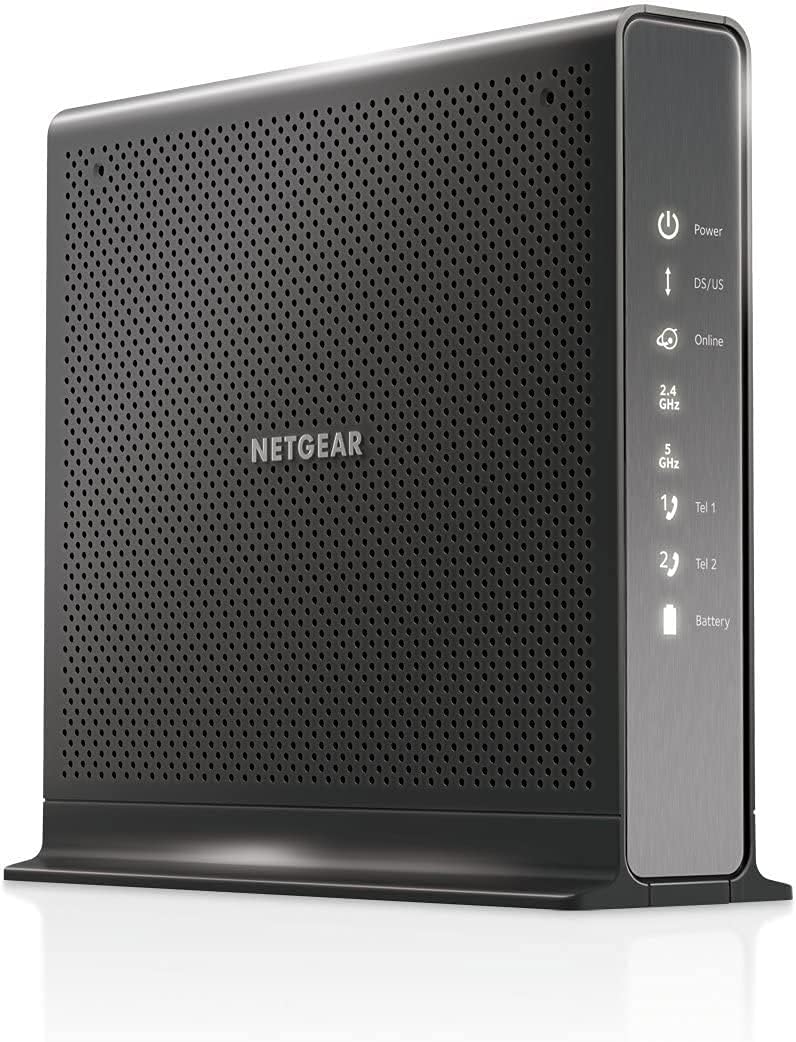
NETGEAR Nighthawk C7000
4.2Editor score
DOCSIS 3.0 Standard
AC1900 Dual Band
Great Value Price
Compare the top 10 Cable Modem WiFi Router Combo units for October 2026. We review speed, coverage, compatibility, and value to help you find the perfect
Finding the right networking equipment can be overwhelming with so many options available today. A Cable Modem WiFi Router Combo simplifies your setup by combining two essential devices into one compact unit. This guide helps you choose the best model for your home internet needs.
We evaluated ten top-rated combos based on speed capabilities, wireless coverage, and provider compatibility. Our analysis focuses on real-world performance metrics like DOCSIS standards and Wi-Fi generations. Each product was reviewed for reliability and feature sets that matter most to users.
Every pick includes detailed specifications and pros to help you make an informed decision. Keep in mind that availability and pricing can change frequently on retailer sites. Always verify compatibility with your specific internet service provider before purchasing any device.
4.2Editor score

4.1Editor score

3.9Editor score
This comparison table lists all ten selected models side by side for easy reference. You can quickly see the key specifications and ratings for each option to narrow down your choice based on your specific requirements.





The NETGEAR Nighthawk CAX30 stands out as a top contender for modern home networks. It combines DOCSIS 3.1 with Wi-Fi 6 to deliver reliable performance for most households. Users appreciate the seamless setup process and robust security features included.
We may earn a commission when you buy through this link, at no additional cost to you.
Its AX2700 speed ensures smooth streaming and gaming even when multiple devices are connected. The modem supports plans up to 2Gbps which provides room for future upgrades. Four Gigabit Ethernet ports allow hardwiring of critical devices for stability.
While the price is higher than older models, the technology included justifies the cost. Voice support is limited to specific providers which might restrict some users. Overall the device offers excellent value for those seeking top-tier performance.
This model is ideal for families with several smart devices and high-speed internet plans. It balances speed and coverage effectively. We recommend it for users wanting a future-proof solution for their home connectivity needs.
The Wi-Fi 6 technology ensures better efficiency and speed in crowded network environments.
Four Gigabit ports give you flexibility to connect consoles and PCs directly.
We may earn a commission when you buy through this link, at no additional cost to you.
The C7000 offers a solid balance of performance and cost for budget-conscious buyers. It supports DOCSIS 3.0 which is sufficient for plans up to 800Mbps. Many users find it reliable for everyday tasks like browsing and streaming.
We may earn a commission when you buy through this link, at no additional cost to you.
AC1900 speeds provide decent coverage for medium-sized homes. The router manages multiple connections well without significant slowdowns. Setup is straightforward using the Nighthawk app which simplifies configuration tasks.
The main drawback is the lack of Wi-Fi 6 which limits future scalability. However for current users it delivers consistent results. It remains a popular choice for those not needing the latest wireless standards.
This unit is perfect for users seeking to cut rental fees without spending too much. It works well with major providers like Xfinity and Cox. We suggest it for standard households needing dependable connectivity.
Paying one upfront cost saves monthly rental fees over time.
Handles typical streaming and browsing tasks without issues.
We may earn a commission when you buy through this link, at no additional cost to you.
The CAX80 is designed for users who demand maximum speed and coverage. It features AX6000 Wi-Fi 6 which handles dozens of devices efficiently. The inclusion of a 2.5 Gig port makes it unique for wired devices.
We may earn a commission when you buy through this link, at no additional cost to you.
Coverage extends up to 2500 square feet making it great for large homes. It supports cable plans up to 2Gbps which is ideal for power users. Security features are robust ensuring family safety online.
The high price tag limits its appeal to a specific audience. Some users report setup complexities compared to simpler models. However the performance benefits outweigh these issues for those who need them.
This model suits enthusiasts with high-speed internet and many connected gadgets. It provides headroom for future network demands. We recommend it for users prioritizing speed and range above cost.
The 2.5 Gig port allows faster wired connections for gaming rigs.
Large areas get consistent signal strength thanks to advanced antennas.
We may earn a commission when you buy through this link, at no additional cost to you.
This renewed version offers the same performance as the new CAX30 at a lower cost. It undergoes testing to ensure it meets quality standards. Many users report it works just as well as a brand new unit.
We may earn a commission when you buy through this link, at no additional cost to you.
Wi-Fi 6 capabilities ensure modern connectivity speeds and efficiency. The DOCSIS 3.1 modem handles fast plans effectively. It saves money while providing similar features to the full retail version.
The warranty is typically shorter which is a consideration for some buyers. Physical condition might vary slightly but function remains consistent. It is a smart pick for budget-conscious tech enthusiasts.
Ideal for those who want high specs without the full price. It supports major providers and offers robust connectivity. We suggest it for users comfortable with certified refurbished electronics.
Access high-end features for less money with certified options.
Devices are tested to ensure they work like new units.
We may earn a commission when you buy through this link, at no additional cost to you.
This variant of the CAX30 maintains the core strengths of the original model. It provides AX2700 speeds which are excellent for streaming and gaming. The modem supports high-speed cable plans comfortably.
We may earn a commission when you buy through this link, at no additional cost to you.
Users find it easy to set up using the Nighthawk app. Security features like Armor are included to protect the network. It is a strong choice for modern home networking needs.
Voice support is not available on this specific unit. It covers standard home sizes well but might struggle in very large properties. Overall it remains a reliable device for most users.
Best for households seeking a balance of speed and price. It handles multiple devices without issues. We recommend it for those upgrading from older DOCSIS 3.0 models.
High speeds ensure buffer-free video on all connected screens.
Manage network settings easily through a mobile interface.
We may earn a commission when you buy through this link, at no additional cost to you.
The G34 brings Wi-Fi 6 and DOCSIS 3.1 at a competitive price point. It supports plans up to 2.5Gbps which is faster than many competitors. The compact design saves space in your home.
We may earn a commission when you buy through this link, at no additional cost to you.
Users appreciate the modern look and easy LED indicators for status. Setup is simple requiring only a coaxial connection. It is a strong contender for those who prefer ARRIS products.
Some users report mixed experiences with customer support. The wireless range is adequate for most homes. It provides good value for the specs offered in the current market.
Ideal for users needing high speed in a smaller package. It works well with major cable providers. We suggest it for those looking for an alternative to theGEAR units.
The small footprint fits easily on any shelf or desk.
Supports speeds up to 2.5Gbps for future growth.
We may earn a commission when you buy through this link, at no additional cost to you.
This renewed model offers the lowest entry price for a reliable combo. It retains the same capabilities as the new C7000. Users find it sufficient for standard internet usage tasks.
We may earn a commission when you buy through this link, at no additional cost to you.
The AC1900 speed handles streaming and browsing without issue. It saves on monthly rental fees effectively. The refurbished process ensures it works correctly before shipping.
Warranty options are limited compared to new devices. It may not last as long as a brand new unit. However for short-term needs it is very cost-effective.
Perfect for rentals or temporary setups where budget is key. It connects to major providers easily. We suggest it for users needing a quick and cheap solution.
Get essential features at a minimal cost.
Amazon policies allow returns if issues arise.
We may earn a commission when you buy through this link, at no additional cost to you.
This model stands out because it supports home phone services over cable. It is designed specifically for Xfinity voice users. The device includes ports for two phone lines which is rare.
We may earn a commission when you buy through this link, at no additional cost to you.
Users with home phone needs find it essential for their setup. The AC1900 router is standard but works well. It supports plans up to 600Mbps which is decent.
Battery backup for outages is an optional feature to consider. It is limited to Xfinity which reduces general compatibility. Overall it is a niche but valuable choice.
Ideal for families relying on Xfinity landline services. It combines phone and internet in one box. We recommend it for voice users seeking simplicity.
Supports two phone lines for home telephone needs.
Works best with Xfinity cable and voice plans.
We may earn a commission when you buy through this link, at no additional cost to you.
The C6250 is designed for users with lower speed internet plans. It handles up to 300Mbps effectively without issues. The compact size fits well in small apartments.
We may earn a commission when you buy through this link, at no additional cost to you.
AC1600 speeds provide enough coverage for basic streaming and browsing. Two Gigabit ports are enough for a few wired devices. It saves on rental fees for budget-conscious users.
Not suitable for large homes or many connected devices. It is an older model which limits future expansion. However for basic needs it works reliably.
Best for small households with modest internet needs. It is compatible with most major providers. We suggest it for entry-level users.
Small design makes it easy to place anywhere.
Perfect for browsing and standard streaming use.
We may earn a commission when you buy through this link, at no additional cost to you.
ARRIS is a trusted name in connectivity solutions. This model offers solid performance for the average household. It supports plans up to 800Mbps which is sufficient for many.
We may earn a commission when you buy through this link, at no additional cost to you.
The SURFboard app makes setup and monitoring easy. Users report it is stable and reliable for daily use. Four Gigabit ports allow for flexible wired connections.
It lacks modern Wi-Fi 6 technology which affects speed. Not all providers approve it so check before buying. It remains a popular choice for its price.
Best for users seeking reliability from a known brand. It saves rental fees efficiently. We recommend it for standard home internet setups.
Central app provides tools to manage devices easily.
Known for consistent performance over time.
We may earn a commission when you buy through this link, at no additional cost to you.
Selecting the right combo depends on your internet plan and home size. This section explains the critical factors to consider before purchasing.
Ensure your device supports the maximum speed of your internet plan. DOCSIS 3.1 models handle speeds over 1Gbps better than older 3.0 versions. If you have gigabit plans choose a modem rated for that speed.
Always verify the modem's speed rating matches your provider's offer to avoid bottlenecks.
Wi-Fi 6 is the latest standard offering better speed and efficiency. Older AC models may struggle with many connected devices. If you have many smart devices prioritize a Wi-Fi 6 router.
Select Wi-Fi 6 for future-proofing and better handling of multiple users.
Consider the square footage of your home when choosing a router. Some units cover 1500 sq ft while others reach 2500 sq ft. Larger homes may need mesh systems or extenders with combos.
Match the coverage rating to your home size for best signal strength.
Not all combos work with all providers. Check your ISP's approved list before buying to ensure functionality. Some devices support only cable internet and not DSL or fiber.
Verify compatibility with your specific ISP to prevent activation issues.
Count how many devices need wired connections. Most combos offer four Gigabit ports. If you need more check for devices with USB or port aggregation features.
Choose a model with enough ports for your gaming consoles and PCs.
Look for built-in security like firewalls and WPA3 encryption. Many devices offer subscriptions for extra protection which can save money. Avoid devices without modern security standards.
Ensure your device has strong security settings to protect your data.
If you use home phone over cable verify voice support. Only specific models support two phone lines or VoIP features. Most standard combos do not include voice capabilities.
Select a model with voice ports if you rely on home phone services.
Prices vary significantly between basic and premium units. Consider saving monthly rental fees against the upfront cost. A higher initial investment often pays off over time.
Calculate total costs over time to choose the best financial option.
Set up your combo by connecting the coaxial cable to the modem port. Plug in the power adapter and wait for the status lights to stabilize. This process usually takes a few minutes to complete.
Use the manufacturer's app or web interface to configure your Wi-Fi network name and password. Update the firmware regularly to ensure security and performance. Most devices update automatically when connected.
Keep the device in a cool and dry place to avoid overheating. Avoid stacking other electronics on top of it. Restart the device every few weeks to clear cached data and maintain speed.
Yes owning your own device eliminates monthly rental fees. These fees usually range from ten to fifteen dollars. Over time the upfront cost is recovered.
Not every model works with every provider. Cable internet is supported but fiber or DSL are not. Always check the approved list for your ISP before purchasing.
DOCSIS 3.1 supports faster speeds and more efficiency. It is required for plans over one gigabit. Older 3.0 models are cheaper but have lower speed limits.
It is recommended for homes with many devices. It handles traffic better and offers faster speeds. If you have older devices Wi-Fi 5 is still functional.
Connect the device to the coaxial outlet and power. Then visit your ISP's site to register the MAC address. They may reset your connection during this process.
Yes you can connect a range extender via Ethernet. This helps if you have a large home. It expands coverage without replacing the main unit.
Check the coaxial cable connections first. Ensure your ISP supports the specific device model. Restart the device and contact support if issues persist.
Most include basic firewalls and WPA3 encryption. However you should change default passwords immediately. Some offer subscription security for extra protection.
We reviewed ten top options ranging from budget-friendly to high-end models. The NETGEAR Nighthawk CAX30 stands out for its balanced performance and features. Other models like the C7000 offer excellent value for standard needs.
Prioritize speed and provider compatibility when making your decision. Ensure the device supports your internet plan and home size. Upgrading saves money and improves connectivity.
Remember to check current availability and compatibility before buying. Prices change and ISPs update their approved lists regularly. With the right choice your home network will perform reliably.