TONOR Podcast Microphone
4.3Editor score
Cardioid pickup pattern
Plug and play USB
Includes shock mount
Finding the right audio equipment is crucial for any content creator looking to establish a professional presence online. A good podcast microphone ensures your voice is captured clearly while minimizing background noise that can distract listeners. This guide explores affordable options that deliver high performance.
We have carefully evaluated ten budget-friendly microphones based on sound quality, build durability, ease of use, and feature sets. Each product was analyzed for its suitability across different recording environments such as home studios, offices, and gaming setups. Our goal is to provide you with reliable data.
Each pick highlights specific strengths and ideal use cases to help you match a microphone to your unique needs and setup. Please note that product availability and pricing can change frequently due to market conditions and promotions. Always verify current details before making a final purchasing decision.
4.3Editor score

4.4Editor score

4.6Editor score
As an Amazon Associate we earn from qualifying purchases.
The following table provides a side-by-side comparison of all ten microphones reviewed in this guide to help you quickly identify key specifications and features.




The ZealSound Podcast Microphone stands out as a top choice for creators seeking professional audio without a high price tag. With a rating reflecting user satisfaction, it offers a comprehensive set of features including intelligent noise reduction and real-time monitoring. This makes it highly versatile for podcasting and streaming.
We may earn a commission when you buy through this link, at no additional cost to you.
Key strengths include its ability to filter out background noise like keyboard clicks and fan hum through a dedicated mode. The inclusion of physical knobs for gain, monitoring, and echo allows for quick adjustments during recording sessions. Its wide compatibility with various operating systems and mobile devices via adapters adds significant value for multi-platform creators.
While it performs exceptionally well for its price point, users should note that the echo control is a basic hardware feature rather than software-based. Additionally, it requires a direct USB connection which may limit mobility compared to wireless options. These trade-offs are minimal considering the rich feature set provided.
This microphone is ideal for podcasters and streamers who need reliable performance and flexibility. Whether you are recording at home or on the go with a tablet, it delivers clear vocal output. We recommend it as a primary tool for anyone building a content creation workflow on a budget.
Press and hold the mute button to enable noise reduction which helps isolate your voice from ambient sounds like fans or chatter.
Included USB-C and Lightning adapters ensure seamless compatibility with modern devices including iPhones and Android tablets for versatile recording.
We may earn a commission when you buy through this link, at no additional cost to you.
The Amazon Basics Condenser Microphone offers a straightforward and effective solution for those starting their podcasting journey. It delivers clear sound capture through a large diaphragm while effectively isolating background noise with its cardioid pattern. Users appreciate its simplicity and ease of setup without driver installation.
We may earn a commission when you buy through this link, at no additional cost to you.
Its key strengths lie in its reliable performance for voice recording and streaming. The one-tap mute function adds convenience for quick silence during calls or broadcasts. The built-in shock absorber and rubber boot help reduce vibrations from desk bumps ensuring cleaner audio tracks even in less quiet environments.
Despite its low cost, the build feels somewhat basic compared to higher-end models. There are no physical volume or gain controls on the unit itself requiring users to rely on software settings for adjustments. However, these limitations are expected given the competitive positioning of this product.
This microphone is perfect for beginners who prioritize functionality over advanced features. It works seamlessly with common recording software and operating systems making it a plug-and-play solution. We suggest it for anyone needing a dependable entry-level microphone for voiceovers or online meetings.
The cardioid pattern isolates background noise ensuring clear and clean sound for recording and broadcasting in typical room environments.
It can be detached and installed on tripods boom arms or microphone stands that feature a standard 5/8 inch thread for mounting.
We may earn a commission when you buy through this link, at no additional cost to you.
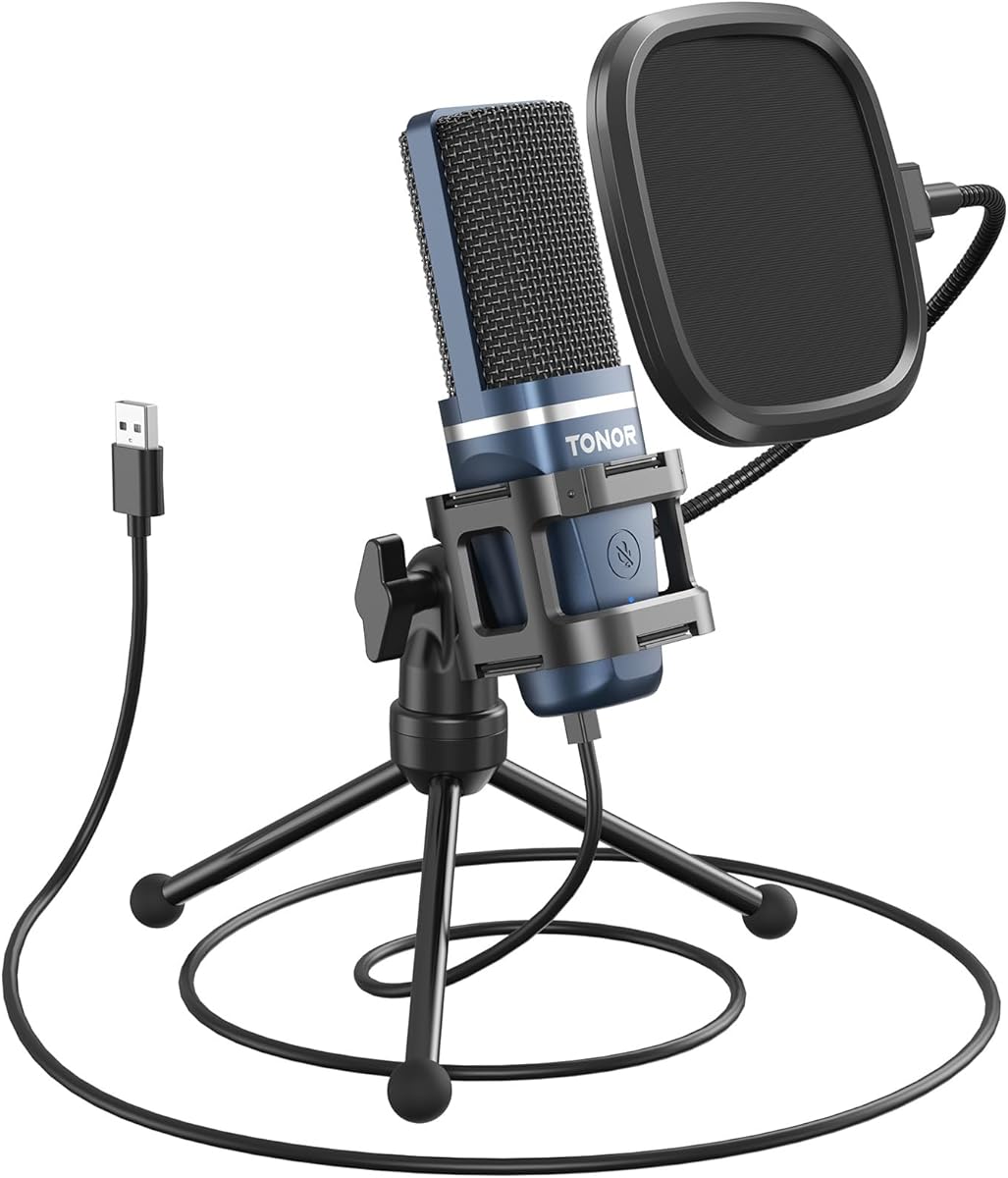
The TONOR Podcast Microphone provides a complete package for content creators needing immediate setup capabilities. It captures clear vocal audio with a cardioid pattern that minimizes unwanted background noise effectively. The inclusion of essential accessories like a shock mount and pop filter makes it ready to use out of the box.
We may earn a commission when you buy through this link, at no additional cost to you.
Users benefit from the comprehensive accessory kit that eliminates the need for additional purchases. The one-click mute and volume control facilitate easy operation during recording sessions. Its multi-device compatibility allows seamless use across Windows Mac and gaming consoles which is beneficial for streamers using various platforms.
While highly functional for its price, the stand is a small foldable tripod that does not offer significant height adjustment. It also lacks an XLR output limiting future upgradability compared to hybrid models. These constraints are minor for casual users but may matter for advanced setups.
This microphone is recommended for podcasters and gamers who want a full kit without extra hassle. It delivers crisp sound suitable for voice chats and streaming. We suggest it for anyone seeking a reliable all-in-one solution for desktop recording and communication.
The box includes a shock mount and pop filter to prevent recordings from being disturbed by vibration and plosive noise immediately.
It is quickly recognized by Zoom Skype and Discord allowing you to start creating or communicating immediately across different applications.
We may earn a commission when you buy through this link, at no additional cost to you.
The FIFINE K669B is a robust option designed for durability and clear voice reproduction. Its solid metal construction ensures longevity while the cardioid pattern focuses on the main sound source to reduce background noise. Users appreciate the ease of use with a direct USB connection and built-in volume control.
We may earn a commission when you buy through this link, at no additional cost to you.
The standout feature is the physical volume knob which allows quick adjustments without touching the computer settings. This is particularly useful for gaming or live streaming where immediate feedback is needed. The durable material extends service life making it a sound investment for daily use.
One limitation is the lack of a mute button requiring users to mute through software or system settings. It also does not support phone connections limiting mobility. However for desktop recording these drawbacks are often negligible given the overall performance quality.
This microphone is well suited for voice over work and podcasting in a fixed location. It integrates well with popular software like Audacity and Discord. We recommend it for creators who value build quality and straightforward operation.
Solid sturdy metal construction design with a stable tripod stand is convenient when you are doing voice overs or livestreams on YouTube.
Your voice would be heard well enough through the USB microphone when gaming skyping or voice recording with adjustment via the knob.
We may earn a commission when you buy through this link, at no additional cost to you.
The FIFINE AmpliGame AM8 offers a unique blend of dynamic sound and flexible connectivity for both USB and XLR setups. Its dynamic microphone design rejects unwanted off-axis noise well which is crucial for recording in non-ideal environments. The RGB ring adds a visual element that appeals to gamers and streamers.
We may earn a commission when you buy through this link, at no additional cost to you.
The dual connection capability allows users to start simple with USB and upgrade to XLR later with an audio interface. Tap-to-mute functionality and an LED reminder provide practical utility during live sessions. The headphone jack enables real-time monitoring to ensure audio quality during recording.
While versatile, the XLR features require a separate cable and interface which adds to the total cost. The dynamic capsule may require speaking closer to the mic for best results compared to condensers. However this trade-off is acceptable for the flexibility it provides.
This microphone is ideal for streamers and creators looking for a long-term solution that can grow with their setup. We recommend it for those who might transition from USB to professional audio interfaces in the future.
Skip the hassle of setting something up and plug the cable to play the dynamic USB microphone directly which suits for beginner creators.
RGB off when muted to indicate status and prevent streaming accidents so you know exactly when the mic is silent instantly.
We may earn a commission when you buy through this link, at no additional cost to you.
The Logitech Blue Yeti is a legendary option in the podcasting world known for its versatile pickup patterns and broadcast-quality sound. It supports cardioid omni bidirectional and stereo modes allowing for diverse recording setups without extra equipment. Users value its premium build and the powerful Blue VO!CE software enhancements.
We may earn a commission when you buy through this link, at no additional cost to you.
Key strengths include the four pickup patterns which allow you to record vocals instruments and podcasts flexibly. The onboard controls for pattern selection and instant mute put you in charge of the audio process. High fidelity reproduction ensures your voice sounds professional and clear on every recording.
Despite its excellence it does require a power source and has a larger footprint than smaller desktop units. The cost is higher than budget options but reflects the professional performance offered. These are acceptable trade-offs for serious content creators needing studio quality.
This microphone is perfect for podcasters and musicians seeking top-tier audio fidelity. It integrates seamlessly with major platforms and recording software. We recommend it as a definitive choice for those ready to invest in high-end audio gear.
Flexible cardioid omni bidirectional and stereo pickup patterns allow you to record in ways that would normally require multiple mics.
Elevate your streamings and recordings with clear broadcast vocal sound and entertain your audience with enhanced effects and samples.
We may earn a commission when you buy through this link, at no additional cost to you.
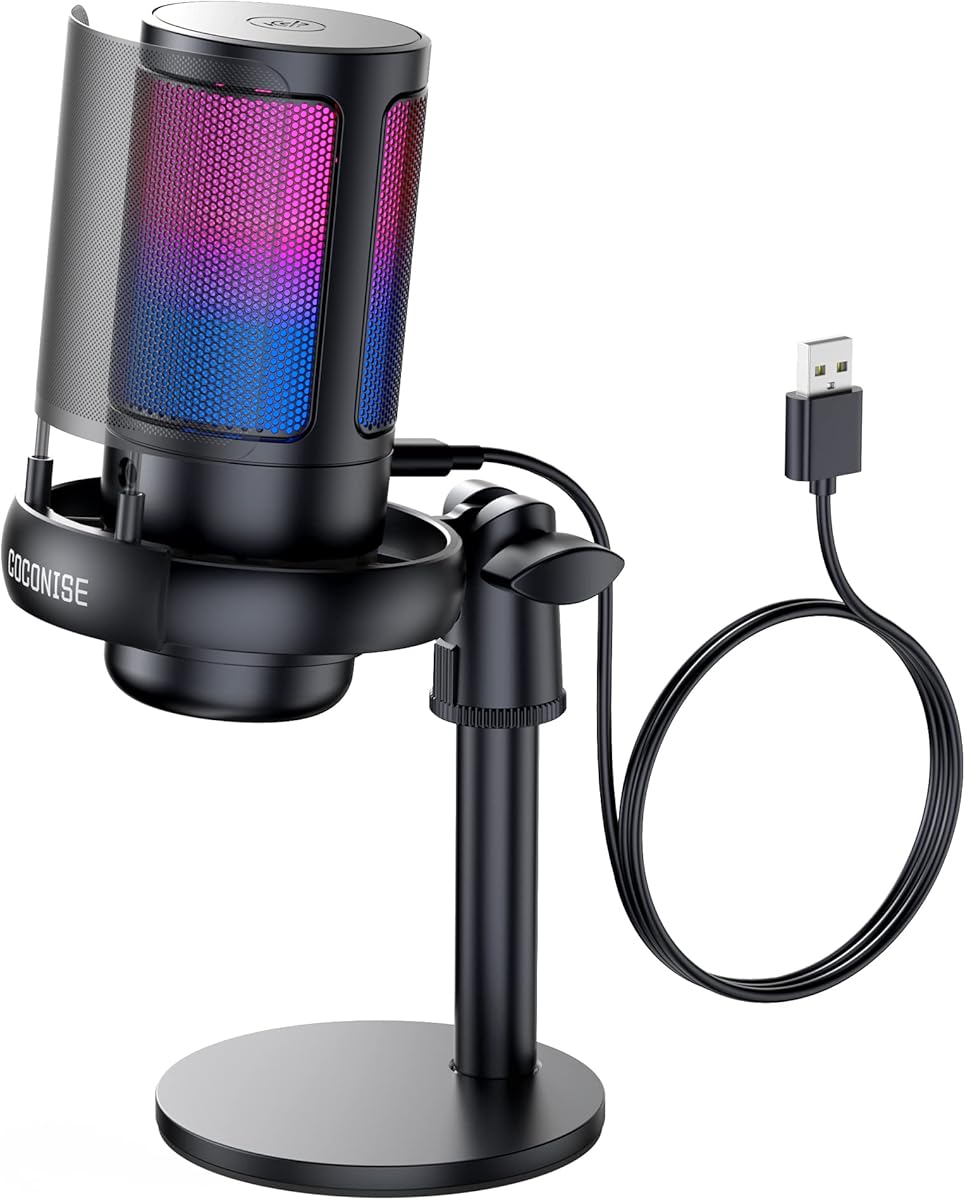
The COCONISE Gaming Mic combines functional audio with vibrant RGB lighting to enhance your gaming setup aesthetics. Its gradient lights sync with your stream visuals and turn off when muted to provide clear status feedback. The cardioid pattern ensures crisp sound capture while minimizing background noise effectively.
We may earn a commission when you buy through this link, at no additional cost to you.
Users appreciate the weighted carbon steel base which provides stability during intense sessions. The detachable metal anti-splash screen filters plosives more effectively than foam. Real-time monitoring via the headphone jack allows for immediate adjustments to your voice levels during streaming.
While the visual features are appealing they might distract some users focused purely on audio. The audio engine is solid but not as refined as higher-end studio models. However for gaming and casual streaming it balances performance and style well.
This microphone is recommended for gamers and content creators who value visual integration. It is a great gift for those looking to upgrade their desktop setup. We suggest it for anyone wanting a microphone that matches their rig aesthetic.
There's a palpable sense of security when the microphone is muted and the RGB lights go off to let you know you are working.
With a weighted carbon steel base your big movements won't knock the mic down even during intense gaming sessions at home.
We may earn a commission when you buy through this link, at no additional cost to you.
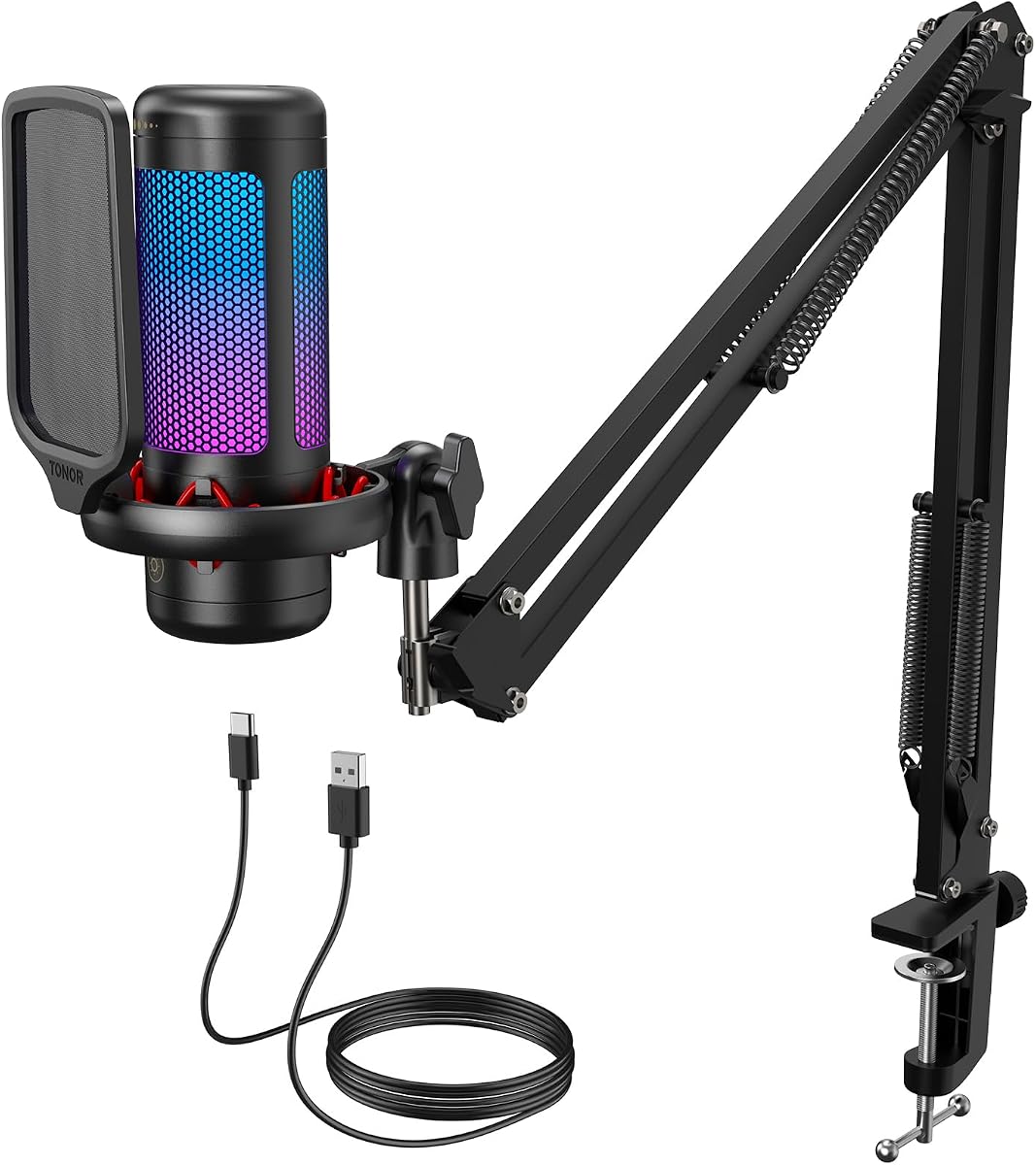
The TONOR TC310 Plus is an all-in-one equipment kit that includes a boom arm to save desk space. It features vibrant RGB lighting and clear sound reproduction suitable for gaming and streaming. The tap mute function and gain control offer convenient hands-on adjustments during sessions.
We may earn a commission when you buy through this link, at no additional cost to you.
The inclusion of a metal boom arm makes it stand out among competitors by providing flexible positioning. Multiple adjustable joints help you find the perfect angle for your setup. Users report that the sound quality is pure and clean with expert tuning for precise communication.
The arm clamp is designed for desks up to a certain thickness which might limit larger desks. Managing the extra cables for the boom arm can be slightly complex initially. However the overall convenience and value provided are significant for the price point.
This kit is perfect for streamers needing a complete solution without extra purchases. It is ideal for those who want to optimize their desk layout immediately. We recommend it for gamers looking for a full mic and arm package.
TC310 Plus is a completed mic and arm kit equipped with a metal-made boom arm and a sturdy clamp that fits most desks.
Vibrant RGB lighting with four modes allows you to quickly transform your gaming vibe by one tap on the lighting control button.
We may earn a commission when you buy through this link, at no additional cost to you.
The MAONO A04 offers professional sound quality with a 192kHz 24Bit chipset for smooth flat frequency response. Its 16mm condenser mic provides strong bass response capturing crystal clear audio suitable for studio work. The complete set includes a scissor arm and shock mount ready for immediate use.
We may earn a commission when you buy through this link, at no additional cost to you.
Users benefit from the high-resolution recording which reproduces sound with exquisite detail for online audiences. The magnet ring on the cable offers anti-interference protection for a better feel and reliable connection. It integrates well with most operating systems and popular streaming platforms.
The clamp is suitable for desktops under 2.1 inches so users must check their desk thickness. The arm quality is functional but may not be as premium as standalone arms. These are minor considerations given the extensive kit provided for the price.
This microphone is recommended for podcasters needing high-fidelity audio in a budget kit. It is a great alternative to more expensive setups for voiceovers and YouTube. We suggest it for creators prioritizing audio resolution and complete hardware packages.
Designed with professional sound chipset allowing the USB microphone to hold high resolution sampling rate for smooth frequency response.
The magnet ring on the USB cable has a strong anti-interference function which gives you a better feel during use.
We may earn a commission when you buy through this link, at no additional cost to you.
The FIFINE A6V is an award-winning gaming microphone offering naturally detailed audio with a 192kHz sampling rate. Its cardioid pattern and high SNR provide dual support for pure voice with reduced background noise. The gradient RGB lighting adds a carnival atmosphere to your desktop rig visually.
We may earn a commission when you buy through this link, at no additional cost to you.
Key strengths include the quick mute button which helps prevent emotional outbursts during competitive gaming. The durable construction includes an anti-vibration shock mount to absorb tremors from keyboard taps. Plug and play compatibility ensures easy setup across Windows and Mac systems.
While the RGB is attractive it offers fixed light modes which might be less customizable than other options. The tripod base is stable but small compared to weighted competitors. These features are minor trade-offs for the overall quality and recognition of the design.
This microphone is perfect for gamers wanting a stylish yet functional audio solution. It is an excellent choice for streaming where visual appeal matters. We recommend it for users valuing award-winning design and performance.
The PC microphone with 192kHz sampling rate delivers naturally detailed audio making your team sound like they are right beside you.
Bicolored RGB cycles through seven gradient colors automatically enhancing your glowing rig for a carnival atmosphere in the game arena.
We may earn a commission when you buy through this link, at no additional cost to you.
Choosing the right microphone involves considering several technical and practical factors to ensure it fits your workflow and recording environment.
Microphones generally fall into two categories: condenser and dynamic. Condenser mics are more sensitive and capture detailed audio which is ideal for quiet studios. Dynamic mics are durable and less sensitive making them better for noisy environments.
For podcasting in a controlled home environment, condenser mics are typically preferred for their clarity. If you record in a busy room, a dynamic mic might reject more background noise.
USB microphones plug directly into your computer making them easy to use without extra hardware. XLR interfaces require an audio interface or mixer but offer higher quality and flexibility for future upgrades.
For beginners and budget shoppers, USB models are usually the best choice. If you plan to grow your audio setup later, consider mics that support both USB and XLR.
A cardioid pattern captures sound from the front and reduces noise from the sides which is standard for podcasting. Some models offer multiple patterns like omnidirectional which picks up sound from all directions for group recordings.
Ensure the mic has a cardioid mode if you are recording solo. This focuses on your voice and helps minimize household distractions during recording sessions.
Microphones used daily should have durable construction to withstand regular handling and adjustments. Metal bodies generally last longer than plastic ones and often provide better acoustic properties.
Look for reinforced joints and sturdy stands to prevent accidental drops or vibration transfer. A good build quality ensures the microphone remains reliable over time.
Features like physical volume knobs and mute buttons allow for quick adjustments without touching your computer. These controls save time and reduce interruptions during live streams or recording sessions.
Prioritize microphones with tactile controls if you record frequently. This convenience helps maintain flow and focus during your creative process.
Most USB microphones work with both Windows and Mac operating systems but it is important to verify driver requirements. Some models also support tablets or gaming consoles which increases versatility.
Check if the microphone requires specific software or drivers. Plug and play devices offer the easiest setup and reduce compatibility issues with different systems.
Many budget kits include essential accessories like pop filters and shock mounts which save you money on extra purchases. These items help improve sound quality by reducing plosives and vibrations.
Evaluate what comes in the box before buying. A complete kit provides immediate value and allows you to start recording without additional costs.
Real-time monitoring via a headphone jack lets you hear your audio as it is recorded. This helps detect issues like distortion or background noise immediately during sessions.
Look for models with a zero-latency monitoring jack. This ensures there is no delay when listening to your voice through headphones while recording.
To get the best audio quality position the microphone at least six inches from your mouth and speak directly into the center. This distance helps capture clear voice while minimizing plosives and breath sounds that can distort your recording.
Regularly clean the mesh grille with a soft brush or compressed air to remove dust and particles that can affect sound. Avoid touching the internal components or exposing the unit to excessive moisture to ensure longevity and consistent performance.
Use software settings to adjust gain levels appropriately so your voice peaks without clipping. Regularly update your audio drivers and check microphone settings in your operating system to maintain stability and optimal functionality.
A pop filter is highly recommended for podcasting to reduce harsh plosive sounds caused by speaking letters like P and B. It helps keep your audio clean and professional without needing excessive post-production editing. Most kits include one or offer affordable separate options.
USB microphones are generally easier to set up and use for beginners since they connect directly to your computer. XLR mics offer higher quality and flexibility but require an audio interface which adds cost and complexity. Choose based on your budget and technical comfort level.
Many modern USB microphones support mobile devices with USB-C or Lightning adapters. However compatibility varies by model so always check the product specifications for phone support before buying. Adapters are often included or can be purchased separately.
Keyboard noise often occurs because the microphone is too sensitive or too close to the keyboard. Positioning the mic away from the keyboard and using a cardioid pattern can help isolate your voice effectively. Adjusting software gain may also reduce unwanted ambient sounds.
A longer USB cable provides more flexibility in positioning the microphone near your face without stretching near your computer. Most standard kits include cables between five and six feet which is sufficient for most desktop setups. Longer extensions are available if needed.
Most USB microphones are plug-and-play devices that do not require installing additional drivers on modern computers. They are recognized automatically by your operating system allowing you to start recording immediately. Some advanced software features may require a specific application.
We have reviewed ten excellent options ranging from budget-friendly choices to premium picks that deliver professional audio. Each microphone offers unique features to meet different needs whether you are streaming or recording interviews.
When making your decision prioritize factors like build quality, connection type, and onboard controls. Finding the right balance between cost and performance ensures you get reliable audio without overspending on unnecessary features.
Remember to check the latest product details and prices before purchasing as offers may vary over time. These microphones provide a solid foundation for any aspiring content creator looking to improve their audio quality.