
Computer Desktop Tower Large Carrying Case
4.3Editor score
Fits ATX mid-tower PCs
Oxford fabric weatherproof design
Dedicated accessory compartments
This guide compares ten top-rated Desktop PC Tower Travel Carrying Case options for ATX and M-ATX towers, focusing on protection, storage, and portability
Transporting a desktop computer tower requires specialized gear to prevent damage during movement. A quality Desktop PC Tower Travel Carrying Case offers padded interiors, sturdy straps, and organized pockets for peripherals. Without proper protection, your valuable hardware risks scratches, drops, or impact damage.
We evaluated ten leading cases based on durability, fit, and user feedback. Each option supports standard ATX or M-ATX form factors while providing ample space for keyboards, mice, and cables. Our analysis prioritizes shock absorption, weather resistance, and ergonomic carrying solutions for frequent movers.
Each pick below highlights unique strengths like rolling wheels, double-layer designs, or heavy-duty fabrics. You will find detailed specs, pros, cons, and ideal use cases for every model. Note that product prices and availability change frequently, so verify current details before purchasing.
4.3Editor score
4.7Editor score

4.9Editor score
This side-by-side comparison highlights key specifications across all ten selected cases. Review dimensions, material quality, and storage options to find the perfect fit for your specific tower size and travel needs.




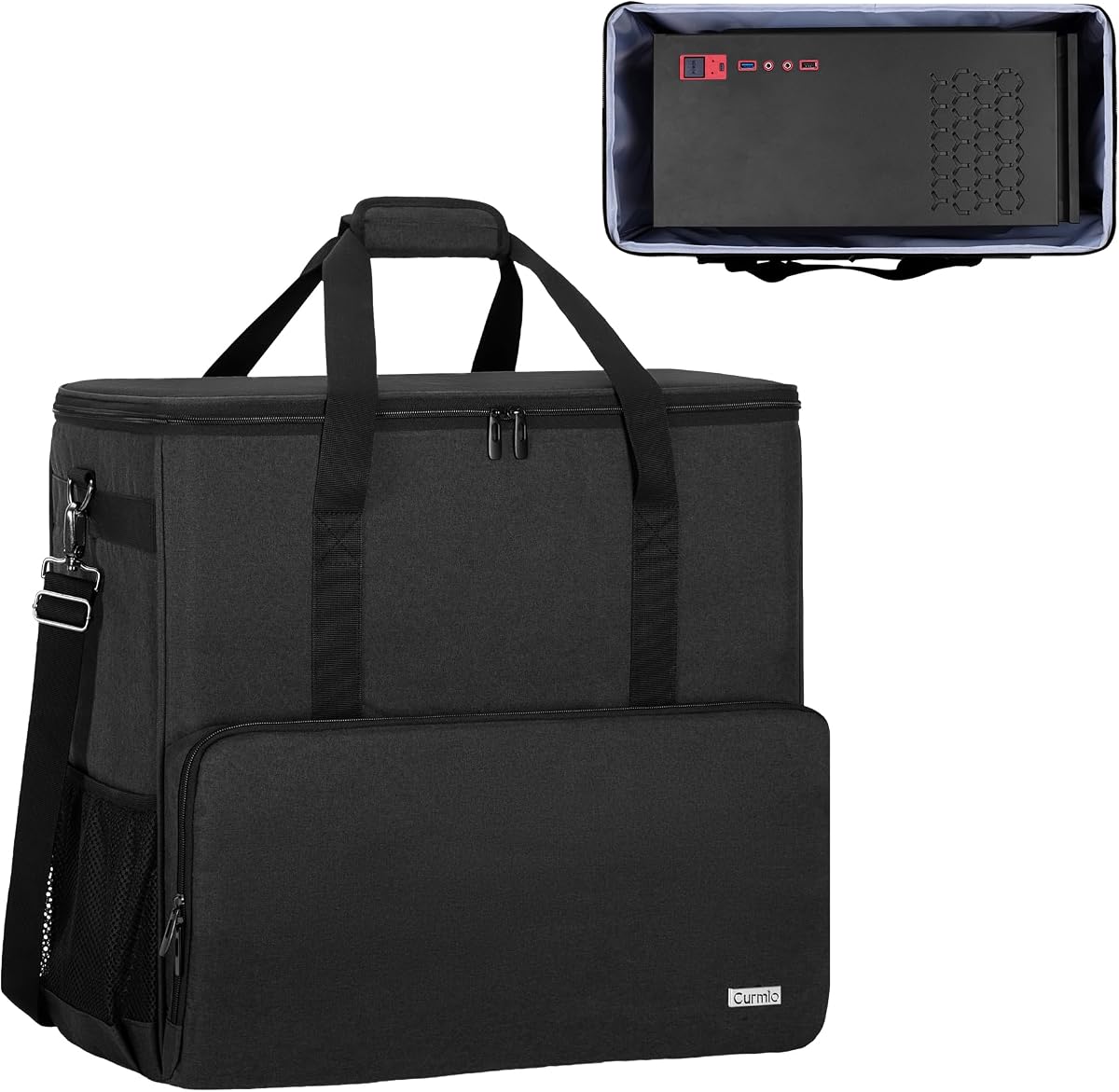
This CURMIO PC Carrying Case stands out for its reliable protection and versatile design. It holds full computer towers securely while offering multiple pockets for peripherals. The thick nylon material ensures longevity in various transport conditions.
We may earn a commission when you buy through this link, at no additional cost to you.
The interior dimensions are optimized for standard towers with a removable foam insert. This allows customization based on your specific chassis size. Multiple pockets organize keyboards, mice, and wires efficiently to prevent tangling or damage during transit.
While it offers robust protection, always verify your tower dimensions before purchase. The case is compact enough for travel but may not fit oversized custom builds. Its sturdy handle and shoulder strap provide comfortable carrying options.
Ideal for gamers and professionals needing reliable weekly transport. It balances price and quality exceptionally well for long term use. The large opening ensures easy loading and unloading without struggling with tight zippers.
The foam padded insert absorbs shocks effectively to protect sensitive components from impact.
Thick nylon fabric resists scratches and moisture ensuring the case remains intact over years.
We may earn a commission when you buy through this link, at no additional cost to you.
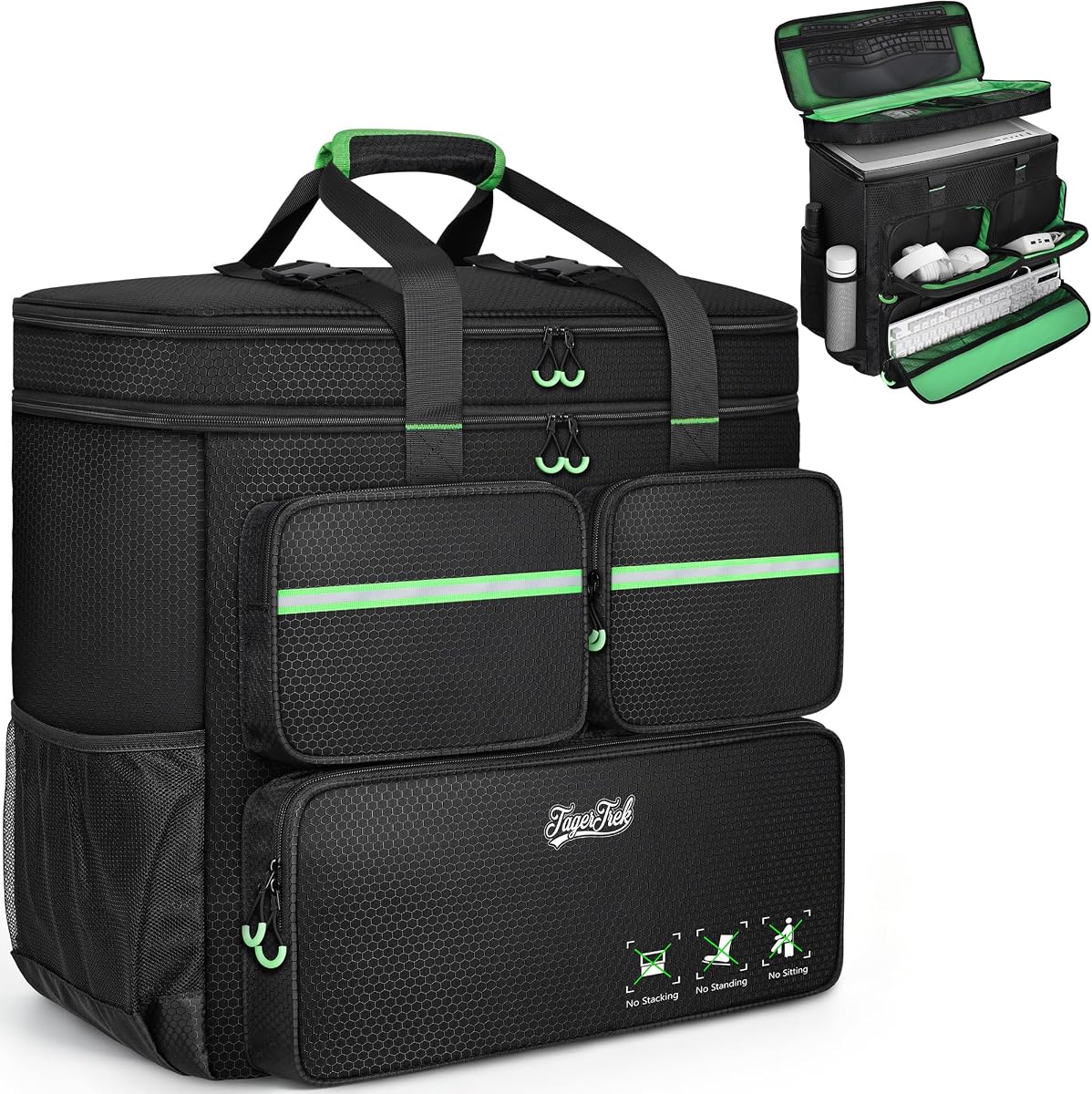
This affordable carrying case delivers solid functionality for standard ATX mid-tower desktops. It features durable Oxford fabric that resists rain and dust effectively. The design prioritizes practical storage and stable transport options.
We may earn a commission when you buy through this link, at no additional cost to you.
Dedicated compartments keep your keyboard, mouse, and cables organized neatly. The rear buckle fastener prevents the bag from tipping during movement. Full height mesh panels help separate accessories from your main tower securely.
Budget options often skip premium padding, so measure your unit carefully before buying. The chest straps help distribute weight but might feel snug for heavier loads. It remains a practical choice for occasional moves or short commutes.
Perfect for users seeking essential protection without high costs. It transforms into a portable workstation setup easily for LAN parties. Check dimensions closely to ensure your tower fits within internal limits comfortably.
Oxford fabric and specialized lining minimize dust and water damage during outdoor transport.
Mesh pockets and expandable side sections keep peripherals organized and accessible when needed.
We may earn a commission when you buy through this link, at no additional cost to you.
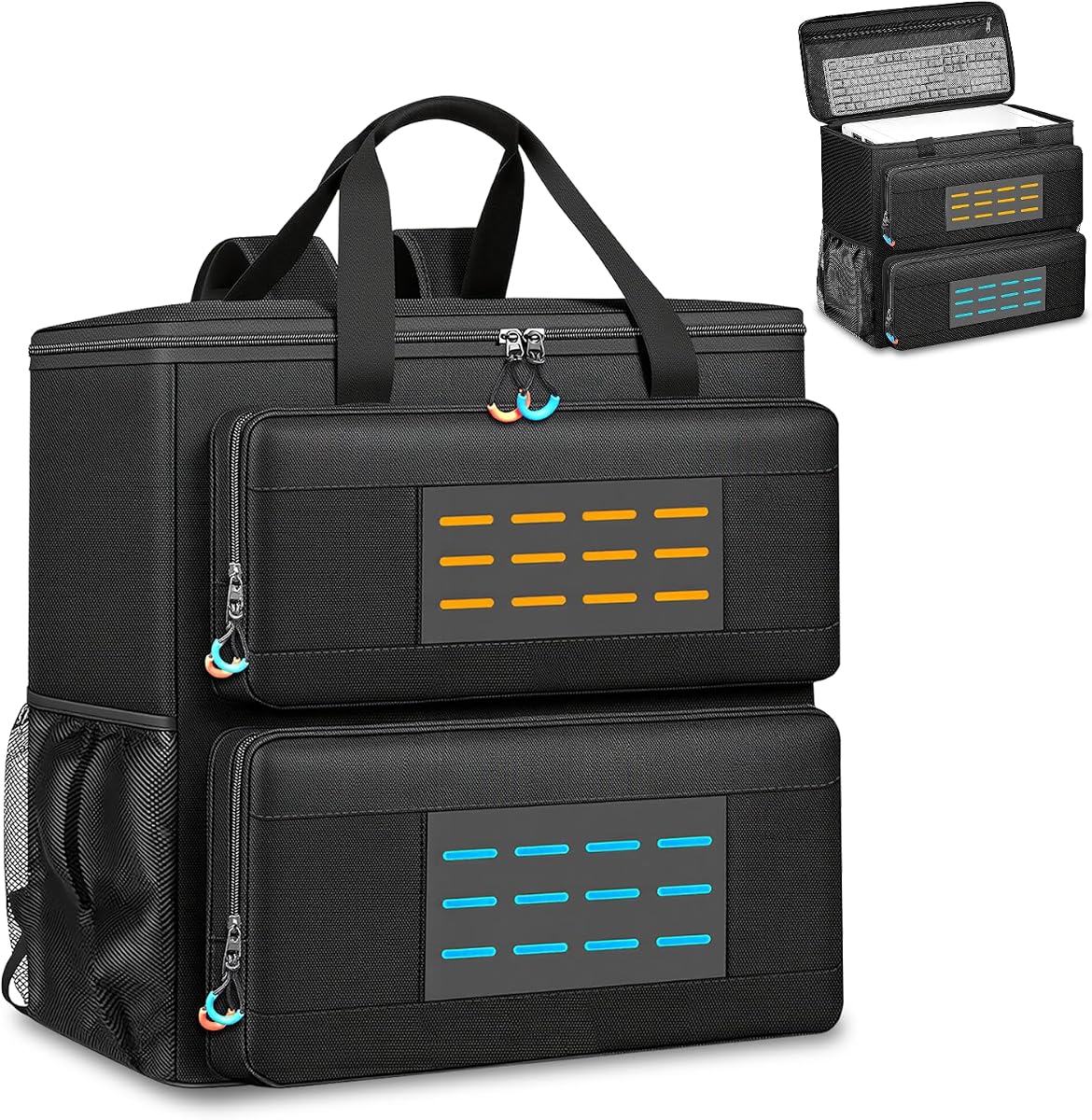
This top-rated PC Carrying Case offers premium features for serious travelers. It includes high-density foam padding for maximum impact absorption. The MOLLE webbing system adds versatility for attaching extra gear securely.
We may earn a commission when you buy through this link, at no additional cost to you.
Its balanced rucksack design with adjustable straps reduces fatigue significantly. A rear luggage strap lets you slide it over wheeled suitcases effortlessly. Smooth zippers ensure easy access even after repeated use over time.
The build quality justifies a higher investment for frequent travelers or movers. However, it may feel bulky if you only move occasionally. Always confirm your tower dimensions fit the internal compartment precisely before ordering.
Best for users needing maximum protection and travel flexibility. It handles long distance flights or LAN party moves with ease. The thoughtful design ensures your computer and accessories stay organized throughout any journey.
External webbing allows attaching extra pouches or tools to suit your specific needs perfectly.
Thickened foam cushioning absorbs shock from drops ensuring your hardware stays safe always.
We may earn a commission when you buy through this link, at no additional cost to you.
This large carrying case provides generous space for towers and extra components like GPUs. Its 5mm EPE inner lining absorbs impacts effectively during transit. The Oxford cloth outer layer ensures resistance to wear and tear.
We may earn a commission when you buy through this link, at no additional cost to you.
Multiple zippered front pockets keep accessories organized separately from your main unit. Side mesh pockets allow you to carry water bottles conveniently during travel. A chest strap helps balance the load when carrying on your back.
While spacious, the extra volume can make the bag heavier overall. Ensure your tower fits the internal dimensions before purchasing to avoid gaps. It serves well for moving offices or transporting servers alongside standard towers.
Ideal for users with bulky builds or additional spare parts. The protective lining guards against vibration damage reliably. Verify dimensions to confirm it accommodates your specific motherboard form factor correctly.
EPE foam lining reduces internal movement and protects hardware from vibrations during transit.
Front pockets and side mesh help separate small items for easy access when needed.
We may earn a commission when you buy through this link, at no additional cost to you.
This rolling case simplifies transport for heavier towers with a detachable cart. Silent swivel casters ensure smooth movement across various floor surfaces. The aluminum pull handle adjusts to three heights for ergonomic pulling comfort.
We may earn a commission when you buy through this link, at no additional cost to you.
It includes ample pockets for keyboards and mice on the top panel. Front pockets organize cables and chargers efficiently. Water resistant fabric protects your gear from unexpected rain or spills during transit.
The detachable design allows flexibility but requires assembly before first use. Rolling is easier on flat ground than stairs where handles work best. Check cart fit to ensure your tower slides in smoothly and fits snugly.
Best for travelers with long airport walks or office corridors. It reduces back strain significantly when carrying heavy equipment alone. Verify the wheel mechanism fits your luggage needs before purchasing for travel.
Quiet swivel wheels allow smooth movement without disturbing others in office or airport settings.
Three height settings ensure comfortable pulling for users of different heights easily.
We may earn a commission when you buy through this link, at no additional cost to you.
This versatile case offers a secure top buckle to keep your tower in place. High quality polyester fabric ensures water resistance and durability over time. It supports ATX and M-ATX towers with multiple pockets for peripherals.
We may earn a commission when you buy through this link, at no additional cost to you.
You can carry it as a backpack or use the sturdy handle for quick lifts. The chest strap distributes weight evenly to prevent shoulder fatigue. Solid stitching prevents tearing even when carrying heavy loads reliably.
While the size is spacious, it may feel bulky for casual users. Always measure your tower before purchasing to confirm internal clearance. It is well suited for commuters or LAN party attendees needing organization.
Ideal for frequent travelers requiring a balance of portability and storage. The top buckle secures your unit so it shifts during transport. Verify compatibility with your motherboard form factor before ordering.
The top buckle keeps your tower from shifting inside the bag during travel.
Chest straps help balance weight across your body reducing strain on shoulders.
We may earn a commission when you buy through this link, at no additional cost to you.
This gaming backpack provides superior protection with its 8mm EPE foam interior. It is designed to hold towers and accessories in a single organized package. The rugged Oxford exterior resists daily wear and minor impacts effectively.
We may earn a commission when you buy through this link, at no additional cost to you.
Front keyboard sleeves and lined cable compartments keep your setup neat. Side mesh pockets allow you to carry water bottles or small tools easily. Stabilizing chest straps ensure comfort during long carry sessions or travel.
Verify your tower dimensions against the interior size before buying to avoid fit issues. It offers generous space but not unlimited room for oversized chassis. Ideal for LAN parties or business trips where organization matters most.
Best for gamers needing a complete portable workstation solution. The shock absorbing foam protects against drops during transport reliably. Check specs to ensure your build fits within the internal dimensions comfortably.
8mm EPE foam provides extra cushioning to protect components from impact and vibration.
Chest straps ensure the bag stays balanced during movement to reduce shoulder strain.
We may earn a commission when you buy through this link, at no additional cost to you.
This backpack uses pearl cotton cushions to offer reliable protection around your tower. Its tear resistant outer material resists daily abrasion and wear effectively. Ergonomic shoulder straps with chest buckles ensure stable carrying comfort.
We may earn a commission when you buy through this link, at no additional cost to you.
Side pockets with buckles keep valuables like phones or keys secure. Non-slip bottom feet reduce friction when setting the case on the ground. It balances affordability with practical features for everyday transport needs.
While pearl cotton provides cushioning, it may not match thick EPE foam on drops. Always verify tower dimensions before purchase to confirm fit. It works well for regular commuters or office relocations within budget.
Ideal for users seeking reliable daily transport without high costs. The side buckle pockets provide quick access to essentials while on the move. Check internal sizes to ensure your chassis fits securely.
Bottom feet pads reduce friction to protect both case and surfaces from scratches.
Side pockets use buckles to keep small items from falling out while walking.
We may earn a commission when you buy through this link, at no additional cost to you.
This mid-tower case features thickened 5mm EPE lining for robust impact absorption. Its oversized dimensions accommodate towers and accessories like GPUs or radiators easily. The fleece elastic pockets hold mice or chargers securely inside.
We may earn a commission when you buy through this link, at no additional cost to you.
Soft padded packages make it comfortable to carry by hand or shoulders. The releasable chest strap helps distribute weight evenly during transport. It serves as a specialized solution for office moves or long business trips.
The extra size may feel cumbersome for casual travel but is practical for moves. Always verify your tower fits the dimensions before purchasing to avoid issues. It provides reliable protection for valuable electronics during relocation.
Best for users managing frequent office relocations or hardware swaps. The fleece pockets organize small components efficiently. Check the internal capacity to ensure your specific build fits comfortably.
Thickened EPE lining reduces shock from bumps ensuring your hardware remains safe.
Fleece elastic pockets protect delicate items like mice or power banks from scratches.
We may earn a commission when you buy through this link, at no additional cost to you.
This double-layer case offers enhanced protection for your tower with extra padding. It includes a removable foldaway cushioned pad to customize internal space as needed. Thick nylon material ensures durability against scratches and moisture over time.
We may earn a commission when you buy through this link, at no additional cost to you.
Multiple pockets inside help organize keyboards, wires, and accessories separately. A large opening makes it easy to load your tower without tight struggles. Adjustable shoulder straps and reinforced handles provide versatile carrying options.
While the extra layer adds weight, it significantly improves safety against impacts. Check dimensions to confirm your tower fits the internal measurements properly. Ideal for users prioritizing maximum security for expensive hardware.
Best for owners needing reliable long-term storage and transport safety. The removable pad allows flexibility if your tower size changes. Verify compatibility before purchasing to ensure your unit fits securely.
Extra layer reduces shock transmission from outside impacts to protect internal components.
The removable pad allows you to adjust space based on tower size variations.
We may earn a commission when you buy through this link, at no additional cost to you.
Selecting the right case ensures your hardware arrives intact at its destination. Here are key factors to evaluate before purchasing.
Always check your tower's width, depth, and height against the case's internal measurements. Most cases fit standard ATX and M-ATX chassis, but custom builds may differ.
Verify dimensions before purchasing to avoid tight fits or excessive gaps that could cause shifting.
Look for high-density foam or EPE foam interiors to absorb impacts effectively. Thicker padding protects against drops during transport.
Premium options offer removable inserts for customizing space around your chassis.
Choose durable materials like Oxford cloth or nylon that resist tears and moisture. Water-resistant fabrics prevent damage from rain or spills.
Check for reinforced stitching to ensure longevity under heavy loads.
Decide between backpack straps, handles, or wheeled carts based on your travel needs. Adjustable shoulder straps and chest buckles improve comfort.
Wheeled options reduce strain on flat surfaces but add weight and complexity.
Multiple pockets for peripherals keep your setup organized. Mesh panels or separate compartments prevent cables from tangling with the tower.
Side pockets or MOLLE systems offer extra storage for accessories during travel.
Secure zippers, top buckles, or chest straps ensure your tower does not shift inside. Reliable closures prevent accidental openings during transit.
Check zipper quality to ensure smooth operation under tension or repeated use.
Consider the total weight when packed since heavier cases can strain your back. Balance protection with practicality based on your typical travel distances.
Lighter materials suit occasional moves, while heavy-duty builds fit frequent transport needs.
Features like non-slip feet or reinforced bases protect against ground friction. Look for cases that minimize damage when placed on floors or tables.
Ensure bottom padding reduces contact between your case and hard surfaces effectively.
Before first use, measure your tower and verify it fits the internal dimensions. Adjust the removable pads to create a snug fit that prevents movement inside the case.
Pack peripherals like keyboards and cables into separate pockets to keep the main compartment clear. Secure loose items with straps or zippers to avoid scratching the tower surface.
Clean the case regularly with a damp cloth to remove dust or debris. Store it in a dry area when not in use to prevent mold or fabric degradation.
Most cases fit standard ATX and M-ATX towers. Custom builds may require specific measurements. Always compare your unit's internal dimensions with the case's listed interior size before purchasing to ensure a proper fit.
Many cases feature water-resistant fabrics like Oxford or nylon. While they protect against rain or light moisture, they are typically not fully waterproof. Avoid exposing them to heavy rain for extended periods.
Use the dedicated accessory pockets or mesh panels provided. This prevents tangling and protects sensitive gear. Keep heavier items like power banks near your center of gravity to balance the load.
These cases are designed primarily for the tower and small accessories. Monitors usually need separate protection. Check if your model has extra capacity but verify dimensions before adding larger items.
Remove the foam insert if possible to wipe it with a damp cloth. Allow it to air dry completely before reinserting. Avoid soaking the padding to prevent mold growth inside.
Most are sturdy enough for air travel within carry-on or checked limits. Check airline size policies to confirm. A wheeled option might ease movement through airports if available.
Most cases support standard tower weights without issue. However, reinforced stitching and quality fabrics allow for heavier loads. Always test the straps and zippers before long-distance travel to ensure safety.
Warranty terms vary by manufacturer. Some offer limited protection against defects. Check the product details or seller policies before purchasing for specific coverage details.
We reviewed ten top cases offering protection for towers and peripherals. The CURMIO PC Carrying Case leads for overall value and durability. The PC Carrying Case for ATX/M-ATX offers premium features for serious travelers.
Prioritize internal dimensions and padding thickness for maximum hardware safety. Wheeled or backpack options suit your travel style best. Look for weather-resistant fabrics to ensure long-lasting use.
Always check current prices and availability before purchasing. Product details may update over time. Choose the model that matches your tower size and transport needs perfectly.