
8mm & Super 8 Film to Digital Converter
3.7Editor score
32GB SD Card Included
2.4 Inch Display Screen
No Computer Required
Preserving vintage movie reels requires reliable digital converters that capture frame by frame details accurately. Modern devices offer high resolution outputs and user friendly interfaces for seamless conversion without needing extra software or computers for basic tasks.
We analyzed ten top rated products focusing on resolution output screen quality reel compatibility and ease of use. Each item was evaluated based on user feedback technical specifications and overall performance to ensure you find a solution that fits your specific archiving needs effectively.
Each review highlights key strengths limitations and ideal use cases to help you make an informed decision. Please note that product availability and pricing can change frequently so check current details before purchasing to ensure you get the best value for your investment today.
3.7Editor score

4.1Editor score

4.0Editor score
As an Amazon Associate we earn from qualifying purchases.
This side by side comparison reviews all ten products based on key technical specifications and user experience metrics to help you quickly identify which converter matches your specific digitization requirements and budget constraints.




This KODAK REELS digitizer stands out as a top choice for converting vintage film into modern digital formats. With a strong user rating it delivers reliable performance for preserving family memories without requiring technical expertise or additional software installations.
We may earn a commission when you buy through this link, at no additional cost to you.
The device features an impressive 8MP sensor that captures frame by frame details in crisp 1080p MP4 video files. The large 5 inch LCD screen with touch buttons allows you to align frames adjust exposure and view playback directly on the device.
While it offers extensive features like compatibility with 3 to 9 inch reels users should note there is no audio output from the film. Additionally you will need to purchase an SD card separately to store your converted digital files immediately.
This converter is ideal for families seeking a standalone solution to digitize their 8mm and Super 8 collections. Its user friendly design and high quality output make it a solid investment for long term archiving and sharing with loved ones.
The 8MP sensor ensures detailed frames are captured accurately for professional quality digital files.
No need for PC or software simplifies the workflow for users of all technical skill levels.
We may earn a commission when you buy through this link, at no additional cost to you.
This budget friendly converter offers a straightforward way to digitize old movie reels without spending a fortune. It captures frames at 20 fps to produce smooth MP4 files that work across Windows Mac and Linux systems easily.
We may earn a commission when you buy through this link, at no additional cost to you.
Users appreciate that a 32GB SD card is included so you can start archiving immediately upon opening the box. The built-in 2.4 inch screen lets you review footage instantly and a TV cable enables sharing on larger displays.
While it lacks the advanced adjustment features of higher end models it gets the job done for basic conversion needs. Just ensure reels are mounted securely using proper adapters as noted in the operational guidelines for best results.
For those looking for an affordable entry point into film digitization this device provides excellent value. It is particularly suitable for casual users who want to preserve memories without needing complex editing tools or professional grade hardware.
Included SD card means you can begin converting films right away without extra purchases.
MP4 format ensures compatibility with most modern operating systems for easy editing.
We may earn a commission when you buy through this link, at no additional cost to you.
The Magnasonic scanner is designed to bring back memories with just a push of a button. It automatically converts 3 5 and 7 inch reels into digital MP4 files while offering a vibrant 2.3 inch screen for immediate viewing.
We may earn a commission when you buy through this link, at no additional cost to you.
You can adjust brightness sharpness and framing directly on the scanner eliminating the need for expensive editing software. The included RCA video out cable lets you connect to a TV or monitor for a larger sharing experience.
Although it supports smaller reel sizes up to 7 inches it excels in ease of use and setup. The frustration free operation right out of the box makes it accessible even for those unfamiliar with film conversion.
This device is perfect for users who want a premium feel without overwhelming complexity. Its balance of features and simplicity makes it a strong contender for anyone serious about preserving their vintage film collections.
One button start reduces setup time and makes the process less daunting.
Vibrant screen ensures you can verify quality before finalizing your digital files.
We may earn a commission when you buy through this link, at no additional cost to you.
This scanner combines a 5 megapixel sensor with a full color touch screen for intuitive operation. It converts motion picture film strips into MP4 files that can be stored on SD cards up to 32GB in capacity.
We may earn a commission when you buy through this link, at no additional cost to you.
Adjustments for brightness sharpness and framing are handled through easy read buttons without needing photo editing software. The included 32GB SD card and accessories like USB and TV cables make it a ready to use solution.
While it is designed for video conversion only it supports a wide range of reel sizes up to 9 inches. The one year warranty and technical support add peace of mind for buyers investing in this conversion tool.
Ideal for families wanting a straightforward conversion process this scanner offers reliable performance at a reasonable price point. It is particularly useful for creating digital backups of old films for sharing on modern devices.
Touch buttons simplify navigation and settings changes during the digitization process.
Included warranty ensures assistance is available if you encounter issues with the device.
We may earn a commission when you buy through this link, at no additional cost to you.
The MovieMaker Pro digitizer supports 3 5 and 9 inch reels with 1080P output for high quality digital movies. It works independently without computer software saving files directly to the included SD card up to 32GB.
We may earn a commission when you buy through this link, at no additional cost to you.
You can view saved movies on the built-in 2.4 inch LCD or connect to a TV using the included cable. The frame by frame conversion at 1080P/20 fps ensures smooth playback across modern operating systems.
Users should be aware that proper mounting with adapters is required before recording and rewinding. While it offers good specs its user rating suggests some might face minor operational hiccups compared to higher rated models.
This device is a solid choice for those needing to handle larger reel sizes without additional hardware. Its automated nature makes it accessible for non tech savvy users looking to archive vintage footage efficiently.
Handles 9 inch reels which is rare in this price range for continuous long sessions.
MP4 files work on any major OS so you can edit on your preferred machine.
We may earn a commission when you buy through this link, at no additional cost to you.
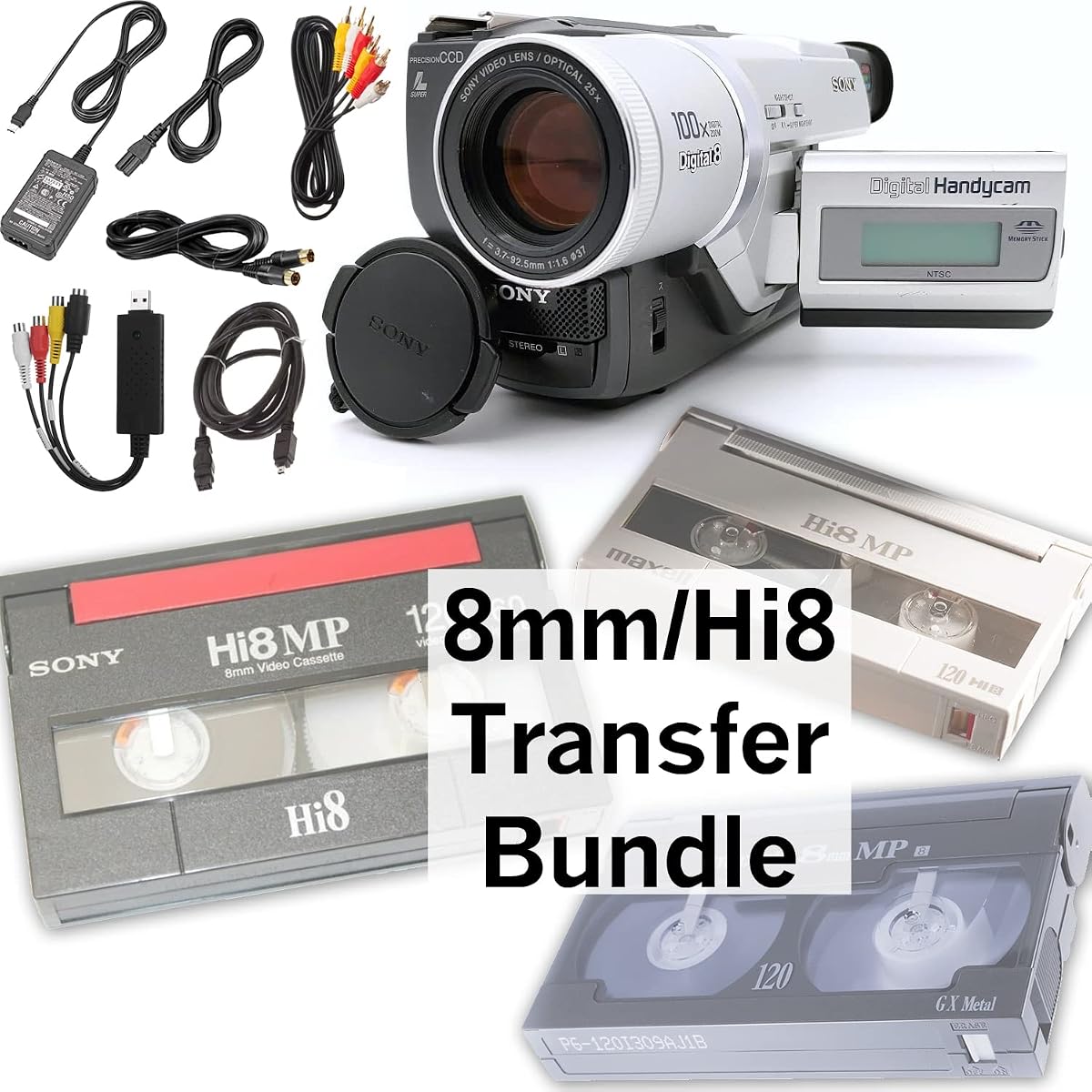
This bundle is designed specifically for 8mm Hi8 and Digital8 tapes rather than film reels but offers a complete transfer solution. It includes a camcorder and USB adapter to move footage to your computer or burn to DVD.
We may earn a commission when you buy through this link, at no additional cost to you.
The package comes with battery and AV cables enabling immediate playback on TVs or transfer to digital files. It is guaranteed working with free returns making it a low risk purchase for tape digitization needs.
While it is not a film scanner it fills a critical gap for users with tape collections that need archiving. The USB capture device ensures you can integrate old footage into modern workflows easily.
Ideal for households with mixed media formats this bundle saves the hassle of finding a playback device. It is particularly useful if you need to convert tapes alongside film or prioritize ease of setup for digital storage.
Specifically targets tape formats which many film scanners cannot handle effectively.
Includes camcorder and cables so you do not need to buy separate accessories.
We may earn a commission when you buy through this link, at no additional cost to you.
This digital converter bundle supports 8mm Hi8 and Digital8 tapes with a camcorder and USB adapter included. It allows you to transfer tapes to computer files or burn them to DVD for easy viewing.
We may earn a commission when you buy through this link, at no additional cost to you.
A blank tape is included to help you start transferring content right away without extra purchases. The AV cables enable direct TV playback which is convenient for sharing memories on larger screens.
Like the previous bundle this solution is focused on tape media rather than film reels. However it offers flexibility for those who have tape collections and need a reliable way to digitize them.
Users looking for an affordable tape transfer solution will find this bundle effective. Its inclusion of necessary hardware makes it a convenient option for archiving legacy media formats efficiently.
Included blank tape ensures you can start digitizing immediately without delays.
USB capture device allows straightforward file transfer to modern computers.
We may earn a commission when you buy through this link, at no additional cost to you.
This scanner aims to bring the past into the present by converting old 8mm and Super 8 films into MP4 files for lifetime viewing. It features a built-in 1080P display for instant review on a 2.4 inch screen.
We may earn a commission when you buy through this link, at no additional cost to you.
You can load 3 or 5 inch film onto the universal supply reel and follow on-screen prompts to send footage to SD cards without computer drivers. It is positioned as a great gift for grandparents or filmmakers.
While it offers simplicity and instant viewing options it does not have a user rating yet. The lack of driver requirements makes it accessible but ensure you are comfortable with the higher price point.
Ideal for gift givers this converter promises to help reminisce with old friends and preserve family history. Its focus on ease of use makes it a strong candidate for non technical users looking for a straightforward device.
On-screen prompts guide you through loading film and saving without technical knowledge.
Packaged well for special occasions like birthdays or anniversaries.
We may earn a commission when you buy through this link, at no additional cost to you.
This scanner converts 8mm and Super 8 films into JPEG images rather than video files which suits static photo needs. It uses a 2.4 inch display for instant viewing and supports universal film supply reels up to 32GB.
We may earn a commission when you buy through this link, at no additional cost to you.
The device requires no drivers making it ready to use on any computer immediately. It is marketed as a great gift option for preserving memories of family gatherings and old friends without needing complex software.
While it offers convenient image capture the lack of video output may limit use cases for motion picture reels. Ensure this static format aligns with your digitization goals before purchasing.
Users seeking to archive still frames from films will find this tool useful for printing or digital photo frames. It is a niche solution for those who prefer image files over continuous video playback.
Produces image files that are easy to print or use in photo albums.
Plug and play functionality saves time setting up on new computers.
We may earn a commission when you buy through this link, at no additional cost to you.
This film scanner includes a full set with USB cable TV cable cleaning cloth and instruction manual for fast and stable digitization. It converts movie film strips into MP4 files suitable for viewing with family and friends on a 2.4 inch display.
We may earn a commission when you buy through this link, at no additional cost to you.
Like other models in this category it requires no drivers and follows simple on-screen prompts to send footage to SD cards up to 32GB. It is described as ideal for quick setup and straightforward usage.
While it shares many features with other scanners it stands out with a full accessory kit. However you should note the lack of user ratings and higher price may require careful consideration.
Best for users who want an all-in-one package with accessories included this device simplifies the conversion process. It is a solid choice for those prioritizing convenience and quick digitization of vintage film reels.
Designed for consistent scanning performance to reduce jitter in final files.
Includes essential cables and cloth so you do not need to source extras.
We may earn a commission when you buy through this link, at no additional cost to you.
Choosing the right digital converter requires understanding key factors that impact your digitization results and workflow efficiency.
Look for devices that output at least 1080p to preserve the detail and quality of your vintage film frames. Higher resolution ensures clearer digital files that are better for editing and sharing across platforms.
Prioritize models with 1080p output for the best balance of quality and storage efficiency.
Check which reel sizes the device supports as most come with adapters for 3 to 9 inch reels. Ensure the scanner matches the specific sizes you have to avoid compatibility issues during conversion.
Select a device that supports the full range of reel sizes you plan to digitize.
Most converters save directly to SD cards so verify the maximum supported capacity like 32GB. Having sufficient storage ensures you can complete long conversion sessions without frequent swapping.
Ensure the device supports SD cards up to at least 32GB for ample storage.
A built-in LCD screen allows instant review of converted footage without transferring to a computer. Larger screens make alignment and quality checks easier during the digitization process.
Choose a model with a clear built-in screen for on-device verification.
Standalone devices that do not require a computer simplify the workflow and reduce setup time. Confirm the scanner operates independently if you prefer a PC-free workflow.
Pick converters labeled no computer needed for simpler standalone operation.
Some devices capture video only without audio so check your needs before purchasing. If sound preservation is critical verify that the model supports audio extraction or syncing.
Verify if the converter includes audio features before finalizing your choice.
USB and TV output options allow easy transfer to computers or direct playback on monitors. Comprehensive connectivity options make sharing and viewing more flexible.
Look for USB and RCA outputs for versatile transfer and playback options.
Bundles that include cables cleaning cloths and warranties provide better long-term value. Additional accessories help maintain film quality and protect your device.
Prefer packages with included accessories and warranty coverage for reliability.
Start by cleaning your film reels with a soft cloth to remove dust and debris before loading. This prevents scratches and ensures clean frames are captured during the digitization process.
Mount the film onto the universal supply reel using the appropriate adapter for your film size. Follow on-screen prompts to align frames and adjust brightness for optimal capture quality.
After conversion transfer files to your computer using the included USB cable for long-term storage. Handle the device gently and keep it in a dry place to ensure it works reliably for future projects.
Most modern converters are standalone and do not need a computer for basic conversion tasks. You can save files directly to SD cards and view them on the built-in screen or TV.
Yes all listed converters support both 8mm and Super 8 formats. You just need to use the included adapters to mount the film correctly on the supply reel.
Converted files are typically saved as MP4 which is compatible with most media players and editing software. This format ensures easy sharing across different operating systems.
Many devices capture video only without audio due to hardware limitations. Check product details to confirm if audio support is available for your specific model.
Some kits include a 32GB SD card but others may require you to purchase one separately. Verify the package contents before starting your conversion workflow.
Clean and repair any tears or scratches before loading to prevent further damage. Using the correct adapters ensures the film feeds smoothly through the scanner.
The time depends on reel size and frame rate but larger reels may take several minutes per reel. Plan accordingly for batch conversions to ensure consistent results.
Many models include cables for connecting to TVs or can transfer files via USB to smart TVs. Check the specific connectivity options for your device model.
The KODAK REELS and Magnasonic scanners lead with high resolution output and user-friendly interfaces ideal for comprehensive archiving projects. They balance premium features with ease of use making them top picks for serious collectors.
Budget options like the 8mm Converter offer reliable standalone performance with included accessories for immediate use. These devices provide solid value for those starting their digitization journey without breaking the bank.
Always check current availability and accessories before buying since inventory and prices may change. Select the converter that matches your reel sizes and workflow needs to preserve your memories effectively.