
Redragon M612 Wired RGB Optical Gaming Mouse
4.6Editor score
8000 DPI adjustable settings
9 programmable buttons included
Ergonomic claw-grip design
This guide compares the top drag click mice for gaming and work, analyzing sensor precision, button durability, ergonomics, and customization options to help
Drag click mice are specialized peripherals designed for gamers and professionals who need rapid, precise inputs. They feature responsive switches and ergonomic designs that reduce fatigue during extended use. Whether you play competitive shooters or manage complex workflows, the right mouse can significantly enhance your performance.
We evaluated ten leading models based on sensor accuracy, build quality, and customization capabilities. Our analysis focused on DPI ranges, polling rates, and button programmability to ensure each recommendation meets diverse user requirements. These selections represent the best value and performance available in the current market.
Each pick highlights unique strengths, from budget-friendly options to high-end esports gear. You will find detailed specs and real-world performance notes to guide your decision. Keep in mind that prices and availability may fluctuate, so verify current details before purchasing.
4.6Editor score

4.6Editor score

4.6Editor score
This side-by-side comparison highlights key specifications across all ten selected models. Review DPI capabilities, connectivity options, and unique features to find the perfect match for your gaming or professional setup.

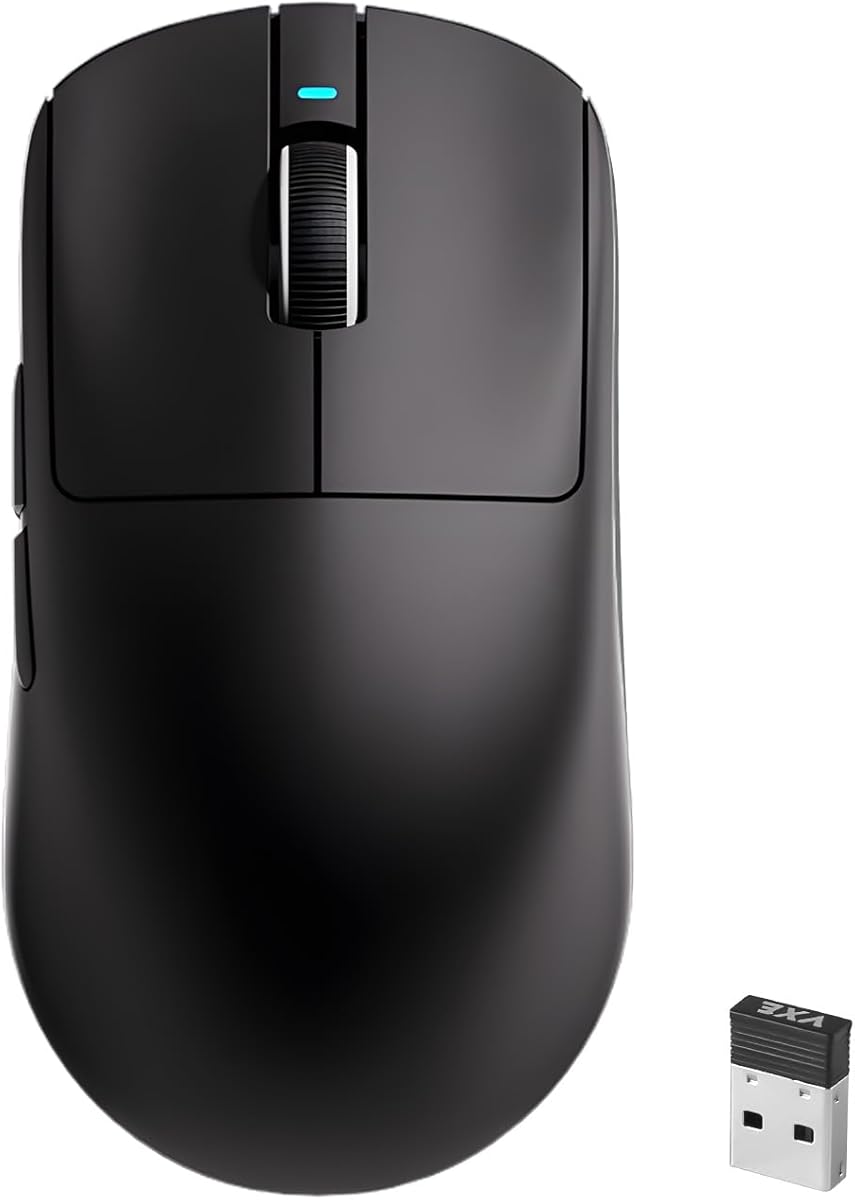



The Redragon M612 offers exceptional value for gamers seeking rapid input capabilities without a high price tag. With a 4.6 rating from users, it stands out for its reliable performance and comfortable design. This mouse is ideal for those starting in competitive gaming who need dependable hardware.
We may earn a commission when you buy through this link, at no additional cost to you.
Its 8000 DPI sensor allows for precise tracking across various surfaces, while the 9 programmable buttons enable complex macro setups. The frosted coating ensures a secure grip, reducing slippage during intense sessions. Additionally, the RGB modes add a vibrant aesthetic to your setup.
While it lacks wireless connectivity, the stable wired connection minimizes latency issues common in budget wireless models. The software required for customization is functional but may take time to master. Overall, these trade-offs are minor given the performance per dollar.
This mouse is perfect for budget-conscious gamers or professionals needing extra macro keys. We recommend it for anyone prioritizing function over form in entry-level drag click scenarios.
The optical sensor delivers consistent tracking, ensuring your cursor lands exactly where intended even during rapid movements.
The claw-grip shape and textured side grips reduce hand strain, allowing for extended use without fatigue.
We may earn a commission when you buy through this link, at no additional cost to you.
The M923 PRO bridges the gap between affordability and high-end performance. Users praise its versatile connectivity, allowing seamless switching between Bluetooth, 2.4Ghz, and wired modes. This flexibility makes it suitable for multi-device setups and different gaming environments.
We may earn a commission when you buy through this link, at no additional cost to you.
With 24K DPI settings and customizable buttons, you gain extensive control over your workflow. The ergonomic shape ensures comfort during long sessions, while the RGB modes enhance visual appeal. The dedicated software supports detailed profiling for different games.
Some users note that the weight is slightly higher than ultra-light esports mice, which might affect speed in fast-paced titles. However, for general gaming and productivity, the comfort and features outweigh this minor drawback.
Ideal for gamers and professionals needing a versatile mouse, this model offers robust customization. We recommend it for those who value connectivity options and high sensitivity settings.
Support for Bluetooth and 2.4Ghz ensures you can connect to laptops, desktops, and tablets effortlessly.
The driver software allows deep customization of buttons and DPI, giving you full control over your setup.
We may earn a commission when you buy through this link, at no additional cost to you.
Designed for elite competition, the Viper V3 Pro CS2 Edition delivers unmatched speed and precision. Its ultra-lightweight 54g frame and 8K polling rate ensure every movement translates instantly to the screen. This model is favored by top esports athletes for its reliability.
We may earn a commission when you buy through this link, at no additional cost to you.
The optical switches eliminate debounce delay and prevent double-clicking, a common issue with mechanical switches. Battery life extends up to 95 hours, ensuring uninterrupted gaming. The focus sensor performs well on diverse surfaces, including glass.
While the price is premium, the performance benefits justify the investment for serious gamers. The minimalist button layout may not suit MMO players needing many macros, but it optimizes speed for FPS titles.
If you seek the fastest response and lightest feel, this mouse is the top choice. We recommend it for competitive shooters where milliseconds matter.
Optical switches ensure consistent actuation, eliminating the annoying double-click problems found in traditional mice.
The lightweight shape and lack of extra buttons allow for swift flicks and precise aiming in first-person games.
We may earn a commission when you buy through this link, at no additional cost to you.
The R1 SE+ combines light weight with modern customization options. At just 55 grams, it feels incredibly agile in hand, making it suitable for fast-paced games. The PAW3395SE sensor provides accurate tracking even at high speeds.
We may earn a commission when you buy through this link, at no additional cost to you.
One unique feature is the web-driven interface for settings, allowing changes without installing heavy software. The tri-mode connection ensures compatibility with various devices. RGB lighting adds a stylish touch to the black chassis.
Some users report that the web interface requires account creation, which can be a hassle. Build quality is generally good but may vary slightly by unit. These minor issues do not significantly impact performance.
This mouse is great for gamers wanting a balance of performance and customization. We recommend it for those who prefer browser tools over traditional drivers.
Adjust DPI and buttons directly in your web browser, simplifying setup without additional software installs.
The PAW3395SE sensor tracks movement accurately, ensuring your actions are recorded without delay or drift.
We may earn a commission when you buy through this link, at no additional cost to you.
The M910-K is designed for gamers who need rapid fire inputs without breaking the bank. Its fire button allows rapid clicking, ideal for FPS games. With 9 programmable buttons, you can set up macros for complex actions easily.
We may earn a commission when you buy through this link, at no additional cost to you.
The ergonomic shape fits comfortably in most hand sizes, reducing fatigue over time. RGB lighting provides a customizable look to match your setup. The software allows switching between 5 user profiles for different games.
While it lacks wireless functionality, the wired connection ensures stability. The RGB options are functional but not as advanced as higher-end models. These limitations are acceptable given the low cost.
This mouse is perfect for budget gamers needing quick inputs. We recommend it for casual play where macro capability is a priority.
The dedicated fire button enables rapid clicks, enhancing performance in shooting games without manual effort.
Switch between 5 profiles instantly, adapting your mouse settings for different games or work tasks effortlessly.
We may earn a commission when you buy through this link, at no additional cost to you.
The MOJO Pro stands out for its silent buttons, making it ideal for shared environments. The ergonomic shape and adjustable force settings offer comfort and control. With 9 programmable buttons, you gain flexibility for various gaming needs.
We may earn a commission when you buy through this link, at no additional cost to you.
The PMW3336 sensor provides reliable tracking up to 12000 DPI. The sniper key lets you reduce sensitivity instantly for precise aiming. Software support allows deep customization of profiles and lighting.
While the sensor is older compared to modern optical ones, it still performs well for most users. The weight may feel heavy for fast flicks, but it adds stability for deliberate movements.
This mouse suits gamers or office users needing quiet clicks. We recommend it for those prioritizing noise reduction and ergonomic support.
Buttons operate quietly, preventing noise disturbance for others during late-night sessions or shared workspaces.
Tweak the force needed to click, allowing a personalized tactile feel that suits your preference.
We may earn a commission when you buy through this link, at no additional cost to you.
Designed for MMO enthusiasts, the M913 Impact Elite features 12 side buttons for complex macro chains. The 16 programmable buttons provide extensive control over skills and inventory. Wireless connectivity adds convenience without sacrificing performance.
We may earn a commission when you buy through this link, at no additional cost to you.
The Pixart 3335 sensor ensures reliable tracking during intense raids. Battery life supports 45 hours of play, reducing recharge frequency. RGB lighting enhances the look of the intricate button layout.
Its larger size may not suit users with smaller hands or those preferring minimalism. Weight could affect speed in FPS games, but it is optimal for MMOs. These factors are acceptable given the specialized design.
This mouse is ideal for MMO players needing many inputs. We recommend it for those wanting extensive macro capabilities and wireless freedom.
With 12 side buttons, you can map dozens of abilities, streamlining gameplay in complex MMORPG environments.
Switch between wired and wireless modes, ensuring you never lose connection during critical moments.
We may earn a commission when you buy through this link, at no additional cost to you.
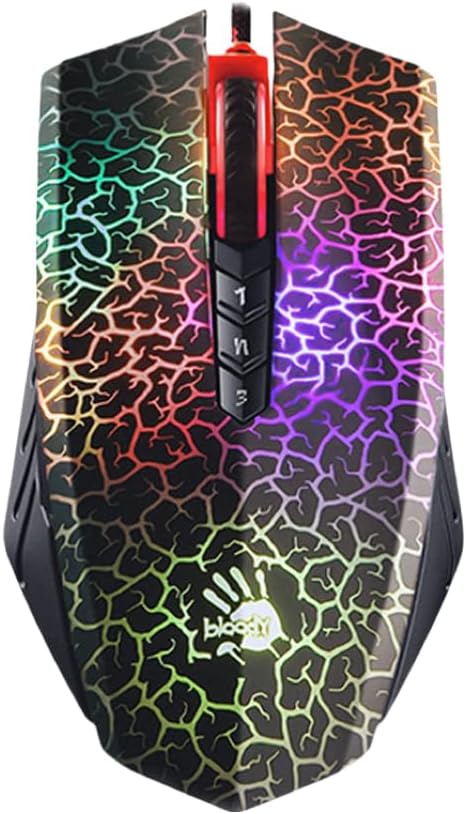
The Bloody A70 II utilizes Light Strike optical switches for near-instant response. This design prevents double-clicking and ensures consistent actuation over millions of clicks. The 8000 DPI sensor offers reliable tracking for competitive gaming.
We may earn a commission when you buy through this link, at no additional cost to you.
X'Glide armor feet enhance smoothness on pads, improving glide precision. The scroll wheel and buttons are fully programmable, supporting advanced macros. The build feels solid and durable for daily use.
Software support is functional but less intuitive than modern options. RGB lighting is minimal compared to newer models. These aspects are secondary to the core performance benefits offered.
This mouse is great for gamers prioritizing speed and durability. We recommend it for those seeking responsive switches without mechanical wear.
Optical switches eliminate debounce delays, delivering faster actuation and longer life spans than traditional contacts.
The armored feet reduce friction, allowing smoother movements and precise tracking across various surfaces.
We may earn a commission when you buy through this link, at no additional cost to you.
The PRO X2 SUPERSTRIKE sets a new standard with its HERO 2 sensor and haptic feedback system. Designed with esports pros, it offers customizable actuation points for rapid triggering. The build quality is exceptional, with thin walls for reduced weight.
We may earn a commission when you buy through this link, at no additional cost to you.
Haptic feedback provides tactile responses, enhancing immersion in games. Battery life ranges from 60 to 90 hours, reducing downtime. The LIGHTSPEED wireless ensures lag-free performance even in crowded environments.
The high cost limits accessibility, but the technology is unmatched. Haptic features may need calibration to suit individual preferences. These considerations are minor for those seeking top-tier performance.
This mouse is perfect for elite gamers wanting cutting-edge tech. We recommend it for those prioritizing precision and innovation over price.
Real-time tactile cues help you react faster, adding a new dimension to gameplay immersion and awareness.
Adjust actuation points to match your playstyle, enabling rapid fire inputs with minimal physical effort.
We may earn a commission when you buy through this link, at no additional cost to you.
The Basilisk V3 combines comfort with performance, featuring a thumb rest for long sessions. The HyperScroll wheel supports both free-spin and tactile modes, ideal for browsing and gaming. Its ergonomic shape fits naturally in the hand.
We may earn a commission when you buy through this link, at no additional cost to you.
The Focus Plus 26K sensor ensures accurate tracking with zero smoothing. Optical switches provide reliable actuation with minimal wear. Chroma RGB offers extensive customization across 11 zones.
Its weight may be too much for gamers preferring ultra-light setups. The lack of wireless connectivity limits portability. However, for stationary use, it offers excellent functionality and comfort.
This mouse suits users prioritizing ergonomics and customization. We recommend it for those wanting a versatile all-rounder with premium features.
Switch between free-spin and tactile modes instantly, adapting to navigation or gaming needs with a single toggle.
The thumb rest and curved design reduce strain, ensuring comfort during extended gaming or work sessions.
We may earn a commission when you buy through this link, at no additional cost to you.
Selecting the right drag click mouse involves evaluating sensor performance, ergonomics, and customization options to match your specific needs.
The sensor is the heart of any gaming mouse, determining how accurately it tracks movement. Look for models with optical sensors offering high DPI ranges, typically 12000 or higher. Ensure the sensor supports adjustable settings to adapt to different games or tasks without losing precision.
Comfort is critical for long gaming sessions. Consider the shape of the mouse and whether it supports your grip style, such as claw or palm. Textured surfaces and rubberized side grips enhance hold stability, reducing the risk of slippage during rapid inputs.
Programmable buttons allow you to assign macros and complex commands. Check how many buttons are customizable and whether the software supports creating detailed profiles. For MMO games, having more side buttons provides an advantage in managing multiple abilities.
Decide between wired and wireless connectivity based on your priorities. Wired mice offer stable connections with zero latency, while wireless models provide convenience. Look for dual-mode options if you need to switch between devices frequently.
Polling rate indicates how often the mouse reports its position to your computer. Higher rates like 8000 Hz ensure smoother tracking and faster response. This is especially important for competitive shooters where milliseconds can change the outcome.
The type of switch impacts the mouse lifespan and feel. Optical switches generally last longer and avoid double-click issues common with mechanical types. Look for switches rated for at least 50 million clicks to ensure longevity over time.
Quality software is essential for maximizing a mouse features. It should allow adjusting DPI, assigning macros, and creating profiles for different games. Web-based drivers offer convenience, while traditional apps may provide more depth for advanced users.
A sturdy chassis ensures the mouse withstands intense use. Materials like reinforced plastics or metal frames add durability without excessive weight. Check reviews regarding long-term wear to avoid models that develop creaking or loose buttons.
To maintain optimal performance, keep the mouse sensor and feet clean by wiping them regularly with a soft cloth. Dust buildup can interfere with tracking accuracy and cause erratic movements during use.
Configure your DPI settings through the provided software to match your display resolution. Lower DPI works best for precision aiming, while higher DPI suits fast scrolling or general navigation tasks.
Store the mouse in a dry environment and avoid exposure to extreme temperatures. Regularly update the driver software to ensure compatibility with new operating system versions and gaming patches.
A drag click mouse features switches designed for rapid, precise inputs often used in gaming. These models typically include high polling rates and ergonomic shapes to facilitate quick movements without fatigue.
Yes, many models with programmable buttons and adjustable DPI suit professional tasks. Look for ergonomic options to reduce strain during long work hours or data entry sessions.
Modern wireless technology minimizes latency significantly. Models with 2.4GHz dongles or optimized Bluetooth connections perform nearly as well as wired options for most users.
Update drivers when new features are released or if you experience connectivity issues. Checking the manufacturer's website every few months ensures compatibility with the latest games and software updates.
Optical switches generally offer longer lifespans and eliminate double-click problems. They actuate faster, making them preferable for competitive gaming and high-frequency usage scenarios.
Ideal DPI varies by preference but 8000 to 16000 is common for competitive play. Lower DPI settings provide better control for aiming, while higher values help with fast cursor movements.
Some optical sensors track well on glass, but performance varies. Verify that the sensor specification explicitly mentions glass support before purchasing if this is a requirement for your setup.
Most reputable brands provide user-friendly software for macro creation. You can assign complex sequences to single buttons, streamlining repetitive tasks in both gaming and productivity applications.
The ten models reviewed represent a diverse range of performance and price points. Top picks like the Razer Viper V3 Pro and Redragon M612 offer exceptional value for different budget tiers and use cases.
Prioritize sensor accuracy and ergonomics when making your decision to ensure long-term satisfaction. Consider whether wireless connectivity or high button counts are essential based on your gaming habits or workflow needs.
Always verify current prices and availability before purchasing, as these details may change. Investing in the right drag click mouse can elevate your gaming or work experience significantly.