
TECKNET Ergonomic Mouse, 4800 DPI Wireless Bluetooth Vertical
4.4Editor score
Connects to three devices seamlessly
Adjustable DPI levels up to 4800
Silent clicks for quiet environments
Discover the top ergonomic mice for wrist pain designed to reduce strain. We compare features, comfort, and performance to help you find relief today.
Chronic wrist pain can severely impact daily productivity and comfort during long computer sessions. Choosing the right ergonomic mouse helps maintain a neutral hand posture, reducing strain on muscles and tendons throughout the day.
We evaluated ten top-rated vertical and ergonomic mice based on design, connectivity, battery life, and user feedback. Each product offers unique features aimed at alleviating discomfort while ensuring precise cursor control for work and leisure.
This guide highlights key strengths and trade-offs for every model to help you select the best fit for your hand size and workflow. Please note that prices and availability may change frequently, so check current listings before purchasing.
4.4Editor score

4.4Editor score

4.4Editor score
The following table provides a side-by-side comparison of all ten selected ergonomic mice, highlighting their key specifications and connectivity options to simplify your decision process.



The Logitech Lift Vertical Ergonomic Wireless Mouse is designed to lift users out of desk fatigue with its upright posture. With a rating of 4.4, it stands out for its ergonomic certification and natural handshake position that minimizes forearm twist during extended work sessions.
We may earn a commission when you buy through this link, at no additional cost to you.
This mouse promotes comfort through a 57 degree vertical angle that aligns the wrist and arm in a neutral position. Its softly textured grip and snug thumb rest provide day long coziness while customizable buttons and a SmartWheel enhance productivity. Connectivity is flexible via Bluetooth or Logi Bolt to support various operating systems.
While highly rated, the Lift is specifically tailored for small to medium right hands which may exclude larger users seeking similar benefits. Additionally while the clicks are whisper quiet for focus they are not fully silent like some competitors designed for libraries or shared offices.
If you prioritize ergonomic certification and comfort for small to medium hands this mouse offers a robust solution for reducing wrist pain. Its long battery life and dual connectivity options make it a reliable choice for professionals seeking sustained comfort and productivity throughout the workday.
Designed and approved by leading ergonomists to ensure it meets high standards for reducing strain and improving posture.
Enjoy up to two years of use on a single battery ensuring uninterrupted work without frequent replacements or recharging.
We may earn a commission when you buy through this link, at no additional cost to you.
The Anker 2.4G Wireless Ergonomic Mouse provides enhanced comfort and productivity through a scientifically designed structure that promotes a neutral handshake wrist position. With a rating of 4.2 it offers reliable performance for those seeking ergonomic relief without a high price point.
We may earn a commission when you buy through this link, at no additional cost to you.
Its optical tracking technology supports multiple DPI settings to ensure smooth precision on various surfaces making it suitable for work and leisure. The inclusion of next and previous buttons aids efficient webpage browsing while the mouse transitions to power saving mode after eight minutes to conserve energy.
However users should note that key click sounds are unavoidable which may disturb others in quiet environments. Additionally the package does not include the required AAA batteries requiring a separate purchase before initial use.
Ideal for budget conscious users this mouse delivers solid ergonomic benefits and versatile connectivity via USB receiver. Its durable construction and energy efficient design make it a practical choice for anyone looking to reduce wrist strain economically.
Boasts 800 to 1600 DPI resolution for sensitive tracking across diverse surfaces ensuring accurate cursor movement.
Automatically enters power saving mode after inactivity disconnecting power to extend battery life significantly.
We may earn a commission when you buy through this link, at no additional cost to you.
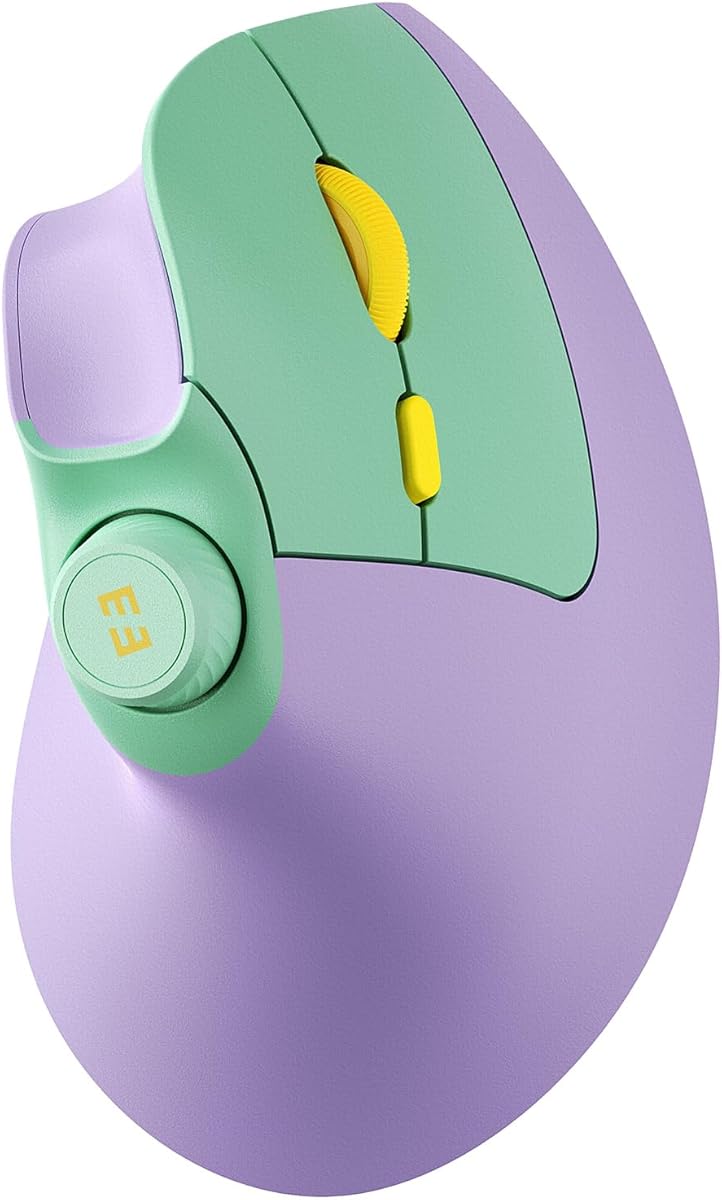
The TECKNET Ergonomic Mouse stands out with seamless switching between three devices via Bluetooth and USB modes making it ideal for multitaskers. Its rating of 4.4 reflects strong user satisfaction regarding its ergonomic design and silent operation.
We may earn a commission when you buy through this link, at no additional cost to you.
Equipped with 6 adjustable DPI levels up to 4800 it offers precise tracking on different surfaces. The silent click feature reduces noise significantly which is beneficial for libraries or shared offices. Battery warning LED ensures timely replacement for uninterrupted use.
A limitation is that side buttons do not function on macOS reducing utility for Apple users. Also it requires two AAA batteries which are not included in the package necessitating an extra purchase for setup.
This model offers exceptional value with its advanced connectivity and silent design at an affordable price point. For those needing versatile device support and quiet operation without breaking the bank it remains a top contender.
Connect via Bluetooth or 2.4G USB to switch between three devices for improved work efficiency.
Nearly silent clicks ensure your work or study remains undisturbed in quiet environments.
We may earn a commission when you buy through this link, at no additional cost to you.
The UGREEN Ergonomic Wireless Mouse promotes a natural handshake position that reduces wrist rotation and muscle strain. With a rating of 4.3 it appeals to users needing quiet operation and smooth tracking for various tasks.
We may earn a commission when you buy through this link, at no additional cost to you.
Its quiet click buttons help maintain a peaceful workspace while the 5-button layout supports efficient navigation. Adjustable DPI levels allow easy switching between precision editing and fast scrolling. PTFE glide feet ensure effortless movement reducing friction on surfaces.
While effective the mouse relies on a single AA battery which is not included. There is no specific mention of ergonomic certification though the design prioritizes comfort for larger hands.
For those valuing quiet clicks and dual wireless connectivity this mouse offers a practical solution. Its smooth tracking and efficient button layout make it a strong candidate for office workers and general users.
Quiet-click buttons keep your workspace peaceful for better focus and productivity.
Built with durable PTFE glide pads for smoother tracking and reduced surface friction.
We may earn a commission when you buy through this link, at no additional cost to you.
The ProtoArc EM11 NL Wireless Ergonomic Vertical Mouse is tailored for small to medium hands under 7.5 inches ensuring a perfect fit. Its rating of 4.4 highlights user satisfaction with its comfortable alignment and rechargeable design.
We may earn a commission when you buy through this link, at no additional cost to you.
Connectivity is versatile allowing connection to up to three devices via Bluetooth or USB. The built-in 500mAh battery eliminates disposable waste and charges via Type-C cable. Silent clicking helps maintain focus during extended work sessions.
Adjusting to the vertical shape can take 1-2 weeks and may cause initial inconvenience. Additionally side buttons are not compatible with Mac OS limiting functionality for Apple users.
This model is ideal for smaller hands seeking ergonomic relief with the convenience of rechargeable power. Its device connectivity and silent operation support efficient workflows for a wide range of users.
Designed specifically for hand lengths under 7.5 inches to reduce wrist strain by aligning with natural grip.
Built-in 500mAh Li-Ion battery conveniently recharged via Type-C cable for environmental sustainability.
We may earn a commission when you buy through this link, at no additional cost to you.
The Lekvey Ergonomic Mouse encourages healthy neutral handshake wrist positions with its scientific design. With a rating of 4.3 users report significant wrist pain reduction and comfort within just 3-5 days of adjustment.
We may earn a commission when you buy through this link, at no additional cost to you.
It features a high capacity rechargeable battery offering over 150 hours of continuous use per charge. The included nano USB receiver ensures easy plug and play setup without needing Bluetooth pairing or drivers.
Lack of Bluetooth connectivity restricts wireless options to USB receivers only. Additionally it is recommended for medium or large hands which might exclude users with smaller hands seeking similar ergonomic relief.
Ideal for those prioritizing simplicity and rechargeable convenience this mouse offers solid ergonomic benefits. Its long battery life and straightforward connectivity make it a reliable choice for daily office tasks.
Enjoy over 150 hours of continuous use on a single charge for convenience and cost savings.
Plug and play nano USB receiver at the bottom of the mouse requires no drivers or pairing.
We may earn a commission when you buy through this link, at no additional cost to you.
The TECKNET Ergonomic Mouse features a natural 52 degree vertical angle to reduce strain on the forearm and carpal tunnel. Its high rating of 4.6 reflects exceptional performance in ergonomic design and battery efficiency.
We may earn a commission when you buy through this link, at no additional cost to you.
Equipped with a 600mAh rechargeable battery it lasts up to 2 months on a single charge. The 4800 DPI precision allows smooth tracking across various surfaces. Whisper-quiet clicks ensure distraction-free operation in libraries or offices.
Forward and back buttons are not functional on Mac OS reducing utility for Apple users. Additionally the USB receiver is stored inside the mouse bottom requiring care during handling.
For those needing long battery life and quiet performance this mouse delivers strong ergonomic value. Its high DPI and versatile connectivity make it a compelling choice for diverse computing environments.
52 degree vertical angle promotes a relaxed handshake grip reducing strain during extended sessions.
Built-in 600mAh rechargeable battery offers up to 2 months of use on a single charge.
We may earn a commission when you buy through this link, at no additional cost to you.
The seenda MOU-302 Wireless Bluetooth Ergonomic Vertical Mouse offers unique convenience with a built-in volume control button. Its rating of 4.6 highlights user satisfaction with its ergonomic grip and silent operation.
We may earn a commission when you buy through this link, at no additional cost to you.
Multi-device connectivity allows connection to three devices via Bluetooth and USB for seamless switching. Silent clicks and adjustable DPI levels support smooth control in diverse environments. The 500mAh battery ensures reliable use up to 2 months per charge.
Side buttons may not function on macOS limiting full utility for Apple users. While rechargeable battery replacement might require additional steps if the built-in battery degrades over time.
Ideal for multitaskers needing quick volume access this mouse provides solid ergonomic support. Its silent operation and long battery life make it suitable for both professional and casual users.
Pause, play, and adjust music volume directly from the mouse for enhanced efficiency.
Noiseless clicks prevent distractions offering flexibility for work and casual gaming.
We may earn a commission when you buy through this link, at no additional cost to you.
The Logitech MX Vertical Wireless Mouse is designed to reduce muscular activity by 10 percent compared to standard mice. Its rating of 4.4 signifies strong approval for its ergonomic posture and precision sensor.
We may earn a commission when you buy through this link, at no additional cost to you.
The 4000 DPI sensor results in 4x less hand movement reducing fatigue during intense tasks. A cursor speed switch allows instant adjustments for accuracy. The textured rubber surface assures a natural grip suitable for various hand shapes.
Premium features come at a higher price point which may be prohibitive for some users. Additionally the USB receiver is not always included in the box depending on packaging or region.
For those seeking top-tier ergonomic relief and performance this mouse is a superior investment. Its scientifically tested design and precision make it a standout choice for demanding professionals.
Reduces muscular activity by 10 percent compared to a standard mouse without loss in performance.
Advanced optical tracking with 4000 DPI sensor results in 4x less hand movement.
We may earn a commission when you buy through this link, at no additional cost to you.
The TECKNET 2.4G Wireless Ergonomic Vertical Mouse promotes a scientific 60 degree grip to straighten the forearm and relax muscles. With a rating of 4.4 users appreciate its productivity boosting features and quiet operation.
We may earn a commission when you buy through this link, at no additional cost to you.
It features 6 programmable buttons that reduce repetitive click fatigue by enabling shortcuts on the fly. Quiet left and right buttons ensure a distraction free workspace. The reliable wireless connection allows pairing with various devices up to 10 meters.
Adjusting to the new shape may take three days as muscles adapt to the natural handshake posture. Lack of Bluetooth support limits connectivity to USB receivers only which may be inconvenient for some setups.
For users focused on boosting efficiency with programmable features this mouse offers solid ergonomic support. Its quiet operation and reliable connection make it a practical choice for office environments.
6 programmable buttons speed up workflow with thumb shortcuts reducing repetitive click fatigue.
60 degree vertical grip cuts wrist strain and pain at the source for long term comfort.
We may earn a commission when you buy through this link, at no additional cost to you.
Selecting the right ergonomic mouse requires evaluating design, connectivity, and user comfort to ensure effective wrist relief.
A vertical design encourages a natural handshake position which reduces forearm twisting and strain on the wrist. Look for angles around 57 to 60 degrees to achieve optimal comfort and alignment during prolonged use.
Prioritize models with a proven vertical angle to maintain a neutral wrist posture throughout the workday.
Ergonomic mice come in sizes tailored for small, medium, or large hands. A mismatched size can cause discomfort or inadequate support leading to worsening wrist pain over time. Measure your hand length before purchasing to ensure the best fit.
Selecting the correct size for your hand ensures maximum ergonomic benefit and long-term usability.
Most ergonomic mice offer wireless connectivity via Bluetooth or a 2.4G USB receiver. Bluetooth saves USB ports and supports multi-device pairing while USB offers stable plug-and-play connections without battery pairing. Choose based on your device ports and workflow needs.
Choose connectivity that matches your device setup to ensure seamless pairing and operation.
Options include disposable batteries, rechargeable internal batteries, or solar panels. Rechargeable models reduce waste and provide convenience but may require periodic charging. Disposable batteries offer long life but contribute to waste. Check estimated usage hours before buying.
Evaluate battery type based on your preference for convenience versus environmental impact.
Some mice feature silent clicks which are ideal for quiet environments like offices or libraries. Traditional clicks are more audible but often feel more responsive. Decide whether noise reduction outweighs tactile feedback for your work setting.
Silent click technology helps maintain a peaceful workspace for focused productivity.
DPI determines cursor sensitivity and precision. Higher DPI levels allow smoother tracking on large screens while lower DPI offers finer control for detailed work. Look for adjustable DPI settings to adapt to different tasks easily.
Adjustable DPI settings provide versatility for various work scenarios and screen sizes.
Features like programmable buttons volume knobs or thumb rests enhance productivity and comfort. Additional buttons can reduce repetitive clicks while volume knobs aid media control. Consider these extras based on your workflow requirements.
Extra features like programmable buttons can streamline workflows and improve efficiency.
A solid warranty ensures protection against defects and adds confidence to your purchase. Look for at least a one-year warranty with responsive customer service. Longer warranties like 36 months often indicate higher product reliability.
Choose models with strong warranty support for long-term reliability and peace of mind.
Proper placement is essential. Position the ergonomic mouse directly next to your keyboard so your forearm remains straight and your wrist stays neutral without twisting inward or outward.
Start slowly by using the new mouse for short intervals before switching back to your old mouse. This helps your muscles adjust to the vertical posture and reduces initial fatigue during the transition.
Maintain your device by keeping it clean and avoiding liquid spills. Regularly check the sensor for debris and clean buttons gently to ensure smooth operation and extend the lifespan of the mouse.
Most ergonomic experts recommend a vertical angle between 57 and 60 degrees. This range supports a natural handshake position that minimizes wrist strain and keeps the forearm aligned comfortably during use.
Yes, it may feel uncomfortable for a few days as your muscles adapt to the new posture. Taking short breaks and alternating with your old mouse can help ease the transition without pain.
Yes, several models are specifically designed for smaller hands under 7.5 inches. These compact ergonomic mice ensure proper support and alignment without overwhelming smaller palms.
Most users report full adaptation within one to two weeks. Daily use combined with gradual practice will help you adjust to the unique shape and improve productivity over time.
Most vertical ergonomic mice are designed for right-handed use only. Left-handed users should look for ambidextrous models or specific left-handed ergonomic designs to ensure proper comfort.
Wireless options offer greater flexibility and a cleaner desk but rely on battery life. Wired models provide consistent power but may restrict movement. Choose based on your workspace needs.
Several models support Mac OS with full button functionality. Check product specifications for macOS compatibility especially regarding side buttons to avoid limited features.
Ergonomic mice help reduce strain and improve posture which may alleviate symptoms. However they do not cure carpal tunnel syndrome. Consult a medical professional for treatment advice.
We have reviewed ten top-rated ergonomic mice designed to reduce wrist pain and improve comfort for daily computing tasks. Each model offers unique features catering to various hand sizes budgets and workflow needs.
Prioritize models that fit your hand size and provide a natural handshake angle to achieve maximum relief. Consider connectivity and battery life to ensure seamless integration with your existing devices.
Remember that prices and availability may change so verify current listings before making a final purchase. Investing in the right ergonomic mouse can lead to long-term comfort and increased productivity.