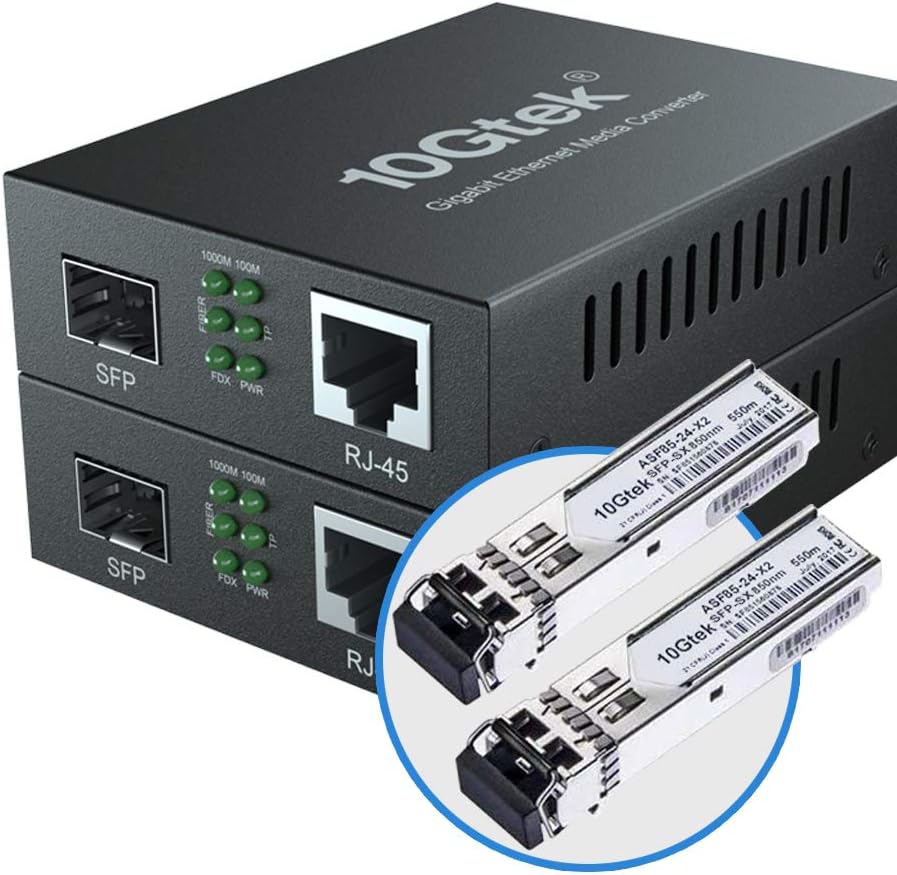
10Gtek Gigabit Ethernet Media Converter
4.7Editor score
Includes dual SFP modules
Up to 550 meters range
UL certified power supply
This guide compares the top Ethernet Fiber Media Converter models for reliable network extension, speed, and compatibility across various enterprise and home
Connecting distant network points requires reliable hardware like an Ethernet Fiber Media Converter. These devices bridge copper and fiber optics, ensuring seamless data flow over long distances without signal loss.
We evaluated ten top-rated models based on speed, range, and build quality. Our analysis focuses on compatibility, ease of setup, and durability for various professional and residential networking environments.
Each pick highlights specific strengths to help you choose the right unit. Prices and availability fluctuate frequently, so verify current details before purchasing to ensure you get the best deal today.
4.7Editor score

4.8Editor score

5.0Editor score
Here is a side-by-side comparison of all ten selected Ethernet Fiber Media Converters to help you identify the best fit for your specific network requirements and budget constraints.


The 10Gtek Gigabit Ethernet Media Converter is a solid choice for budget-conscious users needing reliable fiber connectivity. It delivers consistent 10/100/1000Mbps speeds with excellent stability across short to medium ranges.
We may earn a commission when you buy through this link, at no additional cost to you.
This unit stands out because it includes two SFP multimode modules, saving you extra costs. The auto-negotiation on the RJ45 port ensures compatibility with most standard network switches and routers.
While it lacks advanced diagnostic features, the built-in LEDs provide enough status monitoring for basic troubleshooting. Its UL-certified power supply adds a layer of safety for continuous operation.
Ideal for small offices or home labs extending networks over fiber. It balances affordability with performance, making it the best value option in this comparison.
Each pack comes with two multimode transceivers so you can link two endpoints without buying extra hardware immediately.
The device requires no configuration software, making it suitable for users with minimal networking knowledge.
We may earn a commission when you buy through this link, at no additional cost to you.
The Omada Gigabit SFP to RJ45 Media Converter offers versatile compatibility for both single and multimode fiber networks. It ensures stable 1000Base-T connections while supporting a wide range of distances.
We may earn a commission when you buy through this link, at no additional cost to you.
Its hot-swappable FX port allows users to switch module types easily without powering down the device. This flexibility is particularly useful in environments where network requirements might change over time.
The auto-negotiation feature ensures smooth integration with existing switches regardless of their speed settings. However, it lacks detailed diagnostic tools found in higher-end enterprise models.
This converter is well-suited for businesses needing adaptable network extensions without complex configurations. Its robust build and flexibility make it a dependable choice.
You can replace the SFP module on the fly, allowing quick changes to fiber types or distances without downtime.
The unit supports a wide voltage range, ensuring reliable operation across different power environments globally.
We may earn a commission when you buy through this link, at no additional cost to you.
This BiDi converter allows transmission over a single fiber strand using distinct wavelengths, which can save fiber cable costs. It delivers reliable 1.25Gbps speeds with comprehensive duplex and frame support.
We may earn a commission when you buy through this link, at no additional cost to you.
The inclusion of BiDi SFP modules makes it ready to use out of the box. Its support for 9K jumbo frames enhances throughput for large file transfers, beneficial for storage networks.
While the single-strand capability is efficient, users must ensure both ends use matching BiDi wavelengths. This adds a slight complexity compared to standard duplex fiber setups.
Best for networks looking to maximize existing fiber infrastructure. Its feature set balances cost savings with high performance for data-heavy applications.
Supporting 9K frames means faster transfers for large files, which is crucial for backup and media storage tasks.
Using one fiber strand reduces cabling needs, saving installation time and material costs in dense network environments.
We may earn a commission when you buy through this link, at no additional cost to you.
The 10G Ethernet Media Converter is designed for high-speed networks requiring future-proofing. It supports 10Gigabit transmission and adapts to slower speeds seamlessly for versatile connectivity.
We may earn a commission when you buy through this link, at no additional cost to you.
Its SFP+ slot accepts various 10G modules like SR and LR, giving flexibility in reach. The autoadapt feature on the copper port ensures it works with legacy 1G devices without issues.
LED indicators provide clear status diagnostics to help identify connection problems quickly. Despite its high performance, the unit does not require excessive configuration for operation.
Ideal for data centers or prosumer setups needing bandwidth expansion. It bridges the gap between modern 10G fiber and existing copper cabling effectively.
The RJ45 port can adjust from 100M to 10G based on the connected device, simplifying mixed-network environments.
Supporting 10G standards now ensures you won't need to upgrade hardware soon as your network demands grow.
We may earn a commission when you buy through this link, at no additional cost to you.
This media converter stands out for its impressive 20km transmission range on single-mode fiber. It supports standard Gigabit speeds and comes as a two-pack for immediate end-to-end setup.
We may earn a commission when you buy through this link, at no additional cost to you.
The SC fiber port design is robust and reliable for long-distance links. Its UL certification ensures safe power handling, which is essential for unmanaged installations in remote areas.
While it lacks some advanced management features, its simplicity is a strength. It offers a solid balance of distance capability and straightforward plug-and-play functionality.
Perfect for connecting buildings across campuses or remote sites. It provides the reliability needed for enterprise environments without unnecessary complexity.
With 20km reach, this unit handles building-to-building connections without needing intermediate repeaters or boosts.
Getting two units in one package means you can deploy a complete link immediately without purchasing extras.
We may earn a commission when you buy through this link, at no additional cost to you.
This pair provides ready-to-use 20km single-mode fiber conversion with integrated modules. It ensures seamless gigabit connectivity with easy monitoring via visible LED indicators.
We may earn a commission when you buy through this link, at no additional cost to you.
The built-in LC modules reduce setup time and ensure compatibility right away. Users benefit from US-based support, which can be crucial for resolving issues quickly.
While it does not support advanced features like VLAN tagging, its reliability is high. It is designed for straightforward connectivity tasks where performance stability is key.
Best for small businesses needing reliable long-distance links without complexity. It offers a solid combination of reach, support, and ease of use.
Modules are pre-installed, reducing the risk of mismatched hardware or compatibility issues during installation.
Having access to US-based support adds confidence for users who might need help with network configuration.
We may earn a commission when you buy through this link, at no additional cost to you.
This converter ships with a pre-installed LC SFP module, ensuring optimal optical alignment. It supports up to 20km on single-mode fiber with flexible settings for various network needs.
We may earn a commission when you buy through this link, at no additional cost to you.
The DIP switches allow you to control link fault pass-through and speed settings without software. This hardware-level control offers robust stability for critical links that need precise configuration.
Link fault pass-through ensures that if fiber breaks, the copper side disconnects to alert remote devices. This feature prevents phantom link states that can cause routing issues.
It is an excellent choice for professional installations needing precise control. The included patch cable and mount ears simplify deployment immediately.
Physical switches let you enforce specific speeds or safety features quickly without accessing a management interface.
If the fiber connection drops, the copper link goes down too, helping switches and routers know a path is broken.
We may earn a commission when you buy through this link, at no additional cost to you.
This media converter is designed for enterprise use with an open SFP slot for flexible module choice. It supports link fault pass-through and jumbo frames for high-performance environments.
We may earn a commission when you buy through this link, at no additional cost to you.
Its TAA compliance makes it suitable for government and government-related procurement. The open slot lets you choose between single or multimode modules as required.
While it lacks a pre-installed module, its design prioritizes long-term reliability. It is built to integrate smoothly with structured cabling systems and rackmount chassis.
Ideal for IT professionals needing versatile and compliant equipment. The build quality and features ensure minimal downtime and easy integration.
An open slot allows you to swap modules easily as network distances or types change over time.
This ensures network integrity by alerting devices when a fiber break occurs, preventing silent failures.
We may earn a commission when you buy through this link, at no additional cost to you.
This multimode unit comes with a factory-matched SFP module ensuring alignment out of the box. It supports up to 550m on OM2 or better fiber for reliable local connections.
We may earn a commission when you buy through this link, at no additional cost to you.
Four rear DIP switches let you control link fault pass-through and VLAN tagging easily. The support for QinQ and transparent VLANs makes it suitable for multi-tenant or segmented networks.
Its robust design works well in both desktop and wall-mounted configurations. However, it is limited to multimode fiber types, which may restrict distance compared to single-mode options.
Best for local campus or office LAN extensions. It balances advanced features with practical ease of use for managed environments.
Transparent VLAN pass-through allows tagged traffic to flow without reconfiguration, preserving network segmentation.
Physical switches let you customize settings without needing a computer or complex software interface.
We may earn a commission when you buy through this link, at no additional cost to you.
This premium media converter offers advanced features like remote monitor status and link-loss forwarding for enhanced management. It is built for high-demand environments where uptime is critical.
We may earn a commission when you buy through this link, at no additional cost to you.
The open SFP slot allows flexibility with any MSA-compliant transceiver. Link-loss forwarding ensures remote devices detect failures instantly, improving overall network stability and troubleshooting.
Its TAA compliance suits government projects, and its durability is evident in its construction. While it comes at a higher price, the advanced diagnostics justify the cost for professional use.
Ideal for data centers and mission-critical networks. Its feature set and build quality make it a top choice for reliability and management.
Allows remote monitoring of the converter's state, helping admins track health without physical access.
Ensures that when a link fails, the issue propagates through the network so systems can react quickly.
We may earn a commission when you buy through this link, at no additional cost to you.
Selecting the right converter requires considering fiber type, distance, and speed needs. Here are key factors to guide your purchase decision effectively.
Ensure the device matches your existing fiber cables. Single-mode supports long distances like 20km, while multimode is cost-effective for shorter campus links under 550 meters.
Always verify whether your infrastructure uses SC or LC connectors to avoid compatibility issues during installation.
Choose a unit rated for your required range. Some models support up to 20km, others only 550m. Exceeding these limits will cause signal loss.
Consider future expansion needs so your choice remains viable if you extend the network later.
Most converters support 10/100/1000Mbps speeds. Auto-negotiation ensures compatibility with older or newer devices. Higher-end models support 10G speeds.
Check if the RJ45 port supports jumbo frames for large data transfers.
Some units come with SFP modules included. Others have open slots requiring separate purchases. Pre-installed modules simplify setup but offer less flexibility.
Open slots allow changing fiber types without replacing the whole unit.
Look for universal voltage support like 100V to 240V. UL-certified power supplies ensure safety and reduce fire hazards.
Wall-mountable units with external adapters are easier to deploy in tight spaces.
LED indicators show link and activity status. Advanced units offer DIP switches or remote monitoring for complex networks.
Basic units rely on visual LEDs while premium ones allow deeper troubleshooting.
Sturdy enclosures protect against environmental stress. Check if it supports desk or wall mounting. Fanless designs ensure silent operation.
Consider rackmount options if deploying multiple units.
Reputable brands offer lifetime support and multi-year warranties. US-based help can be crucial for complex deployments.
Ensure the seller provides clear documentation and return policies.
First, power down the converter before connecting cables. Attach the fiber cable to the LC or SC port and the Ethernet cable to the RJ45 port.
Plug in the power adapter and turn on the unit. Wait for the LED indicators to stabilize showing Link and Activity status.
Avoid touching fiber tips to prevent contamination. Keep the unit in a ventilated area to ensure reliable performance.
No, they are not interchangeable. Multimode works for short distances, while single-mode handles long runs. Using the wrong type will cause signal loss or failure.
Most are plug-and-play with no setup needed. However, some advanced models have DIP switches for setting speeds or enabling fault pass-through.
This feature ensures that if a fiber link breaks, the copper side disconnects. It helps switches detect failures quickly, preventing network loops or dead connections.
Standard units are for indoor use. For outdoor deployment, use enclosures or industrial-rated models with weatherproof housing to protect against environmental conditions.
Distances vary by model. Single-mode units reach up to 20km, while multimode units max out around 550 meters. Choose based on your specific distance needs.
You need an Ethernet cable for the RJ45 port and a fiber patch cord matching the connector type. Ensure the fiber grade matches the module specifications.
The 10Gtek Gigabit SingleMode Fiber to Ethernet Media Converter stands out for its long-range capabilities. For budget buyers, the 10Gtek Gigabit Ethernet Media Converter offers excellent value.
Prioritize compatibility with your existing fiber and distance requirements. Enterprise users may prefer StarTech models for advanced diagnostic and compliance features.
Prices and availability fluctuate frequently. Always check current listings to ensure you get the best deal for your networking needs today.