
MEKO Stylus Pen for Touchscreen
4.6Editor score
Three interchangeable tips included
No battery or Bluetooth required
Protective cap for disc tip
Universal capacitive compatibility
This expert guide compares the top ten fine point stylus options for touchscreens, evaluating precision, compatibility, battery life, and design to help you
Finding the right fine point stylus can transform your digital experience, offering precision and comfort that fingers simply cannot match. Whether you are a student taking notes, an artist sketching concepts, or a professional navigating spreadsheets, the right tool matters. A good stylus provides responsive tracking, durable tips, and ergonomic design to keep your workflow smooth and uninterrupted throughout the day.
To compile this list, we analyzed dozens of capacitive and active stylus models based on user reviews, build quality, and feature sets. We prioritized options with interchangeable tips, strong battery life where applicable, and broad compatibility across devices. Each product on this list has been vetted for its ability to deliver accurate input without scratching your screen or causing unnecessary lag during critical tasks.
Each pick below highlights specific strengths, from budget-friendly universal pens to advanced active models with magnetic charging. You will see detailed breakdowns of tips, materials, and compatibility notes to help you decide. Keep in mind that pricing and availability can fluctuate frequently on online marketplaces, so verify current details before making your final purchase decision.
4.6Editor score

4.5Editor score

4.2Editor score
The following table provides a side-by-side comparison of all ten selected stylus models, highlighting their key specifications and unique selling points to help you quickly identify the best fit for your specific workflow and device requirements.




The 2026 Upgraded 3-in-1 Capacitive Stylus Pen stands out as a top choice for users needing precision without complex setup. With a 4.5 rating, it offers a versatile combination of rubber and transparent disc tips to handle everything from gaming to detailed note-taking. Its flexibility and responsiveness make it a reliable daily driver for tablets and smartphones alike.
We may earn a commission when you buy through this link, at no additional cost to you.
The standout feature is the transparent disc tip, which allows you to see exactly where your input is registering. This visibility combined with a 180-degree flexible writing angle ensures smooth strokes without interruptions. The ability to swap between 0.18 and 0.27-inch rubber tips means you can adapt the stylus for scrolling or fine writing instantly.
While it lacks palm rejection which requires care to avoid accidental touches the design focuses on simplicity and durability. The tips are replaceable without tools, extending the product's lifespan significantly. This trade-off is acceptable for most users who prioritize cost-effectiveness and versatility over advanced smart features found in branded active styluses.
Anyone looking for a universal solution that works across iPad, Android, and Nintendo Switch should consider this pick. It is particularly beneficial for seniors or those with limited hand mobility due to arthritis. For the price and performance balance it remains a highly recommended option for everyday digital interaction.
The transparent disc tip ensures you see the exact contact point, reducing errors during drawing or writing tasks.
This stylus works seamlessly with almost any capacitive touchscreen including phones, tablets, and gaming consoles without drivers.
We may earn a commission when you buy through this link, at no additional cost to you.
MEKO continues to lead in value with its upgraded 3-in-1 stylus pen that balances affordability with functionality. Rated 4.6 stars, this model adds a protective cap to its transparent disc tip which is a thoughtful addition for longevity. It offers a smooth writing experience that competes with more expensive options in the market.
We may earn a commission when you buy through this link, at no additional cost to you.
The package includes multiple replacement tips in both rubber sizes and disc types ensuring you are never left without a functional stylus. The dual-sized rubber tips are made from high-quality silicone that resists wear and aging well. This durability makes it a great choice for students or offices where shared devices are common.
Although it lacks any smart connectivity features the simplicity is also its strength. You can power it on instantly without pairing or charging. The only minor downside is the need to occasionally replace tips if you use it heavily daily but the included extras mitigate this concern effectively.
For those on a tight budget who still demand precision this is the definitive choice. It covers all basic needs like browsing, note-taking, and gaming without fuss. The inclusion of a protective cap shows attention to detail that separates it from generic competitors.
Customers receive extra rubber and disc tips ensuring long-term usability without additional purchases.
The cap keeps the disc tip safe from damage and dirt when the stylus is not in use.
We may earn a commission when you buy through this link, at no additional cost to you.
This universal stylus stands out for its magnetic adsorption design which securely attaches to the side of compatible iPad Pro models. With a 4.4 rating it offers a quick charge feature allowing ninety to ten hours of continuous use after just forty minutes of charging. It is a solid mid-range option for creative work.
We may earn a commission when you buy through this link, at no additional cost to you.
The one-touch switch design makes turning the device on and off effortless saving time during sessions. Accuracy is maintained through a sensitive tip that does not lag during writing or drawing. The package includes two complimentary nibs providing options for different line preferences and extending usability.
However the magnetic feature only supports certain iPad Pro generations which limits broader appeal compared to universal passive styluses. Additionally it does not include palm rejection so users must be mindful of hand placement. These constraints are acceptable if you own the specific compatible hardware.
Ideal for iPad Pro users seeking a cost effective alternative to branded pencils this model delivers reliability. It is particularly useful for artists who need to carry their tool securely without it rolling away. Always check device compatibility before purchasing to ensure the magnetic feature works for you.
Attaching magnetically to the iPad side keeps the stylus within reach and reduces the risk of misplacing it.
With up to ten hours of use on a short charge you can work through long sessions without interruption.
We may earn a commission when you buy through this link, at no additional cost to you.
This active stylus offers a realistic pen-like experience with a 1.5mm diameter tip that provides precise lines for drawing and handwriting. Rated 4.0 stars it powers on within one second without needing Bluetooth connection making it highly convenient. It is suitable for most touch screen devices from phones to tablets.
We may earn a commission when you buy through this link, at no additional cost to you.
The battery life is impressive allowing for ten to twelve hours of continuous use on a single charge. The built-in lithium battery and Micro USB port ensure it stays ready when you need it. Additionally the automatic thirty minute power off function saves energy when the device is inactive.
It lacks pressure sensitivity so all lines remain the same thickness which may limit advanced artistic work. The Micro USB charging is also slightly dated compared to modern USB-C standards. Despite this for casual users it remains a functional and reliable tool for note-taking and basic sketches.
For those needing an active stylus without the premium price tag this is a practical choice. It works well for professionals who need to sign documents or draft ideas quickly. Always ensure your device supports active inputs for the best experience with this model.
You can start drawing or writing within one second of picking up the pen without any setup steps.
The automatic power off after thirty minutes of inactivity ensures the battery lasts longer over time.
We may earn a commission when you buy through this link, at no additional cost to you.
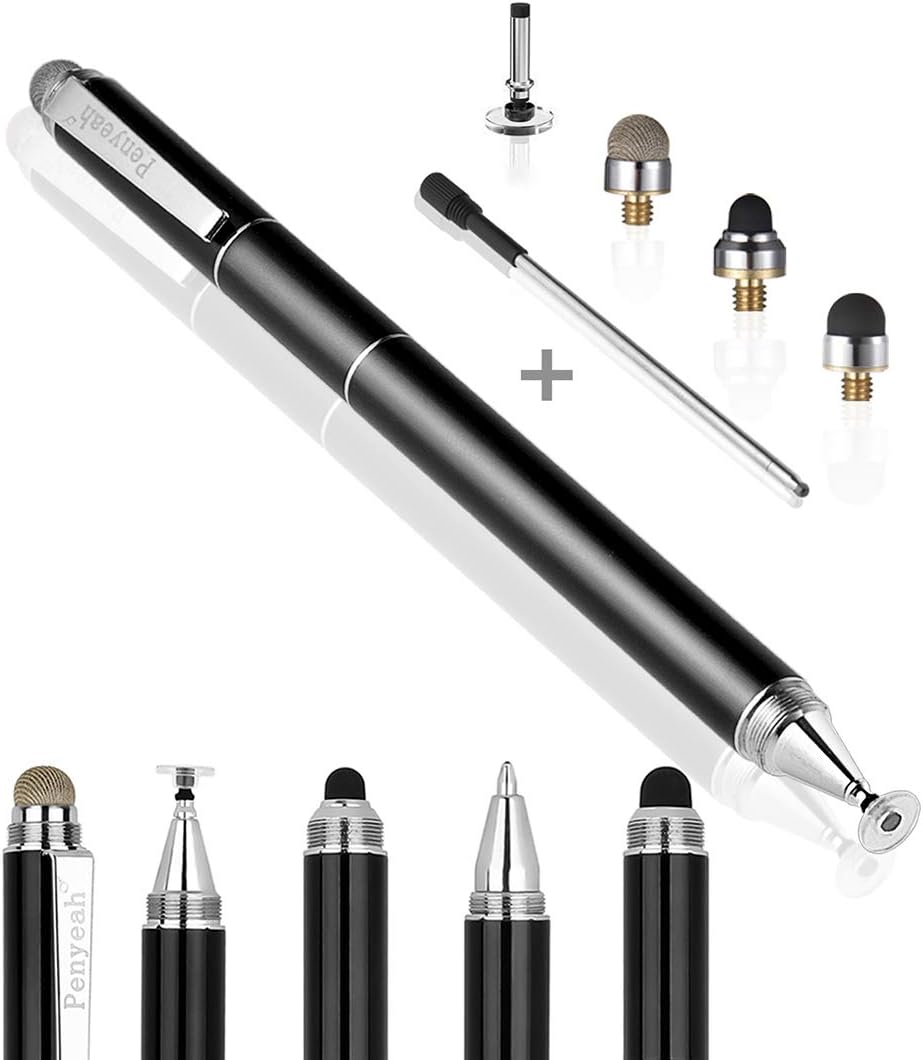
Penyeah offers a unique 4-in-1 design that combines multiple touch tools into one device. Rated 4.4 stars it includes a clear disc tip mesh fiber tip two rubber tips and a ballpoint pen. This variety makes it a versatile companion for both digital and traditional tasks in one slim package.
We may earn a commission when you buy through this link, at no additional cost to you.
The high grade metal body ensures durability and a comfortable feel in hand. The disc tip provides better accuracy for digital work while the fiber tip glides smoothly across the screen. A slim pocket clip keeps it ready for use anywhere without taking up much space in your pocket.
While the design is innovative the lack of palm rejection means you must lift your hand while writing to avoid errors. The metal body might feel colder to touch than plastic alternatives but it contributes to the premium look. For users wanting variety this model delivers excellent utility.
This stylus is ideal for people who want to keep a single tool for all needs from signing docs to signing. The ballpoint pen feature adds genuine value for quick handwritten notes. If you appreciate clever design and versatility this is a strong candidate for your collection.
With four different tips and a real pen you can handle diverse tasks without swapping tools.
The metal construction ensures the stylus withstands daily drops and wear better than plastic options.
We may earn a commission when you buy through this link, at no additional cost to you.
This active stylus delivers professional-grade control with its ultra fine tip and buffer unit design for precise input. Rated 4.2 stars it supports the latest iPad versions and offers eight hours of active use. Its lightweight build makes it easy to hold for long creative sessions without fatigue.
We may earn a commission when you buy through this link, at no additional cost to you.
The precision is enhanced by the buffer unit at the tip which provides more control against tablet and phone screens. It charges fully in sixty minutes and includes smart safety features like auto shutdown after thirty minutes. These features ensure the battery lasts longer and remains safe during use.
The main drawback is its reliance on Micro USB rather than the more common USB-C. Additionally it works best with specific iPad series from 2018 onwards which may limit compatibility with older devices. If your setup matches these requirements it offers excellent value for active stylus capabilities.
Artists and professionals who need precision will appreciate the realistic writing feel and responsiveness. It is a reliable tool for journaling sketching and drafting without the cost of branded alternatives. Always verify device compatibility to ensure full functionality with your specific tablet model.
The buffer unit at the tip gives you enhanced accuracy for detailed work on screens.
Automatic shutdown prevents battery drain and protects the internal chip when the stylus is idle.
We may earn a commission when you buy through this link, at no additional cost to you.
This pack offers six vibrant stylus pens designed for all touch screens including tablets and gaming consoles. With a 4.6 rating it provides a reliable solution for teams or families needing multiple tools. The built-in clip ensures each pen is easy to attach to a pocket or notebook for quick access.
We may earn a commission when you buy through this link, at no additional cost to you.
The high-sensitivity durable rubber tips glide smoothly without lag or scratching the screen. This fine point design allows for detailed work and precise icon selection across various devices. It is a versatile option that works reliably across all capacitive touchscreen products you own.
Each pen comes in a different color making it easy to assign to specific users or tasks. However the individual pens are not designed to have tips replaced so if one fails you rely on the remaining spares. This is a fair trade-off for the convenience of bulk supply.
Perfect for schools offices or households this set ensures you always have a backup ready. The simple no-setup design means anyone can use it immediately. It is an essential utility item for maintaining productivity across multiple devices.
Different colors help distinguish pens for different users or scenarios instantly.
The clip allows secure attachment to pockets and bags preventing the stylus from getting lost.
We may earn a commission when you buy through this link, at no additional cost to you.
MEKO delivers a practical 4-pack set that includes a dozen replacement tips ensuring long-term use for multiple users. Rated 4.5 stars these pens feature a 2-in-1 design with both disc and rubber tips for varied tasks. The aluminum barrel provides a comfortable grip for extended writing sessions.
We may earn a commission when you buy through this link, at no additional cost to you.
The small 0.24-inch disc tip allows for improved accuracy without leaving disconnected lines on the screen. Anti-scratch rubber tips ensure the screen stays pristine while providing a responsive digital touch. This combination meets diverse creative needs from writing to sketching effectively.
While the styluses are not smart devices the sheer value of tips and pens makes this set stand out. You get enough supplies to share with family or keep spares at work. The only downside is ensuring you store them properly to prevent the tips from drying out.
This pack is perfect for anyone looking to enhance their digital experience without complex setups. It serves as a great gift for students and writers needing reliable tools. The variety of tips allows you to switch styles without buying multiple pens.
Getting four pens plus twelve tips offers exceptional cost-effectiveness for personal and shared use.
The aluminum barrel adds a premium feel and comfort during long writing or drawing sessions.
We may earn a commission when you buy through this link, at no additional cost to you.
DAXINGXING offers a massive ten-pack of stylus pens with vibrant colors and durable alloy bodies. Rated 4.7 stars each pen features dual rubber tips for precision and scrolling. The gentle rubber surface protects your screen from scratches and reduces fingerprint smudges during use.
We may earn a commission when you buy through this link, at no additional cost to you.
Each package includes twenty replacement nibs ensuring you have plenty of spares for long-term daily use. The balanced design and comfortable grip make these ideal for classroom or office environments where multiple users need tools. They are ready to use straight out of the package without any setup.
While they are basic passive styluses they excel at reliability and cost-effectiveness. The mix of colors helps users identify their own pen easily in shared settings. There are no smart features but for the price and quantity this is hard to beat for general utility.
This set is perfect for bulk procurement in schools or for families needing multiple pens. It ensures you are never left without a working stylus even if one gets lost. The high rating reflects its strong performance as a reliable everyday tool.
Ten pens and twenty tips offer sufficient supply for classrooms offices or households.
The soft rubber tips glide smoothly without scratching your display or leaving smudges.
We may earn a commission when you buy through this link, at no additional cost to you.
This 10-piece set combines functionality and elegance with a sleek aluminum body and dual silicone rubber tips. Rated 4.6 stars it delivers pixel-perfect precision for seamless writing and navigation. The anti-scratch design ensures your device screen remains pristine even with frequent use.
We may earn a commission when you buy through this link, at no additional cost to you.
The tips are designed to reduce fingerprints and protect your screen from damage. You can use it instantly without Bluetooth or charging which simplifies your workflow. This versatility makes it perfect for tasks ranging from drafting to browsing across multiple platforms.
While it lacks advanced smart features the sheer value of ten styluses makes it a great investment. You get replaceable accessories that extend the usability of the set. The only trade-off is the basic technology which requires manual attention to avoid accidental touches.
Ideal for individuals or groups needing multiple reliable tools this set covers all bases. The stylish design adds a touch of class to your tech gear. For those seeking accuracy and simplicity this is a top choice.
Dual silicone rubber tips provide unmatched accuracy for writing and drawing.
The sleek aluminum body offers an elegant feel that blends well with modern devices.
We may earn a commission when you buy through this link, at no additional cost to you.
Choosing the right fine point stylus depends on your specific devices and workflow needs. Below are key factors to consider to ensure you get the best value and performance.
Ensure the stylus works with your specific devices. Passive capacitive styluses work on almost all touchscreens while active ones may require specific iOS versions. Always check the product description to confirm support for your tablet or smartphone model.
Verify compatibility lists before buying to avoid return issues.
Look for styluses offering interchangeable tips like disc rubber or fiber. Disc tips provide accuracy by showing the contact point while rubber tips are better for scrolling. Having multiple tip options gives you flexibility for different tasks.
Choose a model with replaceable tips to extend longevity.
Metal bodies feel more durable and premium than plastic. Check if the stylus has a pocket clip for portability. A comfortable grip is essential for long sessions to reduce hand fatigue.
Prioritize materials that feel solid and sturdy in hand.
Active styluses require charging so consider battery capacity. Some models offer ten hours of continuous use with fast charging. If you prefer no maintenance choose a passive stylus that needs no power.
Check charging times and usage hours before purchasing.
Advanced active styluses often include palm rejection allowing you to rest your hand while writing. Passive options usually lack this feature requiring you to lift your hand to avoid accidental inputs.
Decide if palm rejection is necessary for your writing style.
Budget options often come in packs which are great for families or offices. Active styluses cost more but offer features like magnetic charging. Balance the features you need with what you can afford.
Compare package contents like extra tips when comparing prices.
Lightweight styluses are easier to hold for long periods. Aim for a size similar to a standard pen for comfort. Heavier styluses might cause fatigue during extended creative sessions.
Choose a weight that feels balanced in your hand.
Reputable brands often provide better customer support and warranties. Check reviews for reliability and durability feedback. A strong reputation usually indicates consistent quality control.
Prioritize brands with positive feedback from users.
Start by cleaning your screen to remove dust and oils before using the stylus. This ensures the tip glides smoothly and prevents scratches. For active styluses check the battery level and charge if necessary before starting your work session.
Store your stylus in a safe place to prevent tip damage. If it has a protective cap use it to keep the disc tip clean. Avoid leaving it in extreme heat or cold as this can affect battery life and tip material.
Replace the tips when they start to wear out or scratch. Most models allow tool-free replacement that takes seconds. Regularly clean the tip with a soft cloth to maintain responsiveness and accuracy during use.
Most passive capacitive styluses work on any capacitive touchscreen like phones and tablets. However active styluses may need specific hardware support. Always check the product's compatibility list before buying to be sure.
Yes if they have soft rubber or disc tips. Avoid using metal or hard tips that scratch. Look for models with screen protection features to keep your display pristine.
Tips vary by material and usage. Rubber tips may wear after months while metal ones last longer. Many styluses come with replaceable tips so you can swap them easily.
Passive styluses do not need Bluetooth as they just mimic touch. Active ones might use Bluetooth for features like palm rejection but many work without it.
Yes styluses are great for precise tapping in games. They offer better control than fingers and prevent screen smudges during long gaming sessions.
Try restarting your device or cleaning the stylus tip. For active models ensure it is charged. If issues persist contact customer support for troubleshooting.
Yes many styluses are designed for precise drawing. Look for disc tips or active models with pressure sensitivity for best results.
Multi-packs are great value for families or shared use. They ensure you have backups. Single styluses work if you only need one for personal use.
This guide has highlighted ten top-rated fine point styluses ranging from budget picks to premium active options. Whether you need versatility or precision there is a model here to match your needs.
Prioritize compatibility and tip type when making your choice. Consider how often you use a stylus to decide if an active or passive model is best.
Prices and availability can change so always check current details before buying. Keep these options in mind to find the perfect stylus for your digital workflow today.