
ASUS TUF Gaming A16 Laptop
4.5Editor score
AMD Ryzen 7 7445HS CPU
RTX 4050 Graphics Unit
144Hz Full HD Plus Display
Finding the right gaming laptop for Baldurs Gate 3 requires balancing powerful graphics with a smooth display. This game demands strong CPUs for its complex systems and dedicated GPUs for its stunning visuals and ray tracing options. Choosing wisely ensures you experience every story moment without frustrating lag or thermal throttling during long sessions.
We analyzed ten current models based on their raw processing power, thermal efficiency, and screen clarity. Each entry was vetted for compatibility with modern DirectX 12 titles and support for advanced AI upscaling features. Our list covers a range of budgets from entry-level powerhouses to premium high-refresh rate machines built for enthusiasts.
Each pick below highlights specific strengths like portability, upgradeability, or pure frame rate performance for your adventures. Prices and availability change frequently so always verify the latest details on the product pages before making your final decision. We aim to provide honest insights to help you invest in a machine that lasts for years.
4.5Editor score

4.4Editor score

4.4Editor score
As an Amazon Associate we earn from qualifying purchases.
Here is a side by side look at every model we reviewed to help you find the perfect match for your needs.



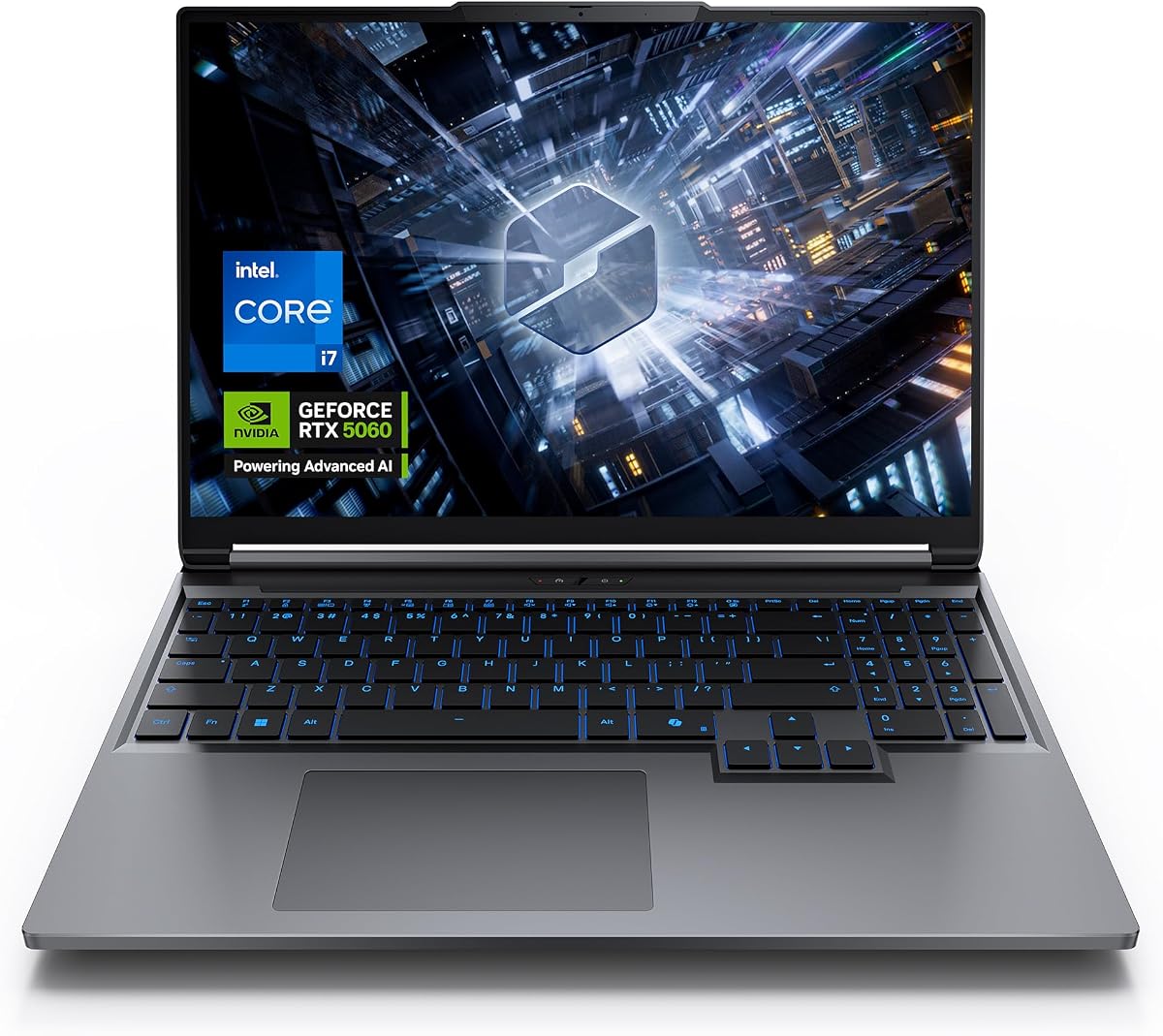


This model stands out as a reliable choice for playing Baldurs Gate 3 with high fidelity. It features a robust Intel Core i7 processor and an RTX 5060 GPU that handle the complex combat systems well. The 165Hz display ensures that combat animations and environmental effects remain fluid even during chaotic encounters.
We may earn a commission when you buy through this link, at no additional cost to you.
The standout strength here lies in the thermal design which uses a tri-fan setup and liquid metal to keep temperatures manageable. This prevents the laptop from throttling down when you are exploring dense forest areas with high graphical settings. The screen also uses an ACR film that reduces glare and improves contrast significantly.
However it is worth noting that the chassis is mostly plastic which may feel less premium than metal alternatives. While the cooling is excellent the fan noise can be noticeable under heavy load during long dungeon crawls. These trade-offs are acceptable given the performance you get at this price point.
You should buy this if you want a balanced machine that delivers strong performance without breaking the bank. It is an ideal pick for students or professionals who need a reliable workhorse for both productivity and gaming. The Wi-Fi 7 support ensures low latency online play which is great for multiplayer modes.
The ROG Intelligent Cooling system maintains peak performance during extended play sessions by keeping the CPU and GPU temperatures stable.
The ACR film on the display enhances contrast and reduces glare for clearer visuals in bright environments.
We may earn a commission when you buy through this link, at no additional cost to you.
This laptop offers a premium feel with its high refresh rate display and generous memory configuration. The AMD Ryzen 7 260 processor paired with the RTX 5060 GPU provides exceptional AI boosted performance that enhances frame rates. You will appreciate the 180Hz screen for its fluid motion when casting spells or navigating tight corridors.
We may earn a commission when you buy through this link, at no additional cost to you.
The key strengths include the massive 32GB of DDR5 RAM which allows for seamless multitasking while streaming or recording your gameplay. The screen covers 100% of the sRGB color spectrum ensuring that the vibrant robes of your companions look true to life. Storage is also flexible with two M.2 slots available for expansion.
On the downside the Wi-Fi connectivity is limited to version 6 which is standard but not the latest generation available. The cooling system works well but the fans can get loud when you are pushing the hardware to its limits during boss fights. These minor issues do not significantly detract from the overall value.
Buy this if you want a machine that can handle heavy multitasking alongside demanding gaming sessions. It is perfect for content creators who need extra RAM for editing while also enjoying high fidelity games. The AI capabilities of the GPU ensure that you can use upscaling features to boost performance further.
With 32GB of DDR5 RAM you can run multiple applications smoothly without worrying about bottlenecks during gaming.
The display covers 100% sRGB ensuring colors are accurate and vibrant for immersive story experiences.
We may earn a commission when you buy through this link, at no additional cost to you.
This machine is an excellent entry point for those looking to play Baldurs Gate 3 without spending too much money. The AMD Ryzen 7 7445HS CPU ensures that loading times are fast and menus remain responsive. Even with the RTX 4050 GPU you can still enjoy the game with adjusted settings for a smooth experience.
We may earn a commission when you buy through this link, at no additional cost to you.
The main advantage here is the price which makes high performance gaming accessible to a wider audience. The build quality is robust and meets military standards for durability which means it can withstand travel and daily use. The 144Hz screen ensures that combat animations play out smoothly without tearing or stuttering.
One limitation is the storage space which is limited to 512GB and might fill up quickly with a large library of games. The GPU is also a step down from the newer 50 series models meaning you may need to lower some graphical options. These are reasonable compromises for the price savings offered.
You should consider this if you are on a budget but still want a reliable gaming experience. It is great for students or casual gamers who prioritize value over maximum settings. The durability of the chassis makes it a safe bet for long term use.
The combination of a strong CPU and affordable GPU makes this an excellent value choice for RPG gaming.
Military grade testing ensures the chassis is resistant to daily wear and tear.
We may earn a commission when you buy through this link, at no additional cost to you.
This laptop offers a large screen experience in a surprisingly portable design for those who prefer bigger visuals. The 17.3 inch display provides ample space for viewing maps and dialogue options while playing Baldurs Gate 3. Despite its size it remains lightweight enough to carry around for mobile gaming sessions.
We may earn a commission when you buy through this link, at no additional cost to you.
The standout feature is the balance between portability and screen real estate which is rare for gaming laptops. The RTX 5060 GPU ensures that you get smooth frame rates even on the larger display. The thermal system keeps the device quiet so you can focus on the immersive audio of the game.
However the resolution is limited to FHD which might appear less sharp compared to higher resolution panels. The memory is soldered so you cannot upgrade it later which limits future proofing for heavier multitasking. These factors are acceptable if you prioritize the screen size over absolute sharpness.
Buy this if you want a big screen for gaming without dealing with a heavy brick. It is ideal for travelers who need a large display for entertainment or work. The Wi-Fi 6E ensures you stay connected with low latency while on the move.
The large 17.3 inch screen provides a cinematic view for exploring game worlds.
MSI Cooler Boost technology keeps the system quiet and cool during long play sessions.
We may earn a commission when you buy through this link, at no additional cost to you.
This model focuses on delivering high graphics performance with its RTX 5070 GPU which handles ray tracing exceptionally well. The screen offers a smooth 180Hz refresh rate that makes combat sequences feel responsive and fluid. It is a great choice for those who want to maximize visual fidelity in the game.
We may earn a commission when you buy through this link, at no additional cost to you.
The key strength is the graphics capability which allows for high settings without compromising on frame rate. The slim chassis design makes it look professional and is easy to transport to different locations. The hinge allows for a flat open position which can be useful for presentations or media consumption.
One drawback is the processor which is slightly older compared to newer models in the list. The cooling fans can get loud when you are pushing the GPU to its limits during intense battles. These trade-offs are necessary to achieve such strong graphical performance at this price.
You should buy this if you prioritize graphics power over the latest CPU architecture. It is perfect for gamers who want to see the best possible visuals in their adventures. The AI software suite helps optimize your performance automatically for a seamless experience.
The RTX 5070 GPU delivers high frame rates and supports advanced ray tracing features.
The 19mm slim chassis makes this laptop easy to carry and looks stylish.
We may earn a commission when you buy through this link, at no additional cost to you.
This laptop combines strong processing power with a generous amount of memory for a smooth gaming experience. The 32GB of DDR5 RAM ensures that you can keep many tabs open while playing Baldurs Gate 3 without slowdown. The Ryzen 7 CPU handles the game logic efficiently which helps with AI performance.
We may earn a commission when you buy through this link, at no additional cost to you.
The standout feature is the memory configuration which is rare at this price point and great for multitasking. The screen has accurate colors which makes the game look vibrant and rich. The audio system enhances the experience with spatial sound that helps you locate enemies by sound.
One limitation is the screen size which is smaller than some competitors limiting your immersion slightly. The graphics card is not the latest model but it is still capable of running the game well. These are minor issues that do not significantly impact the overall value.
Buy this if you want a balanced machine with plenty of memory for productivity and gaming. It is ideal for users who need a laptop for work and play. The clean design fits well in professional settings without looking too flashy.
With 32GB of RAM you can run background apps and games simultaneously without issues.
DTS:X Ultra audio provides immersive soundscapes that enhance the gaming atmosphere.
We may earn a commission when you buy through this link, at no additional cost to you.
This is a high end machine designed for those who demand the best in screen quality and performance. The 240Hz 2.5K display offers crystal clear visuals and ultra smooth motion which is perfect for immersive RPGs. The RTX 5070 Ti GPU ensures that you can use high ray tracing settings effectively.
We may earn a commission when you buy through this link, at no additional cost to you.
The standout quality is the screen which provides stunning detail in textures and lighting effects. The processor is powerful enough to handle complex physics and AI simulations in the game. The build quality is premium with advanced cooling that keeps the system running quietly.
One trade-off is the price which is higher than other options in the list. The battery life is also limited when not plugged in which is typical for high performance laptops. These factors are worth it if you want a top tier experience for your gaming setup.
You should buy this if you want a premium machine with a high-end display. It is ideal for enthusiasts who want the best visual experience possible. The Wi-Fi 7 ensures low latency networking for online play and streaming.
The 240Hz refresh rate provides incredibly smooth motion during combat and exploration.
The 2.5K resolution offers sharp detail that brings the game world to life.
We may earn a commission when you buy through this link, at no additional cost to you.
This laptop features a sleek metal finish that looks professional and durable for everyday use. The 2.5K display provides a sharp image which enhances the text and visuals in Baldurs Gate 3. The strong Intel Core i7 CPU ensures that game logic remains responsive during complex interactions.
We may earn a commission when you buy through this link, at no additional cost to you.
The standout feature is the premium metal build which gives it a high quality feel. It also offers upgradeable memory slots which allows you to expand storage later. The battery capacity is large enough to support several hours of productivity away from a power outlet.
One downside is the weight which is slightly higher than some lighter models in the comparison. The cooling fans can be loud when you are gaming to push performance. These are minor issues that do not detract from the overall quality of the device.
Buy this if you want a sturdy and professional looking gaming laptop. It is perfect for business users who also game on the side. The build quality ensures it can withstand regular travel and use.
The metal chassis provides durability and a professional look for any setting.
The 2.5K screen offers sharp text and vibrant colors for a better experience.
We may earn a commission when you buy through this link, at no additional cost to you.
This model offers a powerful AMD processor and a smooth display for an affordable price. The RTX 5060 GPU handles modern games well and supports AI upscaling for better performance. The screen refresh rate of 180Hz ensures that animations remain smooth and fluid.
We may earn a commission when you buy through this link, at no additional cost to you.
The key strength is the value provided by the AMD processor which is competitive with Intel options. The slim design makes it easy to carry and the hinge allows for flexible positioning. The AI software helps manage system resources to optimize performance automatically.
One limitation is the chassis which is mostly plastic and feels less premium than metal. The memory is soldered so you cannot upgrade it later which limits long term flexibility. These are acceptable trade-offs for the performance you get at this price point.
You should buy this if you want a solid gaming experience without spending too much. It is great for students who need a portable and powerful machine. The value is excellent for those who prioritize raw performance over build materials.
The AMD Ryzen 7 260 provides strong multi-core performance for the price.
The slim chassis makes this laptop easy to transport to different locations.
We may earn a commission when you buy through this link, at no additional cost to you.
This is a premium machine known for its unique design and high performance capabilities. The screen offers a high resolution which makes the game visuals look incredibly sharp and detailed. The 32GB of DDR5 RAM ensures that multitasking remains smooth even with many applications open.
We may earn a commission when you buy through this link, at no additional cost to you.
The standout quality is the premium aluminum design which gives it a distinctive look. The build quality is robust and feels solid in the hand. It includes the latest Wi-Fi 7 for fast and reliable connections.
One drawback is the price which is higher than many other models in the list. The weight is also significant which makes it less ideal for travel. These factors are worth it if you want a high-end aesthetic and top tier build.
Buy this if you want a machine that looks and feels like a high-end device. It is ideal for home setups where performance and design are key. The premium materials ensure it looks good for years to come.
The blue aluminum design stands out and adds a premium feel to your desk.
The WQXGA display provides sharp details that make the game world pop.
We may earn a commission when you buy through this link, at no additional cost to you.
Selecting the right machine requires understanding key factors like processor power and display refresh rates.
For Baldurs Gate 3 you need a dedicated GPU that can handle ray tracing and AI upscaling. Look for models with RTX 4060 or higher to ensure smooth frame rates. The newer 50 series GPUs offer improved efficiency and better performance per watt.
Prioritize a GPU with at least 6GB of VRAM for high texture quality and stable performance during intense scenes.
The game relies heavily on CPU for physics and AI calculations. Choose a laptop with an Intel Core i7 or AMD Ryzen 7 from the latest generation. Avoid older quad-core processors that may struggle with complex environments.
A strong CPU ensures that menus load quickly and combat rolls run without lag during long play sessions.
At least 16GB of RAM is recommended for modern gaming but 32GB provides better future proofing. DDR5 memory is faster and helps with loading times and overall system responsiveness. Check if the RAM is soldered or upgradeable before buying.
More RAM allows you to keep browser tabs and communication apps open while playing the game smoothly.
A display with 144Hz or higher refresh rate makes the game feel more fluid and responsive. This helps during quick combat sequences and fast movement. Look for screens with good color accuracy to enjoy the art style fully.
Higher refresh rates reduce motion blur and make the game world feel more immersive for your eyes.
Gaming laptops generate heat so effective cooling is essential to prevent throttling. Look for models with multiple fans and vapor chamber cooling systems. This ensures the laptop stays quiet and cool even during long sessions.
Good thermal design keeps the system stable and extends the life of the internal components over time.
Fast storage is crucial for quick loading times when entering new areas. Aim for at least 1TB of SSD space to store the game and other files. NVMe SSDs are much faster than traditional hard drives.
Fast storage ensures that you spend less time waiting for maps to load and more time exploring.
Wi-Fi 7 or Wi-Fi 6E ensures low latency online play which is important for multiplayer. Check for enough USB ports to connect controllers or external drives. A good webcam and mic setup is also helpful for streaming or calling friends.
Modern connectivity options keep you connected with the community and ensure stable online performance.
If you plan to travel with your laptop look for a sturdy chassis that can handle movement. Metal builds feel more premium and last longer than plastic. Balance the weight with the screen size for comfortable carry.
A durable build ensures your investment lasts for years and survives daily use and travel.
Start by updating your graphics drivers to the latest version for the best compatibility. This ensures that you have access to all the newest features and optimizations for the game. Use the manufacturer software to adjust power settings for maximum performance.
Keep your laptop in a well ventilated area to help the cooling system work efficiently. Using a cooling pad can also reduce temperatures during long play sessions. Avoid placing the laptop on soft surfaces like beds which can block the intake vents.
Regularly clear your temporary files and keep your SSD from filling up completely. This helps maintain fast loading times and smooth system performance. Back up your game saves to the cloud to ensure your progress is safe.
To run the game smoothly you need at least an RTX 4060 GPU and 16GB of RAM. A modern Core i5 or Ryzen 5 processor is also necessary to handle the game logic. Ensure you have enough SSD space for installation and updates.
Ray tracing improves visual fidelity by adding realistic lighting and reflections to the game world. It does not impact core gameplay mechanics but enhances the immersion. You can enable it if your GPU has enough power to maintain good frame rates.
A 16-inch laptop offers a good balance of portability and screen real estate. A 17-inch model provides more immersion but is heavier to carry. Choose based on whether you plan to travel frequently with your machine.
AI upscaling technologies like DLSS boost frame rates by rendering the game at a lower resolution and upscaling it. This allows you to use higher graphics settings without losing smooth performance. It is especially useful on portable laptops to save battery.
A refresh rate of 144Hz or higher is ideal for a smooth experience. This makes animations and camera movements look fluid. While not critical for RPGs it improves the overall feel of the game significantly.
Some laptops allow RAM upgrades while others have soldered memory. Check the specific model specs before buying to see if it is upgradeable. Models with 32GB RAM often do not need upgrades but slots are good for future proofing.
Cooling is important because high performance components generate a lot of heat during use. Good cooling prevents the system from slowing down due to overheating. It also ensures that the fans are not too loud while playing.
A high resolution screen is worth it if you want to see fine details in textures. It helps with reading dialogue and seeing distant objects clearly. However ensure your GPU can handle the resolution without dropping frame rates.
We reviewed ten excellent options ranging from affordable budget machines to high end powerhouses. The ASUS ROG Strix G16 offers a great balance of performance and portability for most users. The Acer Nitro V 16S is a strong premium choice for those who need more memory.
Prioritize the GPU and display refresh rate when making your final decision. These two factors have the biggest impact on how the game feels and looks. Ensure that you have enough memory and storage for a smooth experience.
Remember that prices and models change frequently so check the current details before buying. We hope this guide helps you find the perfect companion for your adventures. Enjoy your journey through the Sword Coast with a machine that keeps up with you.