
YAWYORE Gaming PC
4.5Editor score
Ryzen 7 5700X
RTX 5060 GPU
32GB DDR4 RAM
Find the ideal Gaming PC for Playing Kenshi with our expert comparison of top models focusing on performance, cooling, and value for immersive strategy gaming.
Choosing the right machine for simulation games requires balancing CPU power with graphics fidelity. A solid system ensures smooth population rendering and stable frame rates during intense combat scenarios in expansive open worlds.
We evaluated ten prebuilt desktops based on processor architecture, GPU capabilities, and thermal management. Our analysis focuses on hardware that handles complex simulation tasks without throttling during extended play sessions.
Each pick highlights specific strengths for strategy enthusiasts and casual players. Prices fluctuate frequently so verify current deals before purchasing to ensure you get the best value for your specific gaming needs and budget.
4.5Editor score

4.5Editor score
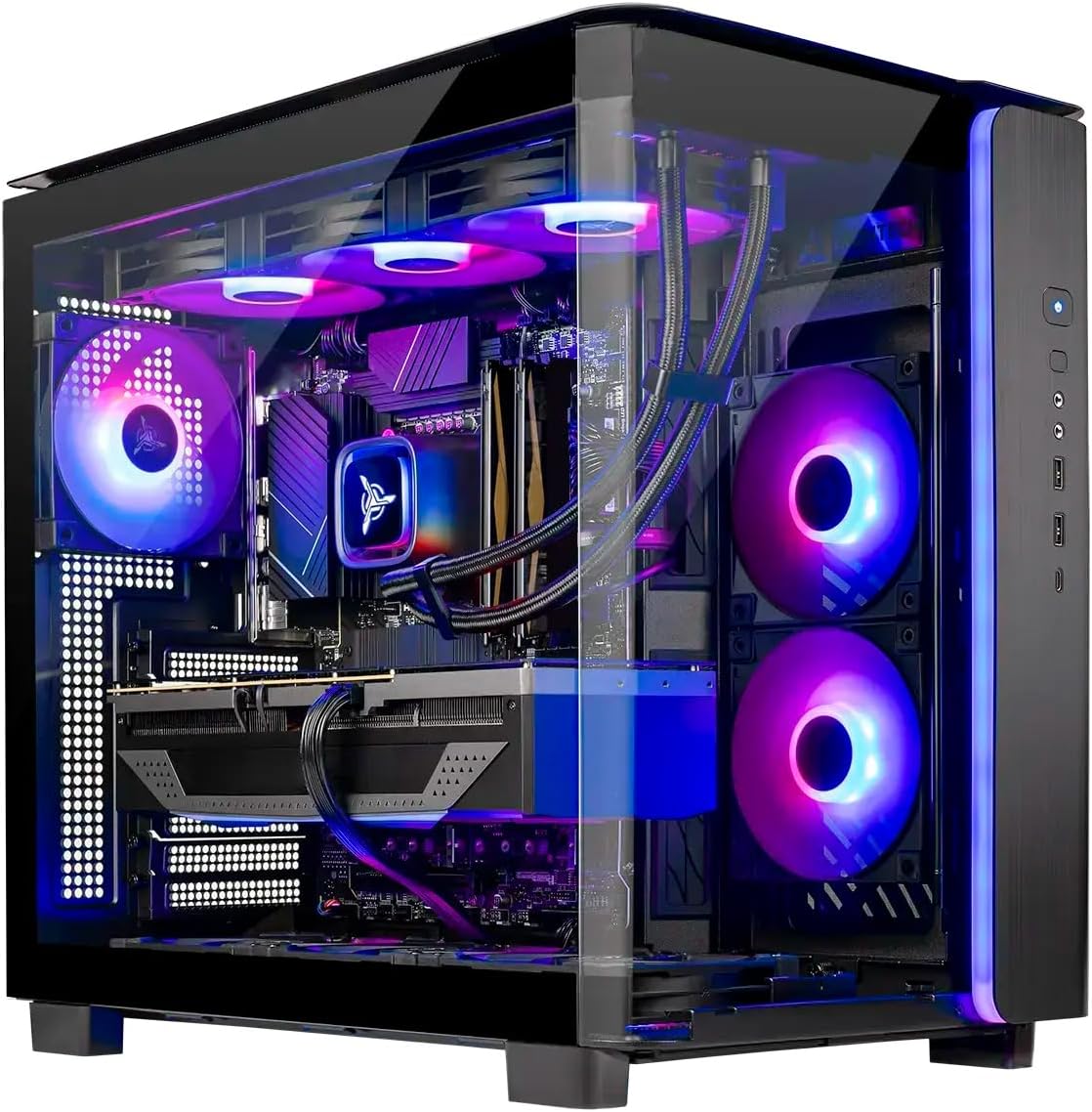
4.8Editor score
This side-by-side comparison highlights key specifications across all ten selected systems to help you quickly identify the best fit for your specific performance requirements and financial constraints.


This Skytech desktop stands out as our top pick due to its powerful Ryzen 7 9850X3D processor combined with the RX 9070 XT graphics card. It is rated 4.5 stars and excels at handling the complex simulation calculations required by games like Kenshi without lag.
We may earn a commission when you buy through this link, at no additional cost to you.
The standout quality is the massive cache and high clock speeds which ensure smooth population rendering and fast loading times. The 360mm liquid cooler keeps temperatures low even during extended gaming sessions preventing thermal throttling effectively.
While the price is high, the performance justifies the cost for serious gamers who want ultra settings. The trade-off is mainly budget related but you get top tier components that will last for years of heavy usage.
Buy this if you need the best possible experience for strategy games and want a system that handles modern AAA titles easily. It is the perfect choice for enthusiasts who prioritize performance over price.
The Ryzen 7 9850X3D offers specific cache advantages that make complex game physics run smoothly.
The 360mm AIO liquid cooler ensures that your CPU stays cool during long gaming sessions.
We may earn a commission when you buy through this link, at no additional cost to you.
The YAWYORE Gaming PC provides excellent value with its AMD Ryzen 7 5700X and RTX 5060 setup. Rated 4.5 stars, it is a solid entry point for players looking to run modern strategy games without spending a fortune.
We may earn a commission when you buy through this link, at no additional cost to you.
The eight core CPU handles background tasks well and the included WiFi enables easy wireless connectivity. The MSI motherboard ensures stability which is crucial for consistent frame rates in complex games.
While DDR4 is older tech and the GPU is mid range, the system performs well for 1080p gaming. You might need to lower some settings but the core experience remains smooth and responsive for most users.
This is the ideal choice for budget conscious gamers who want a reliable machine. It offers a great balance of performance and cost making it accessible for students and casual players.
The RTX 5060 supports modern features like DLSS to boost frame rates efficiently.
Built-in WiFi and Bluetooth make it easy to connect wireless peripherals without extra dongles.
We may earn a commission when you buy through this link, at no additional cost to you.
The MSI Codex Z2 offers strong performance with its Ryzen 7 8700F and RTX 5070 graphics card. Rated 4.3 stars it is a reliable choice for gamers who want modern architecture and good build quality.
We may earn a commission when you buy through this link, at no additional cost to you.
The Blackwell architecture brings significant improvements to ray tracing and rasterization performance. The simplistic design keeps things clean while the RGB lighting adds a nice touch to your setup.
While air cooling is standard it handles heat well enough for most gaming needs. The trade-off is that it might not sustain peak boosts as long as liquid cooled systems under heavy load.
Buy this if you want a balanced machine with plenty of storage and modern GPU tech. It fits well in the middle range offering good value for those not needing top tier cooling solutions.
The RTX 5070 delivers massive generational leaps in performance for ray tracing.
Two terabytes of SSD storage provide plenty of space for large game libraries.
We may earn a commission when you buy through this link, at no additional cost to you.
The KOTIN Prebuilt Gaming PC is unique due to its built-in smart display showing real-time system info. Rated 4.2 stars, it combines strong performance with a distinctive visual feature that appeals to tech enthusiasts.
We may earn a commission when you buy through this link, at no additional cost to you.
The Ryzen 7 9700X paired with 32GB DDR5 memory ensures smooth multitasking and fast load times. The 850W power supply gives you plenty of headroom for future upgrades and stable power delivery.
While the smart display is cool it does take up space and might distract some users. The smaller SSD capacity means you may need external drives for large libraries but the performance remains solid.
This PC is perfect for gamers who love seeing their system stats live while playing. The convenience of monitoring temps and usage directly from the case is a great functional touch.
The 11.3-inch display shows temps and usage directly on the case for easy viewing.
WiFi 7 support ensures you have the fastest wireless speeds available for gaming.
We may earn a commission when you buy through this link, at no additional cost to you.
This Skytech model takes premium performance to the next level with the RTX 5080 and Ryzen 7 9850X3D. Rated 4.8 stars it is a powerhouse designed for those who want the absolute best gaming experience available.
We may earn a commission when you buy through this link, at no additional cost to you.
The RTX 5080 delivers unmatched 4K performance while the CPU ensures zero bottlenecks in any game. The liquid cooling system keeps everything running cool even during intense stress tests or long sessions.
The high price is the main trade-off but you get top tier components throughout. It is worth the investment if you plan to game at high resolutions for years without needing an upgrade.
Buy this if budget is not a concern and you want ultimate power. It handles everything from AAA titles to content creation with ease ensuring smooth performance at high settings.
The RTX 5080 allows for high frame rates at 4K resolution with ray tracing.
The King 95 case offers excellent airflow and a stunning aesthetic for your setup.
We may earn a commission when you buy through this link, at no additional cost to you.
This Skytech PC features the Ryzen 7 9800X3D which is excellent for gaming due to its large cache. Rated 4.1 stars, it provides a strong foundation for competitive gaming and complex simulations.
We may earn a commission when you buy through this link, at no additional cost to you.
The 3D V-Cache technology improves frame rate stability which is critical for strategy games. Paired with the RTX 5070 Ti you get plenty of graphical power for high refresh rate displays.
While it is expensive the performance justifies the cost for serious gamers. You may need to check assembly quality upon arrival but the specs are top notch for long term usage.
This system is best for competitive gamers who need stable frame rates and low latency. It also works well for creators who need strong rendering capabilities.
The 9800X3D offers 96MB L3 cache for better gaming response.
16GB of VRAM ensures smooth performance in high texture games.
We may earn a commission when you buy through this link, at no additional cost to you.
This KOTIN desktop combines the Ryzen 7 9800X3D with an RTX 5070 and a smart display. Rated 4.3 stars it offers a unique look and solid performance for esports and AAA titles.
We may earn a commission when you buy through this link, at no additional cost to you.
The 3D V-Cache helps maintain stable frame rates which is great for smooth gameplay. The display lets you see system stats without opening software which is a nice convenience feature.
The storage is limited to 1TB so you may need external drives for large libraries. While this is a trade-off the performance and unique features make it a compelling choice for many.
Buy this if you want a stylish PC with strong gaming stats and easy monitoring. It fits well for gamers who value both aesthetics and performance.
The display shows CPU and GPU temps directly on the side panel.
DDR5 6000MHz memory ensures quick data access and smooth multitasking.
We may earn a commission when you buy through this link, at no additional cost to you.
The Skytech O11 Vision is known for its stunning Lian Li PC-O11 Vision case and strong performance. Rated 4.5 stars, it combines aesthetics with solid power for gaming and streaming.
We may earn a commission when you buy through this link, at no additional cost to you.
The RTX 5070 handles modern titles well while the Ryzen 7 7700X provides ample processing power. The case design maximizes airflow keeping your system cool and quiet during use.
While the CPU is not the latest generation it is still capable for most tasks. The storage could be larger but you can upgrade it easily if needed for more files.
This PC is perfect for gamers who want a great looking rig with solid performance. It strikes a good balance between style and function for any gaming setup.
The Lian Li case offers a clean and modern look with excellent glass panels.
360mm AIO liquid cooler ensures your components stay cool under load.
We may earn a commission when you buy through this link, at no additional cost to you.
The Horizon Autherium Dragon offers massive storage and RAM with its Core i9 and 64GB memory setup. Rated 4.7 stars it is built for heavy multitasking and content creation alongside gaming.
We may earn a commission when you buy through this link, at no additional cost to you.
The 5TB total storage means you can keep your entire library ready to play instantly. The 850W power supply provides stable power for long sessions without worrying about overheating.
While it is pricier than standard gaming PCs the extra RAM and storage make it valuable. The larger size might be an issue for small desks but the performance is outstanding.
Buy this if you need massive storage and memory for work and play. It is ideal for power users who demand top tier specs for all types of computing.
5TB total storage allows you to keep thousands of files and games.
64GB RAM ensures you can run dozens of apps simultaneously without slowing down.
We may earn a commission when you buy through this link, at no additional cost to you.
The Lenovo Legion Tower 5i is an expandable powerhouse with Intel Core Ultra 7 and RTX 5070 Ti. Rated 4.6 stars it offers easy upgrades and great workflow acceleration for creators.
We may earn a commission when you buy through this link, at no additional cost to you.
The transparent tool-less side panel makes upgrades simple allowing you to grow your system. The included Game Pass gives you immediate access to new titles without extra costs.
While storage is limited to 1TB you can easily add more drives due to the expandable design. The AI features offer better performance and workflow management for various tasks.
This PC is best for users who want a system they can upgrade over time. It balances performance and flexibility making it a solid choice for future-proofing.
The tool-less side panel lets you swap parts quickly without tools.
Three months of PC Game Pass adds value with access to new AAA titles.
We may earn a commission when you buy through this link, at no additional cost to you.
Selecting a PC for strategy and simulation titles requires focusing on specific hardware traits that ensure smooth performance and future longevity.
For complex simulation games you need a processor with high core counts and cache size. This helps handle multiple tasks like population simulation and physics calculations without lag.
Look for Ryzen 7 or Core i7 series processors with at least 8 cores to ensure smooth gameplay.
A dedicated graphics card is essential for rendering large open worlds and detailed environments. Higher VRAM ensures you can play at high resolutions with ray tracing enabled.
Choose an RTX 4060 or higher to get the best balance of performance and value for modern titles.
At least 32GB of RAM is recommended for simulation games to prevent stuttering during intense moments. DDR5 memory offers faster speeds that help with loading and multitasking.
Ensure your system has expandable memory slots to accommodate future needs and software updates.
Solid State Drives are a must for fast loading times and system responsiveness. You need enough space for your game library and potential updates without constant cleaning.
Select a system with at least 1TB of NVMe SSD storage to avoid frequent space management.
Effective cooling keeps your system stable during long sessions. Liquid cooling or high quality air coolers prevent thermal throttling which can reduce performance.
Check for cases with good airflow and enough fans to keep your components cool and quiet.
Modern wireless connectivity like WiFi 6E or WiFi 7 helps reduce latency when playing online. Also check for enough USB ports for peripherals like controllers or webcams.
Ensure the PC supports the latest standards to keep your network connection stable and fast.
Keep your PC in a well-ventilated area to prevent overheating. Avoid placing it near walls or in enclosed spaces where heat can build up easily.
Regularly clean dust from filters and fans using compressed air. This maintains airflow efficiency and extends the lifespan of your components significantly.
Keep your drivers and OS updated to ensure compatibility and stability. Use reliable software to monitor temps and performance to catch issues early.
To play Kenshi smoothly aim for at least 8 cores and 16GB RAM. A dedicated GPU like an RTX 3060 or higher ensures stable frame rates in populated areas.
Yes higher VRAM helps with loading high-resolution textures in large open worlds. At least 8GB of VRAM is recommended for high settings without pop-in issues.
Liquid cooling generally offers better thermal performance which is useful for long play sessions. However air cooling is often cheaper and still adequate for most users.
Most modern strategy games take up 50GB to 100GB each. Having 1TB SSD ensures you can store many titles without running out of space quickly.
Most prebuilt desktops allow upgrades but check the motherboard manual. Ensure you have free slots and that the power supply can support additional components.
WiFi is usually sufficient for modern standards like WiFi 6E but Ethernet is more stable. If latency is critical consider connecting directly via a network cable.
The top picks like the Skytech Gaming PC offer powerful CPUs and GPUs that meet the demanding needs of strategy simulation games easily.
Prioritize CPU power and RAM capacity to ensure smooth gameplay in complex scenarios while considering cooling for longevity.
Remember to check current prices and deals before buying as costs fluctuate frequently across different retailers.