
Redragon K710 Wireless Typewriter Mechanical Gaming Keyboard
4.5Editor score
Tri-mode connectivity support
Metal panel construction
104-key anti-ghosting
Discover the best keyboards that sound like a typewriter. This guide compares ten top models with retro aesthetics, mechanical switches, and vintage vibes.
If you love the nostalgic click of classic machines, keyboards that sound like a typewriter bring that charm to your desk. These mechanical boards combine vintage styling with modern performance for writers and gamers.
We evaluated ten top models based on switch feel, build quality, connectivity, and aesthetic appeal. Each option offers a unique take on the retro typewriter theme to match your workflow and style.
Every pick showcases key specs and real-world strengths to help you choose the right board. Prices and availability change frequently, so check current listings before making your final decision today.
4.5Editor score

4.4Editor score

4.2Editor score
This side-by-side comparison highlights the key differences between all ten models to help you find the perfect match for your needs and preferences.



This board delivers a nostalgic typing experience with blue switches that mimic classic machines. It scores well for its mix of style and practical multi-device connectivity options.
We may earn a commission when you buy through this link, at no additional cost to you.
The 83 key compact design saves desk space while keeping full functionality. Hot swappable parts let you tweak the feel without needing tools or extra hardware.
You may miss the full number pad if you work with spreadsheets often. The layout prioritizes ergonomics over raw key count which works best for writers.
Buy this if you want a retro look that fits modern workflows. It balances aesthetics with performance to support both gaming and professional typing needs.
Blue switches provide tactile feedback and satisfying clicks for engaging typing sessions.
Swap keycaps and switches freely to tailor the board to your exact preferences.
We may earn a commission when you buy through this link, at no additional cost to you.
This model stands out for its deep customization and premium materials. It offers tri mode connectivity and a built in stand for phones or tablets on your desk.
We may earn a commission when you buy through this link, at no additional cost to you.
The PCB supports 3 pin and 5 pin switches for total control over sound and feel. QMK VIA software allows advanced macro programming for power users and pros.
New users might find the software options overwhelming at first. The premium build also means it costs more than basic retro models.
Choose this if you value build quality and want to tweak every detail. It delivers a refined retro experience with modern programmable features for any setup.
Unlock endless customization with QMK VIA support for key remapping and macros.
Integrated stand holder secures your phone or tablet to save desk space.
We may earn a commission when you buy through this link, at no additional cost to you.
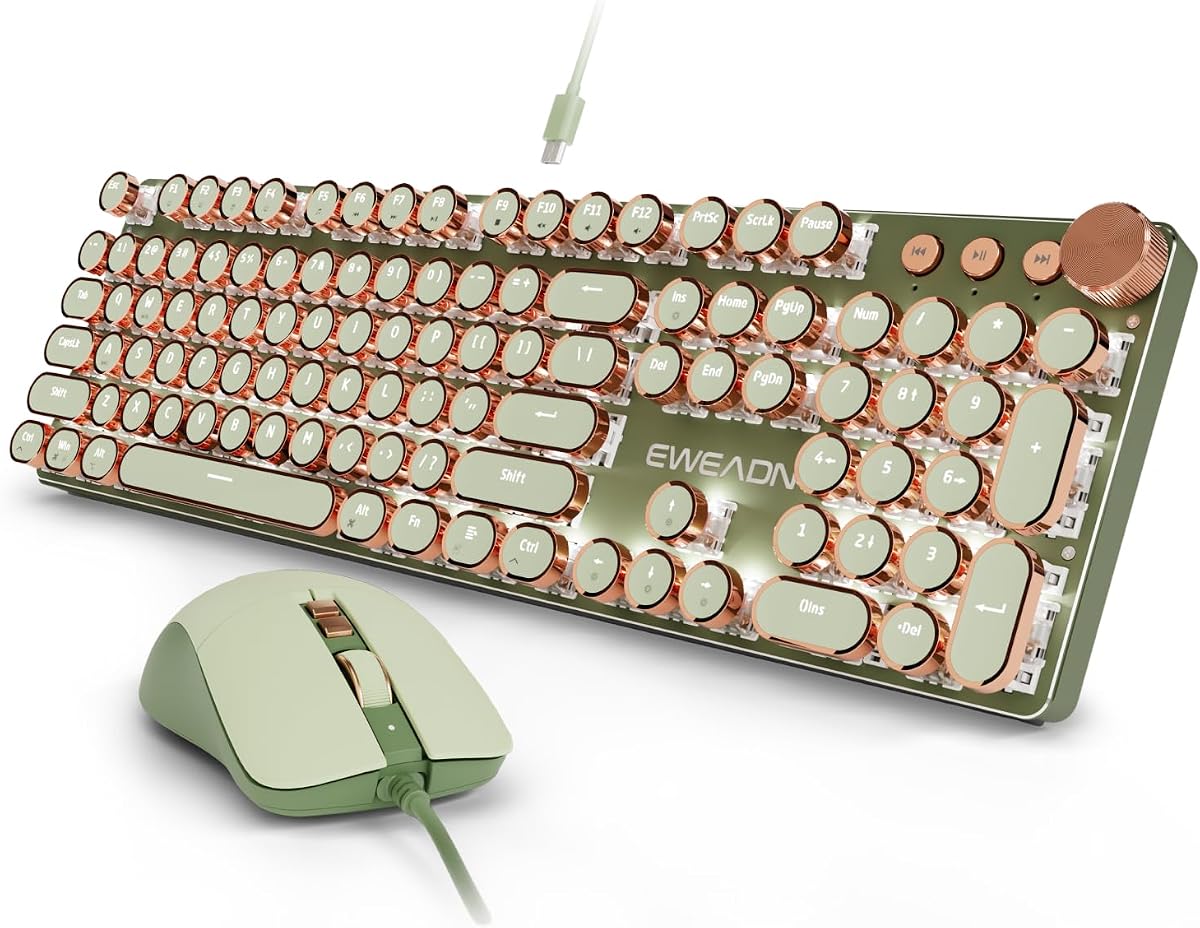
This set brings retro charm at a lower cost with a matching mouse included. Pink switches dampen noise for a softer click than typical blue switches.
We may earn a commission when you buy through this link, at no additional cost to you.
The rotary knob adjusts volume easily while the ambient lighting adds style. Wired connectivity ensures stable performance without battery anxiety or signal drops.
Lack of wireless modes may limit flexibility for multi device users. The green aesthetic might not suit all desk styles compared to classic wood.
Pick this if you want an all in one solution without breaking the bank. It balances price and style for entry level retro enthusiasts and casual users.
Pink switches reduce harsh clacking for a gentler typing experience.
Includes a wired mouse to upgrade your whole setup at once.
We may earn a commission when you buy through this link, at no additional cost to you.
This board keeps retro style with a full size layout for data entry. The metal frame adds durability while hot swappable switches let you personalize the feel.
We may earn a commission when you buy through this link, at no additional cost to you.
Pre lubricated switches offer smooth keystrokes with satisfying clicks. South facing RGB lighting ensures clear visibility in any environment.
Wired only design limits placement flexibility and travel. The weight may be higher than wireless alternatives for desk setups.
Buy this if you need a number pad for work or gaming. It combines retro vibes with full size functionality and robust build quality.
Includes dedicated number pad for complete productivity and gaming needs.
Swap switches easily to tailor the typing feel to your preference.
We may earn a commission when you buy through this link, at no additional cost to you.
This model offers basic retro aesthetics with a full size layout and simple controls. It suits users seeking a clean vintage look without complex features.
We may earn a commission when you buy through this link, at no additional cost to you.
White LED backlighting provides visibility while the knob handles volume. The aluminum panel ensures solid support during long sessions.
Feedback is linear so classic clicks are less pronounced. Fewer customization options than competitors limit personalization.
Choose this for a no fuss vintage look and full key set. It delivers reliable performance at an affordable price for casual users.
Aluminum alloy construction with matte finish provides solid support.
Adjustable feet let you set a preferred typing angle for comfort.
We may earn a commission when you buy through this link, at no additional cost to you.
This board stands out with a pink retro finish and strong battery life. Tri mode connectivity supports up to five devices for seamless workflow switching.
We may earn a commission when you buy through this link, at no additional cost to you.
Blue switches deliver crisp clicks and tactile feedback for writers. The metal faceplate adds durability and a premium look to any desk.
Pink aesthetic may not suit all professional environments. Limited color options restrict choice for users preferring neutral tones.
Buy this if you want wireless freedom with a bold vintage look. It combines charm with long battery life for creative work.
Upgraded 5000mAh battery ensures weeks of wireless use.
Switch between Bluetooth 2.4G and wired modes easily.
We may earn a commission when you buy through this link, at no additional cost to you.
This set prioritizes comfort with a magnetic wrist rest and ergonomic mouse. Built in phone holder keeps devices accessible during typing or calls.
We may earn a commission when you buy through this link, at no additional cost to you.
Seven color backlight options customize your workspace. Both keyboard and mouse charge via USB for long lasting use.
Switches are softer without strong mechanical feedback. Mouse tracking is basic compared to higher end peripherals.
Choose this for comfort and convenience in office or home use. It offers a complete setup with added ergonomic support.
Detachable soft sponge rest with skin friendly surface for support.
Phone holder keeps your phone upright and always in view.
We may earn a commission when you buy through this link, at no additional cost to you.
This model blends retro style with practical wired connectivity and blue switches. The metal panel ensures stability and durability during daily use.
We may earn a commission when you buy through this link, at no additional cost to you.
RGB lighting adds versatility while the keypad offers convenient control. Ergonomic layout supports long typing sessions without fatigue.
Lack of wireless limits placement freedom. Styling is simpler than higher priced vintage boards.
Buy this for a reliable wired setup with classic feel. It balances durability and style for gaming and typing needs.
Crafted from premium aluminum alloy for durability and style.
Multiple RGB color modes with adjustable brightness and speed.
We may earn a commission when you buy through this link, at no additional cost to you.
This model features unique aluminum wheels and levers for a true vintage feel. Connectivity supports up to five devices for seamless transitions across tools.
We may earn a commission when you buy through this link, at no additional cost to you.
The integrated stand aids ergonomics and the battery lasts weeks. Blue switches deliver classic mechanical feedback for typing lovers.
Cost is higher and layout differs from standard boards. Users may need time to adapt to custom controls.
Pick this for a unique retro experience and robust battery. It suits enthusiasts who value distinct design and multi device workflows.
Solid aluminum lever acts as Enter key like old typewriters.
Connect to five devices with USB and Bluetooth simultaneously.
We may earn a commission when you buy through this link, at no additional cost to you.
This board offers wireless freedom with a metal chassis and retro design. Blue switches give responsive clicks and the RGB lighting adds flair.
We may earn a commission when you buy through this link, at no additional cost to you.
Tri mode connectivity supports multiple devices for productivity. The software allows macros and key customization for power users.
Switches may lack premium refinement and require setup. Some users may find the layout basic.
Buy this for a versatile wireless retro option at a fair cost. It balances value with features for daily work and play.
Geared with Redragon innovative tri-mode connection technology.
Pro Software Software Supported to expand options with macros.
We may earn a commission when you buy through this link, at no additional cost to you.
Selecting a retro keyboard involves weighing sound, connectivity, and build quality to match your needs.
Mechanical switches define the sound and feel of your typing. Clicky blue switches mimic old typewriters with loud tactile feedback, while linear ones offer smoother quieter strokes. Choose based on noise tolerance and desired haptic response.
Consider clicky switches for authentic sound or linear for quieter work.
Decide between wired for stability or wireless for flexibility. Tri mode boards support Bluetooth and 2.4GHz to pair with multiple devices. Wireless needs battery care but reduces cable clutter.
Wired suits gaming; wireless suits multi-device setups.
Full size boards include number pads ideal for data work. Compact 83 key or 75 percent layouts save desk space but omit keys. Pick based on your need for numeric entry.
Choose full size for data; compact for space.
Metal panels provide durability and reduce flex during typing. Plastic cases are lighter but less robust. A sturdy chassis ensures the board stays stable over time.
Prioritize metal for long term stability.
Hot swappable boards let you change switches without tools. Programmable software enables macros and key remapping. These features help tailor the board to your exact workflow.
Opt for hot swap and software for flexibility.
Look for round keycaps and vintage colors like wood or retro tones. Lighting modes can enhance the old school vibe. Ensure the design matches your workspace style.
Select design elements that complement your desk.
Wireless models rely on battery for operation. Higher capacity cells mean weeks of use before recharging. USB-C charging is convenient for keeping the board powered.
Check capacity for frequent wireless use needs.
Ergonomic curves, wrist rests, and tilt options reduce strain. Integrated stands can hold phones to reduce neck angle. Comfort matters during long writing or gaming sessions.
Look for ergonomic aids for health.
Connect the keyboard to your computer via USB or Bluetooth to start typing. Install any needed software for RGB effects or macros to customize the layout.
Keep the round keycaps clean by gently wiping them with a soft cloth. Use compressed air to remove dust from the gaps between keys for longevity.
Store the keyboard away from direct sunlight and moisture to prevent fading or corrosion. Regularly update firmware to maintain performance and features over time.
Most models support both Windows and macOS with plug and play functionality. Check the product page for specific OS compatibility to ensure driver support.
Many modern retro boards offer wireless tri mode options for flexibility. Some models remain wired for consistent performance without battery concerns.
Clicky blue mechanical switches closely replicate the audible feedback of vintage machines. They provide both sound and tactile resistance for that classic typing feel.
Hot swappable boards allow you to pull and insert new switches without tools. Follow the manufacturer guide to safely swap parts and adjust the feel.
Yes many of these boards support full key rollover and fast response for gaming. The tactile feedback can also enhance precision during competitive play.
Some models include detachable magnetic or soft padding wrist rests for comfort. Others rely on ergonomic curves so check product details for accessories.
These ten models bring the charm of classic machines to modern setups with retro looks and mechanical performance. Each offers a unique blend of sound, design, and features for your desk.
Prioritize switch sound and connectivity first to match your daily workflow. Consider build materials and customization options to ensure long term satisfaction and adaptability.
Prices and stock change frequently so verify current listings before you buy. Check user reviews and specs to confirm the right fit for your needs today.