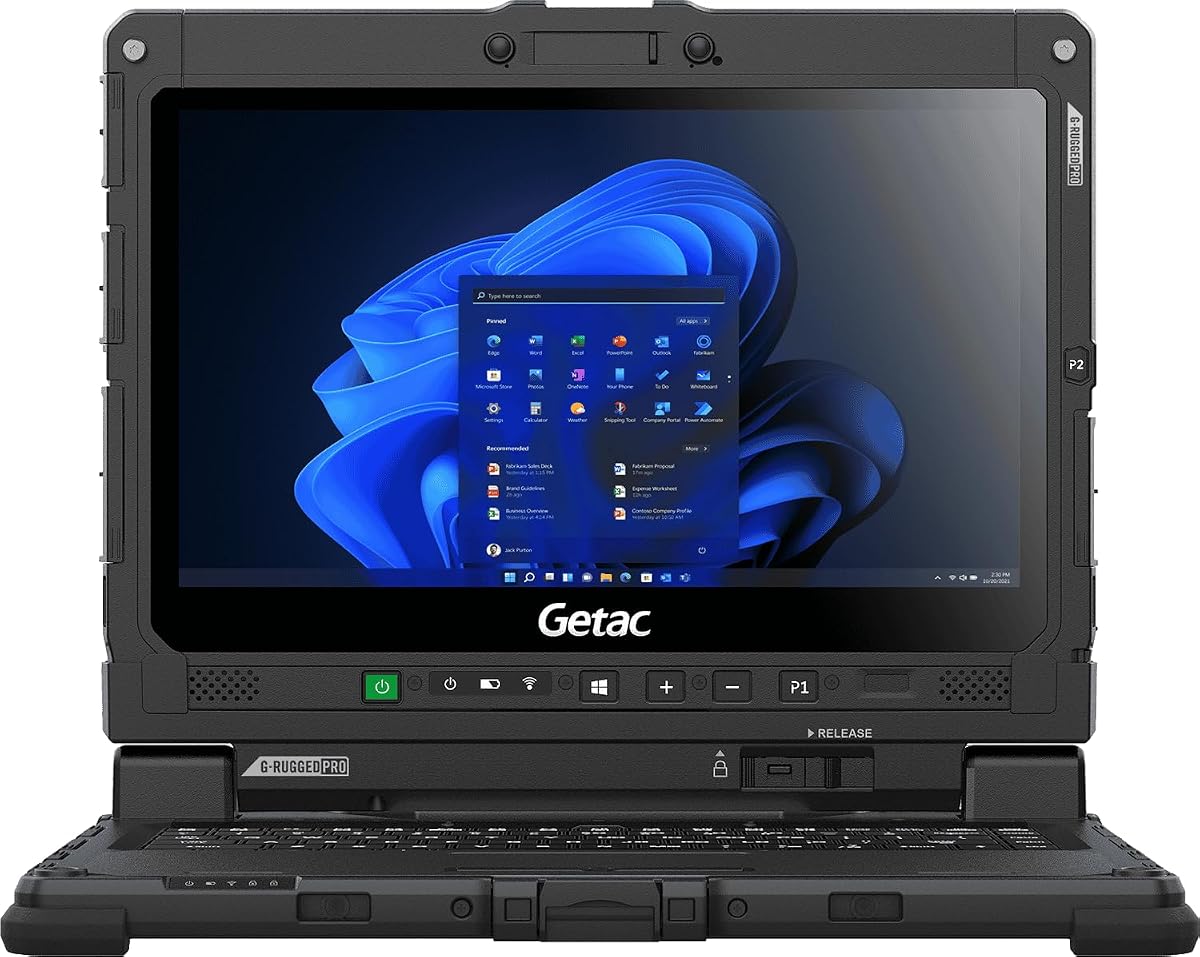
Getac Renewed K120
5.0Editor score
1200 nits sunlight-readable display
IP65 water and dust resistance
Military-grade durability certification
Finding a laptop that remains visible under direct sunlight is critical for outdoor professionals. High brightness displays and durable builds ensure productivity in harsh environments.
We compared ten top models based on screen nits, ruggedness ratings, and performance specs. Our analysis focuses on reliability for field work and outdoor usage scenarios.
Each pick shows key features and real-world suitability. Please note that product availability and pricing can change frequently on the retail platform.
5.0Editor score

4.1Editor score

4.5Editor score
As an Amazon Associate we earn from qualifying purchases.
Here is a side-by-side comparison of the top ten laptops designed for bright sunlight conditions and rugged outdoor environments.


The MUNBYN IRX17 is a top-tier rugged laptop designed for demanding industrial and outdoor environments. It features a high-brightness 1000-nit display that remains readable under direct sunlight. With 32GB of DDR5 RAM and an Intel i7 processor, it handles complex simulations and data analysis with ease.
We may earn a commission when you buy through this link, at no additional cost to you.
Its standout qualities include advanced WiFi 6 connectivity for fast data transfer and a physical camera switch for enhanced privacy. The IP65 and MIL-STD-810H certifications ensure it survives harsh conditions like dust and water exposure. Dual battery support extends usage time significantly in the field.
While the price is higher than consumer models, the durability and performance justify the investment for professionals. The weight may be a consideration for frequent travelers, but the durability makes it reliable for site work.
Buyers needing a powerful, sunlight-readable laptop for construction or engineering should prioritize this model. It delivers on visibility and resilience where standard laptops fail.
The 1000-nit screen ensures crisp visuals even in the brightest sunlight, eliminating the need for shade or hooding.
IP65 rating and MIL-STD-810H certification mean this device withstands water jets, dust, and drops in harsh environments.
We may earn a commission when you buy through this link, at no additional cost to you.
The Getac K120 offers a rare combination of extreme brightness and ruggedness at a budget-friendly price. Its 1200-nit display is one of the brightest on this list, making it ideal for intense sunlight. The Amazon Renewed status ensures quality inspection at a lower cost.
We may earn a commission when you buy through this link, at no additional cost to you.
Key strengths include the glove-friendly capacitive touchscreen and the ability to operate in extreme temperatures from -29C to 63C. The 16GB DDR5 RAM ensures smooth multitasking despite the older CPU architecture.
The main trade-off is the older 8th Gen processor and limited 256GB SSD storage. However, for field data entry and map viewing, this remains a robust choice. The compact 12.5 inch size adds portability.
This model is perfect for budget-conscious teams needing reliable visibility and durability. The high nits rating and environmental resilience make it a top choice for outdoor operations.
With 1200 nits of brightness, the screen remains clear and vibrant even under direct sun, a crucial feature for field work.
Designed to work in extreme cold and heat, this laptop stays reliable in Arctic or desert conditions.
We may earn a commission when you buy through this link, at no additional cost to you.
The Getac S510 represents the latest in rugged computing with Intel Core Ultra processors. Its 1000-nit display and 32GB RAM offer premium performance for demanding tasks. The inclusion of Thunderbolt 4 ensures high-speed docking capabilities.
We may earn a commission when you buy through this link, at no additional cost to you.
This model excels in AI-driven multitasking and storage capacity. The 1TB NVMe SSD provides ample room for large datasets and files. The MIL-STD-810H rating confirms its ruggedness against drops and vibration.
While expensive, the S510 is built for professionals who need top-tier performance in harsh environments. The weight is higher but acceptable for vehicle or desk use. The dedicated Copilot key adds modern workflow efficiency.
Teams requiring advanced AI capabilities and massive storage in a sunlight-readable device should consider this premium pick. It balances power with rugged durability effectively.
Powered by the latest Intel Core Ultra chip, this laptop handles AI workloads and multitasking with superior efficiency.
A massive 1TB SSD ensures you have space for all your critical files without worrying about running out.
We may earn a commission when you buy through this link, at no additional cost to you.
The IRX16 brings rugged durability and high brightness at a competitive price. Its 1000-nit screen ensures clear visuals outdoors while the replaceable SSD offers flexibility. It runs Windows 11 Pro and handles industrial apps smoothly.
We may earn a commission when you buy through this link, at no additional cost to you.
Key strengths include the ability to upgrade storage up to 4TB and the strong WiFi 6 connectivity. The IP65 rating ensures resistance against dust and water. This makes it ideal for construction sites or manufacturing floors.
While it has less RAM than the IRX17, it still handles complex software like AutoCAD well. The main trade-off is the added weight which may affect portability. The privacy camera switch adds a nice touch.
Buyers looking for a balance of power and cost in a rugged form should consider this option. It delivers essential features for field professionals effectively.
The replaceable SSD allows users to easily upgrade storage capacity to meet growing data needs in the field.
Designed to run demanding CAD and design software smoothly, even under heavy workloads.
We may earn a commission when you buy through this link, at no additional cost to you.
This model is an AI PC designed for all-day mobile productivity with massive battery life. The OLED display offers vibrant colors though it lacks extreme brightness. It is perfect for users needing reliability away from outlets.
We may earn a commission when you buy through this link, at no additional cost to you.
The Snapdragon processor and 41-hour battery are standout features. Fast charging ensures quick top-ups when needed. Copilot integration provides modern AI assistance. The device is light and easy to carry.
The main trade-off is the screen brightness which may struggle in direct sun. Some legacy apps may not run on ARM. It is best for indoor or shaded outdoor tasks.
Buyers prioritizing battery and weight over raw brightness should look at this device. It offers modern features in a slim form factor.
With up to 41 hours of battery life, you can work through multiple days without needing to plug in.
Dedicated Copilot key and AI features streamline workflows and enhance productivity effortlessly.
We may earn a commission when you buy through this link, at no additional cost to you.
This laptop offers a large touchscreen and solid performance for everyday tasks. The 16 inch display provides ample screen real estate for multitasking. It runs Windows 11 with modern AI features.
We may earn a commission when you buy through this link, at no additional cost to you.
Strengths include the responsive touchscreen and noise reduction audio for calls. It is a good choice for light work and media consumption. The battery life supports most full work days.
However, the 8GB RAM limits heavy multitasking and the brightness is standard for indoor use. It is not designed for harsh sunlight but works well in shade.
Users looking for a large screen for home office tasks at a reasonable price will appreciate this model. It balances performance and usability well.
A 16 inch display gives you plenty of space to work on multiple documents or windows at once.
Advanced noise reduction ensures your voice is heard clearly during video conferences.
We may earn a commission when you buy through this link, at no additional cost to you.
Dell designed this model for reliable everyday computing with comfort features. The ComfortView software reduces blue light for better eye comfort during long sessions. It features an efficient battery to support daily tasks.
We may earn a commission when you buy through this link, at no additional cost to you.
Key strengths include the ergonomic hinge and spacious keypad. It is a practical choice for students or office workers needing a sturdy machine. The build quality is consistent with Dell standards.
The screen brightness is adequate for indoor use but not for direct sun. This makes it less ideal for outdoor field work. It remains a great choice for general productivity.
Buyers seeking a reliable laptop for home or office use will find this model solid. It balances cost and comfort effectively.
ComfortView technology reduces blue light to help reduce eye strain during long viewing times.
Hinges and keys are designed to provide a comfortable typing angle and reduce wrist fatigue.
We may earn a commission when you buy through this link, at no additional cost to you.
This laptop offers a massive 17.3 inch screen for immersive viewing and multitasking. The AMD Ryzen 5 processor provides smooth performance for daily tasks and light media. The anti-glare finish helps in brighter indoor lighting.
We may earn a commission when you buy through this link, at no additional cost to you.
Strengths include the generous storage and webcam shutter for privacy. The Copilot key adds modern AI features. It is a strong choice for entertainment and light productivity.
The main trade-off is the size and weight which makes it hard to carry. The brightness is not sufficient for direct sunlight. It is best used on a stable desk.
Buyers wanting a large display for media or home office will love this model. It prioritizes screen real estate over portability.
The 17.3 inch screen provides a wide, immersive experience perfect for watching movies or managing complex workflows.
A physical webcam shutter ensures your privacy is protected when not video chatting.
We may earn a commission when you buy through this link, at no additional cost to you.
The Panasonic Toughbook offers legendary durability with a renewed price point. Its 1000-nit display ensures visibility outdoors and the IP53 rating protects against dust and rain. The i7 processor remains capable for many tasks.
We may earn a commission when you buy through this link, at no additional cost to you.
Key strengths include the MIL-STD-810H certification and 4G LTE option for connectivity. This device is built to withstand drops and harsh environments. It is ideal for public sector or field work.
While the processor is older, it handles basic data tasks well. The weight and bulk are trade-offs for the rugged build. The renewed status offers significant savings over new units.
Buyers needing a proven rugged laptop at a discount should consider this model. It delivers reliable performance and sunlight readability.
Built to military standards and IP53 sealed, this laptop survives drops, rain, and dust without issues.
Includes docking connector and 4G LTE support for seamless connectivity in the field.
We may earn a commission when you buy through this link, at no additional cost to you.
This Dell 16 model provides a modern large screen and strong processing power. The Core 7 processor handles productivity tasks easily and the ComfortView Plus reduces blue light. It includes onsite service for peace of mind.
We may earn a commission when you buy through this link, at no additional cost to you.
Strengths include the immersive aspect ratio and wide dynamic range camera. It is a great machine for video calls and office work. The thermal design adapts to different usage scenarios.
The main trade-off is the lack of high brightness and rugged features. It is best for indoor environments. The weight is moderate for general use.
Buyers looking for a reliable, large screen laptop for home office will appreciate this choice. It balances performance with visual comfort.
The 16:10 display offers more vertical space for better multitasking and productivity.
ComfortView Plus technology preserves color quality while reducing harmful blue light.
We may earn a commission when you buy through this link, at no additional cost to you.
Selecting a laptop for outdoor use requires attention to specific hardware features. This guide explains the key factors to consider.
For sunlight readability, look for displays with at least 1000 nits. Standard consumer laptops have around 250 to 400 nits which wash out in direct sun. Higher brightness ensures contrast remains clear and reduces eye strain.
Prioritize 1000 nits or higher for any work done outdoors under direct light.
Outdoor use often means exposure to dust and water. Look for IP65 or higher ratings for water resistance. MIL-STD-810H certification indicates the device has passed military drop and vibration tests.
Ensure your device meets IP65 or MIL-STD-810H for reliable field use.
Field work may involve running heavy software like CAD or simulation tools. Choose modern processors like Intel Core i7 or newer Ryzen. Avoid older generations if you need fast computation.
Select i7 or equivalent performance chips for complex data tasks.
Adequate RAM is essential for multitasking. Aim for at least 16GB for smooth operation. SSDs offer faster boot times and durability. Consider models with replaceable drives for future upgrades.
Aim for 16GB or more RAM and replaceable SSD storage.
Access to power outlets is limited in the field. Look for laptops with long battery life or hot-swappable battery options. Extended usage means fewer interruptions during critical tasks.
Check for long battery duration or dual battery support.
Reliable internet is crucial for remote work. WiFi 6 or 6E offers faster speeds. Consider models with Ethernet ports or cellular data options like 4G LTE for backup connectivity.
Ensure WiFi 6 support or cellular options for stable connections.
Larger screens improve visibility but increase weight. A 14 to 15 inch model balances visibility and portability. If you carry the device daily, consider the total weight of the laptop and accessories.
Balance screen size with weight to ensure portability.
Security matters when handling confidential data. Look for physical camera switches or shutter covers. These allow you to block the camera when not in use preventing potential unauthorized access.
Prioritize physical camera switches for enhanced privacy.
Always check the screen brightness settings before going outdoors. Increasing brightness ensures visibility but drains battery faster so plan usage accordingly. Use the auto-brightness feature if available to balance comfort and power.
Clean the screen with a microfiber cloth to maintain visibility. Dust and debris can accumulate on outdoor devices and scratch the surface. Avoid using harsh chemicals on anti-glare coatings.
Store the laptop in a protective case when not in use. Direct sun exposure can damage internal components over time. Keep the device cool and dry to extend its lifespan.
To see your screen clearly in direct sunlight you should look for a display with at least 1000 nits of brightness. Standard laptops with 300 nits will likely be invisible outdoors.
No not all rugged laptops offer high nits. You must check the specifications to ensure it meets your brightness needs for outdoor work.
Yes newer processors handle complex calculations and multitasking faster. This reduces delays when running engineering or data analysis software in the field.
With proper care and durable construction rugged laptops can last five to seven years or more. Their build quality withstands more wear and tear than consumer devices.
You can use a standard laptop outdoors only in shaded areas. Direct sunlight will make the screen unreadable and may overheat the device.
Extra batteries are highly recommended if you work for long periods without access to power. Some models offer hot-swappable batteries to extend usage time.
This guide highlights ten top laptops suitable for bright sunlight and rugged environments. The MUNBYN IRX17 and Getac K120 lead the pack for brightness and durability.
Prioritize display nits and ruggedness ratings when choosing a device. Performance and battery life are also critical for productivity in the field.
Always verify current specifications and availability as models change over time. Check prices and availability directly on the retailer site before purchasing.