
HP 17 inch Business Laptop Computer
4.5Editor score
17.3 inch FHD display
Long battery life with fast charge
Full size keyboard with numeric keypad
Finding a laptop that stands the test of time requires careful consideration of build quality hardware longevity and software support. Longevity is more than just a durable chassis it involves thermal management component reliability and upgradeability over many years of daily use.
We compared ten distinct business and consumer models evaluating their chassis construction thermal designs and component choices. Our analysis prioritizes devices engineered for sustained performance under heavy workloads while maintaining stability across multiple operating system updates and hardware cycles.
Each pick highlights specific strengths such as military grade testing extensive port selection or robust thermal solutions. Prices and availability fluctuate so verify current listings before purchase to ensure you get the best value for your specific long term computing requirements today.
4.5Editor score

4.3Editor score
5.0Editor score
As an Amazon Associate we earn from qualifying purchases.
The following table provides a side by side overview of all ten models evaluated in this guide highlighting their core specifications and key design features.


This HP business laptop offers a compelling balance of screen real estate and affordability making it ideal for extended use sessions. With a 17.3 inch display and 16GB of RAM it handles multitasking smoothly while maintaining a competitive edge in the budget segment.
We may earn a commission when you buy through this link, at no additional cost to you.
The brushed full size keyboard with a dedicated numeric keypad enhances typing comfort during long data entry tasks. Its slim bezel design maximizes the viewing area while the anti glare coating reduces eye strain during prolonged work hours.
While the chassis is sleek it does not meet military grade standards which might limit its ruggedness compared to other options. However the inclusion of fast charge technology ensures quick top ups when out and about extending useful daily uptime significantly.
This model is best suited for office professionals or students who need a large workspace without spending a fortune. Its combination of modern connectivity ample memory and a spacious screen makes it a solid investment for daily productivity needs.
The 17.3 inch FHD display provides ample screen real estate for managing multiple documents and browser tabs simultaneously.
Fast charge technology allows users to quickly replenish battery levels ensuring minimal downtime during busy workdays.
We may earn a commission when you buy through this link, at no additional cost to you.
The Dell 16 Laptop focuses on visual clarity and user comfort making it a strong candidate for long term daily drivers. Its 16 inch screen with a 16:10 aspect ratio offers more vertical space which is valuable for reading and editing documents.
We may earn a commission when you buy through this link, at no additional cost to you.
Dell ComfortView Plus reduces harmful blue light emissions helping to keep eyes comfortable during extended screen sessions. The adaptive thermals technology adjusts power based on surface stability ensuring efficient cooling and consistent performance across different environments.
A potential drawback is the limited upgradeability since many modern thin laptops solder critical components. However the inclusion of a one year onsite service provides peace of mind and immediate support if hardware issues arise during the warranty period.
This laptop is an excellent choice for users prioritizing screen comfort and professional connectivity features. Its robust build and modern processor make it capable of handling complex workflows while maintaining a comfortable viewing experience over years of use.
Dell ComfortView Plus preserves true to life colors while reducing blue light to minimize eye fatigue over long periods.
Built in adaptive thermals sense surface stability to optimize power usage and cooling for efficient operation.
We may earn a commission when you buy through this link, at no additional cost to you.
The Lenovo V15 Gen 4 stands out for its balanced combination of performance and essential business features. With an Intel Core i5 processor and 16GB of RAM it delivers smooth multitasking capabilities while maintaining a competitive price point for professionals.
We may earn a commission when you buy through this link, at no additional cost to you.
Its connectivity options are particularly generous featuring HDMI and RJ45 ports which reduces reliance on dongles and adapters. The Windows 11 Pro operating system provides enhanced security and management tools that are crucial for long term business deployments and data protection.
While the exterior is utilitarian it is designed to withstand regular office use without compromising on internal thermal performance. The dedicated numeric keypad supports efficient data entry making it a practical tool for finance or administrative tasks requiring frequent typing.
This model is recommended for small businesses or individual professionals needing a reliable daily driver with broad compatibility. Its focus on proven hardware and essential ports ensures it remains useful even as software requirements evolve over time.
Windows 11 Pro includes advanced security features like BitLocker and Remote Desktop which support long term device management.
HDMI and RJ45 ports are built in allowing direct connection to monitors and networks without extra adapters.
We may earn a commission when you buy through this link, at no additional cost to you.
Lenovo V15 models are often praised for their ability to withstand harsh conditions which is a key indicator of long term value. This specific unit features MIL SPEC testing ensuring resistance to physical shocks and environmental stressors that typically degrade standard devices.
We may earn a commission when you buy through this link, at no additional cost to you.
The inclusion of DDR5 memory offers faster data transfer rates and better efficiency than previous generations supporting smoother operation for years. The TÜV Low Blue Light display helps maintain eye health during long work sessions which is vital for daily heavy users.
While it lacks discrete graphics it provides enough power for general productivity and light creative tasks efficiently. The privacy shutter on the webcam adds a layer of security without requiring software toggles making it easy to protect privacy when needed.
This laptop is ideal for field workers or anyone needing a machine that can handle rougher conditions without failure. Its blend of modern memory standards and physical robustness makes it a reliable long term investment for demanding environments.
DDR5 memory provides higher bandwidth and lower power consumption which helps extend battery life and overall system responsiveness.
MIL SPEC testing ensures the chassis can withstand drops vibration and temperature extremes better than standard consumer laptops.
We may earn a commission when you buy through this link, at no additional cost to you.
The Lenovo ThinkBook 16 Gen 8 represents a high end option designed for users who demand maximum performance and security. Its Intel Core Ultra 7 processor with AI capabilities ensures that the device can adapt to workloads efficiently over time.
We may earn a commission when you buy through this link, at no additional cost to you.
With 32GB of DDR5 RAM and a 1TB SSD it provides ample headroom for large datasets and complex applications. This configuration ensures that the machine remains responsive even as software becomes more demanding in future years.
Thunderbolt 4 support offers future proof connectivity allowing for high speed data transfer and multi monitor setups without bottlenecks. The integrated fingerprint reader in the power button adds a layer of security that is convenient and reliable for daily authentication.
This premium device is best for professionals or creatives who need a robust workstation for extended periods. Its combination of high end components and enterprise grade security makes it a worthy investment for those needing a long term productive companion.
Thunderbolt 4 enables ultra fast data transfer and supports multiple high resolution displays for a versatile workstation setup.
Windows 11 Pro with TPM and BitLocker ensures data remains protected and secure for business sensitive operations.
We may earn a commission when you buy through this link, at no additional cost to you.
This Lenovo V15 model emphasizes energy efficiency and sustainability making it a thoughtful choice for long term use. The AMD Ryzen 5 processor delivers reliable performance while optimizing power usage to help reduce overall environmental impact.
We may earn a commission when you buy through this link, at no additional cost to you.
The physical privacy shutter on the webcam provides immediate visual confirmation that the camera is off which enhances trust during remote work. Its noise cancellation and audio features ensure clear communication without needing external hardware which adds to convenience.
While 8GB of RAM is functional for standard tasks it may limit heavy multitasking in the future. However for typical office workflows this memory amount is sufficient and allows the device to remain fast for everyday operations.
This laptop is recommended for eco conscious users or those needing a reliable work machine for standard tasks. Its focus on build quality and efficient components ensures it can serve a purpose for years without unnecessary resource consumption.
The device is made with responsibly sourced materials and certifications to reduce environmental impact throughout its lifecycle.
Intelligent noise cancellation and Dolby Audio ensure clear video calls without needing external microphones or speakers.
We may earn a commission when you buy through this link, at no additional cost to you.
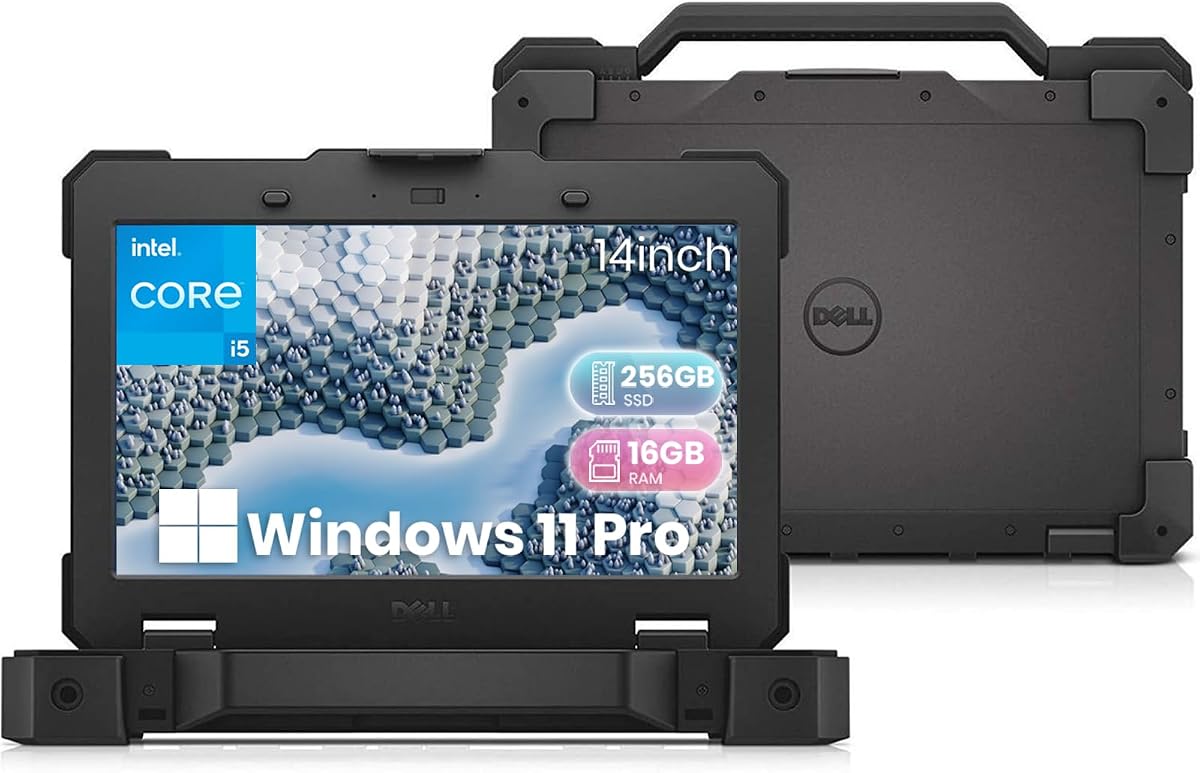
Designed for industrial use the Dell Latitude Rugged 5420 offers durability that far exceeds standard consumer laptops. Its reinforced chassis is built to withstand drops and debris making it a practical choice for construction or field service environments.
We may earn a commission when you buy through this link, at no additional cost to you.
The outdoor visibility display ensures that the screen remains readable even in bright sunlight which is critical for mobile workers. With 16GB of RAM it can handle multiple business applications smoothly despite being an older generation model.
The inclusion of versatile ports like USB 3.1 and HDMI allows direct connection to diagnostic tools and legacy equipment. While the SSD is smaller the system boot times remain responsive and data is stored efficiently for field documentation.
This model is highly recommended for industrial users or anyone working in challenging physical environments. Its rugged construction ensures that it remains operational where typical laptops would fail providing consistent utility over a long period.
The reinforced chassis is specifically designed to withstand harsh conditions found in warehouses and construction sites.
Outdoor viewable technology allows for clear visibility in bright sunlight ensuring data remains accessible in the field.
We may earn a commission when you buy through this link, at no additional cost to you.
The Dell Latitude 5414 Rugged is engineered to survive drops spills and dust making it an exceptional choice for rough use. Its military grade durability standards ensure that the internal components remain protected from external environmental stressors.
We may earn a commission when you buy through this link, at no additional cost to you.
A standout feature is the inclusion of legacy ports like RS 232 serial which connects directly to industrial machines without adapters. This compatibility extends the device lifespan by allowing it to interface with existing older equipment in professional settings.
Despite being a renewed product the unit comes with a service warranty that backs its reliability and performance. The 16GB of RAM ensures that it can multitask effectively even with older hardware architecture ensuring smooth daily operations.
This laptop is ideal for industrial technicians or users who need to interface with legacy hardware regularly. Its robust design ensures it remains functional in challenging environments providing consistent utility without frequent replacement needs.
RS 232 serial ports allow direct connection to older industrial tools without the need for USB adapters or converters.
The chassis is built to withstand extreme temperatures and humidity ensuring reliable operation in harsh outdoor conditions.
We may earn a commission when you buy through this link, at no additional cost to you.
This Lenovo V15 model stands out for its unusual 40GB RAM configuration which supports heavy multitasking and complex workloads. Such high memory capacity ensures that the device remains fluid even when running many browser tabs and applications simultaneously.
We may earn a commission when you buy through this link, at no additional cost to you.
The Ryzen 7 processor provides robust performance for daily tasks and moderate creative work without lag. Combined with a 1TB SSD there is ample space for local files reducing reliance on cloud storage and speeding up access times significantly.
While 40GB of RAM is not a standard configuration it offers significant headroom for future software demands. This makes the device a strong candidate for users who need a powerful workstation for long term professional use.
This laptop is recommended for power users who need high memory capacity for virtual machines or large datasets. Its focus on memory and storage performance ensures it remains a capable tool for demanding tasks over many years.
40GB of RAM allows for running multiple virtual machines or heavy applications without performance degradation.
1TB of SSD storage provides fast access to large files and ensures the system has plenty of room for growth.
We may earn a commission when you buy through this link, at no additional cost to you.
The Lenovo ThinkPad L16 is designed for enterprise users who require robust security and reliability for extended periods. Its MIL STD 810H certification guarantees resistance to physical stress ensuring the device can travel widely without damage.
We may earn a commission when you buy through this link, at no additional cost to you.
The 16 inch display with high brightness ensures productivity even in bright office environments or cafes. Two Thunderbolt 4 ports provide versatile connectivity options for docking stations and external displays which supports flexible work setups.
With a focus on enterprise security features like BitLocker and fingerprint authentication it protects data effectively over time. The customizable RAM and storage options allow users to tailor the device to their specific long term needs easily.
This model is best for business professionals and IT managed environments needing a secure and durable work machine. Its combination of enterprise grade build and high brightness display ensures it remains productive and reliable for years.
Built in security features like BitLocker and fingerprint readers protect sensitive data from unauthorized access effectively.
Two Thunderbolt 4 ports support high speed data transfer and docking for a versatile flexible productivity workspace.
We may earn a commission when you buy through this link, at no additional cost to you.
Selecting a laptop for longevity requires evaluating several key factors beyond basic performance specs.
Look for laptops with reinforced chassis or MIL SPEC certification which indicates resistance to drops vibration and extreme temperatures. Physical durability ensures the device can survive the rigors of daily transport and use over many years.
Prioritize models with robust hinges and sturdy ports to prevent physical wear and tear that often leads to device failure.
Choose a processor with sufficient cores and threads to handle future software demands without becoming obsolete quickly. Modern multi-core processors ensure smoother multitasking and efficiency as applications become more resource intensive.
Ensure the CPU supports efficient power management to maintain performance and battery health during heavy long term use cycles.
Opt for at least 16GB of RAM to accommodate multiple applications and browser tabs without slowdowns. Larger memory ensures the system remains responsive even as background processes increase over time.
Select a solid state drive with ample capacity to store files locally and reduce wear from constant cloud syncing.
A high resolution display with anti-glare coating reduces eye strain during long work sessions. Features like blue light filters help maintain visual health which is crucial for daily users.
Choose a screen with sufficient brightness to remain usable in various lighting conditions without straining the eyes.
Look for laptops with essential ports like USB-C HDMI and Ethernet to avoid relying on adapters. Direct connectivity reduces cable clutter and potential points of failure in your workflow.
Ensure wireless standards are up to date to maintain compatibility with future accessories and networks.
A long battery life ensures productivity during travel or outages without frequent charging. Fast charging capability minimizes downtime allowing you to get back to work quickly.
Consider battery health maintenance features that extend the overall lifespan of the power cell over years.
Choose a model with long term operating system support to ensure security updates and software compatibility. Modern systems often include management tools that help maintain device health over time.
Verify warranty and service options to protect against unexpected hardware failures during the usage period.
Effective cooling systems prevent overheating which can degrade components and reduce overall device lifespan. Laptops with adaptive thermal control maintain performance even under sustained loads without throttling.
Look for designs that allow airflow to dissipate heat efficiently during extended use.
Keep your laptop clean by regularly wiping the screen and keyboard with a soft cloth to remove dust and oils that can damage surfaces over time. Avoid using harsh chemicals that might degrade the protective coatings on your device.
Use a laptop stand to elevate the device for better airflow and ergonomic typing which reduces strain on the chassis and battery. Proper ventilation helps maintain stable temperatures and extends internal component lifespan.
Protect your device with a padded sleeve or case when transporting it to prevent accidental drops or impact damage. Regularly check and tighten any screws or ports to ensure structural integrity remains intact.
A laptop lasts longer when it has robust build quality durable hinges and high quality internal components like solid state drives. Additionally efficient thermal management and regular software updates help maintain performance and stability over many years of use.
Yes 16GB of RAM is generally sufficient for most users for several years as it handles multitasking and modern applications effectively. For heavy professional workloads like video editing you might need 32GB or more to future proof your system further.
Business laptops often last longer because they are built with higher grade materials and undergo stricter durability testing than consumer models. They typically offer better support and longer warranty periods which also contributes to extended usability.
Most users can expect a laptop to remain functional for five to seven years depending on usage intensity. However for high performance needs or specific software requirements you might choose to upgrade more frequently.
Yes all lithium ion batteries degrade over time but modern laptops have features to slow this process such as optimized charging. Avoiding extreme heat and deep discharges helps maintain battery health for a longer period.
A touchscreen can offer intuitive interaction for certain tasks but it is not essential for longevity or performance. For most productivity scenarios a high quality traditional display provides sufficient clarity without the added cost or wear.
This guide highlighted ten reliable options ranging from budget friendly workhorses to rugged industrial machines suitable for long term use. Whether you need a large screen for productivity or a durable chassis for field work there is a model to fit your needs.
Prioritize build quality and sufficient memory when selecting a device to ensure it remains responsive and functional for years. Consider your specific workflow requirements such as port availability and thermal performance to find the best match for your daily tasks.
Remember that prices and availability change frequently so verify current listings before finalizing your purchase. Investing in a quality laptop now can save you money in the long run by reducing the need for frequent replacements.