
HP Everyday Slim Laptop
5.0Editor score
Enhanced video call features
True Vision 720p HD camera
Long battery life for meetings
Finding the right laptop for Zoom calls ensures your meetings run smoothly without technical glitches. A good device balances processing power, camera quality, and microphone clarity to keep you looking and sounding professional. Whether you work from home or travel frequently, the right choice enhances your video conferencing experience significantly.
We evaluated ten top-rated products focusing on real-world performance during video calls. Our analysis considers processor speed, display quality, audio input, and port availability to help you choose wisely. Each entry represents a distinct option tailored to different budgets and specific remote work needs.
Every pick highlights key strengths and potential trade-offs to guide your decision-making process. We include detailed reviews, comparison data, and buying advice to cover all aspects of selection. Prices and availability change often so check current listings before finalizing your purchase decision today.
5.0Editor score

5.0Editor score
4.6Editor score
As an Amazon Associate we earn from qualifying purchases.
This side-by-side comparison highlights key specifications and features across all ten selected products to help you evaluate performance, connectivity, and value quickly for your specific remote work requirements.






The NIMO 15.6 inch FHD Copilot AI Laptop stands out as the top choice for demanding remote workers. With a perfect 5.0 rating, it delivers powerful performance through its Intel N150 CPU and substantial 16GB RAM. This configuration ensures you can run multiple browser tabs and video calls simultaneously without lag.
We may earn a commission when you buy through this link, at no additional cost to you.
Key strengths include its ability to handle 20+ browser tabs and 1080p Zoom video calls at once. The fast boot time and lag-free daily use make it reliable for long workdays. The 15.6 inch Full HD display offers sharp visuals ideal for sharing documents during meetings.
Trade-offs involve weight and build material compared to ultra-thin models. However, the robust performance and expandable storage options justify the slight bulk. The 2-year warranty and US assembly add confidence for long-term reliability.
Buy this if you need a powerful laptop for intensive video conferencing and multitasking. It suits college students and remote professionals requiring consistent performance and clear visuals during virtual meetings.
With 16GB RAM this laptop handles heavy workloads effortlessly ensuring smooth Zoom calls alongside other applications.
The 15.6 inch Full HD screen provides crisp visuals perfect for presenting files and seeing colleagues clearly.
We may earn a commission when you buy through this link, at no additional cost to you.
This HP Everyday Slim Laptop offers exceptional value for budget-conscious users needing reliable video call performance. Rated 5.0 stars it features enhanced video call capabilities with a True Vision 720p HD camera. Dual array microphones ensure your voice comes through clearly during meetings.
We may earn a commission when you buy through this link, at no additional cost to you.
Its long battery life supports extended wireless streaming and video playback making it ideal for travel. The lightweight design at just 3.24 lbs makes carrying easy between locations. Microsoft 365 included adds productivity value for remote work tasks.
While RAM is limited to 4GB it handles basic Zoom calls efficiently. The compact storage is sufficient for cloud-based workflows. The dedicated Copilot key aids navigation and productivity within Windows 11.
Choose this for affordable portability and solid video features. It suits students and remote workers prioritizing battery life and ease of transport over heavy processing power.
The HP True Vision camera with temporal noise reduction keeps your image clear even in varying lighting conditions.
Weighing just 3.24 lbs this laptop slips easily into bags for commuters and travelers working remotely.
We may earn a commission when you buy through this link, at no additional cost to you.
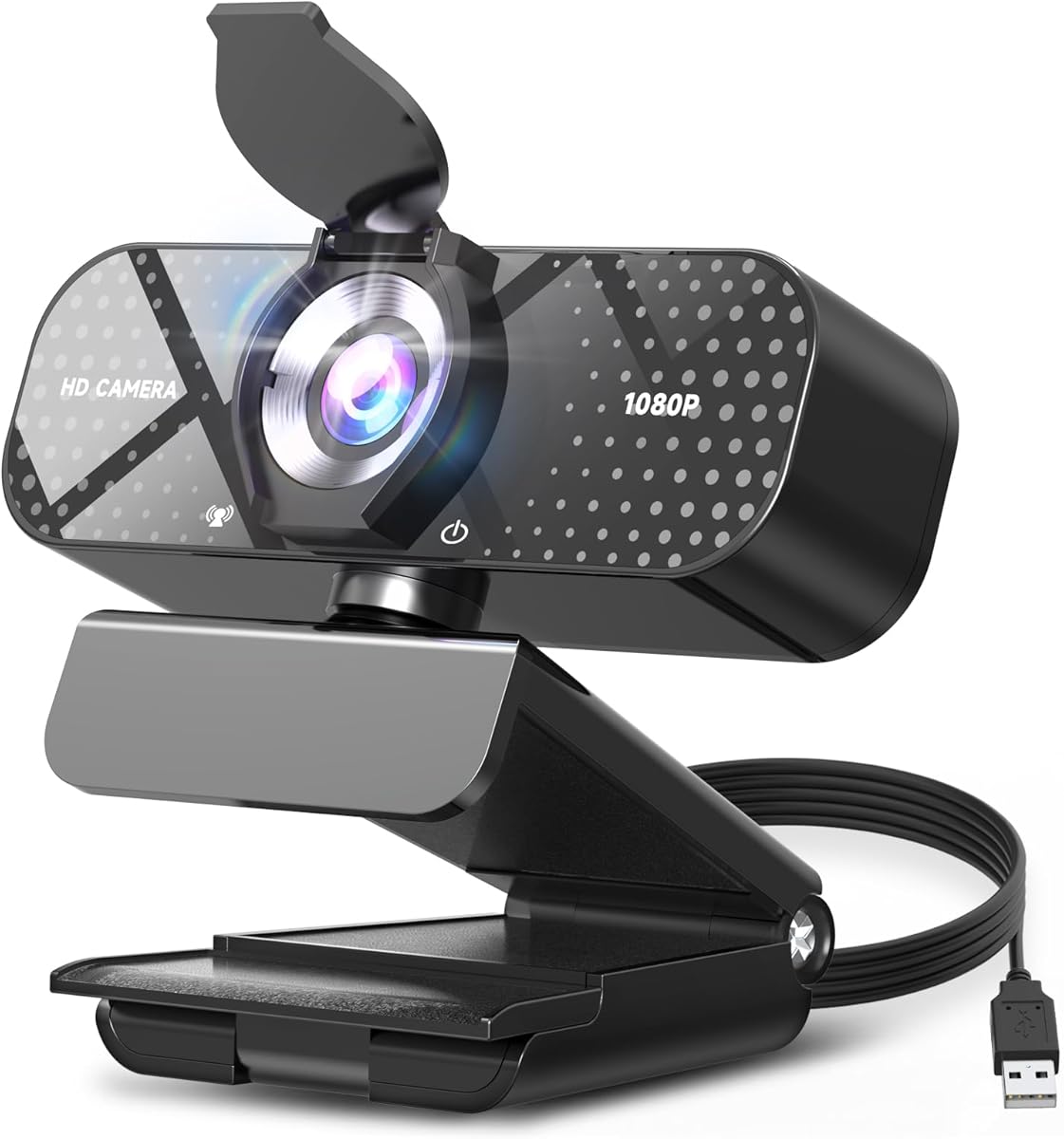
The TRAUSI 1080P FHD Webcam elevates your video call quality with superior clarity and audio features. Rated 4.6 stars it offers 1080p Full HD resolution for sharp images. A wide angle lens ensures you capture every detail during sessions making it great for online teaching.
We may earn a commission when you buy through this link, at no additional cost to you.
Key strengths include automatic light correction that adjusts video brightness dynamically. The noise-canceling microphone ensures clear voice transmission even in noisy environments. The included privacy cover adds security when the camera is not in use.
Being an external device requires a USB port and setup time. However the visual and audio improvements significantly outperform built-in webcams on many laptops. Plug and play compatibility makes setup hassle-free.
Invest in this if your laptop camera lacks quality. It suits content creators and professionals needing reliable high-definition visuals and clear audio for virtual meetings.
1080P resolution provides vivid colors and crisp visuals ensuring you look professional on every call.
Noise cancellation and automatic light adjustments enhance clarity while the privacy cover protects your data.
We may earn a commission when you buy through this link, at no additional cost to you.
This HP 14 inch Laptop integrates cloud storage seamlessly for flexible remote work. Rated 4.5 stars it features 1TB cloud storage alongside local SSD space. The 4GB DDR5 RAM supports efficient multitasking for typical office tasks and video calls.
We may earn a commission when you buy through this link, at no additional cost to you.
Key strengths include one year of Microsoft 365 included with the device. The slim profile makes it easy to carry between home office and school. Versatile connectivity options ensure you can connect peripherals easily.
The non-touch display limits interaction methods but suits standard workflows. Local storage is modest making reliance on cloud services necessary. This works well for users comfortable with online file management.
Choose this for seamless cloud integration and portability. It suits users needing substantial storage space without carrying heavy hardware for daily work.
With 1TB cloud storage you can access files anywhere without worrying about local drive limitations.
At just 3.24 lbs this laptop fits easily into bags for mobile professionals.
We may earn a commission when you buy through this link, at no additional cost to you.
The Cyezcor Video Conference Lighting Kit improves video call appearance affordably. Rated 4.3 stars it offers adjustable color temperatures and brightness levels. The ring light design provides even illumination reducing shadows on your face during Zoom meetings.
We may earn a commission when you buy through this link, at no additional cost to you.
Key strengths include stable clip on setup that fits most monitors. USB powered flexibility means you can use any available USB port for energy. Its lightweight design makes it easy to carry.
Limited color range might not suit all environments. The clip design could loosen with frequent adjustments. However the value proposition remains strong for basic lighting needs.
Buy this for quick video call setup enhancement. It suits users wanting professional lighting without investing in expensive studio gear.
Even light distribution from the ring design ensures you look professional during virtual meetings.
USB connectivity allows you to power the light from laptops or mobile chargers easily.
We may earn a commission when you buy through this link, at no additional cost to you.
This HP 14 Business Laptop targets professional users needing reliable video call performance. Rated 4.1 stars it features a Quad Core processor for efficient processing. The sharp LED display supports text and images clearly during presentations.
We may earn a commission when you buy through this link, at no additional cost to you.
Key strengths include multiple connectivity options for peripherals and displays. The included PLUSERA Earphones add audio value for calls. Windows 11 Home provides a familiar interface for business tasks.
Storage and RAM might limit heavy multitasking capabilities. The UFS storage type differs from standard SSDs which may affect speed slightly. Suitable for standard office workflows.
Choose this for professional aesthetics and basic business needs. It suits small business owners requiring a reliable device for daily operations and meetings.
Multiple ports allow connection to external monitors and accessories for enhanced productivity.
Included earphones ensure you have audio access immediately for conference calls without extra purchase.
We may earn a commission when you buy through this link, at no additional cost to you.
This Zoom Lighting for Computer offers ergonomic benefits for long video call sessions. Rated 4.4 stars it provides uniform soft illumination to reduce eye strain. The adjustable height design ensures comfortable positioning during meetings.
We may earn a commission when you buy through this link, at no additional cost to you.
Key strengths include 360 degree rotation for flexible lighting angles. High CRI ensures accurate color reproduction on video. Space saving design keeps desks organized while enhancing call quality.
Requires permanent desk space which may not suit all setups. USB power dependency limits placement to near power sources. However the adjustability adds significant value for comfort.
Buy this for comfortable long-term video conferencing setups. It suits users working from a fixed desk requiring consistent and adjustable lighting.
Uniform soft illumination reduces eye strain during extended video calls and work sessions.
360 degree rotation allows perfect angle adjustments for any room lighting condition.
We may earn a commission when you buy through this link, at no additional cost to you.
This Ring Light for Computer Video Conference caters to content creators and streamers. Rated 4.4 stars it features a high CRI for vivid video colors. The 6 inch circular design provides soft lighting avoiding harsh shadows.
We may earn a commission when you buy through this link, at no additional cost to you.
Key strengths include 10 levels of dimming for precise control. Suitable for both Zoom calls and live streaming needs. Soft lighting enhances appearance making it ideal for influencers.
Clip fit depends on monitor thickness which may vary. Color control limited to preset modes. However the quality remains strong for budget creators.
Choose this for affordable content creation lighting. It suits beginners needing quality video presentation without complex studio equipment.
CRI over 95 ensures your video looks natural and professional on all platforms.
Designed for streaming and Zoom this light supports various content formats efficiently.
We may earn a commission when you buy through this link, at no additional cost to you.
This HP New Everyday Slim Laptop offers AI features and cloud integration. Rated 3.3 stars it includes Copilot AI for enhanced productivity. Enhanced video call features ensure clear meetings with dual array microphones.
We may earn a commission when you buy through this link, at no additional cost to you.
Key strengths include Office 365 and 1TB cloud storage for workflow continuity. Lightweight design supports travel and remote work needs. Multiple ports ensure connectivity without dongles.
User rating suggests mixed experiences with quality or support. Limited local storage requires cloud reliance. However the AI features offer modern advantages for tech-savvy users.
Choose this for AI-enhanced remote workflows. It suits users comfortable with cloud storage and needing modern productivity tools.
Copilot AI assistance helps automate tasks and enhance efficiency during daily work routines.
1TB cloud storage ensures files are accessible anywhere reducing local drive dependency.
We may earn a commission when you buy through this link, at no additional cost to you.
The yAyusi Dual lamp Video Conference Lighting offers superior brightness through dual bars. Rated 4.2 stars it provides even light for professional podcast effects. Rotatable design supports flexible positioning for different angles.
We may earn a commission when you buy through this link, at no additional cost to you.
Key strengths include remote and touch control options for easy adjustments. Built-in sponge pads prevent scratching devices. Expandable size range suits various monitor configurations.
Setup requires time to position both lights correctly. Space requirements are higher than single clip lights. However brightness and control justify the extra effort.
Buy this for advanced video call and recording needs. It suits professionals requiring precise lighting control for high-quality virtual presence.
Dual bars provide brighter and more even lighting than standard single ring lights.
Remote control allows quick changes without touching the device during live calls.
We may earn a commission when you buy through this link, at no additional cost to you.
Selecting the right laptop for Zoom calls requires balancing performance, display quality, and audio features. This guide explores key factors to ensure a seamless virtual meeting experience.
A capable processor like Intel N150 or higher ensures smooth running of Zoom alongside other apps. Look for 4 cores or more to handle multitasking without lag during meetings.
Prioritize processors with at least 15W TDP for consistent performance during long video sessions.
Memory affects how many apps you can run while on a call. 8GB RAM is ideal for multitasking but 4GB works for basic Zoom use.
Choose 16GB if you often run multiple browser tabs or heavy applications alongside video conferencing.
Built-in cameras vary significantly in resolution. 720p is minimum but 1080p provides clearer visuals for professional settings.
Look for models with temporal noise reduction or HD lenses to ensure clear video in varied lighting.
Audio input is critical for meetings. Dual array microphones help isolate voice and reduce background noise.
Ensure the laptop supports noise-canceling features for clear communication in noisy environments.
A display of 14 to 15.6 inches balances portability and viewing area. Brightness should be at least 250 nits for visibility.
Anti-glare coatings improve comfort during long sessions under bright lights or windows.
Long battery life supports all-day meetings without finding outlets. Look for 8 hours or more for uninterrupted use.
Fast charging capabilities reduce downtime between calls for busy remote workers.
Ports like USB-C HDMI and headphone jacks allow easy connection of peripherals and displays.
Wi-Fi 6 support ensures stable and fast internet connections for high-quality video streams.
Lightweight builds under 3.5 lbs aid transport between locations. Durable materials ensure longevity.
Thin profiles enhance comfort when carried in bags but balance with cooling efficiency for sustained use.
Set up your laptop in a well-lit area facing a natural light source for optimal video quality. Avoid backlighting which makes your face appear dark on camera.
Use noise-canceling headsets or built-in microphone features to ensure audio clarity. Position the microphone close to your mouth for better voice capture.
Regularly update drivers and software to maintain performance. Keep the laptop clean from dust to ensure proper ventilation and cooling.
For smooth Zoom calls prioritize a processor with 4 cores or more such as Intel N150. You need at least 8GB RAM for multitasking and a webcam of 720p or higher for clear visuals.
Use built-in noise-canceling features if available. Position yourself in a quiet room and use an external headset with a boom mic for superior audio input.
Built-in webcams suffice for basic meetings. External webcams offer higher resolution like 1080p which is useful for professional presentations or content creation.
Yes 14 inch laptops are lighter and easier to carry than 15 inch models. However 15 inch screens provide more space for multitasking during meetings.
4GB RAM handles basic Zoom usage but 8GB is recommended for running other applications simultaneously. If you multitask heavily aim for 16GB RAM.
Soft natural light from a window facing you works best. Ring lights or desk lamps positioned behind the monitor improve lighting consistency in dark rooms.
Use software noise suppression features in Zoom. Close windows to reduce external noise and use a microphone with noise-canceling capabilities.
Yes apps like DroidCam allow using your phone as a webcam. This option often provides higher quality than built-in laptop webcams.
Choosing the best laptop for Zoom calls depends on your specific needs from performance to portability. The NIMO and HP models offer excellent balances of power and affordability.
Prioritize processing speed camera quality and microphone clarity to ensure professional interactions during meetings. Consider battery life for extended use without power access.
Always verify current prices and availability as product details change frequently. Selecting the right device enhances productivity and professionalism in virtual collaboration.