
KPXOS OSU3X Custom Gaming Keyboard
3.4Editor score
Magnetic Switches
Rapid Trigger Support
Customizable Interface
Discover the top keyboards for Geometry Dash. This guide compares rapid trigger, magnetic switches, and custom layouts to help you choose the perfect device
Finding the right keyboard for Geometry Dash can transform your gameplay experience. Precision timing and rapid inputs are essential for mastering difficult levels. Players seek devices that offer responsive switches and customizable layouts to meet their unique needs.
We compared ten top-rated keyboards designed for rhythm games and competitive play. Our analysis focuses on trigger speed, switch technology, and build quality. Each product was evaluated based on user feedback and technical specifications to ensure reliability.
Each pick highlights key features like magnetic switches and rapid trigger modes. These elements help reduce input lag and improve accuracy during intense sessions. Note that availability and specific features may change over time as manufacturers update their product lines.
3.4Editor score
4.7Editor score

4.5Editor score
This table provides a side-by-side overview of the ten selected keyboards. It highlights core specifications to help you quickly identify the model that fits your gaming style and desk setup.





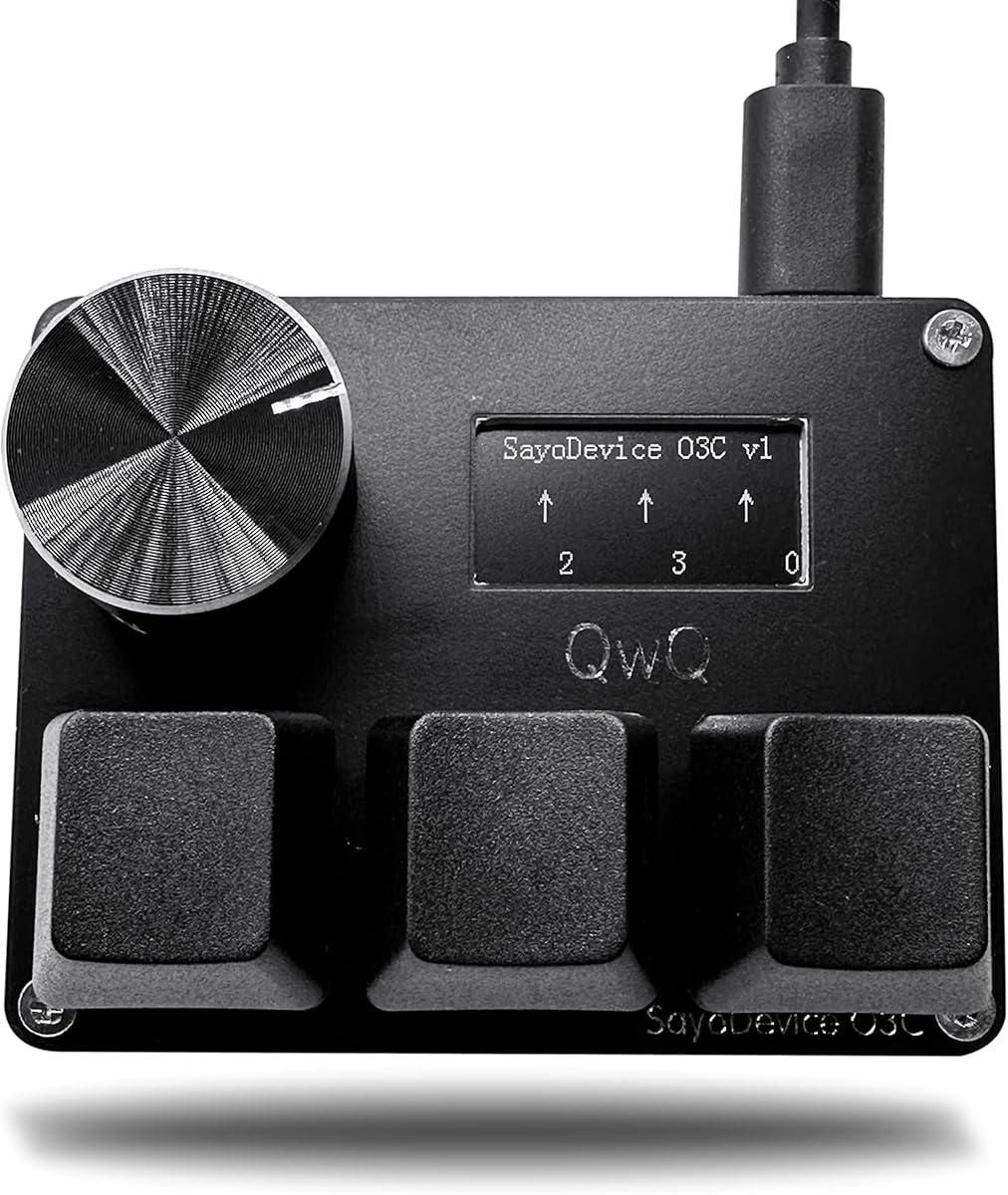
This keyboard stands out with its Hall magnetic linear switches and high polling rate. It is designed for rhythm games and offers rapid trigger functionality for precise inputs. The integrated screen allows for custom text display during use.
We may earn a commission when you buy through this link, at no additional cost to you.
The keyboard supports any Hall magnetic switches with a simple click for calibration. Its high-speed connection ensures minimal latency during intense gameplay sessions. Users can set custom animations and modify the knob for specific key actions.
Some users may find the initial calibration process necessary before first use. This step ensures optimal performance but adds a small setup hurdle. Once calibrated, the device delivers consistent and responsive key presses.
Ideal for players seeking speed and customization in a compact format. The combination of magnetic technology and visual feedback makes it a strong choice for competitive rhythm gaming.
Rapid trigger allows keys to reset based on movement rather than fixed points. This dynamic behavior improves responsiveness and control during fast-paced gameplay.
The IPS color screen displays key counts and status in real time. This feature helps players track inputs and customize the device to match their preferences.
We may earn a commission when you buy through this link, at no additional cost to you.
This keyboard offers an accessible entry point for players seeking magnetic switch technology. It supports rapid trigger and allows adjustable trigger distances down to 0.05mm. The visual feedback display helps track key travel and counts.
We may earn a commission when you buy through this link, at no additional cost to you.
Each key supports independent calibration for personalized performance. Users can modify the startup screen and device name via software. The keyboard supports multi-key combinations for efficient control.
The build quality may not match higher-end models. Some users report inconsistencies with switch stability or RGB lighting. It remains a solid choice for those prioritizing cost over premium materials.
Best for gamers on a budget who need rapid trigger features. It delivers essential functionality without a high investment.
Independent calibration allows fine-tuning of each key trigger distance. This feature ensures consistency across all keys for more accurate gameplay.
The Type-C interface supports high-frequency keystroke polling without complex drivers. This design simplifies setup and enables quick connectivity.
We may earn a commission when you buy through this link, at no additional cost to you.
This model mirrors the main O3C design with identical features and performance. It includes Hall linear switches and a customizable screen for ID display. The hotswap capability allows switch changes without soldering.
We may earn a commission when you buy through this link, at no additional cost to you.
The high polling rate ensures fast response times. Custom knob functions let users assign specific actions like scrolling song lists. The device supports rapid trigger for dynamic key resets.
Users may need to spend time calibrating before optimal use. This process ensures the switches respond accurately to finger movements. After setup, the keyboard performs consistently.
A reliable alternative for those wanting the same quality in a different SKU. It maintains the core strengths of the O3C series for rhythm gamers.
The first line on the screen can be personalized with user IDs. This feature helps identify the device during shared or competitive settings.
Calibration is done with a simple click for each switch. This process is fast and ensures accurate trigger distances.
We may earn a commission when you buy through this link, at no additional cost to you.
This keyboard supports custom animations on the IPS screen. It features professional game magnetic switches with variable trigger release settings. The design aligns with the O3C series for consistent performance.
We may earn a commission when you buy through this link, at no additional cost to you.
Keys and knob can be set to specific combinations. The screen displays button counts and visible ranges. Hotswap support allows switch upgrades without tools.
Some features may require firmware updates. This can introduce minor delays for users who want the latest capabilities. Regular checks ensure full functionality.
Great for players who enjoy visual customization alongside speed. The animation support adds a creative layer to standard gaming input devices.
Users can display custom animations on the screen during use. This visual feedback enhances the gaming experience and personalizes the setup.
The trigger release can be set from 0 to 4mm. This flexibility allows users to fine-tune responsiveness based on play style.
We may earn a commission when you buy through this link, at no additional cost to you.
This keyboard features a 60 percent layout with high-speed magnetic switches. It offers rapid trigger and adjustable actuation for precise control. The web-based driver simplifies customization across devices.
We may earn a commission when you buy through this link, at no additional cost to you.
The compact design saves desk space for wider mouse movement. RGB lighting adds a personal touch to the setup. The switches are durable and designed for competitive gaming.
Lacking dedicated arrow keys may be a drawback for some. Users must rely on function layers for navigation. This can be learned quickly for gaming scenarios.
An excellent choice for players prioritizing speed and desk space. The web driver ensures easy updates and key mapping without software bloat.
The 60 percent design reduces desk footprint for more mouse room. This space efficiency is critical for players needing precise cursor control.
Customization happens in the browser without installing extra apps. This approach keeps systems clean and allows cross-device management.
We may earn a commission when you buy through this link, at no additional cost to you.
This wireless keyboard features a large TFT screen and CNC knob. It offers three connection modes including wireless for flexible setup. The gasket design improves typing comfort and durability.
We may earn a commission when you buy through this link, at no additional cost to you.
PBT keycaps provide long-term resistance to wear. The battery supports extended use without constant charging. Users can customize RGB lighting with various modes.
The switches are linear but not magnetic. This means no rapid trigger or adjustable actuation. For Geometry Dash players needing magnetic tech, this may be a limitation.
Best for players who value wireless convenience over magnetic precision. It delivers quality typing and customization for general gaming use.
Switch seamlessly between Bluetooth, 2.4G wireless, and wired modes. This flexibility supports multiple devices and usage scenarios.
The gasket construction adds shock absorption for a softer feel. It reduces vibration and improves the overall typing experience.
We may earn a commission when you buy through this link, at no additional cost to you.
This keyboard offers ultra-precise actuation adjustments down to 0.01mm. It includes advanced features like DKS and SOCD for competitive play. The gasket structure ensures quiet and refined keystrokes.
We may earn a commission when you buy through this link, at no additional cost to you.
The web-based driver allows customization without software installation. RGB lighting and macros are easily managed. The compact design retains essential keys within a small footprint.
Some users may prefer more color options. The white-only design might not suit all aesthetics. Functionally, it remains a strong performer.
Ideal for competitive players needing high precision and advanced control. The combination of magnetic tech and gasket build offers a premium feel.
Dynamic keystroke and opposing cardinal direction support enhance input handling. These features help maintain accuracy during complex move sequences.
The gasket structure with dampening foam reduces harsh vibrations. This results in a quieter and more pleasant typing experience.
We may earn a commission when you buy through this link, at no additional cost to you.
This keyboard features a web driver for easy customization across devices. It supports adjustable actuation and rapid trigger for fast inputs. The compact design saves desk space while retaining essential keys.
We may earn a commission when you buy through this link, at no additional cost to you.
RGB effects add a dynamic look to the setup. The polling rate ensures low latency for competitive scenarios. The magnetic switches offer precise and consistent actuation.
Mac support is limited with the driver. Windows users get full functionality including mapping and macros. Mac users may need to rely on default settings.
A strong option for Windows users wanting quick setup and portability. The web driver simplifies personalization without extra software.
Access customization tools directly from the browser for easy updates. This approach reduces software clutter and supports multiple systems.
The small size makes it ideal for travel or limited desk space. It balances portability with essential gaming features.
We may earn a commission when you buy through this link, at no additional cost to you.
This white version mirrors the black model with similar magnetic switch performance. It features a visual feedback display and adjustable trigger distances. The interface can be customized for user preferences.
We may earn a commission when you buy through this link, at no additional cost to you.
The plug-and-play setup allows quick connectivity. Key travel is shown in real time. It supports multi-key combos for efficient control.
The lower rating suggests inconsistent performance or quality. Some users may experience issues with switches or software. It remains a budget option for specific needs.
A niche choice for players prioritizing white aesthetics. It delivers basic magnetic functionality without high-end refinement.
The display shows key travel and status in real time. This feedback helps users understand input timing during gameplay.
No drivers are required for basic use. Connectivity is immediate via the included Type-C interface.
We may earn a commission when you buy through this link, at no additional cost to you.
This keypad supports rapid trigger for OSU and Geometry Dash. It includes a customizable boot interface and adjustable trigger travel. The design focuses on essential buttons and a knob for control.
We may earn a commission when you buy through this link, at no additional cost to you.
Users can modify the screen text and device name. High polling rate ensures fast response. The knob can be set to specific keys for easier navigation.
The small key count limits broader use. It is ideal for rhythm games but not typing. Build quality may not meet expectations for all users.
Best for players seeking a dedicated keypad for rhythm titles. It offers core magnetic features in a minimalistic form factor.
The keypad supports multiple rhythm games. This versatility makes it suitable for players who enjoy various titles.
Users can modify the startup screen text via software. This feature allows personalization of device identity.
We may earn a commission when you buy through this link, at no additional cost to you.
Choosing the right keyboard for Geometry Dash requires understanding key features that impact performance and comfort. This guide outlines the most important factors to consider.
Magnetic Hall Effect switches offer rapid trigger and adjustable actuation. These allow keys to reset dynamically based on movement. This improves timing accuracy and reduces input lag during fast gameplay.
Look for switches that support rapid trigger and have low activation points. This ensures precise control over character actions.
A high polling rate like 8000Hz ensures fast input transmission. This reduces latency and helps maintain sync with the game rhythm. Lower rates may introduce delays during intense sequences.
Prioritize keyboards with polling rates above 1000Hz for competitive play. Higher rates improve responsiveness.
Compact layouts save desk space for mouse movement. Full-size keys may hinder mouse sweeps required for some levels. Choose a layout that fits your playstyle and desk setup.
Smaller keyboards like 60 percent models offer more room for cursor control. This supports smoother gameplay.
Custom key mapping and macros allow tailored control schemes. Software should enable easy remapping of keys to preferred positions. Visual feedback screens help track key inputs.
Look for devices with user-friendly drivers or web-based tools. These simplify setup and adjustment.
Durable materials like PBT keycaps resist wear. Hotswap sockets allow switch replacement without soldering. A sturdy case ensures longevity over time.
Check reviews for switch stability and case rigidity. Reliable builds reduce maintenance needs.
Wired connections reduce wireless latency. Ensure the cable is long enough for your desk setup. Bluetooth options offer flexibility but may add delay.
Prioritize wired models for competitive accuracy. If wireless, look for 2.4G connections for low latency.
Some keyboards include screens for status and key tracking. This visual data helps monitor performance. Custom displays add personalization options.
Choose models with readable displays. Ensure they support key count or travel feedback.
Price varies based on features like screens and switches. Higher-end models may include better materials and software. Balance cost with performance needs.
Set a realistic budget and focus on essential features. Extra functions may not impact gameplay much.
Start by calibrating your keyboard according to the manufacturer instructions. This ensures accurate trigger distances and responsiveness. Use the provided software to adjust actuation points.
Keep the surface clean using compressed air and a soft brush. Avoid spills and dust accumulation. Regular maintenance extends the lifespan of switches and keycaps.
Periodically update firmware to access new features or fixes. Store the device in a dry place when not in use. These practices help maintain peak performance.
Rapid trigger allows keys to reset based on movement rather than fixed actuation points. This dynamic behavior improves responsiveness by resetting the key immediately when lifted slightly. It helps players execute fast inputs without delay.
Magnetic switches support rapid trigger and adjustable actuation which is ideal for rhythm games. They allow precise control over timing and reduce latency. Many top players prefer them for competitive play.
Calibration typically involves running a provided software tool before first use. Follow on-screen instructions to set trigger distances for each key. This process ensures consistent response across all buttons.
Yes most keyboards work for various games. However some features like rapid trigger are optimized for rhythm titles. They may still offer benefits in action games needing fast inputs.
A web-based driver lets you customize settings through a browser instead of installing software. This approach reduces system clutter and allows easy updates. It simplifies key mapping and lighting changes.
Hotswap keyboards allow switch replacement without soldering if you want to change the feel. For most users the factory switches are sufficient. This feature adds flexibility for enthusiasts.
A rate of 8000Hz is ideal for minimal latency. Rates above 1000Hz are acceptable for most players. Higher polling ensures faster transmission of keystrokes.
Compact layouts provide more mouse space for smoother camera movement. This helps with aiming and navigating game elements. Full-size models may restrict movement on smaller desks.
These top picks highlight keyboards with rapid trigger and magnetic switches. Each model offers unique features to improve timing and control. Choose based on your preferred layout and customization needs.
Focus on polling rate and switch adjustability for competitive performance. Compact designs and visual feedback add value. Prioritize features that match your playstyle.
Check availability and compatibility before purchasing. Features may vary by region or update. Ensure the device fits your current setup.