
4 Pack HDMI Dummy Plug 4K HDR
4.8Editor score
True 4K@60Hz Virtual Display
Plug-and-Play Simplicity
Industrial-Grade Durability
This guide compares the top HDMI Dummy Plug options for headless PCs, remote desktop, and GPU tasks, detailing features and compatibility to help you choose
Finding the right HDMI dummy plug is essential for users managing headless systems or needing virtual displays for remote access. These small devices trick your graphics card into detecting a monitor, unlocking full performance without a physical screen connected.
We evaluated ten leading models based on resolution support, build quality, and compatibility across Windows, Mac, and Linux systems. Our analysis focuses on reliability for tasks like mining, streaming, and server management to ensure you get stable virtual display output.
Each pick highlights specific strengths such as 4K support, HDR capabilities, or compact design for dense server racks. Note that availability and specific technical details may vary over time, so verify current specs before purchasing your next adapter.
4.8Editor score
4.6Editor score

The following table provides a side-by-side comparison of all ten featured HDMI dummy plug models. Review the key specifications and capabilities to identify which adapter best fits your specific headless computing requirements.


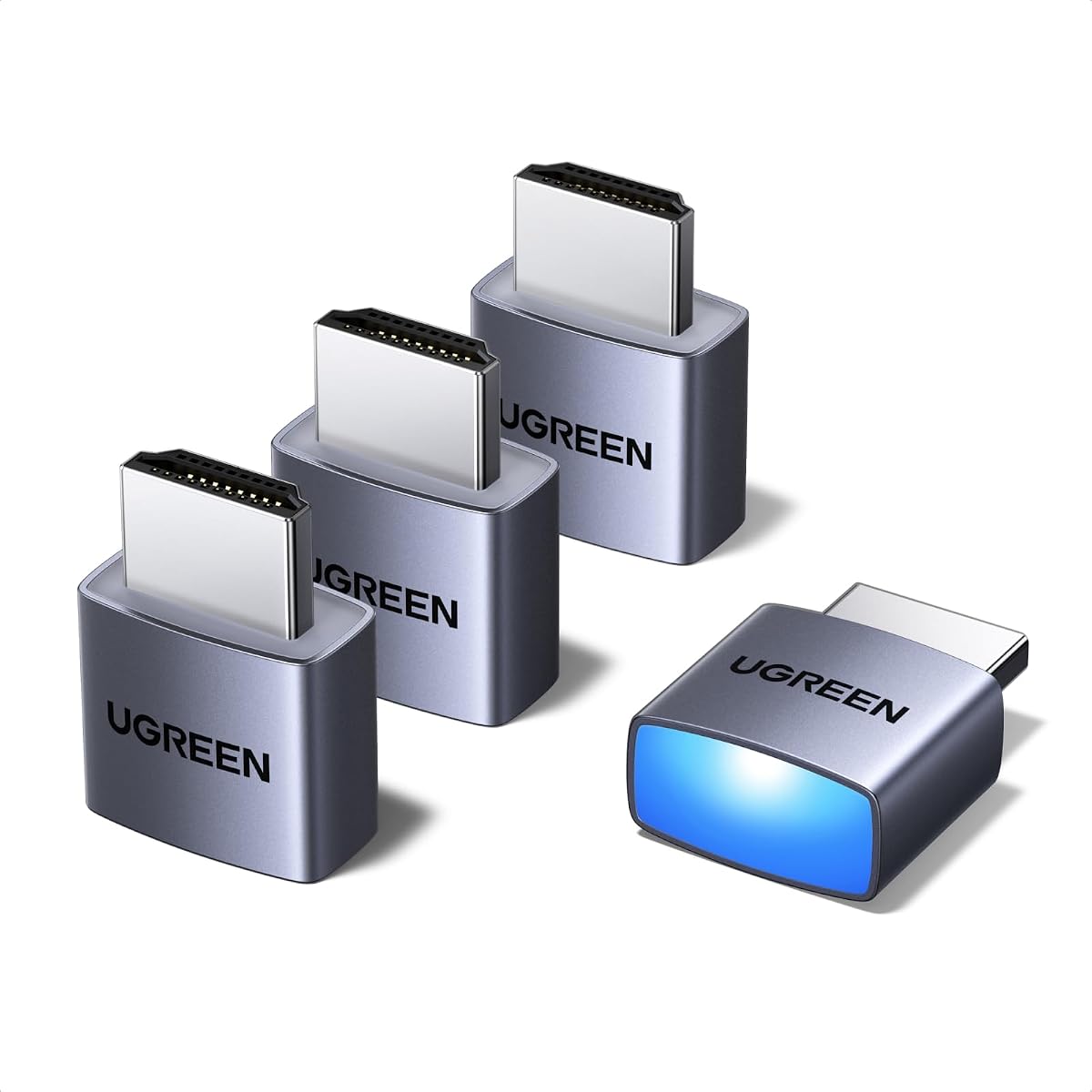
The UGREEN 4 Pack HDMI Dummy Plug stands out as a top choice for users needing reliable virtual display emulation. With a solid 4.6 rating, it offers True 4K@60Hz HDR performance, making it suitable for high-resolution remote desktop and GPU tasks without physical monitors.
We may earn a commission when you buy through this link, at no additional cost to you.
Its robust construction features a sturdy aluminum shell that enhances heat dissipation during intensive tasks like cryptocurrency mining or video editing. The integrated LED light provides instant connection status feedback, ensuring you can monitor connectivity at a glance while managing server farms.
While the 4-pack volume is generous, users requiring larger scale deployments might need multiple purchases. The reliance on HDMI output means it won't work with devices lacking this port, but its plug-and-play simplicity across Windows, Mac, and Linux systems minimizes setup friction.
This adapter is ideal for headless PC deployments in SOHO or home server environments. Its ability to maintain system stability without power consumption costs makes it a practical solution for remote management, video editing, and simulation workloads requiring constant GPU activity.
Enables 4K Ultra HD resolution at 60Hz with 1080P@120Hz compatibility for smooth remote operations.
Designed with heat-dissipating aluminum to prevent overheating during 24/7 mining or rendering tasks.
We may earn a commission when you buy through this link, at no additional cost to you.
This budget-friendly 4 Pack HDMI Dummy Plug delivers excellent value with a impressive 4.8 rating. It provides a True 4K@60Hz HDR virtual display, ensuring crisp visuals for remote desktop operations and gaming streaming without requiring physical screens.
We may earn a commission when you buy through this link, at no additional cost to you.
The aluminum armor casing offers industrial-grade durability to resist overheating during marathon computing sessions. Its plug-and-play simplicity means zero drivers or software are needed, allowing instant virtual display setup for stock trading or simulation workflows in seconds.
Though it lacks some advanced feature sets found in premium models, its reliability and cost-effectiveness make it a strong contender for home labs or small-scale remote deployments. Users should note that HDR details are standard rather than enhanced.
Ideal for optimizing headless server farms or automated trading stations, this adapter maintains 24/7 stability while eliminating display power costs. It works flawlessly with NVIDIA and AMD GPUs across major operating systems, making it a versatile choice for most users.
Affordable solution for headless deployments that keeps GPU active without expensive real displays.
Tool-free connection with no drivers required ensures immediate operational status for critical tasks.
We may earn a commission when you buy through this link, at no additional cost to you.
For users demanding the highest resolution support, this premium HDMI dummy plug stands out with 8K 30Hz capability. While N/A rated due to recent listing status, its technical specs promise top-tier virtual display emulation for advanced GPU tasks and next-gen setups.
We may earn a commission when you buy through this link, at no additional cost to you.
It leverages HDMI 2.1 technology to support 4K@120Hz and other high refresh rates, making it essential for gaming or streaming setups that need ultra-smooth motion. The gold plated interface ensures stable digital signals and longevity against corrosion over time.
The main trade-off is the higher price point and requirement for a graphics card interface supporting HDMI 2.1 to achieve peak refresh rates. Users with older cards may find the value limited, but for high-performance rigs, the investment pays off in flexibility.
This adapter is perfect for headless gaming PCs accessed via Moonlight or Steam Link where 120fps performance is critical. It allows GPU acceleration without physical monitors, enabling efficient management of high-end workstations needing advanced virtual display capabilities.
Unlocks up to 8K 30Hz and 4K 120Hz for future-proof virtual display needs.
Specifically tuned for headless gaming PCs and high refresh rate streaming workflows.
We may earn a commission when you buy through this link, at no additional cost to you.
The DTech HDMI Dummy Plug offers a solid 3 pack option for users needing multiple adapters. With a 4.6 rating, it emulates high resolutions up to 4K, enabling headless operation for tasks like GPU accelerated remote desktop and cryptocurrency mining efficiently.
We may earn a commission when you buy through this link, at no additional cost to you.
Its gold plated HDMI dummy dongle ensures stable digital signals, which is crucial for reliable operation in server farms. The plug-and-play design requires no drivers or external power, solving common OSX headless display issues without complex configuration steps.
While it lacks visible status LEDs found in other models, its low-cost and stable performance make it a practical choice for home servers or colocation farms. Users should ensure their GPU supports the desired 4K output for best results.
Ideal for remote-deployed headless PCs, this adapter unlocks full graphics card potential for game streaming and VR setups. Its simplicity and compatibility across Windows, Mac, and Linux systems provide a straightforward path to virtual display activation.
Small virtual screen monitor emulator perfect for fitting into tight server rack spaces.
No driver requirements mean instant recognition and setup across various operating systems.
We may earn a commission when you buy through this link, at no additional cost to you.
This HDMI Dummy Plug Headless Ghost focuses on ultra-compact design for users prioritizing space-saving solutions. With a 4.6 rating, it supports 1920×1080 resolution at 60Hz, ideal for standard remote desktop needs where 4K is not strictly required.
We may earn a commission when you buy through this link, at no additional cost to you.
The set-and-forget functionality eliminates the need for drivers or power cables, ensuring stable operation for GPU tasks like crypto mining. It works seamlessly with any graphics card having HDMI output, making it a safe bet for general compatibility.
While it lacks 4K capabilities compared to newer models, its simplicity and low profile design make it suitable for basic headless setups. Users needing higher resolution should consider upgraded options, but for standard use, this is a reliable budget choice.
Perfect for colocation farms where space is tight, this adapter allows high resolution GPU accelerated remote desktop without clutter. It acts exactly like a real LCD monitor to keep systems running headlessly with minimal configuration overhead.
Ultra-compact profile fits easily into tight spaces without interfering with other connections.
Works with any HDMI output device ensuring broad support across different hardware setups.
We may earn a commission when you buy through this link, at no additional cost to you.
The 3 Pack HDMI Dummy Plug 4K offers good value for users needing multiple adapters for different rigs. With a 4.5 rating, it supports 4K@60Hz HDR, simulating high resolution for remote control and video rendering tasks without extra hardware costs.
We may earn a commission when you buy through this link, at no additional cost to you.
Its gold-plated interface guarantees complete signal transmission, ensuring stable connection quality over time. The hot swap support allows changing devices without restarting systems, which is useful for testing or temporary deployment scenarios quickly.
While the feature set is standard compared to premium models, the unconditional warranty adds a layer of confidence. Users should check that their OS supports the desired virtual display modes for best performance across varied environments.
Ideal for server farms or multi-user setups, this adapter replaces expensive real displays efficiently. Its low power consumption and plug-and-play design make it a sustainable option for 24/7 operation in energy-saving environments.
Three units allow simultaneous headless management for multiple machines or test systems.
Two years unconditional warranty provides support if any plug fails during normal usage.
We may earn a commission when you buy through this link, at no additional cost to you.
This HDMI dummy plug supports high refresh rates up to 240Hz for specific resolutions, appealing to gaming-focused setups. With HDR display simulation and full copper board design, it ensures signal stability and enhanced electromagnetic shielding for reliable operation.
We may earn a commission when you buy through this link, at no additional cost to you.
The 5-pack quantity is beneficial for large server deployments where multiple headless PCs are managed. Gold-plated connectors resist corrosion, while the thicken aluminum shell delivers durability and premium feel during installation and maintenance workflows.
Users should note the default 1080P mode may require manual adjustments for higher resolutions in some systems. The lack of current rating reflects its new status, so early adopters might need to test compatibility before bulk purchasing.
Ideal for energy-efficient headless setups, this adapter reduces power usage while keeping GPUs active for 24/7 tasks. Its compatibility with Windows, macOS, and Raspberry Pi makes it a versatile choice for diverse development or server environments.
Supports up to 240Hz for 1080P to enable smoother gaming and motion simulations.
Full copper pouring board reduces electromagnetic interference for consistent display output.
We may earn a commission when you buy through this link, at no additional cost to you.
This adapter specializes in HDMI 2.1 compatibility to unlock 4K@120Hz performance for VR and gaming setups. It enables GPU tasks without physical monitors, ensuring HBCC stays active during SSH or remote sessions effectively for continuous workloads.
We may earn a commission when you buy through this link, at no additional cost to you.
Its low power consumption and negligible heat emission make it suitable for long-duration mining or rendering operations. The gold-plated dongle ensures stable digital signals, while plug-and-play design eliminates the need for software drivers or configuration.
Users with Win11 may find limitations to 4K60HZ HDR instead of 120Hz, so checking system compatibility is key. Despite this, its specialized focus on high refresh rates makes it a unique tool for streaming and headless gaming PC management.
Ideal for gamers using Moonlight or Steam Deck streaming from a headless PC, this plug tricks the GPU into detecting a monitor. It supports screen sharing and VR setup needs across Windows, Mac, and Linux platforms seamlessly.
Enables 120Hz output for smooth gaming experiences without needing a physical display.
Keeps GPU performance active during SSH to prevent HBCC disabling in mining operations.
We may earn a commission when you buy through this link, at no additional cost to you.
Offering an 8-pack quantity, this adapter is designed for large-scale deployments requiring multiple virtual displays. With default 1440P mode and HDR emulation, it balances resolution and visual quality for professional video preview and display mirroring tasks.
We may earn a commission when you buy through this link, at no additional cost to you.
Full copper pouring on the board enhances signal stability and reduces electromagnetic interference. The thicken aluminum shell delivers a premium feel and durability, ensuring reliable performance even during intensive 24/7 computing sessions in data centers.
While the default resolution is higher than basic models, users should verify OS support for desired refresh rates. The eco-friendly design reduces power usage, making it a cost-effective solution for headless workstations in home labs.
Ideal for professionals managing remote control or multi-monitor simulations, this plug works seamlessly across Windows, macOS, and development boards. It eliminates real displays while maintaining system efficiency and compatibility with major software platforms.
Eight units provide ample coverage for large server racks or multi-machine workstations.
Full copper board and aluminum shielding prevent interference for crisp virtual output.
We may earn a commission when you buy through this link, at no additional cost to you.
This 5-pack HDMI dummy plug distinguishes itself with a default 2160P mode, offering higher out-of-box resolution. It supports 4K@60Hz and HDR, making it suitable for vibrant and realistic display simulation needs in color-sensitive applications.
We may earn a commission when you buy through this link, at no additional cost to you.
With full copper pouring technology and thicken aluminum shell, signal stability and durability are emphasized. The hot-swappable design allows easy replacement without system restarts, providing flexibility for maintenance and temporary testing scenarios.
Users should verify driver or OS compatibility for specific high refresh rate modes. While newer listings may lack ratings, the technical specs suggest solid build quality for professional virtual display emulation workflows requiring consistent performance.
Ideal for remote control and screen sharing in home labs, this adapter supports devices like Mac Mini and Jetson Nano. It eliminates the need for physical screens, reducing costs while ensuring your GPU stays active for critical tasks.
Starts at 2160P default for immediate high-resolution virtual display activation.
Compatible with Raspberry Pi and development boards for extensive prototyping projects.
We may earn a commission when you buy through this link, at no additional cost to you.
Selecting the right HDMI dummy plug involves balancing resolution needs, build quality, and compatibility with your specific hardware. This section outlines key factors to consider for reliable headless operation.
Ensure the adapter supports at least the resolution your tasks require, such as 4K@60Hz for video editing or 1080P@120Hz for gaming. Higher refresh rates enable smoother motion, which is crucial for remote desktop fluidity and VR setups.
Prioritize models that advertise specific resolution support like 4K@60Hz or HDMI 2.1 capabilities for future-proofing your setup.
A durable aluminum shell helps dissipate heat during intensive tasks like cryptocurrency mining or rendering. Gold-plated connectors prevent corrosion and maintain stable signal transmission over long periods of continuous operation.
Look for reinforced soldering and electromagnetic shielding to ensure reliability in server farm environments where downtime is costly.
Check that the adapter works seamlessly with your OS, whether Windows, macOS, or Linux. Some models specifically note support for OSX headless display issues, which can be critical for Mac Mini server users.
Universal compatibility across major platforms ensures flexibility if you manage mixed device environments in your workspace.
Most modern plugs are plug-and-play, requiring no external power or drivers. This simplifies deployment, especially in remote locations where troubleshooting complex setup steps is difficult.
Confirm hot-swap support if you plan to change adapters frequently without restarting the host system for efficiency.
Packs ranging from 1 to 8 units allow for scalability. Larger packs offer better per-unit cost but may be unnecessary for single-device needs.
Evaluate your total headless PC count before buying to avoid over-purchasing or needing multiple orders for large clusters.
Integrated status LEDs provide instant visual confirmation of connection health. This helps quickly identify loose cables or power issues in dense server racks.
Optional features like HDR support can enhance color accuracy for video preview tasks, adding value for content creators.
Some brands offer unconditional warranties or fast support response times. This can be critical for business deployments where device failure impacts workflow.
Check the seller's reputation for replacement policies to ensure peace of mind after purchase.
Tailor your choice to your primary use case. Mining rigs benefit from heat dissipation, while gamers need high refresh rate support for fluid remote play.
Prioritize features that directly impact your most frequent tasks to get the best performance from the adapter.
To install, simply insert the HDMI dummy plug into the available HDMI port on your graphics card or laptop. Ensure the connection is secure and the device is recognized by your operating system under display settings.
For stable operation, avoid bending the plug excessively during insertion or removal to prevent internal damage. Keep the area free of dust to maintain proper heat dissipation especially if using multiple plugs in close proximity.
Periodically check that the virtual display remains active after system updates or changes to network configurations. If issues arise, reseat the plug or restart the host machine to reinitialize the connection.
An HDMI dummy plug simulates a connected monitor to keep your graphics card active. This enables remote desktop access, GPU tasks like mining, and multi-monitor setups without physical screens.
Most modern HDMI dummy plugs are plug-and-play and require no drivers. The operating system automatically recognizes the virtual display upon connection.
Yes, many models specifically support Mac OS and solve headless display issues for Mac Mini. Ensure the product lists Mac compatibility before purchasing.
Many adapters support up to 4K@60Hz. Verify the specific resolution and HDR capabilities in the product specs for your use case.
You need one free HDMI port per dummy plug. For multiple virtual displays, ensure your GPU has enough HDMI outputs or use a splitter carefully.
Yes, these plugs are designed for 24/7 operation with low power consumption. However, ensure proper ventilation to prevent overheating in dense setups.
Some integrated graphics may not allow virtual display creation without a physical screen. Dedicated GPUs generally provide more consistent results.
Yes, it can unlock GPU performance for VR headsets by simulating a display. Ensure your VR software supports headless GPU modes.
The UGREEN 4 Pack and 4 Pack HDMI Dummy Plug 4K HDR offer reliable choices for most users seeking stable virtual displays. For advanced needs, the HDMI 2.1 options provide higher refresh rates and resolution support.
Prioritize resolution and build quality based on your specific workload. Investing in durable adapters with proper heat dissipation ensures longevity in continuous operation environments.
Always check current prices and availability before purchasing as market conditions may change. Select the model that best fits your hardware and use case requirements.