
PecuMecu Barcode Scanner
4.3Editor score
Supports 1D and 2D codes
3-in-1 connection modes
2600mAh battery life
Discover the top 10 barcode scanners for iPad in October 2026. We compare connectivity, battery life, and scanning accuracy to help you choose the best mobile
Finding the right barcode scanner for iPad is crucial for efficient inventory management and retail operations. Modern businesses need devices that connect seamlessly to tablets while offering reliable scanning performance in various environments.
We evaluated ten top-rated scanners based on compatibility, battery life, and scanning technology. Our analysis covers Bluetooth, wireless, and wired options to ensure you find a model that fits your specific workflow needs.
Each pick highlights key strengths and potential limitations to guide your decision. Note that prices and availability may change frequently, so verify current details before purchasing to get the best value.
4.3Editor score
4.9Editor score

4.5Editor score
This side-by-side comparison highlights the key specifications of each scanner to help you quickly identify the best fit for your iPad setup.


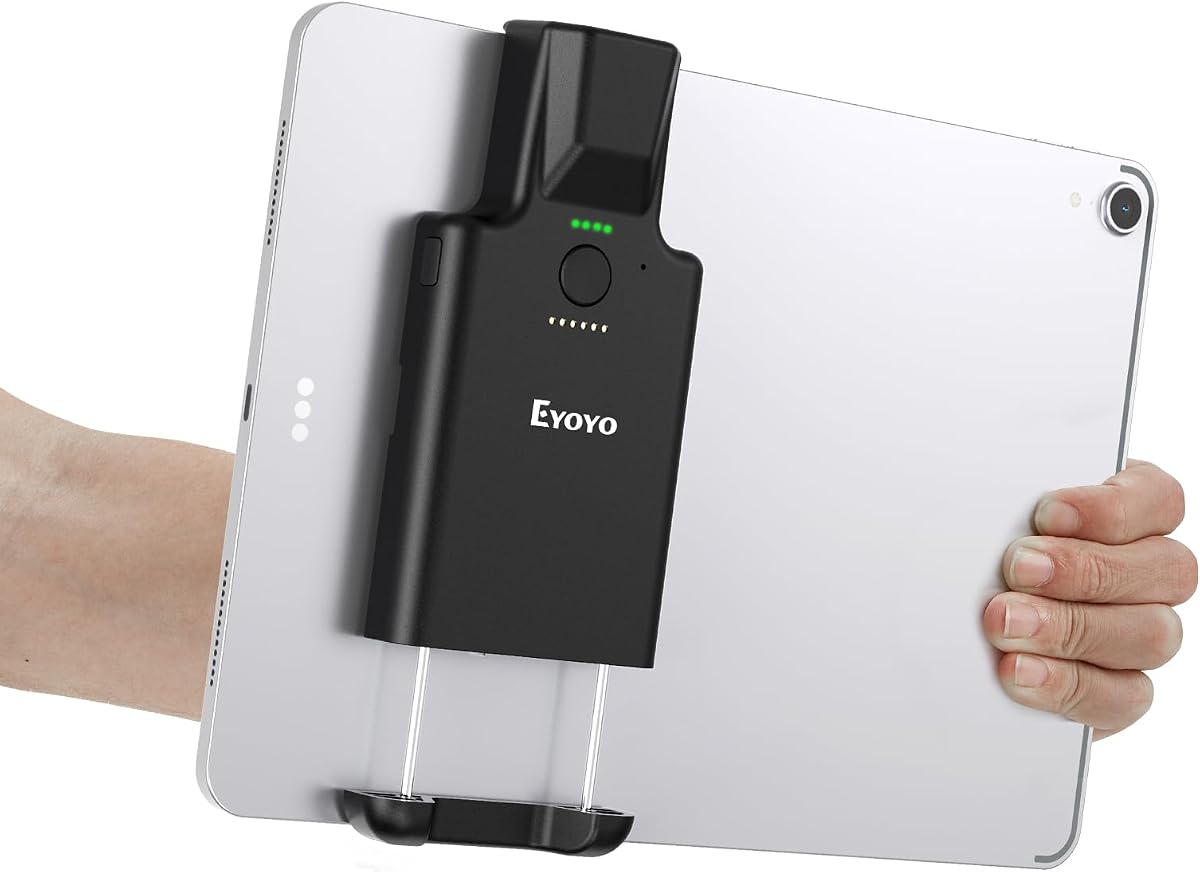
This Eyoyo scanner stands out as the top pick for iPad users due to its unique clip design and high-quality imaging. With a 4.9 rating, it offers reliable performance for retail and inventory tasks.
We may earn a commission when you buy through this link, at no additional cost to you.
The vertical retractable clip allows the scanner to attach securely to your iPad, keeping both hands free for efficient operations. The 2D CMOS imaging technology reads damaged and curved codes with ease.
While it lacks 2.4G wireless support, the Bluetooth connectivity is stable and sufficient for most workflows. The battery life is exceptional, lasting up to 30 days on light usage.
Anyone needing a robust solution for mobile inventory management should consider this model. Its blend of durability, battery life, and ease of use makes it a versatile choice.
The clip fits iPads and tablets between 5.7 and 7.1 inches, ensuring a stable grip during scanning operations.
A 3000mAh battery provides up to 30 hours of continuous scanning, reducing downtime significantly.
We may earn a commission when you buy through this link, at no additional cost to you.
The NETUM scanner offers flexibility with 2.4G wireless, Bluetooth, and wired connections. It is ideal for environments where network stability is critical.
We may earn a commission when you buy through this link, at no additional cost to you.
Its CCD sensor excels at reading 1D codes from screens or glass surfaces. The 2600mAh battery ensures long shifts without interruption.
Storage mode is useful for offline data collection. However, users should note it does not support 2D codes.
This model suits users prioritizing connectivity options and storage capacity. It is a strong choice for traditional retail and library settings.
Switch between 2.4G wireless, Bluetooth, or USB wired modes to suit your specific environment.
Store up to 100,000 barcodes when out of range, then upload once connectivity is restored.
We may earn a commission when you buy through this link, at no additional cost to you.
The PecuMecu scanner delivers 2D capabilities at a budget-friendly price. It is perfect for users needing QR code scanning without high costs.
We may earn a commission when you buy through this link, at no additional cost to you.
With a 70m wireless range and 2600mAh battery, it covers large areas effectively. The 130,000 barcode storage is impressive for offline use.
While it lacks premium build features, it performs reliably for standard inventory tasks. The scanning speed is notably fast.
Buy this if you need 2D scanning on a budget. It balances performance and cost well for small businesses.
Reach up to 70 meters in wireless mode, allowing freedom in large warehouses.
Save up to 130,000 barcodes for later upload when offline.
We may earn a commission when you buy through this link, at no additional cost to you.
Weighing just 35g, this Eyoyo model is perfect for on-the-go scanning. It fits easily in a pocket for quick checks.
We may earn a commission when you buy through this link, at no additional cost to you.
The vibration mode is helpful for quiet environments like libraries. It connects via Bluetooth or USB for flexible use.
Battery life is decent for light tasks but requires frequent charging for heavy use. It only reads 1D codes.
Ideal for professionals needing a lightweight tool for mobile audits. Its size makes it a great secondary scanner.
At 35g, it is easy to carry anywhere without fatigue.
Switch to vibration mode to scan silently in sensitive environments.
We may earn a commission when you buy through this link, at no additional cost to you.
This NetumScan model includes a dock that acts as both charger and receiver. It simplifies setup for busy retail counters.
We may earn a commission when you buy through this link, at no additional cost to you.
The scanner supports 2D codes and offers vibration for quiet environments. The battery lasts through standard shifts comfortably.
While the dock is convenient, it adds weight to the package. The battery is smaller than premium alternatives.
Recommended for small shops needing a complete setup. The dock helps manage cables and keep the scanner ready.
The base serves as a receiver and charger to reduce cable clutter.
Modified hard ABS shell offers a comfortable grip for all-day use.
We may earn a commission when you buy through this link, at no additional cost to you.
With a 4.9 rating, this scanner excels in stability and durability. It is built to withstand tough warehouse conditions.
We may earn a commission when you buy through this link, at no additional cost to you.
The dual-button system prevents accidental power-offs during busy work. Bluetooth pairing is reliable with minimal dropouts.
It supports 2D codes and includes a dock for easy charging. The price is higher but reflects the quality.
Choose this for demanding environments. Its durability and smart controls make it a top investment.
Dual-button design separates power control from scanning to prevent errors.
Constructed to survive drops up to 2 meters on concrete.
We may earn a commission when you buy through this link, at no additional cost to you.
This desktop model is designed for fixed retail counters where hands-free scanning is key. It sits on a base to read items automatically.
We may earn a commission when you buy through this link, at no additional cost to you.
Sensors activate when items move near the window. The USB connection ensures stable data transfer without battery worry.
It is not suitable for mobile use but excels at high-volume transactions. The dust protection helps in busy environments.
Best for stores needing efficiency at checkout. Its hands-free nature speeds up the customer experience.
Scanning starts automatically when items move near the sensor window.
Reads barcodes in any orientation for fast scanning.
We may earn a commission when you buy through this link, at no additional cost to you.
This scanner offers substantial offline storage for users tracking large datasets. It supports both 2.4G and Bluetooth for flexible connection.
We may earn a commission when you buy through this link, at no additional cost to you.
The 50,000 barcode capacity allows extensive offline inventory checks. Its weight is low enough for prolonged handheld use.
However, the lower rating suggests potential connectivity quirks. Users must remember to switch it on manually.
Suitable for those prioritizing data storage. It is a functional tool for specific tracking needs.
Built-in memory stores up to 50,000 codes for later upload.
Weighs only 110g to reduce hand fatigue.
We may earn a commission when you buy through this link, at no additional cost to you.
The KUIIYER scanner uses a high-resolution CMOS sensor for precise reading of damaged codes. It includes a light for low-light environments.
We may earn a commission when you buy through this link, at no additional cost to you.
Its battery capacity is solid for daily use. The waterproof rating makes it suitable for varied conditions.
It does not come with a dock, which some users may prefer. Connectivity is standard for Bluetooth.
Great for industrial or field use. The sensor quality and durability make it a reliable choice.
800×600 CMOS sensor reads difficult codes accurately.
IP54 rating protects against dust and water splashes.
We may earn a commission when you buy through this link, at no additional cost to you.
The Inateck BCST-70 is designed for large spaces needing long-range connectivity. Its standby time is months without charging.
We may earn a commission when you buy through this link, at no additional cost to you.
Customizable settings allow detailed formatting for specific software needs. The case adds durability for tough conditions.
While it lacks 2D codes, its range and reliability are unmatched. It is a premium tool for large warehouses.
Buy this for expansive environments. The battery life and range are standout features.
Up to 115 feet range supports operations in large warehouses.
Up to 180 days on standby reduces charging frequency.
We may earn a commission when you buy through this link, at no additional cost to you.
Choosing the right scanner involves understanding your specific needs and technical requirements. Here are key factors to consider.
Bluetooth is essential for iPad compatibility. Ensure the scanner supports standard BLE protocols. Some models also offer 2.4G wireless for better range.
Prioritize models with verified iPad support.
Decide between 1D or 2D scanning. 1D is for traditional barcodes, while 2D reads QR and Data Matrix. CCD sensors read from screens, unlike lasers.
Match the technology to your barcode types.
Long battery life is vital for mobile use. Look for at least 20 hours of continuous scanning. Higher mAh ratings usually indicate longer shifts.
Choose based on your daily usage hours.
Drop protection is important in warehouse settings. Materials like ABS plastic offer durability. IP ratings indicate resistance to dust and water.
Select a model that fits your environment.
Comfort affects productivity during long shifts. Lightweight designs reduce fatigue. Consider clip-on models for hands-free use on iPads.
Test the weight before purchasing.
Ensure the scanner works with your apps. Some POS systems have specific requirements. Check compatibility notes to avoid issues.
Verify compatibility with your inventory tools.
Offline storage is useful when connectivity is unstable. Some models hold thousands of codes for later upload. This is helpful for audits.
Consider your network reliability needs.
Balance cost with necessary features. Budget models may lack 2D or long battery life. Premium options offer better durability and range.
Invest based on your critical requirements.
Pair the scanner with your iPad via Bluetooth settings. Ensure you are in pairing mode on the device. Select the scanner from the list to connect.
Position the scanner correctly for best results. Hold it steady over the barcode. Adjust the distance for clear capture.
Clean the scanner lens regularly to prevent issues. Use a soft cloth to wipe away dust. Charge the battery fully before first use.
Yes, but you may need a Lightning to USB adapter. Ensure the scanner supports OTG. Most wireless scanners are more convenient for iPad use.
Check that the scanner is in pairing mode. Ensure Bluetooth is enabled on your iPad. Reboot both devices if connection fails.
No, only 2D scanners support QR codes. Standard 1D scanners read traditional barcodes. Verify specifications before buying if you need QR.
Battery life varies by model. Most last between 10 to 30 hours. Continuous scanning drains power faster than intermittent use.
Advanced scanners with CCD sensors handle damaged codes well. Look for models that mention high resolution. Some can read printed screen codes too.
Most scanners require no monthly fees. They work via hardware connection. Some apps may have subscriptions, but the scanner itself does not.
Typical ranges are around 10 to 50 meters. Higher-end models may reach 100 meters. Range depends on environmental obstacles like walls.
Many scanners work with Android phones and PCs. Check the supported OS list on the product page. Most offer universal compatibility across systems.
We reviewed the top 10 scanners suitable for iPad users. The Eyoyo Portable Scanner stood out for its clip design and battery life.
Prioritize connectivity and scanning type based on your business needs. A robust battery ensures you stay productive without frequent interruptions.
Prices can fluctuate so check current deals before finalizing your purchase. Invest wisely in a scanner that matches your workflow.