
Canon imageCLASS LBP6030w
3.8Editor score
Compact design fits anywhere
Wireless connectivity included
Energy saver mode active
This guide compares ten top laser printers with cheap toner options for home and office use, focusing on cost efficiency, speed, and reliability.
Finding a laser printer with cheap toner is essential for saving money over the long term. Many users struggle with high ongoing costs after purchasing the initial device. This guide helps you identify models that balance upfront price with affordable supply costs.
We analyzed ten highly rated printers based on their toner yield, print speed, and connectivity features. Our comparison includes options from Brother, Canon, and HP to ensure a wide range of choices. Each product was evaluated for its suitability in home or small office environments.
Each pick in this list highlights key features, pros, and cons to help you make an informed decision. We also provide a detailed buying guide to assist you in selecting the right model for your needs. Please note that prices and availability may change over time.
3.8Editor score

4.1Editor score

4.5Editor score
This table provides a side-by-side comparison of all ten laser printers selected for their cost-effective toner solutions and reliable performance.




The Brother HL-L2405W is a top choice for users seeking a laser printer with cheap toner. It boasts a 4.1-star rating and delivers sharp prints at 30 pages per minute, making it efficient for home offices.
We may earn a commission when you buy through this link, at no additional cost to you.
Its standout qualities include dual-band wireless connectivity and a 250-sheet paper tray, which reduce downtime. The Refresh EZ Print Subscription Service offers significant savings on genuine toner, ensuring cost-effective operation over time.
Honest trade-offs involve the lack of automatic duplexing, which may increase paper usage. However, for basic document printing, this is acceptable given the printer's speed and reliability in handling high volumes of single-sided prints.
This printer is ideal for home users and small teams needing reliable monochrome output. Its combination of speed, connectivity, and affordable toner options makes it a strong recommendation for those prioritizing long-term savings.
The Refresh EZ Print Subscription Service can save up to 50% on genuine toner, addressing the primary concern of ongoing costs.
Dual-band Wi-Fi ensures stable connections for multiple devices, allowing easy printing from smartphones and laptops without cables.
We may earn a commission when you buy through this link, at no additional cost to you.
The Canon imageCLASS LBP6030w is an excellent budget-friendly option for those needing a laser printer with cheap toner. With a 3.8-star rating, it offers reliable performance for light to moderate printing tasks in home environments.
We may earn a commission when you buy through this link, at no additional cost to you.
Key strengths include its compact design that fits anywhere and wireless connectivity for easy mobile printing. It uses Canon Genuine Toner 125, which provides a respectable page yield at an accessible price point for budget-conscious buyers.
The trade-offs involve a slower print speed of 19 ppm and a smaller paper tray capacity of 150 sheets. These limitations are manageable for users with lower volume needs who prioritize cost savings over high-speed throughput.
This model is perfect for students or home users printing occasionally. Its low total cost of ownership and simple functionality make it a practical choice for those who need basic monochrome printing without extra features.
Its compact footprint allows it to fit easily into tight spaces like dorm rooms or small home office desks.
Energy saver mode uses less than 2 watts, reducing electricity bills during idle times and supporting eco-friendly operations.
We may earn a commission when you buy through this link, at no additional cost to you.
The Brother MFC-L2820DW is a premium all-in-one printer that delivers exceptional value for those needing a laser printer with cheap toner. Its 4.3-star rating reflects its reliability and robust feature set for small offices.
We may earn a commission when you buy through this link, at no additional cost to you.
It offers print speeds up to 36 ppm, a 50-page auto document feeder, and duplex printing. The inclusion of a touchscreen and cloud app support enhances usability, while the Refresh subscription ensures toner costs remain manageable.
Honest trade-offs include a higher upfront cost and a larger size compared to single-function printers. However, the time saved from copying and scanning tasks justifies the investment for users with frequent document processing needs.
This printer is best suited for small businesses needing multifunctionality without sacrificing speed or cost efficiency. Its comprehensive feature set makes it a top recommendation for those seeking a complete office solution.
The 50-page auto document feeder allows quick scanning and copying of multi-page documents, saving significant manual time.
Dual-band wireless and Ethernet ensure stable connections, while cloud integration facilitates remote printing from various platforms.
We may earn a commission when you buy through this link, at no additional cost to you.
The Canon imageCLASS MF3010 VP is a solid choice for users prioritizing high toner yield and basic functionality. With a 4.2-star rating, it offers reliable performance for those who prefer a wired setup in home or small office settings.
We may earn a commission when you buy through this link, at no additional cost to you.
Its key strength lies in the included toner providing up to 2,300 pages, reducing immediate replacement needs. The multifunctionality allows printing, scanning, and copying, while the ID card copy feature simplifies specific document tasks.
Honest trade-offs involve the lack of wireless connectivity, which limits flexibility. However, the simplicity and high yield make it a dependable option for users who primarily connect via USB and need minimal operational complexity.
This model is ideal for users needing a straightforward multifunction printer without advanced networking. Its cost-effective toner and reliable performance make it a good fit for those who value functionality over modern connectivity features.
The initial toner cartridge provides up to 2,300 pages, offering immediate value and reducing the frequency of replacements.
ID card copy easily creates copies of identification cards and small documents, a useful feature for administrative tasks.
We may earn a commission when you buy through this link, at no additional cost to you.
The Brother HL-L2460DW is designed for efficiency, offering fast print speeds and duplexing in a compact form. With a 4.0-star rating, it caters to home offices needing quick, cost-effective monochrome printing with minimal hassle.
We may earn a commission when you buy through this link, at no additional cost to you.
Its key features include 36 ppm speed, automatic duplexing to reduce paper waste, and dual-band wireless connectivity. The Brother Mobile Connect app allows remote management and toner tracking, enhancing convenience for active users.
Honest trade-offs include the absence of scanning capabilities and reliance on a subscription for maximum toner savings. However, for users focused solely on printing, the speed and duplexing provide significant value and operational efficiency.
This printer is best for home users or small teams prioritizing print speed and cost savings. Its reliable performance and modern connectivity options make it a strong contender for those needing a dedicated printing solution.
Automatic duplex printing saves time and reduces paper waste, making it ideal for double-sided document production.
The Brother Mobile Connect app allows remote printing and toner tracking, ensuring you never run out of supplies unexpectedly.
We may earn a commission when you buy through this link, at no additional cost to you.
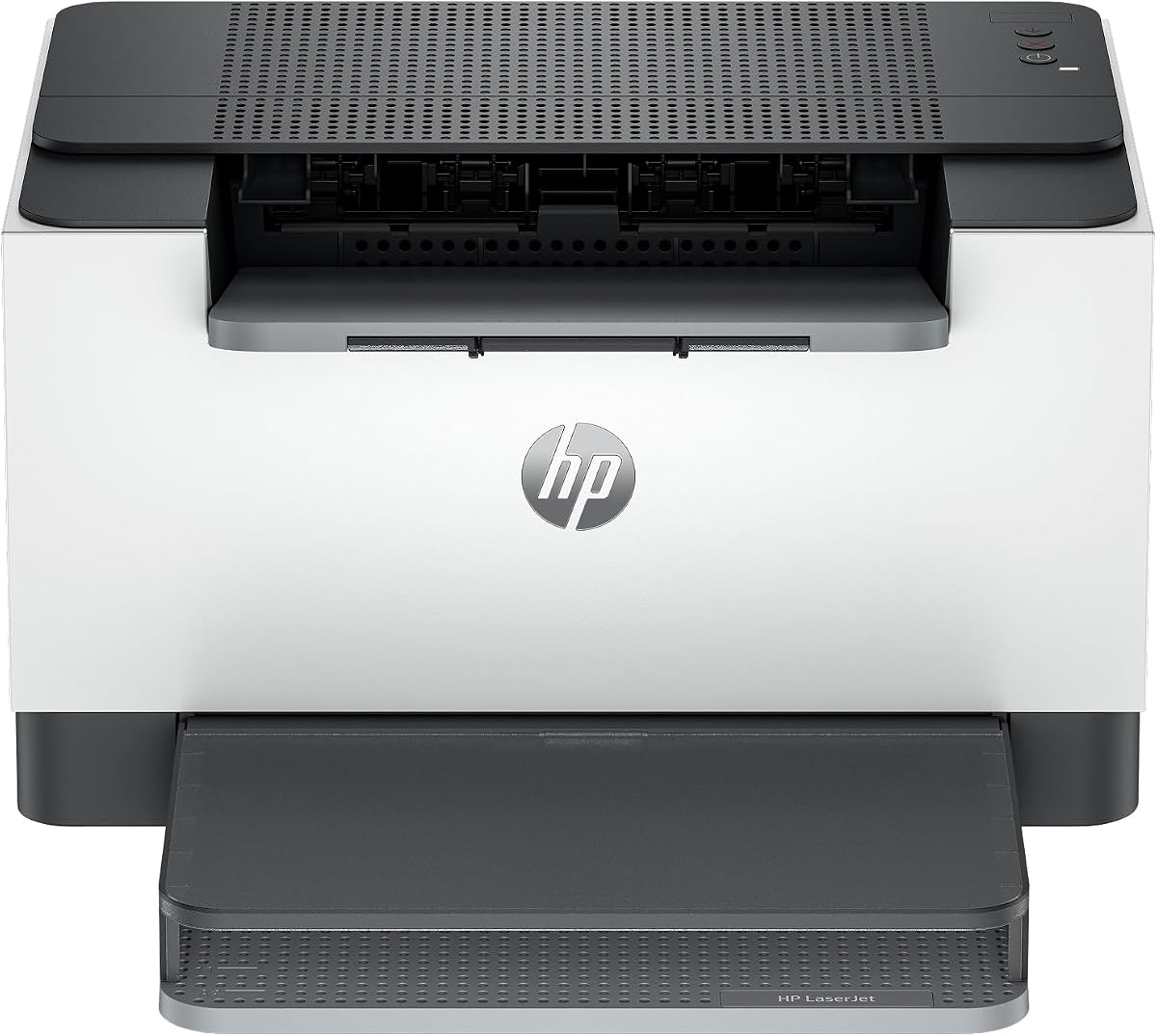
The HP LaserJet M110w is a compact printer ideal for small teams needing reliable wireless printing. With a 3.9-star rating, it offers fast speeds and easy setup, making it accessible for users new to laser printing technology.
We may earn a commission when you buy through this link, at no additional cost to you.
Its key strengths include the HP Smart app for mobile management and self-reset Wi-Fi for stable connections. The design is the smallest in its class, fitting easily into any workspace while delivering professional-quality black and white documents.
Honest trade-offs involve the use of chip-based toner, which can restrict third-party cartridge compatibility. However, for users valuing convenience and brand reliability, the printer's performance and compact footprint provide significant value.
This model is perfect for small teams or home offices with limited space. Its ease of use and wireless capabilities make it a practical choice for those needing straightforward, efficient printing without complex setup.
It is the world's smallest laser in its class, allowing it to fit anywhere in your home or office without taking up much room.
Wireless printing from any mobile device ensures you can print on the go, enhancing productivity for remote workers.
We may earn a commission when you buy through this link, at no additional cost to you.
The HP LaserJet M209dw offers fast print speeds and automatic duplexing in a compact package. With a 4.2-star rating, it is designed for small teams needing reliable, efficient printing with modern security features included.
We may earn a commission when you buy through this link, at no additional cost to you.
Its key features include up to 30 ppm print speed, dual-band Wi-Fi with self-reset, and Instant Ink eligibility. Built-in security features help protect your printer from attacks, adding peace of mind for business users.
Honest trade-offs involve the requirement of an Instant Ink subscription for maximum savings and lack of scanning. However, for users focused on quick document output, its speed and security provide substantial value in daily operations.
This printer is best for small teams needing rapid, secure printing. Its modern connectivity and duplexing make it a strong recommendation for those prioritizing efficiency and protection in a home or office environment.
It offers up to 19 black-and-white images per minute two-sided, ensuring quick completion of duplex projects.
Built-in security features help protect your printer from potential attacks, ensuring your data remains safe during printing.
We may earn a commission when you buy through this link, at no additional cost to you.
The Canon imageCLASS LBP122dw is a wireless duplex printer that balances speed and cost efficiency. With a 3.9-star rating, it offers reliable monochrome printing for home users and small teams seeking modern convenience and value.
We may earn a commission when you buy through this link, at no additional cost to you.
Its key strengths include print speeds up to 30 ppm, duplex printing, and a compact design. Using Canon Genuine Toner 071 high-capacity options ensures a good page yield, reducing the frequency of replacements over time.
Honest trade-offs involve a relatively small paper tray and lack of scanning capabilities. However, for users focused on simple, fast printing tasks, the wireless duplexing and high capacity toner provide significant operational benefits.
This model is ideal for home users needing efficient duplex printing. Its connectivity and speed make it a practical choice for those prioritizing convenience and cost savings in a compact form factor.
Uses Canon GENUINE Toner 071 high-capacity, ensuring fewer replacements and better value over the long term.
Print on-the-go with Canon PRINT app and more, allowing seamless integration with mobile devices for remote printing.
We may earn a commission when you buy through this link, at no additional cost to you.
The HP LaserJet MFP M235sdw is an all-in-one printer that delivers fast duplex printing and strong security. With a 4.0-star rating, it is designed for small offices needing reliable scanning, copying, and printing in one compact unit.
We may earn a commission when you buy through this link, at no additional cost to you.
Its key features include up to 28 ppm speed, Ethernet connectivity, and built-in security features. The printer supports wireless printing from any mobile device, ensuring flexibility and ease of use for diverse user environments.
Honest trade-offs include the lack of a touchscreen and reliance on HP chips for cartridge operation. However, for users prioritizing security and speed, the printer's multifunctionality and duplexing provide significant value in daily tasks.
This model is best for small offices needing a secure, multifunction printer. Its fast performance and connectivity options make it a strong recommendation for those prioritizing efficiency and protection in an office environment.
It offers up to 28 black-and-white pages per minute single-sided, ensuring quick completion of multi-page duplex projects.
Built-in security features help protect your printer from potential attacks, ensuring your office data remains safe during operation.
We may earn a commission when you buy through this link, at no additional cost to you.
The Brother HL-L2480DW is a premium all-in-one printer designed for efficiency and cost-effectiveness. With a 4.5-star rating, it delivers sharp prints, scanning, and copying, making it ideal for small offices needing comprehensive functionality.
We may earn a commission when you buy through this link, at no additional cost to you.
Its key features include 36 ppm speed, automatic duplexing, and a 2.7-inch touchscreen. The Refresh subscription ensures toner costs stay low, while cloud integration facilitates easy access to documents from popular apps like Google Drive and Dropbox.
Honest trade-offs involve a larger footprint and higher initial cost compared to basic models. However, for users needing multifunctionality, the speed, display, and long-term toner savings justify the investment for busy work environments.
This model is best for small offices needing a complete solution. Its speed, connectivity, and user-friendly interface make it a top recommendation for those prioritizing efficiency and cost savings in daily operations.
The convenient flatbed scan glass allows easy copying and scanning of books and delicate documents without binding issues.
The intuitive 2.7-inch touchscreen enables effortless navigation and easy access to cloud-based apps for streamlined workflow.
We may earn a commission when you buy through this link, at no additional cost to you.
Choosing the right laser printer involves more than just upfront cost. Here are key factors to consider for long-term savings and performance.
Look for printers with high-yield toner cartridges that offer more pages per cartridge. This reduces the frequency of replacements and lowers the cost per page over time.
Prioritize models with yield of at least 1,500 pages and consider subscription services for additional discounts on genuine supplies.
Print speed affects productivity, especially in busy environments. Look for models with at least 20 pages per minute to ensure efficient handling of document queues without lag.
Faster printers often justify a higher initial cost by saving time and increasing overall office workflow efficiency significantly.
Wireless connectivity is essential for modern printing. Ensure the printer supports Wi-Fi or Ethernet for easy connection to multiple devices and remote printing from any location.
Dual-band Wi-Fi provides more stable connections, reducing interruptions during large print jobs or multi-device access scenarios.
Duplex printing saves paper and costs by allowing two-sided documents automatically. This feature is crucial for users producing high volumes of reports or handouts.
Investing in a printer with automatic duplexing reduces paper waste and aligns with eco-friendly practices in any home office.
A larger paper tray minimizes the need for frequent refills. Aim for models with at least a 250-sheet capacity to keep workflows uninterrupted during busy periods.
Higher capacity trays also reduce physical interaction with the printer, improving convenience and efficiency in shared office environments.
Consider if you need scanning and copying capabilities. All-in-one printers combine these functions into one device, saving space and streamlining office tasks.
While more expensive upfront, multifunction printers offer significant convenience and can reduce the total cost of ownership for busy users.
Subscription services like HP Instant Ink or Brother Refresh can lower toner costs significantly. These programs deliver supplies automatically based on usage patterns.
Evaluate whether the subscription fits your printing volume to ensure you get the best value without paying for unused ink or toner.
Choose reputable brands with proven reliability and strong customer support. A good warranty ensures protection against defects and reduces unexpected repair costs.
Look for models with at least a one-year limited warranty and accessible support options for troubleshooting any issues quickly.
Start by properly installing the toner cartridge and removing any protective tapes. Ensure the printer is placed on a level surface to avoid jams and maintain print quality.
Regularly clean the interior with a soft, lint-free cloth to remove dust and toner residue. This helps maintain optimal print quality and extends the life of internal components.
Keep the printer firmware updated to ensure security and compatibility. Use the manufacturer's app or website to check for updates periodically, especially when adding new devices.
A cost-effective printer has a high toner yield and low cost per page. Look for high-yield cartridges and subscription services that offer discounts on genuine supplies for long-term savings.
Third-party cartridges can be cheaper but may void warranties or cause issues. Manufacturers often recommend genuine toners to ensure print quality and reliable operation without unexpected errors.
Duplex printing uses half the paper by printing on both sides. This reduces paper costs and waste, which adds up significantly over time in high-volume printing environments.
Subscription services deliver toner based on usage, often at lower rates. They ensure you never run out unexpectedly and provide savings compared to buying cartridges individually.
Print speed impacts productivity and wait times. Faster printers handle larger documents quickly, reducing interruptions and keeping workflows smooth during busy periods.
Clean the printer every few months or whenever print quality drops. Regular cleaning prevents dust buildup and toner residue, maintaining sharp output and preventing mechanical issues.
Wireless features consume negligible power compared to printing. Modern printers include energy-saving modes that minimize usage when idle, ensuring efficiency without impacting connectivity.
This guide highlights ten excellent laser printers with cheap toner options for various needs. Each model balances performance, cost, and features to help you find the right fit.
Prioritize toner yield, print speed, and connectivity options to ensure long-term savings and efficiency. Choose a model that aligns with your specific office requirements.
Prices and availability can change quickly, so verify current details before purchasing. Regular checks will ensure you get the best value for your investment.