Compare the top 10 angled keyboard riser models for ergonomics and comfort. This guide reviews features, materials, and user ratings to help you choose.
As an Amazon Associate we earn from qualifying purchases. We may earn a commission when you buy through links on this page, at no additional cost to you. Read our affiliate disclosure.As an Amazon Associate we earn from qualifying purchases.Purchases through our links may earn us a commission, at no extra cost to you. Read our affiliate disclosure.
Finding the right angled keyboard riser can transform your daily workflow by promoting better posture and reducing strain on your wrists and neck during long typing sessions.
We have carefully evaluated the top models available on the market, focusing on stability, adjustability, and material quality to ensure you get a reliable and comfortable typing experience.
Each pick below highlights key features and user feedback to help you decide which riser fits your desk setup best, though prices may change so check current listings before buying.
Top 3 Picks for Best Angled Keyboard Riser
Best Budget
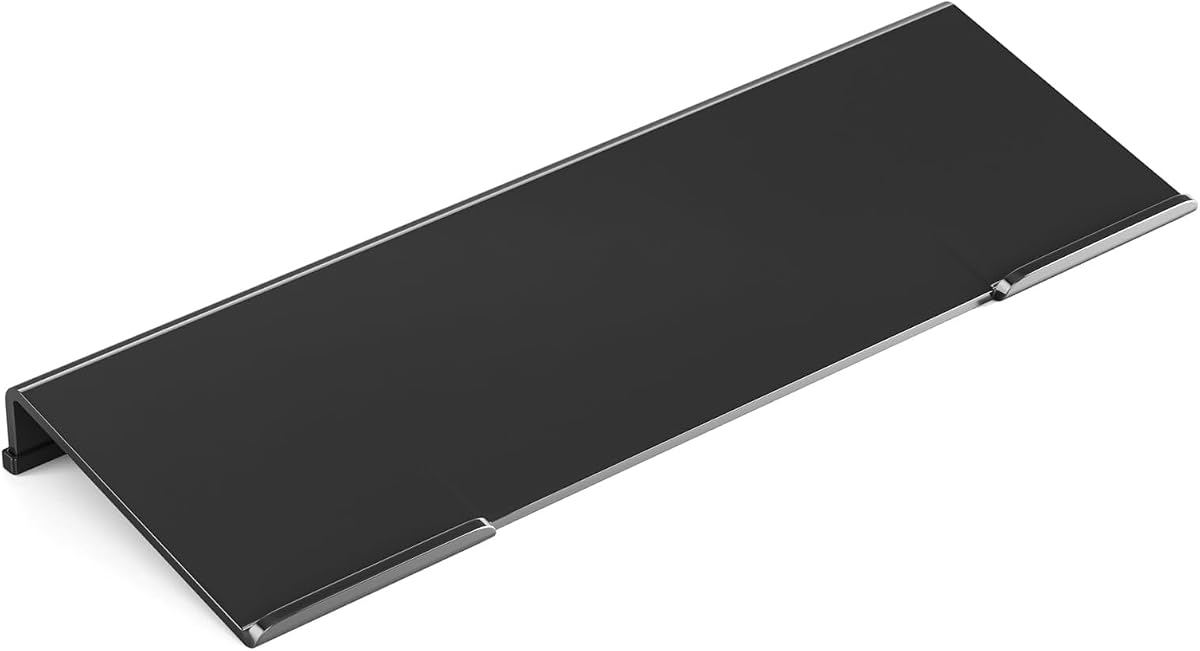
Richboom Computer Keyboard Stand Tilt PC Keyboard Stand Riser for Easy Ergonomic Typing, Acrylic Keyboard Tray Holder for Office Desk, Home, School, with Silicone Anti-Slip Case, Black
Top 10 Best Angled Keyboard Riser in 2026 Compared
Here is a side-by-side comparison of the top ten angled keyboard riser models, highlighting their key specifications and design features to help you make an informed decision.
ProductsSpecificationsEditor scorePrice
1
Editor's Choice
Richboom Computer Keyboard Stand Tilt PC Keyboard Stand Riser for Easy Ergonomic Typing, Acrylic Keyboard Tray Holder for Office Desk, Home, School, with Silicone Anti-Slip Case, Black
Richboom Clear Acrylic Tilted Computer Keyboard Holder for Easy Ergonomic Typing, Upgraded Version, Keyboard Stand with Silicone Anti-Slip Case for Office Desk, Home, School, Clear
Beego Ergonomic Computer Keyboard Stand – Black Acrylic Keyboard Riser Tilted Keyboard Holder Keyboard Tray with Black Non-Slip Strip for Easy Typing at Home School Office Desk Accessories
GPG2 ESC Flip Keyboard Stand for Desk, Tilting Riser That Attaches to Your Keyboard – 3 Adjustable Angles, Compatible with Apple Magic Keyboard, Logitech MX Keys, K380 & Flat-Back Models
Richboom Computer Keyboard Stand Tilt PC Keyboard Stand Riser for Easy Ergonomic Typing, Acrylic Keyboard Tray Holder for Office Desk, Home, School, with Silicone Anti-Slip Case, Black
17L x 5.5W x 1.5H
Ergonomic slanted design
Silicone anti-slip case
Premium acrylic material
This Richboom keyboard stand offers a reliable ergonomic solution with a 4.7-star rating for its sturdy acrylic build and effective silicone anti-slip case that keeps your keyboard secure.
Pros
Strong anti-slip bottom strip
Slim low profile design
Smooth rounded edges
Easy to clean acrylic
No assembly required
Cons
Fixed angle only
Black color may show dust
We may earn a commission when you buy through this link, at no additional cost to you.
Its low front lips ensure your hands feel comfortable during typing without interference, while the smooth polished finish maintains an elegant look that fits various home office aesthetics.
Though the angle is fixed and may not suit everyone perfectly, the sturdy acrylic construction provides consistent support without wobbling which is ideal for long daily work sessions.
If you prioritize a clean minimalistic look and solid support over adjustability, this is an excellent budget-friendly choice for improving posture and reducing wrist strain effectively.
Ergonomic Benefits
The slanted design lifts your keyboard to a natural angle reducing strain on your wrists and neck during extended typing sessions.
Design and Durability
Premium acrylic with polished edges ensures a sleek durable surface that resists scratches and blends well with any desk decor.
KOTEMON Acrylic Tilted Computer Keyboard Stand for Ergonomic Typing, Keyboard Tray Holder with Silicone Non-Slip Case, Black
17L x 5.5W x 1.5H
Low front lip design
Non-slip silicone strip
Smooth rounded edges
With a strong 4.8 rating, the KOTEMON stand is a top choice for ergonomic typing thanks to its solid acrylic construction and effective non-slip silicone case that holds your keyboard firmly in place.
Pros
Highest rated in category
Silicone protects desk surface
Sturdy no wobble design
Clean minimalist appearance
Fits standard full size
Cons
Fixed tilt angle
Black finish needs cleaning
We may earn a commission when you buy through this link, at no additional cost to you.
Its low front lip design prevents your hands from catching on edges while typing and the smooth polished finish adds a clean professional look to any workspace.
While it lacks adjustable angles, the fixed tilt is optimized for neutral wrist posture and the durable material ensures long-term stability without scratches or deformation.
If you value high ratings and a reliable simple design, this stand is a premium pick that balances cost with comfort and desk aesthetics perfectly.
Comfortable Typing Angle
The tilted design promotes a natural wrist position reducing fatigue and strain during long periods of computer work.
Durable Construction
High-quality acrylic and non-toxic silicone ensure a sturdy safe surface that protects your keyboard and desk from scratches and damage.
WINFFOR Comfortable Computer Keyboard Stand – Ergonomic Keyboard Riser Acrylic Tilted Keyboard Holder for Easy Typing&Working at Home Office – Fits All Keyboard Sizes – 17'' Wide (Purple)
Fits all keyboard sizes
No slippery silicone
Simple no assemble
Modern polished edges
This WINFFOR keyboard stand stands out for its versatility and 4.8 rating offering a wide 17-inch platform that fits all keyboard sizes from 60 percent to full size with a stylish purple finish.
Pros
Fits all keyboard sizes
Purple color adds style
Anti-slip grip strips included
Polished rounded edges
No assembly needed
Cons
Fixed tilt angle
Color might not match all desks
We may earn a commission when you buy through this link, at no additional cost to you.
Its ergonomic tilt reduces neck and wrist fatigue while the polished edges and included silicone strips prevent slipping and ensure a neat stable typing surface.
Although the angle is fixed and the unique color might not fit every setup, the build quality and ease of use make it a premium option for home offices.
If you want a stylish reliable stand that handles various keyboards without assembly this is a modern and functional choice for ergonomic comfort and desk organization.
Universal Fit
A wide 17-inch design accommodates compact to full-size keyboards making it ideal for mixed or shared workspaces.
Style and Function
The purple acrylic finish adds a touch of personality while maintaining professional ergonomics and smooth stable typing performance.
Richboom Clear Acrylic Tilted Computer Keyboard Holder for Easy Ergonomic Typing, Upgraded Version, Keyboard Stand with Silicone Anti-Slip Case for Office Desk, Home, School, Clear
Low front lip design
Food grade silicone
Standard size perfect angle
Grade A acrylic
This clear acrylic keyboard stand from Richboom offers a transparent aesthetic with a 4.7 rating and an upgraded silicone anti-slip case for secure keyboard placement on any desk.
Pros
Transparent clear design
Food grade silicone strip
Fits standard keyboards
Polished smooth touch
Separate packing box
Cons
May show fingerprints
Fixed angle limited
We may earn a commission when you buy through this link, at no additional cost to you.
Its low front lip design keeps your hands comfortable during typing and the Grade A acrylic ensures stable sturdy performance that reduces wrist and forearm strain effectively.
While the clear finish may show fingerprints and the angle is fixed the thoughtful packaging prevents scratches during shipping and the standard size fits most keyboards reliably.
If you prefer a minimalist unobtrusive look that blends into any setup this stand delivers excellent ergonomic support without distracting from your desk design.
Clear Design Benefits
Transparent acrylic allows your keyboard to remain visible while providing support and maintaining a clean neat workspace.
Quality and Safety
Food grade silicone and Grade A acrylic ensure a safe durable surface that protects your desk and keyboard from slips and scratches.
Beego Ergonomic Computer Keyboard Stand – Black Acrylic Keyboard Riser Tilted Keyboard Holder Keyboard Tray with Black Non-Slip Strip for Easy Typing at Home School Office Desk Accessories
Anti-slip case design
Low front stopper
No assembly required
Modern sleek look
The Beego keyboard stand offers a simple and affordable solution with a 4.5 rating and an anti-slip case that securely holds your keyboard without wobbling during typing.
Pros
Molded silicone strip
No wobbling design
Minimalistic desk look
Fits compact keyboards
Easy to place
Cons
Fixed tilt angle
Black color shows smudges
We may earn a commission when you buy through this link, at no additional cost to you.
Its low front stopper prevents interference with typing and the sleek black acrylic design adds a neat minimalistic look to any office or home desk setup.
While the tilt is fixed and may not suit every ergonomic need, the sturdy construction and easy placement make it a reliable choice for reducing wrist fatigue.
If you want a no-frills and and budget-friendly stand that delivers solid comfort this model is a practical addition to your workspace accessories.
Anti-Slip Performance
Molded silicone on the back and rubber pads on the front ensure your keyboard stays securely in place during typing.
Desk Organization
The minimalist design keeps your desk tidy and organized while providing ergonomic support without taking up much space.
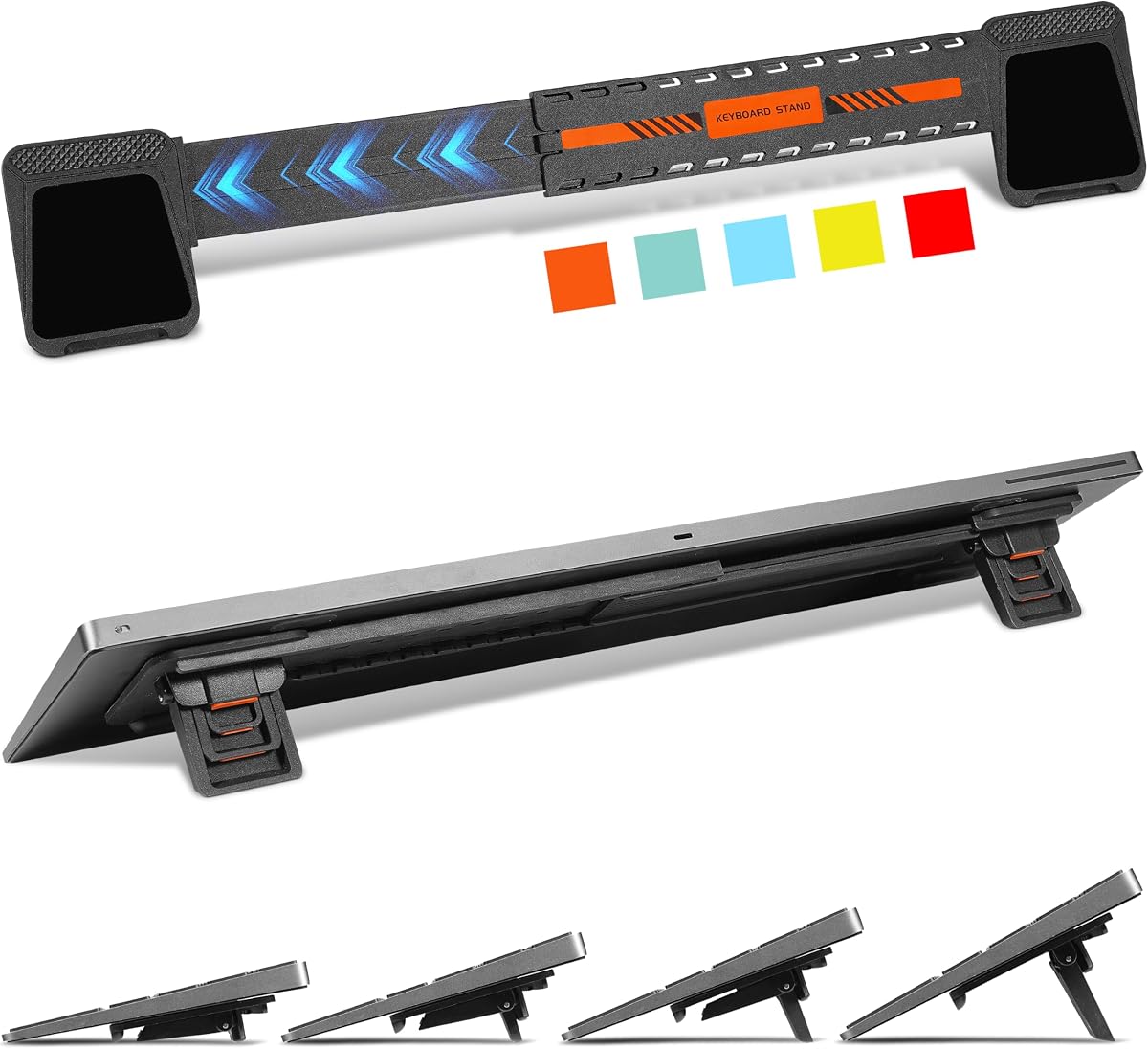
MEKASS Computer Keyboard Stand for Desktop, Adjustable Keyboard Riser
Extendable design
4 angle height adjustments
Durable nylon material
Micro-suction pads
This MEKASS keyboard riser offers unique four height adjustments with a 4.2 rating and an extendable design that fits compact to full-size keyboards using micro-suction pads for stability.
Pros
Four angle adjustments
Extendable width design
Durable nylon material
Micro-suction stable base
Portable lightweight
Cons
Requires suction on keyboard
Suction pads may weaken
We may earn a commission when you buy through this link, at no additional cost to you.
Its adjustable angles optimize your wrist position and the durable nylon material ensures stable support while the suction pads hold the riser firmly to your keyboard.
While the suction system works well on flat-back keyboards and the pads can weaken over time the portability and angle flexibility make it a versatile option.
If you need adjustable ergonomics and a compact portable solution this stand delivers customizable comfort for various typing styles and desk setups.
Adjustable Ergonomics
Four height options let you customize the tilt to reduce strain and improve comfort during long typing sessions.
Portable Design
Compact and lightweight with washable suction pads this riser is ideal for travel or flexible workspace setups.
GPG2 ESC Flip Keyboard Stand for Desk, Tilting Riser That Attaches to Your Keyboard – 3 Adjustable Angles, Compatible with Apple Magic Keyboard, Logitech MX Keys, K380 & Flat-Back Models
Attaches to keyboard
3 adjustable angles
Washable TPU grip
Lightweight 45g
The GPG2 ESC Flip attaches directly to flat-back keyboards with a 4.5 rating offering three adjustable angles and washable TPU grips for portable ergonomic support anywhere.
Pros
Attaches directly to keyboard
Three ergonomic tilt settings
Washable TPU grips
Lightweight portable design
Designed in USA
Cons
Only for flat-back keyboards
Not for ridged or curved
We may earn a commission when you buy through this link, at no additional cost to you.
Its lightweight 45 gram design moves with your keyboard and the rubber feet keep the riser stable on any desk surface reducing wrist strain effectively.
While it only fits flat-back keyboards and not models with ridges or vents the washable grip ensures strong hold and easy maintenance without residue.
If you use flat keyboards and want a portable adjustable stand this is a smart choice for ergonomic comfort on the go.
Portable Ergonomics
Attachable design means the stand goes with your keyboard improving posture wherever you work without extra desk space.
Durable Grip
Washable TPU pads restore strength after cleaning ensuring consistent stability without glue or residue buildup.
Compact Keyboard Stand w/Silicone Wrist Rest & 3-Level Height Adjustment, Klearlook Acrylic 16.85 x 5.5 inches Space-Saving Computer Keyboard Riser w/Storage Slot for Comfortable Typing – Black
3-Level angle adjustable
Comfortable wrist rest
Cable management slot
Space-saving design
This Klearlook keyboard stand includes a silicone wrist rest and three-level height adjustment with a 4.4 rating and a storage slot that helps manage cables and small items effectively.
Pros
Built-in wrist rest
Cable management groove
Storage slot for small items
Compact footprint
Anti-slip strips
Cons
Smaller platform area
Fixed angle per level
We may earn a commission when you buy through this link, at no additional cost to you.
Its compact footprint saves desk space and the anti-slip strips ensure stability while the cable groove keeps your workspace organized and neat.
While the platform is smaller than standard stands the added wrist rest and storage functionality make it a practical choice for tight desks.
If you need a multifunctional stand that combines ergonomics with organization this model is a great fit for limited workspace setups.
Integrated Comfort
Built-in wrist rest reduces strain and adds support for long typing sessions.
Cable and Storage Management
Cable groove and storage slot help keep your desk tidy and clutter-free.
HONKID Computer Keyboard Stand for Desktop,Adjustable Keyboard Riser
Adjustable ergonomic design
High-quality nylon
Universal compatibility
Non-slip feet
The HONKID keyboard riser provides three adjustable angles and a durable nylon build with a 4.4 rating ensuring rock-solid stability and universal compatibility for most keyboards.
Pros
Three adjustable angles
High-quality nylon build
Universal keyboard fit
Non-slip feet stability
Desk-friendly design
Cons
Limited color options
Plastic may scratch over time
We may earn a commission when you buy through this link, at no additional cost to you.
Its non-slip feet protect your desk surface and promote a neutral wrist position while the versatile design fits office gaming and study environments comfortably.
While it lacks metal parts and comes in limited colors the strong nylon construction offers long-lasting support and smooth adjustments for ergonomic typing.
If you seek a sturdy and flexible stand that adapts to your setup this is a reliable choice for reducing repetitive strain injury.
Adjustable Comfort
Three angles allow you to find the optimal wrist position for comfort and reduced strain.
Desk Protection
Non-slip feet keep the stand stable and protect your desk from scratches during use.
Clear Acrylic Tilted Computer Keyboard Holder for Ergonomic Typing
17 x 5.7 x 1.2
Anti-slip design
15 degree inclination
Grade A acrylic
This clear acrylic keyboard holder offers a scientifically tested 15 degree tilt with a 4.7 rating and high-quality anti-slip design for stable comfortable ergonomic typing on any desk.
Pros
Scientific 15 degree tilt
Silicone anti-slip strip
Low front lip design
Premium acrylic finish
Fits standard keyboards
Cons
Fixed angle only
Basic minimalist look
We may earn a commission when you buy through this link, at no additional cost to you.
Its low front lip keeps your hands comfortable and the polished Grade A acrylic provides durability and a clean look that suits home and office setups.
While the angle is fixed and the design is simple the proven ergonomic height and reliable materials make it a solid pick for reducing wrist fatigue.
If you want a straightforward and effective stand with a clear aesthetic this model delivers consistent comfort without unnecessary complexity.
Optimized Ergonomics
A 15 degree inclination angle reduces tension in wrists forearms and elbows during long work sessions.
Stable Typing Surface
Anti-slip silicone strips and polished edges provide a secure comfortable and safe typing surface.
We may earn a commission when you buy through this link, at no additional cost to you.
Buying Guide – How to Choose the Best Angled Keyboard Riser
Choosing the right angled keyboard riser requires considering material, adjustability, stability, and how it fits with your keyboard and desk layout.
Material Quality
High-quality acrylic and nylon are preferred for durability and stability. Acrylic stands provide a smooth elegant look while nylon offers resilience and resistance to cracking over time. Ensure the material has polished edges to prevent scratches on your desk or hands.
Prioritize stands made from Grade A acrylic or reinforced nylon for long-lasting performance and a professional appearance.
Adjustability
Some models offer fixed angles optimized for ergonomics while others provide multiple height or tilt settings. Adjustable stands allow you to customize the angle to your body and typing style which is vital for reducing wrist strain.
Choose adjustable models if you work long hours or need flexibility to accommodate different keyboard sizes and user preferences.
Stability and Anti-Slip Features
A stable stand prevents your keyboard from sliding or wobbling during typing. Look for silicone strips, rubber pads, or micro-suction pads that secure the keyboard and protect your desk surface from scratches.
Ensure the stand has non-slip feet and a solid base to maintain stability and comfort throughout your workday.
Compatibility with Keyboard Size
Not all stands fit all keyboards. Check the dimensions to ensure your keyboard fits securely without hanging off the edges. Some stands are designed specifically for flat-back keyboards while others accommodate full-size and compact keyboards.
Select a stand that matches your keyboard size and type to ensure proper support and ergonomic positioning.
Desk Space and Design
Consider how much space the stand occupies on your desk. A slim or compact design helps maintain a tidy workspace while a transparent stand can blend in seamlessly. Ensure the aesthetic matches your desk decor for a cohesive look.
Choose a design that balances functionality and visual appeal to enhance your workspace organization and comfort.
Ease of Assembly
Most angled keyboard risers come fully assembled for immediate use. Some may require attaching pads or adjusting height settings which should be quick and tool-free. Easy installation saves time and ensures you can start using the stand right away.
Look for no-assembly options or simple adjustments to streamline setup and get ergonomic benefits immediately.
Additional Features
Some stands include extra features like wrist rests, cable management slots, or storage compartments. These additions can improve comfort and desk organization but may increase cost or footprint. Evaluate if these features are necessary for your workflow.
Prioritize stands with useful extras that enhance ergonomics and reduce clutter if they fit your needs and budget.
Price and Value
Angled keyboard risers vary in price depending on materials and features. Higher-priced models may offer better build quality and adjustability while budget options provide basic ergonomic support. Balance cost with durability and features to find the best value.
Invest in a stand that offers long-term comfort and reliability without overspending on unnecessary extras.
How to Use and Care for Your Angled Keyboard Riser
Place the riser on a clean flat surface and ensure the non-slip feet are firmly contacting your desk to prevent sliding during typing.
If your stand has adjustable settings set the height and angle to a comfortable position that keeps your wrists neutral and reduces strain.
Clean the stand regularly with a soft damp cloth to remove dust and oils avoiding harsh chemicals that could damage the acrylic or nylon surface.
Frequently Asked Questions
What is an angled keyboard riser and why do I need one?
An angled keyboard riser elevates and tilts your keyboard to promote a natural typing posture reducing strain on your wrists neck and shoulders. It helps prevent repetitive strain injuries and improves overall comfort during long computer sessions.
Will a keyboard riser fit my specific keyboard?
Most risers fit standard full-size and compact keyboards but check the dimensions and compatibility notes. Some are designed specifically for flat-back keyboards while others support mechanical or wireless keyboards with varied shapes.
Are adjustable keyboard risers better than fixed ones?
Adjustable risers offer more customization for comfort and ergonomics allowing you to find the perfect height and angle. Fixed ones provide reliable support and simplicity but may not suit everyone's posture or desk setup needs.
How do I keep my keyboard from slipping on the riser?
Ensure the riser has silicone strips or non-slip feet and keep both surfaces clean and free from dust. Proper placement and cleaning of anti-slip components will maintain stability during typing.
Can I use a keyboard riser with a mechanical keyboard?
Many risers support mechanical keyboards but verify that the keyboard's height and size fit securely on the stand. Some models may need adjustment or additional padding for heavier mechanical keyboards.
Does a keyboard riser help with carpal tunnel?
A keyboard riser can help by promoting a neutral wrist position reducing pressure on the carpal tunnel. While not a cure it contributes to ergonomic practices that reduce strain and discomfort during typing.
How do I clean my acrylic keyboard stand?
Use a soft microfiber cloth with mild soap and water to clean acrylic stands gently avoid harsh chemicals. Dry thoroughly after cleaning to prevent water spots and maintain a clear polished finish.
Are keyboard risers easy to assemble?
Most keyboard risers come fully assembled and ready to use. Some may have removable or adjustable parts that require minimal setup such as attaching pads or adjusting angles with simple tools.
Final Thoughts on Choosing the Best Angled Keyboard Riser
Our top picks include the Richboom and KOTEMON stands for excellent ergonomic support and the WINFFOR model for versatile style and keyboard compatibility.
Focus on material durability adjustability and anti-slip features when selecting a riser to ensure long-lasting comfort and stability at your desk.
Remember to check current prices and availability before purchasing to get the best value for your ergonomic workspace needs.
Discover the top rated headphones for kids with volume limit features to protect hearing. We compare durability, comfort, and sound quality for school and