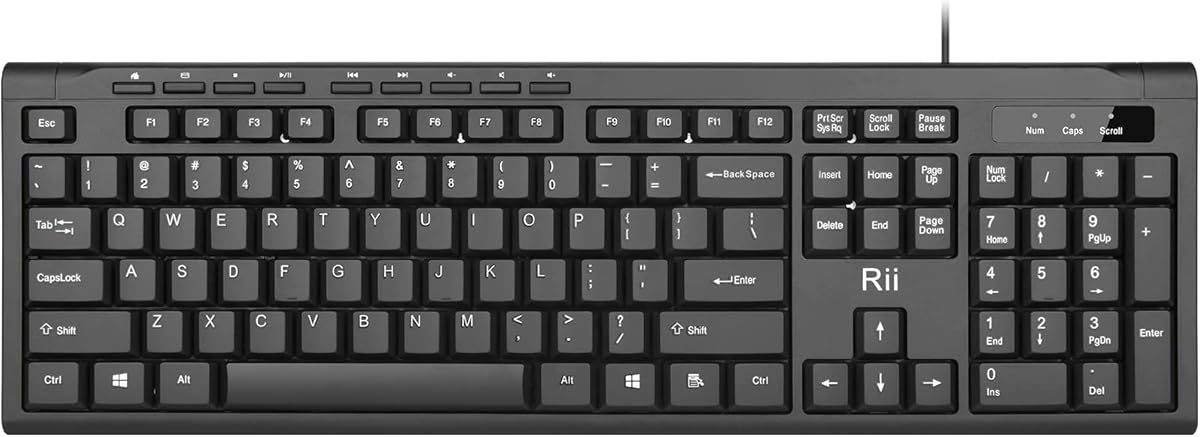
Rii RK907
4.5Editor score
Plug-and-play USB connection
Low-profile quiet keys
Budget-friendly construction
This guide compares the top lightweight keyboard options for portability and performance across gaming, office, and travel use cases.
Finding the right lightweight keyboard can transform your workspace by reducing clutter and improving portability without sacrificing typing quality. Whether you are a gamer looking for compact efficiency or a professional needing a travel-friendly solution, the market offers diverse options. This guide explores ten top-rated models designed to meet various needs while maintaining a slim profile.
We evaluated each keyboard based on build quality, connection stability, battery life, and overall typing comfort. Our analysis focuses on real-world usability, ensuring that every recommendation delivers on its promises. From ultra-slim membrane designs to robust Bluetooth alternatives, these selections represent the best balance of weight and function available today.
Each pick highlights unique strengths such as ergonomic layouts, multi-device switching, or durable construction. You will find detailed insights into what makes each model stand out in its category. Keep in mind that availability and pricing can fluctuate, so always verify current details before making your final decision.
4.5Editor score

4.4Editor score

4.3Editor score
The following table provides a quick side-by-side comparison of all ten selected keyboards to help you identify the best fit for your specific workflow and portability needs.



The Logitech MX Keys Mini stands out as a premium choice for users seeking a lightweight keyboard with intelligent features. With a 4.4 rating, it offers a minimalist form factor that does not compromise on functionality or typing comfort.
We may earn a commission when you buy through this link, at no additional cost to you.
Its smart illumination system lights up keys when hands approach, adjusting to ambient light automatically. The keys are shaped for fingertips, providing a perfect stroke experience that reduces fatigue during long sessions. Multi-device support allows seamless switching between up to three devices via Bluetooth Low Energy.
While the price is higher than average, the battery life is impressive, lasting up to ten days with backlighting or five months without. The use of recycled plastic aligns with environmental goals without sacrificing durability. Some users may find the switches less tactile than mechanical alternatives.
This keyboard is ideal for professionals who need reliability, portability, and smart features in a compact package. Whether you work from home or travel frequently, the MX Keys Mini delivers a premium typing experience that justifies its cost.
The backlit keys activate automatically when your hands approach, ensuring visibility in low light while conserving battery life.
You can pair with up to three devices and switch between them instantly, making it perfect for multitaskers.
We may earn a commission when you buy through this link, at no additional cost to you.
The Rii RK907 offers an excellent entry point for those needing a lightweight keyboard without breaking the bank. With a 4.5 rating, it delivers a quiet and comfortable typing experience suitable for office environments.
We may earn a commission when you buy through this link, at no additional cost to you.
Its low-profile keys ensure reduced noise and comfortable keystrokes, ideal for shared workspaces. The splash-resistant design adds durability, protecting against minor accidents. The plug-and-play USB connection requires no installation or batteries, ensuring immediate usability.
While it lacks wireless capabilities, the wired connection ensures zero latency and reliable performance. The compact design fits easily on small desks, freeing up valuable space. The lack of extra media keys means a purely functional approach to typing tasks.
This model is perfect for users who prioritize simplicity and cost-effectiveness. If you need a reliable backup or a primary input device for basic computing, the RK907 is a solid and budget-friendly choice.
The USB connection ensures a stable link without the need for pairing or battery replacements.
Low-profile keys minimize noise, making this keyboard ideal for libraries or quiet offices.
We may earn a commission when you buy through this link, at no additional cost to you.
The ProtoArc XK01 bridges the gap between portability and full productivity with its unique tri-fold design. Rated at 4.3, it offers a true desktop typing experience that folds down to a compact size for travel.
We may earn a commission when you buy through this link, at no additional cost to you.
With 105 keys, including a number pad, it retains all standard keys found on full-size keyboards. The internal aluminum hinges are tested for over 10,000 folds, ensuring longevity. Bluetooth 5.1 allows switching between three devices with a single button press.
The scissor-switch keys reduce typing noise while maintaining a comfortable feel. USB-C rechargeability ensures you can use it for months on a single charge. However, the setup process involves unfolding and positioning it correctly, which adds a step compared to standard keyboards.
This keyboard is best for remote workers or travelers who need full typing functionality on the go. If you frequently use a laptop or tablet for work and need a robust input device, the XK01 offers premium utility.
Built with tested aluminum hinges, the folding mechanism withstands thousands of cycles for long-term use.
Despite its compact folded size, you get a full 105-key layout for maximum productivity.
We may earn a commission when you buy through this link, at no additional cost to you.
The Arteck 2.4G Wireless Keyboard is designed for users who need a full-size layout without the bulk. Its 4.4 rating highlights its success in balancing slimness with functionality.
We may earn a commission when you buy through this link, at no additional cost to you.
The stainless steel body provides a heavy-duty feel, offering stability during typing. A built-in rechargeable battery lasts up to six months, reducing the need for replacements. Low-profile keys offer a quiet and comfortable typing experience.
The 2.4G wireless connection ensures stability without the latency issues of older wireless tech. However, it requires a USB port on your device, which might limit use with tablets without adapters. The ultra-thin profile saves space on your desk.
This model is perfect for office users who need number pad functionality and durability. If you value a sturdy build and long battery life without constant recharging, the Arteck Full Size is a reliable option.
The metal construction adds durability and a premium look while keeping the keyboard stable during use.
With a six-month battery life, you can focus on work without worrying about frequent charging cycles.
We may earn a commission when you buy through this link, at no additional cost to you.
The TECKNET Mini Compact is tailored for media control and home use with its dedicated hotkeys. Rated at 4.4, it offers a comfortable typing experience in a smaller footprint.
We may earn a commission when you buy through this link, at no additional cost to you.
Its 12-month battery life ensures long-term use without interruption. The chocolate keycap design provides smooth, quiet tapping that reduces finger fatigue. With media hotkeys, you can control playback directly from the keyboard.
The 2.4G wireless connection offers stability up to 32.8 feet. However, it uses a USB receiver, not Bluetooth, which may limit compatibility with some devices. The compact size fits easily on coffee tables or travel bags.
This keyboard is ideal for controlling entertainment systems or working in tight spaces. If you need a lightweight option with media functions and long battery life, the TECKNET Mini is a practical choice.
Dedicated hotkeys allow you to control volume and playback without switching apps.
With a 12-month battery life, this keyboard is ready for use when needed without constant monitoring.
We may earn a commission when you buy through this link, at no additional cost to you.
The Logitech Pebble Keys 2 K380s redefines slimness with its portable design and smart features. With a 4.3 rating, it supports easy switching between three devices via Bluetooth.
We may earn a commission when you buy through this link, at no additional cost to you.
Its round scooped keys offer a quiet, familiar laptop-like typing experience. Made with recycled plastic, it appeals to eco-conscious buyers. The 3-year battery life ensures worry-free usage over long periods.
Bluetooth connectivity allows for seamless integration with Windows, macOS, and ChromeOS. However, the unique key shape may take some adjustment. Additionally, it uses standard batteries instead of a rechargeable port.
This keyboard is perfect for students and professionals who travel frequently. If you need a slim, eco-friendly, and versatile keyboard that handles multiple devices, the K380s is a top contender.
Constructed with significant recycled plastic content, this keyboard reduces environmental impact without sacrificing quality.
Compatible with a wide range of operating systems, ensuring flexibility for diverse tech environments.
We may earn a commission when you buy through this link, at no additional cost to you.
The Arteck 2.4G Slim combines a sleek stainless steel design with a full-size layout. Rated at 4.4, it offers a premium feel in a lightweight package.
We may earn a commission when you buy through this link, at no additional cost to you.
Its ultra-thin profile makes it easy to slide into bags or fit on small desks. The built-in rechargeable battery eliminates the need for disposable replacements. Low-profile keys provide a quiet and comfortable typing experience.
The stainless steel body offers heavy-duty durability and a modern look. However, the metal can feel cold to the touch. A USB cable is required for charging, which adds a minor step to maintenance.
This keyboard is ideal for professionals who value style and durability. If you need a slim, rechargeable keyboard that looks great and lasts long, the Arteck Slim is a compelling choice.
The stainless steel finish provides a modern and professional look suitable for any workspace.
Weighing only 10.2 ounces, this keyboard is easy to carry for meetings or travel.
We may earn a commission when you buy through this link, at no additional cost to you.
The ProtoArc XK04 is designed specifically for mobile devices with its ultra-compact folding. Rated at 4.4, it fits easily into pockets for true portability.
We may earn a commission when you buy through this link, at no additional cost to you.
Its two-fold design with a PU leather cover protects the keys during transport. Bluetooth 5.1 allows connection to three devices. USB-C rechargeability ensures convenient power management. The small keycaps are optimized for mobile use.
This keyboard is ideal for on-the-go messaging and note-taking on tablets. The learning curve is small due to the compact layout. However, it may lack the comfort of full-size models for long typing sessions.
If you need a keyboard for a phone or tablet that fits in your bag or pocket, the XK04 is an excellent solution for mobile productivity.
The integrated PU leather cover shields the keyboard from damage, adding a premium touch to portability.
Optimized for phones and tablets, this keyboard enables physical typing where touchscreens fall short.
We may earn a commission when you buy through this link, at no additional cost to you.
The GEODMAER 65% Gaming Keyboard is a budget-friendly option for gamers seeking a compact setup. With a 4.3 rating, it features a modern look and functional design.
We may earn a commission when you buy through this link, at no additional cost to you.
Its 65% design saves desk space while keeping essential keys. The LED backlighting offers multiple modes for style. The imitation mechanical technology provides a satisfying feel. Anti-ghosting ensures accurate input during gameplay.
The detachable Type-C cable ensures a stable connection. However, it is wired, limiting flexibility compared to wireless options. The lack of a numpad may not suit all users.
This keyboard is perfect for gamers on a tight budget who want style and performance. If you need a compact, well-lit keyboard for gaming or general use, the GEODMAER is a strong pick.
The 65% compact design frees up desktop space, ideal for small desks and portable setups.
Adjustable LED backlighting allows you to customize the look to your personal style.
We may earn a commission when you buy through this link, at no additional cost to you.
The Logitech K400 Plus is built for controlling media PCs and TV setups. With a 4.4 rating, it simplifies navigation from your couch.
We may earn a commission when you buy through this link, at no additional cost to you.
Its integrated touchpad eliminates the need for a separate mouse. The media-friendly layout includes dedicated keys for volume and playback. A 18-month battery life ensures uninterrupted use. The spill-resistant design adds durability.
It connects via a Unifying receiver for reliability. However, the layout is bulky for typing. It is best suited for navigation and media control rather than writing.
This keyboard is ideal for home theaters or living room PCs. If you need a simple way to manage content and navigation on a TV, the K400 Plus is the perfect tool.
The built-in touchpad allows for smooth navigation without needing to reach for a mouse.
Dedicated media keys make it easy to control volume and playback directly from the keyboard.
We may earn a commission when you buy through this link, at no additional cost to you.
Selecting a lightweight keyboard involves balancing portability, functionality, and durability. Understanding the key factors helps you make an informed decision.
Lightweight keyboards come in wired, wireless, and Bluetooth variants. Wired options offer zero latency but restrict movement. Bluetooth provides versatility across devices, while 2.4G wireless ensures stability with a receiver.
Choose Bluetooth for multi-device needs and wired for gaming where latency matters.
Materials like aluminum and stainless steel add durability and weight but often feel more premium. Plastic models are lighter but may feel less sturdy. Splash resistance is a valuable feature for accidental spills.
Look for durable materials if you travel frequently or use your keyboard in varied environments.
Full-size layouts include numpads, which are useful for data entry. Compact layouts like 60% or 65% save space but remove certain keys. Foldable designs offer full functionality in a portable size.
Prioritize compact or foldable layouts if portability is your main goal.
Rechargeable lithium batteries are convenient and eco-friendly. Disposable battery options can last longer but require replacements. Look for keyboards with auto-sleep modes to conserve power.
Aim for models with rechargeable options or multi-year battery life for minimal maintenance.
Mechanical switches provide tactile feedback, while scissor or membrane keys offer quiet operation. Key travel distance affects comfort over long sessions. Low-profile keys reduce finger fatigue.
Test key feel before purchasing if possible to ensure it suits your typing style.
Ensure the keyboard supports your operating system, whether Windows, macOS, or ChromeOS. Some models offer specific function keys for different systems. Bluetooth support ensures broad device compatibility.
Check product descriptions for OS compatibility to avoid connection issues.
Foldable designs, carrying cases, and slim profiles enhance portability. Weight should be considered for frequent travel. Integrated covers protect keys during transit.
Choose models with protective features if you plan to carry your keyboard often.
Prices vary widely from budget-friendly options to premium models. Higher costs often reflect better build quality, features, or brand reliability. Consider your usage needs to justify the investment.
Balance cost with required features to find the best value for your situation.
Always start by ensuring your keyboard is fully charged or has fresh batteries before initial use. Connect via Bluetooth or USB depending on the model and verify the pairing process on your device settings. This ensures a stable link from the start.
For foldable keyboards, unfold gently along the hinges to avoid stress on the joints. Keep the keys free from debris by using a soft brush or compressed air regularly. Wipe the surface with a microfiber cloth to maintain cleanliness without moisture.
When not in use, store the keyboard in a protective case to prevent scratches and dust. For wired models, coil the cable neatly to prevent internal wire damage. Regular maintenance extends the lifespan and ensures consistent performance.
A lightweight keyboard typically uses materials like plastic or thin aluminum to reduce weight. Compact layouts and thin profiles also contribute to overall lightness. Design choices prioritize portability without sacrificing essential functionality.
Yes, many lightweight keyboards are designed for durability with reinforced hinges and spill-resistant coatings. Build quality varies by model, but premium options often use robust materials like metal. Always check warranties for assurance.
Most modern lightweight keyboards offer Bluetooth connectivity, making them compatible with tablets. Ensure your tablet supports the specific Bluetooth version the keyboard uses. Some may require adapters for older models.
Many lightweight keyboards use rechargeable batteries to reduce waste and cost. Some models still support replaceable batteries for convenience. Check the product details to know the power source before purchasing.
Some lightweight keyboards are designed for gaming with anti-ghosting features. Wired models offer better responsiveness than wireless options. Check for dedicated gaming modes and low latency features to ensure performance.
Battery life depends on usage patterns and features like backlighting. Most rechargeable models last weeks to months per charge. Look for auto-sleep features to extend battery life significantly.
Most lightweight keyboards support multiple operating systems. Some feature function keys tailored for specific OS needs. Check compatibility notes to ensure seamless switching between devices.
Bluetooth allows connection to multiple devices without a receiver, making it versatile. Wireless 2.4G offers lower latency and stronger connections. Choose based on your device ecosystem and priority for speed.
Choosing the right lightweight keyboard depends on your specific needs for portability and functionality. Whether you require a compact gaming layout or a full-size foldable option, the top picks offer reliable solutions.
Prioritize connection stability, battery life, and build quality to ensure long-term satisfaction. Consider how the keyboard fits into your daily workflow before making a final decision.
Remember to verify current availability and pricing as these can change frequently. With the right choice, a lightweight keyboard can transform your workspace into a more efficient and portable environment.