
SABRENT 74 in 1 3.5 Inch Internal Flash Media Card Reader/Writer with USB Port (CR-USNT)
4.0Editor score
Supports 74 card types
Includes USB 2.0 port
Low cost solution
This guide compares the top internal media card readers for desktop PCs, evaluating speed, compatibility, and build quality to help you choose the right model
Choosing the right internal media card reader can transform how you manage data on your desktop computer. These devices offer convenient front-panel access for transferring photos, videos, and files without plugging in external drives.
We evaluated ten top-rated models based on compatibility, transfer speeds, and ease of installation. Our analysis covers diverse formats from SD and CF to proprietary types ensuring you find a reader that fits your specific needs.
Each pick highlights key strengths and trade-offs to guide your decision. Note that prices and availability fluctuate, so verify current listings before purchasing to ensure you get the best value for your budget.
4.0Editor score

4.5Editor score

3.8Editor score
The following table provides a side-by-side comparison of the top ten internal media card readers. Each entry lists key specifications to help you quickly identify the model that matches your connectivity and format requirements.


The StarTech Internal Card Reader stands out as the Editor's Choice for professionals needing reliable internal access. With a 4.5 rating, it handles a vast array of formats including xD, CF, and MemoryStick variants.
We may earn a commission when you buy through this link, at no additional cost to you.
Its USB 3.0 interface delivers high-speed data transmission essential for large media files. The ability to access four different card slots simultaneously streamlines workflows for photographers and videographers transferring content.
While the price is higher than basic models, the build quality and TAA compliance justify the investment. The included 20-pin IDC cable ensures a straightforward connection to your motherboard without external dependencies.
This reader is ideal for IT professionals and content creators who require consistent performance. Its OS independence means it works seamlessly across Windows, macOS, and Linux environments.
This model supports an extensive range of legacy and modern card types ensuring you never need multiple readers.
USB 3.0 connectivity ensures fast file movement reducing wait times during critical production schedules.
We may earn a commission when you buy through this link, at no additional cost to you.
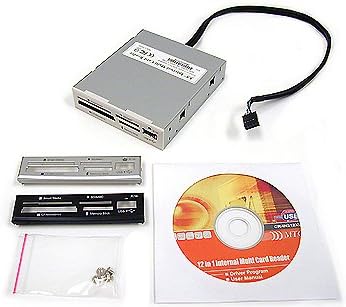
The SABRENT 74 in 1 offers an incredibly affordable entry point for internal card reading. With a 4.0 rating, it supports an impressive 74 different memory card types covering nearly every legacy format.
We may earn a commission when you buy through this link, at no additional cost to you.
Its main advantage is the inclusion of an additional USB 2.0 port which adds convenience for peripherals. This feature alone makes it a versatile addition to a desktop front panel despite its low price.
Users should note the requirement for an internal power connector which may complicate installation in some cases. The USB 2.0 standard is slower than USB 3.0 but acceptable for casual file transfers.
This model is perfect for hobbyists or budget-conscious users needing broad compatibility. It delivers essential functionality without breaking the bank while maintaining decent reliability for everyday use.
Supporting 74 card types ensures you can read older media without needing specialized adapters.
The included USB port allows you to plug in drives or mice directly at the front panel.
We may earn a commission when you buy through this link, at no additional cost to you.
This 5.25-inch media dashboard delivers a premium all-in-one solution for desktop front panels. While the rating is 3.8, its feature set includes a built-in USB hub and audio jacks beyond standard card reading.
We may earn a commission when you buy through this link, at no additional cost to you.
The inclusion of eSATA and multiple USB ports transforms your front panel into a central hub. This is ideal for builders who want to maximize utility from available bay space without adding external accessories.
Users must ensure their case has a 5.25 inch drive bay to accommodate this larger unit. The mixed ratings suggest potential variations in build quality or compatibility that warrant careful selection before purchase.
Best for enthusiasts seeking maximum connectivity, this model simplifies cable management by consolidating functions. It is a robust choice for systems where front-panel access to audio and storage is a priority.
Beyond card reading this unit offers multiple USB ports and eSATA for versatile device connections.
Front audio jacks eliminate the need to reach behind the chassis for headphone or mic plugs.
We may earn a commission when you buy through this link, at no additional cost to you.
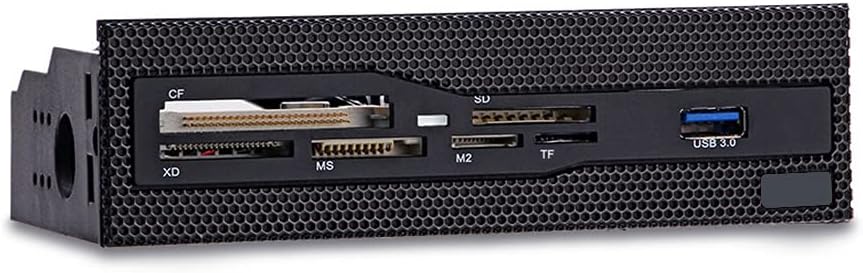
This 5.25-inch card reader emphasizes speed and durability for front panel installations. With a 4.3 rating, it features a high-speed USB 3.0 interface to accelerate file transfers for content creators.
We may earn a commission when you buy through this link, at no additional cost to you.
The copper-plated card slots are designed to ensure signal stability during transmission. This construction detail minimizes data corruption risks compared to standard plastic slots found in cheaper models.
Installation requires a 5.25 inch bay which limits compatibility to larger mid-tower or full-tower cases. The grid panel design integrates well with cases featuring mesh fronts maintaining a clean aesthetic look.
Ideal for users prioritizing transfer speed this model balances performance with build quality. It is a solid choice for those who need reliable access to CF and TF cards without external dongles.
Copper-plated slots reduce interference ensuring consistent data integrity during reads and writes.
The grid design complements cases with front mesh panels preserving airflow and visual consistency.
We may earn a commission when you buy through this link, at no additional cost to you.
The Vantec Link receives a perfect 5.0 rating for its advanced support of high-capacity media. It supports SDXC cards up to 2TB and CompactFlash up to 144PB making it future-proof for large files.
We may earn a commission when you buy through this link, at no additional cost to you.
Multi-LUN technology allows simultaneous access to multiple cards which improves workflow efficiency. This feature is crucial for professionals who manage large archives or need quick data duplication tasks.
Users must connect this reader via a 20-pin USB header ensuring a clean internal setup. The lack of external cables reduces clutter but requires specific motherboard support for installation.
Best for power users needing high reliability and capacity this model delivers exceptional performance. Its broad compatibility with eMMC and MemoryStick variants makes it a comprehensive solution for diverse needs.
Support for massive card sizes ensures compatibility with next-gen high-resolution media files.
Multi-LUN support allows concurrent card operations saving time during bulk file transfers.
We may earn a commission when you buy through this link, at no additional cost to you.
This TCC-QL5E dashboard provides extensive connectivity for 5.25 inch bays. It combines card reading with USB 3.0 and 2.0 ports plus eSATA for comprehensive front panel functionality.
We may earn a commission when you buy through this link, at no additional cost to you.
The inclusion of audio ports and LED indicators enhances usability by providing clear status feedback. Users can connect speakers and microphones directly improving convenience during media consumption or editing.
Installation involves multiple cables including SATA data and audio connectors which may challenge beginners. The lack of a rating suggests limited reviews so verify compatibility with your specific case before purchasing.
Suitable for advanced builders, this unit maximizes the utility of spare drive bays. It delivers a rich feature set that supports both storage and audio needs in a single internal component.
With USB and eSATA ports this unit offers flexible connectivity for various peripheral devices.
Built-in audio jacks provide easy access for headphones and microphones without rear cabling.
We may earn a commission when you buy through this link, at no additional cost to you.
The Sony MRW620 offers a solid 17-in-1 reading solution with trusted brand quality. Its 4.0 rating reflects consistent performance for users needing reliable access to legacy and modern card formats.
We may earn a commission when you buy through this link, at no additional cost to you.
It includes both black and ivory faceplates allowing users to match their PC chassis aesthetic. This attention to detail makes it a preferred choice for custom builds seeking visual cohesion.
The bundled drive letter recognition software simplifies setup for users unfamiliar with internal mounting. However, compatibility is primarily focused on Windows XP and Vista which may limit modern OS support.
Best for users with older systems or specific Sony media formats this reader remains dependable. Its reliable build ensures long-term functionality even if transfer speeds are not state-of-the-art.
Included bezel colors allow the reader to blend seamlessly with your computer case design.
Drive letter recognition software ensures your system identifies the card reader automatically.
We may earn a commission when you buy through this link, at no additional cost to you.
This All-In-One reader achieves a perfect 5.0 rating despite its simple listing. It is designed for 2.5 inch bays which is a smaller and less common internal slot size for PC cases.
We may earn a commission when you buy through this link, at no additional cost to you.
The product comes with black, silver, and white bezels offering flexibility for different PC builds. Its high-quality construction ensures durability even with frequent card insertions and removals.
Users with only 2.5 inch drive bays may find this unit perfectly suited for their needs. While slot counts are not specified, the rating suggests it handles common formats reliably.
Ideal for compact builds or specialized cases this reader provides essential internal access. It is a great option for those seeking a high-quality solution that fits unique chassis dimensions.
Designed for 2.5 inch bays it fits cases that lack standard 3.5 inch or 5.25 inch slots.
High-quality materials ensure the reader withstands daily use without failure or wear.
We may earn a commission when you buy through this link, at no additional cost to you.
The Akasa AK-ICR-07 stands out with dedicated ports for adapters to support microSD and M2 cards. Its 4.2 rating indicates strong performance for general users needing reliable internal card access.
We may earn a commission when you buy through this link, at no additional cost to you.
An additional USB port provides extra connectivity for memory sticks or mobile phones directly. This feature adds versatility beyond card reading making it a more functional front panel addition.
It includes two fascia panels allowing you to choose between black or classic white to match your case. LED indicators for power and data transfer provide clear visual feedback during operations.
Best for users needing adapter support this model simplifies the handling of smaller cards. It is a well-rounded choice that balances essential features with convenient connectivity options.
Dedicated ports eliminate the need for separate adapters when reading microSD and M2 cards.
LED indicators clearly show power and data activity preventing guesswork during file transfers.
We may earn a commission when you buy through this link, at no additional cost to you.
This MTG reader supports 22 media types including CompactFlash and SmartMedia for broad legacy access. Its metal case provides robust protection and durability for demanding internal installation environments.
We may earn a commission when you buy through this link, at no additional cost to you.
Data transfer speeds reach up to 4.5 MB per second which is adequate for small files and documents. The hot-swappable design allows users to connect cards without powering down the system.
Users receive beige black and silver bezels to match their system color scheme. The N/A rating suggests limited recent feedback so verify current compatibility before purchasing for modern cards.
Best for those needing extensive format support this model offers a sturdy build. Its metal construction and bezel options make it a reliable and aesthetically flexible choice for older systems.
A metal case ensures the reader withstands mechanical stress better than plastic alternatives.
Support for 22 formats ensures compatibility with a vast array of legacy and niche cards.
We may earn a commission when you buy through this link, at no additional cost to you.
Selecting the right internal media card reader involves evaluating several technical factors to ensure compatibility and performance.
Internal card readers typically fit into 3.5-inch or 5.25-inch drive bays. Check your PC case specifications to ensure the reader matches the available slot size for a proper fit.
Choose a model that matches your existing drive bay to avoid installation issues.
USB 3.0 readers offer faster transfer speeds up to 5Gbps compared to USB 2.0. If you work with large video or photo files this speed is essential for efficient workflow.
Prioritize USB 3.0 if you need high-speed data transfers for media production.
Ensure the reader supports all card types you currently use such as SD, CF, or MemoryStick. Some legacy formats like xD or SmartMedia require specific slots to be read correctly.
Verify the compatibility list to confirm support for your specific card formats.
Most readers connect via a 20-pin USB header on the motherboard. Some models may require internal power connectors which adds complexity to the installation process.
Check your motherboard capabilities to ensure it has the necessary headers for connection.
Some models include extra USB ports or audio jacks to expand front panel functionality. These features add versatility and can reduce cable clutter by centralizing connections.
Consider extra ports if you need more connectivity options at the front of your PC.
Readers often come with interchangeable bezels in black, white, or silver. This allows you to match the front panel appearance with your system case design for a clean look.
Select a reader with bezel options that align with your build aesthetic.
Metal cases offer better protection against damage and heat than plastic ones. Higher quality materials often correlate with longer lifespan and more reliable signal transmission.
Look for durable construction to ensure the reader lasts through daily use.
Confirm that the device supports your specific operating system including Windows macOS or Linux. OS independence ensures the reader functions correctly without needing additional drivers.
Verify system support to ensure seamless integration with your current setup.
Before installation, shut down your computer and disconnect the power supply to ensure safety. Locate an empty 3.5-inch or 5.25-inch drive bay on your PC case where the reader will fit.
Connect the USB header cable from the reader to the motherboard and secure the unit with screws. Once installed, reconnect power and start your system to detect the device automatically.
Keep the card slots clean by removing dust regularly and avoid forcing cards into the ports. This maintenance ensures consistent signal quality and prevents damage to the internal connectors.
USB 3.0 readers transfer data much faster than USB 2.0 models reaching speeds up to 5Gbps. This speed difference is crucial for large media files but USB 2.0 suffices for small documents.
Most internal readers draw power from the motherboard header but some may need a SATA power connection. Check the specific product requirements to ensure your case has sufficient power cabling.
Internal readers are designed for desktop tower cases with standard drive bays. Laptops generally lack the necessary space and headers so external USB card readers are the best alternative.
If your case lacks a 5.25-inch bay look for models that fit into 3.5-inch drive bays. These smaller units are common in modern mid-tower cases and offer similar functionality.
Bezel choice depends on your case color and aesthetic preference. Most readers include multiple bezels so you can swap them to match your PC panel for a cohesive look.
Many internal readers support macOS automatically via plug-and-play drivers. However, always verify OS compatibility in the product specs to ensure full support without additional software.
Our top picks highlight the StarTech reader for professionals needing reliability and the Sabrent model for budget-friendly versatility. Each option offers distinct advantages depending on your specific workflow and case requirements.
Prioritize USB 3.0 support if you work with large media files to avoid bottlenecks. Also consider build quality and extra ports like audio or USB hubs to maximize front panel utility.
Prices and availability change frequently so check current listings before finalizing your purchase. Verify the model fits your drive bay size and offers the card formats you need most.