
CENMATE Aluminum 4 Bay Hard Drive Enclosure
4.3Editor score
Aluminum alloy housing
Supports 2.5 and 3.5 inch drives
USB 3.0 speed
Direct attached storage offers a simple way to expand your computer's capacity without the complexity of networked systems. These devices connect straight via USB or Thunderbolt for immediate access to large files and backups.
We evaluated ten leading models based on transfer speeds, drive compatibility, cooling efficiency, and build quality. Our analysis highlights key differences between basic enclosures and advanced hybrid units with SSD slots.
Each selection below shows specific strengths for different workflows ranging from creative editing to archival storage. Keep in mind that product availability and pricing can change frequently over time.
4.3Editor score

4.2Editor score

3.5Editor score
As an Amazon Associate we earn from qualifying purchases.
This table provides a side-by-side overview of each model's core capabilities and design features to help you quickly identify the right fit for your specific storage needs.


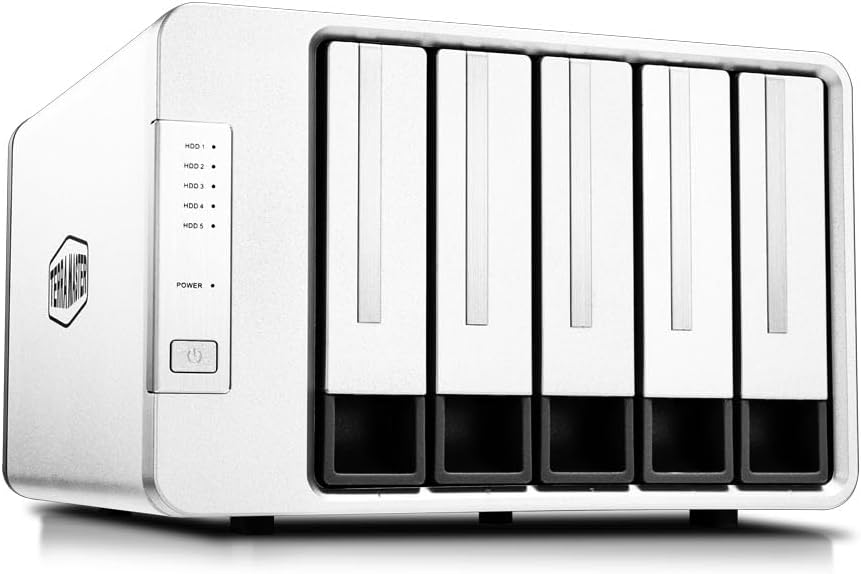


The TERRAMASTER D4-320 stands out as a top performer in the direct attached storage category with its high-speed USB 3.2 Gen2 interface. It supports up to four SATA drives and offers hot swappable convenience for users needing frequent drive changes.
We may earn a commission when you buy through this link, at no additional cost to you.
Its standout quality lies in the combination of speed and usability. Read and write speeds can reach over 1000 MB/s when four drives are installed. The push-lock design secures trays automatically without tools.
Trade-offs include the lack of hardware RAID support which means data protection depends on software. Additionally it requires an external power adapter which adds to the footprint compared to bus-powered options.
This model is ideal for creative professionals who need fast access to large video files and do not require complex RAID arrays. It balances performance with ease of use effectively.
The USB 3.2 Gen2 protocol delivers up to 10Gbps bandwidth ensuring quick file transfers for demanding workflows.
Tool-free trays and hot swap support make drive maintenance and expansion quick and hassle-free without downtime.
We may earn a commission when you buy through this link, at no additional cost to you.
The CENMATE Aluminum 4 Bay enclosure offers excellent value for those needing reliable external storage without a high price tag. It supports both 2.5 and 3.5 inch drives and features a sturdy aluminum body.
We may earn a commission when you buy through this link, at no additional cost to you.
Its main strength is the balance of cost and build quality. The aluminum chassis helps dissipate heat effectively while the fan keeps drives cool during heavy use. It is plug and play.
Noise levels from the fan may be noticeable in quiet environments so it is best suited for offices or workspaces. Transfer speeds are limited to 5Gbps which is slower than Gen2 options.
This unit is perfect for budget-conscious users who need basic storage expansion and do not require the fastest transfer rates. It provides solid protection for internal drives at a low cost.
The aluminum alloy construction ensures durability and helps manage heat better than plastic alternatives.
With a low price point it delivers reliable functionality for users who need simple drive expansion solutions.
We may earn a commission when you buy through this link, at no additional cost to you.
The TERRAMASTER D8 Hybrid introduces a unique approach by combining SATA and NVMe slots in one enclosure. This allows users to separate hot data on SSDs and cold data on HDDs efficiently.
We may earn a commission when you buy through this link, at no additional cost to you.
It offers massive potential capacity up to 152TB with four 30TB HDDs and four 8TB NVMe drives. The USB 3.2 Gen2 interface ensures fast data transfer for active workloads on the SSD portion.
Managing two types of drives may require more planning and software to optimize data placement. The price is higher than standard enclosures reflecting the advanced hybrid design.
This model suits power users who need both large storage and high speed in a single device. It is ideal for video editors or servers managing diverse data types.
The unique mix of SATA and NVMe bays enables tailored storage strategies for different data access patterns.
With support for 152TB total and fast NVMe access you get both volume and performance in one unit.
We may earn a commission when you buy through this link, at no additional cost to you.
The QNAP TR-004 is designed for users who want hardware RAID capabilities without a full NAS system. It supports RAID 0 1 5 and JBOD modes for flexible data management and protection.
We may earn a commission when you buy through this link, at no additional cost to you.
It integrates well with QNAP NAS devices allowing expansion of existing storage pools. The lockable drive bays add a layer of security for shared environments or mobile use.
Note that data compatibility between TR-004 units and NAS systems requires specific firmware updates. Migrating drives between different devices may not preserve file recognition.
This unit is best for those already invested in the QNAP ecosystem or needing basic hardware RAID. It offers a middle ground between simple DAS and complex NAS systems.
Hardware RAID support provides data redundancy or performance boosts without relying on host system software.
Designed to work seamlessly with QNAP NAS it expands capacity while maintaining consistent management workflows.
We may earn a commission when you buy through this link, at no additional cost to you.
The SABRENT 5-Bay enclosure delivers high capacity and reliability with dedicated controllers for each of its five bays. This design reduces interference and improves stability during heavy read and write operations.
We may earn a commission when you buy through this link, at no additional cost to you.
It supports up to 100TB of total storage and features an intelligent PWM fan that adjusts speed based on temperature. The daisy chain port allows connecting multiple devices through a single host port.
The price is higher than basic models reflecting the premium features and capacity. A USB-C host is required for full functionality which may limit compatibility with older systems.
This model is ideal for power users needing maximum storage in a single enclosure without complex network setup. It excels in stability and scalability for demanding environments.
Dedicated controllers per bay ensure stable connections and reduce the risk of drive dropouts during transfers.
Daisy chain support allows connecting additional docks expanding total system capacity without adding host ports.
We may earn a commission when you buy through this link, at no additional cost to you.
The TERRAMASTER D8 Hybrid 2 improves on the original with TPM power management for better energy efficiency and faster wake times. It keeps the hybrid design allowing mixed drive types in one unit.
We may earn a commission when you buy through this link, at no additional cost to you.
Read speeds up to 1020 MB/s make it suitable for demanding video editing or data processing tasks. The device is plug and play across Windows macOS and Linux systems.
Managing hybrid data still requires planning to separate hot and cold data effectively. The price reflects the advanced features and high performance capabilities.
This unit is perfect for users who want maximum flexibility in storage architecture. It balances power efficiency with speed for professional workflows.
TPM technology optimizes energy use and improves drive response times for faster workflow performance.
With up to 1020 MB/s speeds it handles large file transfers and high-speed video editing smoothly.
We may earn a commission when you buy through this link, at no additional cost to you.
The TERRAMASTER D5-310 offers a dedicated hardware RAID system controlled by a physical knob on the back. This allows easy switching between RAID 0 1 5 10 and single disk modes without software.
We may earn a commission when you buy through this link, at no additional cost to you.
It supports up to 120TB total storage and includes free backup software for added data protection. Compatibility with macOS is strong which is rare for hardware RAID enclosures.
Transfer speeds are capped at 5Gbps which may be slower than Gen2 alternatives. The hardware RAID means drives are tied to the unit for data access.
This unit suits users needing simple hardware RAID with cross-platform support. It is a solid choice for those who value ease of RAID management.
A physical knob on the rear simplifies RAID selection and configuration without needing software tools.
Strong compatibility with macOS Windows and Linux makes it versatile for diverse computing environments.
We may earn a commission when you buy through this link, at no additional cost to you.
The WAVLINK 4-Bay enclosure stands out by offering a 4K HDMI video output alongside storage functionality. This turns the dock into a multimedia hub for direct media playback without a host computer.
We may earn a commission when you buy through this link, at no additional cost to you.
It supports 10Gbps transfers via USB 3.2 Type-C and includes temperature controlled fans to maintain drive health. The aluminum shell provides durability and effective heat dissipation.
The HDMI feature requires specific host support and may not work with all USB-C ports. Noise from fans can be noticeable in quiet settings.
This unit is unique for users who want a docking station with media playback and storage. It is great for home theater setups or content creators.
The 4K HDMI output enables direct media playback making it a versatile hub for entertainment systems.
USB 3.2 Type-C ensures fast data transfers for large media files and quick access to stored content.
We may earn a commission when you buy through this link, at no additional cost to you.
The ORICO 5 Bay enclosure uses a magnetic chip design for the cover making it easy to open without tools. It supports up to 110TB of storage across five bays.
We may earn a commission when you buy through this link, at no additional cost to you.
Its multi-protection design guards against overvoltage overcurrent and overheating to ensure data safety. The USB 3.1 Type-C interface delivers up to 5Gbps transfer speeds.
On Linux systems only one drive is read at a time which may limit functionality. The fan provides cooling but can generate some noise during operation.
This model is good for users prioritizing ease of use and drive protection. It offers a simple and safe way to expand storage capacity.
Magnetic covers allow quick access to drives for installation or removal without any tools or screws.
Multiple protection mechanisms safeguard your hardware and data from common electrical and thermal issues.
We may earn a commission when you buy through this link, at no additional cost to you.
The QNAP TR-002 offers a compact two-bay solution for users who need modest storage expansion with hardware RAID options. It supports RAID 0 1 JBOD and individual disk modes for flexibility.
We may earn a commission when you buy through this link, at no additional cost to you.
Lockable drive bays add physical security for drives in shared or public spaces. It integrates with QNAP NAS systems to expand storage pools and capacity seamlessly.
Capacity is limited to two drives which may not suit users needing massive storage. Compatibility depends on NAS firmware versions which requires checking before purchase.
This unit is ideal for small businesses or home users needing secure basic storage. It provides a reliable entry point for RAID and NAS expansion.
Lockable bays help prevent unauthorized access to drives in shared office environments or mobile setups.
Designed to expand QNAP NAS systems it offers seamless storage growth without changing existing workflows.
We may earn a commission when you buy through this link, at no additional cost to you.
Selecting the right direct attached storage model depends on several factors including speed, capacity, and compatibility with your current setup.
The connection interface determines how fast data moves between drives and your computer. USB 3.2 Gen2 offers 10Gbps speeds while older USB 3.0 models provide 5Gbps. Faster speeds matter most for video editing and large file transfers.
Prioritize USB 3.2 Gen2 or Thunderbolt if you need high bandwidth for creative work.
Consider how much total storage you need now and in the future. Some enclosures support up to 152TB while others cap at lower amounts. Ensure the enclosure supports the drive sizes you plan to use.
Choose a model that exceeds your current needs to allow for growth without replacing the enclosure.
Check whether the unit accepts 2.5 or 3.5 inch drives or both. Some models include slots for both andMe and SATA drives. Ensure your existing drives fit the enclosure before purchasing.
Verify compatibility with drive types to avoid return hassles and ensure seamless installation.
Hardware RAID provides data redundancy or performance boosts but adds complexity. If you need redundancy look for models with built-in RAID controllers. Software RAID relies on your system and offers flexibility.
Decide between hardware or software RAID based on your need for data protection and system resources.
Materials like aluminum help dissipate heat and protect drives from physical damage. Plastic housings are lighter but less durable. Check for features like temperature-controlled fans to maintain safe drive temperatures.
Select a sturdy enclosure with cooling features to protect your investment in expensive internal drives.
Hot swap capability allows replacing drives without powering down the unit which saves time. This is useful for frequent changes in shared environments. Ensure your host system and driver support hot plug-in.
Look for models with hot swap trays if you need frequent drive changes without downtime.
Ensure the enclosure works with your computer's operating system. Most support Windows and macOS but some may have issues with Linux. Check for cross-platform compatibility to avoid driver headaches.
Confirm OS compatibility before buying to ensure seamless integration with your workflow.
If you need to move the enclosure often choose a compact and lightweight model. Larger 5 or 8 bay units are better for stationary setups. Consider power requirements as some need external adapters.
Balance size and weight based on whether you need a desktop dock or a mobile solution.
Connect the enclosure to your computer using the included cable. Ensure your system recognizes the drives before transferring data. Format the drives if needed using your operating system tools.
Avoid moving the unit while drives are active to prevent data corruption or physical damage. Keep the enclosure in a well-ventilated area to ensure proper airflow for cooling.
Regularly back up important data to another location to prevent loss from drive failure. Check drive health periodically using software tools to catch issues before they cause problems.
Direct attached storage connects directly to one computer via USB while network attached storage connects to your network. DAS is simpler and faster for single users whereas NAS supports multiple users and network access. Choose DAS for simplicity and NAS for shared access.
Yes NAS drives work in direct attached enclosures as long as the physical size and interface match. These drives are designed for continuous operation which helps reliability. Ensure the enclosure supports the drive size and capacity you plan to use.
Most direct attached storage units are plug and play without additional drivers on Windows and macOS. Some advanced RAID models may require drivers for full functionality. Check the product specs to confirm if drivers are needed for your system.
Each drive in a DAS appears as a separate volume which you can manage independently. You can use software to synchronize data across drives for backup. Hardware RAID models let you combine drives into a single volume for easier access.
Manufacturers use decimal capacity while operating systems use binary which leads to slightly lower reported sizes. Some capacity is also used for file system overhead or RAID parity. This difference is normal and expected across storage devices.
Some models support daisy chaining via extra USB ports allowing multiple enclosures on one host. Check if your specific unit has this feature as not all enclosures support it. Daisychaining requires a host that supports multiple ports or hubs.
Ensure the enclosure is placed in a well-ventilated area away from heat sources. Check that fans are working and vents are clear of dust. If overheating persists reduce heavy load tasks or consider adding external cooling solutions.
With proper care enclosures can last many years but lifespan depends on usage and drive quality. Regular maintenance and proper cooling extend life significantly. Replace any unit showing signs of electrical failure or persistent errors.
The top picks highlight three distinct strengths from budget affordability to advanced hybrid capabilities. Whether you need high speed storage capacity or simplicity there is a model that fits.
Prioritize interface speed and capacity based on your workload while ensuring compatibility with your system. Cooling and build quality also matter for long term reliability.
Always verify current availability and specifications before purchasing as product features can vary by region. Check official sources for the latest updates on firmware and compatibility.