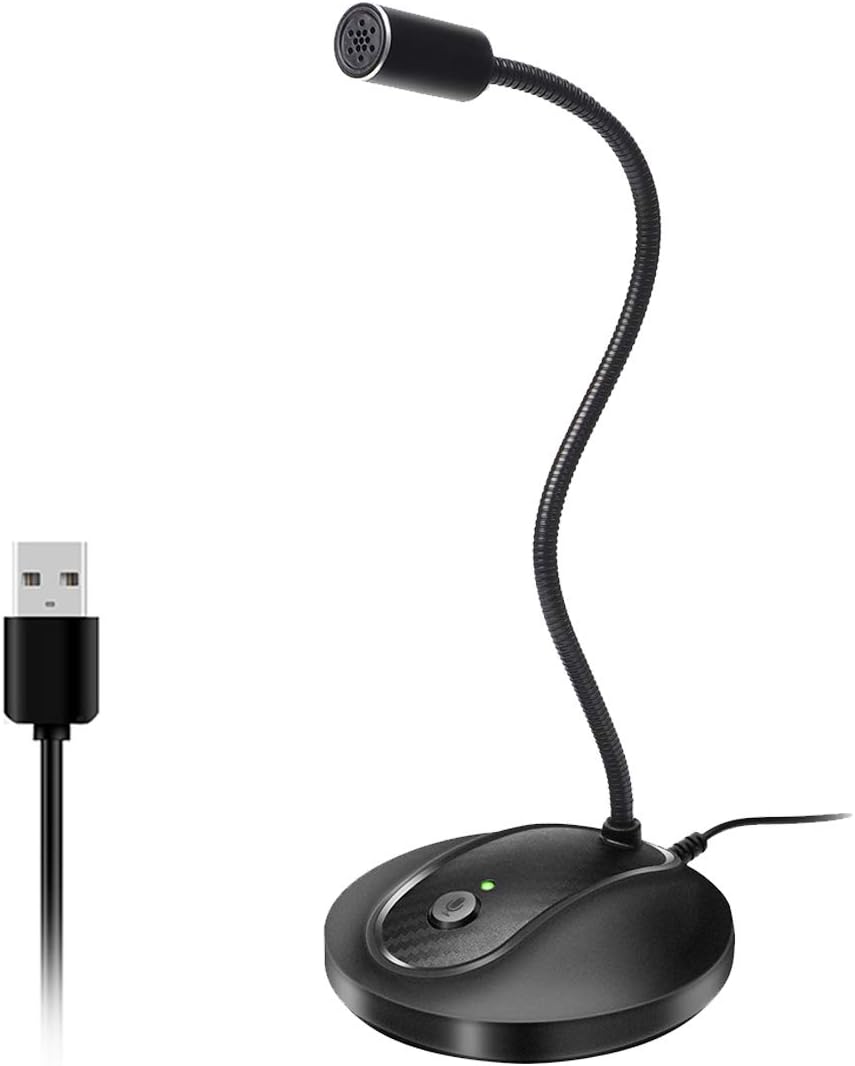
USB Microphone, 360 Degree Adjustable Gooseneck Design
4.4Editor score
360 degree gooseneck design
Intelligent noise canceling technology
Plug and play USB connection
This guide compares the top 10 dictation microphones for computer users to help you find the best USB microphone for accurate speech recognition and clear
Finding the right dictation microphone for computer use is essential for professionals who rely on speech-to-text software. A quality mic ensures your voice is captured clearly, reducing errors in transcription and boosting your overall productivity during long writing sessions.
We evaluated ten leading models based on sound quality, compatibility, ease of setup, and specialized features for dictation work. Our analysis covers everything from budget-friendly USB options to premium handheld devices designed specifically for Dragon NaturallySpeaking and other recognition software.
Each pick highlights key strengths and potential trade-offs so you can choose the best fit for your workspace. Please note that product availability and pricing may change frequently, so verify details on the retailer site before making your final purchase decision today.
4.4Editor score

4.6Editor score

4.2Editor score
This side-by-side comparison highlights the core specifications and unique selling points of each microphone model to help you quickly identify which device aligns best with your specific dictation needs and workflow requirements.




This USB Microphone ranks as the top budget pick for users seeking an affordable dictation microphone for computer systems. With a solid 4.4-star rating, it delivers reliable performance for everyday speech recognition tasks without requiring a significant financial investment.
We may earn a commission when you buy through this link, at no additional cost to you.
Its standout quality lies in the 360-degree adjustable gooseneck design, which allows you to position the mic exactly where your voice originates. The intelligent noise-canceling technology effectively reduces background hum and echo, ensuring your dictation software receives clean input signals consistently.
While it lacks the premium build feel of higher-end models, the metal pipe and heavy-duty ABS stand offer sufficient durability for desk use. The trade-off is a simpler construction, but this keeps costs low and maintains ease of use for non-technical users.
Budget-conscious professionals or students who need a straightforward tool for Dragon or Cortana dictation should buy this model. It offers exceptional value for money and works seamlessly with most operating systems right out of the box.
The flexible gooseneck ensures the microphone stays close to your mouth for maximum sensitivity, which is critical for accurate speech recognition software performance.
Built-in noise canceling helps isolate your voice from room noise, making it ideal for home offices where silence is not guaranteed during recording sessions.
We may earn a commission when you buy through this link, at no additional cost to you.
The Philips LFH3500 SpeechMike stands out as a premium choice for serious dictation professionals who demand precision. Its free-floating, decoupled microphone design minimizes handling noise, ensuring your audio is as clean as possible for transcription software.
We may earn a commission when you buy through this link, at no additional cost to you.
A key strength is the built-in motion sensor, which allows device control through gestures, reducing the need to reach for a keyboard or mouse. The freely configurable function keys let you tailor the device to your specific workflow, boosting productivity over time.
While the price is high compared to standard USB mics, the investment pays off in reduced errors and faster dictation speeds. The main trade-off is the initial setup required to optimize the gesture controls and function keys for your unique needs.
Legal professionals, doctors, or writers who dictate daily will benefit most from this model. If accuracy and workflow efficiency are your top priorities, this premium microphone delivers the specialized control you need.
The decoupled design prevents vibrations from your hand from entering the recording, which is crucial for maintaining high accuracy in sensitive speech recognition software.
Motion sensors allow you to scroll or execute commands without touching the keyboard, keeping your workflow fluid and focused entirely on your dictation tasks.
We may earn a commission when you buy through this link, at no additional cost to you.
The FIFINE Mini Gooseneck offers an ideal solution for users with limited desk space who still need effective dictation capabilities. Its tiny profile keeps your workspace clean while providing a flexible 5.7-inch gooseneck that allows precise positioning.
We may earn a commission when you buy through this link, at no additional cost to you.
This microphone excels in portability and ease of use, featuring a standard USB connection that requires no drivers. The included 6.56-foot cable gives you enough reach to place the mic in the optimal location without stretching cords across your desk.
Although it lacks advanced features like dedicated mute buttons or software integration, the solid metal base ensures it stays put during use. The trade-off is simplicity, which works well for casual dictation tasks where setup speed is valued over complex controls.
Students or casual users who need a reliable, affordable tool for occasional dictation should choose this model. It is particularly useful for those who value desk space and simplicity in their daily computing environment.
The mini design ensures you do not lose valuable desk real estate, making it perfect for small home offices or shared workspaces where every inch counts.
The adjustable neck lets you direct the mic exactly toward your mouth, which is vital for capturing clear speech even in less-than-ideal acoustic environments.
We may earn a commission when you buy through this link, at no additional cost to you.
The Logitech Blue Yeti is widely recognized as a top versatile option for dictation, offering professional-grade audio capture. Its custom three-capsule array produces powerful, clear sound that meets the demands of both speech recognition and high-quality recording.
We may earn a commission when you buy through this link, at no additional cost to you.
A major strength is the inclusion of four pickup patterns, allowing you to tailor how the microphone captures sound based on your environment. The Blue VO!CE software enhances your voice with broadcast-quality effects and modulation, giving you precise control over your output.
While it is excellent for sound quality, the mic is larger and often needs a boom arm to fit comfortably on a desk for dictation. The trade-off is size, but the onboard controls and software flexibility make it worth the investment for serious users.
Users who want a single microphone for dictation, podcasting, and streaming will find this model unmatched. If you value high-fidelity audio and customization options, the Blue Yeti is an excellent long-term investment.
Switching between cardioid, omni, bidirectional, and stereo lets you isolate your voice effectively, which reduces background noise interference in open office settings.
The Blue VO!CE software provides advanced modulation and HD audio samples, ensuring your recorded dictation sounds polished and consistent across all files.
We may earn a commission when you buy through this link, at no additional cost to you.
The TONOR G11 Conference Microphone is engineered to capture sound clearly from multiple directions, making it suitable for dictation in dynamic settings. Its omnidirectional pickup pattern ensures your voice is heard even if you move slightly away from the center.
We may earn a commission when you buy through this link, at no additional cost to you.
Key strengths include a pickup distance of 11.5 feet, which allows you to sit back comfortably while dictating. The convenient mute button with a built-in blue indicator light helps you manage audio privacy quickly without interrupting your workflow.
While the omnidirectional pattern captures your voice well, it may also pick up more ambient noise compared to directional mics. This trade-off is acceptable for users who need flexibility in seating or for shared spaces where mic placement varies.
Professionals who prioritize ease of use and broad coverage should buy this model. It works well for conference rooms or individual workstations where consistent volume capture is more important than strict directional isolation.
With a 11.5-foot range, you can maintain a natural speaking distance without needing to lean over the microphone, reducing physical strain during long sessions.
The instant mute button with visual feedback ensures you can stop recording or speaking accidentally, preserving privacy during sensitive dictation tasks.
We may earn a commission when you buy through this link, at no additional cost to you.
The ZealSound K66 delivers studio-quality audio with intelligent noise reduction tailored for clarity. Its cardioid pickup pattern focuses on your voice while rejecting background noise, which is critical for accurate dictation recognition in noisy environments.
We may earn a commission when you buy through this link, at no additional cost to you.
Key strengths include real-time zero-latency monitoring and dedicated knobs for volume and echo control. These physical controls allow you to adjust sound parameters on the fly without relying on software menus, streamlining your dictation setup process significantly.
While the echo knob can add creative flair, it must be used carefully for professional dictation to avoid artifacts. The trade-off is the need for manual tuning, but this provides flexibility that software-only solutions often lack.
Creators and professionals seeking a mic that bridges dictation and recording needs will appreciate this model. If you want hardware control over your sound quality without complex drivers, the ZealSound K66 is a powerful choice.
Zero-latency monitoring lets you hear your voice instantly through headphones, ensuring consistent volume and clarity throughout your dictation session without delay.
The advanced mode reduces keyboard clicks and fan hum automatically, keeping your recording clean even in active office or home environments.
We may earn a commission when you buy through this link, at no additional cost to you.
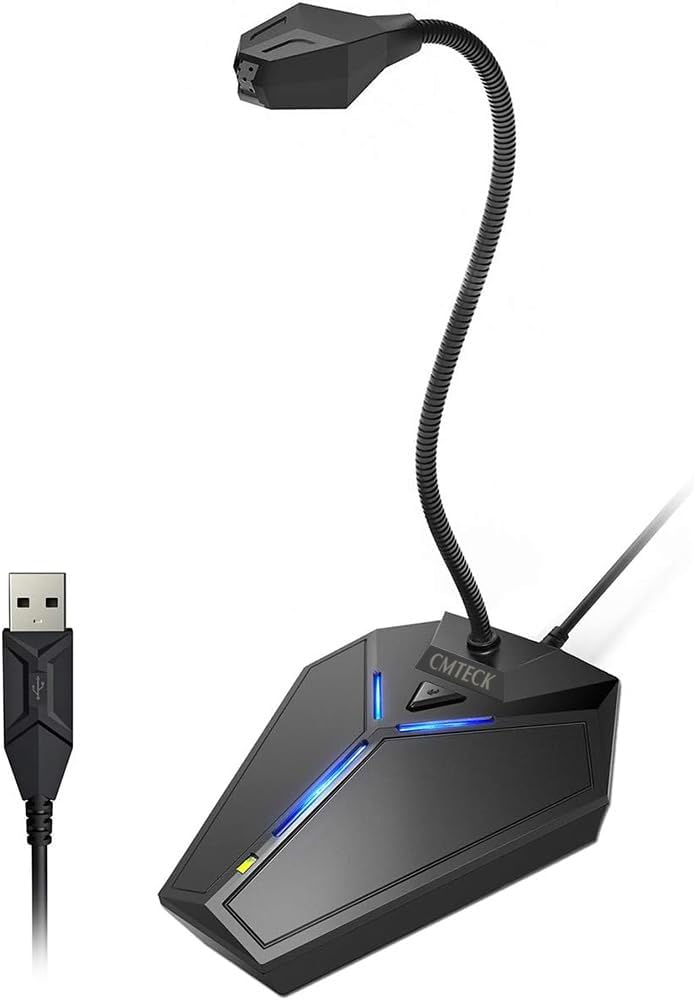
The CMTECK USB Computer Microphone is a solid entry-level option equipped with a high-performance SMART CHIP to suppress noise. This ensures your voice comes through clearly during calls and dictation, making it a practical choice for everyday computer users.
We may earn a commission when you buy through this link, at no additional cost to you.
Its metal gooseneck tube allows flexible positioning similar to premium models but at a lower cost. The unique blue LED light adds a visual effect that you can toggle on or off, blending functionality with a touch of personalization.
While it lacks the advanced acoustic tuning of higher-end microphones, its simple setup and clear audio output make it reliable. The trade-off is basic control features, but for straightforward dictation tasks, this simplicity is often a benefit rather than a drawback.
Students or home office workers who need an affordable, functional mic should choose this model. It provides a no-fuss experience with just enough flexibility to handle common speech recognition needs without complexity.
The SMART CHIP works actively to filter background noise, allowing for clearer dictation transcripts even when your room is not perfectly quiet.
The metal tube ensures the microphone stays bent in place, maintaining optimal positioning for consistent voice capture throughout your day.
We may earn a commission when you buy through this link, at no additional cost to you.
The Nuance PowerMic III is designed specifically for Dragon users who want to combine dictation with PC mouse control. This ergonomic microphone allows you to navigate and dictate using your voice, reducing physical strain on your hands and wrists over long sessions.
We may earn a commission when you buy through this link, at no additional cost to you.
Its unidirectional design and noise cancellation ensure higher accuracy even in noisy environments, which is essential for professional transcription. The ergonomic thumb control lets you manage standard dictation functions quickly, streamlining your workflow without breaking focus.
While it is optimized for Dragon and related software, this specialization means it may not perform as well with generic dictation apps. The trade-off is a specialized tool that excels in its niche but might lack broader compatibility for general use cases.
Legal professionals, doctors, or heavy Dragon users will benefit most from this investment. If you spend hours dictating and need seamless mouse control integrated into your microphone, this model delivers unmatched productivity.
Mouse capabilities let you scroll or click without touching a device, keeping your hands on your keyboard or document for continuous productivity during long work sessions.
Advanced noise cancellation ensures accurate dictation results even in busy office environments, preventing errors that could slow down your transcription workflow.
We may earn a commission when you buy through this link, at no additional cost to you.
The PHILIPS LFH3200 SpeechMike III Pro offers professional-grade dictation capabilities with push button operation tailored for efficiency. Its noise-canceling technology delivers accurate speech recognition results, making it a reliable tool for daily transcription tasks.
We may earn a commission when you buy through this link, at no additional cost to you.
A key strength is its advanced speaker design, which provides crystal-clear playback of your recorded audio for immediate review. The microphone is designed specifically for Dragon NaturallySpeaking, ensuring seamless integration and optimal performance with the software.
While it is highly effective for specialized workflows, its focus on Dragon means other users might not fully utilize its features. The trade-off is specialization; if you rely heavily on Dragon, this mic delivers results that general-purpose devices cannot match.
Professionals requiring high accuracy and efficiency with Dragon software should choose this model. It is an investment in precision and workflow speed that pays off for users who dictate large volumes of text daily.
Push button controls let you dictate and manage recordings instantly, keeping you focused on content creation rather than navigating software menus.
Energy Star compliance means the device operates efficiently without drawing excessive power, which is beneficial for long-duration office sessions.
We may earn a commission when you buy through this link, at no additional cost to you.
The OLYMPUS RecMic II is a push button microphone designed to streamline your dictation workflow with added navigation tools. It features a trackball for enhanced functionality, allowing you to control your PC or navigate documents while recording your voice.
We may earn a commission when you buy through this link, at no additional cost to you.
Its dual microphone systems provide flexibility for recording in noisy environments, ensuring you get usable audio even when conditions are less than ideal. The smooth UV coating and silent keys minimize contact noise, so your typing does not interfere with your dictation.
While it offers practical hardware controls, it lacks some advanced software integration found in newer models. The trade-off is simplicity and hardware reliability, which appeals to users who prefer physical buttons over digital menus for daily tasks.
Users who need a simple, reliable dictation tool with navigation support will find this model effective. If you value tactile controls and a sturdy design for everyday use, the RecMic II is a solid choice.
The improved trackball functionality lets you scroll through text or documents without breaking your dictation flow, keeping your hands productive throughout the session.
Silent keys minimize the sound of button presses, ensuring that your recorded audio remains clean and focused on your voice only.
We may earn a commission when you buy through this link, at no additional cost to you.
Selecting the right dictation microphone for computer use involves evaluating several technical and practical factors to ensure the device meets your specific workflow needs and performance expectations.
The pickup pattern determines how the microphone captures sound from different directions. Cardioid mics focus on sound from one direction, which is ideal for isolating your voice in noisy environments. Omnidirectional mics capture sound from all angles, making them better for conference-style dictation or flexible seating.
Choose cardioid for private spaces and omnidirectional for open or shared work areas.
Noise cancellation is critical for accurate speech recognition. Advanced microphones use hardware or software filters to reduce background noise like fans, keyboards, or traffic. This ensures your dictation software receives clear signals and reduces transcription errors.
Prioritize models with active noise cancellation if your workspace is not quiet.
Ensure the microphone works seamlessly with your preferred dictation software. Some models are optimized for Dragon NaturallySpeaking or similar tools, offering specialized functions like push buttons or gestures. Others are generic USB devices that work with any Windows or macOS application.
Check software compatibility lists to avoid setup issues.
Most dictation microphones use USB for plug-and-play convenience. USB ensures stable power and data transfer without needing external sound cards. Wireless options exist but may introduce latency or battery concerns that affect reliability during long sessions.
Stick to USB for the most stable and reliable experience.
Ergonomics play a large role in comfort during long dictation sessions. Look for adjustable goosenecks, sturdy bases, or ergonomic shapes that fit your hand comfortably. Durable materials like metal or ABS plastic ensure the device withstands daily use without wear.
Select designs that reduce physical strain and stay stable on your desk.
Features like mute buttons, LED indicators, volume controls, and trackballs can enhance workflow efficiency. These tools allow you to manage recording and navigation without switching away from your dictation window. Consider which extras align with your daily habits.
Physical controls often outperform software menus for quick actions.
Dictation microphones range from budget-friendly to premium models. While expensive mics offer better build and features, budget options can suffice for casual users. Evaluate your usage frequency to decide if a premium investment is justified for your needs.
Balance cost with the required performance level for your work.
To start using your new microphone, connect it directly to a USB port on your computer. Your operating system should automatically recognize the device, allowing you to begin dictation immediately without installing additional drivers.
Position the microphone at a comfortable distance from your mouth to ensure clear audio capture. Adjust the gooseneck or stand so that the mic remains stable during use and does not pick up unwanted vibrations from your desk or typing.
Keep the microphone clean by wiping it with a soft cloth regularly to avoid dust buildup. Store the cable neatly to prevent tangling or damage, and check the mute button and indicator lights before each session to ensure the device is ready.
The Philips LFH3500 SpeechMike Premium and Nuance PowerMic III are top choices because they are designed specifically for Dragon. They include features like push buttons and noise cancellation that integrate perfectly with Dragon software for maximum accuracy.
Most USB microphones are plug-and-play and do not require special software. They work immediately with any dictation program on Windows or macOS. Some premium models may include optional software for advanced settings, but basic use needs none.
Yes, many gaming microphones like the Blue Yeti work well for dictation. They offer high-quality audio and flexible positioning. However, dedicated dictation mics often have better noise cancellation tailored for speech recognition accuracy.
Look for microphones with cardioid pickup patterns and active noise cancellation. The ZealSound K66 and Nuance PowerMic III excel here. Their design focuses on your voice while filtering out background sounds like fans or chatter.
Ideally, keep the microphone 6 to 12 inches away from your mouth. This distance ensures clear audio without plosive sounds like pops from p and b letters. Adjust based on the specific mic sensitivity and your voice volume.
Wireless microphones can work but may introduce latency or connectivity issues that disrupt dictation. Wired USB mics are generally more stable. If you need wireless, choose a high-quality Bluetooth device with low latency support.
Check the indicator lights or use your computer's sound settings to test input levels. Most mics have a mute LED that shows status. You can also speak into the mic and listen for audio in your recording software before you start.
Yes, most USB microphones are cross-compatible with both Mac and Windows systems. Models like the Blue Yeti and ZealSound K66 work seamlessly on both. Always check the product details for any specific OS requirements.
We have explored ten excellent options ranging from affordable gooseneck mics to premium handheld devices. The Philips LFH3500 SpeechMike and Logitech Blue Yeti stand out for those needing specialized or versatile performance respectively.
When deciding, prioritize noise cancellation and software compatibility since these directly affect transcription accuracy. A clear signal is more important than fancy features for daily productivity. Consider your workspace noise levels and dictation software needs.
Prices and stock fluctuate regularly on major retailers. Check current listings before purchasing to ensure you get the best deal. With the right microphone, you can streamline your workflow and focus more on your content than your technology.