
Crenova Laminator Machine with 10 Laminating Sheets, A4 Laminating Machine
4.6Editor score
Compact desktop friendly design
Quick one button operation
Includes ten laminating sheets
Cold laminator machines offer a gentle way to protect documents without heat. They are essential for preserving photos, receipts, and delicate materials that might otherwise be damaged by traditional thermal laminators. Choosing the right model ensures your items stay safe and vibrant for years to come.
We evaluated ten top-rated laminators based on ease of use, speed, and versatility. Our analysis considers both thermal and cold capabilities, feeding width, and jam prevention features. This list covers options for home offices, classrooms, and professional settings requiring reliable document protection solutions.
Each pick highlights specific strengths like speed, width, or included accessories. We also note limitations to help you avoid unexpected issues. Please note that prices and availability can change rapidly on online marketplaces. Always verify current details before making your final purchasing decision today.
4.6Editor score

4.7Editor score

4.5Editor score
As an Amazon Associate we earn from qualifying purchases.
This side by side comparison breaks down key specifications for all ten selected models. Look closely at feed width, warm up times, and included accessories to find the perfect match for your specific workflow and budget requirements.


The Qfun Laminator Machine stands out as a top choice for users needing speed and versatility. With a 4.7 star rating, it delivers professional results quickly. The dual hot and cold modes protect a wide variety of documents without risking heat damage.
We may earn a commission when you buy through this link, at no additional cost to you.
Its sixty second warm up time means you waste no time waiting for the machine to heat up. The 13 inch feed allows you to laminate posters and large formats easily. The included kit with cutters and corner rounders makes it an all-in-one solution for your workspace.
While it is larger than portable models, the extra size supports its robust performance and storage capabilities. Users note that the cold mode requires buying separate adhesive sheets. However, the convenience of having tools built into the chassis outweighs this minor drawback.
This machine is ideal for teachers, small business owners, and home users who value efficiency. It balances performance and price exceptionally well. We recommend it as the best overall pick for anyone seeking a comprehensive lamination station.
The quick warm up and high speed mean you can process large batches of documents in minutes.
Accessories like the paper cutter and corner rounder mean you do not need to buy separate tools.
We may earn a commission when you buy through this link, at no additional cost to you.
The Crenova Laminator Machine is perfect for those with limited desk space and tight budgets. It offers both hot and cold modes in a tiny footprint. The 4.6 rating reflects its reliability for home and school projects involving standard documents.
We may earn a commission when you buy through this link, at no additional cost to you.
It warms up in just one to two minutes and fits easily on any desktop. The ABS lever helps you clear jams quickly without tearing important papers. Included pouches let you start laminating right out of the box without extra purchases.
Keep in mind it only fits A4 size documents, so larger items will not work here. Also, it lacks an automatic shut off feature, so remember to unplug it after use. Despite these limits, it is an excellent entry-level choice.
Students and home users will find this machine highly practical for everyday tasks. It keeps memories and cards safe without breaking the bank. We recommend it as the best budget pick for small scale lamination needs.
Its mini size allows it to slip into drawers or small corners when not in active use.
The inclusion of pouches means you can begin your first project immediately upon unboxing.
We may earn a commission when you buy through this link, at no additional cost to you.
The VEVOR 29.5 Inch Cold Laminator is a powerhouse for wide format needs. Its manual crank operation ensures gentle pressure without heat. The solid metal construction makes it suitable for heavy commercial or professional use in studios or offices.
We may earn a commission when you buy through this link, at no additional cost to you.
Its massive twenty nine inch width handles large posters and banners effortlessly. The folding table adds support for big projects, and the non slip feet keep it stable. Since it needs no electricity, it works anywhere you have a flat surface.
The manual operation requires more effort than electric units, and the unit is quite heavy to move. This makes it less ideal for casual home use where ease is priority. However, for large scale cold laminating, it is unmatched.
Professionals needing wide, heat-free protection should consider this model highly. It offers durability and precision that electric machines often cannot match at this price. We recommend it as the best premium pick for industrial or studio use.
Since there is no heating element, sensitive materials like receipts or delicate photos stay perfectly safe.
The all metal structure ensures the machine stays stable even when handling heavy or stiff materials.
We may earn a commission when you buy through this link, at no additional cost to you.
This 9-inch Portable Thermal Laminater offers a quiet solution for classrooms and homes. It features both hot and cold modes to handle standard docs and heat-sensitive items. The 4.6 rating highlights its reliability for teachers and parents.
We may earn a commission when you buy through this link, at no additional cost to you.
It warms up quickly in three minutes and runs silently so it does not disturb work. The ABS jam release button protects documents when issues occur. Its compact design fits easily on small desks without cluttering the workspace.
Note that it works best with 3 to 4.5 mil pouches, so check your material thickness carefully. The cold mode also requires separate adhesive sheets not included in the box. These small details are easy to manage with planning.
Parents and teachers will appreciate the quiet and efficient performance for daily tasks. It balances size and function well for A4 needs. We recommend it for anyone needing a reliable small machine for home or school.
The quiet operation ensures that noise levels remain low during study sessions or classroom activities.
Using cold mode protects older photos from heat damage while still securing them with adhesive film.
We may earn a commission when you buy through this link, at no additional cost to you.
The 13 Inch Laminator Machine provides excellent value with a generous accessory pack. It handles up to 11×17 inches making it great for posters and menus. The 4.3 rating indicates it works well though it faces stiff competition from higher rated rivals.
We may earn a commission when you buy through this link, at no additional cost to you.
It heats up in ninety five seconds and includes fifty pouches for various sizes. The ABS jam release helps you avoid frustration during busy sessions. The roller system ensures smooth results without bubbles or wrinkles on your documents.
Keep in mind that cold mode requires self-adhesive pouches which are not included. Some users note the rating is slightly lower than competitors. However, the included sheets and wide feed make it a strong contender for the price.
Small shops and schools looking for affordable large format support will find this useful. It offers the essential features without unnecessary extras. We recommend it as a solid mid-range option for budget conscious buyers.
The fifty included pouches let you tackle immediate projects without needing to reorder supplies immediately.
Under two minute warm up means you can switch from planning to producing laminates quickly.
We may earn a commission when you buy through this link, at no additional cost to you.
This 13 Inch Laminator Machine comes as a fully integrated 11-in-1 kit. It is designed to streamline workflows for teachers and office staff. The 4.6 rating reflects its high performance and user-friendly design for daily laminating tasks.
We may earn a commission when you buy through this link, at no additional cost to you.
It offers a blazing fast speed of 450mm per minute and warms up in 60 seconds. The built-in compartments keep all accessories like cutters and punchers organized and easy to find. This saves desk space and prevents lost items.
The cold mode requires separate adhesive sheets, but the hot mode handles standard documents well. Some may find the size larger than a standard desktop unit. However the organization and speed benefits often outweigh the footprint concerns.
Educators and busy professionals will love the efficiency and organization this unit provides. It reduces prep time significantly for classroom materials or office docs. We recommend it as the top pick for organized and fast workflows.
Storing accessories inside the machine keeps your desk clean and ensures tools are always with the laminator.
The fast speed allows you to laminate multiple documents in a single minute without waiting.
We may earn a commission when you buy through this link, at no additional cost to you.
The Scotch Thermal Laminator is a trusted choice for reliable document protection. It delivers a professional finish using a 2 roller system. The 4.7 rating shows consistent quality for home, office, and school environments over many years.
We may earn a commission when you buy through this link, at no additional cost to you.
It provides two temperature settings to adjust for different materials and pouch thickness. The release lever makes it easy to remove pouches quickly without pulling too hard. Its compact size fits well in dorm rooms or small offices.
Unlike other units, it lacks a cold mode option for heat sensitive items. It is also slower than high speed models available today. But its simplicity and reliability make it a steady choice for essential tasks.
Users prioritizing brand reputation and simplicity will appreciate this device. It gets the job done without unnecessary complexity. We recommend it for those who want a proven tool for standard thermal laminating needs.
Scotch has a long history of quality lamination products ensuring you get consistent and durable results.
Simple controls and a clear lever mean even beginners can start using it effectively right away.
We may earn a commission when you buy through this link, at no additional cost to you.
The YE381 Laminator Machine offers a smart integrated trimmer for better workflow. It supports both thermal and cold laminating for versatility. The 4.3 rating shows solid performance though it competes with slightly faster modern models.
We may earn a commission when you buy through this link, at no additional cost to you.
It includes a trimmer with three patterns and a corner rounder for neat results. The low noise operation creates a quiet environment for home or office work. With fifty pouches included, you are ready to start immediately.
Speed is moderate at 250mm per minute compared to higher speed units. Some users note the rating is lower than newer competitors. However the integrated cutting tools add real convenience for crafting and document prep.
Crafters and teachers will value the extra cutting tools built into the design. It keeps your workflow efficient by combining steps into one station. We recommend it for those who need trimming alongside laminating often.
Straight perforated and wave patterns allow you to create unique edges for invitations or cards.
The low noise design ensures your laminator does not disturb others while you work.
We may earn a commission when you buy through this link, at no additional cost to you.
The Scotch Cold Laminating System offers a pure manual solution for heat protection. It needs no electricity making it perfect for field work or remote areas. The 4.4 rating reflects its dependability for sensitive photos and receipts.
We may earn a commission when you buy through this link, at no additional cost to you.
It uses an 18ft cartridge plus five bonus cartridges to keep you going. The easy loading system makes it simple to insert materials and laminate. This ensures professional document finishing right at your workstation without cords.
Manual operation is slower than electric machines and requires some physical effort. You will need to buy refills as you use the cartridges. Still it is the best option for truly safe cold laminating without risk of heat damage.
Photographers and archivists protecting fragile items will find this system invaluable. It ensures no heat ever touches your originals. We recommend it for specialized needs requiring absolute heat-free security.
You can use this system anywhere without needing an electrical outlet or cords.
The heat-free process guarantees that vintage photos or receipts are never exposed to thermal risk.
We may earn a commission when you buy through this link, at no additional cost to you.
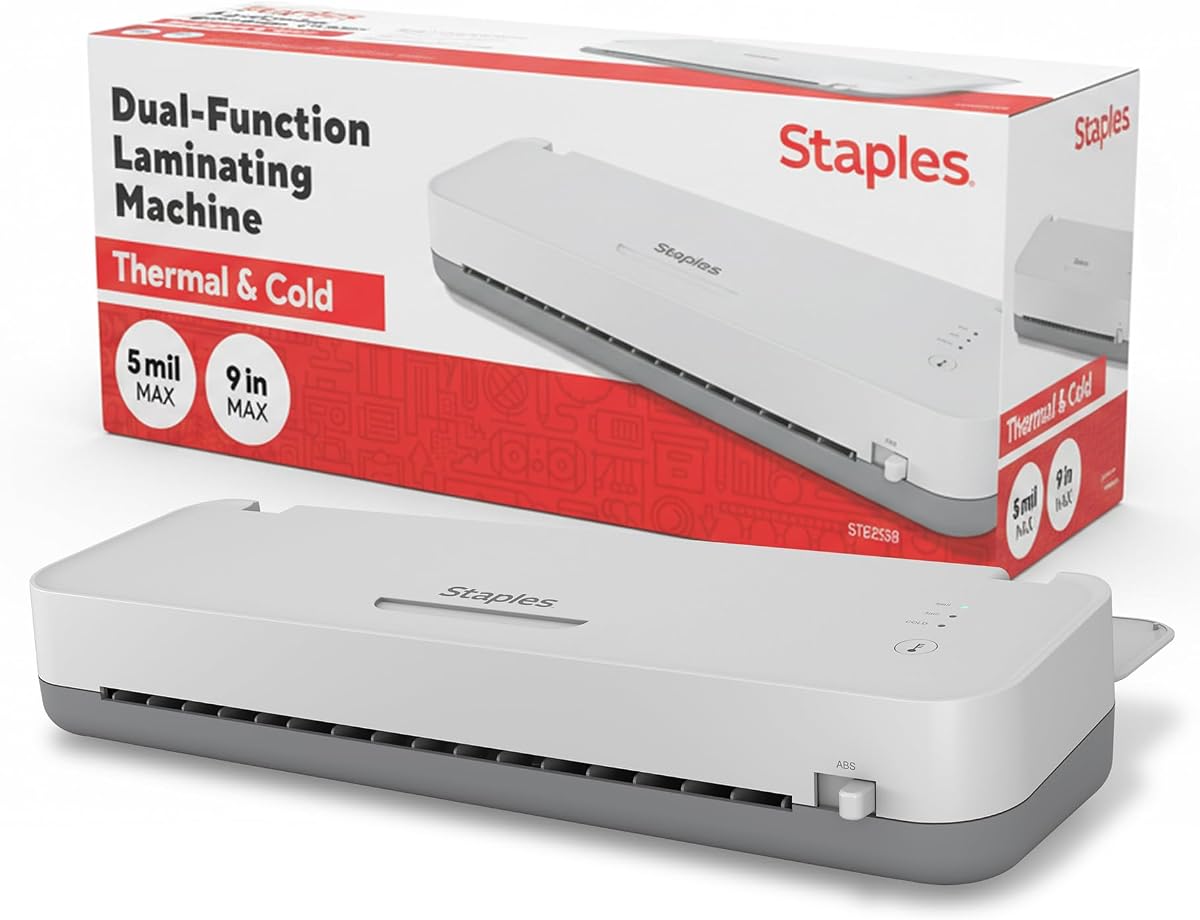
The Staples 12.9 Thermal & Cold Laminating Machine is a robust choice for offices. It handles large documents with a 13 inch throat width. The 4.7 rating shows it is a reliable tool for business presentation laminating tasks.
We may earn a commission when you buy through this link, at no additional cost to you.
It warms up quickly and features jam-free technology to keep workflows smooth. The dual modes allow you to switch between thermal and cold as needed. Its professional appearance fits well in any corporate environment.
Cold mode requires your own self-adhesive pouches but hot mode handles standard docs. It lacks some extra tools like cutters found in other kits. However the core lamination performance is excellent for business use.
Businesses needing consistent wide format support will trust this machine. It balances size and function well for presentations. We recommend it as a strong option for office environments requiring durability.
The jam-free technology ensures you spend less time fixing issues and more time working.
The professional look and performance make it a great fit for business meeting materials.
We may earn a commission when you buy through this link, at no additional cost to you.
Selecting the right cold laminator machine involves evaluating key factors to match your specific needs. This guide explains what features matter most to help you choose the best device for your workflow.
The width of your laminator determines the size of documents you can protect. Machines range from 9 inches for A4 to 13 inches for A3 or larger. If you need to laminate posters or banners, choose a model with at least a 13 inch feed width to avoid trimming.
Always check the max feed width against your largest frequent document size to ensure it fits comfortably.
Many modern machines offer both hot and cold modes for versatility. Hot mode uses heat to seal standard pouches while cold mode uses pressure or adhesive sheets. This dual capability protects heat-sensitive items like receipts or photos without damage.
Prioritize a model with dual modes if you work with both standard documents and fragile materials regularly.
Warm up time affects how quickly you can start your projects. Efficient models heat up in under two minutes while others take five or more. Faster warm up reduces idle time especially when handling urgent tasks.
Look for a warm up time under two minutes for the best daily efficiency.
Jams can ruin important documents so reliable prevention systems are vital. Many machines feature an ABS release button or lever to free stuck paper without tearing. Check for descriptions like jam-free design or quick release buttons.
Ensure your chosen machine has a clear and accessible release mechanism for safety.
Some kits come with essential tools like paper cutters corner rounders and pouches. Having these included saves money and keeps your workspace organized. Check if the package provides starter pouches to begin work right away.
Select a kit that bundles necessary tools to streamline your document preparation workflow.
Laminating speed measured in millimeters per minute dictates how fast you can process batches. Faster speeds like 450mm per minute are better for high volume tasks. Standard models might range from 250mm to 400mm per minute.
Choose a higher speed if you handle large volumes of laminating daily.
Durability impacts longevity especially in heavy use settings. Metal structures and non slip feet offer stability during operation. Lightweight models are portable but may feel less sturdy during large jobs.
Opt for a machine with a stable base to prevent movement during lamination.
A good warranty protects your investment against defects. Look for offers like two year coverage or responsive customer service. This ensures help is available if technical issues arise over time.
Verify warranty terms before buying to ensure peace of mind after purchase.
To start use plug in your machine and select the desired mode such as hot or cold. Allow it to warm up fully before inserting any pouches to avoid jams and ensure a smooth finish. This step prepares the rollers for optimal pressure and sealing.
Insert your documents carefully aligning them straight with the feed slot. Push gently and let the rollers pull the sheet through without forcing it. Once the document is fully through remove it promptly and let it cool or settle.
Clean the rollers regularly with a dry cloth to prevent dust buildup. Store the machine in a cool dry place away from direct sunlight. Proper care extends its life and maintains consistent lamination quality for future projects.
Cold lamination uses pressure or adhesive sheets without heat protecting delicate items like photos. Thermal lamination uses heat to melt pouches for stronger seals on standard documents. Dual mode machines offer both options for maximum versatility.
Standard pouches are usually 3 to 5 mil thick for documents. Thicker 7 to 10 mil pouches are better for items needing extra durability. Check your machine specs to confirm it supports your desired pouch thickness.
Yes manual cold laminators like the Scotch system need no electricity. They rely on a cartridge or manual pressure to adhere sheets. These are great for fieldwork or areas without power outlets.
Ensure your documents are straight before feeding them into the rollers. Do not push too hard and use pouches that match the machine thickness limits. Use the ABS release button if the paper gets stuck.
Warm up time depends on the heating element and insulation of the model. Machines with faster warm up times are more efficient for high volume work. Older or lower wattage models may take longer to reach optimal temperature.
Yes look for models with 13 inch or wider feed widths. These can handle large formats like 11×17 posters without trimming. Ensure the machine has strong rollers to maintain flatness on wide items.
Bubbles usually occur if the pouch is inserted unevenly or too slowly. Re-insert the pouch slowly ensuring edges are aligned properly. High speed and even pressure help eliminate bubbles effectively.
We reviewed ten top-rated laminators offering solutions for every need from compact desktop models to wide format units. The Qfun and Crenova machines stand out for value and ease of use. For professional wide needs the VEVOR manual unit offers unmatched stability.
Prioritize features like warm up time and jam prevention to match your daily workflow. If you work with heat-sensitive items ensure the machine has a reliable cold mode. The right tool protects your documents and keeps your workspace efficient.
Remember to check current prices and availability before buying as online deals change often. Select the model that fits both your budget and technical requirements for the best long-term results.